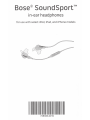
1
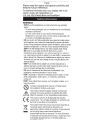
Components
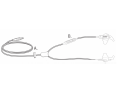
A. Clothing clip
B. In line microphone and 3-button remote
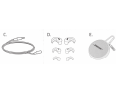
C. Extension cable
D. StayHea~ tips: Large (black); Medium, installed, (grey);
Small (white)
E. Carrying case
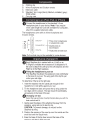
Connecting to an iPod, iPad, or iPhone
O Connect the headphones to the standard 3.5 mm
headphone jack on your device. Note: If you require
more cable length (for use with a treadmill or computer),
attach the supplied extension cable.
The headphones come with an inline microphone and
3-button remote.
~ --,
l x ll>ll
~+
ff4lJ ] Volume+
[Lill [
I
I [
~ ~"J.j I
l x \. } - [
2x
11+1
3x
!+II
~-
1 ••••••••••
~~
Answer/End
Volume -
• Press once to play/pause
or answer/end a call.
• Double press to
track forward.
• Triple press to track back.
Note: Full controls may not be available for some devices.
Importance of proper fit
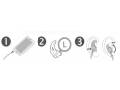
f) Each StayHear tip is marked with an L (Left) or an
R (Right) to indicate which earpiece it is designed to fit.
Be sure to attach the Left tip to the Left earpiece and the
Right tip to the Right earpiece.
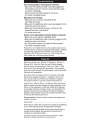
Fitting the headphone to your ear
The StayHear tip allows the earpiece to rest comfortably
in the bowl of your ear. The wing part of the tip fits just
underyourearridge.
To determine if the tip is the right size:
1. Insert the earpiece into the canal just enough for the
headphone to rest lightly against your ear.
2. Tilt the headphone back and press the tip wing under the
ear ridge until it is secure. The tips should fit comfortably
yet securely in the bowl of the ear.
Changing ear tips
Select the type and size of eartip that provides you with the
best comfort and fit.
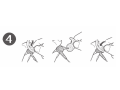
1. Gently peel the edges of the attached tip away from the
earpiece, using care not to tear the tip.
CAUTION: To prevent damage, do not pull on the
StayHear tip wing.
2. Position the opening of the new tip over the nozzle and the
small slot over the nozzle hook.
3. Ease the base of the tip down around the base of the
earpiece until the tip feels secured.
C)
O