1
Operating Temperature: 14-120°F (–10-49°C)
Input Power: 16.5VAC via Class 2 Plug-In 50VA
Transformer (supplied model TRF-14)
Maximum Lock Power Output Current: 1.5A @
12VDC
Maximum Wiegand Power Output Current: 250mA
@ 12VDC
Maximum Wiegand Red and Green LED Current:
20mA each output
Maximum Sounder Current: 100mA
Maximum Keypad Power Output Current: 200mA
@ 12VDC
Primary and Secondary Relays: SPDT Form C, N/
O, N/C 8A @ 30VAC or VDC
Supplied Backup Battery: Sealed Lead Acid 4AH
Battery Backup Time: Approximately 2 hours at full
load
NETDK / NETPDK Networx Keypads
Power Requirements: 12VDC supplied by NETWORXPANEL
Idle Current: 10mA
Maximum Wire Length: 200 feet (61m)
Recommended Wire Size: 24 AWG minimum
Proximity Card Formats Supported: Alarm Lock
standard 36 bit format or HID standard 26 bit format
(for use with the model NETPDK only)
WIEGAND DATA FORMATS SUPPORTED
The NETWORXPANEL Wiegand inputs (terminals T4T8) are compatible with all Wiegand devices that output their data in a "data1 / data0" format. If you are unsure of the compatibility of your Wiegand device data
format, call Alarm Lock customer service (have your
DL-Windows software version number available when
calling).
Wiegand Devices Supported
The NETWORXPANEL control panel has been tested
to work with the following Wiegand device models:
• HID Classic Swipe Wiegand Reader Model 310
(Continental 36-bit card format compatible).
• HID ProxPro with Keypad Model 5355
• HES model RF5910 Hybrid Electric Strike with
HID125k reader
Note that other Wiegand device models not tested may
also be fully compatible. For more information, see the
section "ENROLLING WIEGAND SWIPE CARDS" further in this manual.
LED AND BUTTON DESCRIPTIONS
The NETWORXPANEL PC board contains two LED's
and 1 button, as follows:
(LD1) Activity LED: Green LED located on the right
2
side of the PC board; flickers during keypad data
transfer.
(LD2) AC Power LED: Located on the left side of the
PC board, this LED lights when the panel is powered
(AC is present).
(S2) Reset Button: Located on the right side of the PC
board; press and hold for 15 seconds to clear the
NETWORXPANEL memory. Note: When memory is
cleared, the green LD1 LED will flash once every second for 5 seconds. In addition, all keypad and device
LED's will flash once every second in unison. The
keypad sounders and device sounders (if so
equipped) will also sound in unison with the LED
flashes.
Note: Although the Reset button will clear all NETWORXPANEL memory, if two NETPDK or NETDK
keypads are wired to the NETWORXPANEL, the primary and secondary keypad designations will NOT
be cleared; this keypad identification data is stored
within the memory located inside the keypad itself.
See the section "Designate Primary and Secondary
Keypads" for the operation of this feature.
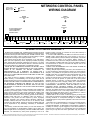
TERMINAL DESCRIPTIONS
From left to right, the PC board terminals are as follows:
(T1) EGND: Wire earth ground using a No. 16 AWG. or
larger wire to a metal cold-water pipe. Do not use a
gas pipe, plastic pipe or AC ground connections.
NOTE: Grounding connections should avoid bends in
the grounding wire whenever possible.
(T2-T3) AC IN: Connect to the supply 16.5VAC transformer. Use 16AWG wire for shorter runs, and use
14AWG for longer runs. 25 feet maximum.
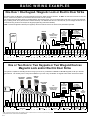
(T4-T8) WIEGAND INPUTS
Two Wiegand devices are supported on the input terminals as detailed below.
(T4) WOA: If one Wiegand device is used, do not connect any wires to this terminal; use the WO terminal
below.
If two Wiegand devices are used, connect the "Data
0" wire from the second Wiegand device to this terminal, (connect the "Data 0" wire from the first Wiegand
device to the WO terminal).
(T5) WO: If one Wiegand device is used, connect the
"Data 0" wire to this terminal.
If two Wiegand devices are used, connect the "Data
0" wire from the first Wiegand device to this terminal
(connect the "Data 0" wire from the second Wiegand
device to the WOA terminal).
(T6) W1: If one Wiegand device is used, connect the
"Data 1" wire to this terminal.
If two Wiegand devices are used, connect both Wie-