1
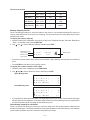
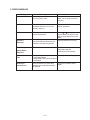
Current consumption
Check point
TYP [µA]
Max [µA]
OFF
CP1 - CP3
—
28
ON (Menu)
CP1 - CP3
230
300
ON (Buzzer)
CP1 - CP3
—
1720
ON (Infrared)
CP1 - CP3
—
63000
Memory Capacity Screen
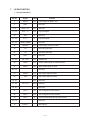
Use the following procedures to check the status of the memory. One procedure displays the amount of
memory used and the how much memory is remaining. The other shows you how many data items you have
stored in each mode.
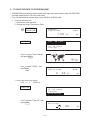
To display the memory capacity:
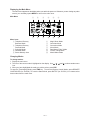
1. While the main menu is displayed, or any time you are in the Telephone Directory, Schedule, Data Memo
"Diary", or Calendar mode, press FUNCTION.
2. Use
and
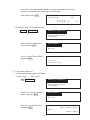
to select "Memory Capacity" and then press EXE.
M e m o r y
Remaining memory
(Unit: bytes)
Memory used
(Unit: bytes)
F r e e
U s e d
C a p a c i t y
4
3 9 2 9
1 6 7
Memory used
%
•
The memory values shown above are the total for both the Open Memory Area and the Secret Memory
Area.
• Press AC/ON to clear the memory capacity screen.
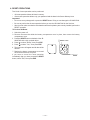
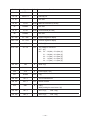
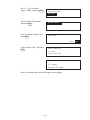
To display the number of items in each mode:
1. While the main menu is displayed, press FUNCTION.
2. Use
and
to select "Number of items" and then press EXE.
Open Memory Area
T
T
S
D
e
e
c
a
l
l
h
t
( B u s i )
( P e r s )
e d u l e
a
M e m o
:
:
:
:
1 5
8
3
7
T e l ( B u s i )
T e l ( P e r s )
S c h e d u l e
:
:
:
3
4
2
D a t a
:
1 1
Secret Memory Area
•
M e m o
If you perform the above procedure while in the Open Memory Area, the number of items stored in the Open
Memory Area only are displayed. To see the number of items in the Secret Memory Area, you must perform
the above operation while accessing the Secret Memory Area.
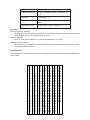
How memory capacity is calculated
There is no limit on the amount of memory you can use in each mode, but the total amount of data that can
be stored is 4,096 bytes. The following shows how many bytes the data in each mode takes up. One character
(each newline operation counts as a character also) takes up one byte.
—5—