1
MEMORY CARDS
The HD Slayer uses micro SD cards to store data. It is compatible with
both microSD and microSDHC cards with a capacity of 2GB, 4GB, 8GB,
16GB, and 32GB.
The HD Slayer is compatible with all speed class ratings, however we
recommend using a micro SD card with a speed class rating of 10 or
higher to ensure all the data is accurately captured. We recommend
branded SD cards.
One of the features of the HD Slayer is its dual micro SD slots. With two
32GB micro SD slots you have the potential of a 64GB capacity when
recording. Your HD Slayer will automatically switch to the 2nd card when
the 1st card is full.
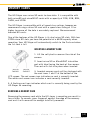
INSERTING A MEMORY CARD
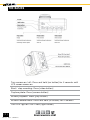
1. Lift the soft plastic cover on the side of the
camera
2. Insert micro SD or MicroSDHC into either
port with label facing the back of the camera.
The card will click into place when inserted.
3. Inserted memory cards will be displayed with
the card icons 1 and 2 at the bottom of the
LCD screen. The red screen icon indicates no card is correctly inserted.
The white card screen icon indicates a card correctly inserted.
4. A flashing card icon indicates which card is currently being used by the
HD Slayer for recording.
REMOVING A MEMORY CARD
Removing the memory card while the HD slayer is recording can result in
loss of data. To remove, press fingernail against the edge of the memory
card and it will come out far enough to be fully removed.
capture it : share it : relive it
[4]
©2013 REEL CAMERAS