1
Hardware Overview
LEDs
Front View
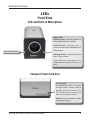
LED and Built-in Microphone
Status LED
Blinking Red: indicates power is
being supplied to the camera.
Solid Green: indicates that a
connection has been established via
Ethernet port.
Built-in Microphone
Blinking Green: indicates Ethernet
traffic in the camera.
If the Ethernet connection is not
established the Status LED will not
be lit.
Compact Flash Card Slot
CF card slot
CompactFlash (CF) is a mass
storage device format used in
portable electronic devices. The
CF card slot can be seen at the
side of the network camera.
Note: Ensure to remove the rubber
strip before using it.
D-Link DCS-3415 Quick Install Guide