1
Completing the Installation
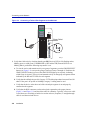
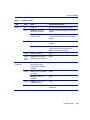
b. Verify that the RJ21 connectors on the twisted pair segment have the proper pinouts and
check the cable for continuity.
c. Check that the twisted pair connection meets the specifications in the Cabling Guide.
If a link is not established, contact Enterasys Networks. Refer to “Getting Help” in About This
Guide for details.
5. Repeat steps 1 through 5, above, until all RJ21 connections are made.
3.6
COMPLETING THE INSTALLATION
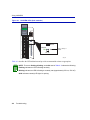
After installing the module and making the connections to the network, proceed as follows:
1. If the chassis is installed in a rack that has strain-relief brackets, secure the cables by running the
cables along the strain-relief bracket and tying them to the bracket using cable ties.
2. The module is now ready to be configured through Local Management. Refer to the appropriate
Local Management User’s Guide for information on how to access and use Local Management.
For details on how to get manuals, refer to the “Related Documents” section in About This
Guide.
Installation
3-11