1
Using the RESET Button
4.3
USING THE RESET BUTTON
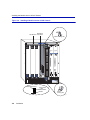
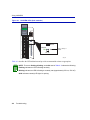
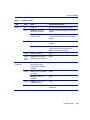
The RESET button shown in Figure 4-2 resets and re-initializes the module.
CAUTION: Pressing the RESET button resets the device, and all current switching
being performed by the module is halted. A network downtime of up to two minutes will
result from this action for any devices connected to the module.
Figure 4-2
RESET Button (both modules)
FAST ENET
RESET Button
6H302-48
RESET
COM
1X
CPU
GROUP
SELECT
G
R
O
U
P
GROUP
GROUP
To reset the module processor, press and release the RESET button. The module goes through a
reset process for approximately 60 seconds. Additional downtime may result as the module
reenters the network.
NOTE: Pressing the RESET button while the module is already in reset mode is not
recommended. If the RESET button is pressed while the module is in reset mode, the
module will enter an extended diagnostic procedure, which is unnecessary for normal
operation. This extended diagnostic procedure takes longer than one minute to
complete.
Troubleshooting
4-7