1
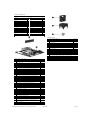
System Board
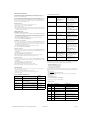
Computer Setup Menu (Continued)
Heading
Option / Description
Advanced
(continued)
Parallel Port
Mode
Allows you to select: SPP, EPP, ECP, ECP + EPP, or Normal.
After AC
Power Loss
Allows you to select power loss behavior to On, Off, or Last
state.
Wake on PCI
Device from
S5
Disable/enable
RTC Alarm
Resume
Disable/enable
Date (of
Month)
If RTC Alarm is enabled, allows you to select day of month to
resumption (0 = every day).
Resume Time
(hh:mm:ss)
If RTC Alarm enabled, allows you to select time to resume.
Device Boot
Disabling
Allows you to restrict a device from booting the unit. May
disable: none, USB, Internal ODD, Internal FDD, or
USB+ODD+FDD
Boot
F9 Boot Menu Disable/enable
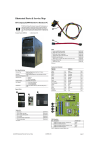
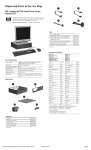
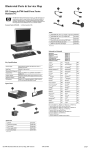
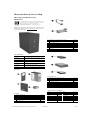
System Board Connectors and Jumpers (position of some untitled components
may vary in location)
JCOM2
Second serial port connector
P24
Front I/O USB connector
J20
PCI slot
P61
First SATA connector
J31
PCI Express Slot 1
P62
Second SATA connector
J32
PCI Express Slot 2
P63
Third SATA connector
J41
x16 PCI Express slot for graphics P64
Fourth SATA connector
P1
Power supply connector (24-pin)
P150
Media card reader
P3
Power supply connector (4-pin)
SW50
Clear CMOS switch
P5
Power switch/LED connector
XBT1
Battery
P6
Speaker connector
DIMM A1 Memory slot
P8
Heatsink fan
DIMM A2 Memory slot
P9
Chassis fan
DIMM B1 Memory slot
P10
Floppy drive connector
DIMM B2 Memory slot
P23
Front audio connector
XU1
Primary processor socket
F10 Setup
Prompting
Disable/enable
F11 Recovery
Prompting
Disable/enable
F12 Boot
from LAN
Prompting
Disable/enable
Removable
Device Boot
Seq.
Allows you to specify the order of attached removable
devices. The first drive in the order has priority and is recognized as drive A.
Hard Disk
Boot Priority
Allows you to specify the order of attached hard drive devices
(USB HDD, USB2 Drive Key, or USB flash media). The first
attached drive in the order has priority and is recognized as
drive C.
Optical Drive
Boot Seq.
Allows you to specify the order in which attached optical
drives (including USB ODD) are checked for a bootable operating system image.
Network Boot
Seq.
Allows you to specify the order in which network devices
(including UP NIC cards) are checked for a bootable operating system image.
First, Second,
Third, and
Fourth Boot
Device
Allows you to specify which devices will boot in which
sequence or to disable any of the four: removable, hard disk,
CDROM, network, or disabled.
Set Supervisor
Password
Allows you to establish a password to enter Computer Setup
Set User Pass- Allows you to establish a password to enter the computer
word
(must have Supervisor password established)
System Setup and Boot
Security
Option
Allows you to set security option to Setup or System so that
the password is required each time the system boots or only
when entering Computer Setup.
BIOS Write
Protection
Enable to prevent BIOS from being updated.
System Fan
Fail Check
Disable/enable
Computer Setup Menu
Smart Fan
Function
Disable/enable
Heading
Option / Description
Lists the following main system specifications:
Current CPU
Temperature
View only
System
Information
Current System Temp
View only
Current CPU
Fan Speed
View only
Current System Fan
Speed
View only
Vcore
View only
12V
View only
Basic system information regarding system information, setup, power management, hardware,
and passwords is maintained in the Setup Utility held in the system ROM. The Setup Utility is
accessed by pressing the F10 key when prompted (on screen) to do so during the boot sequence.
If the screen prompt opportunity is missed, a restart will be necessary.
PC Health
Main
•
•
•
•
•
•
Product Name
SKU Number
Processor Type
Processor Speed
System ROM
Cache Size
Memory Size
Integrated MAC
UUID
System Serial #
Asset Tracking Number
Allows you to set system date.
Date
(mm/dd/yyyy)
Time
(hh/mm/ss)
Advanced
•
•
•
•
•
Allows you to set system time.
SATA Port 1,
2, 3, and 4
Allows you to run HDD self-tests, auto detect HDD size and
head, set extended IDE drive details, set access mode, and
view information about the device(s)
Onboard FDC
Controller
Disable/enable
Drive A
Allows you to set to None or 1.4M, 3.5 in.
Halt On
Allows you to set POST error behavior to: all errors, no
errors, all but keyboard, all but diskette, or all but diskette/
keyboard.
POST Delay
Allows you to set POST delay to 0, 5, 10, 15, or 30 seconds
Execute Disable Bit
Disable/enable hardware DEP function.
MAX DVMT
Allocation
Specify size of DVMT/system memory to allocate for video
memory. Settings: 64MB, 128MB, 224 MB.
Init Display
First
Allows you to set primary display device to PCI slot, OnChip
VGA, or PCIEx.
Onboard HD
Audio
Disable/enable
OnChip USB
Controller
Disable/enable
USB Legacy
Support
Disable/enable (USB keyboard, mouse, and flash media).
Exit
View only
5VSB (V)
View only
Save & Exit
Setup
Allows you to save current settings and exit Computer Setup.
Exit Without
Saving
Allows you to exit Computer Setup without saving changes.
System Hardware Interrupts
IRQ
System Function
IRQ
System Function
0
Timer Interrupt
8
Real-Time Clock
1
Keyboard
9
Unused
2
Interrupt Controller Cascade
10
Unused, available for PCI
3
Serial Port (COM B)
11
Unused, available for PCI
4
Serial Port (COM A)
12
Mouse
5
Unused, available for PCI
13
Coprocessor
Diskette Drive
14
Primary ATA (IDE) Controller
Parallel Port (LPT 1)
15
Secondary ATA (IDE) Controller
Onboard LAN
Disable/enable
Onboard LAN
Boot ROM
Disable/enable
7
Onboard
Serial Port 1
or 2
Allows you to select: Disabled, 3F8/IRQ4, 2F8/IRQ3, 3E8/
IRQ4, or 2E8/IRQ3.
Onboard Parallel Port
Allows you to select: Disabled, 378/IRQ7, 278/IRQ5, or
3BC/IRQ7.
459782-001
View only
VBAT (V)
Load OptiAllows you to reset Computer Setup to factory defaults.
mized defaults
6
dx7400 Illustrated Parts & Service Map, MT Chassis
5V
page 3