1
ECTACO® jetBook®
User Manual
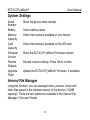
System Settings
Serial
Number
Battery
Memory
Capacity
Card
Capacity
Firmware
Version
Restore
Defaults
Upgrade
Patch
Show the device serial number.
Check battery status.
Check free memory available in your device.
Check free memory available on the SD card.
Show the ECTACO® jetBook® firmware version.
Discard custom settings. Press OK to confirm.
Update the ECTACO® jetBook® firmware, if available.
Internal File Manager
Using this function, you can manage books, pictures, music and
other files stored in the internal memory of the device (112MB
capacity). There are two submenus available in the Internal File
Manager: Files and Format.
18