1
EPSON PhotoPC
Connecting the Camera to the Computer
Optional Accessories
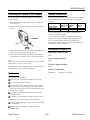
Follow these steps to connect the camera to the computer to
transfer pictures:
You can increase the camera’s storage capacity by installing a
2MB or 4MB PhotoSpan memory module, as described in
this table:
1. Press on the arrows on the camera’s port cover and slide
down the cover.
2. Align the cable connector with the camera’s serial port as
shown.
Number of photos
At high resolution
At standard resolution
1MB internal
memory
16
32
With 2MB
PhotoSpan
A882401
48
96
With 4MB
PhotoSpan
A882411
80
160
See the EPSON PhotoPC User’s Guide for instructions on
installing a PhotoSpan module.
notch
3. Connect the other end of the cable to one of the computer’s
serial ports and tighten the retaining screws.
You can connect the PhotoPC to a standard electrical outlet
using the AC adapter (A882421, model PCDC002) to save
power when transferring pictures to the computer or
operating the camera from the computer. The adapter does
not charge the camera’s batteries.
Information Reference List
Engineering Change Notices
4. Turn on the camera and the computer system. A frame
appears around the picture counter on the control panel.
None.
Note:
When the camera is connected to the computer, you cannot use the
shutter button or any of the control buttons.
None.
Use EasyPhoto to transfer pictures to the computer; see the
EPSON PhotoPC User’s Guide for instructions.
Maintenance
Product Support Bulletins
Technical Support Bulletins
None.
Related Documentation
6360472037
PhotoPC User’s Guide
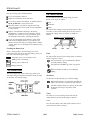
Care for the camera as follows:
Cl Use a clean, dry cloth to keep the camera free of dust.
Ll Do not use harsh abrasive cleaners.
0 To clean the lens, blow off any loose dust; then breath on
the lens and wipe off the moisture with a soft, lint-free
cloth or lens cleaning tissue. To avoid scratching the lens,
do not press too hard.
Li Cover the lens (power switched off) when you are not
using the camera.
Cl If necessary, clean the battery contacts with a dry cloth.
In storage, do not expose the camera to the following:
Cl Direct sunlight, bright light sources, or heat sources (such
as a closed car)
Ll Excessive dust, dirt, humidity, strong vibrations, or
magnetic fields.
Digital Camera
12/95
EPSON PhotoPC-3