1
Chapter 3 ‐ Operation Chapter 3 – Operation
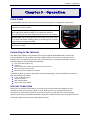
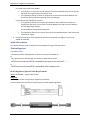
Front Panel The MT9234MU‐CDC has 4 LEDs on the front panel indicating status, configuration, and activity: Data. The Data LED flashes when the modem is transmitting/receiving data to/from another modem. [CD] Carrier Detect. The CD LED lights when the modem detects a valid carrier signal from another modem. It is on when the modem is communicating with the other modem and off when the link is broken. [OH] Off‐Hook. The OH LED lights when the modem is off‐hook, which occurs when the modem is dialing, online, or answering a call. The LED flashes when the modem pulse‐dials. [TR] Terminal Ready. The TR LED lights when Windows detects and initializes the modem. Connecting to the Internet Your Multi‐Tech modem is your gateway to the Internet and the World Wide Web. To access the Internet and Web via your modem, you must establish a dial‐up account with an Internet service provider (ISP). To locate an ISP near you, look in a local directory or computer publication. Your ISP should provide you with the following information: •
•
•
•
•
User name (also called user ID) Password Access number (the number you call to connect to the server) Host name and/or domain name Domain Name Server (DNS) server address If, besides the Web, you use the Internet for e‐mail and newsgroups, your ISP should also provide you with the following information: •
•
•
•
E‐mail or POP mail address POP server address Mail or SMTP address News or NNT server address Internet Connection Before you can connect to the Internet, you must set up a remote‐node client program on your computer to make the connection. Most, if not all, Web browsers can automatically open this connection. For instructions on how to set up this connection, consult your ISP or your operating system’s online help or printed documentation. Many ISPs include with their service a program that will install and configure this connection automatically for you. Multi‐Tech Systems, Inc. MT9234MU‐CDC User Guide (S000470A) 21