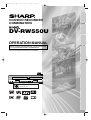
1
E9656UD_EN_1.qx4
05.7.15
11:55 AM
Page 1
INSTRUCCIONES EN ESPAÑOL INCLUIDAS.
Recording
Please read this Operation Manual carefully before using
your VCR/DVD RECORDER COMBINATION.
Getting started
OPERATION MANUAL
Connections
DV-RW550U
Before you start
VCR/DVD RECORDER
COMBINATION
Disc Playback
Editing
The region number for
this unit is 1.
Changing the Setting menu
1
VCR functions
Others Español
E9656UD_EN_1.qx4
05.7.15
11:55 AM
Page 2
Before you start
Precautions
For future reference, record the model and serial numbers (located on
the rear of the unit) in the space provided.
Model No.:
DV-RW550U
Serial No.:
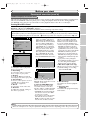
WARNING: TO REDUCE THE RISK OF FIRE OR ELECTRIC SHOCK, DO NOT
EXPOSE THIS APPLIANCE TO RAIN OR MOISTURE.
CAUTION:
TO PREVENT ELECTRIC SHOCK, MATCH WIDE BLADE OF PLUG TO WIDE
SLOT, FULLY INSERT.
ATTENTION: POUR ÉVITAR LES CHOC ÉLECTRIQUES, INTRODUIRE LA LAME LA PLUS
LARGE DE LA FICHE DANS LA BORNE CORRESPONDANTE DE LA PRISE ET
POUSSER JUSQU’AU FOND.
CAUTION
RISK OF ELECTRIC SHOCK
DO NOT OPEN
This symbol warns the user of uninsulated
voltage within the unit that can cause dangerous electric shocks.
CAUTION:
TO REDUCE THE RISK OF ELECTRIC SHOCK, DO
NOT REMOVE COVER (OR BACK). NO USER SERVICEABLE PARTS INSIDE. REFER SERVICING TO QUALIFIED SERVICE PERSONNEL.
This symbol alerts the user that there are
important operating and maintenance instructions in the literature accompanying this unit.
WARNING—FCC Regulations state that any unauthorized changes or modifications to this equipment not expressly approved by the manufacturer could
void the user’s authority to operate this equipment.
This device complies with Part 15 of the FCC Rules. Operation is subject to the following two conditions:
(1) This device may not cause harmful interference, and
(2) this device must accept any interference received, including interference that may cause undesired operation.
INFORMATION
This equipment has been tested and found to comply with the limits for a Class B digital device, pursuant to Part 15
of the FCC Rules.These limits are designed to provide reasonable protection against harmful interference in a residential installation.This equipment generates, uses and can radiate radio frequency energy and, if not installed and
used in accordance with the instructions, may cause harmful interference to radio communications. However, there is
no guarantee that interference will not occur in a particular installation. If this equipment does cause harmful interference to radio or television reception, which can be determined by turning the equipment off and on, the user is
encouraged to try to correct the interference by one or more of the following measures:
— Reorient or relocate the receiving antenna.
— Increase the separation between the equipment and receiver.
— Connect the equipment into an outlet on a circuit different from that to which the receiver is connected.
— Consult the dealer or an experienced radio/TV technician for help.
This Class B digital apparatus complies with Canadian ICES-003.
Cet appareil numérique de la classe B est conforme à la norme NMB-003 du Canada.
Este aparato digital de la Clase B cumple con la norma ICES-003 de Canadá.
Note to the CATV System Installer :
This reminder is provided to call the CATV system installer’s attention to Article 820-40 of the National
Electrical Code, which provides guidelines for proper grounding - in particular, specifying that the cable ground
shall be connected to the grounding system of the building, as close to the point of cable entry as possible.
CAUTION:
THIS UNIT IS A CLASS 1 LASER PRODUCT.
USE OF CONTROLS OR ADJUSTMENTS OR PERFORMANCE OF PROCEDURES OTHER THAN THOSE SPECIFIED HEREIN MAY RESULT IN HAZARDOUS RADIATION EXPOSURE.
AS THE LASER BEAM USED IN THIS UNIT IS HARMFUL TO THE EYES, DO NOT ATTEMPT TO DISASSEMBLE THE
CABINET.
REFER SERVICING TO QUALIFIED PERSONNEL ONLY.
2
E9656UD_EN_1.qx4
05.7.15
11:55 AM
Page 3
Before you start
Important Safeguards
vides information with regard to proper grounding of the mast
and supporting structure, grounding of the lead-in wire to an
antenna discharge unit, size of grounding conductors, location
of antenna-discharge unit, connection to grounding electrodes,
and requirements for the grounding electrode (Fig.A).
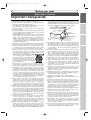
FIGURE A
EXAMPLE OF ANTENNA GROUNDING
AS PER NATIONAL ELECTRICAL CODE
ANTENNA
LEAD
WIRE
GROUND
CLAMP
Connections
ANTENNA
DISCHARGE UNIT
(NEC SECTION 810-20)
ELECTRIC
SERVICE
EQUIPMENT
NEC – NATIONAL ELECTRICAL CODE
S2898A
GROUNDING CONDUCTORS
(NEC SECTION 810-21)
GROUND CLAMP
POWER SERVICE GROUNDING
ELECTRODE SYSTEM
(NEC ART 250, PART H)
Disc Playback
Editing
Changing the Setting menu
VCR functions
Others Español
3
Recording
15. Lightning - For added protection for this video product during a lightning storm, or when it is left unattended and
unused for long periods of time, unplug it from the wall outlet and disconnect the antenna or cable system. This will
prevent damage to the video product due to lightning and
power-line surges.
16. Power Lines - An outside antenna system should not be located in the vicinity of overhead power lines or other electric
light or power circuits, or where it can fall into such power
lines or circuits. When installing an outside antenna system,
extreme care should be taken to keep from touching such
power lines or circuits as contact with them might be fatal.
17. Overloading - Do not overload wall outlets and extension
cords as this can result in a risk of fire or electric shock.
18. Object and Liquid Entry - Never push objects of any kind
into this video product through any openings as they may
touch dangerous voltage points or short-out parts that
could result in a fire or electric shock. Never spill liquid of
any kind on the video product.
19. Servicing - Do not attempt to service this video product
yourself as opening or removing covers may expose you to
dangerous voltage or other hazards. Refer all servicing to
qualified service personnel.
20. Damage Requiring Service - Unplug this video product from
the wall outlet and refer servicing to qualified service personnel under the following conditions:
a. When the power-supply cord or plug is damaged.
b. If liquid has been spilled, or objects have fallen into the video
product.
c. If the video product has been exposed to rain or water.
d. If the video product does not operate normally by following the operating instructions. Adjust only those controls
that are covered by the operating instructions as an improper adjustment of other controls may result in damage and
will often require extensive work by a qualified technician to
restore the video product to its normal operation.
e. If the video product has been dropped or damaged in any way.
f. When the video product exhibits a distinct change in performance this indicates a need for service.
21. Replacement Parts - When replacement parts are required,
be sure the service technician has used replacement parts
specified by the manufacturer or have the same characteristics as the original part. Unauthorized substitutions may
result in fire, electric shock or other hazards.
22. Safety Check - Upon completion of any service or repairs
to this video product, ask the service technician to perform
safety checks to determine that the video product is in
proper operating condition.
23. Heat - This video product should be situated away from heat
sources such as radiators, heat registers, stoves, or other
products (including amplifiers) that produce heat.
Getting started
1. Read Instructions - All the safety and operating instructions
should be read before the appliance is operated.
2. Retain Instructions- The safety and operating instructions
should be retained for future reference.
3. Heed Warnings - All warnings on the appliance and in the
operating instructions should be adhered to.
4. Follow Instructions - All operating and use instructions
should be followed.
5. Cleaning - Unplug this video product from the wall outlet
before cleaning. Do not use liquid cleaners or aerosol cleaners. Use a damp cloth for cleaning.
EXCEPTION: A product that is meant for uninterrupted
service and, that for some specific reason, such as the possibility of the loss of an authorization code for a CATV converter, is not intended to be unplugged by the user for
cleaning or any other purpose, may exclude the reference
to unplugging the appliance in the cleaning description otherwise required in item 5.
6. Attachments - Do not use attachments not recommended by
the video product manufacturer as they may cause hazards.
7. Water and Moisture- Do not use this video product near water,
for example, near a bath tub, wash bowl, kitchen sink, or laundry
tub, in a wet basement, or near a swimming pool, and the like.
8. Accessories - Do not place this video product on an unstable cart, stand, tripod, bracket, or table. The video product
may fall, causing serious injury to a child or adult, and serious damage to the appliance. Use only
with a cart, stand, tripod, bracket, or table
recommended by the manufacturer, or
sold with the video product. Any mounting of the appliance should follow the
manufacturer's instructions and should
use a mounting accessory recommended
by the manufacturer.
9. Transportation - A product and cart combination should be
moved with care. Quick stops, excessive force, and uneven surfaces may cause the appliance and cart combination to overturn.
10. Ventilation - Slots and openings in the cabinet are provided
for ventilation and to ensure reliable operation of the video
product and to protect it from overheating, and these openings must not be blocked or covered. The openings should
never be blocked by placing the video product on a bed,
sofa, rug, or other similar surface.This video product should
not be placed in a built-in installation such as a bookcase or
rack unless proper ventilation is provided or the manufacturer's instructions have been adhered to.
11. Power Sources - This video product should be operated
only from the type of power source indicated on the marking label. If you are not sure of the type of power supply to
your home, consult your appliance dealer or local power
company. For products intended to operate from battery
power, or other sources, refer to the operating instructions.
12. Grounding or Polarization - This video product is equipped
with a polarized alternating-current line plug (a plug having
one blade wider than the other). This plug will fit into the
power outlet only one way.This is a safety feature. If you are
unable to insert the plug fully into the outlet, try reversing
the plug. If the plug should still fail to fit, contact your electrician to replace your obsolete outlet. Do not defeat the
safety purpose of the polarized plug.
13. Power Cord Protection - Power supply cords should be
routed so that they are not likely to be walked on or
pinched by items placed upon or against them, paying particular attention to cords at plugs, convenience receptacles,
and the point where they exit from the appliance.
14. Outdoor Antenna Grounding - If an outside antenna or cable
system is connected to the video product, be sure the antenna or cable system is grounded so as to provide some protection against voltage surges and built-up static charges. Article
810 of the National Electrical Code, ANSI/NFPA No. 70, pro-
Before you start
Precautions (cont’d)
E9656UD_EN_1.qx4
05.7.15
11:55 AM
Page 4
Before you start
Precautions (cont’d)
Location and Handling
Location and Handling
• Do not stand the unit vertically. Install the unit in a horizontal and stable position. Do not place anything directly on top of the
unit. Do not place the unit directly on top of the TV.
• Do not cover or place the unit in enclosed spaces to prevent excessive temperature build up.
• Do not place the unit in direct sunlight, or near heat sources.
• Depending on the use environment, the temperature of the unit may increase slightly.This is not a malfunction.
• Keep the unit away from strong magnetic objects.
• Do not place any object containing water or other liquids on the unit. In the event that liquid should enter the cabinet, unplug
the unit immediately and contact the retailer or service centre approved by SHARP immediately.
• Do not remove the unit cabinet.Touching parts inside the cabinet could result in electric shock and/ or damage to the unit.
For service and adjustment inside the cabinet, call a qualified dealer or service centre approved by SHARP.
• Be sure to remove a disc and videotape, and unplug the AC power cord from the outlet before carrying the unit.
Nonuse Periods
Location and Handling
• When the unit is not being used, switch the unit to the Standby mode.
• When left unused for a long period of time, the unit should be unplugged from the household AC outlet.
• Do not place the unit in direct sunlight, or near heat sources.
Copy Protection
This unit supports Macrovision copy protection.
On DVD discs that include a copy protection code, if the contents of the DVD disc are copied using this unit, the copy protection code prevents the DVD or videotape copy from playing normally.
U.S. Patent Nos. 4,631,603; 4,577,216; 4,819,098; 4,907,093; 5,315,448; and 6,516,132.
This product incorporates copyright protection technology that is protected by U.S. patents and other intellectual property
rights. Use of this copyright protection technology must be authorized by Macrovision, and is intended for home and other
limited viewing uses only unless otherwise authorized by Macrovision. Reverse engineering or disassembly is prohibited.
Notice for progressive scan outputs
Consumers should note that not all high definition television sets are fully compatible with this product and may cause artifacts
to be displayed in the picture. In case of picture problems with 525p progressive scan output, it is recommended that the user
switch the connection to the ‘standard definition’ output. If there are questions regarding your TV set compatibility with this
model 525p DVD recorder, please contact our customer service center.
No Fingers or Other Objects Inside
Do not put your fingers or objects on the disc tray or in the cassette compartment.
Warning of Dew Formation
Moisture may form inside the unit under the following conditions:
• Immediately after a heater is turned on.
• In a steamy or humid room.
• When the unit is suddenly moved from a cold to warm environment.
If moisture forms inside the unit, it may not operate properly or damage the videotape. In such case, turn on the power and
wait for more than two hours for the moisture to evaporate.
Manufactured under license from Dolby Laboratories.“Dolby” and the double-D symbol are trademarks of Dolby
Laboratories.
“DTS” and “DTS Digital Out” are trademarks of Digital Theater Systems, Inc.
is a trademark of DVD Format/Logo Licensing Corporation.
Dolby Digital Recording
“Dolby® Digital Recording enables consumers to record high-quality video with stereo sound on recordable DVD
discs.The technology, when utilized instead of PCM recording, also saves recordable disc space, allowing for higher video resolution or extended recording time on each DVD. DVDs created using Dolby Digital Recording will
play back on all DVD-Video players.”
Note:
This is true when the players are compatible with actual recordable DVD discs.
4
E9656UD_EN_1.qx4
05.7.15
11:55 AM
Page 5
Before you start
Others
It is the intent of SHARP that this product be used in full compliance with the copyright laws of the United States and that prior
permission be obtained from copyright owners whenever necessary.
Maintenance
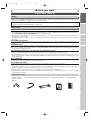
• Operation Manual
• Quick Use Guide
Changing the Setting menu
VCR/DVD RECORDER
COMBINATION
DV-RW550U
OPERATION MANUAL
Please read this Operation Manual carefully before using
your VCR/DVD RECORDER COMBINATION.
INSTRUCCIONES EN ESPAÑOL INCLUIDAS.
1
Editing
• Round Coaxial cable • Audio/Video cables
Disc Playback
• Remote control
with two “AA” size
batteries
Recording
Supplied Accessory
Getting started
SERVICING
1. Please refer to relevant topics in the Troubleshooting on pages 98-101 before returning the product.
2. Do not attempt to service this unit yourself. Instead, unplug it and contact a SHARP Authorized Service Center for inspection.
(See CONSUMER LIMITED WARRANTY at the end of this manual.)
3. Be sure the service technician uses authorized replacement parts or their equivalents. Unauthorized parts may cause fire, electrical shock, or other hazards.
4. Following any service or repair, be sure the service technician performs safety checks to certify that this unit is in safe operating order.
CLEANING THE CABINET
¡Use a soft cloth slightly moistened with a mild detergent solution. Do not use a solution containing alcohol, spirits, ammonia or
abrasive.
CLEANING DISCS
¡When a disc becomes dirty, clean it with a cleaning cloth.Wipe the disc from the center out. Do not wipe in a circular motion.
¡Do not use solvents such as benzine, thinner, commercially available cleaners, detergent, abrasive cleaning agents or antistatic
spray intended for analogue records.
RECOMMENDED MEASURES FOR OPTIMUM PICTURE EXCELLENCE
This unit is a precision device constructed using extremely accurate technology.
¡The disc cannot be played if the disc drive component is worn out or if the internal pick up lens is dirty.
¡If this unit still does not perform properly although you refer to the relevant sections and to Troubleshooting on pages 98-101,
the laser optical pickup unit may be dirty. Consult a SHARP Authorized Service Center for inspection and cleaning of the laser
optical pickup unit.
DISC HANDLING
¡When you handle a disc, hold it by its edge and try not to touch the surface of the disc.
¡Always store a disc in its protective case when it is not used.
AUTO HEAD CLEANING
¡Automatically cleans video heads as you insert or remove a videotape, so you can see a clear picture.
¡Playback picture may become blurred or interrupted while the TV program reception is clear. Dirt accumulated on the video
heads after a long period of use, or the usage of rental or worn videotape can cause this problem. If a streaky or snowy picture
appears during playback, the video heads in your unit may need to be cleaned.
1. Please visit your local Audio/Video store and purchase a good quality VHS Video Head Cleaner.
2. If a Video Head Cleaner does not solve the problem, please call our help line mentioned on page 104 to locate a SHARP
Authorized Service Center.
Connections
“Licensed under one or more of U.S. Pat. 4,972,484, 5,214,678, 5,323,396, 5,530,655, 5,539,829, 5,544,247, 5,606,618,
5,610,985, 5,740,317, 5,777,992, 5,878,080, or 5,960,037.”
Before you start
Precautions (cont’d)
The region number for
this unit is 1.
DIGITAL AUDIO
VCR functions
Others Español
5
E9656UD_EN_1.qx4
05.7.15
11:55 AM
Page 6
Before you start
Table of contents
Before you start . . . . . . . . . . . . . . . . . . .2
Precautions . . . . . . . . . . . . . . . . . . . . . . . . . . . . . .2
Table of contents . . . . . . . . . . . . . . . . . . . . . . . . . .6
Features . . . . . . . . . . . . . . . . . . . . . . . . . . . . . . . .7
Symbols in this operation manual . . . . . . . . . . . . . . .7
Functional overview . . . . . . . . . . . . . . . . . . . . . . .8
Installing batteries in the remote control . . . . . . . . .10
Using a remote control . . . . . . . . . . . . . . . . . . . . . .10
The VCR/DVD recorder Switching . . . . . . . . . . . . . .10
Setting/Disc/CD menus . . . . . . . . . . . . . . . . . . . . . . .11
DISPLAY menu . . . . . . . . . . . . . . . . . . . . . . . . . . . .12
Connections . . . . . . . . . . . . . . . . . . . . .14
Connection to a TV . . . . . . . . . . . . . . . . . . . . . . .14
Connection to a cable box or satellite box . . . .15
Connection to an Audio System . . . . . . . . . . . . .16
Getting started . . . . . . . . . . . . . . . . . . .17
Easy DVD recording . . . . . . . . . . . . . . . . . . . . . .17
Channel setting . . . . . . . . . . . . . . . . . . . . . . . . . .19
Getting channels automatically . . . . . . . . . . . . . . . . .19
Adding/Deleting channels . . . . . . . . . . . . . . . . . . . . .20
Selecting the TV Stereo or SAP . . . . . . . . . . . . .21
Setting the clock . . . . . . . . . . . . . . . . . . . . . . . . .22
Auto Clock Setting . . . . . . . . . . . . . . . . . . . . . . . . .22
Manual Clock Setting . . . . . . . . . . . . . . . . . . . . . . . .23
Setting the Daylight Saving Time . . . . . . . . . . . . . . . .24
Selecting the TV aspect ratio . . . . . . . . . . . . . . .25
Recording . . . . . . . . . . . . . . . . . . . . . . .26
Information on DVD recording . . . . . . . . . . . . . .26
Information . . . . . . . . . . . . . . . . . . . . . . . . . . . . . . .26
Recordable disc . . . . . . . . . . . . . . . . . . . . . . . . . . . .26
Recording speed . . . . . . . . . . . . . . . . . . . . . . . . . . .26
Restrictions on recording . . . . . . . . . . . . . . . . . . . .27
Information on copy control . . . . . . . . . . . . . . . . . .27
Making discs playable on other DVD player (Finalize) . .27
Formatting a disc . . . . . . . . . . . . . . . . . . . . . . . .28
Choosing the recording format of a blank disc . . . .28
Reformatting a disc . . . . . . . . . . . . . . . . . . . . . . . . . .29
Auto Chapter . . . . . . . . . . . . . . . . . . . . . . . . . . . . . .30
Recording Audio Select (XP) . . . . . . . . . . . . . . .31
Basic recording . . . . . . . . . . . . . . . . . . . . . . . . . .32
Checking the recording picture and sound quality . .33
One-touch Timer Recording . . . . . . . . . . . . . . . .34
Timer Recording . . . . . . . . . . . . . . . . . . . . . . . . .35
Hints for Timer Recording . . . . . . . . . . . . . . . . . . . .39
Settings for an external source . . . . . . . . . . . . . .40
Connection to an external source . . . . . . . . . . . . . .40
Recording from an external source . . . . . . . . . . . . .41
Setting a disc to protect . . . . . . . . . . . . . . . . . . .41
Dubbing Mode . . . . . . . . . . . . . . . . . . . . . . . . . . .42
Finalizing the discs . . . . . . . . . . . . . . . . . . . . . . .44
Auto finalize . . . . . . . . . . . . . . . . . . . . . . . . . . . . . . .45
Disc Playback . . . . . . . . . . . . . . . . . . . .46
Information on DVD playback . . . . . . . . . . . . . .46
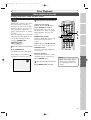
Guide to displays . . . . . . . . . . . . . . . . . . . . . . . . . . .46
Basic playback . . . . . . . . . . . . . . . . . . . . . . . . . . .47
Playback . . . . . . . . . . . . . . . . . . . . . . . . . . . . . . . . . .47
Playing back discs using the disc menu . . . . . . . . . . .49
Playing back discs using the title menu . . . . . . . . . . .50
Special playback . . . . . . . . . . . . . . . . . . . . . . . . .51
Resume playback . . . . . . . . . . . . . . . . . . . . . . . . . . .51
Fast forward / Fast reverse . . . . . . . . . . . . . . . . . . .51
Skipping TV commercials during playback . . . . . . . . .52
Pause . . . . . . . . . . . . . . . . . . . . . . . . . . . . . . . . . . . .52
Step by step playback . . . . . . . . . . . . . . . . . . . . . . . .53
Slow forward / Slow reverse playback . . . . . . . . . . .53
Zoom . . . . . . . . . . . . . . . . . . . . . . . . . . . . . . . . . . .54
Marker Setup . . . . . . . . . . . . . . . . . . . . . . . . . . . . . .55
6
Search . . . . . . . . . . . . . . . . . . . . . . . . . . . . . . . . .56
Title/Chapter search . . . . . . . . . . . . . . . . . . . . . . . .56
Track search . . . . . . . . . . . . . . . . . . . . . . . . . . . . . .57
Time search . . . . . . . . . . . . . . . . . . . . . . . . . . . . . . .57
Repeat/Random/Program playback . . . . . . . . . .58
Repeat playback . . . . . . . . . . . . . . . . . . . . . . . . . . . .58
Random playback . . . . . . . . . . . . . . . . . . . . . . . . . . .59
Program playback . . . . . . . . . . . . . . . . . . . . . . . . . . .59
Selecting a format of audio and video . . . . . . . .60
Switching audio soundtracks . . . . . . . . . . . . . . . . . .60
Switching subtitles . . . . . . . . . . . . . . . . . . . . . . . . . .61
Switching camera angles . . . . . . . . . . . . . . . . . . . . . .62
Visual Noise Reduction . . . . . . . . . . . . . . . . . . . . . .62
Editing . . . . . . . . . . . . . . . . . . . . . . . . .63
Information on disc editing . . . . . . . . . . . . . . . . .63
Guide to a Title List . . . . . . . . . . . . . . . . . . . . . . . . .63
Editing discs in Video mode . . . . . . . . . . . . . . . . . . .63
Editing discs in VR mode . . . . . . . . . . . . . . . . . . . . .64
Editing DVD-RW discs in Video mode . . . . . . . .65
Deleting titles . . . . . . . . . . . . . . . . . . . . . . . . . . . . .65
Putting names on titles . . . . . . . . . . . . . . . . . . . . . .66
Setting or clearing chapter markers . . . . . . . . . . . . .68
Editing DVD-RW discs in VR mode (Original) . .69
Deleting titles . . . . . . . . . . . . . . . . . . . . . . . . . . . . .69
Setting titles to protect . . . . . . . . . . . . . . . . . . . . . .70
Releasing titles from protecting . . . . . . . . . . . . . . . .71
Editing DVD-RW discs in VR mode (Playlist) . . .72
Deleting titles . . . . . . . . . . . . . . . . . . . . . . . . . . . . .72
Deleting parts of titles . . . . . . . . . . . . . . . . . . . . . . .73
Putting names on titles . . . . . . . . . . . . . . . . . . . . . .74
Setting or clearing chapter markers . . . . . . . . . . . . .76
Setting pictures for thumbnails . . . . . . . . . . . . . . . . .78
Dividing a title . . . . . . . . . . . . . . . . . . . . . . . . . . . . . .79
Combining titles . . . . . . . . . . . . . . . . . . . . . . . . . . . .80
Adding titles to a Playlist . . . . . . . . . . . . . . . . . . . . .81
Deleting a Playlist . . . . . . . . . . . . . . . . . . . . . . . . . . .82
Editing DVD-R discs . . . . . . . . . . . . . . . . . . . . . .83
Deleting titles . . . . . . . . . . . . . . . . . . . . . . . . . . . . .83
Putting names on titles . . . . . . . . . . . . . . . . . . . . . .84
Changing the Setting menu . . . . . . . . .86
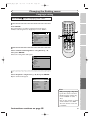
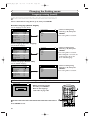
Tour of the Setting menu . . . .
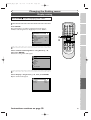
Language setting . . . . . . . . . . .
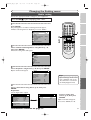
Display setting . . . . . . . . . . . . .
Audio setting . . . . . . . . . . . . . .
Settings for Parental lock level
.
.
.
.
.
.
.
.
.
.
.
.
.
.
.
.
.
.
.
.
.
.
.
.
.
.
.
.
.
.
.
.
.
.
.
.
.
.
.
.
.
.
.
.
.
.
.
.
.
.
.
.
.
.
.
.
.
.
.
.
.
.
.
.
.
.86
.87
.89
.91
.93
VCR functions . . . . . . . . . . . . . . . . . . .95
Playback . . . . . . . . . . . . . . . . . . . . . . . . . . . . . . .95
Recording and One-touch Timer Recording . . . .95
Recording . . . . . . . . . . . . . . . . . . . . . . . . . . . . . . . . .95
One-touch Timer Recording . . . . . . . . . . . . . . . . . . .96
Search . . . . . . . . . . . . . . . . . . . . . . . . . . . . . . . . .96
Index search . . . . . . . . . . . . . . . . . . . . . . . . . . . . . . .96
Time search . . . . . . . . . . . . . . . . . . . . . . . . . . . . . . .97
Other operations . . . . . . . . . . . . . . . . . . . . . . . .97
Others . . . . . . . . . . . . . . . . . . . . . . . . .98
Troubleshooting . . . . . . . . . . . . . . . . . . . . . . . . .98
RF converter output . . . . . . . . . . . . . . . . . . . . .101
Language code . . . . . . . . . . . . . . . . . . . . . . . . .102
Glossary . . . . . . . . . . . . . . . . . . . . . . . . . . . . . . .103
Specifications . . . . . . . . . . . . . . . . . . . . . . . . . . .104
Service Information (For the U.S.) . . . . . . . . . .104
Español . . . . . . . . . . . . . . . . . . . . . . . .105
E9656UD_EN_1.qx4
05.7.15
11:55 AM
Page 7
Before you start
Before you start
Features
This unit not only plays back DVDs, CDs and VHS tapes but also offers features for you to record on DVD
discs and edit them after that.The following features are offered with this unit.
Compatibility
Recording
DVD MODE
VCR MODE
Recording up to 8 programs:
You can program the unit to record up to 8 programs within a month in
advance. Daily or weekly program recordings are also available.
One-touch Timer Recording:
Dubbing mode:
You can copy a DVD disc to a videotape or copy a videotape to a DVD
disc.This function will be possible only if the DVD disc or a videotape is
not copy protected.
You cannot record on a videotape when its erase-protection tab is
removed.
Left channel stereo recording:
This unit can record the Left channel monaural sound as Left and Right
channel sound automatically.
Others
Progressive scan system
Unlike conventional interlace scanning, the progressive scan system provides
less flickering and higher resolution images than the traditional scanning system does.
Symbols in this operation manual
To show what recording speed or disc type applies to each function, the following symbols appear at the beginning of each operating item.
Symbol
Description
Available to DVD-Video discs
Automatic Chapter marker setting:
Available to DVD-RW in Video mode
You can mark each title of recording with chapter markers as you set in
setting menu before recording.
Available to DVD-RW in VR mode
Automatic Title menu making (Video mode):
The unit makes title menus automatically when finalizing the disc.
Available to DVD-R in Video mode
Automatic Playlist making (VR mode):
A Playlist will be prepared from an Original, so that you can edit titles on a
Playlist as you prefer. An Original is kept as it is.
*Available to DVD+RW discs
Automatic finalizing (Video mode):
*Available to DVD+R discs
The unit can finalize discs automatically after finishing all Timer Recordings
or when the disc runs out recordable space.
Available to Audio CDs
Playback
Theater quality sound at your home:
When connecting the unit to an amplifier or a decoder which is compatible with
Dolby Digital or DTS, you can experience the theater quality sound environment.
Quick search for what you want to watch:
DVD
first.
Indicates that you need to select the DVD
mode by pressing DVD on the remote
control before proceeding next step.
press
VCR
first.
Indicates that you need to select the VCR
mode by pressing VCR on the remote
control before proceeding next step.
Start playback from Original and Playlist (VR mode):
You can play back titles from either the Original or the Playlist.
VCR MODE
Quick search for what you want to watch:
* Some DVD+RW/+R discs may not be operated properly because the
unit conforms to the discs recorded in DVD-RW/-R format.
VCR functions
You can easily find the part you want to watch using the Index search/Time search
functions. An index mark will be assigned at the beginning of each recordings you
make. For Time search function, you can go to a specific point on a videotape by
entering the exact amount of time you wish to skip.
Changing the Setting menu
press
Editing
Available to CD-RW/-R discs with
MP3 files
Available to VHS tapes
Use only
tapes marked with this unit.
DVD MODE
You can easily find the part you want to watch using title, chapter or time search
functions.
Disc Playback
You can confirm the picture and the sound quality for recording of the current
recording speed which you set. If you want to change the recording speed, press
REC MODE to select a desired recording speed.
Editing
DVD MODE
Deleting titles:
You can delete titles which you do not need anymore.
Making your own Playlist (VR mode):
Protecting titles (VR mode):
7
Others Español
With the Original remains as it is, you can edit titles on various Playlist as
you prefer.
Putting names on titles.
Setting pictures for thumbnails.
Setting/clearing chapter markers.
Dividing/Combining titles.
Deleting parts of titles, etc.
You can prevent accidental editing or title erasing with protect function.
Recording
DVD MODE
REC MONITOR:
* DVD-Video Format (Video mode) is a new format for recording on DVD-RW/-R
discs that was approved by the DVD Forum in 2000. Adoption of this format is
optional for manufactures of DVD playback devices, and there are DVD-Video
players, DVD-ROM drives or other DVD playback devices that do not play back
DVD-RW/-R discs recorded in the DVD-Video Format.
Getting started
You can easily set recording time as you prefer. Every time REC/OTR on
the remote control or on the front panel is pressed during recording, the
recording time will be increased by 30 minutes up to 8 hours.The recording automatically stops when it reached to the recording time you set.
Discs recorded in Video mode can be played back on other DVD players,
including computer DVD drives compatible with DVD-Video playback*. You
will need to finalize the discs recorded in Video mode to play them back on
other DVD players.
Connections
This unit is compatible with both DVD-RW, which is rewritable repeatedly, and
DVD-R, which is available for one time recording only.Also, this unit allows you
to record to the videotape. You can choose either one for your convenience.
DVD MODE
Playback of discs recorded in Video mode on a other
DVD player (Video mode):
E9656UD_EN_1.qx4
05.7.15
11:55 AM
Page 8
Before you start
Functional overview
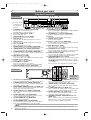
2
Front Panel
3* 4 5
6
OPEN/CLOSE
(*) The unit can also
be turned on by
pressing these
buttons.
1.
2.
3.
4.
5.
6.
7.
8.
9.
10.
11.
12.
13.
STOP/EJECT
STOP
PLAY
CHANNEL
POWER
REW F.FWD
DUBBING
VCR
PLAY
DVD
(L2)S-VIDEO
REC/OTR
VIDEO L(MONO) - AUDIO - R
REC/OTR
OUTPUT SELECT
1
22
21
20 19 18 17
16
POWER button / indicator (DVD/VCR)
Press to turn on and off the unit.
Red LED lights up when power is on.
Cassette compartment (VCR)
Insert a videotape here.
OPEN/CLOSE A button (DVD)*
Press to open or close the disc tray.
VCR indicator
Appears when the VCR output mode is selected.
DVD indicator
Appears when the DVD output mode is selected.
Disc tray (DVD)
Place a disc when it is opened.
AUDIO INPUT jacks (LINE2) (DVD/VCR)
Use to connect external equipment with standard audio cables.
VIDEO INPUT jack (LINE2) (DVD/VCR)
Use to connect external equipment with a standard video cable.
S-VIDEO INPUT jack (LINE2) (DVD/VCR)
Use to connect the S-Video output of external equipment with an S-Video cable.
REC/OTR button (DVD)
Press once to start recording.
Press repeatedly to start a One-Touch timer Recording.
PLAY B button (DVD)*
Press to start or resume playback.
STOP C button (DVD)*
Press to stop playback or recording.
Press to stop the proceeding timer recording in DVD.
OUTPUT SELECT button (DVD/VCR)
Press to select the component you wish to operate.
15 14 13 12* 11* 10 9 8 7
14. DUBBING button (DVD/VCR)
Press to start VCR to DVD (DVD to VCR) duplication
which you set in the setting menu.
15. CHANNEL L / K buttons (DVD/VCR)
Press to change the channel up and down.
16. Display
Shows various information and messages.
17. PLAY B button (VCR)
Press to start playback.
18. Remote control sensor (DVD/VCR)
Receive signals from your remote control so that you
can control the unit from a distance.
19. REC/OTR button (VCR)
Press once to start a recording.
Press repeatedly to start a One-Touch timer Recording.
20. F.FWD g button (VCR)
Press to rapidly advance the videotape, or view the picture
rapidly in forward during playback (Forward Search).
21. REW h button (VCR)
Press to rewind the videotape, or to view the picture rapidly
in reverse during the playback mode (Rewind Search).
22. STOP/EJECT C/A button (VCR)
EJECT A button - Press to remove the videotape from
the cassette compartment when the power is on or off.
STOP C button - Press to stop videotape playback
or recording.
Press to stop the proceeding timer recording in VCR.
1
2 3
4 5
6
Rear Panel
DVD
DIGITAL
AUDIO OUT
DVD
AUDIO
OUT
S-VIDEO
COMPONENT
VIDEO OUT
Y
DVD/VCR
AUDIO IN AUDIO OUT ANTENNA
IN
L
L
DVD/VCR
IN(L1)
PB
/CB
OUT
PR
/CR
L
COAXIAL
R
R
VIDEO IN VIDEO OUT
R
OUT
• These jacks are
(L1)
DVD
useful only in
DVD mode.
8. VIDEO OUTPUT jack (DVD/VCR)
Use to connect a TV monitor, AV receiver or other
equipment with a standard video cable.
9. VIDEO INPUT jack (LINE1) (DVD/VCR)
Use to connect external equipment with a standard
video cable.
10. S-VIDEO OUTPUT jack (DVD only)
Use to connect the S-Video input of a TV monitor, AV
receiver or other equipment with an S-Video cable.
11. AUDIO OUTPUT jacks (DVD only)
Use to connect a TV monitor, AV receiver or other
equipment with standard audio cables.
12. COAXIAL DIGITAL AUDIO OUTPUT jack
(DVD only)
Use to connect an AV receiver, Dolby Digital decoder,
DTS decoder or other equipment with a coaxial digital input jack with a digital coaxial cable.
12 11 10
1.
2.
3.
4.
5.
6.
7.
AC Power Cord (DVD/VCR)
Connect to a standard AC outlet to supply power to this unit.
S-VIDEO INPUT jack (LINE1) (DVD/VCR)
Use to connect the S-Video output of external equipment with an S-Video cable.
COMPONENT VIDEO OUTPUT jacks (DVD only)
Use to connect a TV monitor with component video
inputs with component video cables.
AUDIO INPUT jacks (LINE1) (DVD/VCR)
Use to connect external equipment with standard
audio cables.
AUDIO OUTPUT jacks (DVD/VCR)
Use to connect a TV monitor, AV receiver or other
equipment with standard audio cables.
TV ANTENNA IN jack (DVD/VCR)
Use to connect an antenna.
TV ANTENNA OUT jack (DVD/VCR)
Use to connect an antenna cable to pass the signal
from the TV ANTENNA IN to your TV monitor.
9 8
7
Note
8
Do not touch the inner pins of the jacks on the rear panel. Electrostatic discharge may cause permanent
damage to the unit.
E9656UD_EN_1.qx4
05.7.15
11:55 AM
Page 9
Before you start
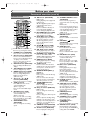
Remote Control
17
1
19
18*
21
3
5
23
4
25
22
24
7
26
27
28
29*
30
31
32
33*
34
8
9
11
13
15
10
12
14
16
(*) In DVD mode, the unit can also be
turned on by pressing these buttons.
Disc Playback
Editing
Changing the Setting menu
VCR functions
Others Español
1. POWER button (DVD/VCR)
Press to turn on and off the unit.
2. Number buttons (DVD/VCR)
Press to select channel numbers.
Press to select a title/chapter/track
on display or a TV channel.
Press to enter values for the settings in the setting menu.
3. DISPLAY button (DVD/VCR)
Press to display the On-screen
display.
4. TOP MENU button (DVD)
Press to display the top menu.
5. MENU/LIST button (DVD)
Press to display the Disc menu.
Press to change Original and
Playlist on the TV screen.
(VR mode only)
6. Cursor K / L / { / B
buttons (DVD/VCR)
Press to select items or settings.
7. VCR
button
Press to activate the remote
control in VCR mode.
(Refer to page 10)
Press to select the VCR output
mode.
8. REC/OTR button (VCR)
Press to activate the remote
control in VCR mode.
(Refer to page 10)
Press once to start a recording.
Press repeatedly to start a OneTouch timer Recording.
9. REC MODE button
(DVD/VCR)
Press to change the recording
speed.
Recording
VCR/DVD RECORDER
COMBINATION
Getting started
6
23. CLEAR/C.RESET button
(DVD/VCR)
Press to clear the program once
entered in the timer recording setting
menu
• DVD mode
Press to clear the password entered,
to cancel the programming for CD, to
clear the highlighted marker number
in the marker setup mode, etc.
• VCR mode
Press to reset the tape counter.
24. ENTER button
(DVD/VCR)
Press to confirm or select menu
items.
25. RETURN
button
(DVD/VCR)
Press to return to the previously
displayed menu screen.
26. DVD button
Press to activate the remote
control in DVD mode.
(Refer to page 10)
Press to select the DVD output
mode.
27. REC/OTR button (DVD)
Press to activate the remote
control in DVD mode.
(Refer to page 10)
Press once to start a recording.
Press repeatedly to start a OneTouch timer Recording.
28. D button (DVD/VCR)
• DVD mode
During playback, press to play
back in fast forward.
Or when playback is paused,
press to play back slow forward.
• VCR mode
Press to rapidly advance the
videotape or view the picture
rapidly in forward during playback.
29. PLAY B button *
(DVD/VCR)
Press to start or resume playback.
30. SKIP G button (DVD)
During playback, press to skip to
the next chapter or track.
Or when playback is paused,
press to play back in forward
step by step.
31. PAUSE F button
(DVD/VCR)
Press to pause playback or recording.
32. SEARCH button (VCR)
Press to call up the index or
time search menu.
33. STOP C button *
(DVD/VCR)
Press to stop playback or recording.
34. AUDIO button (VCR)
During playback a HiFi videotape,
press to change the AUDIO OUT
9
setting “HiFi” and “MONO”.
Connections
20
2
10. E button (DVD/VCR)
• DVD mode
During playback, press to play back
in fast reverse.
Or when playback is paused, press
to play back in slow reverse.
• VCR mode
Press to rewind the videotape or
to view the picture rapidly in
reverse during the playback mode.
11. REC MONITOR button (DVD)
Press to check the video and
audio signals for recording.
12. SKIP H button (DVD)
During playback, press to skip to
the previous chapter or track.
Or when playback is paused,
press to play back in reverse
step by step.
13. SLOW
button (VCR)
During playback, press to view
the videotape in slow motion.
14. CM SKIP button (DVD)
During playback, press to skip to
the 30-second advanced point.
15. DUBBING button (DVD/VCR)
Press to start VCR to DVD
(DVD to VCR) duplication which
you set in the setting menu.
16. ZOOM button (DVD)
During playback, press to enlarge
the picture on the screen.
17. T-SET button
Press to set the unit in the timer
standby mode. In the timer standby
mode, press to cancel the mode
and to turn the unit on.
18. OPEN/CLOSE EJECT A
button *
• DVD mode
Press to open or close the disc tray.
• VCR mode
Press to remove the videotape
from the cassette compartment
when the power is on or off.
19. TIMER PROG. button
(DVD/VCR)
Press to display the timer program setting menu.
20. CH K / L buttons (DVD/VCR)
• DVD mode
Press to change the channel up
and down.
• VCR mode
Press to change the channel up and
down.
Press to adjust the tracking during
playback or in slow motion of the
videotape. Also while playback is in
still mode, you can adjust the picture blurred vertically.
21. VIDEO/TV button (DVD/VCR)
Press to select VIDEO or TV position.
22. SETUP button (DVD/VCR)
Press to display the setting menu.
Before you start
Functional overview (cont’d)
E9656UD_EN_1.qx4
05.7.15
11:55 AM
Page 10
Before you start
Functional overview (cont’d)
Installing batteries in the remote control
Using a remote control
Install two “AA” size batteries (supplied), matching
their polarity to those indicated inside battery compartment of the remote control.
Keep in mind the following when using the remote
control:
• Make sure that there is no obstacle between the
remote control and the remote sensor of the unit.
• Remote operation may become unreliable if strong
sunlight or fluorescent light is on the remote sensor of the unit.
• Remote control for different devices can interfere
with each other. Avoid using remote control for
other equipment located close to the unit.
• Replace the batteries when you notice a fall-off of
the operating range of the remote control.
• The maximum operable range as follows;
Beeline:
approximately 23 feet
(7m)
Either side of center: approximately 16 feet
(5m) within 30 degrees
Above:
approximately 16 feet
(5m) within 15 degrees
Below:
approximately 10 feet
(3m) within 30 degrees
1
2
3
Note
Incorrect use of batteries can result in hazards
such as leakage and bursting. Please follow the
instruction below.
• Do not mix new and old batteries together.
• Do not use different kinds of batteries together.
Although they may look similar, different batteries may have different voltages.
• Make sure that the plus and minus ends of each
battery match the indications in the battery
compartment.
• Remove batteries from equipment that is not
going to be used for a month or more.
• When disposing of used batteries, please comply
with governmental regulations or public rules for
environmental protection that apply in your
country or area.
• Do not recharge, short-circuit, heat, burn or disassemble batteries.
The VCR/DVD recorder Switching
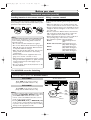
Because this product is a combination of a VCR and a DVD recorder, you must select first which component you wish to operate with OUTPUT SELECT.
OUTPUT SELECT button
VCR MODE
Press VCR on the remote control.
(Verify that the VCR indicator is lit.)
OPEN/CLOSE
STOP
PLAY
STOP/EJECT
POWER
CHANNEL
REW F.FWD
DUBBING
VCR
PLAY
DVD
REC/OTR
REC/OTR
OUTPUT SELECT
DVD MODE
Press DVD on the remote control.
(Verify that the DVD indicator is lit.)
Note
• Pressing only OUTPUT SELECT on the front
panel DOES NOT switch the mode of the
remote control. You MUST select the correct
mode on the remote control.
• Pressing REC/OTR (DVD) or REC/OTR (VCR)
on the remote control switches immediately it’s
respective mode so that you can start recording
directly on the appropriate media.
10
VCR
DVD
OUTPUT SELECT
VCR
button
DVD
indicator DVD
button
VCR
indicator
VCR/DVD RECORDER
COMBINATION
E9656UD_EN_1.qx4
05.7.15
11:55 AM
Page 11
Before you start
Guide to Displays on-screen menu
This unit uses the following on-screen menu for most operations: Easy Setting Menu, Advanced Setting Menu,
Title List, and DISPLAY menu.They allow you to change the playback status of the disc during playback.
The DISPLAY menu also gives you information on the playback status of the disc or a videotape.
Press SETUP to display Easy Setting Menu or Advanced Setting Menu. Choose either Menu using
Cursor K / L, then press ENTER to display it.
These menus allow you to perform all main functions and change important settings.
Easy Setting Menu
OSD Language
VCR DVD
English
Clock
Channel
DVD-RW Recording Format
VR mode
Timer Programming
Auto Finalize
Progressive
OFF
Advanced Setting Menu
Advanced Setting Menu
Playback
Recording
Display
Screen for DVD-RW, DVD-R (Video mode):
Select Video
Disc
Clock
Channel
Disc
Easy Setting Menu
Title List
Format
Finalize
Screen for DVD-RW (VR mode):
Screen for Audio CD:
Disc
1
1
2
3
4
Editing
Playlist
CD Playback Mode
Original
Format
Finalize
Disc Protect OFF
ON
Program Play
5. Random Play:
To activate the random playback
feature.
6. Program Play
(Audio CD):
To activate the programmed playback feature.
• This is an example screen only for explanation. Displayed items are depending on the disc you inserted.
11
Others Español
Note
VCR functions
1. Title List / Playlist / Original:
Turns on a Title List, Playlist or
Original, which shows the recorded titles on the disc.
2. Format (DVD-RW only):
Allows you to erase all of the
recorded content on the disc.
The disc will be completely blank.
• Erased content cannot be retrieved.
• A DVD-RW disc formatted with this
unit cannot be used on other DVD
recorders for recording.
• If you want to use a disc formatted with this unit on another
DVD recorder, you have to reformat the disc on that recorder.
5
6
Random Play
Changing the Setting menu
1. Playback:
To set up the unit to play back
discs as you prefer.
2. Recording:
To set up the unit to record on
discs or tapes as you prefer.
3. Display:
To set up the OSD screen and the
front display of the unit as you prefer.
4. Select Video:
To choose a line input to record
on DVD discs or tapes from
other video equipment.
5. Clock:
To set up the clock of the unit.
6. Channel:
To adjust the channel setting of
the unit as you prefer.
1
2
3
Disc Playback
1
2
3
4
5
6
7
3. Finalize / Undo Finalize:
Allows you to finalize a disc with
titles recorded with this unit. Undo
Finalize reverses the finalized condition to the original, unfinalized one.
• In Video mode, you cannot Undo Finalize
DVD-RW discs finalized by machines
manufactured by other companies and
any DVD-R discs. Some of our recorder
models may not be able to Undo Finalize
DVD-RW discs finalized by this unit.
• In VR mode, you can Undo Finalize any
DVD-RW discs, including the ones finalized by machines manufactured by other
companies.
• If you protect a disc by setting Disc
Protect ON after finalizing it, you cannot
use other editing functions (Playlist,
Original, Format, and Undo Finalize).
4. Disc Protect (VR mode only):
Allows you to protect a disc from
accidental editing or recording.
Recording
Disc
7. Disc / CD Playback Mode:
“Disc” is available only when a
DVD-RW and a DVD-R only in
Video mode disc is inserted into
the unit. When a DVD-Video
disc (commercially available), a
new DVD-R disc or a finalized
DVD-R disc is inserted into the
unit, you cannot select “Disc”.
“CD Playback Mode” is available only when an Audio CD
disc, a CD-RW/-R disc with
MP3 is inserted into the unit.
Getting started
Easy Setting Menu consists of the setting menus frequently needed. Items with
mark indicate such setting menus.This operation
manual explains operation procedures using Advanced Setting Menu screen. However, you can skip several steps in Advanced Setting
Menu by choosing Easy Setting Menu for the items with
mark.The steps which can be skipped are specified next to
mark.
Connections
Setting/Disc/CD menus
Before you start
Functional overview (cont’d)
E9656UD_EN_1.qx4
05.7.15
11:55 AM
Page 12
Before you start
Functional overview (cont’d)
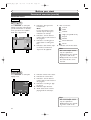
DISPLAY menu
DVD mode
press
first.
DVD
Press DISPLAY to call up the
display menu.This menu will give
you the information on the disc.
Some operations are available
while disc is played back.
4
1
1
1
DVD-RW
--:--:--
Video mode
CH
8
Stereo
5
2
XP
0:58
6
1. Indicates a disc type and a
format mode.
Note:
In some descriptions on this
manual, only one disc type is
indicated as an example.
2. Indicates a current channel
number and an audio status of
the program.
3. Indicates a recording speed
and possible recording time
left.
4. Indicates a title number, chapter number, and the time
elapsed of disc playback.
3
5. Each icon means:
: Search
: Audio
: Subtitle
: Angle (except VR mode)
: Repeat
: Marker
: Noise Reduction
: Zoom
6. Indicates current disc status.
Note
• This is an example screen
only for explanation.
Displayed items are depending on the actual mode.
• Display function is not available when the disc is not
inserted.
VCR mode
press
VCR
first.
Press DISPLAY to call up the
display menu.
1
12:00AM
CH21
STEREO
SP
0:00:00
HIFI
4
5
6
2
3
1. Indicates current video status.
2. Indicates the current time.
3. Indicates a current channel
number and an audio status of
the program.
4. Indicates a recording or playing speed.
5. Indicates a Tape Counter.
6. Audio status of the current
playing back the videotape.
Note
• This is an example screen
only for explanation.
Displayed items are depending on the actual mode.
12
E9656UD_EN_1.qx4
05.7.15
11:55 AM
Page 13
Before you start
Before you start
Functional overview (cont’d)
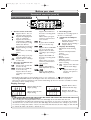
Front Panel Display Guide
4
2
1
5
Appears when the disc
tray is opening.
Appears when data is
being recorded on a disc.
Note
13
Others Español
• Time display during recording/playback
The recording time and playback time of this unit will display about 0.1% faster than the real
recording/playback time.When broadcasting images, 29.9 frames are sent per second.This unit calculates
30 frames as one second. For this reason, time will display about 0.1% faster. For example, if you record
for 1 hour, in reality there will be 1 hour of recorded material. However, the time display on this unit will
be "60 min. X 0.999 = 59.94 min. = 59 min. 56 sec.".
VCR functions
Appears when the disc
tray is closing.
Appears when a disc is
loaded on the disc tray.
Changing the Setting menu
Display message
Editing
• During Timer Recording or timer standby mode on one component,
,
mark (during Timer
Recording), DVD,VCR indicator will disappear when the unit switches to the other component.
However, the function indicated by each mark is still working. (It does not mean the cancellation of Timer
Recording or timer standby mode.)
Disc Playback
3. Recording speed
Indicates the recording speed of
the disc or a videotape.
4. Title/Track and Chapter
mark
: Appears when indicating a
title/track number.
: Appears when indicating a
chapter number.
5. Displays the following
• Played-back time/remaining
time
• Current title/chapter/track
number
• Recording time
• Clock
• Channel number
• VCR tape counter
• Remaining time for a one-touch
timer recording
6.
: Appears in the afternoon
with the clock display.
7.
:
Appears when the progressive scan system is
activated.
Recording
Appears when DVD is in
the timer recording standby mode.
Flashes when a program
cannot be performed for
some reasons.
:
Appears when a DVD-R
disc is on the disc tray.
:
Appears when a DVD-RW
disc is on the disc tray.
: Appears when the timer
recording is proceeding in
VCR.
Appears when VCR is in
the timer recording standby mode.
Flashes when a program
cannot be performed for
some reasons.
:
Appears during VCR to
DVD duplication process.
:
Appears during DVD to
VCR duplication process.
Getting started
1. Current status of the unit
: Appears when a disc or a
videotape play is paused.
: Appears when playing back
a disc or a videotape.
: Appears when the timer
programming or OTR has
been set and is proceeding.
Flashes when all Timer
Recording have been finished.
: Appears during recording
process.
Flashes when a recording
pauses.
:
Appears during repeat playback (disc playback only).
: Appears when a videotape
is in the unit.
2. Disc type and Current status of the unit
: Appears when an audio CD
is on the disc tray.
: Appears when a DVD disc
is on the disc tray.
Appears when the timer
recording is proceeding in
DVD.
Connections
3
7
6
E9656UD_EN_1.qx4
05.7.15
11:55 AM
Page 14
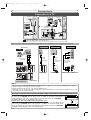
Connections
Connection to a TV
Antenna
(Back of TV)
or
Antenna
(Back of TV)
Cable
Signal
Cable
Signal
3
or
Connect
Round Coaxial Cable
(supplied)
1
DVD
Disconnect
DIGITAL
AUDIO OUT
DVD
AUDIO
OUT
S-VIDEO
COMPONENT
VIDEO OUT
Y
DVD/VCR
AUDIO IN AUDIO OUT ANTENNA
IN
L
L
DVD/VCR
IN(L1)
PB
/CB
OUT
PR
/CR
L
COAXIAL
R
R
VIDEO IN VIDEO OUT
R
2
OUT
Connect
(L1)
DVD
(Back of this unit)
4 Plug in the AC power cord of this unit.
Make one of the following connections, depending on the capabilities of the equipment you possess.
Basic Audio
TV
AUDIO IN
Method 1
Method 2
Good picture
Better picture
VIDEO IN
Method 3
Best picture
COMPONENT
VIDEO IN
S-VIDEO IN
Y
PB/CB
PR/CR
Video
cable
(supplied)
Audio cable
(supplied)
S-Video
cable
(commercially
available)
This unit
Component
Video cables
(commercially
available)
DVD
DVD/VCR
AUDIO OUT
DVD
DIGITAL
AUDIO OUT
DVD
AUDIO
OUT
S-VIDEO
COMPONENT
VIDEO OUT
Y
DVD/VCR
DVD
S-VIDEO
COMPONENT
VIDEO OUT
L
Y
R
PB
/CB
DVD/VCR
AUDIO IN AUDIO OUT ANTENNA
IN
L
L
DVD/VCR
IN(L1)
PB
/CB
OUT
PR
/CR
L
COAXIAL
R
R
VIDEO IN VIDEO OUT
R
OUT
VIDEO OUT
(L1)
DVD
PR
/CR
OUT
DVD
or
DVD
AUDIO
OUT
DVD
DIGITAL
AUDIO OUT
DVD
AUDIO
OUT
S-VIDEO
COMPONENT
VIDEO OUT
Y
DVD/VCR
IN(L1)
PB
/CB
OUT
PR
/CR
L
COAXIAL
R
S-VIDEO OUT
COMPONENT VIDEO OUT
L
R
VIDEO IN VIDEO OUT
R
VIDEO OUT
DVD/VCR
AUDIO IN AUDIO OUT ANTENNA
IN
L
L
OUT
(L1)
DVD
• These jacks are useful
only in DVD mode.
R
AUDIO OUT
Note
• Connect this unit directly to the TV. If the Audio/Video cables are connected to a VCR, pictures may be
distorted due to the copy protection system.
• Method 2 and method 3 are only useful in DVD mode.
• Although you can view images when using the connection Method 1 and 2 while progressive scan is activated, they are in interlace mode.
If your TV is compatible with progressive scan (525p / 480p) and you want to enjoy that high quality picture;
You must select the connection Method 3 above and progressive scan mode.To set
the mode, press SETUP and set “Progressive” to “ON” on the Easy Setting Menu, or
on the “Playback” sub menu of the Advanced Setting Menu.Then press ENTER.
“P.SCAN” will appear on the display of this unit.
If your TV is not compatible with progressive scan;
Use this unit in interlace mode. Make sure that no “P.SCAN” is on the display of this
unit. If not, press SETUP and set “Progressive” to “OFF” on the Easy Setting Menu,
or on the “Playback” sub menu of the Advanced Setting Menu.Then press ENTER.
“P.SCAN” on the display of this unit will disappear.
14
Progressive
DVD
ON
OFF
Progressive
ON
OFF
DVD
E9656UD_EN_1.qx4
05.7.15
11:55 AM
Page 15
Connections
Before you start
Connection to a cable box or satellite box
Connection A (Cable box or
Satellite box)
ANTENNA
IN
OUT
Connections
IN
(Back of this unit)
OUT
Round Coaxial Cable
Cable
Signal
(supplied)
(Back of TV)
Cable
Signal
Disc Playback
ANTENNA
IN
OUT
(Cable box or
Satellite box)
IN
OUT
Round Coaxial Cable
(Back of TV)
VCR functions
Others Español
15
Changing the Setting menu
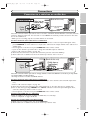
Select this connection when you want to change channels on this unit.With this connection, you may watch
one channel while recording another.
• You may not view or record a scrambled channel.
To select channels of the cable box or satellite box
1) At the cable box or satellite box, select channel 3 or 4 (the same channel as this unit’s RF output channel.)
• Refer to “RF converter output” on page 101.
2) At the TV, select the same channel as the output channel (3 or 4) of the cable box or satellite box.
3) Turn on this unit by pressing POWER. The “POWER” indicator on the front panel will appear.Then,
select the channel you want to view or record.
• If noise appears on the TV screen, press VIDEO/TV on the remote control.
To play back a DVD disc or a videotape
Follow the STEPs 1) to 2) above, to playback a DVD disc or a videotape.
• Refer to “Playback” on pages 47-48, 95.
To view one channel while recording another
1) While you are recording on this unit, press VIDEO/TV.
2) At the cable box or satellite box, select the channel you want to view.
Editing
Round Coaxial Cable (supplied)
Recording
(Back of this unit)
Connection B
Getting started
Select this connection when you want to view or record a scrambled channel.With this connection, channels
cannot be changed on this unit. You can view or record ONLY the channels you have selected on the cable
box or the satellite box.
• While you are recording, only the recorded channel can be viewed.
To select channels of the cable box or satellite box
1) Turn on this unit by pressing POWER .The “POWER” indicator on the front panel will appear. Then,
press CHANNEL to select channel 3 or 4 (the same channel as the output channel of the cable box or
satellite box).
• If noise appears on the TV screen, press VIDEO/TV on the remote control.
• If you use the channel 4, you will need to change this unit’s RF output to channel 4.
• Refer to “RF converter output” on page 101.
2) At the TV, select channel 3 or 4 (the same channel as you have selected at STEP 1)).
3) At the cable box or satellite box, select the channel you want to view or record.
E9656UD_EN_1.qx4
05.7.15
11:55 AM
Page 16
Connections
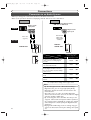
Connection to an Audio System
• When you change the connections, all devices should be turned off.
• Refer to the operation manual accompanying external devices for more information.
Method 1
Method 2
Stereo system
Dolby Digital decoder, DTS decoder,
MD deck or DAT deck
Analog audio
input jacks
AUDIO
COAXIAL
Digital audio
input jack
Audio Coaxial
Digital cable
(commercially
available)
Audio cable
(supplied)
This unit
DVD
DVD/VCR
AUDIO OUT
AUDIO OUT
DIGITAL
AUDIO OUT
L
DIGITAL
AUDIO OUT
R
COAXIAL
or
Setting
DVD
AUDIO
OUT
L
R
Connection
If output is Dolby Digital encoded
audio, connect to a Dolby Digital
decoder.
SETUP>Advanced Setting Menu
>Playback >Digital Out >
PCM Dolby Digital DTS
-
Stream
OFF
If output is DTS encoded audio, connect to the DTS decoder.
-
PCM
ON
If output is encoded audio for both
Dolby Digital and DTS, connect to
the decoder which encodes multiple
audio sources.
-
Stream
ON
Connecting to an MD deck or DAT
deck.
-
PCM
OFF
If not connected to any external
devices.
-
PCM
OFF
* To complete these settings, refer to pages 91-92.
Note
16
• By connecting this unit to a Multi-channel Dolby
Digital decoder, you can enjoy high-quality Dolby
Digital 5.1 channel surround sound as heard in the
movie theaters.
• The audio source on a disc in a Dolby Digital 5.1
channel surround format cannot be recorded as digital
sound by an MD or DAT deck.
• By connecting this unit to the DTS decoder, you can
enjoy 5.1 channel Surround System which reproduces
the original sound as truthfully as possible. 5.1 channel
Surround System is developed by the Digital Theater
System Inc.
• Playing back a DVD using incorrect settings may generate noise distortion and may also damage the speakers.
E9656UD_EN_1.qx4
05.7.15
11:55 AM
Page 17
Getting started
Before you start
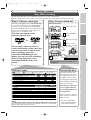
Easy DVD recording
The following will help you to understand easily how to record on DVD discs.
Make sure batteries are in the remote control and you have connected this unit and the TV correctly.
Step 2: Insert a blank disc
Remote Control
or
4.7
Close the
disc tray.
Open the disc tray.
4
Insert a recordable disc you wish
to record.
Loading
Format the disc
: Some functions are limited.
You want to
DVD-RW VR
: Cannot be used.
DVD-RW VR
DVD-RW Video
DVD-R Video
Rewritable?
Yes
Yes
No
Can create chapters at fixed intervals (auto.)
Yes
Yes
Yes
Reuse by deleting unwanted contents
Edit recorded contents
Edit/Record from connected equipment
Copy discs for distribution
*1
Play on other DVD equipment
*1
Features
Recording
Can create chapters wherever you like (manual)
Yes
No
No
Can record 16:9 size pictures
Yes
Yes
Yes
Can record Copy-Once programs
Yes
No
No
Can perform basic edit functions
Yes
Yes
Yes
Can perform advanced edit functions (Playlist edit)
Yes
No
No
Editing
DVD-RW (VR mode) can only be played on DVD equipment that is VR compatible.
For details of the above functions and implied restrictions, see the explanations inside this operation manual.
Formatting is only necessary to prepare the disc
for recording. Details are
on pages 28-29.
When you format a disc, the
entire contents on that disc
will be erased.
• The unit automatically
starts formatting when an
unused disc is inserted.
17
Others Español
Note
Insert the disc in the unit.
Then, format the disc from
the setting menu. Video format (Video mode) or Video
recording format (VR mode)
will be available depending on
the inserted disc type.
VCR functions
DVD-R Video
Changing the Setting menu
DVD-RW Video
Record TV programs
*1
3
Editing
: Can be used.
Select the DVD
mode.
This operation may take a while to be
recognized.
DVD disc types
: Most suitable.
2
Disc Playback
5
Turn on the unit.
Recording
For example, when you want to
record repeatedly on the same disc
or when you want to edit the disc
after recording, select the
rewritable DVD-RW type disc.
When you want to save recordings
without any alteration, a nonrewritable DVD-R can be your
choice.
1
Getting started
This unit can record on the
following type of discs.
Connections
Step 1: Choose a disc type
There are several types of recordable DVD discs
to choose from. Choose a recordable DVD disc
type based on your playback/recording/editing
needs. See “DVD disc types” at the bottom of this
page for more information on the differences
among various compatible media.
E9656UD_EN_1.qx4
05.7.15
11:55 AM
Page 18
Getting started
Easy DVD recording (Cont’d)
Step 3: Select the
recording
speed
Step 4: Select the
desired
channel
Step 5: Record to
DVD discs
CH 12
XP
0:58
I
Hint 1: Play back the recorded contents
You can select the title you want to play back from a displayed menu and immediately start playback. Recorded contents are easi- Start Rec.
Stop/Start
Stop Rec.
ly accessible, with simple procedure of choosing
a title on a chapter on the menu screen.
What are titles and chapters?
The contents of a DVD disc are generally
divided into titles.Titles may be further divided into chapters.
Title 1
Title 2
Step 6: Stop the
Record
Chapter 1 Chapter 2 Chapter 3 Chapter 1 Chapter 2
Hint 2: Edit the recorded disc
You will find editing discs is easy.This unit offers convenient editing functions
which are possible only with DVD-RW/-R discs.
Title List offers the following editing functions.
• Putting names on titles
• Setting pictures for thumbnails
• Setting/clearing chapter markers
• Deleting parts of titles or scenes
(Possible
editing functions depend on the recording format and editing method.)
Original and Playlist (VR mode)
You can edit the contents on a Playlist without changing the original recordings. A Playlist does not take up much disc space.
Wait for a moment.
Appears only DVD-RW in
VR mode.
What “Original” or “Playlist” is for?
Throughout this operation manual, you will find Original and Playlist to refer to
the original content and the edited version.
• Original content refers to what’s originally recorded on the disc.
• Playlist content refers to the edited version of the original content.
Finalizing a Disc
• You need to record in Video mode and finalize the disc to play it back on other
players.
• Once you finalize a disc recorded in Video mode, you cannot record or edit any
information on the disc.
• Discs recorded in VR mode can still be edited after finalization.
18
C
This operation may
take a while to be
completed.
E9656UD_EN_1.qx4
05.7.15
11:55 AM
Page 19
Getting started
Before you start
Channel setting
Getting channels automatically
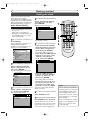
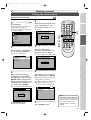
1
4
Select “Channel” using
Cursor K / L, then press
ENTER.
Channel menu will appear.
Screen for Advanced Setting Menu:
VCR DVD
Channel
Auto Preset
Press POWER to turn on the
unit.
3
6
4
5
Getting started
1
6
Manual Preset
TV Audio Select
Stereo
2
To select a channel
5
CH 1
Auto Presetting Now
Press SETUP.
Easy Setting Menu or Advanced
Setting Menu will appear.
Wait for several minutes to finish
channel scanning.
Playback
Recording
Display
Select Video
Clock
Channel
Disc
Easy Setting Menu
6
19
Others Español
•You cannot change the channel
when one of the components
of the unit (VCR or DVD) is in
the recording, OTR or Timer
Recording mode.
•If the auto presetting is canceled during presetting, some
of the channels not yet preset
may not be received.
•The selection will depend on
how you receive the TV channels.
To cancel the auto presetting during scanning:
Press RETURN
or
SETUP to cancel.
VCR functions
Press SETUP to exit.
•You can select only the channels
memorized in this unit by using
CHANNEL K / L on the front
panel or CH K / L on the
remote control.
Note
Changing the Setting menu
Advanced Setting Menu
Editing
3
Disc Playback
Select “Auto Preset” using
Cursor K / L, then press
ENTER.
The unit will start getting channels available in your area.
You can select a channel by
directly entering channel number using the Number buttons on the remote control.
Notes for using the
Number buttons:
•When selecting cable channels which are larger than 99,
enter channel numbers as a
three-digit number (For
example: 117, press 1, 1, 7).
•You must precede single-digit
channel numbers with a zero
(For example: 02, 03, 04 and
so on).
•You can select the line input
mode (“L1” or “L2”). To
select, press 0, 0, 1.To select
“L2”, press 0, 0, 2. Details are
on page 41.
Recording
Turn on the TV and be sure to
select the input to which the
unit is connected.
Connections
Right after the purchase of the
unit and whenever you move to a
new area, we recommend available
channels in your area be stored
using “Auto Preset” in the
Channel Preset of the setting
menu.
E9656UD_EN_1.qx4
05.7.15
11:55 AM
Page 20
Getting started
Channel setting (cont’d)
Adding/Deleting channels
The channels you no longer
receive or seldom watch can be
deleted from the memory. You can
also add channels manually into
memory.
1
Press SETUP.
Easy Setting Menu or Advanced
Setting Menu will appear.
2
Select “Channel” using
Cursor K / L, then press
ENTER.
Channel menu will appear.
Screen for Advanced Setting Menu:
4
Select the channel number to
add or delete.
Press Cursor { or CH L to
move to a smaller channel number.
Press Cursor B or CH K to
move to a larger channel number.
•Press Cursor { / B to move
through the channels one by
one, including the ones not in
the channel memory, while press
CH K / L to move through the
channels only in the channel
memory.
Press the Number buttons to
select a channel number directly.
VCR DVD
Channel
Manual Preset
VCR DVD
Auto Preset
Manual Preset
TV Audio Select
Stereo
CH 2
Add
Delete
3
5
Select “Manual Preset” using
Cursor K / L, then press
ENTER.
Manual Preset menu will appear.
Select “Add” or “Delete”
using Cursor K / L, then
press ENTER.
The channel number will be
added or deleted from a channel
memory. Then the next channel
number will appear so that you
can continue adding or deleting
channels.
Manual Preset
VCR DVD
CH 2
Add
Delete
6
Press SETUP to exit.
20
4
1
6
2
3
4
5
VCR/DVD RECORDER
COMBINATION
E9656UD_EN_1.qx4
05.7.15
11:55 AM
Page 21
Getting started
Before you start
Selecting the TV Stereo or SAP
You can select an audio channel
to output from TV.
1
Easy Setting Menu
VCR DVD
TV Audio Select
Stereo
VCR DVD
English
Clock
Channel
DVD-RW Recording Format
VR mode
Timer Programming
Auto Finalize
Progressive
1
6
SAP
OFF
The default is “Stereo”.
Disc
Advanced Setting Menu
2
Advanced Setting Menu
Playback
Recording
Display
Select Video
Clock
VCR/DVD RECORDER
COMBINATION
Disc Playback
Select “Advanced Setting
Menu” using Cursor K / L,
then press ENTER.
Advanced Setting Menu will appear.
Select “Stereo” or “SAP”
using Cursor K / L, then
press ENTER.
Stereo:
Outputs main-audio.
SAP(Secondary Audio
Program):
Outputs Sub-audio.
Refer to the item in “Glossary”
on page 103 for more information.
Recording
5
2
3
4
5
Getting started
OSD Language
Select “TV Audio Select”
using Cursor K / L, then
press ENTER.
Option window will appear.
Connections
Press SETUP.
Easy Setting Menu or Advanced
Setting Menu will appear.
If Advanced Setting Menu is displayed, proceed to STEP 3.
4
Channel
Disc
Editing
6
Easy Setting Menu
Press SETUP to exit.
3
Notes on TV channel audio
Channel
Auto Preset
Stereo
Manual Preset
TV Audio Select
Selected audio
Broadcast audio
VCR DVD
Stereo
Disc (Videotape) Audio output
recording
STEREO
STEREO
STEREO
STEREO
MONO+SAP
MONO
MONO
MONO
MONO
MONO
STEREO+SAP
SAP
SAP
STEREO
STEREO
STEREO
MONO+SAP
SAP
SAP
MONO
MONO
MONO
• You can only play back the disc in second audio if a TV program is
available in second audio and you set “TV Audio Select” to “SAP”.
21
Others Español
STEREO+SAP
STEREO
VCR functions
SAP
Changing the Setting menu
Select “Channel” using
Cursor K / L, then press
ENTER.
Channel menu will appear.
• If you want to record a TV program available in second audio or
stereo on a DVD-RW/-R or video tape, you have to select either
Stereo or SAP in the Channel Preset screen beforehand. Refer to
the following table to check an appropriate setting.
E9656UD_EN_1.qx4
05.7.15
11:55 AM
Page 22
Getting started
Setting the clock
Set the correct time before using
Timer Recording. If a Public
Broadcasting Service (PBS) station is
available in your area, follow the Auto
Clock Setting below. If not, follow the
Manual Clock Setting on pages 23.
Auto Clock Setting
4
Select “Auto Clock Setting”
using Cursor K / L, then
press ENTER.
Option window will appear.
Auto Clock Setting
Make sure:
• The antenna/CATV connections
are correct.
• If this unit is connected to a
Cable Box or Satellite Box, select
the local PBS station to set the
clock automatically.
1
Easy Setting Menu
OSD Language
VCR DVD
English
Clock
Channel
DVD-RW Recording Format
VR mode
Timer Programming
Auto Finalize
Progressive
OFF
Disc
5
VCR DVD
OFF
Auto
1
6
Manual
2
3
4
5
The default is “Auto”.
Press SETUP.
Easy Setting Menu or Advanced
Setting Menu will appear.
If Advanced Setting Menu is displayed, proceed to STEP 3.
7
5
• If you do not know the PBS
channel number in your area,
select “Auto” using Cursor
K / L, then press ENTER.
The setting will be activated.
• If you know the PBS channel
number in your area, select
“Manual” using Cursor
K / L, then press ENTER.
Advanced Setting Menu
Auto Clock Setting - Manual
VCR/DVD RECORDER
COMBINATION
VCR DVD
Set Channel No.
CH 1
2
Select “Advanced Setting
Menu” using Cursor K / L,
then press ENTER.
Advanced Setting Menu will appear.
Advanced Setting Menu
Playback
Recording
Display
Select Video
Clock
Channel
Disc
Easy Setting Menu
3
Select “Clock” using Cursor
K / L, then press ENTER.
Clock menu will appear.
VCR DVD
Clock
Enter the PBS channel
number using the Number
buttons or Cursor K / L,
then press ENTER.
The setting will be activated.
• If you want to set the clock manually and cancel the auto clock setting function, select “OFF” using
Cursor K / L, then press ENTER.
The auto clock setting function
will be canceled.
6
Press SETUP to exit.
Clock Setting
Auto Clock Setting
Auto
Daylight Saving Time
ON
7
Press POWER to turn off the unit.
This unit will search for the clock time
only when the power is off. Leave it off for
several minutes to give this unit time to
set the clock on the front display panel.
22
Note
• The clock may set itself automatically after you connect the
antenna/CATV signal to this
unit and plug in the power
cord. In this case, the current
time will appear on the front
panel display.
• If the current time is not displayed or the displayed clock
time is not correct, set the
clock manually.
E9656UD_EN_1.qx4
05.7.15
11:55 AM
Page 23
Getting started
Before you start
Setting the clock (cont’d)
Manual Clock Setting
1
SKIP 2
Enter the date (month / day /
year) using Cursor K / L.
Press Cursor { / B to move
the cursor.
Playback
JAN/ 01 / 2005(SAT)
12: 00 AM
Display
Select Video
Clock
Channel
Disc
Easy Setting Menu
5
2
Select “Clock” using Cursor
K / L, then press ENTER.
Clock menu will appear.
Enter the time (hour /
minute) using Cursor K / L,
then press Cursor { / B.
A cursor will move on AM or PM.
VCR DVD
Clock
Recording
2
3
4
5
6
Recording
VCR/DVD RECORDER
COMBINATION
VCR DVD
Clock Setting
Disc Playback
Clock Setting
Auto Clock Setting
Auto
Daylight Saving Time
ON
JAN/ 01 / 2005(SAT)
12: 00 AM
When entering from Easy
Setting Menu, select “Clock”
using Cursor K / L, then press
ENTER. When entering from
Advanced Setting Menu, select
“Clock Setting” using Cursor
K / L, then press ENTER.
Clock Setting window will appear.
Press Cursor K / L to select
AM or PM, then press ENTER.
Clock menu will appear, then the
settings will be activated.
Although seconds are not displayed,
they will be counted from zero.
Screen for Advanced Setting Menu:
Changing the Setting menu
6
Editing
3
Clock Setting
VCR DVD
Clock
Clock Setting
VCR DVD
Auto
Daylight Saving Time
ON
Note
Press SETUP to exit.
23
Others Español
7
• Your clock setting will be lost
if either there is a power failure or this unit has been
unplugged for more than 1
minute.
VCR functions
Auto Clock Setting
---- / -- / ---- ( ---- )
-- : ----
Press ENTER again.
Default date will appear.
Getting started
1
7
VCR DVD
Clock Setting
Advanced Setting Menu
Connections
Press SETUP.
Easy Setting Menu or Advanced
Setting Menu will appear.
If Easy Setting Menu is displayed,
proceed to STEP 3.
4
E9656UD_EN_1.qx4
05.7.15
11:55 AM
Page 24
Getting started
Setting the clock (cont’d)
Setting the Daylight Saving Time
When Daylight Saving Time is
ON, the unit clock will automatically move forward 1 hour on the
first Sunday in April and move
back 1 hour on the last Sunday in
October.
3
Select “Clock” using Cursor
K / L, then press ENTER.
Clock menu will appear.
VCR DVD
Clock
Clock Setting
1
Auto Clock Setting
Auto
Daylight Saving Time
ON
Press SETUP.
Easy Setting Menu or Advanced
Setting Menu will appear.
If Advanced Setting Menu is displayed, proceed to STEP 3.
Easy Setting Menu
OSD Language
VCR DVD
English
Clock
Channel
DVD-RW Recording Format
VR mode
Timer Programming
Auto Finalize
Progressive
OFF
2
3
4
5
4
Select “Daylight Saving Time”
using Cursor K / L, then
press ENTER.
Option window will appear.
Disc
Daylight Saving Time
Advanced Setting Menu
VCR DVD
ON
OFF
2
Select “Advanced Setting
Menu” using Cursor K / L,
then press ENTER.
Advanced Setting Menu will appear.
The default is “ON”.
Advanced Setting Menu
Playback
Recording
Display
Select Video
Clock
Channel
Disc
Easy Setting Menu
5
Select “ON” or “OFF” using
Cursor K / L, then press
ENTER.
Choose “ON” if you are currently
observing the daylight saving time.
6
Press SETUP to exit.
24
1
6
VCR/DVD RECORDER
COMBINATION
E9656UD_EN_1.qx4
05.7.15
11:55 AM
Page 25
Getting started
Before you start
Selecting the TV aspect ratio
You can select the TV aspect ratio
to match the formats of what you
are playing back on the unit and
your TV screen (4:3 standard or
16:9 widescreen TV).
Select “TV Aspect” using
Cursor K / L, then press
ENTER.
Option window will appear.
TV Aspect
The default is “4:3 Letter Box”.
Channel
DVD-RW Recording Format
VR mode
Timer Programming
OFF
Disc
2
3
4
5
Recording
Refer to the Note on this
page below.
Auto Finalize
Progressive
16:9 Wide
English
Clock
1
6
4:3 Pan & Scan
VCR DVD
Easy Setting Menu
OSD Language
DVD
4:3 Letter Box
Advanced Setting Menu
VCR/DVD RECORDER
COMBINATION
5
2
Select a desired option using
Cursor K / L, then press
ENTER.
Disc Playback
Select “Advanced Setting
Menu” using Cursor K / L,
then press ENTER.
Advanced Setting Menu will appear.
6
Press SETUP to exit.
Advanced Setting Menu
Getting started
Press SETUP.
Easy Setting Menu or Advanced
Setting Menu will appear.
If Advanced Setting Menu is displayed, proceed to STEP 3.
Connections
1
4
Playback
Recording
Display
Select Video
Editing
Clock
Channel
Disc
Easy Setting Menu
Changing the Setting menu
3
Select “Playback” using
Cursor K / L, then press
ENTER.
Playback menu will appear.
DVD
4:3 Letter Box
Parental Lock
All
Disc Menu Language
English
Audio Language
Original
Subtitle Language
OFF
Digital Out
ON
Fast Forward with Audio
ON
Progressive
OFF
25
Others Español
Dynamic Range Control
Note
If you have a standard TV:
Select “4:3 Letter Box”, for a
full length picture with black
bars on the top and bottom of
the screen. Select “4:3 Pan &
Scan” for a full height picture
with both sides trimmed.
If you have a widescreen TV:
Select “16:9 Wide”.
VCR functions
Playback
TV Aspect
E9656UD_EN_1.qx4
05.7.15
11:55 AM
Page 26
Recording
Information on DVD recording
Information
Recording speed
This unit can record on DVD-RW and DVD-R discs.
DVD-RW discs allow you to record programs
repeatedly, and the recorded contents can be erased.
DVD-R discs allow you to record programs only
once, and the recorded contents cannot be erased.
You can record programs on DVD-R discs only in
Video mode, while recording format for DVD-RW
discs can be either Video mode or VR mode.
You can select a recording speed among 6 options.
The recording time will depend on the recording
speed you select as follows.
Discs recorded in SLP or SEP on this unit
may not be played back on other DVD
recorders or DVD players.
Logo
Attributes
8 cm/12 cm, single-sided, single layer disc
Approx. max. recording time (SEP mode):
600 minutes (4.7GB) (for 12 cm)
DVD-RW
180 minutes (1.4GB) (for 8 cm)
8 cm/12 cm, single-sided, single layer disc
Approx. max. recording time (SEP mode):
600 minutes (4.7GB) (for 12 cm)
4.7
180 minutes (1.4GB) (for 8 cm)
DVD-R
Recordable disc
•Discs which can be used with this recorder:
DVD-R: up to 8x (4x disc is recommended)
DVD-RW: 2x and 4x (2x disc is recommended)
•Discs tested and proven to be compatible
with this recorder:
MAXELL DVD-R
TDK DVD-RW 2x
JVC DVD-RW 4x
MITSUBISHI DVD-R 8x
About Video mode and VR (Video Recording)
mode
Video mode is the same recording format as DVDVideo discs purchased locally and played back on most
DVD players.To play back the contents recorded in
this mode on other DVD players, you will need to
finalize them (see page 44). However, you can play back
record additional materials or edit discs recorded in
Video mode with this unit without finalization.
VR (Video Recording) mode is a basic recording format for DVD-RW. You can record and edit repeatedly.
DVD players with
are capable of playing
back DVD-RW recorded in VR mode.
Disc type
Disc format
Functions
Video mode
Playback, limited recording,
limited editing
DVD-RW VR mode
Video mode
4.7
DVD-R
26
Playback, recording,
Original/Playlist editing
Playback, limited recording,
limited editing
Disc Size
Recording Recording Video/Sound
speed
time *
Quality
XP
18 min
SP
8 cm Disc LP
36 min
72 min
EP
108 min
SLP
144 min
SEP
180 min
XP
60 min
SP
120 min
12 cm Disc LP
EP
240 min
360 min
SLP
480 min
SEP
600 min
•The actual recording time may deviate from the
time listed above.
•The audio and video quality is getting poorer as
the recording time becomes longer.
•Each time REC MODE is pressed, recording time
will change and be displayed.
E9656UD_EN_1.qx4
05.7.15
11:55 AM
Page 27
Recording
Information on copy control
Some satellite broadcasts include copy-protected
information. For their recording, refer to the following.
Disc type / format
Copy-free Copy-once Copyprohibited
ver.1.1, 1.2
ver.1.1, 1.2 CPRM compatible
ver.1.1, 1.2
ver.1.1, 1.2 CPRM compatible
Recordable
Not Recordable
Making discs playable on other DVD
player (Finalize)
After recording, you must finalize disc in order to
play back on any other unit. (Refer to page 44.)
Playable
Editing
OPEN/CLOSE
STOP/EJECT
POWER
STOP
PLAY
CHANNEL
REW F.FWD
DUBBING
VCR
PLAY
DVD
REC/OTR
REC/OTR
OUTPUT SELECT
This Unit
DVD Player
Not Playable
After finalizing:
Finalize discs recorded on this unit in order to
play them back on other DVD players.
Others Español
27
VCR functions
• Once DVD-RW/-R (Video mode) is finalized, you
cannot record additional materials or edit.
• You can record additional materials on or edit the
finalized DVD-RW (VR mode).
• When DVD-RW/-R (Video mode) is finalized, title
menu will be created automatically.
Changing the Setting menu
What is “CPRM”?
(Content Protection for Recordable Media)
This is a format used to record copy-once programs. By recording coded data on the area of
DVD discs that ordinary writing software cannot write, it prevents copy-once programs from
being recorded repeatedly on different media.
This unit is CPRM compatible, which means
that you can record copy-once broadcast programs, but then you cannot make a copy of
those recordings. CPRM recordings can only be
made on DVD-RW discs formatted in VR mode,
and CPRM recordings can only be played back
on players that are compatible with CPRM.
Disc Playback
ver.2.0
Recording
You cannot record copy-protected materials using
this unit. Copy-protected materials includes DVDVideo discs and some satellite broadcasts.
If copy-protected material is encountered during a
recording, recording will be paused or stop automatically and an error message will be displayed on
screen.
When recording a TV broadcast or through an
external input, you can display copy control information on screen.
Getting started
Note
• This recorder cannot record on CD-RW or
CD-R discs.
• DVD-RW/-R and CD-RW/-R discs recorded on a
personal computer or a DVD or CD recorder
may not be played back if the disc is damaged or
dirty or if there is dirt of condensation on the
player’s lens.
• If you record on a disc using a personal computer, there are cases in which it may not be played
back because of the settings of the application
software used to create the disc even if it is
recorded in a compatible format. (Check with the
software publisher for more detailed information.)
• Discs recorded in Video mode on this unit cannot
record any additional materials using other DVD
recorders.
• A DVD-RW disc formatted with this unit cannot be
used on other DVD recorders.
• Since the recording is made by the variable bit rate
(VBR) method, the actual remaining time for recording may be a little bit shorter than the remaining
time displayed on the OSD depending on the picture you are recording.
Connections
Restrictions on recording
Before you start
Information on DVD recording (cont’d)
E9656UD_EN_1.qx4
05.7.15
11:55 AM
Page 28
Recording
Formatting a disc
Choosing the recording format of a blank disc
When inserting a blank disc, the
unit starts to initialize it automatically.
After that, you can record on the
disc with a recording format
selected in the setting menu.
3
Select “DVD-RW Recording
Format” using Cursor K / L,
then press ENTER.
Option window will appear.
DVD-RW Recording Format
Video mode
VR mode
1
SKIP 2
Press SETUP.
Easy Setting Menu or Advanced
Setting Menu will appear.
If Easy Setting Menu is displayed,
proceed to STEP 3.
1
5
DVD
Video mode
DVD Player Compatibility mode.
VR mode
Editing possibility mode.
2
3
4
The default is “VR mode”.
Advanced Setting Menu
4
Playback
Recording
Display
Select “Video mode” or “VR
mode” using Cursor K / L,
then press ENTER.
The recording mode will be set.
Select Video
Clock
Channel
Disc
Easy Setting Menu
5
2
Press SETUP to exit.
Select “Recording” using
Cursor K / L, then press
ENTER.
Recording menu will appear.
Recording
DVD
DVD-RW Recording Format
VR mode
Auto Chapter
10 minutes
Timer Programming
Recording Audio Select (XP)
Dolby Digital
Auto Finalize
Dubbing Mode
28
VCR/DVD RECORDER
COMBINATION
VCR DVD
Note
• The recording format setting
is effective only for DVD-RW
discs. You cannot change the
recording format for a DVDR disc. DVD-R discs will
always be in Video mode.
• You cannot mix two formats on one DVD-RW disc.
When you load a disc once
recorded before, the
recording format cannot be
changed even if you change
it in the setting menu.
• When inserting a blank
DVD+RW or DVD+R disc,
the error message (“Disc
Error”) will appear. This unit
is not compatible with a
DVD+RW/+R disc for
recording.
• Playlist will be created automatically when recording on
DVD-RW in VR mode.
E9656UD_EN_1.qx4
05.7.15
11:55 AM
Page 29
Recording
Before you start
Formatting a disc (cont’d)
Reformatting a disc
1
4
Select “Yes” using
Cursor K / L, then press
ENTER.
Final confirmation window will
appear.
Yes
No
Are you sure?
2
Yes
No
Disc
Original
VCR/DVD RECORDER
COMBINATION
5
Select “Yes” using
Cursor K / L, then press
ENTER.
Formatting will start.
Disc Playback
Playlist
Recording
Select “Disc” using
Cursor K / L, then press
ENTER.
Disc menu will appear.
Screen for VR mode Disc menu:
Getting started
2
3
4
5
Format
Press SETUP.
Easy Setting Menu or Advanced
Setting Menu will appear.
1
Format
Finalize
Disc Protect OFF
ON
Formatting
Format
90%
6
Formatting is complete.
Changing the Setting menu
Select “Format” using
Cursor K / L, then press
ENTER.
Confirmation window will appear.
Editing
3
Connections
VR mode is the default recording
format for DVD-RW. You can
change it to Video mode from the
setting menu.
“100%” will be indicated.
Yes
No
Formatting
100%
This operation may take a
while to be completed.
29
Others Español
• When you reformat the disc,
all contents of the disc will be
erased.
• If you want to cancel reformatting at STEP 4 or 5, select
“No”.
• A disc once formatted with
this unit cannot be used on
other DVD recorders.
VCR functions
Note
E9656UD_EN_1.qx4
05.7.15
11:55 AM
Page 30
Recording
Auto Chapter
You can set specific time interval
for chapter marks.
1
4
Select “Auto Chapter” using
Cursor K / L, then press
ENTER.
Option window will appear.
Press SETUP.
Easy Setting Menu or Advanced
Setting Menu will appear.
If Advanced Setting Menu is displayed, proceed to STEP 3.
Auto Chapter
DVD
OFF
10 minutes
15 minutes
30 minutes
60 minutes
Easy Setting Menu
OSD Language
VCR DVD
English
Clock
Channel
DVD-RW Recording Format
VR mode
The default is “10 minutes”.
Timer Programming
Auto Finalize
Progressive
1
6
5 minutes
2
3
4
5
5
OFF
Disc
Advanced Setting Menu
2
Select “Advanced Setting
Menu” using Cursor K / L,
then press ENTER.
Advanced Setting Menu will appear.
Select a desired time option
using Cursor K / L, then
press ENTER.
Chapter marks will be put as you
specified.
VCR/DVD RECORDER
COMBINATION
6
Press SETUP to exit.
Advanced Setting Menu
Playback
Recording
Display
Select Video
Clock
Channel
Disc
Easy Setting Menu
3
Select “Recording” using
Cursor K / L, then press
ENTER.
Recording menu will appear.
Recording
DVD
DVD-RW Recording Format
VR mode
Auto Chapter
10 minutes
Timer Programming
Recording Audio Select (XP)
Dolby Digital
Auto Finalize
Dubbing Mode
30
VCR DVD
Note
• The interval for auto chapter
marks may slightly deviate
from the one you specified on
the Auto chapter screen in
Video mode.
• A blank chapter may be created depending on the remaining time of the disc.
E9656UD_EN_1.qx4
05.7.15
11:55 AM
Page 31
Recording
Before you start
Recording Audio Select (XP)
1
4
Select “Recording Audio
Select (XP)” using
Cursor K / L, then press
ENTER.
Option window will appear.
Recording Audio Select (XP)
Easy Setting Menu
OSD Language
Dolby Digital
VCR DVD
English
The default is “Dolby Digital”.
Clock
1
6
DVD
PCM
2
3
4
5
Getting started
Press SETUP.
Easy Setting Menu or Advanced
Setting Menu will appear.
If Advanced Setting Menu is displayed, proceed to STEP 3.
Connections
You can enjoy high quality sound
recording.This function works
only when the recording speed is
set at XP.
Channel
DVD-RW Recording Format
VR mode
Auto Finalize
Progressive
OFF
5
VCR/DVD RECORDER
COMBINATION
Select “PCM” or “Dolby
Digital” using Cursor K / L,
then press ENTER.
Disc
Advanced Setting Menu
Recording Audio Select (XP)
Select “Advanced Setting
Menu” using Cursor K / L,
then press ENTER.
Advanced Setting Menu will appear.
Dolby Digital
DVD
Disc Playback
2
Recording
Timer Programming
PCM
Advanced Setting Menu
Playback
Display
Select Video
Clock
Editing
PCM:
Records PCM audio for the best
quality sound.
Recording
Channel
Easy Setting Menu
3
Recording
VCR DVD
DVD-RW Recording Format
VR mode
Auto Chapter
10 minutes
Timer Programming
Recording Audio Select (XP)
Dolby Digital
Auto Finalize
Dubbing Mode
VCR DVD
6
Press SETUP to exit.
Note
31
Others Español
• “PCM” stands for Pulse Code
Modulation. It changes analog
sound to digital sound without compressing audio data.
• When the recording speed is
set at other than XP, the unit
records “Dolby Digital” audio
automatically even if you
selected “PCM”.
VCR functions
Select “Recording” using
Cursor K / L, then press
ENTER.
Recording menu will appear.
Changing the Setting menu
Dolby Digital:
Records Dolby Digital audio for
good quality sound.
Disc
E9656UD_EN_1.qx4
05.7.15
11:55 AM
Page 32
Recording
Basic recording
Follow steps below to record TV
programs.
press
DVD
first.
4
Select a desired channel to
record using CH K / L or
the Number buttons.
1
4
CH 12
Turn on the unit and load a
recordable disc.
Make sure that the TV input is set
on the unit.
5
2
This operation may take a
while to be recognized.
6
5
2
Select a recording speed
using REC MODE.
Press REC/OTR to start
recording.
“¶” mark will be displayed for 5
seconds.
VCR/DVD RECORDER
COMBINATION
Note
XP
0:58
I
Refer to “Recording speed” on
page 26.
3
Make sure that the recording
format is set to the desired
mode.
Refer to “Formatting a disc” on
pages 28-29.
When a DVD-RW disc is
loaded:
You can choose Video mode or
VR mode from the setting menu.
The default is “VR mode”. Refer
to “Choosing the recording format of a blank disc” on page 28.
When a DVD-R disc is loaded:
DVD-R discs will be always in
Video mode.
32
To pause the recording, press
PAUSE F. Press REC/OTR or
PAUSE F to restart the
recording.
6
Press STOP C to stop the
recording.
This operation may take a
while to be completed.
• Recording starts immediately
after you press REC/OTR
and continues until the disc is
full or you stop recording.
• When the clock setting has
not been made, the space for
a date and time of title names
in the Original or Playlist will
be blank.
• When you record a TV program broadcasted in both
Stereo and SAP audio on a
DVD-RW/-R, you have to
select the TV channel audio
(Stereo or SAP) beforehand.
Only the selected channel
audio will be recorded. Refer
to “Selecting the TV Stereo or
SAP” on page 21 for more
details.
• You cannot mix two formats on one DVD-RW
disc.
When you load a disc
once recorded before, the
recording format cannot
be changed even if you
change it in the setting
menu.
• You cannot change the
recording speed during the
REC pause mode.
• You can change channels during the REC pause mode.
E9656UD_EN_1.qx4
05.7.15
11:55 AM
Page 33
Recording
Before you start
Basic recording (cont’d)
Checking the recording picture and sound quality
press
DVD
2
Press REC MONITOR again
to exit.
Connections
You can confirm the recording picture and the sound quality for the
recording speed you have selected
before attempting to record on a
DVD disc.
first.
1
1
2
Recording
While the unit is in stop
mode or recording mode
with a DVD disc to record
inserted, press
REC MONITOR.
The TV program will be on the
screen in the same picture and
sound quality as it will be for the
recording speed you have selected.
Getting started
1
VCR/DVD RECORDER
COMBINATION
Disc Playback
Rec Monitor
XP
0:58
LP
SEP
SLP
EP
VCR functions
SP
Changing the Setting menu
XP
Editing
If you want to change the
recording speed, press
REC MODE repeatedly.
The recording speed will be
changed as you press the button
as shown below. Refer to
“Recording speed” on page 26.
• You cannot change the recording speed during recording.
Note
33
Others Español
• If you press REC MONITOR
while receiving the bilingual
broadcast, the sound to be
recorded is output.
E9656UD_EN_1.qx4
05.7.15
11:55 AM
Page 34
Recording
One-touch Timer Recording
This is a simple way to set the
recording time in blocks of 30
minutes. Check that the disc has
enough recordable space for the
time you set.
After finishing the recording, the
recorder automatically goes into
standby.
press
DVD
first.
1
Turn on the unit and load a
recordable disc.
Make sure that the TV input is set
on the unit.
4
Select a desired channel to
record using CH K / L or
the Number buttons.
5
Press REC/OTR, then press
REC/OTR repeatedly to
select a desired recording
time.
Recording time appears on the TV
screen (30 minutes to 8 hours).
Recording will start.
This operation may take a
while to be recognized.
0:30
2
3
Make sure that the recording
format is set to the desired
mode.
Refer to “Formatting a disc” on
pages 28-29.
When a DVD-RW disc is
loaded:
You can choose Video mode or
VR mode from the setting menu.
The default is “VR mode”. Refer
to “Choosing the recording format of a blank disc” on page 28.
When a DVD-R disc is loaded:
DVD-R discs will always be in
Video mode.
34
2
5
Note
I
Select a recording speed
using REC MODE.
Refer to “Recording speed” on
page 26.
4
0:30
(Normal Recording)
8:00
1:00
7:30
When the unit reaches the specified time, it will be turned off
automatically.
To change the recording time during the One-touch Timer
Recording, press REC/OTR
repeatedly until the desired time
appear.
To cancel the One-touch Timer
Recording within the specified
time, press STOP C.
This operation may take a
while to be completed.
• The remaining recording
time will appear on the display panel during an Onetouch Timer Recording.
Press DISPLAY to see it on
the TV screen.
• You cannot pause a Onetouch Timer Recording.
• Unlike a Timer Recording, you
can perform the following
operations during a Onetouch Timer Recording.
- Turning off the power.
- Using REC/OTR, STOP C.
• The unit will be turned off
automatically under the following conditions.
1) No space remained on the disc.
2) When a power failure occurs.
• If OTR is finished in DVD during playback or REC mode in
VCR, the DVD will be in stop
mode and the VCR keeps the
current mode.
• When OTR is finished and the
power is turned off, the unit
will switch to the standby
mode automatically if a Timer
Recording has been programmed. Press T-SET to cancel the standby mode for using
the unit continuously.
E9656UD_EN_1.qx4
05.7.15
11:55 AM
Page 35
Recording
4
5
Enter a date or a routine
option for Timer Programming using Cursor K / L.
SKIP 2
DVD
VCR
Start
End
CH
1. JAN/01
--:--
--:--
L1 DVD
2.
---
3.
---
4.
---
Speed
e.g. January 1st
Cursor K changes date.
Cursor L will give you routine
option as described.
1
6
7
JAN/01
Advanced Setting Menu
6
Playback
Recording
L
Daily
Select Video
Clock
Channel
Disc
Date
1. JAN/01
2
Recording
DVD
DVD-RW Recording Format
VR mode
Auto Chapter
10 minutes
2.
---
3.
---
4.
---
End
CH
--:--
L1 DVD
FRI
L
7
Select the channel number to
record using Cursor K / L, then
press Cursor B.
1. JAN/01
2.
VCR DVD
VCR DVD
Start
End
CH
12:57AM
1:57AM 8
DVD
VCR
Speed
DVD
---
To record from external input, select
L1 or L2.
8
Select a recording media using
Cursor K / L, then press ENTER.
Timer Programming
Date
1. JAN/01
Timer Programming list will appear.
Timer Programming
---
4.
---
CH
DVD
VCR
CH
12:57AM 1:57AM 8
---
VCR DVD
End
VCR DVD
End
Speed
Instructions continue on page 36
DVD
VCR
DVD
Speed
• If you have not set the
clock yet:
A clock setting window will
appear after STEP 3. Continue
with the STEP 3 in “Auto
Clock Setting” on page 22 or
“Manual Clock Setting” on
page 23 before setting a timer
programming.
• Press Cursor { / B on
move the cursor to the left
and the right on the timer
programming menu.
35
Others Español
---
3.
Start
2.
Start
Note
VCR functions
Select “Timer Programming”
using Cursor K / L, then press
ENTER.
JAN/31
Changing the Setting menu
Date
Dolby Digital
3
SAT
L
SUN
Auto Finalize
Dubbing Mode
Speed
L
Timer Programming
Recording Audio Select (XP)
DVD
VCR
Start
12:57AM
L
Timer Programming
2.
MON-FRI
VCR DVD
Editing
Select “Recording” using
Cursor K / L, then press
ENTER.
Recording menu will appear.
---
MON-SAT
L
L
Timer Programming
Easy Setting Menu
1.
L
Disc Playback
Enter the time to start and to
end using Cursor K / L, then
press Cursor B.
Display
Date
Recording
Press SETUP.
Easy Setting Menu or Advanced
Setting Menu will appear.
If Easy Setting Menu is displayed,
proceed to STEP 3.
VCR DVD
Timer Programming
Date
2
3
4
5
8
Getting started
1
Connections
You can program the unit to record
up to 8 programs, within a month in
advance. Daily or weekly program
recordings are also available.
• Be sure to set the clock before
programming a timer recording.
• Insert a recordable disc or a
videotape with an erase-protection tab.
Select the program which is
not set up using Cursor K / L,
then press ENTER.
You can choose the timer programming menu by pressing
TIMER PROG. In this case,
continue with STEP 4.
Before you start
Timer Recording
E9656UD_EN_1.qx4
05.7.15
11:55 AM
Page 36
Recording
Timer Recording (cont’d)
9
Select a recording speed using
Cursor K / L.
Timer Programming
Date
1. JAN/01
2.
Start
VCR DVD
End
12:57AM 1:57AM
CH
DVD
VCR
8
DVD
Speed
SP
---
Refer to “Recording speed” on page 26.
If you choose Auto, the unit automatically selects the best recording speed to
make the best quality picture according
to the remaining disc space.
• This function works only on the
Program 1 in the DVD recording.
• The recording may be cut short,
when the available recording space
of the disc is too limited.
10
Press ENTER when all information required is entered.
11
Your program setting will be stored.
• To set another program, repeat STEPs 4 to 10.
• To exit, press TIMER PROG. or
SETUP.
• When programs are overlapped,
“Overlap” and the overlapped program
number will appear on the display.
10
9
11
Press T-SET to turn off.
The unit will be set in the timer standby
mode.
indicator will appear on the
front display.
• Also the DVD or VCR indicates in the
display window which you set.
• After this step, the available functions for
the other component will be limited to a
playback and basic recording.You can not
use SETUP or change output mode under
such conditions.
1
6
Canceling, or correcting the timer programming information
during the timer standby mode
1
Press T-SET so that
indicator
disappears from the front display.
2
Press TIMER PROG.
Timer Programming list will appear.
VCR DVD
Timer Programming
Date
1. JAN/01
2.
3
Start
End
12:57AM 1:57AM
CH
DVD
VCR
8
DVD
Speed
SP
---
Check the information on the
list you will need.
5
Press TIMER PROG. to exit.
6
Press T-SET to return to the
timer standby mode.
To stop the Timer Recording in progress
Press STOP C to stop the disc recording or STOP/EJECT C/A
to stop the videotape recording on the front panel of the main
unit. STOP C on the remote control is not effective.
36
4
4
To clear the timer programming,
select the program using Cursor
K / L.Then, press CLEAR/C.RESET.
To correct the timer programming, select the program using
Cursor K / L. Then, press
ENTER. Next, correct the timer
programming by using
Cursor K / L / { / B.
Finally, press ENTER again.
2
5
Note
• To confirm the timer programming, press POWER
first and then TIME PROG.
when the unit is in timer
standby mode. Or, press
TIME PROG. while using
the side of the unit that is
free from Timer Recording
(either DVD or VCR).You
cannot select any programs
for correction or add new
programs while the unit is in
timer standby mode.
• When all the Timer Recording
is completed, the
indicator
flashes.To play or eject the
recorded disc (or the videotape), press T-SET or
POWER first and then press
PLAY B or OPEN/CLOSE A
(or STOP/EJECT C/A).
• The unit will be turned on
automatically before the
recording time.
E9656UD_EN_1.qx4
05.7.15
11:55 AM
Page 37
Recording
If the timer program did not complete correctly, the error number appears on the timer programming list.
Error number will appear
Timer Programming
Date
2.
---
3.
---
Start
End
CH
DVD
VCR
12:57AM
1:57AM
8
DVD E22
E36
E40
E41
E42
Note
Already finalized Video format
disc
Some portion has not been
recorded because of program
overlapping. Recording did not
start at the start time.
No videotape is inserted.
Videotape ran out during
recording.
Power failed
No disc when recording
• A program with the error
number is highlighted in gray
of the asterisked line in the
timer programming list.
• Once the timer programming
list with error indication is displayed, the program line(s)
with error will be cleared only
after the programs are canceled and reset to the timer
standby mode.
• The current recording program will be highlighted in red.
Recording
Explanation on the front panel indicator during Timer Recording
Lights off
(CLOCK) mark
Flashing
Lights on
- The VCR entered into the timer standby mode.
Flashing
- The VCR entered into the timer standby mode when no tape or a tape
without an erase protection tap is in the unit.
- The tape runs out during Timer Recording.
Lights off
- All DVD Timer Recordings are completed, and there is no other timer
recordings in standby.
- The DVD timer standby mode is cancelled by pressing T-SET.only momentarily.
- POWER is pressed during DVD timer standby, and the unit switched to the
VCR mode.
Lights on
- The DVD entered into the timer standby mode.
Flashing
- The DVD entered into the timer standby mode when no disc or an
unrecordable disc is in the unit.
- The disc runs out of the space during Timer Recording.
Changing the Setting menu
DVD mark
Lights off
- All VCR Timer Recordings are completed, and there is no other timer
recordings in standby.
- A VCR Timer Recording is cancelled by pressing STOP/EJECT C/A on
the unit.
- The VCR timer standby mode is cancelled by pressing T-SET.
- POWER is pressed during VCR timer standby, and the unit switched to
the DVD mode.
Editing
VCR mark
- An OTR is completed, and there is no other timer recordings in standby.
- The timer standby mode is cancelled by pressing T-SET.
- POWER is pressed during timer standby, and the component that is not
in timer standby mode is turned on.
- The unit entered into the timer standby mode.
- A Timer Recording or an OTR has started.
- When this indicator is on, you cannot use SET UP.
- All timer recordings are completed.
Playing discs
Lights on
Getting started
Each error number means:
E1-22
Recording error other than
E37-39 below
E23-24 Unrecordable disc
E25-28 Copy prohibited program
E29
Disc protected
E30
Disc full
E31-32 Already 99 titles recorded
E33
Already 999 chapters recorded
E34
No space for Control information
E35
PCA full
Speed
Connections
* JAN/01
VCR DVD
Before you start
Timer Recording (cont’d)
VCR functions
Note
37
Others Español
• If the end of programmed time in DVD and a start of programmed time in VCR are the same, the indicator
of the front panel may not be switched from DVD to VCR automatically. However, the Timer Recording for VCR
is in progress normally. In such case, press OUTPUT SELECT on the front panel or VCR
on the remote
control to activate the display.This is not a malfunction.
E9656UD_EN_1.qx4
05.7.15
11:55 AM
Page 38
Recording
Timer recording (cont’d)
Notes on Timer Recording
Both DVD and VCR
DVD
• If there is a power failure or the unit has been unplugged for more than 1
minute, the clock setting and all timer settings will be lost.
• If a programmed start and end time are the same, the recording will be set for
24 hours automatically.
• If a start time is earlier and an end time is later than the current time, the
recording will start right after you press T-SET.
• If a disc becomes full during timer recording, the unit turns itself off. In such
case, press T-SET. Insert a new disc. And then press T-SET again to resume the
timer recording.
• If a tape reaches the end during timer recording, the unit automatically ejects
the tape. In such case, insert a new tape to resume the timer recording.
VCR
Limited Functions during Timer Recording
Cancelling the Timer
stanby mode.
Timer Recording is in Standby
• Press T-SET.
Both DVD and VCR
• You cannot use any functions for either component (even after a timer recording on one component has already began).
Either DVD or VCR
• You cannot change output mode or use SETUP while the other component is
in timer standby.
• You can turn on the side of the unit that is not in timer standby by pressing
POWER, however you cannot use SETUP or change output mode.You only
can play or make a basic recording while the other component is in timer
standby.
OR
Cancelling the Timer
Recording.
Both DVD and VCR
Either DVD or VCR
OR
Timer Recording is in progress
• Press STOP C on the front panel of the Timer Recording side (VCR or DVD).
• The timer recording cannot be performed in DVD and VCR at the same time. If
you make two programmings withe the same channel and time in both components, the program with a lower program number will be recorded.
• You cannot change channels.
Other Situations
• If a basic recording or an OTR is in progress on one component (e.g.VCR) and the timer recording set
for the other component (e.g. DVD) is about to begin, the unit automatically switches to the programmed
channel 2 minutes before the programmed starting time, and the recording in progress (for VCR) will be
cancelled UNLESS their recording channels are the same. If their recording channels are the same, the
timer recording (for DVD) will start without cancelling the recording currently in progress (on the VCR).
In this case, a recording of the same channel will be made on both DVD and VCR.
38
E9656UD_EN_1.qx4
05.7.15
11:55 AM
Page 39
Recording
Before you start
Timer recording (cont’d)
Hints for Timer Recording
The priority of overlapped settings
This unit prioritizes recording as follows if the timer programmings are overlapped.
A Timer Recording of lower priority will be canceled, start from the middle or stop on the way.
Check the overlapped timer programmings and change the priority if necessary.
Connections
A programming set first has priority
When the starting time is same:
A program with a lower program number
(PROG. 1) has priority.
When some programmings have been made
around the ending time of the program
currently being recorded:
A program with a lower program number (PROG. 2)
has priority.
PROG. 1
PROG. 2
PROG. 2
Getting started
PROG. 1
PROG. 3
Actual
PROG. 2
PROG. 1
recording
The first 30 seconds (at the longest) will be cut off
When the recording time is partially overlapped:
PROG. 1 will start after PROG. 2 is completed.
Actual
PROG. 1
PROG. 2
recording
The first 30 seconds (at the longest) will be cut off
When the recording time is entirely overlapped:
PROG. 1 will not be recorded.
PROG. 1
PROG. 2
PROG. 2
Actual
PROG. 2
PROG. 1
recording
The first 30 seconds (at the longest) will be cut off
Actual
recording
Recording
PROG. 1
PROG. 2
When the ending time of the programming currently being recorded
and the starting time of the subsequent program are same:
If PROG. 1 is recorded on a DVD, the beginning of the PROG. 2 may be cut off.
The amount of time cut off differs depending on the recording media. For example, if both PROG. 1
and PROG. 2 are recorded on a DVD, the first 30 seconds (at the longest) of PROG. 2 will be cut off.
PROG. 1
PROG. 2
Actual
recording
PROG. 1
Editing
• When the recording time of two
programs are overlapped, or the
ending time of a program and the
starting time of another is same, the
first 30 seconds (at the longest) of
the subsequent program will be cut
off.
• If the cut-off portion reaches 1
minute or more, this program will
be displayed with error number E40
on the Timer Programming list.
Disc Playback
Note for DVD recording
PROG. 2
The first 30 seconds (at
the longest) will be cut off.
Changing the Setting menu
VCR functions
Others Español
39
E9656UD_EN_1.qx4
05.7.15
11:55 AM
Page 40
Recording
Settings for an external source
Connection to an external source
Connect the external source properly to the unit by using input jacks either LINE2 (Front) or LINE1 (Rear).
When connecting an external equipment of monaural output to this unit, use AUDIO L jack of LINE1 (Rear)
or LINE2 (Front).
Use commercially available S-Video or Video cable and an Audio cable for this type of connection.
OUTPUT
S- VIDEO
Another source
(VCR camcorder etc.)
VIDEO AUDIO
L
R
OUTPUT
S -VIDEO VIDEO
R
L
or
or
S-Video Video
cable cable
AUDIO
Audio
cable
S-Video
cable
Video Audio
cable cable
DVD/VCR
S-VIDEO
AUDIO IN
L
S-INPUT
or
VIDEO L(MONO) - AUDIO - R
DVD/VCR
R
IN(L1)
VIDEO IN
OUT
(L1)
DVD
To LINE 2 IN
Front of this unit
To LINE 1 IN
Back of this unit
OPEN/CLOSE
DVD
DIGITAL
AUDIO OUT
DVD
AUDIO
OUT
S-VIDEO
COMPONENT
VIDEO OUT
Y
STOP/EJECT
STOP
PLAY
CHANNEL
POWER
REW F.FWD
DUBBING
VCR
PLAY
DVD
REC/OTR
DVD/VCR
AUDIO IN AUDIO OUT ANTENNA
IN
L
L
DVD/VCR
S-INPUT
L
VIDEO L(MONO) - AUDIO - R
IN(L1)
COAXIAL
REC/OTR
PB
/CB
R
R
VIDEO IN VIDEO OUT
R
OUT
OUTPUT SELECT
OUT
PR
/CR
(L1)
DVD
1. Press SETUP.
Easy Setting Menu or Advanced Setting Menu will
appear. If Advanced Setting Menu is displayed, proceed to STEP 3.
2. Select “Advanced Setting Menu” using
Cursor K / L, then press ENTER.
Advanced Setting Menu will appear.
3. Select “Select Video” using
Cursor K / L, then press ENTER.
Select Video menu will appear.
Select Video
VCR DVD
Select Video
VCR DVD
L1 (Rear)
Video In
L1 (Rear)
Video In
L2 (Front)
Video In
L2 (Front)
Video In
4. Select “L2 (Front)” using Cursor K / L, then
press ENTER.
L2 (Front)
VCR DVD
4. Select “L1 (Rear)” using Cursor K / L, then
press ENTER.
L1 (Rear)
Video In
Video In
S-Video In
S-Video In
5. Select the input jack type to connect using
Cursor K / L, then press ENTER.
If you want to use S-VIDEO INPUT, select “S-Video
In”. If you want to use VIDEO INPUT (Composite),
select “Video In”.
Select Video
40
1. Press SETUP.
Easy Setting Menu or Advanced Setting Menu will
appear. If Advanced Setting Menu is displayed, proceed to STEP 3.
2. Select “Advanced Setting Menu” using
Cursor K / L, then press ENTER.
Advanced Setting Menu will appear.
3. Select “Select Video” using
Cursor K / L, then press ENTER.
Select Video menu will appear.
VCR DVD
VCR DVD
5. Select the input jack type to connect using
Cursor K / L, then press ENTER.
If you want to use S-VIDEO INPUT, select “S-Video
In”. If you want to use VIDEO INPUT (Composite),
select “Video In”.
Select Video
VCR DVD
L1 (Rear)
Video In
L1 (Rear)
S-Video In
L2 (Front)
S-Video In
L2 (Front)
Video In
E9656UD_EN_1.qx4
05.7.15
11:55 AM
Page 41
Recording
Before you start
Settings for an external source (cont’d)
Recording from an external source
press
first.
2. When you want to record to the disc:
Press OPEN/CLOSE EJECT A to open the disc tray, then
place the disc to record.
3. Press OPEN/CLOSE EJECT A to close the disc tray.
DVD
1
4
2
3
VCR
6
5
PLAY
PLAY
STOP/EJECT
8
SLP
REW F.FWD
REC/OTR
REC/OTR
6
OPEN/CLOSE
STOP/EJECT
This operation may take a while to be completed.
STOP
PLAY
CHANNEL
POWER
REW F.FWD
DUBBING
VCR
PLAY
Disc Playback
6. Press REC/OTR to start recording.
7. Press Play on the external source to record from.
8. For disc: Press STOP C to stop recording.
8
Recording
press
first.
When you want to record to a videotape:
Insert the videotape with an erase-protection tab into the cassette
compartment.
4. Select the input of the unit which the external equipment is
connected (L2 or L1).
• To use the input jacks on the back of this unit, select “L1” position by
pressing 0, 0, 1 on the remote control or CH K / L.
• To use the input jacks on the front of this unit, select “L2” position by
pressing 0, 0, 2 on the remote control or CH K / L.
5. Select a recording speed by using REC MODE. Refer to
“Recording speed” on page 26 for DVD or page 95 for VCR.
SP
LP
EP
SLP
SEP VCR mode SP
DVD mode XP
Getting started
This operation may take a while to be recognized.
Connections
Before recording from an external source, see the instructions for the connection on page 40.
1. Turn on the TV and the unit, and be sure to select the input
of the TV to which the unit is connected.
DVD
REC/OTR
REC/OTR
OUTPUT SELECT
For videotape: Press STOP/EJECT C/A on the unit to stop recording.
1
3
Select “Disc Protect OFF ➔
ON” using Cursor K / L, then
press ENTER.
Option window will appear.
Disc Protect OFF
Yes
No
4
2
Select “Disc” using
Cursor K / L, then press
ENTER.
Disc menu will appear.
Note
• The Disc Protect setting is
available only for a DVD-RW
disc recorded in VR mode.
• You can select only Disc Protect off
when a protected disc is inserted.
To cancel the disc protect:
• When you insert a protected
disc in this unit,“Disc Protect
ON → OFF” will appear.
ON
Select “Yes” using
Cursor K / L, then press
ENTER.
The disc will be protected.
Disc Protect ON
OFF
VCR functions
Press SETUP.
Easy Setting Menu or Advanced
Setting Menu will appear.
1
2
3
4
Changing the Setting menu
To prevent accidental recording,
editing or erasing of the titles,
you can protect them from Disc
menu.
Editing
Setting a disc to protect
Yes
Writing to Disc.
90%
Playlist
Original
Format
Finalize
Disc Protect OFF
ON
This operation may take a
while to be completed.
To cancel the protection setting for
the disc, select “Disc Protect ON →
OFF” at STEP 3, then select “Yes”.
41
Others Español
No
Disc
E9656UD_EN_1.qx4
05.7.15
11:55 AM
Page 42
Recording
Dubbing Mode
2
You can copy a DVD disc to a
videotape or copy a videotape to a
DVD disc.This function will be possible only if the DVD disc or the
videotape is not copy protected.
Before starting this function, prepare for the recording on the
DVD-RW/-R disc or the videotape.
Refer to pages 32-33, 95.
Select “Advanced Setting
Menu” using Cursor K / L,
then press ENTER.
Advanced Setting Menu will appear.
Advanced Setting Menu
Playback
1
Recording
Display
Select Video
2
3
4
Clock
Channel
Disc
Make sure:
• Insert a recordable disc and a
videotape with an erase-protection tab.
Note for recording to a
videotape:
• The videotape's erase-protection
tab is intact.
• The remaining time of the videotape is long enough.
Note for recording to a disc:
• Make sure that the disc is
recordable. Refer to pages 26-27.
Easy Setting Menu
3
Select “Recording” using
Cursor K / L, then press
ENTER.
Recording menu will appear.
Recording
VCR/DVD RECORDER
COMBINATION
DVD
DVD-RW Recording Format
VR mode
Auto Chapter
10 minutes
Timer Programming
Recording Audio Select (XP)
Dolby Digital
Auto Finalize
Dubbing Mode
VCR DVD
1
Press SETUP to display setting menu.
Easy Setting Menu or Advanced
Setting Menu will appear.
If Advanced Setting Menu is displayed, proceed to STEP 3.
Easy Setting Menu
OSD Language
VCR DVD
Dubbing Mode
Channel
VR mode
Disc
42
DVD VCR
Note
Auto Finalize
Advanced Setting Menu
VCR DVD
VCR DVD
Timer Programming
Progressive
Select “Dubbing Mode” using
Cursor K / L, then press
ENTER.
Option window will appear.
English
Clock
DVD-RW Recording Format
4
OFF
For VCR to DVD duplication:
• After starting VCR to DVD
duplication, the picture may be
distorted because of the auto
tracking function.
This is not a malfunction. Be
advised to play back the videotape until the picture is stabilized, then set the starting
point which you wish to start
recording, and start VCR to
DVD duplication.
E9656UD_EN_1.qx4
05.7.15
11:55 AM
Page 43
Recording
Before you start
Dubbing Mode (cont’d)
VCR to DVD
DVD to VCR
5-b
Select “VCR
DVD” using
Cursor K / L, then press
ENTER.
Select “DVD
VCR” using
Cursor K / L, then press
ENTER.
Dubbing Mode
VCR DVD
Dubbing Mode
VCR DVD
VCR DVD
DVD VCR
DVD VCR
Press SETUP to exit Setting
menu.
Press SETUP to exit Setting
menu.
DVD
first.
press
VCR
7-a
7-b
9-a
9-b
VCR/DVD RECORDER
COMBINATION
first.
Select a recording speed using
REC MODE.
7-a
7-b
7-a
9-a
OPEN/CLOSE
press
VCR
first.
press
STOP/EJECT
POWER
DVD
first.
REW F.FWD
DUBBING
VCR
PLAY
DVD
REC/OTR
REC/OTR
Press DUBBING.
VCR to DVD duplication will start.
Press STOP/EJECT C/A on
the unit or STOP C on the
remote control to stop the
recording.
Note
43
Others Español
• When you turn off the unit
after setting the Dubbing
Mode to
, the
setting will be set to
automatically.
• Dubbing Mode is available
only if the videotape or disc is
not copy protected.
• You cannot change the output
mode during VCR to DVD or
DVD to VCR duplication.
For DVD to VCR duplication:
• Only the Audio CDs can be
copied to a videotape.You cannot copy MP3 files to a videotape.
For VCR to DVD duplication:
• The playback sound mode is
followed by the setting of
VCR playback sound mode on
page 97. Set the playback
sound mode to which you
wish to record to the DVD.
VCR functions
9-b
Press DUBBING.
DVD to VCR duplication will start.
8-a 7-b
8-b
Changing the Setting menu
8-a
8-b
9-b
Editing
Press PLAY B on the unit,
and then press PAUSE F at
the point you wish to start
recording.
Press STOP C on the unit or
STOP C on the remote control to stop the recording.
CHANNEL
OUTPUT SELECT
Press PLAY B on the unit,
and then press PAUSE F at
the point you wish to start
recording.
• Since it takes about a few seconds before the actual dubbing
begins, please allow extra 5 seconds when selecting the starting
point.
9-a
STOP
PLAY
Disc Playback
Select a recording speed using
REC MODE.
Recording
6-b
5-a
5-b
6-a
6-b
8-a
8-b
Getting started
6-a
press
6-a
6-b
VCR DVD
Connections
5-a
E9656UD_EN_1.qx4
05.7.15
11:56 AM
Page 44
Recording
Finalizing the discs
You will need to finalize the discs
recorded in Video mode to play
them back on other DVD players.
Finalizing may take several minutes
up to an hour. (It can take up to
15 minutes for a disc recorded in
Video mode and 60 minutes for a
disc recorded in VR mode.)
A shorter recording period on the
disc will require a longer time
period for finalization. Do not
unplug the power cord during
finalization.
Details are on pages 26-27.
1
4
Select “Yes” using
Cursor K / L, then press
ENTER.
Finalizing will start.
Finalizing
90%
To cancel finalizing...
(DVD-RW only)
• To cancel finalizing at STEP 4,
press STOP C, select “YES”,
then press ENTER. Finalizing
is canceled and the unit will
be in stop mode.
Press SETUP.
Easy Setting Menu or Advanced
Setting Menu will appear.
1
4
2
3
4
VCR/DVD RECORDER
COMBINATION
Do you want to cancel ?
Yes No
2
Select “Disc” using
Cursor K / L, then press
ENTER.
Disc menu will appear.
Disc
Playlist
Original
Format
Finalize
Disc Protect OFF
ON
Finalizing
5%
• If appear when pressing
STOP C, you cannot cancel
finalizing because the finalizing
has progressed to a certain
point.
• When selecting “No” and press
ENTER or RETURN ,
finalizing will be continued.
• You cannot cancel finalizing the
DVD-R disc once it has started.
This operation may take a
while to be completed.
3
Select “Finalize” using Cursor
K / L, then press ENTER.
Confirmation window will appear.
Finalize
5
Note
• Finalizing discs in Video mode
automatically creates title
menus.
• Once you have finalized a disc
recorded in Video mode, you
can not edit or record anything else on that disc.
Discs recorded in VR mode
can still be recorded and edited on this unit even after
finalization.
• When you insert a DVD-RW
disc finalized with this unit,
“Undo Finalize” will appear
instead of “Finalize”.
Disc
Finalizing is complete.
Playlist
Original
Format
Yes
Undo Finalize
No
Disc Protect OFF
Finalizing
44
100%
ON
To reverse the finalization of
the disc, select “Undo
Finalize” at STEP 3.
* DO NOT power off during
finalization.This will result in
malfunction.
E9656UD_EN_1.qx4
05.7.15
11:56 AM
Page 45
Recording
Before you start
Finalizing the discs (cont’d)
Auto finalize
4
Select “Disc Full” or “End of
Timer Rec” using Cursor
K / L, then press ENTER.
Option window will appear.
Auto Finalize - Disc Full
SKIP 2
Auto Finalize - End of Timer Rec
DVD
Recording
Press SETUP.
Easy Setting Menu or Advanced
Setting Menu will appear.
If Easy Menu is displayed, proceed
to STEP 3.
ON
Advanced Setting Menu
OFF
VCR/DVD RECORDER
COMBINATION
Playback
Getting started
2
3
4
5
ON
OFF
1
1
6
DVD
Connections
You can finalize discs automatically
using Auto Finalize function. This
function automatically finalizes
discs after all Timer Recordings
are completed or when the disc
space runs out. This function is
available only for DVD-RW/-R
recorded in Video mode.
Recording
Display
Select Video
Clock
Channel
Disc Playback
Disc
Easy Setting Menu
Select “Recording” using
Cursor K / L, then
press ENTER.
Recording menu will appear.
Select “ON” using Cursor
K / L, then press ENTER.
Your setting will be activated.
3
6
Select “Auto Finalize” using
Cursor K / L, then
press ENTER.
Option window will appear.
Press SETUP to exit.
Changing the Setting menu
5
Editing
2
DVD
Auto Finalize
Disc Full
OFF
End of Timer Rec
OFF
VCR functions
• Auto Finalize function is not
available for discs recorded in
VR mode.
45
Others Español
Note
E9656UD_EN_1.qx4
05.7.15
11:56 AM
Page 46
Disc Playback
Information on DVD playback
Before you attempt to play back DVD discs, read the following information.
Playable discs
Color systems
This unit is compatible with the following discs.
To play back a DVD, make sure that it meets the requirements
for Region Codes and Color Systems as described below.
Discs with the following logos can be played back on the unit.
Other Disc types are not guaranteed to be played back.
DVDs are recorded in different color systems throughout
the world.The most common color system is NTSC
(which is used primarily in the United States and Canada).
This unit uses NTSC. You must use DVDs recorded in
the NTSC system. You cannot play back DVDs recorded
in other color systems.
Disc
Logo
Region codes
This unit has been designed to play
back DVD discs with Region
One (1). DVDs must be labeled for
ALL regions or for Region 1. You
cannot play back DVDs labeled for
other regions. Look for the symbols below on your DVDs.
If these region symbols are not on your DVD, you cannot
play back the DVD on this unit.
The number inside the globe refers to region of the world.
A DVD labeled for a specific region can only be played
back on a DVD recorder with the same region code.
DVD VIDEO
DVD-RW (VIDEO/VR mode)
DVD-R (VIDEO mode)
*DVD+RW
Hints for DVD playback
The contents of DVD disc are generally divided into titles.
Titles may be further subdivided into chapters.
*DVD+R
Start Rec.
CD-DA (AUDIO CD)
CD-RW (CD-DA FORMAT, MP3 files)
Title 1
Stop/Start
Stop Rec.
Title 2
Chapter 1 Chapter 2 Chapter 3 Chapter 1 Chapter 2
CD-R (CD-DA FORMAT, MP3 files)
* Some DVD+RW/+R discs may not be operated properly because the
unit conforms to the discs recorded in DVD-RW/-R format.
Guide to displays
press
DVD
first.
Press DISPLAY to call up the
display menu.This menu will give
you the information on the disc
currently played back. Some operations are available during disc
playback.
1
1
--:--:-DVD-RW
4
1
Video mode
5
CH 8
2
Stereo
6
XP
0:58
3
1. Indicates a disc type and a
format mode.
Note:
In some descriptions on this
manual, only one disc type is
indicated as an example.
2. Indicates a current channel
number and an audio status of
the program.
3. Indicates a recording speed
and possible recording time
left.
4. Indicates a title number, chapter number, and the time
elapsed of disc playback.
5. Each icon means:
: Search
: Audio
: Subtitle
: Angle (except VR mode)
: Repeat
: Marker
: Noise Reduction
: Zoom
6. Indicates current disc status.
Note
• This is an example screen only for explanation.
Displayed items are depending on the actual mode.
46
E9656UD_EN_1.qx4
05.7.15
11:56 AM
Page 47
Disc Playback
Before you start
Basic playback
Playback
5
DVD
first.
1
1
2
4
7
5
6
Title List
1
2
3
5
6
JAN/1 1:00AM CH12 XP
4
Press OPEN/CLOSE EJECT A
to open the disc tray.
The disc tray will open.
Screen for DVD-RW in VR
mode:
VCR/DVD RECORDER
COMBINATION
Original
1
2
3
5
6
Disc Playback
3
JAN/1 1:00AM CH12 XP
Place the disc on the disc tray
with its label facing up and
make sure to align the disc to
the disc tray guide.
4
Note
MENU/LIST button
1
2
3
5
6
JAN/1 1:00AM CH12 XP
4
Screen for the Disc finalized
on this unit:
Title Menu
Press OPEN/CLOSE EJECT A
to close the disc tray.
XP
6
2 CH 10
XP
3 CH 8
LP
4 CH 8
LP
Select a desired title using
Cursor K / L / { / B, then
press ENTER.
Playback will start.
5 CH 8
EP
7
47
Others Español
Press STOP C to stop playback.
To eject the disc, press
OPEN/CLOSE EJECT A to
open the disc tray, then remove
the disc before turning off the unit.
• You can resume playback
from the point you stopped
playback (Resume playback).
Refer to page 51 for details
about resume playback.
• Some discs may start playback
automatically.
VCR functions
The unit may take a while to
recognize the disc type.
1 CH 10
Changing the Setting menu
disc
tray
guide
• For DVD-RW (Video mode),
DVD-R (Video mode), and
DVD+R discs which are
already finalized and
DVD+RW discs, a Title Menu
will be displayed instead of
thumbnails.
Editing
Playlist
4
Recording
7
2
Getting started
Press POWER on the remote
control or the front panel of
the unit.
When you are playing back a
DVD, turn on the TV and be sure
to select the input to which the
unit is connected.
Press TOP MENU to display
the title menu.
You can change “Original” or
“Playlist” of VR mode using
MENU/LIST.
Screen for DVD-RW/-R in
Video mode:
Connections
press
E9656UD_EN_1.qx4
05.7.15
11:56 AM
Page 48
Disc Playback
Basic playback (cont’d)
press
DVD
3
first.
1
Press POWER on the remote
control or the front panel of
the unit.
When you are playing back a
DVD, turn on the TV and be sure
to select the input to which the
unit is connected.
2
Press OPEN/CLOSE EJECT A
to open the disc tray.
The disc tray will open.
Place the disc on the disc tray
with its label facing up and
make sure to align the disc to
the disc tray guide.
1
2
4
Press PLAY B to start playback.
Playback will start.
If you are playing back a DVDVideo, a menu may appear.
Refer to page 49 for details about
a disc menu.
4
5
5
Note
Press STOP C to stop playback.
• Some discs may start playback
or bring up the File List automatically.
For MP3 playback
1
In stop mode, press
TOP MENU to call up the
File List.
File List
DISC NAME
FOLDER NAME 1
FOLDER NAME 2
FOLDER NAME 3
FOLDER NAME 4
3 FILE NAME 3
4 FILE NAME 4
1/2
• To exit the File List, press
TOP MENU again.
2
Press Cursor K / L to select a
desired folder (group) or track,
then press ENTER.
When selecting track:
Playback will start.
When selecting the folder:
The files in folder will appear.
Press Cursor K / L to select the track
or file you want, then press ENTER.
48
• Press PLAY B, ENTER or Cursor B
to move to the lower hierarchies.
• Press Cursor s or RETURN
to move back to the previous hierarchy.
• Press STOP C to return to the
first item.
Hints for MP3 files:
• Folders are known as Groups,
files are known as Tracks.
• Folders are accompanied by
icon.
• MP3 files are accompanied by icon.
Playback will start from the selected
track and go to the next one in turn.
• The unit can recognize up to 255 groups
(or folders) and tracks.
• The name of group and track can
be displayed in up to 29 characters. Unrecognizable characters
will be replaced with asterisks.
• If there are no files in the folder,
“No Files” will be displayed.
• For MP3 file recorded in Variable
Bit Rate (VBR), the unit may not
display the actual elapsed time.
This unit recommends the files recorded under the following circumstances:
<Applicable MP3 files>
• Sampling frequency: 44.1kHz or 48kHz.
• Constant bit rate: 112kbps - 320kbps.
1
2
2
VCR/DVD RECORDER
COMBINATION
Note
• The audio source of MP3 files
cannot be recorded as digital
sound by an MD or DAT
deck.
• Files whose extension is
other than “.mp3(MP3)” will
not appear in the File List.
• Some unplayable folders or
tracks may appear in the File
List due to the recording status.
E9656UD_EN_1.qx4
05.7.15
11:56 AM
Page 49
Disc Playback
Before you start
Basic playback (cont’d)
Playing back discs using the disc menu
DVD
first.
Press MENU/LIST.
The DVD main menu will appear.
3
Press MENU/LIST to exit.
2
1
2
3
Note
Disc Playback
If the feature is not available,
may appear on the TV screen.
2
Recording
1
Select an item using
Cursor K / L / { / B, then
press ENTER to confirm.
Continue this step to set up all
the features you want or to start
playing back the disc from the
menu.
MENU/LIST button:
Displays a DVD disc menu. It may
be the same with the “Title
menu”.
Cursor K / L / { / B buttons:
Moves the cursor on the screen.
ENTER button:
Selects the currently highlighted
menu option.
Number buttons:
Selects a numbered menu option
(available only on certain discs).
(Press ENTER after.)
Getting started
press
2
Connections
A DVD disc contains a disc menu
that describes the contents or
allows you to customize the playback. For example, the menu may
offer choices for subtitle languages, special features, or chapter
selection.
Some discs display them automatically when you start playback. For
others, they only appear when
you press MENU/LIST.
• Menus vary among discs.
Refer to the information
accompanying the disc for
details.
Editing
Changing the Setting menu
VCR functions
Others Español
49
E9656UD_EN_1.qx4
05.7.15
11:56 AM
Page 50
Disc Playback
Basic playback (cont’d)
Playing back discs using the title menu
Some DVDs have a title menu,
which lists the titles available on
them. It helps you to start playback of a specific title.
press
DVD
first.
1
Press TOP MENU.
The title menu will appear.
If the feature is not available,
may appear on the TV screen.
2
Select a title to play back
using Cursor K / L / { / B,
then press ENTER.
Playback will begin at the title you
selected.
TOP MENU button:
Displays the “Title menu” of a
DVD disc.
Cursor K / L / { / B button:
Moves the cursor on the screen.
ENTER button:
Selects the currently highlighted
menu option.
Number buttons:
Selects a numbered menu option
(available only on certain discs).
(Press ENTER after.)
3
Press TOP MENU to exit.
50
2
1
2
3
2
Note
• The TOP MENU button will
not always be active with all
DVDs.
• Menus vary among discs.
Refer to the information
accompanying the disc for
details.
E9656UD_EN_1.qx4
05.7.15
11:56 AM
Page 51
Disc Playback
Before you start
Special playback
Resume playback
2
press
DVD
first.
During playback, press
STOP C.
The resume message will appear.
To cancel resuming and start disc
playback from the beginning, press
STOP C again while the playback
is stopped.
VCR/DVD RECORDER
COMBINATION
• For MP3 file, playback will
resume from the beginning of
the track which you stopped
playing back.
Disc Playback
Resume ON
Fast forward / Fast reverse
DVD
first.
1
x20
x5
Normal
speed
playback
x1.5
x20
51
Others Español
For Audio CDs, approximate speed is fixed at x8 with sound.
For MP3 files, approximate speed is fixed at x16.
To return to the normal playback, press PLAY B.
x40
Note
• Forward/reverse speed will be
indicated with icons as follows.
Forward (Approx. Speed)
x1.5:
x20:
x40:
Reverse (Approx. Speed)
x5:
x20:
x40:
VCR functions
During playback, press D or E.
Every time you press D or E, approximate speed will be changed as
follows. For DVD discs, sound will be output during x1.5 fast forward
only if you set “Fast Forward with Audio” to “ON” at the “Playback”
setting in the setting menu.
Fast forward or fast reverse playback across titles (for DVD discs) or
tracks (for MP3) is not possible.
Changing the Setting menu
VCR/DVD RECORDER
COMBINATION
x40
Editing
1
press
Recording
Note
Getting started
1
2
1
2
Connections
You can resume playback from
where you stopped it last time.
Press PLAY B.
Within a few seconds, playback
will resume from the point at
which it stopped last. You can
resume playback at the same
point even if you turn off the unit.
E9656UD_EN_1.qx4
05.7.15
11:56 AM
Page 52
Disc Playback
Special playback (cont’d)
Skipping TV commercials during playback
e.g. Press CM SKIP once.
You can skip TV commercials by
pressing CM SKIP in order to
enjoy the recorded programs
without interruption.
press
DVD
first.
CM Skip 30sec.
1
(forwarding 30 seconds.)
During playback, press
CM SKIP.
Normal playback will start at 30second advanced point from
where you press CM SKIP.
Every time you press CM SKIP,
the playback starting point will be
extended by 30 seconds ahead.
You can press up to 6 times (180
seconds).
1
VCR/DVD RECORDER
COMBINATION
B
Playback will restart automatically.
Pause
2
Press PLAY B to resume
playback.
press
DVD
first.
1
During playback, press
PAUSE F.
Playback will pause and sound will
be muted.
2
1
VCR/DVD RECORDER
COMBINATION
F
52
E9656UD_EN_1.qx4
05.7.15
11:56 AM
Page 53
Disc Playback
Before you start
Special playback (cont’d)
Step by step playback
2
DVD
Press SKIP G repeatedly.
The playback will advance one
frame (or step) at a time when
you press SKIP G.The sound
will be muted.
first.
1
To play back step by step
backward:
Press SKIP H repeatedly.
Every time you press the button,
the playback will go backward by
one frame at a time.
2
3
1
Recording
3
Press PLAY B to resume
playback.
F
Disc Playback
Slow forward / Slow reverse playback
DVD
first.
1
1
x1/4
x1/8
x1/16
Pause
x1/16
x1/2
53
Others Español
• Forward/reverse speed will be
indicated with icons as follows.
Forward (Approx. Speed)
x1/16:
x1/8:
x1/2:
Reverse (Approx. Speed)
x1/16:
x1/8:
x1/4:
VCR functions
To return to the normal playback, press PLAY B.
x1/8
Note
Changing the Setting menu
During playback, press PAUSE k, then press D or E.
Every time you press D or E, approximate speed will change as follows. (The sound will remain muted.)
Editing
press
Getting started
During playback, press
PAUSE F.
Playback will be paused and sound
will be muted.
Connections
press
E9656UD_EN_1.qx4
05.7.15
11:56 AM
Page 54
Disc Playback
Special playback (cont’d)
Zoom
2
press
DVD
Select a desired zoom factor
to zoom using Cursor K / L,
then press ENTER.
The zoom area will be displayed.
first.
1
During playback, press ZOOM.
Zoom menu will appear.
1
1
0:00:00
2
3
1
DVD-Video
VCR/DVD RECORDER
COMBINATION
1.2
1.5
2.0
Note
B
There are four options (x1.0, x1.2, x1.5
and x2.0), which will be displayed
excluding the current zoom rate.
54
3
Select a desired zoom position
using Cursor K / L / { / B, then
press ENTER.
The zoom playback will start.
• When selecting a smaller factor
than the current one, the zoom
area will not be displayed.
• To remove the zoom menu, press
ZOOM again at STEP 1.
• To cancel the zoom function,
select x1.0 using Cursor K / L,
then press ENTER.
E9656UD_EN_1.qx4
05.7.15
11:56 AM
Page 55
Disc Playback
Before you start
Special playback (cont’d)
Marker Setup
Screen for DVD:
1
1
1
3
4
5
6
press
DVD
first.
1
0:00:00
2
3
1
5
6
During playback, press
DISPLAY.
The display menu will appear.
0:00:00
1
DVD-Video
Audio CD
-------------
3
4
B
Select
icon using
Cursor { / B,then press ENTER.
Marker Setting menu will appear.
• To clear a marker, select the
marker number to be cleared,
then press CLEAR/C.RESET.
• You can mark up to 6 points.
• All markers will be erased if
you perform the follwing operations;
– Opening the disc tray.
– Turning off the power.
– making additional recording.
– Changing the mode between
Original and Playlist (VR mode).
Disc Playback
2
To return to the marker later,
select the desired marker
number using Cursor K / L,
then press ENTER.
Note
Recording
Select a desired marker number using Cursor K / L.When
it reaches the desired point,
press ENTER.
2
3
4
Getting started
1
4
1
-------------
Screen for Audio CD:
This feature allows you to assign
a specific point on a disc to be
called back later.
1
DVD-Video
Connections
2
0:00:00
Editing
Changing the Setting menu
VCR functions
Others Español
55
E9656UD_EN_1.qx4
05.7.15
11:56 AM
Page 56
Disc Playback
Search
Title/Chapter search
press
DVD
first.
2
Using SKIP H / G
1
1
During playback, press SKIP G to skip the current title or
chapter and move to the next.
2
To go back to the beginning of the current title or chapter, press
SKIP H. Press it repeatedly to go to the previous titles or chapters.
1
Using DISPLAY
1
VCR/DVD RECORDER
COMBINATION
During playback, press DISPLAY.
The display menu will appear.
1
1
0:00:00
DVD-Video
2
Select
icon using Cursor { / B, then press ENTER.
The title number next to
will be highlighted.
Title:
Enter a desired title number to search using Cursor K / L or
the Number buttons, then press ENTER.
Title search will start.
Chapter:
To move to
for chapter, press Cursor B.
Enter a desired chapter number to search using Cursor K / L
or the Number buttons, then press ENTER.
Chapter search will start.
Note
• In search mode display, total
numbers of each search contents
(title/chapter/time) are shown as
a denominator.
01 /01
Total number
of titles
56
001/028
00:00:00/02:18:33
Total number
of chapters
Total time
of titles
E9656UD_EN_1.qx4
05.7.15
11:56 AM
Page 57
Disc Playback
Before you start
Search (cont’d)
Track search
press
DVD
first.
1
During playback,press SKIP Gto skip the current track and move to the next.
To go back to the beginning of the current track, press SKIP H. Press
it repeatedly to go to the previous tracks.
Connections
3
Using SKIP H / G
1
Using DISPLAY
1
1
1
0:15:25
VCR/DVD RECORDER
COMBINATION
Audio CD
Screen for MP3:
1
0:15:25
Recording
During playback, press DISPLAY.
The display menu will appear.
Screen for Audio CD:
Note
MP3
Select
icon using Cursor { / B, then press ENTER.
The track number next to
will be highlighted.
3
Editing
Enter a desired track number to search using Cursor K / L or
the Number buttons, then press ENTER. Track search will start.
• During Audio CD playback
you can enter a track number
directly using the Number
buttons for Track search
without displaying the menu.
• For Audio CDs and MP3,
Track search is not available
for programmed or random
playback.
Time search
press
DVD
first.
1
1
1
0:00:00
DVD-Video
Screen for Audio CD:
1
0:15:25
Audio CD
Enter a desired time to search
using Cursor K / L or the
Number buttons, then press
ENTER. Time search will start.
1
2
3
Note
• Time search function is available only within the same
track or title.
57
Others Español
3
3
VCR functions
During playback,press DISPLAY.
Display menu will appear.
Screen for DVD:
Changing the Setting menu
2
Select
icon using
Cursor { / B, then press
ENTER.
The number next to
will be
highlighted.
To move to the clock icon
,
press Cursor B.
When time search is not available
“- - : - - : - - /- - : - - : - -”
(“0:00:00/0:00:00” for Audio CD)
is displayed instead of time count.
Disc Playback
2
Getting started
2
3
E9656UD_EN_1.qx4
05.7.15
11:56 AM
Page 58
Disc Playback
Repeat/Random/Program playback
Repeat playback
3
press
DVD
Select a desired option for
repeat playback using Cursor
K / L, then press ENTER.
The selected repeat playback will
start.
first.
1
During playback, press
DISPLAY.
Display menu will appear.
1
1
0:00:00
DVD-Video
B
2
Select
icon using Cursor
{ / B , then press ENTER.
Repeat menu will appear.
Screen for DVD:
1
1
0:15:25
DVD-Video
OFF
Title
Chapter
A-B
Screen for Audio CD:
1
0:15:25
Audio CD
OFF
Track
All
A-B
Screen for MP3:
1
0:15:25
OFF
Track
All
Group
58
MP3
Title:
The current title will be played
back repeatedly (DVD only).
Chapter:
The current chapter will be played
back repeatedly (DVD only).
All:
The current disc will be played
back repeatedly (DVD-RW (VR
mode), Audio CD and MP3 only).
A-B:
The A-B point will be played back
repeatedly.
When pressing ENTER while
A-B is highlighted, the unit
becomes ready for the input.
Press ENTER again to decide the
starting point (A).
Press ENTER again to select the
ending point (B) (DVD and Audio
CD only).
Track:
The current track will be played
back repeatedly (Audio CD and
MP3 only).
Group:
The current group will be played
back repeatedly (MP3 only).
1
2
3
VCR/DVD RECORDER
COMBINATION
Note
• The A-B Repeat playback can
only be set within the current title (for DVDs), or current track (for Audio CDs).
• To cancel the repeat playback, select OFF at STEP 2.
The repeat setting will be
also cleared when you stop
playback.
• You cannot select “Group”
for repeat playback during
the random playback of MP3
file.
E9656UD_EN_1.qx4
05.7.15
11:56 AM
Page 59
Disc Playback
Before you start
Repeat/Random/Program playback (cont’d)
Random playback
1
2
Select “CD Playback Mode” using
Cursor K / L, then press ENTER.
CD Playback Mode menu will appear.
Screen for Audio CD:
CD Playback Mode
Press SETUP.
Easy Setting Menu or Advanced
Setting Menu will appear.
1
2
3
Connections
With this function, you can play
back a disc randomly instead of
playing back in the original order.
Random Play
Program Play
Recording
3
Getting started
Note
• To cancel random playback,
press STOP C twice during
random playback. “Playmode
OFF” appears on the screen.
Select “Random Play” using
Cursor K / L, then press ENTER.
Random playback will start.
Program playback
Program Play
1
2
--
--
--
--
--
--
--
--
--
--
--
--
--
--
--
--
--
--
--
--
--
--
--
--
--
--
--
--
--
--
--
--
--
--
--
--
--
--
--
--
--
--
--
--
--
--
--
Total
0:00:00
1
2
3
4
5
4
Select a desired track using
Cursor K / L or the Number
buttons, then press ENTER or
Cursor B.
A cursor will move to next.
09
--
--
--
--
--
--
--
--
--
--
--
--
--
--
--
--
--
--
--
--
--
--
--
--
--
--
--
--
--
--
--
--
--
--
--
--
--
--
--
--
--
--
--
--
--
--
--
--
--
Total
0:06:11
5
Select “Program Play” using
Cursor K/ L,then press ENTER.
Press PLAY B to start program playback.
Program playback will start.
59
Others Español
3
• To erase tracks you selected,
press CLEAR/C.RESET.
• You can make program settings up to 50.
• To cancel program playback,
press STOP C twice during
program playback. “Playmode
OFF” appears on the screen.
• You may also select a desired
track using the Number
buttons at STEP 4.
VCR functions
Program Play
VCR/DVD RECORDER
COMBINATION
Note
Program Play
CD Playback Mode
Random Play
Changing the Setting menu
Select “CD Playback Mode”
using Cursor K / L, then
press ENTER.
CD Playback Mode menu will
appear.
Screen for Audio CD:
--
--
Editing
Press SETUP.
Easy Setting Menu or Advanced
Setting Menu will appear.
--
4
Disc Playback
Program Play list will appear.
You can program a playback
sequence in your desired order.
E9656UD_EN_1.qx4
05.7.15
11:56 AM
Page 60
Disc Playback
Selecting a format of audio and video
You can select a desired audio and video format. Selections depend on
the contents of the disc you are playing back.
Switching audio soundtracks
When playing back a DVD-Video
disc recorded with two or more
soundtracks (these are often in
different languages), you can
switch between them during playback.
On DVD-RW discs recorded in
VR mode, you can switch to main
(L), sub audio (R) or a mix of
both (L/R).
press
DVD
3
Select a desired audio soundtrack using Cursor K / L,
then press ENTER.
Audio soundtrack will change.
Screen for DVD-RW VR mode:
1
1
0:00:00
DVD-RW
VR Playlist
L/R
L
R
1
2
3
4
first.
4
1
During playback, press
DISPLAY.
Display menu will appear.
1
1
0:00:00
VCR/DVD RECORDER
COMBINATION
Select a desired audio channel using Cursor K / L, then
press ENTER.
Audio channel will change.
DVD-Video
2
Select
icon using
Cursor { / B, then press
ENTER.
Audio menu will appear.
Screen for DVD-Video:
1
1
0:00:00
DVD-Video
1.Dolby Digital 5.1ch English
2.Dolby Digital 2ch Japanese
Screen for DVD-RW VR mode:
1
1
0:00:00
DVD-RW
VR Playlist
1.Dolby Digital Dual L/R
60
Note
• Some discs will only allow
you to change the soundtrack from the disc’s menu.
Press TOP MENU or
MENU/LIST to display the
disc’s menu.
• On DVD-RW discs recorded
in VR mode with both main
and sub audio, you can switch
to main (L), sub audio (R) or
a mix of both (L/R).
• This unit CANNOT record
in both stereo and SAP
(Secondary Audio Program)
at the same time.
E9656UD_EN_1.qx4
05.7.15
11:56 AM
Page 61
Disc Playback
Before you start
Selecting a format of audio and video (cont’d)
press
DVD
first.
2
Select
icon using
Cursor { / B, then press
ENTER.
Audio menu will appear.
3
1
1
0:15:25
1
Audio CD
0:00:00
1
Getting started
During playback, press
DISPLAY.
Display menu will appear.
Screen for Audio CD:
Select a desired audio channel using Cursor K / L, then
press ENTER.
Audio channel will change.
Screen for Audio CD:
Connections
When playing back Audio CDs or
MP3 files, you can switch among
stereo, the left channel only and
the right channel only.
2
3
Audio CD
Recording
L/R
L
R
VCR/DVD RECORDER
COMBINATION
Disc Playback
Switching subtitles
press
DVD
2
Select
icon using
Cursor { / B, then press
ENTER.
Subtitle menu will appear.
1
first.
1
0:00:00
DVD-Video
OFF
1.English
2.Japanese
During playback, press
DISPLAY.
Display menu will appear.
1
1
0:00:00
DVD-Video
1
2
3
Changing the Setting menu
1
Editing
Many DVD Video discs have subtitles in one or more languages –
they usually tell you which subtitle
languages are available. You can
switch subtitle languages anytime
during playback.
3
When selecting “OFF”, subtitles
will disappear.
Note
61
Others Español
• Some discs will only allow
you to change subtitles from
the disc menu. Press
TOP MENU or
MENU/LIST to display the
disc menu.
• If a 4-digit language code
appears in the subtitle menu
at STEP 2, please refer to the
Language code on page 102.
VCR functions
Select a desired subtitle language using Cursor K / L,
then press ENTER.
Subtitles will be displayed in the
selected language.
E9656UD_EN_1.qx4
05.7.15
11:56 AM
Page 62
Disc Playback
Selecting a format of audio and video (cont’d)
Switching camera angles
Some DVD Video discs feature
scenes shot from two or more
angles.The disc package should be
marked with an angle icon if it
contains multi-angle scenes.
press
DVD
first.
2
Select
icon using
Cursor { / B, then press
ENTER.
Angle will switch each time you
press ENTER.
1
2
1
During playback, press
DISPLAY.
Display menu will appear.
Screen for DVD:
1
1
0:00:00
DVD-Video
VCR/DVD RECORDER
COMBINATION
B
Angle icon appears when different camera angles are available.
Visual Noise Reduction
Screen for DVD:
1
press
DVD
first.
1
0:00:00
DVD-Video
OFF
Type 1
Type 2
1
1
During playback, press DISPLAY.
Display menu will appear.
Screen for DVD:
1
1
0:00:00
B
DVD-Video
3
2
3
Select a desired option using
Cursor K / L, then press
ENTER.
Your setting will be activated.
B
2
Select
icon using
Cursor {/ B,then press ENTER.
Noise Reduction menu will appear.
62
This function reduces visual noise.
When playing back discs recorded
in long time mode such as SLP or
SEP mode, select “Type 1” or
“Type 2”. (“Type 2” is more
effective.)
When playing back discs with a
few noises such as DVD-Video
discs, select “OFF”.
VCR/DVD RECORDER
COMBINATION
E9656UD_EN_2.qx4
05.7.15
11:58 AM
Page 63
Editing
Editing discs in Video mode
Title List allows you to check the titles recorded on
the disc easily. You can choose a title to play back
from this screen and easily edit the titles as you prefer.
You can edit discs with Video mode for the following items. Be sure that once you edit titles, you cannot change them back to the original ones.
• Deleting titles (Refer to page 65)
• Putting names on titles (Refer to pages 66-67)
• Setting or clearing chapter markers (Refer to page
68)
Original
1
2
3
5
6
JAN/1 1:00AM CH12 XP
4
2
Note
3
Getting started
1
Connections
Guide to a Title List
Before you start
Information on disc editing
• Once a disc is finalized, editing the disc or
recording to the disc will not be available.
(Except DVD-RW discs in VR mode.)
• A playlist is not available for the DVD-R discs
and DVD-RW discs in Video mode.
Original
Title Delete
Recording
6
Ptotect
JAN/1 1:00AM CH12 XP
0:00:59
6
5
Disc Playback
8 7
4
Editing
1. Titles recorded on the disc can be selected for
editing by pressing ENTER with the Cursor on
the title.
2. Protect icon, which appears when the title has
been protected (Original title only).
3. The arrow icon, which means the Title List has
a next or a previous page. Press Cursor { / B
or SKIP H / G by following direction of
the icon.
4. The menus for selecting function for editing
titles.The available menus depends on the disc
type and the format type. An unavailable item is
grayed out.
5. The details of the title.Title name can be
changed on the Playlist.
6. Time status bar of the title.
After exiting the edit mode, you can resume
playback from that point you stopped for editing.
7. The thumbnail of the title selected from the
Title List.
• The selected title will be played back automatically.
8. Playback status of the current disc.
Changing the Setting menu
VCR functions
63
Others Español
After you finish all editing, press SETUP to exit the editing mode. “Writing to Disc” appears momentarily.
If you open the disc tray, or press POWER to turn off the unit, or when a recording error occurs after
editing, “Writing to Disc” also appears.
E9656UD_EN_2.qx4
05.7.15
11:58 AM
Page 64
Editing
Information on disc editing (cont’d)
Editing discs in VR mode
For discs with VR mode, you can use either “Original” menu or “Playlist” menu, which is created from the
original for editing.
Editing original titles
Editing playlists
The following items are available for editing of the
original titles.
• Deleting titles (Refer to page 69)
• Setting titles to protect (Refer to page 70)
• Releasing titles from protecting (Refer to page 71)
You can create a playlist from original titles, in order
to edit as you prefer without losing original titles.
The following items are available for editing on a
Playlist.
• Deleting titles (Refer to page 72)
• Deleting parts of titles (Refer to pages 73-74)
• Putting names on titles (Refer to pages 74-75)
• Setting or clearing chapter markers (Refer to
pages 76-77)
• Setting pictures for thumbnails (Refer to page 78)
• Dividing a title (Refer to page 79)
• Combining titles (Refer to page 80)
• Adding titles to a Playlist (Refer to page 81)
• Deleting a Playlist (Refer to page 82)
Note
• Once-edited original titles will not remain as recorded originally.When you want to leave the original as it
is, edit the Playlist.
After you finish all editing, press SETUP to exit the editing mode. “Writing to Disc” appears momentarily.
If you open the disc tray, or press POWER to turn off the unit, or when a recording error occurs after
editing, “Writing to Disc” also appears.
64
E9656UD_EN_2.qx4
05.7.15
11:58 AM
Page 65
Editing
Before you start
Editing DVD-RW discs in Video mode
Deleting titles
4
Select “Title Delete” using
Cursor K / L, then press
ENTER.
Confirmation window will appear.
6
Yes
No
1
Press SETUP. Select “Disc”
using Cursor K / L, then
press ENTER.
Disc menu will appear.
JAN/1 1:00AM CH12 XP
0:00:59
Select “Yes” using Cursor
K / L, then press ENTER.
Title will be deleted.
Format
Finalize
Recording
5
Disc
Title List
1
2
3
4
5
Getting started
1
6
Title List - Title Delete
Connections
You can delete titles which you
do not need anymore.
Be advised that the titles once
deleted cannot be recovered.
In Video mode, recordable disc
space of DVD-RW disc will
increase when the last title on
the Title List is deleted.
VCR/DVD RECORDER
COMBINATION
Title List
2
Disc Playback
1
3
JAN/1 1:00AM CH12 XP
2
4
Title List
1
2
3
5
6
When the only one title is
recorded, the Disc menu will not
appear after this operation and
the unit starts writing the data on
the disc automatically.
Editing
Select “Title List” using
Cursor K / L, then press
ENTER.
Title List will appear.
5
JAN/1 1:00AM CH12 XP
Changing the Setting menu
4
6
Press SETUP to exit.
Writing the data on the disc will
start momentarily.
3
This operation may take a
while to be completed.
VCR functions
Select a desired title using
Cursor K / L / { / B, then
press ENTER.
Edit menu will appear.
Title List
6
Title Delete
Edit Title Name
JAN/1 1:00AM CH12 XP
0:00:59
65
Others Español
Chapter Mark
E9656UD_EN_2.qx4
05.7.15
11:58 AM
Page 66
Editing
Editing DVD-RW discs in Video mode (cont’d)
Putting names on titles
You can name titles and change
the names from this menu.
The names you put on the titles
will be displayed on a Title List.
1
Press SETUP. Select “Disc”
using Cursor K / L, then
press ENTER.
Disc menu will appear.
4
Select “Edit Title Name”
using Cursor K / L, then
press ENTER.
A window for entering a title
name will appear.
6
A B C
a b c
1 2 3
@ !
?
Disc
Title List
JAN/1 1:00AM CH12 XP
Format
0:00:59
Finalize
1
Title List - Edit Title Name
1
2
3
4
VCR/DVD RECORDER
COMBINATION
2
Select “Title List” using
Cursor K / L, then press
ENTER.
Title List will appear.
Title List
1
2
3
5
6
JAN/1 1:00AM CH12 XP
4
3
Select a desired title using
Cursor K / L / { / B, then
press ENTER.
Edit menu will appear.
Title List
6
Title Delete
Edit Title Name
Chapter Mark
JAN/1 1:00AM CH12 XP
0:00:59
66
E9656UD_EN_2.qx4
05.7.15
11:58 AM
Page 67
Editing
Before you start
Editing DVD-RW discs in Video mode (cont’d)
7
To enter a title name, follow
the STEPs of “Guide to edit
title name” on this page.
character set
After this operation is completed, press SETUP to exit.
Writing the data on the disc will
start momentarily.
Title List - Edit Title Name
6
A B C
5
This operation may take a
while to be completed.
7
a b c
Connections
5
1 2 3
@ !
JAN/1 1:00AM CH12 XP
Getting started
5
6
?
0:00:59
area for entering title names
Recording
When you finish entering a title
name, press ENTER.
Confirmation window will appear.
VCR/DVD RECORDER
COMBINATION
6
[ Guide to edit title name ]
[STEP1]: Select a desired character set using Cursor K / L,
then press ENTER.
Title List
6
Title Delete
Edit Title Name
ABC
abc
123
@!?
[STEP2]: Follow the list below, press the Number buttons repeatedly until the
desired letter appears.
Chapter Mark
e.g. character set : A B C
press 2
Select
@!?
0
<space>
<space>
0
<space>
1
-
-
1
!”#$%&’()
* + ,- ./ :;< = >
?@[]^_{|}
2
ABC
abc
2
-
3
DEF
def
3
-
4
GHI
ghi
4
-
5
6
JKL
jkl
5
-
MNO
mno
6
-
7
8
PQRS
pqrs
7
-
TUV
tuv
8
-
9
WXYZ
wxyz
9
-
A B C A...
0:00:59
Note:
Undefined letters in a
title name are shown
by “*”. If you delete
them, adjoining letters
may change to “*” or
other.
67
Others Español
• Character set will be changed to the “@!?” automatically if you press 1 after
you selected the “ABC” or “abc” mode.
• If you want to mix different character sets in one title, repeat
STEP [1] and [2] above.
• To delete letters, press CLEAR/C.RESET repeatedly. Hold
CLEAR/C.RESET to delete all letters.
• To go on to the next entering area for letters, press Cursor B.
• You can enter up to 30 letters.
VCR functions
123
Changing the Setting menu
abc
Editing
ABC
Press
MY FAVORITE
Disc Playback
Select “Yes” using Cursor
K / L, then press ENTER.
The name you entered will be
activated.
E9656UD_EN_2.qx4
05.7.15
11:58 AM
Page 68
Editing
Editing DVD-RW discs in Video mode (cont’d)
Setting or clearing chapter markers
You can put chapter markers on
each title and use them for the
chapter search feature.
You can specify time internal for
chapter markers for titles last
more than 5 minutes.
4
Select “Chapter Mark” using
Cursor K / L, then press
ENTER.
Option window will appear.
Title List - Chapter Mark
1
6
1
7
OFF
5 minutes
10 minutes
Press SETUP. Select “Disc”
using Cursor K / L, then
press ENTER.
Disc menu will appear.
15 minutes
30 minutes
60 minutes
JAN/1 1:00AM CH12 XP
0:00:59
Disc
Title List
5
Format
Finalize
Select a desired time using
Cursor K / L, then press
ENTER.
Confirmation window will appear.
1
2
3
4
5
6
VCR/DVD RECORDER
COMBINATION
Title List - Chapter Mark - 5 minutes
2
6
Yes
No
Select “Title List” using
Cursor K / L, then press
ENTER.
Title List will appear.
JAN/1 1:00AM CH12 XP
0:00:59
Title List
1
2
3
5
6
JAN/1 1:00AM CH12 XP
4
3
Select a desired title using
Cursor K / L / { / B, then
press ENTER.
Edit menu will appear.
Title List
6
Title Delete
Edit Title Name
Chapter Mark
JAN/1 1:00AM CH12 XP
0:00:59
68
6
Select “Yes” using Cursor
K / L, then press ENTER.
Chapter markers will be added.
If you select “OFF” at STEP 5, all
the chapter markers will be
erased.
7
After this operation is completed, press SETUP to exit.
Writing the data on the disc will
start momentarily.
This operation may take a
while to be completed.
Note
• You cannot select a time
internal for markers beyond a
length of the title.
• The interval between markers
may slightly deviate from the
one specified at the STEP 5.
• A chapter marker may be
delayed according to the
recording content.
E9656UD_EN_2.qx4
05.7.15
11:58 AM
Page 69
Editing
Before you start
Editing DVD-RW discs in VR mode (Original)
Deleting titles
Deleting titles
4
Select “Title Delete” using
Cursor K / L, then press
ENTER.
Confirmation window will appear.
1
3
Press SETUP. Select “Disc”
using Cursor K / L, then
press ENTER.
Disc menu will appear.
Yes
No
JAN/1 1:00AM CH12 XP
Disc
0:00:59
Playlist
Original
5
Finalize
Disc Protect OFF
ON
Recording
Format
1
2
3
4
5
VCR/DVD RECORDER
COMBINATION
Select “Yes” using Cursor
K / L, then press ENTER.
Title will be deleted.
Getting started
1
6
Original - Title Delete
Connections
When a title is deleted from an
Original in VR mode, the recordable disc space will increase.
Be advised that the titles once
deleted cannot be recovered.
Original
1
Select “Original” using
Cursor K / L, then press
ENTER.
Original list will appear.
2
Disc Playback
2
3
JAN/1 1:00AM CH12 XP
4
5
Original
2
3
5
6
JAN/1 1:00AM CH12 XP
4
When the only one title is
recorded, the Disc menu will not
appear after this operation and
the unit starts writing the data on
the disc automatically.
Editing
1
Changing the Setting menu
6
3
Original
3
VCR functions
Select a desired title using
Cursor K / L / { / B, then
press ENTER.
Edit menu will appear.
After this operation is completed, press SETUP to exit.
Writing the data on the disc will
start momentarily.
This operation may take a
while to be completed.
Title Delete
Protect
JAN/1 1:00AM CH12 XP
0:00:59
69
Others Español
Note
• When a title is deleted from
an Original, the title on the
Playlist will be also deleted.
E9656UD_EN_2.qx4
05.7.15
11:58 AM
Page 70
Editing
Editing DVD-RW discs in VR mode (Original) (cont’d)
Setting titles to protect
To prevent accidental editing or
title erasing, you can protect the
contents in the Original menu.
4
Select “Protect” using Cursor
K / L, then press ENTER.
Confirmation window will appear.
1
1
6
5
Original - Protect
Press SETUP. Select “Disc”
using Cursor K / L, then
press ENTER.
Disc menu will appear.
3
OFF
ON
JAN/1 1:00AM CH12 XP
Disc
0:00:59
Playlist
Original
Format
5
Finalize
Disc Protect OFF
ON
1
2
3
4
Confirm the indication
“OFF ➔ ON”. Press ENTER.
VCR/DVD RECORDER
COMBINATION
Original - Protect
2
3
Select “Original” using
Cursor K / L, then press
ENTER.
Original list will appear.
OFF
ON
JAN/1 1:00AM CH12 XP
Wait for a moment.
Original
1
2
3
5
6
JAN/1 1:00AM CH12 XP
4
6
After this operation is completed, press SETUP to exit.
Writing the data on the disc will
start momentarily.
This operation may take a
while to be completed.
3
Select a desired title using
Cursor K / L / { / B, then
press ENTER.
Edit menu will appear.
Original
3
Title Delete
To protect a whole disc
(DVD-RW VR mode Only):
Select “Disc Protect OFF ➔ ON”
from Disc menu, then select
“Yes”.
Refer to “Setting a disc to protect” on page 41.
Protect
Note
JAN/1 1:00AM CH12 XP
0:00:59
70
• The protected title will be
marked with a key icon on
the Original.
E9656UD_EN_2.qx4
05.7.15
11:58 AM
Page 71
Editing
Before you start
Editing DVD-RW discs in VR mode (Original) (cont’d)
Releasing titles from protecting
4
Press ENTER.
Confirmation window will appear.
1
Original - Protect
3
ON
JAN/1 1:00AM CH12 XP
Disc
0:00:59
Playlist
Original
Format
5
Finalize
Disc Protect OFF
ON
1
6
4
5
OFF
1
2
3
Recording
Confirm the indication
“ON ➔ OFF”. Press ENTER.
VCR/DVD RECORDER
COMBINATION
Original - Protect
2
3
OFF
Disc Playback
Select “Original” using
Cursor K / L, then press
ENTER.
Original list will appear.
ON
JAN/1 1:00AM CH12 XP
Wait for a moment.
Original
1
3
5
6
JAN/1 1:00AM CH12 XP
4
6
After this operation is completed, press SETUP to exit.
Writing the data on the disc will
start momentarily.
Editing
2
Changing the Setting menu
This operation may take a
while to be completed.
3
Select a desired title using
Cursor K / L / { / B, then
press ENTER.
Edit menu will appear.
“Protect” is already highlighted.
VCR functions
Original
3
Getting started
Press SETUP. Select “Disc”
using Cursor K / L, then
press ENTER.
Disc menu will appear.
Connections
You can cancel the
titles-protecting feature.
Title Delete
Protect
0:00:59
71
Others Español
JAN/1 1:00AM CH12 XP
E9656UD_EN_2.qx4
05.7.15
11:58 AM
Page 72
Editing
Editing DVD-RW discs in VR mode (Playlist)
Deleting titles
In VR mode, even if a title is deleted from a Playlist, the original title
will remain on the Original.
The recordable disc space will not
increase.
4
Select “Title Delete” using
Cursor K / L, then press
ENTER.
Confirmation window will appear.
3
Yes
No
Press SETUP. Select “Disc”
using Cursor K / L, then
press ENTER.
Disc menu will appear.
JAN/1 1:00AM CH12 XP
0:00:59
Disc
Playlist
Original
5
Format
Finalize
Disc Protect OFF
Select “Yes” using Cursor K / L,
then press ENTER.
Title will be deleted.
ON
Playlist - Title Delete
2
3
Yes
No
Select “Playlist” using Cursor
K / L, then press ENTER.
Playlist will appear.
JAN/1 1:00AM CH12 XP
Wait for a moment.
Playlist
1
2
3
5
6
6
JAN/1 1:00AM CH12 XP
4
After this operation is completed, press SETUP to exit.
Writing the data on the disc will
start momentarily.
This operation may take a
while to be completed.
3
Select a desired title using
Cursor K / L / { / B, then
press ENTER.
Edit menu will appear.
Playlist
3
Title Delete
Scene Delete
Edit Title Name
Chapter Mark
Index Picture
Title Dividing
Title Combining
JAN/1 1:00AM CH12 XP
0:00:59
72
1
6
Playlist - Title Delete
1
1
2
3
4
5
VCR/DVD RECORDER
COMBINATION
E9656UD_EN_2.qx4
05.7.15
11:58 AM
Page 73
Editing
Before you start
Editing DVD-RW discs in VR mode (Playlist) (cont’d)
Deleting parts of titles
4
Select “Scene Delete” using
Cursor K / L, then press
ENTER.
Option window will appear.
1
Playlist - Scene Delete
3
Start
End
Preview
Delete
Press SETUP. Select “Disc”
using Cursor K / L, then
press ENTER.
Disc menu will appear.
JAN/1 1:00AM CH12 XP
0:00:59
Disc
Original
Format
Finalize
Disc Protect OFF
ON
Select “Playlist” using Cursor
K / L, then press ENTER.
Playlist will appear.
Playlist
2
3
5
6
JAN/1 1:00AM CH12 XP
4
Before
editing
Start point End point
VCR functions
<Preview>
Select a desired title using
Cursor K / L / { / B, then
press ENTER.
Edit menu will appear.
Changing the Setting menu
3
Editing
1
VCR/DVD RECORDER
COMBINATION
Disc Playback
2
Use SKIP H / G, E / D,
PLAY B, and PAUSE F to
decide the start point, then
press ENTER.Then use SKIP
H / G,E / D, PLAY B,
and PAUSE F again to move
to the end point, and press
ENTER. Press ENTER again
to start the preview.
The cursor will move to
“Preview.”
You can check the preview by
pressing ENTER.
The bar at the bottom of the
screen indicates the total and the
elapsed time of the title.The area
selected for deletion will be indicated in red during the preview.
5
Recording
5
Playlist
1
2
3
4
Edited
Playlist
3
Getting started
1
Connections
You can delete a specific part of a
title.
Even if a part of a title is deleted
from the Playlist, the original title
will remain as it was, and the
recordable disc space will not
increase.
Title Delete
Scene Delete
Edit Title Name
Chapter Mark
Index Picture
Title Dividing
0:00:59
Instructions continue on page 74
73
Others Español
Title Combining
JAN/1 1:00AM CH12 XP
E9656UD_EN_2.qx4
05.7.15
11:58 AM
Page 74
Editing
Editing DVD-RW discs in VR mode (Playlist) (cont’d)
6
7
Select “Delete” using Cursor
K / L, then press ENTER.
Confirmation window will appear.
Select “Yes” using Cursor
K / L, then press ENTER.
Part of a title will be deleted.
Playlist - Scene Delete
Playlist - Scene Delete
3
Yes
3
No
Yes
No
8
JAN/1 1:00AM CH12 XP
6
7
JAN/1 1:00AM CH12 XP
0:00:59
Wait for a moment.
8
After this operation is completed, press SETUP to exit.
Writing the data on the disc will
start momentarily.
This operation may take a
while to be completed.
Note
• You cannot select “Scene
Delete” when the number of
chapter markers in the
Original or Playlist exceeds
900.
Putting names on titles
You can name the titles and
change the names from this
menu.
The names you put on the titles
will be displayed on a Title List.
1
2
Select “Playlist” using Cursor
K / L, then press ENTER.
Playlist will appear.
Playlist
1
Press SETUP. Select “Disc”
using Cursor K / L, then
press ENTER.
Disc menu will appear.
2
3
5
6
1
JAN/1 1:00AM CH12 XP
4
1
2
Disc
Playlist
Original
Format
Finalize
Disc Protect OFF
ON
VCR/DVD RECORDER
COMBINATION
74
E9656UD_EN_2.qx4
05.7.15
11:58 AM
Page 75
Editing
Before you start
Editing DVD-RW discs in VR mode (Playlist) (cont’d)
6
Select a desired title using
Cursor K / L / { / B, then
press ENTER.
Edit menu will appear.
Select “Yes” using Cursor
K / L, then press ENTER.
The name you entered will be
activated.
5
Playlist
Playlist
3
3
Title Delete
Title Delete
7
Scene Delete
Scene Delete
Edit Title Name
Edit Title Name
Chapter Mark
Index Picture
Index Picture
Title Dividing
Title Dividing
3
4
5
6
Title Combining
Title Combining
MY FAVORITE
JAN/1 1:00AM CH12 XP
0:00:59
0:00:59
7
Select “Edit Title Name”
using Cursor K / L, then
press ENTER.
A window for entering a title
name will appear.
After this operation is completed, press SETUP to exit.
Writing the data on the disc will
start momentarily.
?
[STEP1]: Select a desired character set using Cursor K / L,
then press ENTER.
JAN/1 1:00AM CH12 XP
0:00:59
e.g. character set : A B C
123
@!?
0
<space>
<space>
0
<space>
1
-
-
1
!”#$%&’()
* + ,- ./ :;< = >
?@[]^_{|}
Playlist - Edit Title Name
3
A B C
2
ABC
abc
2
-
3
DEF
def
3
a b c
-
4
GHI
ghi
4
-
5
6
JKL
jkl
5
-
MNO
mno
6
-
7
8
PQRS
pqrs
7
-
TUV
tuv
8
-
9
WXYZ
wxyz
9
-
1 2 3
@ !
?
JAN/1 1:00AM CH12 XP
0:00:59
area for entering title names
Note:
Undefined letters in a
title name are shown
by “*”. If you delete
them, adjoining letters
may change to “*” or
other.
• Character set will be changed to the “@!?” automatically if you press 1 after
you selected the “ABC” or “abc” mode.
• If you want to mix different character sets in one title, repeat
STEP [1] and [2] above.
• To delete letters, press CLEAR/C.RESET repeatedly. Hold
CLEAR/C.RESET to delete all letters.
• To go on to the next entering area for letters, press Cursor B.
• You can enter up to 30 letters.
75
Others Español
When you finish entering a title
name, press ENTER.
Confirmation window will appear.
A B C A...
VCR functions
abc
Changing the Setting menu
ABC
Press
Editing
press 2
Select
To enter a title name, follow
the STEPs of “Guide to edit
title name” on this page.
character set
ABC
abc
123
@!?
[STEP2]: Follow the list below, press the Number buttons repeatedly until the
desired letter appears.
5
Disc Playback
[ Guide to edit title name ]
a b c
@ !
VCR/DVD RECORDER
COMBINATION
This operation may take a
while to be completed.
A B C
1 2 3
Recording
4
3
Getting started
Chapter Mark
Playlist - Edit Title Name
Connections
3
E9656UD_EN_2.qx4
05.7.15
11:58 AM
Page 76
Editing
Editing DVD-RW discs in VR mode (Playlist) (cont’d)
Setting or clearing chapter markers
You can put chapter markers on
each title and can use them for
the chapter search feature.
You can put a chapter marker
anywhere you want until the total
number of the markers reaches
999.
3
Select a desired title using
Cursor K / L / { / B, then
press ENTER.
Edit menu will appear.
1
Playlist
1
3
Title Delete
Scene Delete
Edit Title Name
Press SETUP. Select “Disc”
using Cursor K / L, then
press ENTER.
Disc menu will appear.
Chapter Mark
Index Picture
Title Dividing
Title Combining
JAN/1 1:00AM CH12 XP
0:00:59
1
2
3
4
Disc
Playlist
4
Original
Format
Select “Chapter Mark” using
Cursor K / L, then press
ENTER.
Option window will appear.
Finalize
Disc Protect OFF
VCR/DVD RECORDER
COMBINATION
ON
Playlist - Chapter Mark
2
3
Delete
Select “Playlist” using Cursor
K / L, then press ENTER.
Playlist will appear.
1
2
3
5
6
JAN/1 1:00AM CH12 XP
4
Chapter
2/ 2
JAN/1 1:00AM CH12 XP
0:00:59
Playlist
76
Add
E9656UD_EN_2.qx4
05.7.15
11:58 AM
Page 77
Editing
Before you start
Editing DVD-RW discs in VR mode (Playlist) (cont’d)
Use SKIP H / G, E / D,
PLAY B, and PAUSE F to
decide the point for a new
chapter marker. Or, use
SKIP H / G to decide a
chapter marker that you will
delete. Select “Add” or
“Delete” accordingly using
Cursor K / L, then press
ENTER.
Confirmation window will appear.
Screen for Add:
Select “Yes” using Cursor
K / L, then press ENTER.
A chapter marker will be added at
the point you have decided.
Screen for Add:
Playlist - Chapter Mark - Add
3
7
5
6
5
Yes
No
Chapter
2/ 2
JAN/1 1:00AM CH12 XP
Wait for a moment.
Playlist - Chapter Mark - Add
3
No
Chapter
2/ 2
F
Recording
When you select “Delete” at
STEP 5, the chapter marker you
have selected will be deleted.
Screen for Delete:
Yes
VCR/DVD RECORDER
COMBINATION
Playlist - Chapter Mark - Delete
JAN/1 1:00AM CH12 XP
0:00:59
3
Getting started
6
Connections
5
Yes
No
Screen for Delete:
Chapter
2/ 2
Disc Playback
Playlist - Chapter Mark - Delete
3
Yes
JAN/1 1:00AM CH12 XP
No
Wait for a moment.
Chapter
2/ 2
F
JAN/1 1:00AM CH12 XP
0:00:59
After this operation is completed, press SETUP to exit.
Writing the data on the disc will
start momentarily.
Editing
You cannot delete the first chapter of each title.
7
Changing the Setting menu
This operation may take a
while to be completed.
VCR functions
Others Español
77
E9656UD_EN_2.qx4
05.7.15
11:58 AM
Page 78
Editing
Editing DVD-RW discs in VR mode (Playlist) (cont’d)
Setting pictures for thumbnails
You can set an image picture to
each title as thumbnail. It helps
you remember the contents of the
title during playback.The default
setting chooses the first scene of
each title as the thumbnail.
1
Press SETUP. Select “Disc” using
Cursor K / L, then press ENTER.
Disc menu will appear.
4
Select “Index Picture” using
Cursor K / L. Use SKIP
H / G, E / D, PLAY B,
and PAUSE F to decide the
picture you want to select as
thumbnail.Then press
ENTER.
Confirmation window will appear.
Playlist - Index Picture
3
Yes
No
Disc
Playlist
Original
F
Format
Finalize
JAN/1 1:00AM CH12 XP
Disc Protect OFF
ON
1
6
1
2
3
4
5
0:00:59
4
VCR/DVD RECORDER
COMBINATION
5
2
Select “Playlist” using Cursor
K / L, then press ENTER.
Playlist will appear.
Select “Yes” using Cursor
K / L, then press ENTER.
A picture for thumbnail will be
set.
Playlist - Index Picture
3
Playlist
1
Yes
No
2
3
5
6
JAN/1 1:00AM CH12 XP
JAN/1 1:00AM CH12 XP
4
Wait for a moment.
6
3
Select a desired title using
Cursor K / L / { / B, then
press ENTER.
Edit menu will appear.
After this operation is completed, press SETUP to exit.
Writing the data on the disc will
start momentarily.
This operation may take a
while to be completed.
Playlist
3
Title Delete
Scene Delete
Edit Title Name
Chapter Mark
Index Picture
Title Dividing
Title Combining
JAN/1 1:00AM CH12 XP
0:00:59
78
Note
• If a selected picture as
thumbnail is deleted by deleting a part of a title, a default
picture will automatically
replace it.
E9656UD_EN_2.qx4
05.7.15
11:58 AM
Page 79
Editing
Before you start
Editing DVD-RW discs in VR mode (Playlist) (cont’d)
Dividing a title
1
Use SKIP H / G, E / D,
PLAY B and PAUSE F to decide
the point at which you will divide
the title.
Select “Title Dividing” using
Cursor K / L, then press
ENTER.
Confirmation window will appear.
Disc
Playlist - Title Dividing
Playlist
3
Original
Yes
No
Format
Finalize
Disc Protect OFF
ON
1
2
3
4
5
0:00:59
5
Select “Playlist” using Cursor
K / L, then press ENTER.
Playlist will appear.
Select “Yes” using Cursor
K / L, then press ENTER.
The title will be divided into two
new titles.
Both title names are identical, and
index pictures are reset to the
first scene of each title.
Playlist
1
2
3
5
6
VCR/DVD RECORDER
COMBINATION
Disc Playback
2
4
Recording
F
JAN/1 1:00AM CH12 XP
1
6
Getting started
Press SETUP. Select “Disc”
using Cursor K / L, then
press ENTER.
Disc menu will appear.
4
Connections
You can divide a title into two
new titles.
JAN/1 1:00AM CH12 XP
Playlist - Title Dividing
3
Editing
4
Yes
No
Changing the Setting menu
3
JAN/1 1:00AM CH12 XP
Select a desired title using
Cursor K / L / { / B, then
press ENTER.
Edit menu will appear.
Playlist
Title Delete
Scene Delete
Edit Title Name
6
After this operation is completed, press SETUP to exit.
Writing the data on the disc will
start momentarily.
Chapter Mark
Index Picture
Title Dividing
Title Combining
JAN/1 1:00AM CH12 XP
0:00:59
This operation may take a
while to be completed.
Note
79
Others Español
• If a disc contains the maximum number of recording
(99), you cannot divide any
titles.
• You cannot divide the titles if
the total number of the chapters have already reached
999.
VCR functions
3
Wait for a moment.
E9656UD_EN_2.qx4
05.7.15
11:58 AM
Page 80
Editing
Editing DVD-RW discs in VR mode (Playlist) (cont’d)
Combining titles
You can combine two titles into a
single title.
1
Press SETUP. Select “Disc”
using Cursor K / L, then
press ENTER.
Disc menu will appear.
Title Combining setting window
will appear.
If you select the title 1 as the first
title for Title Combining, it will be
grayed out and the title 2 will be
highlighted in yellow. If you select
another title as the first title, the
title 1 will be highlighted in yellow.
Disc
1
2
3
5
6
1 +
Playlist
Original
JAN/1 1:00AM CH12 XP
Format
4
Finalize
Disc Protect OFF
ON
5
2
Select “Playlist” using Cursor
K / L, then press ENTER.
Playlist will appear.
1
7
Playlist - Title Combining
Select another title to combine using Cursor
K / L / s / B, then press
ENTER.
Confirmation window will appear.
1
2
3
4
5
6
VCR/DVD RECORDER
COMBINATION
Playlist
Playlist - Title Combining
1
2
3
1
2
3
1 + 2
JAN/1 1:00AM CH12 XP
4
5
Yes
6
No
4
3
Select a desired title using
Cursor K / L / { / B, then
press ENTER.
Edit menu will appear.
5
6
6
Select “Yes” using Cursor
s / B, then Press ENTER.
Playlist - Title Combining
Playlist
1
1
2
3
1 + 2
Title Delete
Scene Delete
Edit Title Name
Yes
Chapter Mark
Index Picture
4
No
5
6
Title Dividing
Title Combining
Wait for a moment.
JAN/1 1:00AM CH12 XP
0:00:59
4
Select “Title Combining”
using Cursor K / L, then
press ENTER.
80
Two titles will be combined into a
single title.
7
After this operation is completed, press SETUP to exit.
Writing the data on the disc will
start momentarily.
This operation may take a
while to be completed.
Note
• If either one of the two combined titles is deleted from
the original list, the combined
title in the Playlist is also
deleted.
• The name of the title selected
first will become the name of
the combined title.
• The title selected first will be
the first part of the combined
title.
E9656UD_EN_2.qx4
05.7.15
11:58 AM
Page 81
Editing
Before you start
Editing DVD-RW discs in VR mode (Playlist) (cont’d)
Adding titles to a Playlist
4
Select a desired title using
Cursor K / L / { / B, then
press ENTER.
Playlist - Add New Title
1
1
3
5
6
JAN/1 1:00AM CH12 XP
4
Wait for a moment.
Disc
Playlist
5
Original
Format
Disc Protect OFF
1
2
3
4
After this operation is completed, press SETUP to exit.
Writing the data on the disc will
start momentarily.
ON
Recording
Finalize
1
5
VCR/DVD RECORDER
COMBINATION
Select “Playlist” using Cursor
K / L, then press ENTER.
Playlist will appear.
Playlist
1
3
5
6
To delete a title from Playlist,
refer to “Deleting titles” on page
72.
To delete a Playlist, refer to
“Deleting a Playlist” on page 82.
Editing
2
Disc Playback
This operation may take a
while to be completed.
2
JAN/1 1:00AM CH12 XP
4
Changing the Setting menu
3
VCR functions
Use Cursor K / L / { / B to
select “Add New Title” at the
end of the titles. Then, press
ENTER.
Original will appear.
Playlist - Add New Title
1
2
3
Note
JAN/1 1:00AM CH12 XP
5
6
• When a Playlist contains 99
titles or more, or 999 chapters or more, Add New Title
cannot be selected.
81
Others Español
4
Getting started
Press SETUP. Select “Disc”
using Cursor K / L , then
press ENTER.
Disc menu will appear.
2
Connections
You can add or delete a title on
the Playlist as you prefer.
You can add up to 99 titles to a
Playlist.
E9656UD_EN_2.qx4
05.7.15
11:58 AM
Page 82
Editing
Editing DVD-RW discs in VR mode (Playlist) (cont’d)
Deleting a Playlist
A Playlist can be deleted if no
longer needed.
1
Press SETUP. Select “Disc”
using Cursor K / L, then
press ENTER.
Disc menu will appear.
3
Use Cursor K / L / { / B to
select “Add New Title” at the
end of the titles. Then, select
“Delete Playlist” using
Cursor K / L , then press
ENTER.
Confirmation window will appear.
Playlist - Delete Playlist
Disc
Playlist
7
8
9
Original
Format
Finalize
Yes
Disc Protect OFF
ON
No
Add New
Title
1
5
1
2
3
4
Delete
Playlist
VCR/DVD RECORDER
COMBINATION
4
2
Select “Playlist” using Cursor
K / L , then press ENTER.
Playlist will appear.
Playlist
1
5
2
3
5
6
JAN/1 1:00AM CH12 XP
4
Select “Yes” using Cursor
{ / B, then press ENTER.
A Playlist will be erased.
After this operation is completed, press SETUP to exit.
Writing the data on the disc will
start momentarily.
The unit will be in stop
mode after exiting the Disc
menu automatically.
This operation may take a
while to be completed.
Note
• Deleting a Playlist will not
increase the recordable disc
space.
82
E9656UD_EN_2.qx4
05.7.15
11:58 AM
Page 83
Editing
Before you start
Editing DVD-R discs
Deleting titles
4
Select “Title Delete” using
Cursor K / L, then press
ENTER.
Confirmation window will appear.
6
Yes
No
Press SETUP. Select “Disc”
using Cursor K / L, then
press ENTER.
Disc menu will appear.
JAN/1 1:00AM CH12 XP
0:00:59
Disc
Title List
Format
Select “Yes” using Cursor
K / L, then press ENTER.
Title will be deleted.
Recording
5
Finalize
1
2
3
4
5
Getting started
1
6
Title List - Title Delete
1
Connections
You can delete titles which you
no longer need.The recordable
disc space will not change.
The deleted titles cannot be
recovered.
VCR/DVD RECORDER
COMBINATION
Title List
1
Select “Title List” using
Cursor K / L, then press
ENTER.
Title List will appear.
4
3
5
6
5
When the only one title is
recorded, the Disc menu will not
appear after this operation and
the unit starts writing the data on
the disc automatically.
Editing
2
JAN/1 1:00AM CH12 XP
4
3
JAN/1 1:00AM CH12 XP
Title List
1
2
Disc Playback
2
Changing the Setting menu
6
3
VCR functions
Select a desired title using
Cursor K / L / { / B, then
press ENTER.
Edit menu will appear.
After this operation is completed, press SETUP to exit.
Writing the data on the disc will
start momentarily.
This operation may take a
while to be completed.
Title List
6
Title Delete
Edit Title Name
Chapter Mark
0:00:59
You cannot select “Chapter Mark”.
83
Others Español
JAN/1 1:00AM CH12 XP
E9656UD_EN_2.qx4
05.7.15
11:58 AM
Page 84
Editing
Editing DVD-R discs (cont’d)
Putting names on titles
You can name the titles and
change the names from this menu.
The names you put on the titles
will be displayed on a Title List.
1
3
Select a desired title using
Cursor K / L / { / B, then
press ENTER.
Edit menu will appear.
1
Title List
6
Press SETUP. Select “Disc”
using Cursor K / L, then
press ENTER.
Disc menu will appear.
Title Delete
Edit Title Name
Chapter Mark
JAN/1 1:00AM CH12 XP
Disc
0:00:59
Title List
1
2
3
You cannot select “Chapter Mark”.
Format
Finalize
VCR/DVD RECORDER
COMBINATION
2
Select “Title List” using
Cursor K / L, then press
ENTER.
Title List will appear.
Title List
1
2
3
5
6
JAN/1 1:00AM CH12 XP
4
84
E9656UD_EN_2.qx4
05.7.15
11:58 AM
Page 85
Editing
Before you start
Editing DVD-R discs (cont’d)
7
Select “Edit Title Name”
using Cursor K / L, then
press ENTER.
A window for entering a title
name will appear.
After this operation is completed, press SETUP to exit.
Writing the data on the disc will
start momentarily.
Title List - Edit Title Name
6
5
This operation may take a
while to be completed.
7
A B C
Connections
4
a b c
@ !
?
JAN/1 1:00AM CH12 XP
0:00:59
Getting started
4
5
6
1 2 3
5
Recording
To enter a title name, follow
the STEPs of “Guide to edit
title name” on this page.
character set
VCR/DVD RECORDER
COMBINATION
Title List - Edit Title Name
A B C
[ Guide to edit title name ]
a b c
1 2 3
@ !
?
[STEP1]: Select a desired character set using Cursor K / L,
then press ENTER.
JAN/1 1:00AM CH12 XP
0:00:59
desired letter appears.
e.g. character set : A B C
press 2
Select
Title List
Title Delete
Edit Title Name
Chapter Mark
JAN/1 1:00AM CH12 XP
0:00:59
123
@!?
0
<space>
<space>
0
<space>
1
-
-
1
!”#$%&’()
* + ,- ./ :;< = >
?@[]^_{|}
2
ABC
abc
2
-
3
DEF
def
3
-
4
GHI
ghi
4
-
5
6
JKL
jkl
5
-
MNO
mno
6
-
7
8
PQRS
pqrs
7
-
TUV
tuv
8
-
9
WXYZ
wxyz
9
-
Press
A B C A...
Note:
Undefined letters in a
title name are shown
by “*”. If you delete
them, adjoining letters
may change to “*” or
other.
85
Others Español
• Character set will be changed to the “@!?” automatically if you press 1 after
you selected the “ABC” or “abc” mode.
• If you want to mix different character sets in one title, repeat
STEP [1] and [2] above.
• To delete letters, press CLEAR/C.RESET repeatedly. Hold
CLEAR/C.RESET to delete all letters.
• To go on to the next entering area for letters, press Cursor B.
• You can enter up to 30 letters.
VCR functions
6
abc
Changing the Setting menu
Select “Yes” using Cursor
K / L, then press ENTER.
The name you entered will be
activated.
ABC
Editing
6
ABC
abc
123
@!?
[STEP2]: Follow the list below, press the Number buttons repeatedly until the
area for entering title names
When you finish entering a title
name, press ENTER.
Confirmation window will appear.
Disc Playback
6
E9656UD_EN_2.qx4
05.7.15
11:58 AM
Page 86
Changing the Setting menu
Tour of the Setting menu
The following table shows the items which you can change the settings and their default settings.
Refer to the following table for your convenience.
Setting menu
Items (highlight is the default)
1. Language setting Disc Menu Language English
French
Pages 87-88
Spanish
2. Display setting
Pages 89-90
4. Parental setting
Pages 93-94
Set the language for disc menu.
Audio Language
Original
English
French
Set the language for audio.
Subtitle Language
OFF
English
French
Set the language for subtitles.
OSD Language
English
Français
Español
Set the language for OSD
(On-Screen Display).
FL Dimmer
Auto
Bright
Dark
OFF
5 minutes
10 minutes
Set the brightness of front display.
Screen Saver
3. Audio setting
Pages 91-92
Contents
Digital Out
Dynamic Range
Control
Fast Forward with
Audio
Parental Lock
(Change password)
PCM
48kHz
96kHz
Dolby Digital
PCM
Stream
DTS
ON
OFF
ON
OFF
ON
OFF
All
level 8 to 1
Enter the current
four-digit password
Set the idling time before the screen saver
starts.
Set whether the sound recorded in 96kHz
will be down sampled in 48kHz.
Set the type of sound signal output from
the digital audio output jack.
Set whether or not DTS signal will be
output.
Compress the range of sound volume.
Set whether or not to output sound
during fast forward playback.
Set the parental level for DVD playback.
Set and change the password.
Note
• If you change the settings in the setting menu, the information of contents stays on even after the power
is switched off.
• An item which is not currently available is grayed out in setting menu.
86
E9656UD_EN_2.qx4
05.7.15
11:58 AM
Page 87
Changing the Setting menu
Before you start
Language setting
Press STOP C if you are playing back a disc.
Press SETUP.
Easy Setting Menu or Advanced Setting Menu will appear.
If Advanced Setting Menu is displayed, proceed to STEP 3.
English
Clock
Channel
DVD-RW Recording Format
VR mode
Timer Programming
Auto Finalize
Progressive
Getting started
OSD Language
1
VCR DVD
Easy Setting Menu
2
3
OFF
Disc
Advanced Setting Menu
Recording
2
VCR/DVD RECORDER
COMBINATION
Select “Advanced Setting Menu” using Cursor K / L,
then press ENTER.
Advanced Setting Menu will appear.
Connections
1
Advanced Setting Menu
Disc Playback
Playback
Recording
Display
Select Video
Clock
Channel
Disc
Easy Setting Menu
Editing
3
Select “Playback” using Cursor K / L, then press ENTER.
Option window will appear.
Changing the Setting menu
DVD
Playback
TV Aspect
4:3 Letter Box
Parental Lock
All
Disc Menu Language
English
Audio Language
Original
Subtitle Language
OFF
Digital Out
Dynamic Range Control
ON
Fast Forward with Audio
Progressive
ON
OFF
Instructions continue on page 88
87
Others Español
• Only the languages supported
by the disc can be selected.
• Audio Language setting may
not be available on some
discs.
• You can also change or switch
off the subtitles on a DVD
disc from the disc menu if it
is available.
VCR functions
Note
E9656UD_EN_2.qx4
05.7.15
11:59 AM
Page 88
Changing the Setting menu
Language setting (cont’d)
4
Select a desired item using Cursor K / L, then press ENTER.
Disc Menu Language (Default : English)
Set the language for Disc Menu.
DVD
Playback
TV Aspect
4:3 Letter Box
Parental Lock
All
Disc Menu Language
English
Audio Language
Original
Subtitle Language
OFF
Disc Menu Language
DVD
English
French
Spanish
Other
• Select a setting using
Cursor K / L, then press
ENTER.
Your setting will be activated.
Digital Out
Dynamic Range Control
ON
Fast Forward with Audio
ON
Progressive
OFF
Audio Language (Default : Original)
Set the Audio language.
DVD
Playback
TV Aspect
4:3 Letter Box
Parental Lock
All
Disc Menu Language
English
Audio Language
Original
Subtitle Language
OFF
Audio Language
DVD
Original
English
French
Spanish
Other
Digital Out
Dynamic Range Control
ON
Fast Forward with Audio
ON
Progressive
OFF
• Select a setting using
Cursor K / L, then press
ENTER.
Your setting will be activated.
• When Original is selected, the
audio language will be the
disc’s default language.
Subtitle Language (Default : OFF)
Set the Subtitle language.
DVD
Playback
TV Aspect
4:3 Letter Box
Parental Lock
All
Disc Menu Language
English
Audio Language
Original
Subtitle Language
OFF
Subtitle Language
OFF
English
French
Spanish
DVD
• Select a setting using
Cursor K / L, then press
ENTER.
Your setting will be activated.
Other
Digital Out
Dynamic Range Control
ON
Fast Forward with Audio
ON
Progressive
OFF
If “Other” is selected, press 4-digit code using the Number buttons.
DVD
Disc Menu Language
Code Input
-
-
-
-
• When you finish entering
the code, press ENTER.
Refer to the language
code table on page 102.
4
5
5
Press SETUP to exit.
88
4
E9656UD_EN_2.qx4
05.7.15
11:59 AM
Page 89
Changing the Setting menu
Before you start
Display setting
Press STOP C if you are playing back a disc.
Connections
1
Press SETUP.
Easy Setting Menu or Advanced Setting Menu will appear.
If Advanced Setting Menu is displayed, proceed to STEP 3.
Easy Setting Menu
OSD Language
1
VCR DVD
English
Getting started
Clock
Channel
DVD-RW Recording Format
VR mode
Timer Programming
Auto Finalize
Progressive
OFF
2
3
Disc
Advanced Setting Menu
Select “Advanced Setting Menu” using Cursor K / L,
then press ENTER.
Advanced Setting Menu will appear.
Recording
2
VCR/DVD RECORDER
COMBINATION
Advanced Setting Menu
Disc Playback
Playback
Recording
Display
Select Video
Clock
Channel
Disc
Easy Setting Menu
Editing
3
Select “Display” using Cursor K / L , then press ENTER.
Option window will appear.
Changing the Setting menu
Display
OSD Language
VCR DVD
English
FL Dimmer
Bright
Screen Saver
10 minutes
VCR functions
89
Others Español
Instructions continue on page 90
E9656UD_EN_2.qx4
05.7.15
11:59 AM
Page 90
Changing the Setting menu
Display setting (cont’d)
4
Select a desired item using Cursor K / L, then press ENTER.
OSD Language (Default : English)
SKIP 2 and 3
Set the language for OSD (On-Screen Display).
You can also choose this setting from the Easy Setting Menu.
Display
OSD Language
VCR DVD
OSD Language
English
English
FL Dimmer
Bright
Français
Screen Saver
10 minutes
VCR DVD
Español
• Select a setting using
Cursor K / L, then press
ENTER.
Your setting will be activated.
FL Dimmer (Default : Bright)
Set the brightness of front display.
You can choose one among “Auto”, “Bright” and “Dark”.
If “Auto” is selected, the display will be shown brighter when the power is
on, and darker when the power is off.
Display
OSD Language
VCR DVD
FL Dimmer
English
Auto
FL Dimmer
Bright
Bright
Screen Saver
10 minutes
VCR DVD
Dark
• Select a setting using
Cursor K / L, then press
ENTER.
Your setting will be activated.
Screen Saver (Default : 10 minutes)
This feature displays simplified animation on the screen to prevent the
screen of your TV from getting burned. Screen saver will be activated automatically when the unit is left untouched for a certain amount of time with
some screens such as; Easy Setting Menu, Advanced Setting Menu or Timer
Programming list displayed on the screen.You can set the idling time before
the screen saver's activation. If you select “OFF”, the screen saver is not
effective.
DVD
Display
Screen Saver
English
OFF
FL Dimmer
Bright
5 minutes
Screen Saver
10 minutes
10 minutes
OSD Language
15 minutes
DVD
• Select a setting using
Cursor K / L, then press
ENTER.
Your setting will be activated.
30 minutes
5
5
Press SETUP to exit.
4
90
E9656UD_EN_2.qx4
05.7.15
11:59 AM
Page 91
Changing the Setting menu
Before you start
Audio setting
Choose the appropriate Audio settings for your equipment.
Press STOP C if you are playing back a disc.
Connections
1
Press SETUP.
Easy Setting Menu or Advanced Setting Menu will appear.
If Advanced Setting Menu is displayed, proceed to STEP 3.
VCR DVD
Easy Setting Menu
OSD Language
Clock
Channel
DVD-RW Recording Format
2
3
4
VR mode
Timer Programming
Auto Finalize
Progressive
OFF
Disc
Advanced Setting Menu
then press ENTER.
Advanced Setting Menu will appear.
Recording
2
Select “Advanced Setting Menu” using Cursor K / L,
Getting started
1
English
VCR/DVD RECORDER
COMBINATION
Advanced Setting Menu
Playback
Recording
Disc Playback
Display
Select Video
Clock
Channel
Disc
Easy Setting Menu
3
Select “Playback” using Cursor K / L, then press ENTER.
Editing
Option window will appear.
DVD
Playback
TV Aspect
4:3 Letter Box
Parental Lock
All
Disc Menu Language
English
Audio Language
Original
Subtitle Language
OFF
Note
Digital Out
Dynamic Range Control
ON
Fast Forward with Audio
ON
Progressive
OFF
4
Select a desired item using Cursor K / L, then press
Changing the Setting menu
• Dynamic Range Control function is available only on the
discs which are recorded in
the Dolby Digital format.
ENTER.
VCR functions
Digital Out
Set the digital audio output.
DVD
Playback
DVD
Digital Out
4:3 Letter Box
PCM
48kHz
Parental Lock
All
Dolby Digital
Stream
Disc Menu Language
English
DTS
OFF
Audio Language
Original
Subtitle Language
OFF
Digital Out
Dynamic Range Control
ON
Fast Forward with Audio
ON
Progressive
OFF
Instructions continue on page 92
• Select a setting using
Cursor K / L, then press
ENTER.
Option window will appear.
Proceed to STEP A, B or C.
91
Others Español
TV Aspect
E9656UD_EN_2.qx4
05.7.15
11:59 AM
Page 92
Changing the Setting menu
Audio setting (cont’d)
A
Settings for PCM (Default : 48kHz)
Digital Out - PCM
• Select a setting using Cursor K / L, then
Note
press ENTER.
When playing back disc with
Your setting will be activated.
copyright protection
48kHz : If your amplifier/decoder is NOT compatible with 96kHz PCM, select “48kHz”. • Even if you select “96kHz”, the
sound will be down sampled at
96kHz sound will be output in 48kHz.
48kHz.
96kHz : If your amplifier/decoder is compatible
with 96kHz PCM, select “96kHz”.
: 96kHz sound will be output.
DVD
48kHz
96kHz
B
Settings for Dolby Digital (Default : Stream)
Digital Out - Dolby Digital
• Select a setting using Cursor K / L, then
press ENTER.
Your setting will be activated.
PCM : Convert the Dolby Digital into PCM
(2 channel).
When your amplifier/decoder is NOT compatible with Dolby Digital, set to “PCM”.
Stream : Outputs Dolby Digital signals.
When your amplifier/decoder is compatible
with Dolby Digital, set to “Stream”.
DVD
PCM
Stream
C
Note
When playing back a DVD-RW
disc recorded in VR mode
• If the audio on a disc is recorded in Dolby Digital format, set
“Dolby Digital” to “PCM” so
that you can switch to main (L),
sub audio (R), or a mix of both
(L/R) with your
amplifier/decoder.
Settings for DTS (Default : OFF)
• Select a setting using Cursor K / L, then press ENTER.
Your setting will be activated.
ON : Outputs DTS signals.
When your amplifier/decoder is compatible with DTS, set to “ON”.
OFF : No DTS signal is output.
When your amplifier/decoder is NOT compatible with DTS, set to
“OFF”.
DVD
Digital Out - DTS
ON
OFF
Dynamic Range Control (Default : ON)
Set to “ON” to compress the range between soft and loud sounds.
DVD
Playback
Dynamic Range Control
TV Aspect
4:3 Letter Box
ON
Parental Lock
All
OFF
Disc Menu Language
English
Audio Language
Original
Subtitle Language
OFF
DVD
• Select a setting using Cursor
K / L, then press ENTER.
Your setting will be activated.
Digital Out
Dynamic Range Control
ON
Fast Forward with Audio
Progressive
ON
OFF
Fast Forward with Audio (Default : ON)
Set to “ON” to output the sound during playback in x1.5 fast forward.
DVD
Playback
Fast Forward with Audio
TV Aspect
4:3 Letter Box
ON
Parental Lock
All
OFF
Disc Menu Language
English
Audio Language
Original
Subtitle Language
OFF
DVD
• Select a setting using Cursor
K / L, then press ENTER.
Your setting will be activated.
Digital Out
Dynamic Range Control
ON
Fast Forward with Audio
ON
Progressive
OFF
5
Press SETUP to exit.
92
5
E9656UD_EN_2.qx4
05.7.15
11:59 AM
Page 93
Changing the Setting menu
Before you start
Settings for Parental lock level
Connections
Some DVD-Video discs feature a Parental Lock level. Playback
will stop if the disc’s general rating exceeds the level you set. It
will require you to enter a password before the disc will be
played back.This feature prevents your children from viewing
inappropriate materials.
Press STOP C if you are playing back a disc.
1
1
VCR DVD
Easy Setting Menu
OSD Language
Getting started
Press SETUP.
Easy Setting Menu or Advanced Setting Menu will appear.
If Advanced Setting Menu is displayed, proceed to STEP 3.
2
3
English
Clock
Channel
DVD-RW Recording Format
VR mode
Recording
Timer Programming
Auto Finalize
Progressive
OFF
Disc
Advanced Setting Menu
VCR/DVD RECORDER
COMBINATION
Disc Playback
2
Select “Advanced Setting Menu” using Cursor K / L,
then press ENTER.
Advanced Setting Menu will appear.
Advanced Setting Menu
Playback
Recording
Display
Editing
Select Video
Clock
Channel
Disc
Easy Setting Menu
Select “Playback” using Cursor K / L, then press ENTER.
Option window will appear.
DVD
Playback
4:3 Letter Box
All
Disc Menu Language
English
Audio Language
Original
Subtitle Language
OFF
Digital Out
Dynamic Range Control
ON
Fast Forward with Audio
ON
Progressive
OFF
93
Others Español
Instructions continue on page 94
VCR functions
TV Aspect
Parental Lock
Note
• Parental lock function may
not be available on some
discs.
• For some DVDs, it may be
difficult to find if they are
compatible with parental lock.
Be sure to check if the
parental lock function operates in the way that you have
set.
• Record the password in case
you forget it.
Changing the Setting menu
3
E9656UD_EN_2.qx4
05.7.15
11:59 AM
Page 94
Changing the Setting menu
Settings for Parental lock level (cont’d)
4
Select “Parental Lock” using Cursor K / L, then press ENTER.
Parental Lock (Default : All)
Set the Parental Lock level.
DVD
Playback
TV Aspect
4:3 Letter Box
All
Parental Lock
All
8
Disc Menu Language
English
7
Audio Language
Original
6
Subtitle Language
OFF
5
4
Digital Out
Dynamic Range Control
ON
3
Fast Forward with Audio
ON
2
Progressive
OFF
1
A
DVD
Parental Lock
• Change the parental level
using Cursor K / L, then
press ENTER.
Option window will appear.
Proceed to STEP A or B.
A password has not been set yet
Parental Lock
DVD
Parental Lock
DVD
Change Password?
Yes
Password Input
Yes
No
-
-
-
-
• Select “Yes” using Cursor
K / L, then enter a new
password (except for 4, 7, 3,
7) using the Number buttons, then press ENTER.
Your setting will be activated.
• If you select “No”, proceed to STEP 5.
B
A password has been set already
DVD
Parental Lock
Parental Lock
Change the password
DVD
Parental Lock
DVD
Change Password?
Yes
Password Input
• Enter the current password
using the Number buttons.
Yes
No
* * * *
• If you want to change the
password select “YES”.
• If you don’t need to
change the password,
select “No”, and proceed
to STEP 5.
Password Input
-
-
-
-
• Select “Yes” using Cursor
K / L, then enter a new
password (except for 4, 7,
3, 7) using the Number
buttons, then press ENTER.
Your setting will be activated.
Note
4
5
Press SETUP to exit.
5
4
94
• Press CLEAR/C.RESET to
erase numbers entered incorrectly.
• When you forget the
password or you want to clear
all settings in Parental lock,
enter 4, 7, 3, 7 using
the Number buttons in
input window at STEP B.
Password will be cleared and
parental levels will be set to All.
E9656UD_EN_2.qx4
05.7.15
11:59 AM
Page 95
VCR functions
3
1
first.
6
3
5
5
2
4
5
4
Press PLAY B to resume
playback.
2
5
Insert a prerecorded videotape, then press PLAY B to
begin playback.
Press STOP C to stop playback.
Getting started
press
VCR
1
Connections
Press POWER on the remote
control or the front panel of
the unit.
When you are playing a videotape, turn the TV on and be sure
to select the input to which the
unit is connected.
During playback, press
PAUSE F .
Playback will pause and sound will
be muted.
Before you start
Playback
Note
Press OPEN/CLOSE/EJECT A
(or STOP/EJECT C / A on the
front panel of the unit) to
eject the videotape.
Recording and One-touch Timer Recording
Disc Playback
• When a videotape without
erase-protection tab is inserted, the unit will start playback
automatically.
• Tracking will be automatically
adjusted upon playback.To
adjust the tracking manually,
press CHANNEL K / L on
the front panel of the unit or
CH K / L on the remote
control.
Recording
6
Recording
• Stereo or SAP is selected. Refer
to page 21.
• Refer to pages 35-39 for instructions on Timer Recording.
Press REC/OTR to begin the
recording.
To temporarily stop recording or
to resume it, press PAUSE F.
After the unit has been in Pause
mode for 5 minutes, it will stop
automatically to protect the
videotape and the video head
from damage.
2
Press STOP C when the
recording is completed.
Accidental erasure prevention
To prevent accidental recording
on a recorded videotape,
remove its erase-protection
tab.To record on it later, cover
the hole with cellophane tape.
Erase-protection tab
1
2
Note
• To view one channel while
recording another
1) While you are recording on
the unit, press VIDEO/TV.
2) At the cable box or satellite box, select the channel
you want to view.
If you have connected the
unit to a cable box or satellite
box, refer to “Connection to
a cable box or satellite box”
section on page 15.
95
Others Español
Recording/Playback Time
T60
T120
T160
2hours
2-2/3hours
1hour
3hours
6hours
8hours
1
VCR functions
Tape speed
Type of tape
SP mode
SLP mode
first.
Changing the Setting menu
Before recording, make sure:
• The desired channel is selected
by pressing the Number
buttons or CH K / L on the
remote control or CHANNEL
K / L on the front panel of the
unit.
• A videotape with an erase-protection tab is in the unit.
• The desired recording speed is
selected in SP (standard playback)
or SLP (super long playback)
mode by pressing REC MODE
on the remote control.
Recording speed:
VCR
Editing
press
E9656UD_EN_2.qx4
05.7.15
11:59 AM
Page 96
VCR functions
Recording and One-touch Timer Recording (cont’d)
One-touch Timer Recording
This feature allows you to set the
recording length simply by pressing
REC/OTR on the remote control
or the front panel of the unit.
press
VCR
first.
1
During normal recording,
press REC/OTR to begin onetouch timer recording.
You can select a fixed recording
time by pressing REC/OTR
repeatedly.
1
Note
(Normal recording)
(0:30)
(1:00)
(8:00)
(7:30)
When one-touch timer recording
is finished, the unit will turn off
automatically.
To change the recording length
during the one-touch timer
recording, press REC/OTR
repeatedly until the desired length
appear.
To cancel the one-touch timer
recording within the specified
time, press STOP C.
• The remaining recording time
will appear on the display panel
during an one-touch timer
recording. Press DISPLAY to
see it on the TV screen.
• You cannot pause a onetouch timer recording.
• If OTR is finished in VCR during
playback or REC mode in DVD, the
VCR will be in STOP mode and
the DVD keeps the current mode.
• Unlike a timer recording, you can
perform the following operations
during a one-touch timer recording.
- Turning the power off.
- Using REC/OTR or STOP C.
• When OTR is finished and the power is
turned off, the unit will switch to the
standby mode automatically if a Timer
Recording has been programmed. Press
T-SET to cancel the standby mode for
using the unit continueously.
Search
Index search
An index mark will be assigned at
the beginning of each recording
you make. You may skip to a specific marked point by following the
steps below.
3
1
Press h / g to start index
search.
If you want to go in the forward
direction, press g.
If you want to go in the reverse
direction, press h.
After index search, the VCR will
play the videotape automatically.
Press SEARCH so that the
index search menu appears.
CURRENT PROGRAM
Beginning
of tape
press
VCR
first.
Pro.1
2
02
Pro.2
01
Pro.3
01
2
End
of tape
Pro.4
02
3
1
Pro.5
03
INDEX MARK
Enter the number of recordings you wish to skip using
the Number buttons within
30 seconds.
INDEX SEARCH
03
96
VCR/DVD RECORDER
COMBINATION
Note
• Every time a videotape is
recorded, an index mark is
written on the videotape.
• You can make the index mark
up to 20.
E9656UD_EN_2.qx4
05.7.15
11:59 AM
Page 97
VCR functions
Before you start
Search (cont’d)
Time search
TIME SEARCH
2:50
This feature allows you to go to a
specific point on a videotape by
entering the exact amount of time
you wish to skip in order to reach
the point.
VCR
first.
Connections
press
2
3
Press SEARCH repeatedly so
that the Time search menu
appears.
2
You can set the time up to 9:59.
3
1
Note
Other operations
press
VCR
first.
Editing
Changing the Setting menu
VCR functions
Others Español
Fast forward:
When the unit is in stop mode, press g to fast forward the videotape.
Rewind:
When the unit is in stop mode, press h to rewind the videotape.
To cue or review picture during playback (Picture Search):
Press h / g during playback.
Press it again and the unit will search in super high speed. (in the SLP mode only)
Your Selection
Hi-Fi
MONO
To freeze the picture on TV screen during playback (Still mode): Type of recorded tape L-channel R-channel
Monaural
Monaural
Monaural
non Hi-Fi tapes
Press PAUSE F. Each time you press the button, the picture will be
Hi-Fi tapes
forwarded by one frame.
recorded in
L
R
L+R
Hi-Fi stereo
• If the picture begins to vibrate vertically during the still mode, stabiHi-Fi tapes
Main audio
Main audio
Main audio
lize the picture by pressing CHANNEL K / L or CH K / L.
recorded main
program
program
• If the picture is distorted or rolling vertically, adjust the vertical hold audio program program
Hi-Fi
tapes
Second audio Second audio Second audio
control on your TV, if equipped.
recorded second
program
program
program
audio program
Counter Reset:
Press CLEAR/C.RESET.
Note
To play back in slow motion:
Press SLOW
during playback or the still mode.
• Still/Slow/Pause mode will be
• If the noise bars appear on the TV screen, you can reduce it by pressautomatically canceled after 5
ing CHANNEL K / L or CH K / L.
minutes to prevent damage to
Automatic Rewind:
the videotape and the video
When a videotape is played or fast forwarded to its end, the videotape
head.
will rewind to the beginning, stop, and eject itself.
• To return to playback from
When you play back a videotape recorded in Hi-Fi stereo:
the Picture Search/Still/Slow
Press AUDIO on the remote control to select Hi-Fi or MONO for
mode, press PLAY B.
playback sound mode.
• If you have connected a stereo TV to this unit, select “Hi-Fi”.
• If you have connected a monaural TV to this unit, select “MONO”.
97
Disc Playback
• These functions are not available during recording.
• Press STOP C to stop the
search.
• If the end of the videotape is
reached during a Search, this
unit will cancel the search and
rewind the videotape.
Recording
Enter your desired time to skip
using the Number buttons
within 30 seconds.
Press h / g to start time
search.
If you want to go in the forward
direction, press g.
If you want to go in the reverse
direction, press h.
After time search, the unit will play
the videotape automatically.
Getting started
1
E9656UD_EN_2.qx4
05.7.15
11:59 AM
Page 98
Others
Troubleshooting
Before requesting service for this unit, check the table below for a possible cause of the problem you are experiencing.
Some simple checks or a minor adjustment on your part may eliminate the problem and restore proper operation.
Symptom
The power does not turn on.
There is no picture.
D
V
D
•
V
C
R
• Check that the AC power cord is connected securely.
• (In case of power failure) Check the breaker.
• Press T-SET to cancel the timer standby mode.
• Re-connect the connecting cord securely.
• The connecting cords are damaged.
• Check the connection to your TV (page 14).
• Check the RF output channel when you view a TV program
using RF connection.
• Switch the input selector on your TV (such as to “LINE1”) so
that the signal from this unit appears on the TV screen.
TV program reception does not fill the
screen.
• Try to set the channels with “Auto Preset” in the setting menu
(page 19).
• Select a channel of any TV program using CH K / L buttons.
• Press VIDEO/TV if necessary.
TV program pictures are distorted.
• Adjust TV antenna.
• Adjust the picture (see the TV's instruction manual).
• Place the unit and TV farther apart.
• Place the TV and any bunched antenna cables farther apart.
TV channels cannot be changed.
• Switch the input to TV.
• Connect the antenna cable correctly (page 14).
Playback picture is distorted.
• Keep the equipment which may cause electrical disturbances,
such as a cellular phone, away.
The playback picture or TV program from
the equipment connected through the
unit is distorted.
• If the playback picture output from a DVD player,VCR, or tuner goes
through the unit before reaching your TV, the copy-protection signal
applied to some programs could affect picture quality. Disconnect the
playback equipment in question and connect it directly to your TV.
There is no sound.
• Re-connect all connections securely.
• The connecting cord is damaged.
• Check the connections to the amplifier input.
• The input source setting on the amplifier is incorrect.
• The unit is in pause mode or in Slow-motion Playback mode.
• The unit is in fast forward or fast reverse mode.
The channel cannot be changed from the
channel you are recording.
• Set the TV's input to “TV”.
Nothing was recorded even though you
set the timer setting correctly.
• There was a power failure during recording.
• The internal clock of the unit stopped due to a power failure
that lasted for more than 30 seconds.
Reset the clock (pages 22-24).
• Disconnect the AC power cord from the AC outlet, and connect it again.
• The program contains copy protection signals that restricts copying.
• The timer setting overlapped with another setting that was set
later or has priority (page 39).
Timer recording is not completed or did
not start from the beginning.
• The timer setting overlapped with another setting that was set
later or has priority (page 39).
• Disc space was not enough or tape reaches the end.
• Make sure indicator appears on the front display of this unit.
If not, press T-SET.
Timer recording is impossible.
98
Remedy
The remote control does not function.
• Batteries are weak.
• There are obstacles between the remote control and the unit.
• The remote control is far from the unit.
• There are no batteries in the remote.
• Turn on the unit.
• The remote control is not pointed at the remote sensor on the unit.
• Press DVD or VCR, whichever you need. Then, try again.
• Press T-SET to cancel the timer standby mode.
• If above remedies do not solve the problem, please call the
Service Center for help.
The unit does not operate properly.
• When static electricity, etc., causes the unit to operate
abnormally, unplug the unit and then plug it again.
E9656UD_EN_2.qx4
05.7.15
11:59 AM
Page 99
Others
Before you start
Troubleshooting (cont’d)
Symptom
There is no picture.
• The Setup Display appears. Press SET UP or RETURN
to
turn off the display.
• Check if the INTERLACE/PROGRESSIVE mode is set correctly
(page 14).
Picture noise appears.
• The disc is dirty or flawed.
• If the picture output signal from the unit passes through your VCR
before reaching your TV, or if you are connected to a combination
TV/VIDEO player, the copy-protection signal applied to some DVD
programs could affect picture quality. If you still experience this
problem even when you connect the unit directly to your TV, try
connecting the unit to your TV's S-VIDEO input.
There is no sound.
• If the audio signal does not come through the DIGITAL AUDIO OUT
(COAXIAL) jack, check the Audio Setup settings (page 16).
• The disc is dirty or flawed.
Sound is noisy.
• The disc is dirty or flawed.
This unit does not play back the disc.
• No disc is inserted.
• A blank disc is inserted.
• The disc is upside down. Insert the disc with the labeled side facing up.
• The disc is not correctly inserted.
• The unit cannot play back certain discs (such as a CD-ROM)
(page 46).
• The region code on the DVD-Video does not match the ones
on the unit (page 46).
• Moisture has condensed inside the unit. Remove the disc and
leave the unit turned on for about two hours until the moisture
evaporates (page 4).
• If the disc was recorded on another recorder, the unit cannot
play back the disc unless it is finalized (page 44).
Playback image freezes for a second.
• During the playback of two layered disc, picture may freeze for
a moment when the 1st layer switches to the 2nd layer. This is
not a malfunction.
The disc does not start playback from the
beginning.
• Resume playback was activated (page 51). Press STOP C twice.
• You have inserted a disc whose Title menu or DVD menu
automatically appears on the TV screen when it is inserted for
the first time.
The unit starts playing back the disc
automatically.
• The DVD-Video features an auto playback function.
Connections
Editing
• Multi-angles are not recorded on the DVD-Video being played
back.
• The angle-change operation is possible as long as the disc
contains a multi-angle portion. Actual change can be performed
when the portion has come up.
• The DVD-Video prohibits changing angles.
• Try changing the angles using the DVD-Video's menu.
Recording does not stop immediately
after you press STOP C.
• It will take a few seconds for the unit to input disc data before
recording can stop.
Recording does not start immediately
after you press REC/OTR.
• An unused DVD-RW or DVD-R was inserted. It takes a while
for the unit to automatically format a DVD-RW.
99
Others Español
The angles cannot be changed.
VCR functions
• Multilingual subtitle are not recorded on the DVD-Video.
• The DVD-Video prohibits changing of the subtitles.
• Try changing the subtitles using the DVD-Video's menu.
Changing the Setting menu
The subtitle language cannot be changed
or turned off.
Disc Playback
• Multilingual tracks are not recorded on DVD-RW or DVD-R
being played back.
• The DVD-Video prohibits the changing of the language for the
sound track.
• Try changing the language using the DVD-Video's menu.
Recording
Some functions such as Stop, Search, or
• Depending on the disc, you may not be able to do some of these
Slow-motion Playback cannot be performed. operations. See the instruction manual supplied with the disc.
The language for the sound track cannot
be changed.
Getting started
D
V
D
Remedy
E9656UD_EN_2.qx4
05.7.15
11:59 AM
Page 100
Others
Troubleshooting (cont’d)
Symptom
The disc tray does not open when you
press OPEN/CLOSE A.
D
V
D
“Repairing” appears on the display.
Repairing
Picture noise appears.
V
C
R
The tape does not play.
Recording does not start immediately
after you press REC/OTR.
The remote control does not function.
The motor rotates even when playback /
recording is stopped.
Error message
Remedy
• It may take a few seconds for the disc tray to open after you
have recorded or edited a disc. This is because the unit is adding
disc data to the disc.
• If there is a power failure or unplugging during recording,
finalizing, formatting or editing, a Repairing process will begin
automatically soon after turning the unit on again.
It may take several minutes up to about four hours.
• Head cleaning for VCR may be necessary.
Refer to “AUTO HEAD CLEANING” (page 5).
• Adjust tracking control for better picture by pressing
CHANNEL K / L on this unit or CH K / L while you are
playing a videotape.
• No videotape is inserted.
• Make sure the videotape has a record tab when you record to a
videotape. If needed, cover the hole with cellophane tape.
• Check if a videotape is in this unit.
• The motor may rotate for the duration of approximately 5
minutes for efficient operation. This is not a malfunction.
Cause
Solution
Disc Error
--- Please eject the disc. --Playback feature may not be
available on this Disc.
Unplayable disc is inserted
in the unit.
The disc is upside down.
Insert the standardized disc which
bears the marks on page 46.
Insert the disc with the labeled side
facing up.
Region Error
--- Please eject the disc. --Playback is not authorized in your
region.
The region of the DVD-Video
disc does not match the ones on the
unit.
Insert the DVD-Video disc with
region code 1 or ALL.
Parental Lock On
--- Please eject the disc. --The current selected parental level
prohibits playback.
The current selected parental
level in the setting menu
prohibits playback.
Check the “Parental Lock” setting
(pages 93-94).
Recording Error
This program is not allowed
to be recorded.
The recording function encountered
a copy prohibited program.
You cannot record copy prohibited
programs.
Recording Error
This program is not
recordable in Video mode.
You are trying to record a copyonce program on the DVD-RW
disc in Video mode.
Set “DVD-RW Recording Format”
to “VR mode” (page 28).
Can not record on this disc.
You are trying to record on the
disc which is unrecordable, or the
disc status is unable to record.
The disc is dirty.
The disc is damaged.
Insert a recordable disc, and
ensure the disc status satisfies the
recording requirements (pages 26-27).
Clean the disc with a cleaning cloth.
Replace the disc.
Recording Error
This program is not allowed to
be recorded on this disc.
You are trying to record a copyonce program on the DVD-RW
disc which is not compatible with
CPRM.
Insert a ver.1.1 or 1.2 CPRM
compatible DVD-RW disc.
Recording Error
This disc is protected and not
recordable.
You are trying to record on the
protected disc.
Cancel the disc protect setting
in the Disc setting menu (page 41).
Recording Error
Disc is full.
(No area for new recording)
You are trying to record on the
disc with no recording space left.
Insert the recordable disc with
enough recording space.
Recording Error
100
E9656UD_EN_2.qx4
05.7.15
11:59 AM
Page 101
Others
Before you start
Troubleshooting (cont’d)
Error message
Cause
Solution
Delete unnecessary titles
(pages 65, 69).
Recording Error
You cannot record more than
999 chapters on one disc.
(The maximum is 999)
You are trying to record on the
VR mode DVD-RW disc on which
the number of recording chapters
already reached the maximum (999).
This unit cannot delete the original
chapter. Delete unnecessary chapter
marker using other DVD recorders.
Delete unnecessary titles from the
Original
(page 69).
This disc has no space to write
the Control Information when
recording or deleting contents.
Delete unnecessary titles
(pages 65, 69).
Recording Error
You cannot record on this disc
as Control Information is full.
Getting started
You are trying to record on the
disc on which the number of
recording titles already reached the
maximum (99).
When editing has been repeatedly
performed, the control Information
area may become full even if the
recording area still has enough space.
This disc is already finalized.
Insert a new disc.
Every time you insert a disc for
recording, the disc's working area
will be taken up. And if you repeat
this frequently, it will be used up
sooner and you may not be able
to record full 99 titles.
You are trying to record on
the disc already finalized.
Undo finalizing of the disc
(page 44).
* If you are still having trouble with this unit after checking Troubleshooting, write down the error code and the error
description, and call a SHARP Authorized Service Center for inspection. (See Service Information on page 104.)
1
Select channel 3 on your TV.
2
for more than
3 seconds
3 seconds
(RF ON) CH4
(RF ON) CH3
3 seconds
(RF ON) CH4
3 seconds
• Every time the RF output channel
is changed, CH3 or CH4 will
appear on the front panel display.
VCR/DVD RECORDER
COMBINATION
101
Others Español
Press VIDEO/TV on the
remote control.
• If noise appears, change the RF
output channel of the unit to CH
4 by pressing VIDEO/TV for 3
seconds.The RF output channel
will alternate between CH3 and
CH4 as follows.
3 seconds
VCR functions
2
Changing the Setting menu
You can watch the TV programs with
the tuner of the unit. (Usually channel
3 or 4 of the TV is available for the
RF converter setting.) Be sure to connect the unit to a TV using the Round
Coaxial cable. Refer to page 14.
Editing
RF converter output
Disc Playback
Recording Error
When recordings are performed
repeatedly on an unstable disc,
this area may become full.
Recording
Recording Error
You cannot record on the
disc as Power Calibration
Area is full.
Connections
Recording Error
You cannot record more
than 99 titles on one disc.
(The maximum is 99)
E9656UD_EN_2.qx4
05.7.15
11:59 AM
Page 102
Others
Language code
Language
(Afan) Oromo
Abkhazian
Afar
Afrikaans
Albanian
Amharic
Arabic
Armenian
Assamese
Aymara
Azerbaijani
Bashkir
Basque
Bengali;Bangla
Bhutani
Bihari
Bislama
Breton
Bulgarian
Burmese
Byelorussian
Cambodian
Catalan
Chinese
Corsican
Croatian
Czech
Danish
Dutch
English
Esperanto
Estonian
Faroese
Fiji
Finnish
French
Frisian
Galician
Georgian
German
Greek
Greenlandic
Guarani
Gujarati
Hausa
Hebrew
102
Code
6159
4748
4747
4752
6563
4759
4764
5471
4765
4771
4772
4847
5167
4860
5072
4854
4855
4864
4853
5971
4851
5759
4947
7254
4961
5464
4965
5047
6058
5160
5161
5166
5261
5256
5255
5264
5271
5358
5747
5051
5158
5758
5360
5367
5447
5569
Language
Hindi
Hungarian
Icelandic
Indonesian
Interlingua
Interlingue
Inupiak
Irish
Italian
Japanese
Javanese
Kannada
Kashmiri
Kazakh
Kinyarwanda
Kirghiz
Kirundi
Korean
Kurdish
Laothian
Latin
Latvian; Lettish
Lingala
Lithuanian
Macedonian
Malagasy
Malay
Malayalam
Maltese
Maori
Marathi
Moldavian
Mongolian
Nauru
Nepali
Norwegian
Occitan
Oriya
Panjabi
Pashto; Pushto
Persian
Polish
Portuguese
Quechua
Rhaeto-Romance
Romanian
Code
5455
5467
5565
5560
5547
5551
5557
5347
5566
5647
5669
5760
5765
5757
6469
5771
6460
5761
5767
5861
5847
5868
5860
5866
5957
5953
5965
5958
5966
5955
5964
5961
5960
6047
6051
6061
6149
6164
6247
6265
5247
6258
6266
6367
6459
6461
Language
Russian
Samoan
Sangho
Sanskrit
Scots Gaelic
Serbian
Serbo-Croatian
Sesotho
Setswana
Shona
Sindhi
Singhalese
Siswat
Slovak
Slovenian
Somali
Spanish
Sundanese
Swahili
Swedish
Tagalog
Tajik
Tamil
Tatar
Telugu
Thai
Tibetan
Tigrinya
Tonga
Tsonga
Turkish
Turkmen
Twi
Ukrainian
Urdu
Uzbek
Vietnamese
Volapuk
Welsh
Wolof
Xhosa
Yiddish
Yoruba
Zulu
Code
6467
6559
6553
6547
5350
6564
6554
6566
6660
6560
6550
6555
6565
6557
6558
6561
5165
6567
6569
6568
6658
6653
6647
6666
6651
6654
4861
6655
6661
6665
6664
6657
6669
6757
6764
6772
6855
6861
4971
6961
7054
5655
7161
7267
E9656UD_EN_2.qx4
05.7.15
11:59 AM
Page 103
Others
Playlist
From this list you can play back
contents of a disc in your desired
order or sequence. Also it allows
to search a specific scene directly.
SAP
(Secondary Audio Program)
Sub-audio channel which is delivered separately from main-audio
channel.This audio channel is used
as an alternate in bilingual broadcasting.
Title (DVD only)
A collection of chapters on DVD
disc. See also Chapter.
103
Others Español
Track
Audio CDs use tracks to divide
the content of a disc.The DVD
equivalent is called a chapter. See
also Chapter.
VCR functions
S-Video output
It delivers independently each signal of color(C) and luminance(Y)
to TV as video signals, so that
higher-quality picture will be
materialized.
Changing the Setting menu
Digital audio
An indirect representation of
sound by numbers. During recording, the sound is measured at discrete intervals (44, 100 times a
second for CD audio) by an analog-to-digital converter, generating
a stream of numbers. On playback,
a digital-to-analog converter generates an analog signal based on
these numbers. See also Sampling
frequency and Analog audio.
PCM
(Pulse Code Modulation)
PCM is a format that converts
audio into digital data. It is mainly
used for Audio CDs and DAT.This
unit can play back sounds as realistic as possible by converting
even compressed Dolby Digital
and MPEG audio to PCM.
Sampling frequency
The rate which sound is measured
by a specified interval to turn it
into digital audio data.The numbers of sampling in one second
defines as sampling frequency.The
higher the rate, the better the
sound quality is.
Editing
CPRM
(Content Protection for
Recordable Media)
This is a format used to record
copy-once programs. By recording
coded data on the area of DVD
discs that ordinary writing software cannot write on, it prevents
copy-once programs from being
recorded repeatedly on different
media.
MP3 (MPEG Audio Layer 3)
MP3 is a method of compressing
files.You can copy MP3 files on
CD-RW/-R discs from the computer and play back the files on
this unit.
Disc Playback
Component video output
This is a video signal format that
conveys each of three principal
colors of light (red, blue and
green) through different signal
lines.This allows the viewers to
experience picture colors as original as it is.There are several signal
formats, including Y/PB/PR and
Y/CB/CR.
Finalize
To make recorded contents on
DVD discs possible to be played
back on DVD players.With this
unit, it is possible to finalize
DVD-RW/DVD-R discs.
Regions code
Regions associate discs and players with particular areas of the
world.This unit will only play back
discs that have compatible region
codes.You can find the region
code of your unit by looking at
the rear panel. Some discs are
compatible with more than one
region (or all regions).
Recording
Chapter
Just as a book is split up into several chapters, a title on a DVD
disc is usually divided into chapters. See also Title.
DTS (Digital Theater System)
DTS is a 5.1 channel surround
sound system, but it is different
from Dolby Digital.The formats
were developed by Digital Theater
System, Inc.
Progressive scan (480p)
A type of display that does not
split each frame into fields, and
instead scans directly through all
the scanlines of each frame in
order. Progressive scan provides
less flickering and higher image
resolution than traditional (480i)
TV signals. Refer to page 14 for
instructions on selective progressive scan mode.
Getting started
Aspect ratio
The width of a TV screen relative
to its height. Conventional TVs are
4:3 (in other words, the screen is
almost square); widescreen models
are 16:9 (the screen is almost
twice as wide as it is high).
Dolby Digital
The system developed by Dolby
Laboratories to compress digital
sound. It offers you sound of
stereo(2ch) or multi-channel
audio (up to 5.1ch).
Connections
Analog audio
An electrical signal that directly
represents sound. In contrast, digital audio can be an electrical signal, but is an indirect representation of sound. See also Digital
audio.
Before you start
Glossary
E9656UD_EN_2.qx4
05.7.15
11:59 AM
Page 104
Others
Specifications
General
System
VCR video heads
Power requirements
Power consumption
Weight
Dimensions (width x height x depth)
Operating temperature
Operating humidity
TV format
DVD-Video, DVD-RW/-R, CD-DA, CD-RW/-R,
VHS Video Cassette Tape
Four heads
AC120 V, 60 Hz
30W (standby: 3.0 W)
9.48 lbs ( 4.3 kg )
17 3/16" x 2 5/8" x 9 5/8" (435 x 99.5 x 260 mm)
41Fº to 104Fº (5ºC to 40ºC)
Under 80%
NTSC
Recording
Recording format
Recordable discs
Video recording format
Sampling frequency
Compression format
Audio recording format
Sampling frequency
Compression format
Video Recording format (DVD-RW only), Video format (DVD-RW, DVD-R)
DVD-ReRecordable, DVD-Recordable
13.5MHz
MPEG
48kHz
Dolby Digital
Tuner
Receivable channels
VHF
UHF
CATV
RF Converter
Converter output
2-13ch
14-69ch
C1-C125ch
Built-in VHF converter
VHF channel 3 or 4
Input/Output
VHF/UHF antenna input/output terminal
Video input
Input level
Jacks
Video output
Output level
Jacks
S-Video input
Y (Iuminance) - Input level
C (color) - Input level
Jacks
S-Video output
Y (Iuminance) - Output level
C (color) - Output level
Jacks
Component video output
Output level
Jacks
Audio input
During audio input
Jacks
Audio output
During audio output
Jacks
Digital audio output
Output level
Jacks
VHF/UHF set 75Ω
Input 1 (rear), 2 (front)
1 Vp-p (75Ω)
RCA jack
1 Vp-p (75Ω)
RCA jack
Input 1 (rear), 2 (front)
1 Vp-p (75Ω)
286 mVp-p (75Ω)
4 pin mini DIN
1 Vp-p (75Ω)
286 mVp-p (75Ω)
4 pin mini DIN
Y: 1.0 Vp-p (75Ω), PB/CB, PR/CR: 0.7 Vp-p (75Ω)
RCA jacks
Input 1 (rear), 2 (front) L/R
2V rms (47kΩ)
RCA jacks
Output 1,2 L/R
2V rms (47kΩ)
RCA jacks
500 mVp-p (75Ω)
RCA jack
Note: The specifications and design of this product are subject to change without notice.
Service Information (For the U.S.)
For the location of the nearest SHARP Authorized Service Center, or to obtain product literature, accessories,
supplies or customer assistance, please call 1-800-BE-SHARP (1-800-237-4277) or visit SHARP’s website
(http://www.sharpusa.com).
104
E9656UD_EN_2.qx4
05.7.15
11:59 AM
Page 105
Español
Before you start
Precaciones
Para futura referencia, anote los números de modelo y de serie (indicados en la parte posterior esta unidad) en el espacio provisto.
No. de modelo:
DV-RW550U
No. de serie:
PARA REDUCIR EL RIESGO DE INCENDIO O ELECTROCHOQUE
NO EXPONGA ESTE APARATO A LA HUMEDAD.
PRECAUCION
PELIGRO DE DESCARGA ELECTRICA NO
ABRIR DECLARACIÓN DE CONFORMIDAD
Este símbolo previene al usuario del voltaje
aislado dentro de la unidad que puede provocar descargas eléctricas peligrosas.
PRECAUCION:
Este símbolo advierte al usuario que existen
instrucciones de operación y de mantenimiento en la literatura incluida en esta unidad.
Este dispositivo cumple con la Parte 15 de las reglas de la FCC (Comisión Federal de Comunicaciones). La operación
se encuentra sujeta a las dos condiciones siguientes:
(1) Este dispositivo no debería producir interferencias perjudiciales, y
(2) este dispositivo debe aceptar cualquier interferencia recibida, incluyendo las que puedan producir una operación
indeseable.
Disc Playback
ADVERTENCIA—Las reglas de la FCC (Comisión Federal de Comunicaciones) estipulan que cualquier modificación o cambio a este equipo no aprobado expresamente por
el fabricante podrá anular la autorización del usuario para operar este equipo.
Recording
TPARA REDUCIR EL RIESGO DE DESCARGA ELECTRICA,
NO QUITE LA CUBIERTA. EL USUARIO NO DEBERA DAR
NINGUN TIPO DE SERVICIO A NINGUNA PARTE INTERNA. DEBERA SER REALIZADO SOLO POR PERSONAL DE
SERVICIO CALIFICADO.
Getting started
PRECAUCIÓN: PARA EVITAR DESCARGAS ELÉCTRICAS, HAGA QUE LA PALETA
ANCHA DEL ENCHUFE COINCIDA CON LA RANURA ANCHA E
INTRODÚZCALA HASTA EL FONDO.
Connections
AVISO:
INFORMACION
PRECAUCION:
105
Others Español
ESTA UNIDAD HA SIDO CLASIFICADA COMO PRODUCTO CLASS 1 LASER.
EL USO DE MANDOS O AJUSTES O LA REALIZACION DE PROCEDIMIENTOS DISTINTOS DE LOS INDICADOS EN LA
PRESENTE IMPLICA EL RIESGO DE EXPOSICION A UNA RADIACION PELIGROSA.
COMO LOS RAYOS LASER UTILIZADOS EN ESTA UNIDAD PUEDEN RESULTAR PERJUDICIALES PARA SUS OJOS, NO
INTENTE DESARMAR EL GABINETE. SOLICITE EL SERVICIO UNICAMENTE A PERSONAL CUALIFICADO.
VCR functions
Aviso al instalador del sistema CATV:
Este aviso tiene la finalidad de llamar la atención del instalador del sistema CATV para que tenga en cuenta el Artículo
820-40 de NEC, que ofrece instrucciones para realizar una conexión a tierra apropiada y, en particular, especifica que
el cable de puesta a tierra deberá conectarse al sistema de puesta a tierra del edificio tan cerca del punto de entrada
del cable como sea posible.
Changing the Setting menu
This Class B digital apparatus complies with Canadian ICES-003.
Cet appareil numérique de la classe B est conforme à la norme NMB-003 du Canada.
Este aparato digital de la Clase B cumple con la norma ICES-003 de Canadá.
Editing
Este equipo se ha sometido a todo tipo de pruebas y cumple con las normas establecidas para dispositivo digital de
Clase B, de conformidad con la Parte 15 de las reglas de la FCC (Comisión Federal de Comunicaciones). Estas reglas
están diseñadas para asegurar una protección razonable contra interferencias perjudiciales en las instalaciones residenciales. Este equipo genera, utiliza y puede emitir energía de radiofrecuencia y, si no se instala y utiliza debidamente,
es decir, conforme a las instrucciones, podrían producirse interferencias perjudiciales en las radiocomunicaciones. Sin
embargo, no se garantiza que estas interferencias no se produzcan en una instalación determinada. Si este equipo ocasiona interferencias en la recepción de radio o televisión, lo cual puede comprobarse con sólo apagar y encender el
equipo, intente corregir el problema mediante una o una combinación de las siguientes medidas:
— Reoriente la antena receptora o cámbiela de lugar.
— Aumente la separación entre el equipo y el receptor.
— Enchufe el equipo a una toma de corriente situada en un circuito distinto del receptor.
— Consulte a su distribuidor o a un técnico experto en radio/televisión.
E9656UD_EN_2.qx4
05.7.15
11:59 AM
Page 106
Español
Precaciones (cont.)
Importantes Medidas de Seguridad y Precauciones
1) Lea las instrucciones - Lea detenidamente todas las instrucciones de seguridad y operación antes de usar el producto.
2) Conserve las instrucciones - Conserve las instrucciones de
seguridad y operación para consultas futuras.
3) Respete las advertencias - Observe estrictamente todas las
advertencias impresas en el producto y las incluidas en el
manual de instrucciones.
4) Siga las instrucciones - Siga todas las instrucciones de operación.
5) Limpieza - Desconecte el producto del tomacorriente mural
antes de limpiarlo. No use limpiadores líquidos ni aerosol.
Use un paño húmedo para la limpieza del producto.
6) Enchufes - No use enchfes no recomendados por el fabricante del producto, ya que podría ser peligroso.
7) Agua y humedad - No use este producto cerca del agua, por
ejemplo, cerca de una bañera o lavamanos, cerca del fregadero de la cocina o lavandería, en un piso mojado, cerca de
una piscina, etc.
8) Accesorios - No instale este producto en un carro, soporte,
trípode o mesa inestables. El grabador de videocassettes
podría caerse, causando serias lesiones a un niño o adulto,
resultando también severamente dañado. Uselo sólo el un
carro, soporte, trípode o mesa recomendados por el fabricante, o vendidos con el producto. Toda instalación del producto deberán hacerse de acuerdo a las instrucciones del
fabricante, empleando los accesorios de instalación recomendados por el mismo.
ADVERTENCIA SOBRE EL USO
DE CARROS PORTÁTILES
9) La combinación de producto y
carro debe ser movida con cuidado. Las detenciones bruscas, la
fuerza excesiva y las superficies
disparejas podrán hacer que el
producto y el carro se vuelquen.
10) Ventilación - El gabinete del producS3125A
to tiene renuras y aberturas de ventilación que garantizan el funcionamiento confiable del producto,
evitando que se recaliente. Estas aberturas no deberán ser bloquear las aberturas, nunca setúe el grabador de videocassettes
encima de una cama, sofá, alfombra u otra superficie similar. El
grabador de videocassettes no debe ser instalado en un mueble
emportado, como una repisa para libros o bastidor, a menos que
se pueda garantizar una ventilación adecuada, o cuando las
instrucciones del fabricante así lo especifiquen.
11) Alimentación - Este grabador de videocassettes sólo debe ser
operado mediante el tipo de fuente de alimentación especificado en la etiqueta indicadora. Si no seta seturo del tipo de fuente
de alimentación que tiene en su casa, consulte a su distribuidor
o a la compañía de electricidad local En el caso de grabador de
doseñados para funcionar a pilas o con otras fuentes de alimentación, consulte el manuel de instrucciones respectivo.
12) Conexión a tierra o polarización - Este producto está equipado con una clavija polarizada de corriente alterna (una clavija que tiene una espiga más ancha que la otra). Esta clavija
solamente pordá ser insertada en el tomacorriente en una
sola dirección. Esta es una medida de seguridad. Si no
puediera insertar completamente la clavija en el tomacorriente, vuelva a intentarlo invirtiendo la clavija. Si aún no fuera
posible insertar la clavija, tome contacto con un electricista
para que repare su tomacorriente obsoleto. No modifique las
características de seguridad de la clavija polarizada.
13) Protección del cable de alimentación - Los cables de alimentación deberán ser tendidos de manera tal que la probabilidad de que sean pisados o aplastados por otros objetos sea
mínima. Preste especial atención a las clavijas de los cables, a
los receptáculos, y al punto por donde salen del producto.
14) Conexión Tierra de una Antena Exterior: Si una antena exterior o
sistema de cable es conectado al aparato de vídeo, asegúrese de
que la antena o el cableado tenga conexión tierra para conseguir
de esta manera una protección contra voltajes no deseados y cargas estáticas. El artículo 810 del Código de Electricidad Nacional
ANSI/NFPA número 70, proporciona información acerca de la
manera adecuada de conexiones a tierra de la estructura del
mástil y la estructura soporte, sobre la unidad del cable del interior de cobre de antena, tamaño de los conductores tierra, ubi-
106
cación de la unidad de descarga de la antena, conexión a los electrodos tierra, y requerimientos de los electrodos tierra (Fig.A).
FIGURA A
EJEMPLO DE CONEXIÓN A TIERRA DE ANTENA DE
ACUERDO CON EL CÓDIGO ELÉCTRICO NACIONAL.
CABLE DE COBRE
PARA LA ANTENA.
ABRAZADERA
DE LA ANTENA.
UNIDAD PARA LA DESCARGA
DE LA ANTENA
(NEC SECCIÓN 810-20)
EQUIPO PARA EL
SERVICIO
ELÉCTRICO
CÓDIGO DE NEC NATIONAL ELECTRIC
S2898A
CONDUCTORES TIERRA
(NEC SECCIÓN 810-21)
ABRAZADERA A TIERRA.
SISTEMA DE ELECTRODOS PARA EL
SUMINISTRO DE TOMA A TIERRA
(NEC ARTÍCULO 250, PARTE H)
15) Tormentas eléctricas - Como medida adicional de protección
durante tormentas eléctricas, o cuando el producto permanezca sin uso durante períodos prolongados de tiempo,
desconéctelo del tomoacorriente mural y desconecte la antena o sistema de cable. Esto evitará que el grabador de videocassettes resulte dañado por tormentas eléctricas o sobretensiones en la línea de alimentación.
16) Líneas de alimentación - Un antena exterior no debe ser
instalada en la cercanía de líneas de alimentación aéreas ni de
otros circuitos de potencial para iluminación eléctrica, o
donde pueda caerse y hacer contacto con tales líneas o circuitos. Al instalar un sistema de antena exterior, enta mucho
cuidado de no tocar tales líneas o circuitos de alimentación,
ya que el contacto con ellos podría será fatal.
17) Sobrecarga - No sobrecargue los tomacorrientes murales ni
los cables de extensión, ya que esto podría causar incendios o
descargas eléctricas.
18) Entrada de objetos y líquidos - Nunca introduzca objetos de
ningún tipo por las aberturas de sete producto, ya que pordría
tocar peligrosos puntos de alta tensión o cortocircuitar
partes, provocando incendios o descargas elécticas. Nunca
derrame ningún tipo de líquido sobre el producto.
19) Servicio - No intente reparar el producto usted mismo; al
abrir o desmontar las cobiertas usted se expondrá a alta tensión y a otros peligros. Solicite todo servicio a personal calificado.
20) Daños que requieran reparación - En los siguientes casos,
desconecte el producto del tomacorriente mural y llame a un
técnico de servicio calificado:
a ) Cuando el cable de alimentación o la clavija estén dañados,
b) Si se ha derramado líquido sobre la unidad, o si algún objeto ha caído dentro del producto,
c) Si el producto ha sido expuesto a la lluvia o al agua,
d) Cuando a pesar de haber sebuido las instrucciones de
operación, el producto no funcione normalmente. Ajuste
solamente los controles mencionados en el manual de
instrucciones; el ajuste incorrecto de otros controles
podrá causar daños a la unidad, la que por lo general
requerirá de un prolongado trabajo de reparación (por un
técnico calificado) para que sus condiciones normales de
operación puedan ser restablecidas,
e) Si el producto se ha caído o si el gabinete se ha dañado.
f ) Cuando el producto muestre un cambio notorio en su
rendimiento.
21) Piezas de requesto - Cuando sea necesario reemplazar piezas,
asegúrese de que el técnico de servicio emplee las piezas de
requesto especificadas por el fabricante, o piezas que tengan
las mismas características que las piezas originales. Las sustituciones no autorizadas podrán causar incendios, descargas
eléctricas y otoros problemas.
22) Revisión de seguridad - Al finalizar cualquier servicio de mantenimiento o reparación de este producto, solicítele al técnico que efectúe comprobaciones de seguridad para determinar
si el producto se encuentra o no en condiciones óptimas de
operación.
23) Calor - Este producto debe colocarse fuera del alcance de
fuentes de calor tales como radiadores, rejillas de calefacción,
estufas o cualquier otro producto destinado a producir calor,
incluyendo los amplificadores.
E9656UD_EN_2.qx4
05.7.15
11:59 AM
Page 107
Español
Estas instrucciones le ayudarán a entender fácilmente cómo grabar discos DVD.
Asegúrese que las pilas están en el mando a distancia y que ha conectado correctamente esta unidad y el TV.
Puede elegir entre distintos tipos de discos DVD
grabables. Elija un tipo de disco DVD grabable de
acuerdo con sus necesidades de
reproducción/grabación. Vea los “Tipos de disco
DVD” en la parte inferior de esta página para más
detalles sobre las diferencias entre los distintos
medios compatibles.
Este grabador de DVD puede grabar los
siguientes tipos de discos.
Mando a distancia
O
1
Para
encender.
2
Selecione el
modo DVD.
3
Para abrir.
4
Getting started
Paso 2:Coloque un disco en blanco
Connections
Paso 1: Elija un tipo de disco
Before you start
Fácil grabación de DVD
4.7
Recording
5
Para cerrar.
Disc Playback
Por ejemplo, cuando desea grabar repetidamente en el mismo disco o cuando desea
editar el disco después de grabar, seleccione el disco de tipo regrabable DVD-RW.
Cuando desea guardar grabaciones sin
alterarlos, un DVD no regrabable DVD-R
puede ser más conveniente.
Cargando
Esta operación puede demorar en
reconocerse.
Tipos de disco DVD
: Puede utilizar
: Algunas funciones son limitadas
Desea
DVD-RW VR
: No puede utilizar
DVD-R Video
DVD-RW VR
DVD-RW Video
DVD-R Video
Sí
Sí
No
Volver a utilizar borrando partes no deseadas
Editar las grabaciones
Editar/grabar de equipos conectados
Copiar discos para distribución
*1
Reproducir en otro equipo de DVD
*1
Detalles
Grabación
¿Regrabable?
Sí
Sí
Sí
Puede crear capítulos donde desee (manual)
Sí
No
No
Puede grabar imágenes de tamaño 16:9
Sí
Sí
Sí
Puede grabar un programa de Copia-una-vez
Sí
No
No
Puede hacer funciones de edición básica
Sí
Sí
Sí
Puede hacer funciones de edición avanzadas (edición de lista a reproducir)
Sí
No
No
Edición
*1
El DVD-RW (modo VR) sólo puede reproducirse en equipos de DV compatibles con VR.
Para más detalles sobre las funciones anteriores y las limitaciones implícitas, lea las explicaciones en este manual.
107
Others Español
Nota
Al formatear, todo el contenido de ese disco se
borarán.
• La unidad empieza a formatear automáticamente
cuando se inserta un disco
no usado.
VCR functions
Puede crear capítulos a intervalos fijos (auto.)
Esto es necesario para
preparar el disco para
grabación. Vea los
detalles en las páginas
28-29.
Changing the Setting menu
DVD-RW Video
Grabar programas de TV
Coloque el disco en el
grabador. Haga el formato
del disco del menú Setting,
existen los formatos de
video (modo de Video) o de
grabación de video (modo
VR) según el tipo de disco
colocado.
Editing
: Más adecuado
Formato del disco
E9656UD_EN_2.qx4
05.7.15
11:59 AM
Page 108
Español
Fácil grabación de DVD (cont.)
Paso 3: Seleccione la
velocidad de
grabación
Paso 4: Seleccione
el canal
deseado
Paso 5: Grabe en
discos DVD
CH 12
XP
0:58
I
Sugerencia 1: Reproduzca el contenido grabado
Puede seleccionar el título que desea reproducir de
un menú indicado y empiece a reproducir inmediatamente. El contenido grabado se puede acceder
fácilmente con un simple procedimiento de elegir
un título en un capítulo en la pantalla del menú.
¿Qué son títulos y capítulos?
Inicio de Grab.
Parada/Incio
Título 1
Parada Grab.
Título 2
Paso 6: Pare la
grabación
Capítulo 1 Capítulo 2 Capítulo 3 Capítulo 1 Capítulo 2
El contenido de un disco DVD se divide
generalmente en títulos. Los títulos pueden dividirse a su vez en capítulos.
Sugerencia 2: Edite el disco grabado
La edición de discos es fácil. Esta unidad ofrece convenientes funciones de
edición que sólo son posibles con discos DVD-RW/-R.
Puede editar lo siguiente de la lista de títulos.
• Poniendo nombres en títulos
• Seleccionando imágenes para índices
• Seleccionando/borrando marcadores de capítulos
• Borrado de partes de títulos o escenas
(Las funciones editables dependen del modo de grabación y forma de edición.)
Original y Playlist (modo VR)
Puede editar las grabaciones en la lista a reproducir sin cambiar las grabaciones
originales. Cualquier lista a reproducir no ocupa mucho espacio en el disco.
Escrit de datos
58%
Aparece sólo en el modo
DVD-RW VR
¿Qué significa “Original” o “Playlist” ?
A lo largo de este manual encontrará Original y Playlist que se refieren a las
grabaciones reales y la versión editada.
• La grabación Original se refiere a la grabación real en el disco.
• El Playlist se refiere a la versión editada del disco; cómo se va a reproducir la versión Original.
Finalización de un disco
• Para reproducir el disco en un reproductor DVD diferente, grade el disco
en el modo de video y finalizelo.
• Después de finalizar un disco grabado en el modo de vídeo, usted no podrá
editar ninguna Información que se encuentre on este disco.
• Para un disco grabado en el modo VR, la edición podrá realizarse incluso
después de la finalización.
108
C
Esta operación puede
demorar en completarse.
E9656UD_EN_2.qx4
05.7.15
11:59 AM
Page 109
Español
3
1
first.
1
6
4
Presione PLAY B para continuar la reproducción.
2
5
Coloque una cinta pregrabada y presione PLAY B para
empezar la reproducción.
Presione STOP C para detener la reproducción.
2
4
3
5
6
Recording
VCR/DVD RECORDER
COMBINATION
Getting started
press
VCR
Durante la reproducción, presione PAUSE F.
Se hará una pausa de reproducción y se silenciará el sonido.
Connections
Presione POWER en el
mando a distancia o el panel
frontal de la unidad.
Cuando reproduzca una cinta,
conecte el TV y asegúrese de
seleccionar la entrada donde se
conecta la unidad.
Before you start
Reproducción con videograbadora
Presione STOP/EJECT C / A
en el panel frontal de la
unidad para expulsar la cinta.
Disc Playback
Nota
Editing
Changing the Setting menu
• Cuando se coloca una cinta
sin la lengüeta de grabación, la
unidad empezará a reproducir
automáticamente.
• El seguimiento se ajustará
automáticamente para la
reproducción. Para ajustar
manualmente el seguimiento,
presione CHANNEL K / L
en el panel frontal de la
unidad o CH K / L en el
mando a distancia.
VCR functions
Others Español
109
E9656UD_EN_2.qx4
05.7.15
11:59 AM
Page 110
Español
Grabación y grabación con temporizador de un toque (VCR)
Grabación
press
Antes de grabar, asegúrese de que:
• Se seleccionó el canal deseado
presionando los botones
numéricos en el mando a distancia o CHANNEL K / L en
el panel frontal de la unidad.
• Hay una cinta con la lengüeta
para grabación intacta en la
unidad.
• Se seleccionó la velocidad de
grabación deseada en SP (reproducción estándar) o SLP (reproducción de super larga duración)
presionando REC MODE en el
mando a distancia.
Velocidad de grabación:
Velocidad
de la cinta
Tipo de cinta
Modo SP
Modo SLP
Tiempo de
grabación/reproducción
T60
T120
T160
2 horas 2-2/3 horas
1 hora
3 horas
6 horas
8 horas
• Se selecciona Estéreo o SAP.
VCR
first.
1
Presione REC/OTR para
empezar la grabación.
Para detener temporalmente la
grabación o continuarla, presione
PAUSE F. Después de que la
unidad haya estado en el modo de
pausa durante 5 minutos, se
detendrá automáticamente para
proteger al cinta y el cabezal de
video contra cambios.
2
Presione STOP C
cuando se complete la
grabación.
Prevención contra borrado accidental
Para evitar una grabación por
accidente en un casete grabado,
rompa la lengüeta de grabación.
Para volver a grabar posteriormente, cubra el orificio con
cinta adhesiva.
Lengüeta de
grabación
Grabación con temporizador de un toque (OTR)
Esta función permite seleccionar
la longitud de la grabación simplemente presionando REC/OTR en
el mando a distancia o en el panel
frontal de la unidad.
press
VCR
first.
1
Durante la grabación normal,
presione REC/OTR para
empezar la grabación con
temporizador de un toque.
Puede seleccionar un tiempo de
grabación determinado presionando repetidamente REC/OTR.
110
(Canal a grabar)
(8:00)
(0:30)
1
2
Nota
• Para ver un canal mientras
graba en otro
1) Mientras está grabando en
la unidad, presione
VIDEO/TV.
2) En la caja de cable o caja de
satélite, seleccione el canal que
desea ver.
Si se conectó la unidad a una
caja de cable o caja de satélite,
consulte la sección de
“Connection to a cable box or
satellite box” en la página 15.
1
(1:00)
(7:30)
Cuando termina la grabación
con temporizador de un
toque, la unidad se desconectará automáticamente.
Para cambiar la longitud de
tiempo durante la grabación con
temporizador de un toque,
presione repetidamente
[REC/OTR] hasta que aparezca
la longitud deseada.
Para cancelar la grabación con
temporizador de un toque dentro
del tiempo especificado, presione
STOP C.
Nota
• El tiempo de grabación remanente aparecerá en la pantalla durante una grabación
con temporizador de un toque.
Presione DISPLAY para que
aparezca en la pantalla de TV.
• No puede hacer una pausa en una
grabación con temporizador de un toque.
• Si se termina el OTR en la
videograbadora durante el modo
de reproducción o REC en DVD,
la videograbadora estará en el
modo STOP y la DVD se
mantiene en el modo actual.
• A diferencia de una grabación con temporizador, durante una grabación con
temporizador de un toque usted puede
realizar las operaciones siguientes.
- Desconectar la alimentación.
- Utilizar REC/OTR o STOP C.
E9656UD_EN_2.qx4
05.7.15
11:59 AM
Page 111
Note
111
E9656UD_EN_2.qx4
05.7.15
11:59 AM
Page 112
CONSUMER LIMITED WARRANTY
(Valid for warranty service in the U.S. only)
SHARP ELECTRONICS CORPORATION warrants to the first consumer purchaser that this Sharp brand product (the
“Product”), when shipped in its original container, will be free from defective workmanship and materials, and agrees that it
will, at its option, either repair the defect or replace the defective Product or part thereof with a new or
remanufactured equivalent at no charge to the purchaser for parts or labor for the period(s) set forth below.
This warranty does not apply to any appearance items of the Product nor to the additional excluded item(s) set forth
below nor to any Product the exterior of which has been damaged or defaced, which has been subjected to improper
voltage or other misuse, abnormal service or handling, or which has been altered or modified in design or
construction.
In order to enforce the rights under this limited warranty, the purchaser should follow the steps set forth below and
provide proof of purchase to the servicer.
The limited warranty described herein is in addition to whatever implied warranties may be granted to purchasers by law.
ALL IMPLIED WARRANTIES INCLUDING THE WARRANTIES OF MERCHANTABILITY AND FITNESS FOR USE ARE
LIMITED TO THE PERIOD(S) FROM THE DATE OF PURCHASE SET FORTH BELOW. Some states do not allow
limitations on how long an implied warranty lasts, so the above limitation may not apply to you.
Neither the sales personnel of the seller nor any other person is authorized to make any warranties other than those
described herein, or to extend the duration of any warranties beyond the time period described herein on behalf of
Sharp.
The warranties described herein shall be the sole and exclusive warranties granted by Sharp and shall be the sole and
exclusive remedy available to the purchaser. Correction of defects, in the manner and for the period of time described
herein, shall constitute complete fulfillment of all liabilities and responsibilities of Sharp to the purchaser with respect to
the Product, and shall constitute full satisfaction of all claims, whether based on contract, negligence, strict liability or
otherwise. In no event shall Sharp be liable, or in any way responsible, for any damages or defects in the Product which
were caused by repairs or attempted repairs performed by anyone other than an authorized servicer. Nor shall Sharp
be liable or in any way responsible for any incidental or consequential economic or property damage. Some states do not
allow the exclusion of incidental or consequential damages, so the above exclusion may not apply to you.
THIS WARRANTY GIVES YOU SPECIFIC LEGAL RIGHTS. YOU MAY ALSO HAVE OTHER RIGHTS WHICH VARY
FROM STATE TO STATE.
Model Specific Section
Your Product Model Number & Description: DV-RW550U VCR/DVD Recorder Combination
(Be sure to have this information available when you need service
for your Product.)
Warranty Period for this Product:
One (1) year parts and ninety (90) days labor from date of purchase.
Additional Item(s) Excluded from warranty
Coverage (if any):
Non-rechargeable batteries.
Where to Obtain Service:
Call Sharp Electronics corporation toll free at 1-800-BE-SHARP for
instructions on how to obtain service on your VCR/DVD Recorder
combination.
What to do to Obtain Service:
Ship your product, prepaid, as per the instruction given by the Sharp
representative at the toll free number (1-800-BE-SHARP). BE sure to
have your proof of purchase available. Be sure to ship the product
securely packaged and insured against shipping damage.
TO OBTAIN SUPPLY, ACCESSORY OR PRODUCT INFORMATION, GO TO OUR WEBSITE AT www.sharpusa.com
OR CALL 1-800-BE-SHARP.
SHARP ELECTRONICS CORPORATION
Sharp Plaza, Mahwah, New Jersey 07430-2135
SHARP CORPORATION
Osaka, Japan
9HS1VMN20561
E9656UD★★★★★
1VMN20561
Printed in China