1
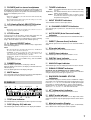
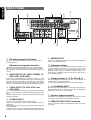
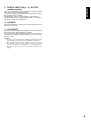
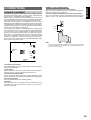
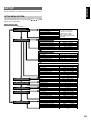
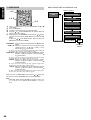
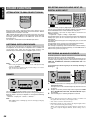
MENU STRUCTURE of SURROUND setup
ENGLISH
7. SURROUND
M-CH
ST
4. 5.
7
BASS
2CH
8
F.DIRECT
MODE / Speaker
6.1CH
-IN
9
A/D
0
7.SURROUND
setup
OFF
SETUP/T.TONE
1. 3. 5.
MENU
SURROUND MODE
C(Center)LEV
OK
S-DIRECT
VOLUME
MUTE
2. 5.
NIGHT
1.
2.
3.
4.
5.
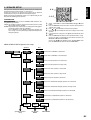
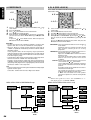
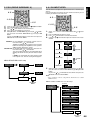
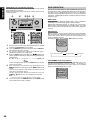
Select “7. SURROUND” in SETUP MAIN MENU with or
cursor button.
Press the OK button.
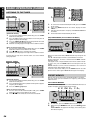
To select a desired item, press or cursor button.
Using the or cursor button to select the mode or adjust the
volume level of each speaker.
When you select “TO MAIN MENU” by pressing the or button,
you can return the SETUP MAIN MENU by pressing the OK
button .
Or press the or cursor button to select “EXIT” then press the
OK button to exit the SETUP MENU.
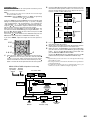
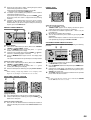
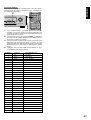
SURR-MODE : Select the desired surround mode with or cursor
button.
SURR. L/R : Adjust the volume level of the surround left/right
speaker between -10 dB and +10 dB in 1 level
interval with or cursor button.
• If “None” was selected for the Surround L/R speaker setting in
the Speaker size, then this setting will not appear.
SURR. BACK : Adjust the volume level of the surround back speaker
between -10 dB and +10 dB in 1 level interval with
or cursor button.
• If “None” was selected for the Surround back speakers setting
in the Speaker size, then this setting will not appear.
CENTER : Adjust the volume level of the center speaker
between -10 dB and +10 dB in 1 level interval with
or cursor button.
• If “None” was selected for the Center speaker setting in the
Speaker size, then this setting will not appear.
SUB W : Adjust the volume level of the subwoofer speaker
between -15 dB and +10 dB in 1 level interval with
or cursor button.
• If “None” was selected for the Subwoofer speaker setting in the
Speaker size, then this setting will not appear.
When you select “TO MAIN MENU” by pressing the or button, you
can return the SETUP MAIN MENU by pressing the OK button.
Note:
• SURR.L/R, SURR. BACK, CENTER and SUB W volume level
are synchronized with SETUP MAIN MENU 2-3 Speaker
Level.
26
SL(Surround Left)LEV
SR(Surround Right)LEV
SB(Surround back)LEV
S(Subwoofer)LEV
TO MAIN MENU
EXIT
exit SETUP
MENU