1
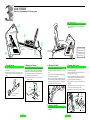
LET'S HAVE A RIDE
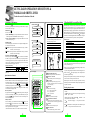
Try a ride so that you can familiarize yourself with the unit.
Attach Pulse Sensor
LOADING
LEVEL
MODE
Press Adv Button
Make sure Initial Display
appears
Press Adv Button
Begin Exercise
Press Md Button
Make sure In-Exercise
Display(A) and (B) appear
Operate Workload Shift
Lever/ Make sure Pedal
Resistance changes
LOADING
LEVEL
MODE
PULSE
PULSE
PLL
CADENCE
SPEED
TPL
TIME
DISTANCE
min
sec
WORK RATE
CALORIE
TARGET
PULSE
ON/OFF
SET
MODE
ADVANCE
AGE
TARGET
PULSE
ON/OFF
SET
MODE
LOADING
LEVEL
MODE
MODE
rpm
CADENCE
SPEED
min
sec
TIME
DISTANCE
WORK RATE
CALORIE
watt
TARGET
PULSE
ON/OFF
SET
MODE
CADENCE
SPEED
CADENC
SPEED
TIME
DISTANCE
mile
TIME
DISTANCE
TIME
DISTANC
WORK RATE
CALORIE
WORK RA
CALORI
WORK RATE
CALORIE
kcal
ADVANCE
TARGET
PULSE
ON/OFF
SET
MODE
ADVANCE
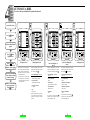
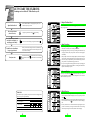
In-Exercise Display (A)
Screen
In-Exercise Display (B)
Screen
When power is off, no display appears on the screen. In this state, the
battery consumes minimal power.
When the unit is not in use, turn off
to "No-Display" state.
• If input signal is not entered into
the control unit in 10 minutes, the
unit is automatically turned off to
"No-Display" state.
In the "No-Display" state, this "Initial Display" appears with a press of
the Advance button
.
After the "Initial Display" state, this
"In-Exercise Display (A)" appears
with a press of the advance button
.
The In-Exercise Display (A) and (B)
are alternative. With a press of the
mode button
, they alternate.
• Preset Initial Display (from top)
• Exercise Display (A) Screen
• In-Exercise Display (B) Screen
Finish Exercise when Buzzer
beeps to signal the end.
Press Adv Button
• Target Exercise Time
15 minutes
• Age
40 years old
Before starting exercise, input your
age, target exercise time and target
pulse rate, in accordance with your
purpose.
8
PULSE
PULSE
mile/h
Initial Display Screen
• Target Pulse Rate
120 bpm (beats per minute)
MODE
CADENCE
SPEED
No-Display Screen
• Upper-Limit Pulse Rate
160 bpm (beats per minute)
LOADING
LEVEL
PULSE
PULSE
PULSE
PULSE
PULSE
PULSE
ADVANCE
LOADING
LEVEL
(from top)
(from top)
• Current Pulse Rate
(bpm)
• Current pulse Rate
(bpm)
• Pedal Cadence
(rpm-revolutions per minute)
• Simulated Current Speed
(mile/h or km/h)
• Countdown Timer
(minute:second)
• Simulated Trip Distance
(mile or km)
• Work Rate
(watt)
If you press the advance button av
when the screen is in this state, it turns
to the "No-Display" state.
• Calorie Consumption
(kcal)
If you press the Advance button av
when the screen is in this state, it turns
to the "No-Display" state.
9
TARGET
PULSE
ON/OFF
SET
MODE
ADVANCE
No-Display Screen