1
Section 3. Instrumentation Installation
3.3.6.2 MD485 Multidrop Interface at the Computer
1.
Connect the CABLE3CBL cable to one of the MD485’s RS-485 ports.
2.
Attach one end of the #10873 RS-232 cable to the MD485’s RS-232 port.
3.
Attach the other end of the #10873 RS-232 cable to the computer’s
RS-232 port.
4.
Attach the barrel plug of the #15966 wall charger to the MD485’s Pwr
port, then plug the wall charger into an AC outlet.
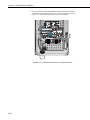
Connects to another MD485
via the CABLE3CBL-L three
conductor 22-AWG cable
Connects to a PC via
the #10873 cable
Connects to the
datalogger CS I/O port
via an SC12 cable
FIGURE 3.3-5. You can configure any two types of interface ports
(RS-485, RS-232, and CS I/O) to be used at a time.
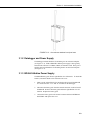
3.4 Sealing and Desiccating the Enclosure
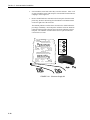
CSI enclosures include an Enclosure Supply Kit with the following items:
(4) Desiccant packs
(1) Humidity indicator card
(6) 4-inch cable ties
(6) 8-inch cable ties
(4) Cable tabs
(1) 4 oz. sealing putty
Items in the Enclosure Supply Kit are used to strain relief the sensor leads, and
to seal and desiccate the enclosure, as shown in Figure
3.4-1.
1.
Secure the sensor leads to the left side of the enclosure and to the
datalogger using cable ties and tabs.
3-15