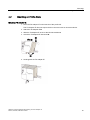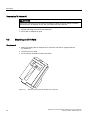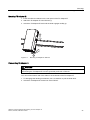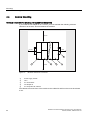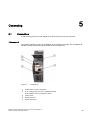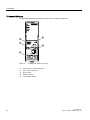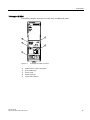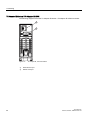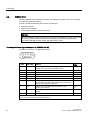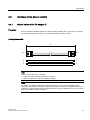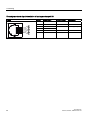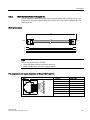
1
SIMATIC Industrial Software Engineering Tools TS Adapter IE 1 Introduction ______________ Properties of the TS Adapter IE 2 ______________ SIMATIC Industrial Software Engineering Tools TS Adapter IE Manual 3 Requirements for Operation ______________ 4 Mounting ______________ 5 Connecting ______________ 6 Commissioning ______________ Working with the TS Adapter IE 7 ______________ 8 Error diagnostics ______________ 9 Specifications ______________ 06/2008 A5E00977705-02 Safety Guidelines This manual contains notices you have to observe in order to ensure your personal safety, as well as to prevent damage to property. The notices referring to your personal safety are highlighted in the manual by a safety alert symbol, notices referring only to property damage have no safety alert symbol. These notices shown below are graded according to the degree of danger. DANGER indicates that death or severe personal injury will result if proper precautions are not taken. WARNING indicates that death or severe personal injury may result if proper precautions are not taken. CAUTION with a safety alert symbol, indicates that minor personal injury can result if proper precautions are not taken. CAUTION without a safety alert symbol, indicates that property damage can result if proper precautions are not taken. NOTICE indicates that an unintended result or situation can occur if the corresponding information is not taken into account. If more than one degree of danger is present, the warning notice representing the highest degree of danger will be used. A notice warning of injury to persons with a safety alert symbol may also include a warning relating to property damage. Qualified Personnel The device/system may only be set up and used in conjunction with this documentation. Commissioning and operation of a device/system may only be performed by qualified personnel. Within the context of the safety notes in this documentation qualified persons are defined as persons who are authorized to commission, ground and label devices, systems and circuits in accordance with established safety practices and standards. Prescribed Usage Note the following: WARNING This device may only be used for the applications described in the catalog or the technical description and only in connection with devices or components from other manufacturers which have been approved or recommended by Siemens. Correct, reliable operation of the product requires proper transport, storage, positioning and assembly as well as careful operation and maintenance. Trademarks All names identified by ® are registered trademarks of the Siemens AG. The remaining trademarks in this publication may be trademarks whose use by third parties for their own purposes could violate the rights of the owner. Disclaimer of Liability We have reviewed the contents of this publication to ensure consistency with the hardware and software described. Since variance cannot be precluded entirely, we cannot guarantee full consistency. However, the information in this publication is reviewed regularly and any necessary corrections are included in subsequent editions. Siemens AG Industry Sector Postfach 48 48 90327 NÜRNBERG GERMANY A5E00977705-02 Ⓟ 06/2008 Copyright © Siemens AG 2008. Technical data subject to change Safety Guidelines Table of contents 1 Introduction................................................................................................................................................ 7 1.1 2 3 4 5 6 Properties of the TS Adapter IE ................................................................................................................. 9 2.1 Variants of the TS Adapter IE ........................................................................................................9 2.2 Functions......................................................................................................................................10 2.3 Connection Types ........................................................................................................................12 2.4 Features .......................................................................................................................................13 2.5 Product Package and Spare Parts ..............................................................................................13 Requirements for Operation..................................................................................................................... 15 3.1 Software Requirements ...............................................................................................................15 3.2 Hardware Requirements ..............................................................................................................16 Mounting.................................................................................................................................................. 17 4.1 Montieren .....................................................................................................................................17 4.2 Mounting on Profile Rails .............................................................................................................19 4.3 Mounting on DIN Rails .................................................................................................................20 4.4 Cubicle Mounting .........................................................................................................................22 Connecting .............................................................................................................................................. 23 5.1 Connections .................................................................................................................................23 5.2 LEDs on the TS Adapter IE..........................................................................................................27 5.3 Power Supply ...............................................................................................................................29 5.4 Ethernet Port ................................................................................................................................31 5.5 RS232 Port...................................................................................................................................34 5.6 5.6.1 5.6.2 Interfaces to the phone network...................................................................................................35 Modem Variant of the TS Adapter IE...........................................................................................35 ISDN Variant of the TS Adapter IE ..............................................................................................37 Commissioning ........................................................................................................................................ 39 6.1 7 Preface...........................................................................................................................................7 Overview ......................................................................................................................................39 Working with the TS Adapter IE............................................................................................................... 41 7.1 Safety Instructions .......................................................................................................................41 7.2 Software Installation.....................................................................................................................41 7.3 Firmware Update .........................................................................................................................42 7.4 Setting the PG/PC Interface.........................................................................................................43 TS Adapter IE Manual, 06/2008, A5E00977705-02 3 Table of contents 8 4 7.5 Connecting the TS Adapter IE .................................................................................................... 44 7.6 7.6.1 7.6.2 Setting IP Parameters of TS Adapter IE for the First Time......................................................... 46 Setting IP Parameters by Direct Connection with TeleService................................................... 46 Setting IP Parameters by Direct Connection with the SIMATIC Manager.................................. 48 7.7 7.7.1 7.7.2 Establishing a Remote Connection to the TS Adapter IE ........................................................... 49 Establishing a Remote Connection to the TS Adapter IE via TeleService ................................. 51 Establishing a Remote Connection to the TS Adapter IE via a Dial-up Connection................... 52 7.8 TS Adapter IE Configuration - Overview..................................................................................... 54 7.9 7.9.1 7.9.2 7.9.3 7.9.4 Opening the Configuration Interface ........................................................................................... 56 Opening the Configuration Interface by Direct Connection with TeleService............................. 56 Opening the Configuration Interface by Direct Connection in a Browser ................................... 57 Opening the Configuration Interface via a Remote Connection with TeleService...................... 58 Opening the Configuration Interface in a Browser via a Remote Connection ............................ 59 7.10 Setting Remote Maintenance Parameters .................................................................................. 60 7.11 Setting the E-mail Parameters .................................................................................................... 61 7.12 Sending an E-mail from a SIMATIC CPU ................................................................................... 62 7.13 Setting Parameters for Use as Default Router............................................................................ 63 7.14 Windows Settings for Use as Default Router.............................................................................. 64 7.15 Resetting the Configuration with the Configuration Interface ..................................................... 65 7.16 Resetting the Configuration with P RES button .......................................................................... 66 Error diagnostics...................................................................................................................................... 69 8.1 Error Diagnostics Based on LEDs .............................................................................................. 69 8.2 Logon to the configuration interface fails .................................................................................... 70 8.3 Logon to the configuration interface is denied ............................................................................ 71 8.4 8.4.1 8.4.2 8.4.3 8.4.4 Malfunctions in remote maintenance .......................................................................................... 72 The partner is not answering....................................................................................................... 72 Logon to the TS Adapter IE fails ................................................................................................. 73 The callback fails......................................................................................................................... 74 Access to the automation component fails ................................................................................. 75 8.5 8.5.1 8.5.2 8.5.3 Malfunctions when establishing an outgoing call........................................................................ 76 Check connection establishment ................................................................................................ 76 The modem connection is not made........................................................................................... 76 The connection establishment fails............................................................................................. 77 8.6 Not possible to send e-mail......................................................................................................... 78 8.7 Internet access via the TS Adapter IE is not possible ................................................................ 79 8.8 8.8.1 8.8.2 Error diagnostics - Ethernet ........................................................................................................ 80 You do not know the IP address of the TS Adapter IE. .............................................................. 80 The TS Adapter IE is not accessible via Ethernet .................................................................... 880 TS Adapter IE Manual, 06/2008, A5E00977705-02 Table of contents 9 Specifications .......................................................................................................................................... 81 9.1 General Specifications .................................................................................................................81 9.2 Specifications of the analog modem............................................................................................83 9.3 Specifications of the ISDN Terminal Adapter ..............................................................................84 9.4 Electromagnetic Compatibility......................................................................................................85 9.5 Transportation and Storage Conditions .......................................................................................87 9.6 Mechanical and Climatic Ambient Conditions for Operation of the TS Adapter IE......................88 9.7 Specification of Insulation Testing, Protection Class and Degree of Protection / Test Voltage .........................................................................................................................................90 9.8 Standards, Approvals, Certificates, Guidelines, Labels and Declarations ..................................91 9.9 Customer Information for ACTA...................................................................................................96 9.10 Technical Support ........................................................................................................................97 Index........................................................................................................................................................ 99 Tables Table 9-1 Pulsed interference ......................................................................................................................86 Table 9-2 Sinusoidal interference ................................................................................................................86 Table 9-3 Transportation and storage conditions for modules.....................................................................87 Table 9-4 Mechanical ambient conditions....................................................................................................88 Table 9-5 Testing of mechanical environmental conditions .........................................................................89 Table 9-6 Climatic ambient conditions .........................................................................................................89 Figures Figure 2-1 Functions of the TS Adapter IE....................................................................................................11 Figure 2-2 Direct connection .........................................................................................................................12 Figure 2-3 Modem connection with the internal modem ...............................................................................12 Figure 2-4 Modem connection with an external modem ...............................................................................12 Figure 4-1 Rear panel of the TS Adapter IE..................................................................................................18 Figure 4-2 Slide for mounting the TS Adapter IE on a DIN rail .....................................................................20 Figure 4-3 Mounting TS Adapter on DIN rail .................................................................................................21 Figure 4-4 Minimum clearances in a cubicle .................................................................................................22 Figure 5-1 TS Adapter IE...............................................................................................................................23 Figure 5-2 TS Adapter IE-Modem, front view................................................................................................24 Figure 5-3 TS Adapter IE ISDN, front view ...................................................................................................25 Figure 5-4 TS Adapter IE, view from below...................................................................................................26 Figure 5-5 LEDs on the TS Adapter IE..........................................................................................................27 TS Adapter IE Manual, 06/2008, A5E00977705-02 5 Table of contents Figure 5-6 Power socket............................................................................................................................... 29 Figure 5-7 Direct connection to PG/PC ........................................................................................................ 33 Figure 5-8 Direct connection to a CPU......................................................................................................... 33 Figure 5-9 Direct connection in a networked system ................................................................................... 33 Figure 7-1 Example of a networked system ................................................................................................. 50 Figure 7-2 Front view with P RES button ..................................................................................................... 66 6 TS Adapter IE Manual, 06/2008, A5E00977705-02 1 Introduction 1.1 Preface Purpose of this manual This manual provides a comprehensive overview of the TS Adapter IE. It offers support for the installation and commissioning of the software and hardware. It explains the requirements for operation and the hardware installation, and how to connect the adapter to Ethernet. The intended readership of the manual includes programmers and engineering personnel involved in configuration, commissioning and servicing of automation systems. Basic knowledge required General knowledge of automation systems engineering is prerequisite for understanding the topics dealt with in this manual. Users should also be familiar with the operation of computers or auxiliary programming equipment similar to PCs, operating under the Windows 2000 or XP operating systems via Ethernet communication and modems. Supplementary documentation You can find information on PROFINET and Ethernet in the following documentation: Documentation Contents PROFINET system description Basic knowledge of PROFINET: Network component, data exchange and communications, PROFINET IO, Component Based Automation, application example PROFINET IO and Component Based Automation System manual SIMATIC NET: Twisted-pair and fiberoptic networks Manual Communication with SIMATIC Manual TS Adapter IE Manual, 06/2008, A5E00977705-02 Description of Industrial Ethernet networks, network configuration, components, installation regulations for networked automation systems in buildings, etc. Basics, services, networks, communication functions, connecting PGs/OPs, project design and configuration in STEP 7 7 Introduction 1.1 Preface Range of validity of this manual This manual applies to the following variants of the TS Adapter IE: Variant Order number As of version Firmware Hardware TS Adapter IE Modem 6ES7 972-0EM00-0XA0 V 1.0.1 2 TS Adapter IE ISDN 6ES7 972-0ED00-0XA0 V 1.0.1 1 This manual details the device applicable at date of publication. Network approval for Europe The TS Adapter II Modem is compliant with the European Standard TBR 21. The TS Adapter IE ISDN is compliant with the telecommunications registration TBR 3. Network approval for the USA The TS Adapter IE Modem complies with ACTA. Network approval for Canada The Industry Canada (ic) Label identifies certified TS Adapter IE Modem. Recycling and disposal The TS Adapter IE features low-pollution components which make it suitable for recycling. In order to ensure environmentally friendly recycling and disposal of your used device, engage a certified electronic scrap disposal specialist. 8 TS Adapter IE Manual, 06/2008, A5E00977705-02 Properties of the TS Adapter IE 2.1 2 Variants of the TS Adapter IE Variants of the TS Adapter IE There are two variants of the TS Adapter IE: ● TS Adapter IE Modem – with an internal modem – with a connection for an external modem or ISDN-TA ● TS Adapter IE ISDN – with internal ISDN-TA – with a connection for an external modem or ISDN-TA TS Adapter IE Manual, 06/2008, A5E00977705-02 9 Properties of the TS Adapter IE 2.2 Functions 2.2 Functions Functions of the TS Adapter IE The TS Adapter IE has the following functions: ● Remote maintenance over the phone network With the TS Adapter IE, you can use an application running on the PG/PC, such as STEP 7, to access Industrial Ethernet connected S7 and C7 automation components over the phone network. For this the TS Adapter IE requires – a connection to the automation components via Industrial Ethernet, – a modem connection to the PG/PC ● Sending e-mail With the AS_MAIL function block you can send e-mail from a SIMATIC CPU via the TS Adapter IE. To do this, the TS Adapter IE establishes an outgoing modem connection to a dial-up server, such as at an Internet Service Provider (ISP), and sends the e-mail via a mail server accessible there. ● Standard routing With the TS Adapter IE you can set up a modem connection to an ISP to access data on the Internet using a browser. The TeleService application V6.1 or higher, or Windows dial-up, is required for remote connections over the phone network. Note It is not possible to operate remote maintenance, e-mail and standard routing simultaneously. With the TS Adapter IE, you can either answer an incoming remote maintenance call or initiate an outgoing call for sending e-mail and standard routing. 10 TS Adapter IE Manual, 06/2008, A5E00977705-02 Properties of the TS Adapter IE 2.2 Functions The following diagram illustrates the various functions of the TS Adapter IE. 3*3& 3*3& (0DLO6HUYHU 7HOH6HUYLFH RU GLDOXS (0DLO6HUYHU :HEVHUYHU ,QWHUQHW ,630RGHP 6HQGLQJHPDLO :LGH$UHD1HWZRUN 6WDQGDUG5RXWHU 5HPRWHPDLQWHQDQFH 76$,( ,QGXVWULDO(WKHUQHW :HE%URZVHU $XWRPDWLRQ FRPSRQHQW 3*3& Figure 2-1 Functions of the TS Adapter IE TS Adapter IE Manual, 06/2008, A5E00977705-02 11 Properties of the TS Adapter IE 2.3 Connection Types 2.3 Connection Types Connection types of the TS Adapter IE The following diagrams show the connection types possible with the TS Adapter IE. 76$GDSWHU,( (WKHUQHW 3*3& Figure 2-2 Direct connection 76$GDSWHU,( 0RGHP (WKHUQHW :$1 3*3& Figure 2-3 $XWRPDWLRQV\VWHP Modem connection with the internal modem 76$GDSWHU,( 0RGHP 3*3& Figure 2-4 12 :$1 0RGHP 56 (WKHUQHW $XWRPDWLRQV\VWHP Modem connection with an external modem TS Adapter IE Manual, 06/2008, A5E00977705-02 Properties of the TS Adapter IE 2.4 Features 2.4 Features Features of the TS Adapter IE ● Connection to PG/PC and automation system via Industrial Ethernet ● Support for routing ● Support for the "AS_MAIL" function block ● Integrated DIN rail fastener 2.5 Product Package and Spare Parts Product package TS Adapter IE Modem Order number 6ES7 972-0EM00-0XA0 TS Adapter IE ISDN Order number 6ES7 972-0ED00-0XA0 • TS Adapter IE Modem • TS Adapter IE ISDN • "SIMATIC TeleService Edition" CD with software and documentation • "SIMATIC TeleService Edition" CD with software and documentation • 24V power plug • 24V power plug • Slide for DIN rail mounting • Slide for DIN rail mounting • Analog phone cable with 2 RJ11 connectors Length 3 meters • ISDN phone cable with 2 RJ45 connectors Length 3 meters • Hinged ferrite • Hinged ferrite • TAE connector (Europe) Spare parts Designation Order number Analog phone cable A5E00243688 ISDN phone cable A5E00243651 TAE connector A5E00243701 24V power plug A5E00073529 Slide for DIN rail mounting A5E00213070 Please order the spare parts from your local Siemens representative. TS Adapter IE Manual, 06/2008, A5E00977705-02 13 Properties of the TS Adapter IE 2.5 Product Package and Spare Parts 14 TS Adapter IE Manual, 06/2008, A5E00977705-02 Requirements for Operation 3.1 3 Software Requirements Overview For working with the TS Adapter IE, you need a PC with an MS Windows operating system and the software (device driver) for the TS Adapter IE. The list of the supported operating systems is included in the latest Readme file on the TS Adapter IE software. For first-time configuration of IP addresses over a direct connection you will alternatively need: ● SIMATIC TeleService V6.1 or higher ● SIMATIC Manager of STEP 7 For further configuration you will alternatively need: ● SIMATIC TeleService V6.1 or higher ● A browser To establish a remote connection you will alternatively need: ● SIMATIC TeleService V6.1 or higher ● Windows dial-up You will additionally need: ● The TS Adapter IE software V1.0 or higher. This software is installed from the "TeleService Edition" CD. SIMATIC Industrial Software Engineering Tools TS Adapter IE Manual, 06/2008, A5E00977705-02 15 Requirements for Operation 3.2 Hardware Requirements 3.2 Hardware Requirements Overview: ● To work with the TS Adapter IE you will need a programming device (PG) or a PC with a CD-ROM drive and Ethernet port. ● In order to fulfill the installation requirements for UL, you must use a UL-listed NTBA on the TS Adapter IE ISDN. NTBA = Network Terminal Basic Adapter ● In order to fulfill the UL requirements, the following phone cable is required on the TS Adapter II modem: Phone cable of UL category DUXR, consisting of a line plus connector, with a crosssection of AWG 26. The supplied cable fulfills this requirement. 16 SIMATIC Industrial Software Engineering Tools TS Adapter IE Manual, 06/2008, A5E00977705-02 4 Mounting 4.1 Mounting Mounting methods There are two alternative methods for mounting the TS Adapter IE: ● On the profile rail of the S7-300 ● On a DIN rail Always make sure to install the TS Adapter IE at the start or end, because it does not loop through the S7-300 bus. WARNING The profile rail or DIN rail on which the TS Adapter IE is mounted has to be grounded. SIMATIC Industrial Software Engineering Tools TS Adapter IE Manual, 06/2008, A5E00977705-02 17 Mounting 4.1 Mounting Rear panel of the TS Adapter IE: Figure 4-1 Rear panel of the TS Adapter IE See also Mounting on Profile Rails (Page 19) Mounting on DIN Rails (Page 20) 18 SIMATIC Industrial Software Engineering Tools TS Adapter IE Manual, 06/2008, A5E00977705-02 Mounting 4.2 Mounting on Profile Rails 4.2 Mounting on Profile Rails Mounting TS Adapter IE 1. Place the TS Adapter IE on the last slot of the profile rail. The TS Adapter IE does not require the bus connector used on S7-300 modules. 2. Attach the TS Adapter IE ❶. 3. Slide the TS Adapter IE as far as the left side module ❷. 4. Swivel the TS Adapter IE downward ❸. 76$ GDSWH U,( 5. Hand-tighten the TS Adapter IE. 76$GD SWHU,( SIMATIC Industrial Software Engineering Tools TS Adapter IE Manual, 06/2008, A5E00977705-02 19 Mounting 4.3 Mounting on DIN Rails Dismounting TS Adapter IE WARNING Unplug the connectors from the analog and Ethernet cables of the TS Adapter IE before dismounting the TS Adapter IE from the grounded profile rail or DIN rail. 1. Slacken the fixing screw of the TS Adapter IE. 2. Swivel the TS Adapter IE up ❸. 4.3 Mounting on DIN Rails Requirement ● Slide for mounting the TS Adapter IE on a DIN rail. The slide is supplied with the TS Adapter IE. ● The DIN rail is mounted. ● Tools required: Screwdriver with 3 mm blade Figure 4-2 20 Slide for mounting the TS Adapter IE on a DIN rail SIMATIC Industrial Software Engineering Tools TS Adapter IE Manual, 06/2008, A5E00977705-02 Mounting 4.3 Mounting on DIN Rails Mounting TS Adapter IE 1. Insert the slide from below into the rear panel of the TS Adapter IE. 2. Attach the TS Adapter IE in the DIN rail ①. 3. Swivel the TS Adapter IE back until the slide engages audibly ②. Figure 4-3 Mounting TS Adapter on DIN rail Dismounting TS Adapter IE WARNING Unplug the connectors from the analog and Ethernet cables of the TS Adapter IE before dismounting the TS Adapter IE from the grounded profile rail or DIN rail. You can see the bottom end of the slide on the underside of the TS Adapter IE. 1. To disengage the latching mechanism, use a screwdriver to pull the slide down. 2. Swivel the TS Adapter IE forward out of the DIN rail. SIMATIC Industrial Software Engineering Tools TS Adapter IE Manual, 06/2008, A5E00977705-02 21 Mounting 4.4 Cubicle Mounting 4.4 Cubicle Mounting Minimum clearances for mounting, wiring and heat dissipation If you install the TS Adapter IE in a cubicle, you must maintain the following minimum clearances to the side, above and below the modules: PP PP PP Figure 4-4 PP Minimum clearances in a cubicle ① Power supply module ② CPU ③ S7 300 modules ④ TS Adapter IE ⑤ S7-300 profile rail / DIN rail The clearance from the front of the module to the cubicle lid and front door must be at least 2 mm. 22 SIMATIC Industrial Software Engineering Tools TS Adapter IE Manual, 06/2008, A5E00977705-02 5 Connecting 5.1 Connections In the following pictures the TS Adapter IE is shown with its front panel removed. TS Adapter IE The following diagram shows the TS Adapter IE from below at an angle. The TS Adapter IE Modem is shown representing both variants of the TS Adapter IE. Figure 5-1 TS Adapter IE ① P RES button to reset configuration ② RJ11 analog modem port on TS Adapter IE Modem RJ45 ISDN-S0 port on TS Adapter IE ISDN ③ Power socket ④ RS232 serial port ⑤ RJ45 Ethernet port SIMATIC Industrial Software Engineering Tools TS Adapter IE Manual, 06/2008, A5E00977705-02 23 Connecting 5.1 Connections TS Adapter IE Modem The following diagram shows the front view of the TS Adapter IE Modem. Figure 5-2 24 TS Adapter IE-Modem, front view ① P RES button to reset configuration ② RJ11 analog modem port ③ Power socket ④ RS232 serial port ⑤ Custom MAC address TS Adapter IE Manual, 06/2008, A5E00977705-02 Connecting 5.1 Connections TS Adapter IE ISDN The following diagram shows the front view of the TS Adapter IE ISDN. Figure 5-3 ① TS Adapter IE ISDN, front view P RES button to reset configuration ② RJ45 ISDN S0 port ③ Power socket ④ RS232 serial port ⑤ Custom MAC address TS Adapter IE Manual, 06/2008, A5E00977705-02 37 Connecting 5.1 Connections TS Adapter IE Modem / TS Adapter IE ISDN The following diagram shows the TS Adapter IE Modem / TS Adapter IE ISDN from below. Figure 5-4 26 TS Adapter IE, view from below ① RJ45 Ethernet port ② RS232 serial port TS Adapter IE Manual, 06/2008, A5E00977705-02 Connecting 5.2 LEDs on the TS Adapter IE 5.2 LEDs on the TS Adapter IE Overview The following diagram shows the LEDs on the front panel of the TS Adapter IE. The yellow RX/TX LED and the green LINK LED are located behind the front panel. The TS Adapter IE ISDN with its front panel removed is shown representing both variants of the TS Adapter IE. Figure 5-5 TS Adapter IE Manual, 06/2008, A5E00977705-02 LEDs on the TS Adapter IE 37 Connecting 5.2 LEDs on the TS Adapter IE Meanings of the LEDs Designation Color Meaning SF Red Group error: Lights up when the TS Adapter IE detects an error situation on the modem port or Ethernet interface. This LED also indicates firmware download operations. BUSF Red Bus error: Lights up when the TS Adapter IE detects a static error in the Industrial Ethernet. Off when the TS Adapter IE is communicating without error over Industrial Ethernet. DC3V Green Lights up when the TS Adapter IE is supplied with the necessary power. RX/TX Green Indicates data traffic between the TS Adapter IE and the internal modem. The LED flickers when data are being transferred. DCD Yellow Lights up when a remote connection is established to the TS Adapter IE via the internal modem. Off when the remote connection is down. Flashes three times when the default configuration has been applied after pressing the P RES button. RX/TX Yellow Indicates data traffic at the Ethernet port of the TS Adapter IE. The LED flickers when data are being transferred. The LED is located behind the front panel. LINK Green Lights up when the connection at the Ethernet port is active. Off when the connection at the Ethernet port is cut. The LED is located behind the front panel. The indication of possible error states is described in the "Error Diagnostics" chapter. Startup characteristics All LEDs are switched on when the power is restored. After a few seconds, the LEDs are set according to the current operating state. See also Error Diagnostics Based on LEDs (Page 69) The partner is not answering (Page 72) 28 TS Adapter IE Manual, 06/2008, A5E00977705-02 Connecting 5.3 Power Supply 5.3 Power Supply Power supply The 24 V DC power is supplied to the TS Adapter IE via the power socket. DANGER Only safely isolated 24 V DC low voltage may be used for the power supply. Safe isolation can be achieved according to one of the following standards: • VDE 0100-410 / HD 384-4-41 S2 / IEC 60364-4-41 (as functional extra-low voltage - FELV - with safe isolation) • VDE 0805 / EN 60950 / IEC 60950 (as safety extra-low voltage - SELV or VDE 0106 part 101.) The wire cross-sections must meet the minimum requirements of the relevant installation standard. The following diagram shows the power socket on the front panel of the TS Adapter IE. The TS Adapter IE ISDN is shown representing both variants of the TS Adapter IE. Figure 5-6 Power socket ① 0 V (GND) ② 24 V DC power socket ③ +24 V DC TS Adapter IE Manual, 06/2008, A5E00977705-02 37 Connecting 5.3 Power Supply Use the supplied 24V power plug to connect to the power supply. Connectable wires on the 24 V power plug Solid wires No Flexible wires (termination zone) • Without ferrule 0.25 mm2 to 2.5 mm2 • With ferrule 0.25 mm2 to 1.5 mm2 Number of wires per terminal 1 wire or 2 wires up to 1.5 mm2 in total in a common ferrule Diameter of wire insulation Max. 3.8 mm Stripped length 11 mm Ferrules to DIN 46228 • Without insulating collar Shape A, 10 mm to 12 mm long • With insulating collar Shape E, to 12 mm long See also General Specifications (Page 81) 30 TS Adapter IE Manual, 06/2008, A5E00977705-02 Connecting 5.4 Ethernet Port 5.4 Ethernet Port The TS Adapter IE has an Ethernet port with an 8-pin RJ45 socket. To that socket you connect an Industrial Ethernet cable. The cable is not supplied with the TS Adapter IE. You can use a standard Ethernet cable or a crossover cable with crossed wires. The TS Adapter IE supports automatic switching between the two cable variants. The cable must be fitted with 8-pin RJ45 connectors conforming to ISO/IEC 8877:1992. This connector type is recommended in accordance with IEEE 802.3 for 10BASE-T and 100BASE-TX. For detailed information on the RJ45 connector refer to ● the "SIMATIC NET Twisted Pair and Fiber Optic Networks" manual, order number 6GK1970-1BA10-0AA0, ● the Internet at http://www.siemens.com/automation/service&support. NOTICE If you confuse the Ethernet connector with the ISDN connector, the TS Adapter IE will malfunction. Make sure the Ethernet cable is connected only to the Ethernet port. NOTICE The specifications relating to interference immunity and interference emission apply only when using lines and connectors conforming to industrial requirements in accordance with EN 61000-6-4:2001 and EN 61000-6-2:2001. Note Place a short strain relief device for the Ethernet cable underneath the TS Adapter IE, securing it by a cable tie to an S7 300 shield mounting element for example. TS Adapter IE Manual, 06/2008, A5E00977705-02 37 Connecting 5.4 Ethernet Port Pin assignment and signal description of Ethernet port X1 Figure Pin number Signal name 1 TX+ 2 TX– 3 RX+ 4 – 5 – 6 RX– 7 – 8 – 32 TS Adapter IE Manual, 06/2008, A5E00977705-02 Connecting 5.4 Ethernet Port TS Adapter IE by direct connection in a standalone system For first-time configuration via an Ethernet connection, connect the TS Adapter IE over Ethernet directly to your PG/PC: 3*3& Figure 5-7 76$GDSWHU,( Direct connection to PG/PC For remote maintenance and sending e-mail, connect the TS Adapter IE over Ethernet directly to an automation component: 76$GDSWHU,( &38 Figure 5-8 Direct connection to a CPU TS Adapter IE by direct connection in a networked system In a networked system, connect the TS Adapter IE over Ethernet to a switch to which a PG/PC and automation components are connected for example: &38 6ZLWFK &38 3*3& 76$GDSWHU,( Figure 5-9 TS Adapter IE Manual, 06/2008, A5E00977705-02 Direct connection in a networked system 37 Connecting 5.5 RS232 Port 5.5 RS232 Port The TS Adapter IE has a COM port configured as a RS232C interface, which is used solely for connecting external modems. You can operate the following devices from the COM port: ● Standard modems ● ISDN terminal adapters ● GSM wireless modems with an RS232 port NOTICE The specifications relating to interference immunity and interference emission apply only when using devices, lines and connectors conforming to industrial requirements in accordance with EN 61000-6-4:2001 and EN 61000-6-2:2001. Pin assignment and signal description of RS232C port X2 The RS232 connector is configured as follows: Pin no. Short name Meaning Input/ Output 1 DCD Received signal level - the DCE signals to the DTE the reception of a carrier and the connection setup. Input 2 RXD Received data - from DCE1 to DTE2 Input 3 TXD Transmitted data - from DTE to DCE Output 4 DTR Ready to send - the DTE signals this to the DCE. Output 5 GND Internal reference ground 6 DSR Ready to operate - the DCE signals this to the DTE. Input 7 RTS Switch on transmission unit - the DTE requests the DCE to transmit data on the data cable. The DTE waits for the CTS (ready-to-send) signal from the DCE. Output 8 CTS Ready to send - the DCE is able to transfer the data incoming from the DTE. Input 9 RI Incoming call - the DCE signals reception of a call signal to the DTE. Input On connector housing - Shield 34 1 DCE = Data Communication Equipment (modem or ISDN-TA) 2 DTE = Data Terminal Equipment (TS Adapter IE) TS Adapter IE Manual, 06/2008, A5E00977705-02 Connecting 5.6 Interfaces to the phone network 5.6 Interfaces to the phone network 5.6.1 Modem Variant of the TS Adapter IE Properties The TS Adapter IE Modem features an internal analog modem with a 6-pin RJ11 port. Using the supplied analog phone cable, you connect this port to a phone socket. Analog phone cable P 5- 5- Note How to connect the RJ11 connector: • Grasp the cable just below the RJ11 connector. • Make sure the RJ11 connector engages audibly. Note To use the TS Adapter IE Modem outside Germany, you can fit a country-specific TAE connector onto the RJ11 connector of the phone cable. For Germany a TAE6N connector is supplied. In some countries phone sockets with RJ11 ports are available, so you can use the phone cable without a TAE connector. TS Adapter IE Manual, 06/2008, A5E00977705-02 37 Connecting 5.6 Interfaces to the phone network Pin assignment and signal description of analog modem port X3 Figure Pin no. Signal name 1 – 2 b1 3 b1 4 a1 5 a1 6 – 36 Signal direction Comments Bidirectional Incoming core pair TS Adapter IE Manual, 06/2008, A5E00977705-02 Connecting 5.6 Interfaces to the phone network 5.6.2 ISDN Variant of the TS Adapter IE The TS Adapter IE ISDN features an internal terminal adapter with an S0 port on an 8-pin RJ45 socket. Using the supplied ISDN phone cable, you connect the TS Adapter IE to an ISDN S0 socket. ISDN phone cable P 5- 5- Note How to connect the RJ45 connector: • Grasp the cable just below the RJ45 connector. • Make sure the RJ45 connector engages audibly. Pin assignment and signal description of S0 port/ISDN port X4 Figure Pin number Signal name 1 – 2 – 3 TX+ 4 RX+ 5 RX– 6 TX– 7 – 8 – TS Adapter IE Manual, 06/2008, A5E00977705-02 37 Connecting 5.6 Interfaces to the phone network 38 TS Adapter IE Manual, 06/2008, A5E00977705-02 6 Commissioning 6.1 Overview Commissioning options In the factory state and after a parameter reset, the IP parameters of the TS Adapter IE are set so that remote maintenance and e-mail are not possible. The following table shows an overview of the various options for commissioning the TS Adapter IE into operation: Step Commissioning ... ... by direct connection via an Ethernet connection 1 2 ... via a remote connection with TeleService Set IP parameters by direct connection: • With TeleService • With the SIMATIC Manager Establish remote connection: Open configuration interface by direct connection: • With TeleService • With a browser Open configuration interface via a remote connection: • With TeleService • With TeleService ... via a remote connection without TeleService Establish remote connection: • By dial-up Open configuration interface via a remote connection: • With a browser 3 Configuration for remote maintenance or e-mailing 4 Carry out remote maintenance or send e-mail For details on the individual commissioning tasks, refer to the subsections of the same names in the "Working with the TS Adapter IE" chapter. SIMATIC Industrial Software Engineering Tools TS Adapter IE Manual, 06/2008, A5E00977705-02 39 Commissioning 6.1 Overview 40 TS Adapter IE Manual, 06/2008, A5E00977705-02 Working with the TS Adapter IE 7.1 7 Safety Instructions Qualified personnel The device may only be serviced by qualified personnel. Qualified personnel under the terms of the safety instructions contained in this manual is defined as persons who are authorized to commission, ground and label devices, systems and circuits in accordance with established safety practices and standards. WARNING Regulation use: The device may only be used for the applications described in the catalog and the technical description, and only in connection with third-party devices and components approved or recommended by Siemens. This product can only function correctly and safely if it is transported, stored, set up, and installed correctly, and operated and maintained with due care and attention. 7.2 Software Installation Procedure 1. Insert the supplied "SIMATIC TeleService Edition" CD into the CD-ROM drive of your PC. 2. The setup runs automatically. Follow the on-screen instructions provided by the setup program. If the autostart function is disabled for your CD-R drive, run the setup program by doubleclicking Setup.exe in the root folder of your "SIMATIC TeleService Edition" CD. TS Adapter IE Manual, 06/2008, A5E00977705-02 41 Working with the TS Adapter IE 7.3 Firmware Update 7.3 Firmware Update You can update the TS Adapter IE firmware as required, after you have added new functions for example. You will find the latest firmware in the Internet at: http://www.siemens.com/automation/service&support To update the firmware: 1. Search for "TS Adapter IE" under Product Support. 2. Enter "Firmware" in the the search box. 3. Download the file containing the available firmware to your PC. 4. Connect the TS Adapter IE via an Ethernet cable directly to your programming device or PC. 5. Open the configuration interface for the TS Adapter IE in your PC's web browser. 6. Log on with your user name and password. 7. Open the page titled "Actions > Firmware". 8. Click "Select...". 9. Select the firmware file you want to download and click "Firmware > Update". When the download is complete, the firmware is written to the nonvolatile memory. During this process, all the LEDs on the front of the TS Adapter IE are lit. Then the TS Adapter IE performs a restart. This breaks the connection to your browser. To access the TS Adapter IE again, you must reconnect to the configuration interface of the TS Adapter IE by pressing the F5 key, for example, or by clicking your browser's "Refresh" button. Note You can also perform the firmware update over a remote connection. Note The firmware current at time of shipping is included on your "SIMATIC TeleService Edition" CD in the "TS Adapter IE\Firmware" catalog. 42 TS Adapter IE Manual, 06/2008, A5E00977705-02 Working with the TS Adapter IE 7.4 Setting the PG/PC Interface 7.4 Setting the PG/PC Interface Procedure During installation of the software you are prompted to set the PG/PC interface. 1. Open the "Set PG/PC interface" dialog box to verify it. – If "TS Adapter IE" interface is included in the selection list, go to step 5. – If "TS Adapter IE" interface is missing from the list, continue with step 2. 2. To add or remove interfaces, click "Select...". The "Install/Remove Interface" dialog box opens. 3. Select the "TS Adapter IE" module from the selection list and install the adapter. 4. Click "Close" to close the dialog box. 5. In the "Set PG/PC interface" dialog box select the TS Adapter IE. 6. Click "Properties...". The "Properties - TS Adapter IE" dialog box opens. 7. Open the "Local Modem" tab. Under "Modem:" choose the modem with which you want to connect to the TS Adapter IE. For ISDN, select the B-channel protocol X.75, e.g. AVM ISDN SoftCompression X.75-V.42bis. 8. Under "Location > Name:" choose the location of your PG/PC. Click "Edit" if needed to open up the "Phone and Modem Options" dialog box to set up a new location. For more information on the location, refer to the help for the "Edit location" dialog box. 9. Click "OK" to exit the "Properties - TS Adapter IE" dialog box. If you have changed an access path in these settings, a warning message then appears. To apply the changes, click "OK". TS Adapter IE Manual, 06/2008, A5E00977705-02 43 Working with the TS Adapter IE 7.5 Connecting the TS Adapter IE 7.5 Connecting the TS Adapter IE Connecting to the PC Direct connection of the TS Adapter IE to the PC is only required for configuring the TS Adapter IE. 1. Plug the Ethernet cable into the Ethernet port on the TS Adapter IE. 2. Plug the other end of the Ethernet cable into the Ethernet port X1 on your PC or to a switch. NOTICE If you confuse the Ethernet connector with the ISDN connector, the TS Adapter IE will malfunction. Make sure the Ethernet cable is connected only to the Ethernet port. Connecting to the automation system 1. Plug the Ethernet cable into the Ethernet port on the TS Adapter IE. 2. Plug the other end of the Ethernet cable into the Ethernet port on your CPU or to a switch. Connecting to 24 V DC Wire the supplied 24V power plug and plug it into the TS Adapter IE. Note Make sure the 24V supply cable is protected suitably for its cross-section. 44 TS Adapter IE Manual, 06/2008, A5E00977705-02 Working with the TS Adapter IE 7.5 Connecting the TS Adapter IE Connecting to the analog phone socket WARNING Injury to persons or damage to property may occur. Connecting the TS Adapter IE ISDN to an analog phone socket can lead to life-threatening situations and the adapter may be destroyed. Do not connect the TS Adapter IE ISDN to an analog phone socket. 1. Plug the supplied analog phone cable into the TS Adapter IE Modem. 2. Fold the supplied ferrite over the phone line close to the TS Adapter IE Modem. 3. Plug the other end of the phone cable into your phone socket. Use the TAE adapter if necessary. Note You can operate the TS Adapter IE Modem on internal and public analog telecommunications networks, TNV-3 systems. Note The insulation voltage between the phone side and the remaining electronics is rated for 250 V AC. Connecting to the ISDN phone socket 1. Plug the supplied ISDN phone cable into the TS Adapter IE ISDN. 2. Fold the supplied ferrite over the phone line close to the TS Adapter IE ISDN. 3. Plug the other end of the ISDN phone cable into the ISDN port on your NTBA or your ISDN socket. Connecting to the external modem Connect your modem by a modem cable to RS232 connector X2. TS Adapter IE Manual, 06/2008, A5E00977705-02 45 Working with the TS Adapter IE 7.6 Setting IP Parameters of TS Adapter IE for the First Time 7.6 Setting IP Parameters of TS Adapter IE for the First Time In the factory state and after a parameter reset, the Ethernet port of the TS Adapter IE has the IP address 0.0.0.0. To be able to work with the TS Adapter IE, you must first set its IP parameters. The IP parameters are set: ● by direct connection with TeleService ● by direct connection with the SIMATIC Manager ● via a remote connection with TeleService ● via a remote connection with a browser If you are unable to establish an Ethernet connection or a remote connection, refer to the "Error Diagnostics" chapter. See also Setting IP Parameters by Direct Connection with TeleService (Page 46) Setting IP Parameters by Direct Connection with the SIMATIC Manager (Page 48) Opening the Configuration Interface via a Remote Connection with TeleService (Page 58) Opening the Configuration Interface in a Browser via a Remote Connection (Page 59) 7.6.1 Setting IP Parameters by Direct Connection with TeleService Requirement ● You have a free Ethernet port on your PG/PC. Procedure 1. Install TeleService from the "SIMATIC TeleService Edition"CD. Follow the installation instructions given in the TeleService manual. 2. Install the TS Adapter IE software from the "SIMATIC TeleService Edition" CD. 3. Connect the Ethernet port of your PG/PC to the Ethernet port of the TS Adapter IE. 4. Connect the TS Adapter IE to your power supply. 5. Select the TeleService menu command "Options > Customize...". Set the "Interface for TS Adapter IE connected directly" to your PG/PC's interface card to which you have connected the TS Adapter IE. 46 TS Adapter IE Manual, 06/2008, A5E00977705-02 Working with the TS Adapter IE 7.6 Setting IP Parameters of TS Adapter IE for the First Time 6. Select the TeleService menu command "Options > Set TS Adapter IE IP Parameter...". If more than one TS Adapter IE is connected to the interface card of the PG/PC, the "Select TS Adapter IE" dialog box opens. 7. Select the TS Adapter IE based on its MAC address and confirm with OK. You will find the MAC address under the front panel of the TS Adapter IE. 8. In the "Set TS Adapter IE IP Parameter" dialog box, enter an IP address from your network which is not used by any other device. 9. Enter the subnet mask of your network. 10.If you want to use the TS Adapter IE as the default router for IP packets, enter the address of your default gateway. 11.Assign a unique device name for this TS Adapter IE. 12.Confirm with OK. Result You can now open the configuration interface for the TS Adapter IE with TeleService via Ethernet. To do so, select the menu command "Options > Administrate TS Adapter IE". See also Power Supply (Page 29) Opening the Configuration Interface by Direct Connection with TeleService (Page 56) TS Adapter IE Manual, 06/2008, A5E00977705-02 47 Working with the TS Adapter IE 7.6 Setting IP Parameters of TS Adapter IE for the First Time 7.6.2 Setting IP Parameters by Direct Connection with the SIMATIC Manager Requirement You have a free Ethernet port on your PG/PC. Procedure 1. Connect the Ethernet port of your PG/PC to the Ethernet port of the TS Adapter IE. 2. Connect the TS Adapter IE to your power supply. 3. In the SIMATIC Manager under "Options > Set PG/PC Interface", set the "S7ONLINE (STEP 7)" access point to your PG/PC's interface card to which you have connected the TS Adapter IE. 4. From the SIMATIC Manager menu choose "PLC > Edit Ethernet Node". 5. Click "Help" to find out more about what to do next. Result You can now open the configuration interface of the TS Adapter IE in a browser via Ethernet at the address http://<IP address>. See also Power Supply (Page 29) Opening the Configuration Interface by Direct Connection in a Browser (Page 57) 48 TS Adapter IE Manual, 06/2008, A5E00977705-02 Working with the TS Adapter IE 7.7 Establishing a Remote Connection to the TS Adapter IE 7.7 Establishing a Remote Connection to the TS Adapter IE You have two options for making a remote connection to the TS Adapter IE: ● Establishing a remote connection to the TS Adapter IE via TeleService ● Establishing a remote connection to the TS Adapter IE via a dial-up connection In the factory state and after a parameter reset, the TS Adapter IE is set so that the PPP connection from the PC to the TS Adapter IE uses the following IP addresses: Client IP address (IP address on PC) Server IP address (IP address on TS Adapter IE) Internal modem 192.168.0.2 192.168.0.1 External modem 192.168.0.3 192.168.0.1 Note Before making a remote connection, make sure there are no address conflicts with devices accessible from your PC. If you are unable to establish a remote connection, refer to the "Error Diagnostics" chapter. The following diagram shows an example of the assignment of IP addresses in a networked system: TS Adapter IE Manual, 06/2008, A5E00977705-02 49 Working with the TS Adapter IE 7.7 Establishing a Remote Connection to the TS Adapter IE &38 6ZLWFK &38 3*3& 76$GDSWHU,( LQWHUQDO 0RGHP H[WHUQDO 0RGHP :$1 3*3& Figure 7-1 3*3& Example of a networked system Note: The slash separates the IP address from the subnet mask. The value after the slash - the subnet mask value - corresponds to the number of ones in binary format. Example: 192.168.0.53/24 IP address: 192.168.0.53 Subnet mask: 255.255.255.0 decimal = 11111111.11111111.11111111.00000000 binary See also Establishing a Remote Connection to the TS Adapter IE via TeleService (Page 51) Establishing a Remote Connection to the TS Adapter IE via a Dial-up Connection (Page 52) 50 TS Adapter IE Manual, 06/2008, A5E00977705-02 Working with the TS Adapter IE 7.7 Establishing a Remote Connection to the TS Adapter IE 7.7.1 Establishing a Remote Connection to the TS Adapter IE via TeleService Requirement You have connected and put into an operation a modem or ISDN TA on your PG/PC. Procedure 1. Install TeleService from the "SIMATIC TeleService Edition"CD. Follow the installation instructions given in the TeleService manual. 2. Install the TS Adapter IE software from the "SIMATIC TeleService Edition" CD. 3. Connect the TS Adapter IE via a phone cable to the phone network. 4. Connect the TS Adapter IE to your power supply. 5. Establish a remote connection from your PG/PC to the TS Adapter IE with TeleService. You will find details of the procedure in the online help or in the TeleService manual. 6. Enter the user name and password to log on to the TS Adapter IE: – User: Default "Administrator" – Password: Default "admin" When shipped, the TS Adapter IE is configured such that in most cases the remote connection setup is successful. If you are unable to establish a remote connection, refer to the "Error Diagnostics" chapter. You may need to reconfigure the TS Adapter IE parameters by direct connection in order to remedy the problem. Result You can now open the configuration interface for the TS Adapter IE with TeleService. To do so, select the menu command "Options > Administrate TS Adapter IE". You can also carry out remote maintenance using this remote connection. See also Connection Types (Page 12) Power Supply (Page 29) Opening the Configuration Interface via a Remote Connection with TeleService (Page 58) TS Adapter IE Manual, 06/2008, A5E00977705-02 51 Working with the TS Adapter IE 7.7 Establishing a Remote Connection to the TS Adapter IE 7.7.2 Establishing a Remote Connection to the TS Adapter IE via a Dial-up Connection Requirement You have connected and put into an operation a modem or ISDN TA on your PG/PC. Procedure 1. Connect the TS Adapter IE via a phone cable to the phone network. 2. Connect the TS Adapter IE to your power supply. 3. Commission your local modem on the PC as set out in the modem manual. Also install the drivers for the modem. 4. Click "Start > Control Panel > Network Connections" or "Start > Settings > Control Panel > Network Connections" as appropriate to launch the New Connection Wizard and click "Next" to start the Wizard. 5. Select "Connect to the network at my workplace" and click "Next" to continue. 6. Select "Dial-up connection" and click "Next" to confirm. If only one device is available on your PG/PC, go to step 8. 7. Select the device via which you want to connect and click "Next" to confirm. If you are using an ISDN TA, select a device with the B-channel protocol X.75. Disable all other devices. 8. Enter a name for the connection and click "Next" to confirm. 9. Enter the phone number of the TS Adapter IE and click "Next" to confirm. 10.Select who is to use the connection and click "Next" to confirm. 11.Enter the user name and password to log on to the TS Adapter IE and click "Next" to confirm. – User: Default "Administrator" – Password: Default "admin" 12.Click "Finish" to save the connection. 13.Click "Start > Control Panel > Network Connections" or "Start > Settings > Control Panel > Network Connections" as appropriate to select the new connection. 14.Click "Select" to start connecting. 15.If you want the TS Adapter IE to call you back, enter the number of your local modem in the "Callback" box. Always click "OK" to confirm the "Callback" dialog box anyway. The existing connection is maintained. When shipped, the TS Adapter IE is configured such that in most cases the remote connection setup is successful. If you are unable to establish a remote connection, refer to the "Error Diagnostics" chapter. You may need to reconfigure the TS Adapter IE parameters by direct connection in order to remedy the problem. 52 TS Adapter IE Manual, 06/2008, A5E00977705-02 Working with the TS Adapter IE 7.7 Establishing a Remote Connection to the TS Adapter IE Checking status of dial-up connection 1. Click "Start" > "Control Panel" > "Network Connections". 2. Right-click on your connection to open its shortcut menu. 3. Select "Status" in the shortcut menu. In the "General" tab of the Status dialog box, you can see if the connection has been made. Result You can now open the configuration interface for the TS Adapter IE in a browser. You cannot carry out remote maintenance using this dial-up connection, however. See also Power Supply (Page 29) Opening the Configuration Interface in a Browser via a Remote Connection (Page 59) Connection Types (Page 12) TS Adapter IE Manual, 06/2008, A5E00977705-02 53 Working with the TS Adapter IE 7.8 TS Adapter IE Configuration - Overview 7.8 TS Adapter IE Configuration - Overview Overview You can use the configuration interface to: ● Configure the TS Adapter IE parameters. ● Restore the TS Adapter IE default configuration. ● Export adapter parameters. ● Import adapter parameters. Useful facts about configuration You can configure the TS Adapter IE parameters by direct connection or over a remote connection. For configuration you alternatively need: ● The TeleService application ● A browser If you make changes in one tab of the configuration interface and open another tab without saving your changes, the changes will be discarded without warning. If you enter inadmissible values in a tab, the fields in question are colored red as soon as you click "Save Settings". The incorrect values are not saved in this case. Correct the incorrect inputs and click "Save Settings" again. As long as you have not yet saved your input in a tab by clicking "Save Setting", you can cancel them by clicking "Discard Changes". The configuration data are written to the nonvolatile memory of the TS Adapter IE. Note If you change the current parameters while a remote connection is open, there is a risk that you may not be able to establish a modem connection again with the changed parameters. In this case, you can only configure the TS Adapter IE parameters by direct connection. That means that you must configure the TS Adapter IE using a PG/PC on-site or you must take the TS Adapter IE to the location of the local PG/PC to configure its parameters there. 54 TS Adapter IE Manual, 06/2008, A5E00977705-02 Working with the TS Adapter IE 7.8 TS Adapter IE Configuration - Overview Configuration dialogs The configuration interface of the TS Adapter IE includes the following tabs: ● "Information > Adapter" ● "Information > Modems" ● "Information > Status" ● "Parameters > Modem > Internal Modem" ● "Parameters > Modem > External Modem" ● "Parameters > Outgoing Calls" ● "Parameters > IP Parameters" ● "Security > User Management" ● "Security > Incoming Calls" ● "Security > Outgoing Calls" ● "Actions > Firmware Update" ● "Actions > Parameter Set" When do parameter changes take effect? ● The parameters from the following tabs only take effect the next time a remote connection is made: – "Parameters > Modem > Internal Modem" – "Parameters > Modem > External Modem" – The "Internal Modem" and "External Modem" parameters on the "Parameters > IP Parameters" tab ● All other parameters take effect immediately when you click "Save Settings". See also Connection Types (Page 12) TS Adapter IE Manual, 06/2008, A5E00977705-02 55 Working with the TS Adapter IE 7.9 Opening the Configuration Interface 7.9 Opening the Configuration Interface To open the configuration interface you have the following options: ● Open the configuration interface by direct connection with TeleService ● Opening the configuration interface by direct connection in a browser ● Open the configuration interface via a remote connection with TeleService ● Opening the configuration interface in a browser via a remote connection 7.9.1 Opening the Configuration Interface by Direct Connection with TeleService Requirement ● You have already set the IP parameters of the TS Adapter IE. ● The IP address of your PG/PC's interface card is in the same subnet as the IP address you assigned to the TS Adapter IE. Procedure 1. Connect the TS Adapter IE via an Ethernet cable to your PG/PC. 2. Connect the TS Adapter IE to your power supply. 3. Select the TeleService menu command "Options > Administrate TS Adapter IE ..." If more than one TS Adapter IE is connected to your PG/PC's interface card, the "Select TS Adapter IE" dialog box opens. 4. Select the TS Adapter IE based on its MAC address and confirm with OK. 5. Enter your user name and password in the "Administrate TS Adapter IE" dialog box: – User: Default "Administrator" – Password: Default "admin" 6. Click "Logon". Result You see the configuration interface start screen. See also Power Supply (Page 29) 56 TS Adapter IE Manual, 06/2008, A5E00977705-02 Working with the TS Adapter IE 7.9 Opening the Configuration Interface 7.9.2 Opening the Configuration Interface by Direct Connection in a Browser Requirement You have already set the IP parameters of the TS Adapter IE. Procedure 1. Connect the TS Adapter IE via an Ethernet cable to your PG/PC. 2. Connect the TS Adapter IE to your power supply. 3. Launch a browser. 4. In the address field of the browser, enter the IP address you assigned the TS Adapter IE, in the syntax http://<IP address>. 5. Enter your user name and password: – User: Default "Administrator" – Password: Default "admin" 6. Click "Logon". Result You see the configuration interface start screen. See also Power Supply (Page 29) TS Adapter IE Manual, 06/2008, A5E00977705-02 57 Working with the TS Adapter IE 7.9 Opening the Configuration Interface 7.9.3 Opening the Configuration Interface via a Remote Connection with TeleService Procedure 1. Connect the TS Adapter IE via a phone cable to the phone network. 2. Connect the TS Adapter IE to your power supply. 3. Establish a modem connection from your PC to the TS Adapter IE with TeleService. You will find details of the procedure in the online help or in the TeleService manual. 4. Select the TeleService menu command "Options > Administrate TS Adapter IE ...". Result You see the configuration interface start screen. IP parameters You can set the IP parameters in the "Parameters > IP Parameters" tab of the configuration interface. See also Power Supply (Page 29) 58 TS Adapter IE Manual, 06/2008, A5E00977705-02 Working with the TS Adapter IE 7.9 Opening the Configuration Interface 7.9.4 Opening the Configuration Interface in a Browser via a Remote Connection Procedure 1. Connect the TS Adapter IE via a phone cable to the phone network. 2. Connect the TS Adapter IE to your power supply. 3. Establish a dial-up connection from your PC to the TS Adapter IE. 4. Launch a browser and enter the IP address you assigned to the TS Adapter IE. 5. Enter your user name and password: User: Default "Administrator" Password: Default "admin" 6. Click "Logon". Result You see the configuration interface start screen. IP parameters You can set the IP parameters in the "Parameters > IP Parameters" tab of the configuration interface. See also Power Supply (Page 29) Setting IP Parameters by Direct Connection with TeleService (Page 46) Setting IP Parameters by Direct Connection with the SIMATIC Manager (Page 48) TS Adapter IE Manual, 06/2008, A5E00977705-02 59 Working with the TS Adapter IE 7.10 Setting Remote Maintenance Parameters 7.10 Setting Remote Maintenance Parameters Requirements ● You have correctly set the IP parameters for the network and for the internal or external modem. ● The configuration interface of the TS Adapter IE is open. Remote maintenance parameters The TS Adapter IE is configured such that it is possible to establish a remote connection in most cases. If you are unable to establish a remote connection, refer to the "Error Diagnostics" chapter. When a remote connection has been made, you can carry out remote maintenance of the automation components connected to the TS Adapter IE via Ethernet. For the TS Adapter IE to support remote maintenance, you must make settings on the following tabs of the configuration interface: ● "Parameters > Modem > Internal Modem" ● "Parameters > Modem > External Modem" ● "Parameters > IP Parameters" ● "Security > User Management" ● "Security > Incoming Calls > General" Recommended settings: Firewall active, except "SIMATIC Protocols" ● "Security > Incoming Calls > SIMATIC Protocols" Recommended setting: Allow "S7 Communication" For more details, refer to the online help on the relevant tabs of the configuration interface. If remote maintenance is not possible, refer to the "Error Diagnostics" chapter. Result When you have set the parameters, you can establish a remote connection to the TS Adapter IE under a newly configured user name. 60 TS Adapter IE Manual, 06/2008, A5E00977705-02 Working with the TS Adapter IE 7.11 Setting the E-mail Parameters 7.11 Setting the E-mail Parameters Requirement ● The configuration interface of the TS Adapter IE is open. Sending e-mail The TS Adapter IE routes IP telegrams between its Ethernet port and the remote connection to a dial-up server, such as to an Internet Service Provider (ISP). Parameters for sending e-mail If you want the TS Adapter IE to support e-mailing, you must make settings in the following tabs in the configuration interface: ● "Parameters > Modem > Internal Modem" ● "Parameters > Modem > External Modem" ● "Parameters > IP Parameters" ● "Parameters > Outgoing Calls" ● "Security > Outgoing Calls > General" Recommended settings: "IP Masquerading (NAPT)" active Firewall active, except "Internet Protocols" ● "Security > Outgoing Calls > Internet Protocols" Recommended setting: Allow "SMTP (Simple Mail Transfer Protocol)" For more details, refer section on the relevant tabs of the configuration interface. If the TS Adapter IE does not support e-mail, refer to the section "Not possible to send email". Result Once you have set the parameters, you can send an e-mail to an e-mail server from a SIMATIC CPU via the TS Adapter IE. See also Not possible to send e-mail (Page 78) TS Adapter IE Manual, 06/2008, A5E00977705-02 61 Working with the TS Adapter IE 7.12 Sending an E-mail from a SIMATIC CPU 7.12 Sending an E-mail from a SIMATIC CPU Function block for sending e-mail To send an e-mail from a SIMATIC CPU, you need the "AS_MAIL" function block from the STEP 7 "TeleService" block library. The "TeleService" block library is stored on your PG/PC during installation of TeleService S7-Library under "...Siemens\Step7\s7libs\Tellib32". Open Online Help for AS_Mail function block 1. Open the "TeleService" block library in the SIMATIC Manager. 2. From the "Blocks" folder, select function block 49, "AS_MAIL". 3. Press the F1 key. An e-mail cannot be sent If you are unable to send an e-mail, refer to the section "Not possible to send e-mail". See also Not possible to send e-mail (Page 78) 62 TS Adapter IE Manual, 06/2008, A5E00977705-02 Working with the TS Adapter IE 7.13 Setting Parameters for Use as Default Router 7.13 Setting Parameters for Use as Default Router Requirement The configuration interface of the TS Adapter IE is open. Parameters of the TS Adapter IE If you want to use the TS Adapter IE as the default router, you must make settings in the following tabs of the configuration interface: ● "Parameters > Modem > Internal Modem" or "Parameters > Modem > External Modem" ● "Parameters > IP Parameters" ● "Parameters > Outgoing Calls" ● "Security > Outgoing Calls > General" Recommended settings: "IP Masquerading (NAPT)" active Firewall active, except "Internet Protocols" ● "Security > Outgoing Calls > Internet Protocols" Recommended setting: Allow "HTTP (Hyper Text Transfer Protocol)" For more details, refer to the online help on the relevant tabs of the configuration interface. Result Once you have set the parameters, the TS Adapter IE supports Internet access. TS Adapter IE Manual, 06/2008, A5E00977705-02 63 Working with the TS Adapter IE 7.14 Windows Settings for Use as Default Router 7.14 Windows Settings for Use as Default Router Windows settings Make the following settings on your PG/PC. The instructions are based on the example of Windows XP Professional. 1. Open the Control Panel by clicking "Start > Control Panel" or "Start > Settings > Control Panel". 2. Double-click "Network Connections". 3. Double-click the network connection by which your PG/PC is connected to the TS Adapter IE. The "Status of …" dialog box opens. 4. Click "Properties...". The "Properties of …" dialog box opens. 5. Select "Internet Protocol (TCP/IP)" from the list and click "Properties". The "Properties of Internet Protocol (TCP/IP)" dialog box opens. 6. Check the "Use the following IP address" check box. 7. Enter the IP address of your PG/PC's network adapter. This IP address must be in the same subnet as the IP address you assigned the TS Adapter IE. 8. Enter the same subnet mask you assigned to the TS Adapter IE. 9. Under "Default gateway:" enter the IP address you assigned to the TS Adapter IE. 10.Check the "Use the following DNS server addresses" check box. 11.Under "Preferred DNS server:" again enter the IP address you assigned to the TS Adapter IE. 12.Close all open windows by clicking "OK" or "Close". Note Your browser must be configured to not use a proxy server. You can check this in Internet Explorer 6.0, for example, as follows: 1. Select "Tools > Internet Options ...". 2. In the "Internet Options" dialog box, select the "Connections" tab and click "LAN Settings". 3. Clear all check boxes. 4. Close the open windows by clicking "OK". Result When you have set these parameters, your browser accesses the Internet via the TS Adapter IE. 64 TS Adapter IE Manual, 06/2008, A5E00977705-02 Working with the TS Adapter IE 7.15 Resetting the Configuration with the Configuration Interface 7.15 Resetting the Configuration with the Configuration Interface It may be necessary to reset the configuration if the adapter parameters on a remote system have been altered such that you are no longer able to access the TS Adapter IE via the modem connection. Requirements ● Your PG/PC is connected directly or by modem via an active remote connection to the TS Adapter IE. ● You are logged on as an administrator. Procedure NOTICE If you reset the configuration of the TS Adapter IE, all the parameter settings you made will be lost. 1. Open the "Actions > Parameter Set > Reset" tab in the configuration interface. 2. Click "Reset Parameters". Result The TS Adapter IE is reset to its default configuration in the factory state. See also Connection Types (Page 12) TS Adapter IE Manual, 06/2008, A5E00977705-02 65 Working with the TS Adapter IE 7.16 Resetting the Configuration with P RES button 7.16 Resetting the Configuration with P RES button It may be necessary to reset the configuration if the adapter parameters on a remote system have been altered such that you are no longer able to access the TS Adapter IE via the modem connection. P RES button The TS Adapter IE has a Reset button (P RES) with which you can reset the adapter to its default configuration. The following diagram shows the front panel of the TS Adapter IE with the opening concealing the P RES button. The P RES button is behind the front panel. The TS Adapter IE ISDN with its front panel removed is shown representing both variants of the TS Adapter IE. Figure 7-2 ① 66 Front view with P RES button P RES button to reset configuration TS Adapter IE Manual, 06/2008, A5E00977705-02 Working with the TS Adapter IE 7.16 Resetting the Configuration with P RES button Procedure NOTICE If you reset the configuration of the TS Adapter IE, all the parameter settings you made will be lost. 1. Use a sharp implement, such as a paper clip, to press the P RES button and hold it down for about 2 seconds. The TS Adapter IE acknowledges the P RES reset by flashing the DCD LED three times. Result The TS Adapter IE is reset to its default configuration in the factory state. TS Adapter IE Manual, 06/2008, A5E00977705-02 67 Working with the TS Adapter IE 7.16 Resetting the Configuration with P RES button 68 TS Adapter IE Manual, 06/2008, A5E00977705-02 8 Error diagnostics 8.1 Error Diagnostics Based on LEDs To check the functioning of the LEDs, switch the power to the TS Adapter IE off and back on. All LEDs are switched on when the power is restored. After a few seconds, the LEDs are set according to the current operating state. The following instructions will help you to diagnose and rectify simple faults yourself. Displayed error and cause Remedy No LED lit • The external power supply is not connected or switched off. • Connect or switch on external power supply • Hardware error. • Inform Customer Support. SF LED lit • The TS Adapter IE cannot communicate with the internal modem. Hardware error. • Replace the TS Adapter IE. • The internal or external modem responds with an error message. • The "Initialization 1" or "Initialization 2" parameters in the "Parameters > Modem > Internal Modem" or "Parameters > Modem > External Modem" tab contain AT commands which the modem or ISDN TA does not understand. Correct the parameters as necessary. You can view the response of the modem or ISDN TA to these initialization strings in the "Information > Status" tab of the configuration interface. If the reply is not "OK", the SF LED is switched on. • The TS Adapter IE cannot establish an outgoing connection. • The TS Adapter IE tries to establish an outgoing remote connection and an error occurs. To find a remedy, refer to the section "Not possible to send e-mail". You can view the status of the connection in the "Information > Status" tab of the configuration interface under "Outgoing Call". • Plug in the Ethernet cable. You can also view the status of the Ethernet connection in the "Information > Status" tab of the configuration interface. BUSF LED lit • The Ethernet cable is not plugged in. DC3V LED not lit • The external power supply is not connected or switched off. • Connect or switch on external power supply • Hardware error. • Inform Customer Support. TS Adapter IE Manual, 06/2008, A5E00977705-02 69 Error diagnostics 8.2 Logon to the configuration interface fails Displayed error and cause Link LED not lit Remedy • The Ethernet cable is not plugged in. • Plug in the Ethernet cable. • The TS Adapter IE is not accessible via Ethernet. • Set the IP parameters by direct connection. • If all the LEDs on the device continue to flash after repeatedly plugging in the Ethernet cable and connecting the external power supply, the device is defective and must be replaced. All LEDs flashing continuously • Hardware error. See also Not possible to send e-mail (Page 78) 8.2 Logon to the configuration interface fails Error message "The user name or password is unknown to the TS Adapter IE. Log on with a known user name." Possible cause It may be that the user name and password you entered are not registered in the user management system of the TS Adapter IE. Remedy 1. Reset the TS Adapter IE to its default configuration using the P RES button. 2. Log on to the TS Adapter IE with the user name "Administrator" and the password "admin". See also Resetting the Configuration with P RES button (Page 66) 70 TS Adapter IE Manual, 06/2008, A5E00977705-02 Error diagnostics 8.3 Logon to the configuration interface is denied 8.3 Logon to the configuration interface is denied Error message "The TS Adapter IE is not allowing any further logon at present. Try again later." Possible cause A user is already logged on to the TS Adapter IE. The TS Adapter IE is therefore busy. No further logon is possible. Remedy 1. Take one of the following actions: – Click "Logout" to close a running session. – If a direct connection session was ended without "Logout", wait at least 10 minutes. Then log back on to the TS Adapter IE. 2. If none of the actions work, switch the TS Adapter IE OFF and back ON at the external power supply. TS Adapter IE Manual, 06/2008, A5E00977705-02 71 Error diagnostics 8.4 Malfunctions in remote maintenance 8.4 Malfunctions in remote maintenance 8.4.1 The partner is not answering Error message on connecting "Partner not answering" Remedy 1. Check the phone cables and the power connection of the TS Adapter IE. 2. Check the SF LED on the TS Adapter IE. If the LED is lit, refer to the section "Error Diagnostics Based on LEDs". 3. Check the DCD LED on the TS Adapter IE or on the external modem of the TS Adapter IE. If it is lit, an outgoing connection is possibly active. To exclude this error, set the "Connection establishment" parameter to "never" in the "Parameters > Outgoing Calls" tab. 4. Also check the area code and country code of the phone number you use to call the TS Adapter IE. 5. If you are using an ISDN connection, the following may have caused the error: The ISDN TA on the PC does not signal the B-channel protocol to the remote station when connecting. Automatic detection of the B-channel protocol by the ISDN TA on the TS Adapter IE then fails. As a test, set the B-channel protocol of the ISDN TA on the TS Adapter IE to match your ISDN TA on the PC: – For an internal ISDN TA, change this setting in the "Parameters > Modem > Internal Modem" tab under "Protocol for Incoming Calls". – For an external ISDN TA, you must add an AT command under the "Initialization 2" parameter in the "Parameters > Modem > External Modem" tab. You will find the appropriate AT command in the manual for your ISDN TA. 6. If you are using an ISDN connection, there is another possible cause of the error: You have configured a multiple subscriber number on the TS Adapter IE and the PABX to which the TS Adapter IE is connected is working with number suppression, meaning it does not transmit the subscriber number when calling. 72 TS Adapter IE Manual, 06/2008, A5E00977705-02 Error diagnostics 8.4 Malfunctions in remote maintenance You have two options to remedy this error: – Delete the multiple subscriber number configured on the TS Adapter IE: With an internal ISDN TA: Delete the number from the "Multiple Subscriber Number" parameter in the "Parameters > Modem > Internal Modem" tab. With an external ISDN TA: Edit or remove the AT command in the "Initialization 2" parameter in the "Parameters > Modem > External Modem" tab. – Disable number suppression on the PABX. 7. Check the response of the modems on the TS Adapter IE to the initialization strings. You can also view the response of the modems in the "Information > Status" tab of the configuration interface. If ERROR or TIMEOUT is displayed as the status, the modem does not understand the initialization string. Correct the initialization string. See also Error Diagnostics Based on LEDs (Page 69) 8.4.2 Logon to the TS Adapter IE fails Error message on connecting "The logon to TS Adapter was denied." Remedy 1. Check that the user name and password specified for dial-up are configured in the TS Adapter IE. You can reset the TS Adapter IE to its default configuration using the P RES button. Then you can log on to the TS Adapter IE with the user name "Administrator" and the password "admin". 2. If you are using an ISDN connection and are operating other devices on the same S0 bus as the TS Adapter IE, you must configure an MSN on the ISDN TA of the TS Adapter IE: – For the internal ISDN TA, enter this MSN in the "Parameters > Modem > Internal Modem" tab under "Multiple Subscriber Number". – For an external ISDN TA, add an AT command under the "Initialization 2" parameter in the "Parameters > Modem > External Modem" tab. You will find the appropriate AT command in the manual for your ISDN TA. See also Resetting the Configuration with P RES button (Page 66) TS Adapter IE Manual, 06/2008, A5E00977705-02 73 Error diagnostics 8.4 Malfunctions in remote maintenance 8.4.3 The callback fails Diagnostics The call to the TS Adapter IE is successful, but the callback fails. Remedy 1. Check the callback procedure. If you have entered a callback number for the selected user in the "Security > User Management" tab, the TS Adapter IE uses that number for the callback. If you have not entered anything for the callback number parameter, you can specify any callback number when making a connection on the PC. 2. The TS Adapter IE prefixes the callback phone number with the dial code for accessing an outside line. Check the outside line dial code under "To access an outside line, first dial" in the "Parameters > Modem > Internal Modem" or "Parameters > Modem > External Modem" tab. 3. Check the preset dial procedure in the "Parameters > Modem > Internal Modem" or "Parameters > Modem > External Modem" tab. 4. Check the "Wait for dial tone" setting in the "Parameters > Modem > Internal Modem" or "Parameters > Modem > External Modem" tab. Activate this check box only if you are operating the modem on a main line. 74 TS Adapter IE Manual, 06/2008, A5E00977705-02 Error diagnostics 8.4 Malfunctions in remote maintenance 8.4.4 Access to the automation component fails Diagnostics The connection establishment was successful, but access to the remote automation component fails. Remedy 1. Check the BUSF LED on the TS Adapter IE. If it is lit, there is no connection to another device over Ethernet. You can also view the status of the Ethernet connection in the "Information > Status" tab of the configuration interface. 2. Check the IP addresses of the TS Adapter IE and the internal or external modem. The addresses must be in the same subnet as the addresses of the remote automation component, and must not be used either by another component in the network or by your PG/PC. 3. Check the firewall setting: – First disable the firewall in the "Security > Incoming Calls > General" tab for test purposes. NOTICE When the firewall is disabled, your automation system is vulnerable to attack over the remote connection! Test the access to the automation component. – Then enable the firewall in the "Security > Incoming Calls > General" tab. In the same tab, allow SIMATIC Protocols as exceptions. In the "Security > Incoming Calls > SIMATIC Protocols" tab, allow S7 communication. Test the access to the automation component again. TS Adapter IE Manual, 06/2008, A5E00977705-02 75 Error diagnostics 8.5 Malfunctions when establishing an outgoing call 8.5 Malfunctions when establishing an outgoing call 8.5.1 Check connection establishment Procedure for checking the connection establishment 1. In the "Parameters > Outgoing Calls" tab, set the "Connection establishment" parameter to "never" and click "Save Setting". Any active connection establishment is aborted. 2. In the "Parameters > Outgoing Calls" tab, set the "Connection establishment" parameter to "always" and click "Save Setting". A new connection establishment is initiated. In the "Information > Status" tab of the configuration interface, you can view the status of the connection establishment for the outgoing Call. 8.5.2 The modem connection is not made Diagnostics The modem connection is not made. The DCD LED on the TS Adapter IE or on the external modem remains unlit. Remedy 1. Check the phone cables and the power connection of the TS Adapter IE. 2. Check the phone number in the "Parameters > Outgoing Calls" tab. 3. Check the following parameter in the "Parameters > Modem > Internal Modem" or "Parameters > Modem > External Modem" tab: – To access an outside line, first dial – Dial procedure – Wait for dial tone Activate this check box only if you are operating the modem on a main line. 76 TS Adapter IE Manual, 06/2008, A5E00977705-02 Error diagnostics 8.5 Malfunctions when establishing an outgoing call 8.5.3 The connection establishment fails Diagnostics The modem connection is made, but the PPP connection establishment fails. The DCD LED on the TS Adapter IE or on the external modem lights up and goes out again. Remedy 1. Check the user name and password in the "Parameters > Outgoing Calls" tab. 2. If you are using an ISDN connection, make sure the B-channel settings of the two ISDN TAs match. 3. Now do the following, depending on the connection type: Connection via internal modem Connection via an external ISDN TA Connection to an ISP In the "Parameters > Modem > Internal Modem" tab under the outgoing call protocol parameters, set HDLC-PPP or HDLC-transparent. In the "Parameters > Modem > External Modem" tab under "Initialization 3", specify an AT command which presets the B-channel protocol HDLC-PPP or HDLC-transparent on the ISDN TA. You will find the appropriate command in the manual for your ISDN TA. Connection to a dedicated dial-up server In the "Parameters > Modem > Internal Modem" tab under the parameter for outgoing call protocols, make the same setting you made on the ISDN TA of your dial-up server. In the "Parameters > Modem > External Modem" tab under "Initialization 3", specify an AT command which presets the same B-channel protocol as you set on the ISDN TA on your dialup server. You will find the appropriate command in the manual for your ISDN TA. TS Adapter IE Manual, 06/2008, A5E00977705-02 77 Error diagnostics 8.6 Not possible to send e-mail 8.6 Not possible to send e-mail Diagnostics An outgoing modem connection is active, but e-mail cannot be sent. In the "Information > Status" tab of the configuration interface, you can check if an outgoing connection is active. Remedy 1. Check the BUSF LED on the TS Adapter IE. If it is lit, there is no connection to another device over Ethernet. You can see the status of the Ethernet connection in the "Information > Status" tab of the configuration interface. 2. Check the firewall setting. – First disable the firewall in the "Security > Outgoing Calls > General" tab for test purposes. NOTICE When the firewall is disabled, your automation system is vulnerable to attack over the remote connection! Test the e-mail function. – Then enable the firewall in the "Security > Outgoing Calls > General" tab. In the same tab, enable "IP Masquerading (NAPT)". In the same tab, allow Internet Protocols as exceptions. In the "Security > Outgoing Calls > Internet Protocols" tab, allow SMTP. Test the e-mail function again. 3. Check the IP address of the TS Adapter IE. The address must be in the same subnet as the addresses of the remote automation component, and must not be used by any other component in the network. 78 TS Adapter IE Manual, 06/2008, A5E00977705-02 Error diagnostics 8.7 Internet access via the TS Adapter IE is not possible 8.7 Internet access via the TS Adapter IE is not possible Diagnostics An outgoing modem connection is active, but access to the Internet is not possible. In the "Information > Status" tab of the configuration interface, you can check if an outgoing connection is active. Remedy 1. Check the BUSF LED on the TS Adapter IE. If it is lit, there is no connection to another device over Ethernet. You can see the status of the Ethernet connection in the "Information > Status" tab of the configuration interface. 2. Check the firewall setting. – First disable the firewall in the "Security > Outgoing Calls > General" tab for test purposes. NOTICE When the firewall is disabled, your automation system is vulnerable to attack over the remote connection! Test Internet access. – Then enable the firewall in the "Security > Outgoing Calls > General" tab. In the same tab, enable "IP Masquerading (NAPT)". In the same tab, allow Internet Protocols as exceptions. In the "Security > Outgoing Calls > Internet Protocols" tab, allow "HTTP (Hyper Text Transfer Protocol)". Test Internet access again. 3. Check the IP address of the TS Adapter IE. The address must be in the same subnet as the address of your PG/PC port, and must not be used by any other component in the network. TS Adapter IE Manual, 06/2008, A5E00977705-02 79 Error diagnostics 8.8 Error diagnostics - Ethernet 8.8 Error diagnostics - Ethernet 8.8.1 You do not know the IP address of the TS Adapter IE. Remedy Follow the procedure described in the section "Set IP parameters by direct connection with TeleService", steps 1 through 7. See also Setting IP Parameters by Direct Connection with TeleService (Page 46) 8.8.2 The TS Adapter IE is not accessible via Ethernet Remedy 1. If the Link LED is not lit, first check the Ethernet cabling. If the Link LED is lit, move on to step 2. 2. Proceed as described in the following chapters: – "Set IP parameters by direct connection with TeleService" – "Set IP parameters by direct connection with the SIMATIC Manager" 3. If you are still unable to access the TS Adapter IE via Ethernet, reset the configuration of the TS Adapter IE using the P RES button. NOTICE If you reset the configuration of the TS Adapter IE, all the parameter settings you made will be lost. Repeat step 2. If the TS Adapter IE is still not accessible via Ethernet, there is a hardware error. Inform Customer Support in this case. See also Setting IP Parameters by Direct Connection with TeleService (Page 46) Setting IP Parameters by Direct Connection with the SIMATIC Manager (Page 48) 80 TS Adapter IE Manual, 06/2008, A5E00977705-02 9 Specifications 9.1 General Specifications What are general specifications? The general specifications include the following: ● The standards and test values to which the TS Adapter IE complies. ● The criteria by which the TS Adapter IE was tested. TS Adapter IE Order number, TSA-IE ISDN 6ES7 972-0ED00-0XA0 Order number, TSA-IE Modem 6ES7 972-0EM00-0XA0 Dimensions approx. 125 x 110 x 40 mm Weight approx. 370 g Interfaces To SIMATIC S7 / C7 To PC To external modem To analog phone network To ISDN phone network Ethernet Ethernet RS 232 (maximum 115 kbps) RJ11 RJ45 Power supply 24 V DC (SELV) (20.4 V … 28.8 V DC ) Current consumption of the TSA-IE ISDN 170 mA typical / 230 mA maximum Current consumption of the TSA-IE Modem 180 mA typical / 240 mA maximum Inrush current Imax 700 mA; 8 µs TS Adapter IE Manual, 06/2008, A5E00977705-02 81 Specifications 9.1 General Specifications TS Adapter IE Horizontal and vertical mounting Comply with the general installation guidelines for SIMATIC. Cabinet installation is stipulated. You can install the TS Adapter IE vertically or horizontally. Permitted ambient temperatures: Vertical mounting: 0 to 40° C Horizontal mounting: 0 60° C. Always make sure to install the TS Adapter IE at the start or end, because it does not loop through the S7-300 bus. 76$GDSWHU ;; ;; ;; ;; ;; ;; ;; ;; 36 &38 ;; ;; ;; ;; ;; ;; ;; ;; &38 36 ① Vertical mounting of a S7-300 ② Horizontal mounting of a S7-300 ③ Profile rail 82 TS Adapter IE Manual, 06/2008, A5E00977705-02 Specifications 9.2 Specifications of the analog modem 9.2 Specifications of the analog modem Modem modules of the SIM family are used on the TS Adapter IE. These modules are small, highly integrated, state-of-the-art data communication units. Properties / Specifications ● ITU transmission standards: V.21, V.22, V.22bis, V.23, V.32, V.32bis, V.34, V.34x, K56flex, V.90, V.92 ● Error correction and data compression ● Power supply 3.3 V ● Serial port V.24/TTL, 300 bps ... 115 kbps ● a/b port ● Hayes (AT) command set ● All data formats ● Dial procedures: Dual-tone multiple-frequency (DTMF), pulse dialing Country list Explicit telecommunications approvals have been obtained for the following countries: • • • • • • • • • • • Australia 1) Belgium Bulgaria Denmark Germany Estonia Finland France Greece Great Britain Ireland • • • • • • • • • • • Iceland Italy Canada Latvia Lithuania Luxembourg Malta New Zealand 1) Netherlands Norway Austria • • • • • • • • • • • • Poland Portugal Romania Sweden Switzerland Slovakia Slovenia Spain Czech Republic Hungary USA Cyprus As of hardware version 02. Extended modem parameterization (initialization) is also required. See product information. 1) For information on approval in other countries, please contact Technical Support. Note The modem in the TS Adapter IE Modem variant is design for use worldwide. Ensure compliance with national laws and country-specific requirements when installing and operating the TS Adapter IE Modem. Customer Support has a list of countries in which the TS Adapter IE Modem cannot be used. Please request this list in cases of doubt. TS Adapter IE Manual, 06/2008, A5E00977705-02 83 Specifications 9.3 Specifications of the ISDN Terminal Adapter 9.3 Specifications of the ISDN Terminal Adapter The TS Adapter IE is equipped with a modular active ISDN terminal adapter which is controlled via a serial port by means of TTL level signals. Properties / Specifications ● D-channel protocols DSS1 (Euro-ISDN), 1TR6 ● Multiple subscriber number (MSN) ● Support for the major B-channel protocols: V.110 (9600 bps, 19200 bps, 38400 bps) V.120 (64 kbps) X.75 (64 kbps) ● AT command interpreter Country list Explicit telecommunications approvals have been obtained for the following countries: • • • • • • • • • • Belgium Bulgaria Denmark Germany Estonia Finland France Greece Great Britain Ireland • • • • • • • • • • Italy Latvia Lithuania Luxembourg Malta Netherlands Norway Austria Poland Portugal • • • • • • • • • • Romania Sweden Switzerland Slovakia Slovenia Spain Czech Republic Turkey Hungary Cyprus For information on approval in other countries, please contact Technical Support. Note Ensure compliance with national laws and country-specific requirements when installing and operating the TS Adapter IE ISDN. 84 TS Adapter IE Manual, 06/2008, A5E00977705-02 Specifications 9.4 Electromagnetic Compatibility 9.4 Electromagnetic Compatibility Definition of "EMC" Electromagnetic Compatibility (EMC) defines the capability of electrical equipment to operation satisfactorily in its electromagnetic environment without influencing this environment. WARNING Injury to persons or damage to property may occur. Any installation of expansion units which are not approved for TS Adapter IE may violate requirements and standards relating to safety and electromagnetic compatibility. Always use expansions approved for the system. NOTICE The specifications relating to interference immunity and interference emission apply only when using devices, lines and connectors conforming to industrial requirements in accordance with EN 61000-6-4:2007 and EN 61000-6-2:2005. TS Adapter IE Manual, 06/2008, A5E00977705-02 85 Specifications 9.4 Electromagnetic Compatibility Pulsed interference The table below shows the electromagnetic compatibility of the TS Adapter IE in relation to pulsed interference. This requires that the electrical installation to comply with relevant specifications and standards. Table 9-1 Pulsed interference Pulsed interference Test voltage Equivalent to severity Electrostatic discharge according to IEC 61000-4-2 Air discharge: ±8 kV 3 Contact discharge: ±6 kV Burst pulses to IEC 61000-4-4 3 2 kV (power supply line) 2 kV (signal line >30 m) 1 kV (signal line < 30 m) Powerful single pulse (surge) according to IEC 61000-4-5 • Asymmetric coupling 3 2 kV (power supply line) DC with protective elements 1 1 kV (signal/data line only >30 m), with protective elements as required • Symmetric coupling 1 kV (power supply line) DC with protective elements 1) 1 e.g. surge arresters from Dehn Type: BD VT AD24 Order no. 918402 Sinusoidal interference The table below shows the electromagnetic compatibility of the TS Adapter IE in relation to sinusoidal interference. Table 9-2 Sinusoidal interference Sinusoidal interference Test values Equivalent to severity HF irradiation (electromagnetic fields) according to IEC 61000-4-3 10 V/m with 80% amplitude modulation of 1 kHz in the range from 80 MHz to 1000 MHz and 1.4 GHz to 2 GHz. 3 1 V/m with 80% amplitude modulation of 1 kHz in the range from 2 GHz to 2.7 GHz RF current coupling on cables and cable shields to IEC 61000-4-6 Test voltage 10 V, with 80% amplitude modulation 3 of 1 kHz in the 10 MHz to 80 MHz range Radio interference emission Emission of electromagnetic fields to EN 55011: Limit class A, group 1. 86 TS Adapter IE Manual, 06/2008, A5E00977705-02 Specifications 9.5 Transportation and Storage Conditions Additional measures If you want to operate the TS Adapter IE in an office environment, you must ensure compliance with limit class B to EN 55022. Take suitable measures for increasing resistance to high external interference levels as required. 9.5 Transportation and Storage Conditions Transportation and storage of modules The TS Adapter IE exceeds requirements to IEC 61131-2 with respect to transportation and storage conditions. The following specifications apply to TS Adapter IE units which are transported and stored in their original packaging. Climatic conditions compliant with IEC 60721-3-3, class 3K7 for storage and IEC 60721-3-2, class 2K4 for transportation. Mechanical conditions compliant with IEC 60721-3-2, class 2M2. Table 9-3 Transportation and storage conditions for modules Permitted range Temperature -40 to +70° C Barometric pressure 1080 to 660 hPa (corresponding to an altitude of -1000 to 3500 m) Relative humidity (at +25° C) 5 to 95%, without condensation Sinusoidal vibration to IEC 60068-2-6 5 - 9 Hz: 3.5 mm 9 - 500 Hz: 9.8 m/s2 Shock impact to IEC 60068-2-29 TS Adapter IE Manual, 06/2008, A5E00977705-02 250 m/s2, 6 ms, 1000 shocks 87 Specifications 9.6 Mechanical and Climatic Ambient Conditions for Operation of the TS Adapter IE 9.6 Mechanical and Climatic Ambient Conditions for Operation of the TS Adapter IE Operating conditions The TS Adapter IE is designed for weather-protected, stationary use. The TS Adapter IE complies with the operational requirements to DIN IEC 60721-3-3: ● Class 3M3 (mechanical requirements) ● Class 3K3 (climatic ambient conditions) Operation with additional measures In the following environments the TS Adapter IE must not be operated without additional measures: ● In locations with high levels of ionizing radiation ● In locations subject to difficult operating conditions, such as dust, aggressive fumes or gases, severe electrical or magnetic fields ● In installations requiring special monitoring, such as elevators and electrical systems in high risk areas A suitable additional measure might be installation of the TS Adapter IE in a cabinet or cubicle for example. Mechanical ambient conditions The table below sets out the mechanical ambient conditions for the TS Adapter IE in the form of sinusoidal vibration. Table 9-4 Mechanical ambient conditions Frequency range in Hz Test values 5≤f<9 3.5 mm amplitude 9 ≤ f < 150 9.81 m/s2 constant acceleration Reduction of vibration Where the TS Adapter IE is subject to major shock impact or vibration, you must take suitable measures in order to reduce the acceleration or amplitude. 88 TS Adapter IE Manual, 06/2008, A5E00977705-02 Specifications 9.6 Mechanical and Climatic Ambient Conditions for Operation of the TS Adapter IE Testing of mechanical environmental conditions The table below provides information on the type and scope of testing of mechanical ambient conditions. Table 9-5 Testing of mechanical environmental conditions Test of ... Test standard Comments Vibration Vibration test to IEC 60068-2-6 (sine wave) Vibration type: Frequency sweeps at a rate of change of 1 octave per minute. 5 Hz ≤ f < 9 Hz, constant amplitude 3.5 mm 9 Hz ≤ f < 150 Hz, constant acceleration 9.81 m/s2 Vibration period: 10 frequency sweeps per axis on each of the 3 perpendicular axes Shock Shock impact test to IEC 60068-2-29 Type of shock: Half-sine shock pulse Shock intensity: 150 m/s2 peak value, 11 ms period Direction of shock: 100 pulses on each of the 3 perpendicular axes Climatic ambient conditions The TS Adapter IE can be operated under the following climatic ambient conditions: Table 9-6 Climatic ambient conditions Ambient conditions Temperature Permitted range Comments 0 to +60° C Horizontal installation 0 to +40° C Vertical installation Temperature change Max. 3° C per min. Relative humidity Max. 95% at +25° C No condensation, corresponding to RH loading level 2 to IEC 61131-2. Barometric pressure 1080 to 795 hPa (corresponding to an altitude of -1000 to 2000 m) - Pollutant concentration SO2: <0.5 ppm; Test: 10 ppm; 4 days RH <60%, no condensation Test: 1 ppm; 4 days H2S: <0.1 ppm; RH <60%, no condensation TS Adapter IE Manual, 06/2008, A5E00977705-02 89 Specifications 9.7 Specification of Insulation Testing, Protection Class and Degree of Protection / Test Voltage 9.7 Specification of Insulation Testing, Protection Class and Degree of Protection / Test Voltage Test voltage The TS Adapter IE MODEM can also be operated in TNV-3 systems. The insulation voltage between the phone end and the processing end is rated at 250 V AC. In routine testing of the TS Adapter IE MODEM, the reinforced insulation between the phone end and the rest is tested with 2200 V DC for 1 second in accordance with EN 60950-1:2001. Protection class The TS Adapter IE conforms to protection class I in accordance with EN 61140:2002 (VDE 0140-1). The profile rail or DIN rail on which the TS Adapter IE is mounted has to be grounded. Protection against foreign bodies and water The TS Adapter IE provides IP20 protection to IEC 60529. The TS Adapter IE is protected against touch contact with standard test fingers. The TS Adapter IE is not protected against water incursion. 90 TS Adapter IE Manual, 06/2008, A5E00977705-02 Specifications 9.8 Standards, Approvals, Certificates, Guidelines, Labels and Declarations 9.8 Standards, Approvals, Certificates, Guidelines, Labels and Declarations Note The currently valid approvals are to be found on the product rating plate. Safety requirements ● The TS Adapter IE meets the requirements and criteria of the IEC 61131-2 standard. ● The IT interface is subject to the IEC 60950 standard. ● The Ethernet port is rated for a test voltage of 1500 V AC for 60 seconds in accordance with IEEE 802.3. CE mark Our products conform to the requirements and safety objectives of the EC Directives listed below. They are compliant with the harmonized European Standards (EN) for programmable logic controllers as published in the official gazettes of the European Community: ● 2004/108/EC "Electromagnetic Compatibility" (EMC Directive) ● 94/9/EC "Equipment and protective systems intended for use in potentially explosive atmospheres" (Explosion Protection Directive) ● 1999/5/EC "Radio and telecommunications terminal equipment" (RTTE Directive) The EC declaration of conformity is held on file available to competent authorities at: Siemens Aktiengesellschaft Industry Sector I IA AS RD ST Typetest P.O. Box 1963 D-92209 Amberg TS Adapter IE Manual, 06/2008, A5E00977705-02 91 Specifications 9.8 Standards, Approvals, Certificates, Guidelines, Labels and Declarations EMC Directive SIMATIC products are designed for industrial applications. Fields of application Requirement for Interference emission Industry EN 61000-6-4 : 2007 Interference immunity EN 61000-6-2 : 2005 Explosion Protection Directive Conforming to EN 60079-15:2005 and EN 60079-0:2006 (Electrical apparatus for potentially explosive atmospheres; Type of protection "n") II 3 G Ex nA II T4 RTTE Directive ● Safety: Telecommunications interface tested to EN 60950-1 ● EMC: see EMC Directive ● Network compatibility: TS Adapter IE-ISDN: TBR3 TS Adapter IE-Modem: TBR21 Marking for Australia and New Zealand Our products comply with the requirements of the AS/NZS CISPR 11 standard (Class A). Note Which of the following approvals has been issued in respect of your product is indicated by the markings on the rating plate. cULus approval Underwriters Laboratories Inc. to ● UL 508 (Industrial Control Equipment) ● CSA C22.2 No. 142 (Process Control Equipment) 92 TS Adapter IE Manual, 06/2008, A5E00977705-02 Specifications 9.8 Standards, Approvals, Certificates, Guidelines, Labels and Declarations cULus approval, Hazardous Location cULus Listed 7RA9 INT. CONT. EQ. FOR HAZ. LOC. Underwriters Laboratories Inc. to +$=/2& ● UL 508 (Industrial Control Equipment) ● CSA C22.2 no. 142 (Process Control Equipment) ● UL 1604 (Hazardous Location) ● CSA-213 (Hazardous Location) APPROVED for Use in ● Cl. 1, Div. 2, GP. A, B, C, D T4A ● Cl. 1, Zone 2, GP. IIC T4 Note The system installation must be compliant with NEC (National Electric Code) requirements. For use in Class I, Division 2 environments, the TS Adapter IE must be installed in a cubicle with minimum IP54 protection to IEC 60529. Information on use of the TS Adapter IE in Zone 2 hazardous areas is contained in the "Product Information ATEX Zone 2.pdf" file, located on the product CD in the "_Product_Information" folder. WARNING Explosion Hazard - Do not disconnect while circuit is live unless area is known to be non-hazardous. Explosion Hazard - Substitution of components may impair suitability for Class I, Division 2 or Class I, Zone 2. TS Adapter IE Manual, 06/2008, A5E00977705-02 93 Specifications 9.8 Standards, Approvals, Certificates, Guidelines, Labels and Declarations FM approval Factory Mutual Approval Standard Class Number 3611, Class I, Division 2, Group A, B, C, D, T4A. Class I, Zone 2, Group II C, T4. WARNING Injury to persons or damage to property may occur. In potentially explosive atmospheres there is a risk of injury to persons or damage to property if you connect or disconnect a live electrical circuit (such as connectors, fuses, switches) when a TS Adapter IE is in operation. Do not disconnect live circuits, except where the risk of explosion can be safely excluded. For use under FM conditions, the TS Adapter IE must be installed in a cubicle with minimum IP54 protection to IEC 60529. Safety requirements for mounting The TS Adapter IE is "open equipment" in accordance with the IEC 61131-2 standard, and an "open type" in accordance with UL / CSA certification. The alternative installation methods described below are stipulated in order to ensure safe operation with respect to mechanical strength, flame resistance, stability and touch protection: ● Installation in a suitable cabinet ● Installation in a suitable cubicle ● Installation in an appropriately equipped closed switchroom. Compliance with installation guidelines The installation guidelines and safety instructions set out in this manual must be observed during commissioning and operation. Connecting peripherals Interference immunity requirements are met when connected to an industrial standard PC/modem in accordance with EN61000-6-2:2005. 94 TS Adapter IE Manual, 06/2008, A5E00977705-02 Specifications 9.8 Standards, Approvals, Certificates, Guidelines, Labels and Declarations Certification regulations The TS Adapter IE Modem is designed for connection to the analog public telecommunications network. In Germany, the device is connected by means of the supplied standard cable with TAE connector and N-coding. The TS Adapter IE ISDN is designed for connection to the digital public ISDN network. Use the supplied standard ISDN cable for connection. EU approval This equipment has been approved in accordance with Council Decision 98/4827EC for panEuropean single terminal connection to the public switched telephone network. However, due to differences between the individual PSTNs provided in different countries the approval does not, of itself, give an unconditional assurance of successful operation on every PSTN network termination point. Network compatibility In accordance with the European Telecommunication Standard Institute (ETSI) Guide EG 201121 (R&TTE Directive), this product conforms to European standard TBR21/TBR3 and to national requirements. Consequently, this product will function correctly in conjunction with the telecommunications networks of all the member states of the EU as well as in those countries which support the TBR21/TBR3 standard. IC and REN for Canada This equipment meets the applicable Industry Canada Terminal Equipment Technical Specifications. This is confirmed by the registration number. The abbreviation, IC, before the registration number signifies that registration was performed based on a Declaration of Conformity indicating that Industry Canada technical specifications were met. It does not imply that Industry Canada approved the equipment. Registration Number: TS Adapter IE Modem: IC 4030A-022 B3V3 The RINGER EQUIVALENCE NUMBER (REN) for the TS Adapter IE Modem is 1.0. The REN assigned to each terminal equipment provides an indication of the maximum number of terminals allowed to be connected to a telephone interface. The termination on an interface may consist of any combination of devices subject only to the requirement that the sum of the Ringer Equivalence Numbers of all the devices does not exceed five (5.0). TS Adapter IE Manual, 06/2008, A5E00977705-02 95 Specifications 9.9 Customer Information for ACTA 9.9 Customer Information for ACTA Customer Information for ACTA This equipment is compliant with Part 68 of the FCC regulations and requirements adopted by ACTA. The label on the right side of this equipment also contains the product ID (US: CO4DT10B022B3V3 for the TS Adapter IE -Modem). This ID must be submitted to the telephone company on request. The plug and jack used to connect this equipment to the circuit and telephone network at your site must conform to FCC Part 68 regulations and requirements adopted by ACTA. A compliant telephone cord and modular plug is supplied with this product. It is designed to be connected to a compliant modular jack. See the installation instructions for details. The REN is used to determine the maximum number of devices on an analog telephone line. If the number of RENs on an analog telephone line is exceeded, the devices may not ring in response to an incoming call. In most areas the sum of RENs should not exceed five (5.0). Contact the local telephone company to ascertain the number of devices that may be connected to a line, as determined by the total RENs. For products approved after July 23, 2001, the REN forms part of the product identifier that has the format for the TS Adapter IE Modem: US: CO4DT10B022B3V3. REN is set to NAN. The user does not need to calculate the REN, but may not exceed a maximum number of 8 ISDN terminals on the network termination. The telephone company will notify you in advance if services are temporarily discontinued as a result of your TS Adapter IE causing disturbances on the telecommunications network. If advance notice is not deemed practical, the telephone company will notify the customer as soon as possible. You will be advised of your rights of filing a complaint with the FCC. The telephone company may modify its services, equipment, operations or procedures, which could affect operation of your equipment. In this case, the telephone company will notify you in advance, thus allowing you to adapt your equipment configuration for uninterrupted service. If you experience trouble with the TS Adapter IE and require repair or warranty information, please contact Siemens Johnson City - SIAC One Internet Plaza Johnson City, TN 37604 If the equipment is causing disturbances on the telecommunications network, the telephone company may ask you to disconnect the equipment until the problem is resolved. Connections to a party line service are subject to state tariffs. Contact the state public utility commission, public service commission or corporation commission for information. If your premises are equipped with an alarm system which is connected to the telephone line, ensure the installation of the TS Adapter IE does not disable your alarm system. If you have questions about negative effects on your alarm system, contact your telephone company or a qualified service point. Note Disruptions of the alarm functions of alarm equipment may occur not only as a result of faulty installation, but also in situations where the TS Adapter IE is used as intended (dual channel mode). 96 TS Adapter IE Manual, 06/2008, A5E00977705-02 Specifications 9.10 Technical Support 9.10 Technical Support Technical support How to contact Technical Support for all Industry Automation products ● Using the Web form for a support request http://www.siemens.de/automation/support-request ● Phone: + 49 180 5050 222 ● Fax: + 49 180 5050 223 Additional information about our technical support is available in the Internet at http://www.siemens.de/automation/service. Service & Support on the Internet In addition to our documentation, we offer a comprehensive online knowledge base on the Internet at: http://www.siemens.com/automation/service&support There you will find: ● Our Newsletter which continuously provides the latest information about your products. ● Relevant documentation for your application, which you can access via the search function in Product Support ● Our Forum where users and experts exchange their knowledge world-wide. ● Your local partner of Industry onsite. ● Information about repairs, spare parts and consulting. TS Adapter IE Manual, 06/2008, A5E00977705-02 97 Specifications 9.10 Technical Support Additional support If you have any questions about using the products described in the manual, and do not find the right answers, please contact your local Siemens partner at your Siemens office. You can find your local partner at: http://www.siemens.com/automation/partner A guide to our technical documentation for the various SIMATIC products and systems is available at: http://www.siemens.de/simatic-tech-doku-portal The online catalog and online ordering systems are available at: http://mall.automation.siemens.com Training Centers We offer a range of courses to help you to get started with the SIMATIC S7 automation system. Please contact your regional training center or the central training center in 90327 Nuremberg, Germany. Phone: +49 (911) 895-3200. Internet: http://www.sitrain.com 98 TS Adapter IE Manual, 06/2008, A5E00977705-02 Index A Access to automation component fails, 75 Ambient conditions, 88 Analog modem Specifications, 83 Analog modem port, 35 Pin assignment, 36 Analog phone cable, 35 Analog phone socket Connect adapter, 45 Approvals, 91 Telecommunications, 84 Assigning parameters, 15 Automation system Connect adapter, 44 B Bus connector, 19 C Callback fails, 74 Callback number, 74 CE mark, 91 Certification regulations, 95 Check connection establishment, 76 Climatic ambient conditions, 89 COM port, 34 Pin assignment, 34 Configuration First-time, 15, 33 reset, 65, 67 Connecting to 24 V DC, 44 to the analog phone socket, 45 to the automation system, 44 to the external modem, 45 to the ISDN phone socket, 45 to the PC, 44 Connection establishment fails, 77 Connection types, 12 SIMATIC Industrial Software Engineering Tools TS Adapter IE Manual, 06/2008, A5E00977705-02 cULus approval, 92 Customer Information, 96 D DIN rail, 17 Direct connection, 12, 33 Dismounting, 21 E Electromagnetic compatibility, 85 EMC Directive, 92 Error Access to automation component fails, 75 Callback fails, 74 Connection establishment fails, 77 Internet access not possible, 79 Logon to the TS Adapter fails, 73 Modem connection is not made, 76 Not possible to send e-mail, 78 Partner not answering, 72 User name or password unknown, 70, 71 Error diagnostics via LEDs, 69 Establish remote connection via dial-up connection, 49, 52 via TeleService, 49, 51 Ethernet cable, 31 Ethernet port, 31 Pin assignment, 32 EU approval, 95 Explosion Protection Directive, 92 External modem, 34 F Features, 13 Firewall, 78, 79 setting for e-mail, 61 setting for remote maintenance, 60 setting for use as default router, 63 Settings, 75 Firmware 99 Index Update, 42 FM approval, 94 Functions of the TS Adapter IE, 10 G Grounding, 17 H Hardware requirements, 16 I Installation horizontal, 82 vertical, 82 Internal modem, 35 Internet access not possible, 79 ISDN phone cable, 37 ISDN phone socket Connect adapter, 45 ISDN port Pin assignment, 37 ISDN terminal adapters Specifications, 84 L LEDs Error diagnostics, 69 Meaning, 27, 28 Logon to configuration interface fails, 70 Logon to configuration interface is denied, 71 Logon to the TS Adapter fails, 73 M Marking for Australia and New Zealand, 92 Mechanical ambient conditions, 88 Minimum clearances, 22 Modem Connect TS Adapter IE, 45 Modem connection with an external modem, 12 with the internal modem, 12 Modem connection is not made, 76 Mounting on DIN rail, 17, 20 on profile rail, 17, 19 100 Mounting methods, 17 N Not possible to send e-mail, 78 O Opening the configuration interface via Ethernet with browser, 57 via Ethernet with TeleService, 56 via remote connection with browser, 59 via remote connection with TeleService, 58 Operating conditions, 88 P P RES (reset) button, 66 Partner not answering, 72 PC Connect TS Adapter IE, 44 PG/PC interface set, 43 Pin assignment Analog modem port, 36 Ethernet port, 32 RS232 port, 34 S0 port, 37 Power supply, 29 Product package, 13 Profile rail, 17 Protection class, 90 R Remote connection set up, 15 Remote maintenance, 10, 33 Parameters, 60 Requirements Hardware, 16 Software, 15 Reset Configuration, 65, 67 RJ11 port, 35 RJ45 socket Ethernet port, 31 ISDN S0 port, 37 RS232 port Pin assignment, 34 TS Adapter IE Manual, 06/2008, A5E00977705-02 Index RTTE Directive, 92 S S0 port Pin assignment, 37 Safety instructions, 41 Safety requirements, 94 Sending e-mail Parameters, 61 Sending e-mail, 10, 33 Sending e-mail, 62 Set IP parameters, 46 via Ethernet with SIMATIC Manager, 48 via Ethernet with TeleService, 47 Shipped condition IP address, 46, 49 Software installation, 41 Software requirements, 15 Spare parts, 13 Specifications, 81 Standard routing, 10 Startup characteristics, 28 Storage conditions, 87 T Test voltages, 90 Transportation conditions, 87 TS Adapter IE Dismounting, 21 in a networked system, 33 in a standalone system, 33 Mounting on DIN rail, 20 Mounting on profile rail, 19 TS Adapter IE ISDN Front view, 25 View from below, 26 TS Adapter IE Modem Front view, 24 View from below, 26 U UL requirements Installation requirements, 16 Phone cable, 16 Update Firmware, 42 TS Adapter IE Manual, 06/2008, A5E00977705-02 101 TS Adapter IE Manual, 06/2008, A5E00977705-02 102 TS Adapter IE Manual, 06/2008, A5E00977705-02 103