1
Upgrading the Secure Path driver
You can download the Secure Path 2.0D Service Pack 3 for IBM AIX driver from the following HP web site:
http://h18006.www1.hp.com/products/sanworks/softwaredrivers/securepath/index.html
NOTE:
A previous version of Secure Path for IBM AIX must be installed on your system.
After downloading the software, drivers, and associated documentation to a directory of your choice,
install the new driver as follows:
1. Change to the directory where you downloaded the software:
cd /directory_location
2. Enter the ./SPinstall command.
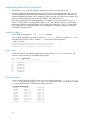
3. Depending on the type of array, enter one following commands to verify that the recover limit is
modified:
The correct results are displayed after each of the command lines.
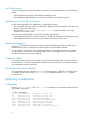
# odmget -q “attribute=recovery_limit and uniquetype=disk/scsi/HSV110” PdAt
PdAt:
uniquetype = “disk/scsi/HSV110
attribute = “recovery_limit”
deflt = “15”
values = “15”
width = ““
type = “R”
generic = ““
rep = “n”
# odmget -q “attribute=recovery_limit and uniquetype=disk/scsi/HSG80” PdAt
PdAt:
uniquetype = “disk/scsi/HSG80”
attribute = “recovery_limit”
deflt = “15”
values = “15”
width = ““
type = “R”
generic = ““
rep = “n”
nls_index = 0
NOTE:
Adobe® software and High Availability Cluster Multiprocessing (HACMP) software
modifications must be installed from the server.
Verifying the driver version
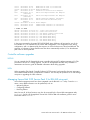
Enter the following command to verify that the driver version for the FC HBA is 1.6.3.7:
# lslpp –l PC1000.driver.obj
A verification message appears:
Fileset
Level State Description
------------------------------------------------------Path:/usr/lib/objrepos
PC1000.driver.obj
1.6.3.7 COMMITTED Secure Path AIX Fabric
Secure Path 2.0D Service Pack 3 for IBM AIX release notes
5