1
Changing the Lens
5
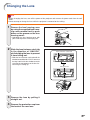
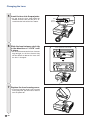
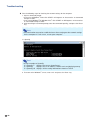
Insert the lens into the projector.
• As you insert the lens, look inside the
window to make sure that the pin is inserted into the hole of the lens mount.
6
Slide the lens fastener catch tab
in the direction of “LOCK” until
it stops.
• Be careful not to rotate the lens fastener
ring too tight, as the lens fastener ring
will be difficult to loosen the next time
the lens is changed.
7
Replace the lens housing cover.
• If the lens housing cover is not secured
to the projector, you will not be able to
turn the power on.
-10
Pin
Lens
mount
Lens fastener catch tab