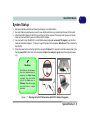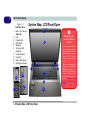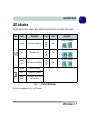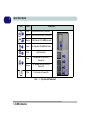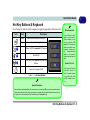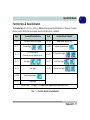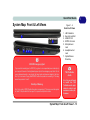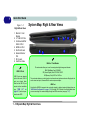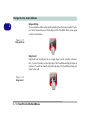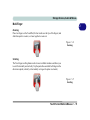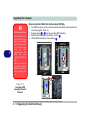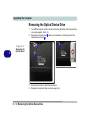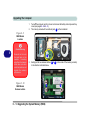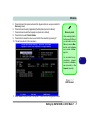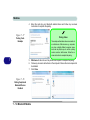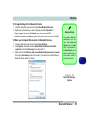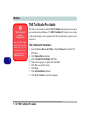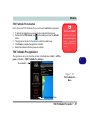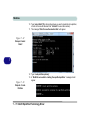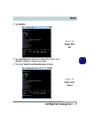
1
V12.1.00 Preface Notice The company reserves the right to revise this publication or to change its contents without notice. Information contained herein is for reference only and does not constitute a commitment on the part of the manufacturer or any subsequent vendor. They assume no responsibility or liability for any errors or inaccuracies that may appear in this publication nor are they in anyway responsible for any loss or damage resulting from the use (or misuse) of this publication. This publication and any accompanying software may not, in whole or in part, be reproduced, translated, transmitted or reduced to any machine readable form without prior consent from the vendor, manufacturer or creators of this publication, except for copies kept by the user for backup purposes. Brand and product names mentioned in this publication may or may not be copyrights and/or registered trademarks of their respective companies. They are mentioned for identification purposes only and are not intended as an endorsement of that product or its manufacturer. ©June 2012 Trademarks Intel and Intel Core are trademarks/registered trademarks of Intel Corporation. I Preface R&TTE Directive This device is in compliance with the essential requirements and other relevant provisions of the R&TTE Directive 1999/5/EC. This device will be sold in the following EEA countries: Austria, Italy, Belgium, Liechtenstein, Denmark, Luxembourg, Finland, Netherlands, France, Norway, Germany, Portugal, Greece, Spain, Iceland, Sweden, Ireland, United Kingdom, Cyprus, Czech Republic, Estonia, Hungary, Latvia, Lithuania, Malta, Slovakia, Poland, Slovenia. EuP-Standby and Off Mode Power Consumption Statement: The figures below note the power consumption of this computer in compliance with European Commission (EC) regulations on power consumption in off mode or standby mode: • Standby Mode < 2W • Off Mode < 1W II Preface CE Marking This device has been tested to and conforms to the regulatory requirements of the European Union and has attained CE Marking. The CE Mark is a conformity marking consisting of the letters “CE”. The CE Mark applies to products regulated by certain European health, safety and environmental protection legislation. The CE Mark is obligatory for products it applies to: the manufacturer affixes the marking in order to be allowed to sell his product in the European market. This product conforms to the essential requirements of the R&TTE directive 1999/5/EC in order to attain CE Marking. A notified body has determined that this device has properly demonstrated that the requirements of the directive have been met and has issued a favorable certificate of expert opinion. As such the device will bear the notified body number 0560 after the CE mark. The CE Marking is not a quality mark. Foremost, it refers to the safety rather than to the quality of a product. Secondly, CE Marking is mandatory for the product it applies to, whereas most quality markings are voluntary. III Preface FCC Statement (Federal Communications Commission) You are cautioned that changes or modifications not expressly approved by the party responsible for compliance could void the user's authority to operate the equipment. This equipment has been tested and found to comply with the limits for a Class B digital device, pursuant to Part 15 of the FCC Rules. These limits are designed to provide reasonable protection against harmful interference in a residential installation. This equipment generates, uses and can radiate radio frequency energy and, if not installed and used in accordance with the instructions, may cause harmful interference to radio communications. However, there is no guarantee that interference will not occur in a particular installation. If this equipment does cause harmful interference to radio or television reception, which can be determined by turning the equipment off and on, the user is encouraged to try to correct the interference by one or more of the following measures: • • • • Re orient or relocate the receiving antenna. Increase the separation between the equipment and receiver. Connect the equipment into an outlet on a circuit different from that to which the receiver is connected. Consult the service representative or an experienced radio/TV technician for help. Operation is subject to the following two conditions: 1. This device may not cause interference. And 2. IV This device must accept any interference, including interference that may cause undesired operation of the device. Preface FCC RF Radiation Exposure Statement: 1. This Transmitter must not be co-located or operating in conjunction with any other antenna or transmitter. 2. This equipment complies with FCC RF radiation exposure limits set forth for an uncontrolled environment. This equipment should be installed and operated with a minimum distance of 20 centimeters between the radiator and your body. Warning Use only shielded cables to connect I/O devices to this equipment. You are cautioned that changes or modifications not expressly approved by the manufacturer for compliance with the above standards could void your authority to operate the equipment. V Preface IMPORTANT SAFETY INSTRUCTIONS Follow basic safety precautions, including those listed below, to reduce the risk of fire, electric shock, and injury to persons when using any electrical equipment: 1. 2. 3. 4. 5. Do not use this product near water, for example near a bath tub, wash bowl, kitchen sink or laundry tub, in a wet basement or near a swimming pool. Avoid using this equipment with a telephone line (other than a cordless type) during an electrical storm. There may be a remote risk of electrical shock from lightning. Do not use the telephone to report a gas leak in the vicinity of the leak. Use only the power cord and batteries indicated in this manual. Do not dispose of batteries in a fire. They may explode. Check with local codes for possible special disposal instructions. This product is intended to be supplied by a Listed Power Unit: • Full Range AC/DC Adapter - AC Input 100 - 240V, 50 - 60Hz, DC Output 19V, 6.3A (120W) minimum. This Computer’s Optical Device is a Laser Class 1 Product VI Preface Instructions for Care and Operation The notebook computer is quite rugged, but it can be damaged. To prevent this, follow these suggestions: 1. Don’t drop it, or expose it to shock. If the computer falls, the case and the components could be damaged. Do not expose the computer to any shock or vibration. 2. Do not place it on an unstable surface. Do not place anything heavy on the computer. Keep it dry, and don’t overheat it. Keep the computer and power supply away from any kind of heating element. This is an electrical appliance. If water or any other liquid gets into it, the computer could be badly damaged. Do not expose it to excessive heat or direct sunlight. Do not leave it in a place where foreign matter or moisture may affect the system. Don’t use or store the computer in a humid environment. Do not place the computer on any surface that will block the Vents/Fan Intakes. VII Preface 3. Avoid interference. Keep the computer away from high capacity transformers, electric motors, and other strong magnetic fields. These can hinder proper performance and damage your data. 4. Follow the proper working procedures for the computer. Shut the computer down properly and don’t forget to save your work. Remember to periodically save your data as data may be lost if the battery is depleted. Do not turn off the power until you properly shut down all programs. 5. Do not turn off any peripheral devices when the computer is on. Take care when using peripheral devices. Use only approved brands of peripherals. VIII Do not disassemble the computer by yourself. Unplug the power cord before attaching peripheral devices. Perform routine maintenance on your computer. Preface Power Safety The computer has specific power requirements: • Only use a power adapter approved for use with this computer. • Your AC/DC adapter may be designed for international travel but it still requires a steady, uninterrupted power supply. If you are unsure of your local power specifications, consult your service representative or local power company. • The power adapter may have either a 2-prong or a 3-prong grounded plug. The third prong is an important safety feature; do not defeat its purpose. If you do not have access to a compatible outlet, have a qualified electrician install one. • When you want to unplug the power cord, be sure to disconnect it by the plug head, not by its wire. • Make sure the socket and any extension cord(s) you use can support the total current load of all the connected devices. • Before cleaning the computer, make sure it is disconnected from any external power supplies (i.e. AC/DC adapter or car adapter). Do not plug in the power cord if you are wet. Do not use the power cord if it is broken. Do not place heavy objects on the power cord. Power Safety Warning Before you undertake any upgrade procedures, make sure that you have turned off the power, and disconnected all peripherals and cables (including telephone lines and power cord). You must also remove your battery in order to prevent accidentally turning the machine on. Before removing the battery disconnect the AC/DC adapter from the computer. IX Preface Polymer Battery Precautions Note the following information which is specific to polymer batteries only, and where applicable, this overrides the general battery precaution information overleaf. • Polymer batteries may experience a slight expansion or swelling, however this is part of the battery’s safety mechanism and is not a cause for concern. • Use proper handling procedures when using polymer batteries. Do not use polymer batteries in high ambient temperature environments, and do not store unused batteries for extended periods. See also the general battery precautionary information overleaf for further information. X Preface General Battery Precautions • Only use batteries designed for this computer. The wrong battery type may explode, leak or damage the computer. • Do not remove any batteries from the computer while it is powered on. • Do not continue to use a battery that has been dropped, or that appears damaged (e.g. bent or twisted) in any way. Even if the computer continues to work with a damaged battery in place, it may cause circuit damage, which may possibly result in fire. • If you do not use the battery for an extended period, then remove the battery from the computer for storage. • Recharge the batteries using the notebook’s system. Incorrect recharging may make the battery explode. • Do not try to repair a battery pack. Refer any battery pack repair or replacement to your service representative or qualified service personnel. • Keep children away from, and promptly dispose of a damaged battery. Always dispose of batteries carefully. Batteries may explode or leak if exposed to fire, or improperly handled or discarded. • Keep the battery away from metal appliances. • Affix tape to the battery contacts before disposing of the battery. • Do not touch the battery contacts with your hands or metal objects. Battery Disposal & Caution The product that you have purchased contains a rechargeable battery. The battery is recyclable. At the end of its useful life, under various state and local laws, it may be illegal to dispose of this battery into the municipal waste stream. Check with your local solid waste officials for details in your area for recycling options or proper disposal. Danger of explosion if battery is incorrectly replaced. Replace only with the same or equivalent type recommended by the manufacturer. Discard used battery according to the manufacturer’s instructions. XI Preface Cleaning Do not apply cleaner directly to the computer; use a soft clean cloth. Do not use volatile (petroleum distillates) or abrasive cleaners on any part of the computer. Servicing Do not attempt to service the computer yourself. Doing so may violate your warranty and expose you and the computer to electric shock. Refer all servicing to authorized service personnel. Unplug the computer from the power supply. Then refer servicing to qualified service personnel under any of the following conditions: • • • • • When the power cord or AC/DC adapter is damaged or frayed. If the computer has been exposed to rain or other liquids. If the computer does not work normally when you follow the operating instructions. If the computer has been dropped or damaged (do not touch the poisonous liquid if the LCD panel breaks). If there is an unusual odor, heat or smoke coming from your computer. Removal Warning When removing any cover(s) and screw(s) for the purposes of device upgrade, remember to replace the cover(s) and screw(s) before restoring power to the system. Also note the following when the cover is removed: • • XII Hazardous moving parts. Keep away from moving fan blades. Preface Travel Considerations Packing As you get ready for your trip, run through this list to make sure the system is ready to go: 1. 2. 3. 4. 5. 6. 7. 8. Check that the battery pack and any spares are fully charged. Power off the computer and peripherals. Close the display panel and make sure it’s latched. Disconnect the AC/DC adapter and cables. Stow them in the carrying bag. The AC/DC adapter uses voltages from 100 to 240 volts so you won’t need a second voltage adapter. However, check with your travel agent to see if you need any socket adapters. Put the notebook in its carrying bag and secure it with the bag’s straps. If you’re taking any peripherals (e.g. a printer, mouse or digital camera), pack them and those devices’ adapters and/or cables. Anticipate customs - Some jurisdictions may have import restrictions or require proof of ownership for both hardware and software. Make sure your “papers” are handy. Power Off Before Traveling Make sure that your notebook is completely powered off before putting it into a travel bag (or any such container). Putting a notebook which is powered on in a travel bag may cause the Vents/Fan Intakes to be blocked. To prevent your computer from overheating make sure nothing blocks the Vent/Fan Intakes while the computer is in use. XIII Preface On the Road In addition to the general safety and maintenance suggestions in this preface, and Chapter 8: Troubleshooting, keep these points in mind: Hand-carry the notebook - For security, don’t let it out of your sight. In some areas, computer theft is very common. Don’t check it with “normal” luggage. Baggage handlers may not be sufficiently careful. Avoid knocking the computer against hard objects. Beware of Electromagnetic fields - Devices such as metal detectors & X-ray machines can damage the computer, hard disk, floppy disks, and other media. They may also destroy any stored data - Pass your computer and disks around the devices. Ask security officials to hand-inspect them (you may be asked to turn it on). Note: Some airports also scan luggage with these devices. Fly safely - Most airlines have regulations about the use of computers and other electronic devices in flight. These restrictions are for your safety, follow them. If you stow the notebook in an overhead compartment, make sure it’s secure. Contents may shift and/or fall out when the compartment is opened. Get power where you can - If an electrical outlet is available, use the AC/DC adapter and keep your battery(ies) charged. Keep it dry - If you move quickly from a cold to a warm location, water vapor can condense inside the computer. Wait a few minutes before turning it on so that any moisture can evaporate. XIV Preface Developing Good Work Habits Developing good work habits is important if you need to work in front of the computer for long periods of time. Improper work habits can result in discomfort or serious injury from repetitive strain to your hands, wrists or other joints. The following are some tips to reduce the strain: • Adjust the height of the chair and/or desk so that the keyboard is at or slightly below the level of your elbow. Keep your forearms, wrists, and hands in a relaxed position. • Your knees should be slightly higher than your hips. Place your feet flat on the floor or on a footrest if necessary. • Use a chair with a back and adjust it to support your lower back comfortably. • Sit straight so that your knees, hips and elbows form approximately 90-degree angles when you are working. • Take periodic breaks if you are using the computer for long periods of time. Remember to: • Alter your posture frequently. • Stretch and exercise your body several times a day. • Take periodic breaks when you work at the computer for long periods of time. Frequent and short breaks are better than fewer and longer breaks. XV Preface Lighting Proper lighting and a comfortable viewing angle can reduce eye strain and shoulder and neck muscle fatigue. • • • • Position the display to avoid glare or reflections from overhead lighting or outside sources of light. Keep the display screen clean and set the brightness and contrast to levels that allow you to see the screen clearly. Position the display directly in front of you at a comfortable viewing distance. Adjust the display-viewing angle to find the best position. LCD Screen Care To prevent image persistence on LCD monitors (caused by the continuous display of graphics on the screen for an extended period of time) take the following precautions: • • • • Set the Windows Power Plans to turn the screen off after a few minutes of screen idle time. Use a rotating, moving or blank screen saver (this prevents an image from being displayed too long). Rotate desktop background images every few days. Turn the monitor off when the system is not in use. LCD Electro-Plated Logos Note that in computers featuring a raised LCD electro-plated logo, the logo is covered by a protective adhesive. Due to general wear and tear, this adhesive may deteriorate over time and the exposed logo may develop sharp edges. Be careful when handling the computer in this case, and avoid touching the raised LCD electro-plated logo. Avoid placing any other items in the carrying bag which may rub against the top of the computer during transport. If any such wear and tear develops contact your service center. XVI Preface Contents Notice .............................................................................................................................................................I EuP-Standby and Off Mode Power Consumption Statement: ..................................................................... II FCC Statement ............................................................................................................................................IV FCC RF Radiation Exposure Statement: ..................................................................................................... V Instructions for Care and Operation ......................................................................................................... VII Power Safety ...............................................................................................................................................IX Polymer Battery Precautions ....................................................................................................................... X General Battery Precautions .......................................................................................................................XI Cleaning .................................................................................................................................................... XII Servicing ................................................................................................................................................... XII Travel Considerations .............................................................................................................................. XIII Quick Start Guide Overview ....................................................................................................................................................1-1 Advanced Users .........................................................................................................................................1-2 Beginners and Not-So-Advanced Users ....................................................................................................1-2 Warning Boxes ..........................................................................................................................................1-2 Not Included ..............................................................................................................................................1-3 System Software ........................................................................................................................................1-4 System Startup ...........................................................................................................................................1-5 System Map: LCD Panel Open ..................................................................................................................1-6 XVII Preface LED Indicators ...........................................................................................................................................1-7 Hot Key Buttons & Keyboard ...................................................................................................................1-9 Keyboard ..................................................................................................................................................1-10 Function Keys & Visual Indicators .........................................................................................................1-11 Control Center .........................................................................................................................................1-12 System Map: Front & Left Views ...........................................................................................................1-13 System Map: Right & Rear Views ..........................................................................................................1-14 System Map: Bottom View .....................................................................................................................1-15 Video Features .........................................................................................................................................1-17 NVIDIA® Optimus™ Technology .........................................................................................................1-17 Power Options .........................................................................................................................................1-21 Storage Devices, Audio & Mouse Overview ....................................................................................................................................................2-1 Hard Disk Drive .........................................................................................................................................2-2 Optical Device ...........................................................................................................................................2-3 Loading Discs ............................................................................................................................................2-3 Handling CDs or DVDs .............................................................................................................................2-4 DVD Regional Codes ................................................................................................................................2-5 Multi-in-1 Card Reader ..............................................................................................................................2-6 Audio Features ...........................................................................................................................................2-7 Setup for Audio Recording ........................................................................................................................2-8 XVIII Preface TouchPad and Buttons/Mouse ...................................................................................................................2-9 One-Finger ...............................................................................................................................................2-13 Multi-Finger .............................................................................................................................................2-15 Additional ................................................................................................................................................2-18 Power Management Overview ....................................................................................................................................................3-1 The Power Sources ....................................................................................................................................3-2 AC/DC Adapter .........................................................................................................................................3-2 Battery ........................................................................................................................................................3-2 Turning On the Computer ..........................................................................................................................3-3 Power Plans ...............................................................................................................................................3-4 Power-Saving States ..................................................................................................................................3-6 Sleep ..........................................................................................................................................................3-6 Hibernate ....................................................................................................................................................3-7 Shut down ..................................................................................................................................................3-7 Configuring the Power Buttons .................................................................................................................3-8 Resuming Operation ..................................................................................................................................3-9 Power Conservation Modes .....................................................................................................................3-10 Battery Information .................................................................................................................................3-11 Conserving Battery Power .......................................................................................................................3-12 Battery Life ..............................................................................................................................................3-13 XIX Preface New Battery .............................................................................................................................................3-13 Recharging the Battery with the AC/DC Adapter ...................................................................................3-13 Proper handling of the Battery Pack ........................................................................................................3-14 Battery FAQ .............................................................................................................................................3-15 Drivers & Utilities What to Install ............................................................................................................................................4-1 Module Driver Installation ........................................................................................................................4-1 Driver Installation ......................................................................................................................................4-2 Manual Driver Installation .........................................................................................................................4-4 Updating/Reinstalling Individual Drivers ..................................................................................................4-4 User Account Control ................................................................................................................................4-5 Windows Security Message .......................................................................................................................4-5 New Hardware Found ................................................................................................................................4-5 Driver Installation Procedure .....................................................................................................................4-6 Chipset .......................................................................................................................................................4-6 Video (VGA) .............................................................................................................................................4-6 NVIDIA Video (VGA) ..............................................................................................................................4-6 LAN ...........................................................................................................................................................4-6 Card Reader ...............................................................................................................................................4-7 TouchPad ...................................................................................................................................................4-7 Hot Key ......................................................................................................................................................4-7 XX Preface USB 3.0 ......................................................................................................................................................4-7 MEI Driver .................................................................................................................................................4-7 Audio .........................................................................................................................................................4-7 Windows Experience Index .......................................................................................................................4-8 Optional Drivers ........................................................................................................................................4-9 BIOS Utilities Overview ....................................................................................................................................................5-1 The Power-On Self Test (POST) ...............................................................................................................5-2 Failing the POST .......................................................................................................................................5-3 Fatal Errors ................................................................................................................................................5-3 Non-Fatal Errors ........................................................................................................................................5-3 The Setup Utility ........................................................................................................................................5-4 Entering Setup ...........................................................................................................................................5-4 Setup Screens .............................................................................................................................................5-5 Main Menu .................................................................................................................................................5-6 System Time & Date (Main Menu) ...........................................................................................................5-6 SATA Port # (Main Menu) ........................................................................................................................5-7 System/Extended Memory (Main Menu) ..................................................................................................5-7 MB Series / BIOS Revision / KBC/EC Firmware Revision (Main Menu) ...............................................5-7 Advanced Menu .........................................................................................................................................5-8 Advanced Chipset Control (Advanced Menu) ..........................................................................................5-8 XXI Preface Bluetooth Power Setting (Advanced Menu > Advanced Chipset Control) ...............................................5-9 Intel(R) Rapid Start Technology (Advanced Menu) .................................................................................5-9 Intel Anti-Theft Technology (Advanced Menu ) .......................................................................................5-9 SATA Mode (Advanced Menu) ..............................................................................................................5-10 Boot Logo (Advanced Menu) ..................................................................................................................5-10 Power On Boot Beep (Advanced Menu) .................................................................................................5-10 Battery Low Alarm Beep (Advanced Menu) ...........................................................................................5-10 Security Menu ..........................................................................................................................................5-11 Set Supervisor Password (Security Menu) ..............................................................................................5-11 Password on boot: (Security Menu) ........................................................................................................5-12 Boot Menu ...............................................................................................................................................5-13 Boot Option Priorities (Boot Menu) ........................................................................................................5-14 Exit Menu ................................................................................................................................................5-15 Upgrading The Computer Overview ....................................................................................................................................................6-1 When Not to Upgrade ................................................................................................................................6-2 Removing the Battery ................................................................................................................................6-4 Removing the Component Bay Cover .......................................................................................................6-5 Replacing the Component Bay Cover .......................................................................................................6-6 Upgrading the Hard Disk Drive(s) ............................................................................................................6-7 Removing the Optical Device Drive ........................................................................................................6-12 XXII Preface Upgrading the System Memory (RAM) ..................................................................................................6-13 Modules Overview ....................................................................................................................................................7-1 Setting Up SATA RAID or AHCI Mode ..................................................................................................7-2 AHCI Mode ...............................................................................................................................................7-2 RAID ..........................................................................................................................................................7-2 Intel® Rapid Storage Technology Application .........................................................................................7-2 SATA RAID Setup Procedure (BIOS) ......................................................................................................7-5 RAID Setup (Intel Matrix) .........................................................................................................................7-6 Intel Rapid Storage Technology ................................................................................................................7-9 IRST Driver Installation ............................................................................................................................7-9 RAID Volume Data Verification and Repair ..........................................................................................7-12 Replacing and Reverting Recovery and Master Volumes .......................................................................7-12 PC Camera Module ..................................................................................................................................7-15 PC Camera Driver Installation .................................................................................................................7-16 PC Camera Audio Setup ..........................................................................................................................7-17 Wireless LAN Module .............................................................................................................................7-23 3rd Party WLAN Driver Installation (for WLAN Module) ....................................................................7-24 3rd Party WLAN Driver Installation (for Combo Module) .....................................................................7-25 Intel® WLAN Driver Installation ............................................................................................................7-26 Connecting to a Wireless Network in Windows 7 ...................................................................................7-29 XXIII Preface Connecting to a Wireless Network Using Intel® PROSet Wireless .......................................................7-32 Intel® My WiFi Configuration ................................................................................................................7-34 Windows Mobility Center .......................................................................................................................7-43 Intel® Wireless Display Application .......................................................................................................7-44 Intel® WiDi Application Installation ......................................................................................................7-45 Intel® Wireless Music Driver Installation ...............................................................................................7-45 Intel® WiDi Application Configuration ..................................................................................................7-46 Bluetooth Module ....................................................................................................................................7-49 3rd Party Bluetooth (V4.0) Combo Driver Installation ...........................................................................7-50 Intel Bluetooth Combo Driver Installation ..............................................................................................7-51 Standard Bluetooth Configuration in Windows 7 ...................................................................................7-52 THX TruStudio Pro Audio ......................................................................................................................7-56 THX TruStudio AP Installation ...............................................................................................................7-56 THX TruStudio Pro Activation ...............................................................................................................7-57 THX TruStudio Pro Application .............................................................................................................7-57 Intel® Rapid Storage Technology Driver ................................................................................................7-61 Intel® Smart Response Technology ........................................................................................................7-62 Enabling Intel Smart Response Technology ............................................................................................7-63 Intel® Rapid Start Technology Driver ....................................................................................................7-66 Intel® Rapid Start Technology Configuration ........................................................................................7-67 Intel® Rapid Start Technology Driver Installation .................................................................................7-73 XXIV Preface Troubleshooting Overview ....................................................................................................................................................8-1 Basic Hints and Tips ..................................................................................................................................8-2 Backup and General Maintenance .............................................................................................................8-3 Viruses .......................................................................................................................................................8-4 Upgrading and Adding New Hardware/Software ......................................................................................8-5 Problems & Possible Solutions ..................................................................................................................8-7 Bluetooth Connection Problems ..............................................................................................................8-15 Intel® WLAN & Bluetooth Combo Modules .........................................................................................8-19 Installing Windows 7 (pre Service Pack 1) for RAID Systems with Advanced Format Disks ...............8-20 Interface (Ports & Jacks) Overview ...................................................................................................................................................A-1 Ports and Jacks ..........................................................................................................................................A-2 Card Reader ..............................................................................................................................................A-2 DC-In Jack ................................................................................................................................................A-2 DVI-Out Port ............................................................................................................................................A-2 e-SATA / USB 3.0 Combo Port ...............................................................................................................A-2 HDMI-Out Port .........................................................................................................................................A-3 Headphone-Out Jack .................................................................................................................................A-3 Microphone-In Jack ..................................................................................................................................A-3 RJ-45 LAN Jack .......................................................................................................................................A-3 XXV Preface S/PDIF-Out Jack .......................................................................................................................................A-3 Security Lock Slot ....................................................................................................................................A-3 USB 2.0/1.1 Ports .....................................................................................................................................A-4 USB 3.0 Port .............................................................................................................................................A-4 Control Center Overview ...................................................................................................................................................B-1 Video Driver Controls Video Driver Installation ..........................................................................................................................C-1 Video (VGA) ............................................................................................................................................C-1 NVIDIA Video (VGA) .............................................................................................................................C-1 NVIDIA® Optimus™ Technology ..........................................................................................................C-2 Intel® Graphics & Media Control Panel ..................................................................................................C-5 Display Devices & Options ......................................................................................................................C-7 Attaching Other Displays .........................................................................................................................C-8 Configuring an External Display in Windows 7 .....................................................................................C-11 NVIDIA Control Panel ...........................................................................................................................C-14 Optimus™ Customization Options .........................................................................................................C-16 Set PhysX® Configuration .....................................................................................................................C-20 Video Settings .........................................................................................................................................C-21 HDMI Audio Configuration ...................................................................................................................C-22 XXVI Preface Specifications Processor ...................................................................................................................................................D-2 Core Logic ................................................................................................................................................D-3 Memory .....................................................................................................................................................D-3 Display ......................................................................................................................................................D-3 Video Adapter Options .............................................................................................................................D-4 Storage ......................................................................................................................................................D-4 BIOS .........................................................................................................................................................D-4 Audio ........................................................................................................................................................D-4 Keyboard & Pointing Device ....................................................................................................................D-4 Interface ....................................................................................................................................................D-4 Slots ..........................................................................................................................................................D-5 Card Reader ..............................................................................................................................................D-5 Communication .........................................................................................................................................D-5 Security .....................................................................................................................................................D-5 Features .....................................................................................................................................................D-5 Power Management ..................................................................................................................................D-5 Power ........................................................................................................................................................D-5 Environmental Spec ..................................................................................................................................D-6 Physical Dimensions & Weight ................................................................................................................D-6 XXVII Preface XXVIII Quick Start Guide Chapter 1: Quick Start Guide Overview This Quick Start Guide is a brief introduction to the basic features of your computer, to navigating around the computer and to getting your system started. The remainder of the manual covers the following: • Chapter 2 • Chapter 3 • Chapter 4 • Chapter 5 • Chapter 6 • Chapter 7 • Chapter 8 • Appendix A • Appendix B • Appendix C • Appendix D A guide to using some of the main features of the computer e.g. the storage devices (hard disk, optical device, card reader), TouchPad & Mouse & Audio Features. The computer’s power management options. The installation of the drivers and utilities essential to the operation or improvement of some of the computer’s subsystems. An outline of the computer’s built-in software or BIOS (Basic Input Output System). Instructions for upgrading your computer. A quick guide to the computer’s PC Camera, Wireless LAN, Wireless Display, Fingerprint, Bluetooth & WLAN Combo and TruStudio Audio modules (some of which may be optional depending on your purchase configuration). A troubleshooting guide. Definitions of the interface, ports/jacks which allow your computer to communicate with external devices. Information on the Control Center. Information on the NVIDIA Video driver controls. The computer’s specification. Overview 1 - 1 1 1 Quick Start Guide Advanced Users If you are an advanced user you may skip over most of this Quick Start Guide. However you may find it useful to refer to “Drivers & Utilities” on page 4 - 1, “BIOS Utilities” on page 5 - 1 and “Upgrading The Computer” on page 6 - 1 in the User’s Manual. You may also find the notes marked with a of interest to you. Notes Check the light colored boxes with the mark above to find detailed information about the computer’s features. Beginners and Not-So-Advanced Users If you are new to computers (or do not have an advanced knowledge of them) then the information contained in this Quick Start Guide should be enough to get you up and running. Eventually you should try to look through all the documentation (more detailed descriptions of the functions, setup and system controls are covered in the remainder of the User’s Manual), but do not worry if you do not understand everything the first time. Keep this manual nearby and refer to it to learn as you go. You may find it useful to refer to the notes marked with a as indicated in the margin. For a more detailed description of any of the interface ports and jacks see “Interface (Ports & Jacks)” on page A - 1. Warning Boxes No matter what your level please pay careful attention to the warning and safety information indicated by the symbol. Also please note the safety and handling instructions as indicated in the Preface. 1 - 2 Overview Quick Start Guide Not Included Operating Systems (e.g. Windows 7) and applications (e.g. word processing, spreadsheet and database programs) have their own manuals, so please consult the appropriate manuals. Drivers If you are installing new system software, or are re-configuring your computer for a different system, you will need to install the appropriate drivers. Drivers are programs which act as an interface between the computer and a hardware component e.g. a wireless network module. It is very important that you install the drivers in the order listed in Table 4 - 1, on page 4 - 3. You will be unable to use most advanced controls until the necessary drivers and utilities are properly installed. If your system hasn’t been properly configured (your service representative may have already done that for you), refer to “Drivers & Utilities” on page 4 - 1 for installation instructions. Ports and Jacks See “Ports and Jacks” on page A - 2 for a description of the interface (ports & jacks) which allow your computer to communicate with external devices, connect to the internet etc. Overview 1 - 3 1 1 Quick Start Guide System Software Your computer may already come with system software pre-installed. Where this is not the case, or where you are re-configuring your computer for a different system, you will find that this manual refers to the Windows 7 operating system. Windows OS In order to run Windows 7 without limitations or decreased performance, your computer requires a minimum 1GB of system memory (RAM), however if you are running Windows 7 64 bit your computer requires a minimum 2GB of system memory (RAM). 1 - 4 Overview Quick Start Guide System Startup 1. 2. 3. 4. 5. Remove all packing materials and place the computer on a stable surface. Securely attach any peripherals you want to use with the notebook (e.g. keyboard and mouse) to their ports. Attach the AC/DC adapter to the DC-In jack at the rear of the computer, then plug the AC power cord into an outlet, and connect the AC power cord to the AC/DC adapter. Use one hand to raise the lid/LCD to a comfortable viewing angle (do not exceed 135 degrees); use the other hand (as illustrated in Figure 1 - 1 below) to support the base of the computer (Note: Never lift the computer by the lid/LCD). Press the power button on the top right of the computer for about 2 - 3 seconds to turn the computer “on” (note that the power LED on the front of the computer will turn from orange to green when the computer powers on). Shutdown Note that you should always shut your computer down by choosing the Shut Down command from the bottom right of the Start menu in Windows. This will help prevent hard disk or system problems. Figure 1 - 1 - Opening the Lid/LCD & Computer with AC/DC Adapter Plugged-In System Startup 1 - 5 1 1 Quick Start Guide Figure 1 - 2 LCD Panel Open System Map: LCD Panel Open 1 1. Built-In PC Camera (Optional) 2. LCD 3. Power Button 4. GPU Button 5. Speakers 6. Top Case LED Indicators) 7. Hot Key Buttons 8. Keyboard 9. Built-In Microphone 10. Touchpad & Buttons The use of any portable electronic transmission devices aboard aircraft is usually prohibited. Make sure the module(s) are OFF if you are using the computer aboard aircraft. 3 5 5 8 4 9 7 Wireless Device Operation Aboard Aircraft 2 7 3 6 1 - 6 System Map: LCD Panel Open 10 4 6 Use the key combinations to toggle power to the WLAN/ Bluetooth modules, and check the LED indicator or on-screen icon to see if the modules are powered on or not (see Table 1 - 4, on page 1 - 11/ Table 1 - 2, on page 1 - 8). Quick Start Guide LED Indicators The LED indicators on the computer display helpful information about the current status of the computer. Icon Color Description Icon Color Orange AC/DC Power is Plugged In Green Green The Computer is On Green Blinking Green The Computer is in Sleep Mode Green Orange The Battery is Charging Green The Battery is Fully Charged Blinking Orange The Battery Has Reached Critically Low Power Status Description Number Lock is Activated Caps Lock is Activated Scroll Lock is Activated Table 1 - 1 - Front Left LED Indicators See overleaf for information on the Top Case LED indicators. LED Indicators 1 - 7 1 1 Quick Start Guide Icon Color Description Green UMA Mode Activated (GPU Button) Orange Optimus Mode Activated (GPU Button) Orange NVIDIA Discrete GPU (dGPU) Activated 3 Green Intel Integrated GPU (iGPU) Activated 4 White Hard Disk Activity Green The (optional) WLAN Module is Powered On Orange The (optional) Bluetooth Module is Powered On 4 White The Computer is Powered On 5 1 2 5 Table 1 - 2 - Top Case LED Indicators 1 - 8 LED Indicators 1 2 3 Quick Start Guide Hot Key Buttons & Keyboard Press the hot key buttons on the computer to toggle the appropriate function on/off. Icon Color Description Green UMA Mode Activated (GPU Button) Orange Optimus Mode Activated (GPU Button) 1 1 Power On/Off the (optional) PC Camera 2 Mute On/Off 2 3 Power On/Off the (optional) Wireless LAN Module 3 Other Keyboards If your keyboard is damaged or you just want to make a change, you can use any standard USB keyboard. The system will detect and enable it automatically. However special functions/hot-keys unique to the system’s regular keyboard may not work. NumLk & ScrLk Hold down the Fn Key and either NumLk or ScrLk to enable number or scroll lock, and check the LED indicator for status. Power the Computer On/Off Table 1 - 3 - Hot Key Buttons Special Characters Some software applications allow the number-keys to be used with Alt to produce special characters. These special characters can only be produced by using the numeric keypad. Regular number keys (in the upper row of the keyboard) will not work. Make sure that NumLk is on. Hot Key Buttons & Keyboard 1 - 9 1 1 Quick Start Guide Keyboard The keyboard has an embedded numerical keypad for easy numeric data input, and features function keys to allow you to change operational features instantly. See Table 1 - 4, on page 1 - 11 for full function key combination details. Function Keys NumLk & ScrLk Keys Play/Pause Key Numerical Keypad Fn Key Figure 1 - 3 - Keyboard 1 - 10 Keyboard Quick Start Guide Function Keys & Visual Indicators The function keys (F1 - F12 etc.) will act as hot keys when pressed while the Fn key is held down. Visual indicators (see the table below) are available when the Hot Key driver is installed. Keys Function/Visual Indicators Keys Function/Visual Indicators Fn + ~ Play/Pause (in Audio/Video Programs) Fn + Esc Control Center Toggle (see over) Fn + F1 Touchpad Toggle Fn +F8/F9 Fn + F2 Turn LCD Backlight Off (Press a key to or use Touchpad to turn on) Fn + F10 PC Camera Power Toggle Fn + F11 WLAN Power Toggle Fn + F12 Bluetooth Power Toggle Fn + F3 Fn + F4 Fn +F5/F6 Fn + F7 Mute Toggle Sleep Toggle Brightness Decrease/Increase Volume Decrease/Increase Display Toggle See also Table 1 - 1, on page 1 - 7 for Number Lock, Caps Lock and Scroll Lock indicators Table 1 - 4 - Function Keys & Visual Indicators Keyboard 1 - 11 1 1 Quick Start Guide Control Center Press the Fn + Esc key combination, or double-click the icon in the notification area of the taskbar to toggle the Control Center on/off. The Control Center gives quick access to frequently used controls and enables you to quickly turn modules on/off. Control Center Click on any button to turn any of the modules (e.g. TouchPad, Camera) on/off. Click on the power conservation modes to switch between Performance, Balanced or Energy Star modes (see page 3 - 10). To remove the Power Conservation Modes screen just click in a blank area of the icon or press a key on the keyboard. Click on the buttons (or just click and hold the mouse button) to adjust the slider for Brightness/Volume. Click on Display Switch and click to choose a display mode from the menu (see page C - 13). Table 1 - 5 - Control Center 1 - 12 Control Center Quick Start Guide System Map: Front & Left Views Figure 1 - 4 Front & Left Views 1 1 2 3 4 5 6 7 1. 2. 3. 4. 5. LED Indicators Security Lock Slot USB 2.0 Port S/PDIF-Out Jack Microphone-In Jack 6. Headphone-Out Jack 7. Optical Device Drive Bay CD/DVD Emergency Eject If you need to manually eject a CD/DVD (e.g. due to an unexpected power interruption) you may push the end of a straightened paper clip into the emergency eject hole. Do not use a sharpened pencil or any object that may break and become lodged in the hole. Don’t try to remove a floppy disk/CD/DVD while the system is accessing it. This may cause the system to “crash”. Disk Eject Warning Don’t try to eject a CD/DVD while the system is accessing it. This may cause the system to “crash”. Stop the disk first then eject it, or press the stop button twice. THX TruStudio Audio Note that you will need to install the THX TruStudio audio application in order to get maximum audio performance. System Map: Front & Left Views 1 - 13 1 1 Quick Start Guide Figure 1 - 5 Right & Rear Views 1. Multi-In-1 Card Reader 2. 2 * USB 3.0 Ports 3. Combined eSATA/ USB 3.0 Port 4. HDMI-Out Port 5. RJ-45 LAN Jack 6. External Monitor Port 7. DC-In Jack 8. Vent/Fan Intake System Map: Right & Rear Views 1 6 3 4 5 8 7 Multi-In-1 Card Reader The card reader allows you to use the most popular digital storage card formats: MMC (MultiMedia Card) / RS MMC SD (Secure Digital) / Mini SD / SDHC / SDXC MS (Memory Stick) / MS Pro / MS Duo USB 3.0 Ports USB 3.0 ports are denoted by their blue color; USB 2.0 ports are colored black. Note that the USB 3.0 port requires a driver installation (see “USB 3.0” on page 4 - 7) and is not operational under DOS. 2 The card reader features a push-in/push-out card insertion and ejection mechanism. Simply push the card to insert and eject it, however Ms Duo cards require an adapter. HDMI Port Note that the HDMI Port supports video and audio signals to attached external displays (also see “HDMI Audio Configuration” on page C - 22). Note that THX TruStudio Pro will be disabled when you are connecting to an external display through an HDMI connection (see page 7 - 57). 1 - 14 System Map: Right & Rear Views Quick Start Guide System Map: Bottom View Figure 1 - 6 Bottom View 1. 1 4 2. 3. 4. 4 2 Component Bay Cover Battery Primary HDD Bay Fan Outlet/Intake 3 Battery Information CPU The CPU is not a user serviceable part. Overheating To prevent your computer from overheating make sure nothing blocks the Vent/Fan Intake while the computer is in use. Always completely discharge, then fully charge, a new battery before using it. Completely discharge and charge the battery at least once every 30 days or after about 20 partial discharges. See “Battery Information” on page 3 - 11 for full instructions. System Map: Bottom View 1 - 15 1 1 Quick Start Guide Windows 7 Start Menu & Control Panel Most of the control panels, utilities and programs within Windows 7 (and most other Windows versions) are accessed from the Start menu. When you install programs and utilities they will be installed on your hard disk drive, and a shortcut will usually be placed in the Start menu and/or the desktop. Right-click the Start menu icon , and then select Properties if you want to customize the appearance of the Start menu. Click here to toggle Category View Figure 1 - 7 - Start Menu & Control Panel In many instances throughout this manual you will see an instruction to open the Control Panel. The Control Panel is accessed from the Start menu, and it allows you to configure the settings for most of the key features in Windows (e.g. power, video, network, audio etc.). Windows 7 provides basic controls for many of the features, however many new controls are added (or existing ones are enhanced) when you install the drivers. To see all controls it may be necessary to toggle off Category View to view the control panel icons. 1 - 16 System Map: Bottom View Quick Start Guide Video Features NVIDIA® Optimus™ Technology NVIDIA® Optimus™ technology is a seamless technology designed to get best performance from the graphics system while allowing longer battery life, without having to manually change settings. When the computer is in Optimus Mode it will automatically switch between the integrated UMA (Unified Memory Architecture) GPU (iGPU) and the discrete GPU (dGPU) when required by the applications in use. This switch is seamless to the user and does not require any use of the GPU button (see “NVIDIA® Optimus™ Technology” on page C - 2). The GPU button allows you to switch between the Optimus Mode (where GPU switching is automatically handled) and UMA Mode (for constant power-saving with the integrated GPU only). Icon Color Description Green UMA Mode Activated Orange Optimus Mode Activated Green Integrated GPU (iGPU) Activated Orange Discrete GPU (dGPU) Activated Note The GPU LED indicators will display which GPU is currently in use Table 1 - 6 - GPU Modes & GPU LED Indicators You can switch display devices, and configure display options, from the Display control panel (in Appearances and Personalization) in Windows 7 (see over). For more detailed video information see “Video Driver Controls” on page C - 1. Video Features 1 - 17 1 1 Quick Start Guide To access Display (Control Panel) and Screen Resolution in Windows: 1. 2. 3. 4. 5. 6. Click Start and click Control Panel. Click Display (icon) - In the Appearances and Personalization category. Click Adjust Screen Resolution/Adjust resolution. Alternatively you can right-click the desktop and select Screen resolution. Use the dropbox to select the screen Resolution 1 (Figure 1 - 8). Click Advanced settings 2 (Figure 1 - 8) to bring up the Advanced properties tabs. 1 2 Figure 1 - 8 - Screen Resolution 1 - 18 Video Features Quick Start Guide To access the Intel(R) Graphics and Media Control Panel: 1. 2. Click Advanced settings 2 (Figure 1 - 8 on page 1 - 18) in the Display Settings control panel in Windows. Click Graphics Properties (button) 3 (Figure 1 - 9) in the Intel Graphics & Media Control Panel tab. OR 3. Right-click the desktop and select Graphics Properties from the menu. OR 4. Click the icon 4 (Figure 1 - 9) in the taskbar and select Graphics Properties from the menu. OR 5. 6. Access the Intel(R) Graphics and Media Control Panel from the Windows control panel in Classic View. Choose the application mode (Basic, Advanced or Wizard) required. 4 3 Figure 1 - 9 - Intel Graphics and Media Control Panel Video Features 1 - 19 1 1 Quick Start Guide To access the NVIDIA Control Panel: 1. Right-click the desktop and select NVIDIA Control Panel 5 (Figure 1 - 10). OR 2. Double-click the icon 6 (Figure 1 - 10) in the Windows control panel. 5 6 Figure 1 - 10 - NVIDIA Control Panel 1 - 20 Video Features Quick Start Guide Power Options The Power Options (Hardware and Sound menu) control panel icon in Windows (see page 1 - 15) allows you to configure power management features for your computer. You can conserve power by means of power plans and configure the options for the power button, sleep button, computer lid (when closed), display and sleep mode from the left menu. Note that the Power saver plan may have an affect on computer performance. Click to select one of the existing plans, or click Create a power plan in the left menu and select the options to create a new plan. Click Change plan settings and click Change advanced power settings to access further configuration options. Pay attention to the instructions on battery care in “Battery Information” on page 3 - 11. Figure 1 - 11 - Power Options Power Options 1 - 21 1 1 Quick Start Guide 1 - 22 Storage Devices, Audio & Mouse Chapter 2: Storage Devices, Audio & Mouse Overview Read this chapter to learn more about the following main features and components of the computer: • • • • • Hard Disk Drive Optical Device Multi-in-1 Card Reader Audio Features TouchPad and Buttons/Mouse Overview 2 - 1 2 Storage Devices, Audio & Mouse 2 Power Safety Before attempting to access any of the internal components of your computer please ensure that the machine is not connected to the AC power, and that the machine is turned off. Also ensure that all peripheral cables, including phone lines, are disconnected from the computer. Figure 2 - 1 Hard Disk Location 2 - 2 Hard Disk Drive Hard Disk Drive The hard disk drive(s) is(are) used to store your data in the computer. The hard disk(s) can be taken out to accommodate other 2.5" serial (SATA) hard disk drives with a height of 9.5 mm. The hard disk(s) is(are) accessible after removing the hard disk bay cover (primary hard disk drive) or component bay cover (secondary hard disk drive) from the bottom of your computer as seen below. Further details on removing and inserting the hard disk are available in “Upgrading the Hard Disk Drive(s)” on page 6 - 7. Primary HDD Secondary HDD Storage Devices, Audio & Mouse Optical Device There is a bay for a 5.25" optical (CD/DVD) device (12.7mm height). The actual device will depend on the model you purchased (see “Storage” on page D - 4). The optical device is usually labeled “Drive D:” and may be used as a boot device if properly set in the BIOS (see “Boot Menu” on page 5 - 13). Loading Discs To insert a CD/DVD, press the open button 1 and carefully place a CD/DVD onto the disc tray with label-side facing up (use just enough force for the disc to click onto the tray’s spindle). Gently push the CD/DVD tray in until its lock “clicks” and you are ready to start. The busy indicator 2 will light up while data is being accessed, or while an audio/video CD, or DVD, is playing. If power is unexpectedly interrupted, insert an object such as a straightened paper clip into the emergency eject hole 3 to open the tray. Sound Volume Adjustment How high the sound volume can be set depends on the setting of the volume control within Windows. Click the Volume icon on the notification area to check the setting. Peripherals must be connected before you turn on the system. Figure 2 - 2 1 Optical Device 2 3 Optical Device 2 - 3 2 Storage Devices, Audio & Mouse 2 Handling CDs or DVDs CD Emergency Eject If you need to manually eject a CD (e.g. due to an unexpected power interruption) you may push the end of a straightened paper clip into the emergency eject hole. However please do NOT use a sharpened pencil or similar object that may break and become lodged in the hole. Disk Eject Warning Don’t try to remove a CD/DVD while the system is accessing it. This may cause the system to “crash”. 2 - 4 Optical Device Proper handling of your CDs/DVDs will prevent them from being damaged. Please follow the advice below to make sure that the data stored on your CDs/DVDs can be accessed. Note the following: • • • • • • • • Hold the CD or DVD by the edges; do not touch the surface of the disc. Use a clean, soft, dry cloth to remove dust or fingerprints. Do not write on the surface with a pen. Do not attach paper or other materials to the surface of the disc. Do not store or place the CD or DVD in high-temperature areas. Do not use benzene, thinner, or other cleaners to clean the CD or DVD. Do not bend the CD or DVD. Do not drop or subject the CD or DVD to shock. Storage Devices, Audio & Mouse DVD Regional Codes To change the DVD regional codes: 1. 2. 3. Go to the Control Panel Double-click Device Manager (Hardware and Sound), then click the + next to DVD/CD-ROM drives. Double-click on the DVD-ROM device to bring up the Properties dialog box, and select the DVD Region (tab) to bring up the control panel to allow you to adjust the regional code. • Region 1 - USA & Canada • Region 2 - Western Europe, Japan, South Africa, Middle East & Egypt • Region 3 - South-East Asia, Taiwan, South Korea, The Philippines, Indonesia, Hong Kong DVD Region Note DVD region detection is device dependent, not OS-dependent. You can select your module’s region code 5 times. The fifth selection is permanent. This cannot be altered even if you change your operating system or you use the module in another computer. • Region 4 - South & Central America, Mexico, Australia, New Zealand • Region 5 - N Korea, Russia, Eastern Europe, India & Most of Africa • Region 6 - China Figure 2 - 3 DVD Region Codes Optical Device 2 - 5 2 Storage Devices, Audio & Mouse 2 Card Reader Cover Make sure you keep the cover in the card reader when not in use. This will help prevent foreign objects and/or dust getting in to the card reader. Push-Push Card Reader Multi-in-1 Card Reader The card reader allows you to use some of the latest digital storage cards. Push the card into the slot and it will appear as a removable device, and can be accessed in the same way as your hard disk (s). Make sure you install the Card Reader driver (see “Card Reader” on page 4 - 7). • MMC (MultiMedia Card) / RSMMC • SD (Secure Digital) / Mini SD / SDHC / SDXC • MS (Memory Stick) / MS Pro / MS Duo Note: Some of these cards require PC adapters that are usually supplied with the cards. The card reader features a push-in/pushout card insertion and ejection mechanism. Simply push the card to insert and eject it, however Ms Duo cards require an adapter. Figure 2 - 4 Left View 1. Card Reader 2 - 6 Multi-in-1 Card Reader 1 Storage Devices, Audio & Mouse Audio Features You can configure the audio options on your computer from the Sound control panel in Windows, or from the Realtek HD Audio Manager icon in the notification area/control panel (right-click the taskbar notification area icon to bring up an audio menu). The volume may also be adjusted by means of the Fn + F5/F6 key combination (see Table 1 - 4, on page 1 - 11). THX TruStudio Audio Note that you will need to install the THX TruStudio audio application in order to get maximum audio performance. See “THX TruStudio Pro Audio” on page 7 - 56. Figure 2 - 5 Realtek Audio Manager Volume Adjustment Right-click the icon to access the menu above. See “HDMI Audio Configuration” on page C - 22 for a description of the audio configuration when connecting an HDMI supported display device. See “THX TruStudio Pro Audio” on page 7 - 56 for more information on the THX TruStudio Pro Audio setup. The sound volume level is set using the volume control within Windows (and the volume function keys on the computer). Click the volume icon in the notification area to check the setting. Audio Features 2 - 7 2 Storage Devices, Audio & Mouse Setup for Audio Recording 2 To record audio sources on your computer at optimum quality follow the instructions below: 1. 2. 3. 4. Figure 2 - 6 Realtek Audio Manager Recording Setup 2 - 8 Audio Features Click Start, and click Control Panel (or point to Settings and click Control Panel) and make sure you are in Classic View. Click Realtek HD Audio Manager (or right-click the taskbar icon and select Sound Manager). Click Microphone Effects (tab) in Microphone (tab), and then click to select Noise Suppression (button), or adjust the Recording Volume level to around 60, to obtain the optimum recording quality. Click OK to close the control panel and save the settings. Storage Devices, Audio & Mouse TouchPad and Buttons/Mouse The TouchPad is an alternative to the mouse; however, you can also add a mouse to your computer through one of the USB ports. The TouchPad buttons function in much the same way as a two-button mouse. Mouse Driver If you are using an external mouse your operating system may be able to auto-configure your mouse during its installation or only enable its basic functions. Be sure to check the device’s user documentation for details. TouchPad and Buttons/Mouse 2 - 9 2 Storage Devices, Audio & Mouse 2 Mouse Driver If you are using an external mouse your operating system may be able to auto-configure your mouse during its installation or only enable its basic functions. Be sure to check the device’s user documentation for details. Elan TouchPad Once you have installed the TouchPad driver (see “TouchPad” on page 4 - 7) you can configure the functions by double-clicking the TouchPad driver icon in the notification area of the taskbar (or from Options in the ELAN tab in the Mouse control panel in Windows). You may then configure the gestures and options to your preferences. Figure 2 - 7 Mouse Properties (ELAN tab) & Taskbar Icon 2 - 10 TouchPad and Buttons/Mouse Storage Devices, Audio & Mouse The Elan Smart-Pad control panel allows you to use a specific gesture (action) on the surface of the TouchPad to perform specific actions to manipulate documents, objects and applications. 2 Click the menu tabs (One-finger, Multi-finger or Additional) and then the function button on the left to access the Configuration controls in the right panel. Click the checkbox to Enable most of the controls and click Apply to save the settings. Click the close icon or Yes to close the control panel. Figure 2 - 8 Smart-Pad Control Panel (Button) TouchPad and Buttons/Mouse 2 - 11 Storage Devices, Audio & Mouse Click the Function Description tion. 2 Click the Default Figure 2 - 9 Smart-Pad Control Panel with Function Description 2 - 12 TouchPad and Buttons/Mouse button to get a detailed description of any func- button to set any of the functions to the default setting. Storage Devices, Audio & Mouse One-Finger 2 Tapping The Smart-Pad supports one, two and three finger tapping, all configured from the Tapping control panel in the One-finger tab. You can configure two or three finger tapping to perform a number of different functions by selecting them from the dropdown menus provided. Figure 2 - 10 Tapping Button The left and right TouchPad buttons may be configured to perform any action listed in the Button drop-down menu. Figure 2 - 11 Button TouchPad and Buttons/Mouse 2 - 13 Storage Devices, Audio & Mouse Drag and Drop You can select the different drag and drop methods from the menu provided. The object can be released when you lift the finger off the TouchPad, when you tap again or after a set time delay. 2 Figure 2 - 12 Drag and Drop Edge Scroll Edge Scroll can be configured to use a single finger to scroll vertically or horizontally. To scroll vertically, tap the right edge of the TouchPad and drag the finger up and down. To scroll horizontally, tap the bottom edge of the TouchPad and drag your finger left or right. Figure 2 - 13 Edge Scroll 2 - 14 TouchPad and Buttons/Mouse Storage Devices, Audio & Mouse Multi-Finger 2 Zooming Place two fingers on the TouchPad (for best results use the tips of the fingers) and slide them apart to zoom in, or closer together to zoom out. Figure 2 - 14 Zooming Scrolling The Two-Finger scrolling feature works in most scrollable windows and allows you to scroll horizontally and vertically. Tap the pad surface and slide both fingers in the direction required (vertically or horizontally as long as the option is selected). Figure 2 - 15 Scrolling TouchPad and Buttons/Mouse 2 - 15 Storage Devices, Audio & Mouse Rotation You can rotate objects by using a two-finger gesture. Touch and rotate using two fingers on the pad in the direction required. Alternatively place a finger down on the pad and rotate the other finger around it in a circular motion (clockwise or counterclockwise). 2 Figure 2 - 16 Rotation Swipe Page This gesture is used to activate a Page Up/Page Down operation. Swipe three fingers quickly to the left to go to the previous page, or to the right to go to the next page. After you release your fingers from the pad the page changes, and make sure to lift your fingers immediately after the page change. Figure 2 - 17 Swipe Page 2 - 16 TouchPad and Buttons/Mouse Storage Devices, Audio & Mouse Fast Keys The Fast Keys gesture allows you to switch windows or open My Computer. 2 Figure 2 - 18 Fast Keys My Computer (Fast Keys) Tap three fingers simultaneously on the pad and then move them up until you get to the My Computer window, you can then release the fingers from the pad. Switch Windows (Fast Keys) Tap three fingers simultaneously on the pad and then move them down until the active window switches, you can then use a single finger to select the window required. TouchPad and Buttons/Mouse 2 - 17 Storage Devices, Audio & Mouse Additional 2 Palm Tracking This feature helps guard against accidental contact such as palms resting on the pad. Use the slider to adjust the sensitivity of the feature as appropriate. Figure 2 - 19 Palm Tracking Smart Motion Smart Motion makes it easier to drag objects across the screen or move the pointer across long distances. When a finger reaches the edge of the TouchPad, holding the finger on the edge of the TouchPad will allow the cursor to continue moving until the finger is lifted. Figure 2 - 20 Smart Motion 2 - 18 TouchPad and Buttons/Mouse Storage Devices, Audio & Mouse Slow Motion Slow Motion allows you to slow down the cursor movement for more precise control. Pressing and holding key (configured from the drop-down menu) will enable this feature. 2 Figure 2 - 21 Slow Motion TouchPad and Buttons/Mouse 2 - 19 Storage Devices, Audio & Mouse 2 2 - 20 Power Management Chapter 3: Power Management Overview To conserve power, especially when using the battery, your computer power management conserves power by controlling individual components of the computer (the monitor and hard disk drive) or the whole system. This chapter covers: • • • • • • • The Power Sources Turning On the Computer Power Plans Power-Saving States Configuring the Power Buttons Power Conservation Modes Battery Information OS Note Power management functions will vary slightly depending on your operating system. For more information it is best to refer to the user’s manual of your operating system. (Note: All pictures used on the following pages are from the Windows 7 OS.) The computer uses enhanced power saving techniques to give the operating system (OS) direct control over the power and thermal states of devices and processors. For example, this enables the OS to set devices into low-power states based on user settings and information from applications. Overview 3 - 1 3 Power Management The Power Sources The computer can be powered by either an AC/DC adapter or a battery pack. 3 AC/DC Adapter Use only the AC/DC adapter that comes with your computer. The wrong type of AC/ DC adapter will damage the computer and its components. 1. 2. 3. 4. Attach the AC/DC adapter to the DC-In jack on the left of the computer. Plug the AC power cord into an outlet, and then connect the AC power cord to the AC/DC adapter. Raise the lid/LCD to a comfortable viewing angle. Press the power button on the top left of the computer for about 2 - 3 seconds to turn the computer “on” (note that the power LED on the front of the computer will turn from orange to green when the computer powers on). Battery The battery allows you to use your computer while you are on the road or when an electrical outlet is unavailable. Battery life varies depending on the applications and the configuration you're using. To increase battery life, let the battery discharge completely before recharging (see “How do I completely discharge the battery?” on page 3 - 15). We recommend that you do not remove the battery. For more information on the battery, please refer to “Battery Information” on page 3 - 11. 3 - 2 The Power Sources Power Management Turning On the Computer Now you are ready to begin using your computer. To turn it on simply press the power button on the front panel. When the computer is on, you can use the power button as a Stand by/Hibernate/ Shutdown hot-key button when it is pressed for less than 4 seconds (pressing and holding the power button for longer than this will shut the computer down). Use Power Options in the Windows control panel to configure this feature. Shut Down Note that you should always shut your computer down by choosing the Shut Down command from the bottom right of the Start menu in Windows. This will help prevent hard disk or system problems. Forced Off If the system “hangs”, and the Ctrl + Alt + Del key combination doesn’t work, press the power button for 4 seconds, or longer, to force the system to turn itself off. Power Button as Stand by or Hibernate Button You can use the OS’s Power Options control panel to set the power button to send the system into Stand by or Hibernate mode (see your OS’s documentation, or “Configuring the Power Buttons” on page 3 - 8 for details). Turning On the Computer 3 - 3 3 Power Management 3 Resuming Operation See Table 3 - 1, on page 3 - 9 for information on how to resume from a power-saving state. Password It is recommended that you enable a password on system resume in order to protect your data. Figure 3 - 1 Power Plan Advanced Settings (Win 7) 3 - 4 Power Plans Power Plans The computer can be configured to conserve power by means of power plans. You can use (or modify) an existing power plan, or create a new one. The settings may be adjusted to set the display to turn off after a specified time, and to send the computer into Sleep after a period of inactivity. Click Change plan settings and then click Change advanced power settings to access further configuration options in Advanced Settings. Power Management Each Windows power plan will also adjust the processor performance of your machine in order to save power. This is worth bearing in mind if you are experiencing any reduced performance (especially under DC/battery power). 3 Choose High performance (you may need to click Show additional plans to view the High performance plan) for maximum performance when the computer is powered from an AC power source. Choose the Power saver (bear in mind that this scheme may slow down the overall performance of the computer in order to save power) for maximum power saving when the computer is battery (DC power) powered. Click to Show/Hide additional power plans Figure 3 - 2 Power Plans (Win 7) Power Plans 3 - 5 Power Management Power-Saving States 3 You can use power-saving states to stop the computer’s operation and restart where you left off. Win 7 uses the Sleep, Hibernate and Shut Down power-saving states. Sleep In Sleep all of your work, settings and preferences are saved to memory before the system sleeps. When you are not using your computer for a certain length of time, which you specify in the operating system, it will enter Sleep to save power. The PC wakes from Sleep within seconds and will return you to where you last left off (what was on your desktop) without reopening the application(s) and file(s) you last used. If your mobile PC in Sleep is running on battery power the system will use only a minimum amount of power. After an extended period the system will save all the information to the hard disk and shut the computer down before the battery becomes depleted. 3 - 6 Power-Saving States Power Management Hibernate Hibernate uses the least amount of power of all the power-saving states and saves all of your information on a part of the hard disk before it turns the system off. If a power failure occurs the system can restore your work from the hard disk; if a power failure occurs when work is saved only to memory, then the work will be lost. Hibernate will also return you to where you last left off within seconds. You should put your mobile PC into Hibernate if you will not use the computer for a period of time, and will not have the chance to charge the battery. 3 Shut down You should Shut down the computer if you plan to install new hardware (don’t forget to remove the battery and follow all the safety instructions in Chapter 6), plan to be away from the computer for several days, or you do not need it to wake up and run a scheduled task. Returning to full operation from Shut down takes longer than from Sleep or Hibernate. Figure 3 - 3 Start Menu Power Power-Saving States 3 - 7 Power Management 3 Password Protection Configuring the Power Buttons The power/sleep button (Fn + F4 key combo) and closed lid may be set to send the computer in to a power-saving state. Click Choose what the power buttons do on the left menu in Power Options to bring up the menu. It is recommended that you enable a password on wake up in order to protect your data. However you can disable this setting from the Power Options menu by clicking Require a password on wakeup in the left menu, and selecting the options (click Change settings that are currently unavailable). Figure 3 - 4 Power Options Define Power Buttons 3 - 8 Configuring the Power Buttons Power Management Resuming Operation You can resume operation from power-saving states by pressing the power button, or in some cases pressing the sleep button (Fn + F4 key combo). Power Status Icon Color Power Off Off Sleep Blinking Green To Resume Press the Power Button Press the Power Button Closing the Lid If you have chosen to send the computer to Sleep when the lid is closed, raising the lid will wake the system up. Press the Sleep Button (Fn + F4 Key Combo) Table 3 - 1 Off (battery) Hibernate Press the Power Button Orange (AC/DC adapter) Display Turned Off Green Resuming Operation Press a Key or Move the Mouse/Touchpad Power Button When the computer is on, you can use the power button as a Sleep/Hibernate/Shut Down hot key button when it is pressed for less than 4 seconds (pressing and holding the power button for longer than this will force the computer to shut down). Configuring the Power Buttons 3 - 9 3 Power Management 3 Power Conservation Modes The Energy Star setting will result in maximum power saving, but with the possible loss of some performance. Power Conservation Modes This system supports Energy Star power management features that place computers (CPU, hard drive, etc.) into a low-power sleep modes after a designated period of inactivity. Adjust Power Conservation Modes from the Control Center: 1. 2. 3. Press the Fn + Esc key combination to toggle the Control Center on/off. Click either the Performance, Balanced or Energy Star button. Click in a blank area of the icon or press a key on the keyboard to exit Power Conservation Mode without making any changes. Setting the mode to Balance will give power saving matched with performance. Performance will give optimum computer performance but with less power conservation. Figure 3 - 5 Control Center 3 - 10 Configuring the Power Buttons Power Management Battery Information Follow these simple guidelines to get the best use out of your battery. Low Battery Warning Battery Power Your computer’s battery power is dependent upon many factors, including the programs you are running, and peripheral devices attached. You can set actions to be taken (e.g. Shut down, Hibernate etc.), and set critical and low battery levels from power plan Change plan settings > Change advanced power settings (see Figure 3 - 1 on page 3 - 4). Click the battery icon charge status. in the notification area to see the current battery level and When the battery is critically low, immediately connect the AC/DC adapter to the computer or save your work, otherwise, the unsaved data will be lost when the power is depleted. Figure 3 - 6 Battery Icon (Notification Area) & Battery Advanced Settings Battery Information 3 - 11 3 Power Management 3 Windows Mobility Center The Windows Mobility Center control panel provides an easy point of access for information on battery status, power plans used and wireless device status etc. Conserving Battery Power • Use a power plan that conserves power (e.g Power saver), however note that this may have an affect on computer performance. • Lower the brightness level of the LCD display. The system will decrease LCD brightness slightly to save power when it is not powered by the AC/DC adapter. • Reduce the amount of time before the display is turned off. • Close wireless, Bluetooth, modem or communication applications when they are not being used. • Disconnect/remove any unnecessary external devices e.g. USB devices. Figure 3 - 7 Windows Mobility Center 3 - 12 Battery Information Power Management Battery Life Battery life may be shortened through improper maintenance. To optimize the life and improve its performance, fully discharge and recharge the battery at least once every 30 days. We recommend that you do not remove the battery yourself. If you do need to remove the battery for any reason (e.g. long term storage) see “Removing the Battery” on page 6 - 4. New Battery Always completely discharge, then fully charge, a new battery (see “Battery FAQ” on page 3 - 15 for instructions on how to do this). Recharging the Battery with the AC/DC Adapter The battery pack automatically recharges when the AC/DC adapter is attached and plugged into an electrical outlet. If the computer is powered on, and in use, it will take several hours to fully recharge the battery. When the computer is turned off but plugged into an electrical outlet, battery charge time is less. (Refer to “LED Indicators” on page 1 - 7 for information on the battery charge status, and to “Battery Information” on page 3 - 11 for more information on how to maintain and properly recharge the battery pack.) Battery Information 3 - 13 3 Power Management Proper handling of the Battery Pack 3 Caution Danger of explosion if battery is incorrectly replaced. Replace only with the same or equivalent type recommended by the manufacturer. Discard used battery according to the manufacturer’s instructions. • DO NOT disassemble the battery pack under any circumstances. • DO NOT expose the battery to fire or high temperatures, it may explode. • DO NOT connect the metal terminals (+, -) to each other. Damaged Battery Warning Should you notice any physical defects (e.g. the battery is bent out of shape after being dropped), or any unusual smells emanating from the notebook battery, shut your computer down immediately and contact your service center. If the battery has been dropped we do not recommend using it any further, as even if the computer continues to work with a damaged battery in place, it may cause circuit damage, which may possibly result in fire. It is recommended that you replace your computer battery every two years. 3 - 14 Battery Information Power Management Battery FAQ How do I completely discharge the battery? Use the computer with battery power until it shuts down due to a low battery. Don’t turn off the computer even if a message indicates the battery is critically low, just let the computer use up all of the battery power and shut down on its own. 1. 2. 3 Save and close all files and applications. Create a power plan for discharging the battery and set all the options to Never. Figure 3 - 8 Power Plan Create Battery Information 3 - 15 Power Management 3. Click Change plan settings (after creating it) and click Change plan settings > Change advanced power settings. 3 Figure 3 - 9 Change Plan Settings / Change Advanced Power Settings 3 - 16 Battery Information Power Management 4. 5. Scroll down to Battery and click + to expand the battery options. Choose the options below (click Yes if a warning appears): 3 Figure 3 - 10 Power Options Advanced Settings Battery • • • • • Low battery levels = 0% Critical battery Levels = 1% Low battery action = Do Nothing Critical battery action (On battery) = Shut Down Critical battery action (Plugged in) = Do Nothing Battery Information 3 - 17 Power Management 3 How do I fully charge the battery? When charging the battery, don’t stop until the LED charging indicator light changes from orange to green. How do I maintain the battery? Completely discharge and charge the battery at least once every 30 days or after about 20 partial discharges. 3 - 18 Battery Information Drivers & Utilities Chapter 4: Drivers & Utilities This chapter deals with installing the drivers and utilities essential to the operation or improvement of some of the computer’s subsystems. The system takes advantage of some newer hardware components for which the latest versions of most available operating systems haven’t built in drivers and utilities. Thus, some of the system components won’t be auto-configured with an appropriate driver or utility during operating system installation. Instead, you need to manually install some system-required drivers and utilities. What to Install The Device Drivers & Utilities + User’s Manual disc contains the drivers and utilities necessary for the proper operation of the computer. Table 4 - 1, on page 4 - 3 lists what you need to install and it is very important that the drivers are installed in the order indicated. Module Driver Installation The procedures for installing drivers for the PC Camera, WLAN and Combination Bluetooth & WLAN modules (you should also install the THX Studio Pro Audio and Intel Rapid Storage Technology drivers as instructed in Chapter 7) are provided in “Modules” on page 7 - 1. Driver Installation & Power When installing drivers make sure your computer is powered by the AC/DC adapter connected to a working power source. Some drivers draw a significant amount of power during the installation procedure, and if the remaining battery capacity is not adequate this may cause the system to shut down and cause system problems (note that there is no safety issue involved here, and the battery will be rechargeable within 1 minute). What to Install 4 - 1 4 Drivers & Utilities Driver Installation Insert the Device Drivers & Utilities + User’s Manual disc and click Install Drivers (button), or Option Drivers (button) to access the Optional driver menu. 4 1. 2. 3. Check the driver installation order from Table 4 - 1, on page 4 - 3 (the drivers must be installed in this order) which is the same as that listed in the Drivers Installer menu below. Click to select the driver you wish to install, (you should note down the drivers as you install them). Follow the instructions for each individual driver installation procedure as listed on the following pages. Figure 4 - 1 - Drivers Installer Screen 1 Note: If you need to reinstall any driver, you should uninstall the driver first. 4 - 2 Driver Installation Figure 4 - 2 - Drivers Installer Screen 2 Drivers & Utilities Windows 7 SP1 Driver Page Windows 7 SP1 Driver Page Chipset Page 4 - 6 Setting Up SATA RAID or AHCI Mode Page 7 - 2 Video (VGA) Page 4 - 6 PC Camera Module Page 7 - 15 NVIDIA Video (VGA) Page 4 - 6 Wireless LAN Module Page 7 - 23 LAN Page 4 - 6 Intel® Wireless Display Application Page 7 - 44 Card Reader Page 4 - 7 Bluetooth Module Page 7 - 49 TouchPad Page 4 - 7 THX TruStudio Pro Audio Page 7 - 56 Hot Key Page 4 - 7 Intel® Rapid Storage Technology Driver (required for hard disks in AHCI mode) Page 7 - 61 USB 3.0 Page 4 - 7 Intel® Rapid Start Technology Driver Page 7 - 66 MEI Driver Page 4 - 7 Audio Page 4 - 7 Table 4 - 1 - Driver Installation Note all drivers provided are for Windows 7 with Service Pack 1. Note that you need to install both the WLAN & Bluetooth drivers for the WLAN & Bluetooth Combo modules. Driver Installation 4 - 3 4 Drivers & Utilities 4 Manual Driver Installation Updating/Reinstalling Individual Drivers Click the Browse CD/DVD button in the Drivers Installer application and browse to the executable file in the appropriate driver folder. If you wish to update/reinstall individual drivers it may be necessary to uninstall the original driver.To do this go to the Control Panel in the Windows OS and double-click the Programs and Features icon (Programs > Uninstall a program). Click to select the driver (if it is not listed see below) and click Uninstall, and then follow the on screen prompts (it may be necessary to restart the computer). Reinstall the driver as outlined in this chapter. Windows Update After installing all the drivers make sure you enable Windows Update in order to get all the latest security updates etc. (all updates will include the latest hotfixes from Microsoft). See “Windows Update” on page 4 8 for instructions. If the driver is not listed in the Programs and Features menu: 1. 2. 3. 4. 4 - 4 Driver Installation Click Start, and click Control Panel (or point to Settings and click Control Panel). Double-click Device Manager (Hardware and Sound > Device Manager). Double-click the device you wish to update/reinstall the driver for (you may need to click “+” to expand the selection). Click Driver (tab) and click the Update Driver or Uninstall button and follow the on screen prompts. Drivers & Utilities User Account Control New Hardware Found If a User Account Control prompt appears as part of the driver installation procedure, click Continue/Allow, and follow the installation procedure as directed. If you see the message “New Hardware Found” during the installation procedure (other than when outlined in the driver install procedure), click Cancel to close the window, and follow the installation procedure. Windows Security Message If you receive a Windows security message as part of the driver installation process. Just click “Install this driver software anyway” or Install to continue the installation procedure. You will receive this message in cases where the driver has been released after the version of Windows you are currently using. All the drivers provided will have already received certification for Windows. Driver Installation 4 - 5 4 Drivers & Utilities Driver Installation Procedure Insert the Device Drivers & Utilities + User’s Manual disc and click Install Drivers (button), or Option Drivers (button) to access the Optional driver menu. 4 Driver Installation General Guidelines The driver installation procedure outlined in this Chapter (and in Chapter 7 Options & Modules), are accurate at the time of going to press. Drivers are always subject to upgrade and revision so the exact procedure for certain drivers may differ slightly. As a general guide follow the default on screen instructions for each driver (e.g. Next > Next > Finish) unless you are an advanced user. In many cases a restart is required to install the driver. Chipset 1. Click 1.Install Chipset Driver > Yes. 2. Click Next > Yes > Next > Next. 3. Click Finish to restart the computer. 4 - 6 Driver Installation Video (VGA) 1. Click 2.Install VGA Driver > Yes. 2. Click Next > Yes > Next > Next. 3. Click Finish to restart the computer. NVIDIA Video (VGA) 1. Click 3.Install NVIDIA VGA Driver > Yes. 2. Click AGREE AND CONTINUE (button) to accept the terms of the license agreement. 3. Click Next > Next. 4. Click the RESTART NOW button to restart the computer. Note: After installing the video driver go to the Display/Display Settings control panel to adjust the video settings to the highest resolution. LAN 1. Click 4.Install LAN Driver > Yes. 2. Click Next > Install. 3. Click Finish. Drivers & Utilities Card Reader 1. Click 5.Install Cardreader Driver > Yes. 2. Click Finish. TouchPad 1. Click 6.Install Touchpad Driver > Yes. 2. Click Next. 3. Click the button to accept the license, and then click Next. 4. Click Finish > Restart Now to restart the computer. MEI Driver 1. Click 9.Install MEI Driver > Yes. 2. Click Next > Yes > Next. 3. Click Finish. Audio 1. Click 10. Install Audio Driver > Yes. 2. Click Next. 3. Click Finish to restart the computer. Hot Key 1. Click 7.Install Hotkey AP > Yes. 2. Click Next > Next. 3. Click Finish > Finish to restart your computer. After installing the audio driver the system will not return to the Drivers Installer screen. To install any of the optional drivers, eject the Device Drivers & Utilities + User’s Manual disc and then reinsert it (or double-click the disc icon in My Computer), and click Option Drivers (button) to access the optional driver menu. USB 3.0 1. Click 8.Install USB 3.0 Driver > Yes. 2. Click Next > Yes > Next > Next. 3. Click Finish to restart the computer. It is recommended that you install the THX Tru Studio Pro Audio application for maximum audio performance (see “THX TruStudio AP Installation” on page 7 - 56) and Intel Rapid Storage Technology driver (see “Intel® Rapid Storage Technology Driver” on page 7 - 61 - required for AHCI mode). Driver Installation 4 - 7 4 Drivers & Utilities Windows Experience Index Windows Update 4 After installing all the drivers make sure you enable Windows Update in order to get all the latest security updates etc. (all updates will include the latest hotfixes from Microsoft). To enable Windows Update make sure you are connected to the internet: 1. 2. 3. 4. 5. 6. Click Start, and click Control Panel (or point to Settings and click Control Panel). Click Windows Update (System and Security/ Security). Click Check for updates (button). The computer will now check for updates (you need to be connected to the internet). Click Install now (button) to begin checking for the updates. Click Install updates (button) to install the updates. 4 - 8 Driver Installation After Video (VGA) driver has been installed, and the system restarted, the OS will automatically run the "Winsat.exe" to rate the performance. If you have restarted the system during this time then follow the instructions below to update the information. After the drivers are installed follow this procedure to ensure an accurate rating from the Windows Experience Index (make sure the AC/DC adapter is plugged in): 1. Click Start, and click Control Panel. 2. Click Performance Information and Tools (System and Security > System > Check the Windows Experience Index). 3. Click “Rate this computer/Refresh Now/Rerun the assessment”. 4. The computer will take a few minutes to assess the system performance. 5. Close the control panel. Drivers & Utilities Optional Drivers See the pages indicated in Table 4 - 1, on page 4 - 3 for the driver installation procedures for any modules included in your purchase option. 4 Models A & B Figure 4 - 3 - Optional Drivers Installer Screen Note that you need to install both the WLAN & Bluetooth drivers for all the Bluetooth Combo modules. Driver Installation 4 - 9 Drivers & Utilities 4 4 - 10 BIOS Utilities Chapter 5: BIOS Utilities Overview This chapter gives a brief introduction to the computer’s built-in software: Diagnostics: The POST (Power-On Self Test) Configuration: The Setup utility If your computer has never been set up, or you are making important changes to the system (e.g. hard disk setup), then you should review this chapter first and note the original settings found in Setup. Even if you are a beginner, keep a record of the settings you find and any changes you make. This information could be useful if your system ever needs servicing. There is one general rule: Don’t make any changes unless you are sure of what you are doing. Many of the settings are required by the system, and changing them could cause it to become unstable or worse. If you have any doubts, consult your service representative. BIOS Screens Note that the BIOS screens pictured on these pages are intended for guidance in setting up your system’s BIOS. BIOS versions are subject to constant change and revision, therefore your computer’s actual screens may appear slightly different from those pictured on these pages. Overview 5 - 1 5 BIOS Utilities The Power-On Self Test (POST) If you enable the Boot-time Diagnostic Screen in the Setup Utility, each time you turn on the computer the system takes a few seconds to conduct a POST, including a quick test of the on-board RAM (memory). 5 As the POST proceeds, the computer will tell you if there is anything wrong. If there is a problem that prevents the system from booting, it will display a system summary and prompt you to run Setup. If there are no problems, the Setup prompt will disappear and the system will load the operating system. Once that starts, you can’t get into Setup without rebooting. 5 - 2 The Power-On Self Test (POST) BIOS Utilities Failing the POST Errors can be detected during the POST. There are two categories, “fatal” and “nonfatal”. Fatal Errors These stop the boot process and usually indicate there is something seriously wrong with your system. Take the computer to your service representative or authorized service center as soon as possible. Non-Fatal Errors This kind of error still allows you to boot. You will get a message identifying the problem (make a note of this message!) and you can then press F7 (the F7 on screen will be highlighted to illustrate that the system is processing the request) for boot options. Press F2 (give the system a few seconds to enter Setup; the F2 on screen will be highlighted to illustrate that the system is processing the request) to run the Setup program and try to correct the problem. If you still get an error message after you change the setting, or if the “cure” seems even worse, call for help. The Power-On Self Test (POST) 5 - 3 5 BIOS Utilities BIOS Settings Warning 5 Incorrect settings can cause your system to malfunction. To correct mistakes, return to Setup and restore the Previous Values with <F2>, or Optimized Defaults with <F3>. The Setup Utility The Aptio Setup Utility tells the system how to configure itself and manage basic features and subsystems (e.g. port configuration). Entering Setup To enter Setup, turn on the computer and press F2 (give the system a few seconds to enter Setup; the F2 on screen will be highlighted to illustrate that the system is processing the request) during the POST (or press F7 for boot options). If you get a “Keyboard Error”, (usually because you pressed F2 too quickly) just press F2 again. If the computer is already on, reboot using the Ctrl + Alt + Delete combination and then hold down F2 when prompted. The Setup main menu will appear. To see the boot options press F7. 5 - 4 The Setup Utility BIOS Utilities Setup Screens The following pages contain additional advice on portions of the Setup. Along the top of the screen is a menu bar with menu headings. When you select a heading, a new screen appears. Scroll through the features listed on each screen to make changes to Setup. Instructions on how to navigate each screen are in the box at the bottom right side of the screen. Setup Menus The Setup menus shown in this section are for reference only. Your computer’s menus will indicate the configuration appropriate for your model and options. Figure 5 - 1 Navigation Menu If these tools are confusing, press F1 to call up a General Help screen, and then use the arrow keys to scroll up or down the page. The Item Specific Help on the upper right side of each screen explains the highlighted item and has useful messages about its options. If you see an arrow next to an item, press Enter to go to a sub-menu on that subject. The sub-menu screen that appears has a similar layout, but the Enter key may execute a command. The Setup Utility 5 - 5 5 BIOS Utilities Main Menu Figure 5 - 2 Main Menu 5 System Time & Date (Main Menu) The hour setting uses the 24-hour system (i.e., ØØ = midnight; 13 = 1 pm). If you can change the date and time settings in your operating system, you will also change these settings. Some applications may also alter data files to reflect these changes. 5 - 6 Main Menu BIOS Utilities SATA Port # (Main Menu) Pressing Enter opens the sub-menu to show the configuration of a optical Device/ HDD on the computer’s SATA Ports. System/Extended Memory (Main Menu) This item contains information on the system memory, and is not user configurable. The system will auto detect the amount of memory installed. 5 MB Series / BIOS Revision / KBC/EC Firmware Revision (Main Menu) This item contains information on the BIOS version and video card etc., and is not user configurable. Main Menu 5 - 7 BIOS Utilities Advanced Menu Figure 5 - 3 Advanced Menu 5 Advanced Chipset Control (Advanced Menu) The sub-menu here allows you to adjust the Bluetooth Power Setting . 5 - 8 Advanced Menu BIOS Utilities Bluetooth Power Setting (Advanced Menu > Advanced Chipset Control) You can adjust the Bluetooth module power setting to your preference. The default setting (Disabled) will see the Bluetooth module powered off when the system is started up or restarted. Enabling the power setting will have the module retain the last power status (on or off) before any restart or shut down. Intel(R) Rapid Start Technology (Advanced Menu) Enable/disable Intel(R) Rapid Start Technology from this menu. The rapid start hibernation mode can resume power within 5 to 6 seconds and can remember your computer's state with zero power. 5 Intel Anti-Theft Technology (Advanced Menu ) Anti-Theft Technology, which is built-in to the processor of the computer, allows system administrators to render your computer useless to thieves by sending a poison pillencrypted SMS message over a 3G network etc. Administrators can also remotely unlock a recovered computer quickly, or direct the system to send location information (GPS coordinates) back to a central server. Advanced Menu 5 - 9 BIOS Utilities SATA Mode Selection 5 If you have installed the Windows 7 operating system with either IDE, AHCI or RAID mode enabled, DO NOT disable the set mode (if you wish to disable the set mode you will need to reinstall the Windows 7 OS). SATA Mode (Advanced Menu) You can configure SATA (Serial ATA) control to operate in IDE (native/compatible), AHCI (Advanced Host Controller Interface) or RAID (Redundant Array of Independent disks) modes from this menu. The SATA Mode should be set BEFORE installing an operating system, and after you have backed up all necessary files and data (see sidebar). See “Setting Up SATA RAID or AHCI Mode” on page 7 - 2 for details. Make sure you install the Intel Rapid Storage Technology application if you have set the SATA Mode to RAID or AHCI “Intel® Rapid Storage Technology Driver” on page 7 - 61. Boot Logo (Advanced Menu) Use this menu item to enable/disable the Boot Logo screen at system startup. Power On Boot Beep (Advanced Menu) Use this menu item to enable/disable the beep as the computer starts up. Battery Low Alarm Beep (Advanced Menu) Use this menu item to enable/disable the battery low alarm beep. 5 - 10 Advanced Menu BIOS Utilities Security Menu Security Menu The changes you make here affect the access to the Setup utility itself, and also access to your machine as it boots up after you turn it on. These settings do not affect your machine or network passwords which will be set in your software OS. Figure 5 - 4 Security Menu Set Supervisor Password (Security Menu) You can set a password for access to the Aptio Setup Utility. This will not affect access to the computer OS (only the Aptio Setup Utility). Security Menu 5 - 11 5 BIOS Utilities Password Warning 5 If you set a boot password (Password on boot is “Enabled“), NEVER forget your password. The consequences of this could be serious. If you cannot remember your boot password you must contact your vendor and you may lose all of the information on your hard disk. 5 - 12 Security Menu Note: To clear existing passwords press Enter and type the existing password, then press Enter for the new password (without typing any password entry) and Enter again to confirm the password clearance. Note: You can only set the user password after you have set the supervisor password. Password on boot: (Security Menu) Specify whether or not a password should be entered to boot the computer (you may only set a password on boot if a supervisor password is enabled). If “Enabled” is selected, only users who enter a correct password can boot the system (see the warning in the sidebar). The default setting is “Disabled”. Note: To clear existing passwords press Enter and type the existing password, then press Enter for the new password (without typing any password entry) and Enter again to confirm the password clearance. BIOS Utilities Boot Menu Figure 5 - 5 Boot Menu BIOS Screens Note that the BIOS screens pictured on these pages are intended for guidance in setting up your system’s BIOS. When you turn the computer on it will look for an operating system (e.g. Windows 7) from the devices listed in this menu, and in this priority order. If it cannot find the operating system on that device, it will try to load it from the next device in the order specified in the Boot Option Priorities. Item specific help on the right is available to help you move devices up and down the order. BIOS versions are subject to constant change and revision, therefore your computer’s actual screens may appear slightly different from those pictured on these pages. Boot Menu 5 - 13 5 BIOS Utilities Boot Option Priorities (Boot Menu) Use the arrow keys to move up and down the menu and press Enter, then select the item in the Boot Option # using the arrow keys, and press Enter again to set the item as the appropriate boot priority. You can go to either Network Device BBS Priorities, CD/DVD ROM Drive BBS Priorities or Hard Drive BBS Priorities and use the + and - keys to move any device’s boot priority up and down the list (the selected device will be highlighted in white). 5 5 - 14 Boot Menu BIOS Utilities Exit Menu Figure 5 - 6 Exit Menu 5 Click Save Changes and Reset to save all changes made. Choosing to Discard Changes, or Exit Discarding Changes, will wipe out any changes you have made to the Setup. You can also choose to restore the original Setup defaults that will return the Setup to its original state, and erase any previous changes you have made in a previous session. Exit Menu 5 - 15 BIOS Utilities 5 5 - 16 Upgrading The Computer Chapter 6: Upgrading The Computer Overview This chapter contains information on upgrading the computer. Follow the steps outlined to make the desired upgrades. If you have any trouble or problems you can contact your service representative for further help. Before you begin you will need: • A small crosshead or Phillips screwdriver • A small regular slotted (flathead) screwdriver • An antistatic wrist strap Warranty Warning Please check with your service representative before undertaking any upgrade procedures to find out if this will VOID your warranty. Before working with the internal components you will need to wear an antistatic wrist strap to ground yourself because static electricity may damage the components. The chapter includes: • • • • • Removing the Battery Removing the Component Bay Cover Upgrading the Hard Disk Drive(s) Removing the Optical Device Drive Upgrading the System Memory (RAM) Please make sure that you review each procedure before you perform it. Overview 6 - 1 6 Upgrading The Computer When Not to Upgrade Power Safety Warning 6 Before you undertake any upgrade procedures, make sure that you have turned off the power, and disconnected all peripherals and cables (including telephone lines). You must also remove your battery in order to prevent accidentally turning the machine on. Before removing the battery disconnect the AC/DC adapter from the computer . These procedures involve opening the system’s case, adding and sometimes replacing parts.You should not perform any of these upgrades if: • • • • Your system is still under warranty or a service contract You don’t have all the necessary equipment You’re not in the correct environment You doubt your abilities Under any of these conditions, contact your service representative to purchase or replace the component(s). Removal Warning When removing any cover(s) and screw(s) for the purposes of device upgrade, remember to replace the cover(s) and screw(s) before turning restoring power to the system. Also note the following when the cover is removed: • • 6 - 2 Overview Hazardous moving parts. Keep away from moving fan blades. Upgrading The Computer Upgrading the Processor If you want to upgrade your computer by replacing the existing processor with a faster/new one you will need to contact your customer service representative. We recommend that you do not do this yourself, since if it is done incorrectly you may damage the processor or mainboard. 6 Overview 6 - 3 Upgrading The Computer Warranty Warning Please check with your service representative before undertaking any upgrade procedures to find out if this will VOID your warranty. Removing the Battery If you are confident in undertaking upgrade procedures yourself, for safety reasons it is best to remove the battery. Before removing the battery disconnect the AC/ DC adapter from the computer first. 1. 2. 3. 4. Turn the computer off, remove the AC/DC adapter and turn it over. Slide the latch 1 in the direction of the arrow. Slide the latch 2 in the direction of the arrow and the battery will pop up. Lift the battery 3 out of the compartment. 6 Figure 6 - 1 Battery Removal 1 2 3 6 - 4 Removing the Battery Upgrading The Computer Removing the Component Bay Cover 1. 2. 3. 4. Turn off the computer, and turn it over and remove the battery. Locate the component bay cover and remove screws 1 - 3 Slide the cover in the direction of arrow 4 , until the case markers 5 line up. Remove the component bay cover 6 . 1 2 5 5 3 Figure 6 - 2 4 Component Bay Cover Removal 5 5 6 Removing the Component Bay Cover 6 - 5 6 Upgrading The Computer Replacing the Component Bay Cover 1. 2. 3. Reinsert the component bay cover by placing it on the bottom case assembly and sliding it on to the case in the direction of arrow 7 . Make sure the case markers 7 line up. Replace screws 1 - 3 (Figure 6 - 2 on page 6 - 5). Figure 6 - 3 6 Component Bay Cover Replacement 8 8 6 - 6 Removing the Component Bay Cover 7 8 8 Upgrading The Computer Upgrading the Hard Disk Drive(s) The hard disk Drive(s) can be taken out to accommodate up to two other 2.5" serial (SATA) hard disk drives with a height of 9.5mm (h) (see “Storage” on page D - 4). Follow your operating system’s installation instructions, and install all necessary drivers and utilities (as outlined in “Drivers & Utilities” on page 4 - 1), when setting up a new hard disk. HDD System Warning New HDD’s are blank. Before you begin make sure: You have backed up any data you want to keep from your old HDD. You have all the CD-ROMs and FDDs required to install your operating system and programs. If you have access to the internet, download the latest application and hardware driver updates for the operating system you plan to install. Copy these to a removable medium. Upgrading the Hard Disk Drive(s) 6 - 7 6 Upgrading The Computer Removing the Hard Disk from the Primary HDD Bay 1. 2. 3. 4. Turn off the computer, and turn it over and remove the battery (see page 6 - 4). Remove screw 1 . Slide the HDD cover in the direction of arrow 2 until the case markers line up. Lift the HDD cover out of the computer 3 . 6 Figure 6 - 4 1 Primary HDD Cover Removal 2 6 - 8 Upgrading the Hard Disk Drive(s) 2 3 Upgrading The Computer 5. 6. 7. 8. Slide the hard disk assembly 4 forward, and remove the assembly from the computer. Remove screws 5 & 6 and the primary HDD insulation plate 7 . Reverse the process to install a new disk and do not forget to reinstall the insulation plate. Replace the component bay cover (see page 6 - 6). 6 7 HDD Insulation Plates Note that the HDD insulation plates for the primary and secondary hard disks, though similar in outward appearance, are NOT interchangeable. The plates are clearly marked 1ST HDD & 2nd HDD. Make sure you use the appropriate insulation plate for the HDD as the sizes are slightly different 5 4 Figure 6 - 5 Primary Hard Disk Insulation Plate Removal Upgrading the Hard Disk Drive(s) 6 - 9 6 Upgrading The Computer Removing the Hard Disk from the Secondary HDD Bay 6 1. HDD Insulation Plates 2. 3. 4. Note that the HDD insulation plates for the primary and secondary hard disks, though similar in outward appearance, are NOT interchangeable. The plates are clearly marked 1ST HDD & 2nd HDD. Turn off the computer, and turn it over and remove the battery and component bay cover (see pages 6 - 4 & 6 - 5). Remove screws 1 & 2 from the secondary HDD assembly. Slide the HDD assembly in the direction of arrow 3 . Lift the HDD assembly out of the computer 4 . 2 1 Make sure you use the appropriate insulation plate for the HDD as the sizes are slightly different Figure 6 - 6 Secondary HDD Assembly Screws & Removal 6 - 10 Upgrading the Hard Disk Drive(s) 4 3 Upgrading The Computer 5. Remove screws 5 & 6 and separate the case bracket 7 and the insulation plate 8 . 8 Figure 6 - 7 Secondary Hard Disk Case Bracket & Insulation Plate Removal 6 6 7 5 6. 7. 8. 9. Reverse the process to install a new disk (pay careful attention to the orientation of the hard disk in the case bracket before tightening the screws). Insert the new HDD into the case along with the insulation plate and replace the crews. Reinsert the HDD assembly back into the case and replace the screws 1 & 2 (Figure 6 - 6 on page 6 - 10). Replace the component bay cover (see page 6 - 6). Upgrading the Hard Disk Drive(s) 6 - 11 Upgrading The Computer Removing the Optical Device Drive 1. 2. Turn off the computer, and turn it over and remove the battery and component bay cover (see pages 6 - 4 & 6 - 5). Remove the screw at point 1 , and use a screwdriver to carefully push out the optical device at point 2 . Figure 6 - 8 6 2 Removing the Optical Device 2 1 3. 4. Reverse the process to install the new device. Replace the component bay cover (see page 6 - 6). 6 - 12 Removing the Optical Device Drive Upgrading The Computer Upgrading the System Memory (RAM) The computer has two memory sockets for 204 pin Small Outline Dual In-line (SODIMM) DDR III (DDR3) type memory modules (see “Memory” on page D - 3). The total memory size is automatically detected by the POST routine once you turn on your computer. Note that three SO-DIMMs are only supported by Quad-Core CPUs; Dual-Core CPUs support two SO-DIMMs maximum (see “Memory” on page D - 3 for full details). Two primary memory sockets are located under component bay cover (the bottom case cover), and secondary memory socket is located under the keyboard (and is not user upgradable). If you are installing only two RAM modules then they should be installed in the primary memory sockets under the component bay cover. Note that the RAM located under the keyboard is not user upgradable. Contact your service center for more information if you wish to upgrade the memory in the secondary memory sockets. Upgrading the System Memory (RAM) 6 - 13 6 Upgrading The Computer 1. 2. Turn off the computer, and turn it over and remove the battery and component bay cover (see pages 6 - 4 & 6 - 5). The memory sockets will be visible at point 1 on the mainboard. Figure 6 - 9 RAM Module Location Contact Warning 6 Be careful not to touch the metal pins on the module’s connecting edge. Even the cleanest hands have oils which can attract particles, and degrade the module’s performance. 1 3. Gently pull the two release latches ( 2 & 3 ) on the sides of the memory sockets) in the direction indicated below. Figure 6 - 10 RAM Module Release Latches 6 - 14 Upgrading the System Memory (RAM) 2 3 Upgrading The Computer 4. The RAM module will 4 pop-up, and you can remove it. Single Memory Module Installation Figure 6 - 11 4 If your computer has a single memory module, then insert the module into the Channel 0 (JDIMM1) socket. In this case this is the lower memory socket (the socket closest to the mainboard). 5. 6. 7. 8. 9. RAM Module Removal Contact Warning Pull the latches to release the second module if necessary. Insert a new module holding it at about a 30° angle and fit the connectors firmly into the memory socket. The module’s pin alignment will allow it to only fit one way. Make sure the module is seated as far into the socket as it will go. DO NOT FORCE the module; it should fit without much pressure. Press the module in and down towards the mainboard until the socket levers click into place to secure the module. Replace the component bay cover (see page 6 - 6). Be careful not to touch the metal pins on the module’s connecting edge. Even the cleanest hands have oils which can attract particles, and degrade the module’s performance. Upgrading the System Memory (RAM) 6 - 15 6 Upgrading The Computer 6 6 - 16 Modules Chapter 7: Modules Overview This chapter contains the information on the various modules (some of which are optional) which may come with your computer, depending on the configuration purchased. If you are unsure please contact your service representative. The chapter includes information on the following: • • • • • • • • Setting Up SATA RAID or AHCI Mode PC Camera Module Wireless LAN Module Intel® Wireless Display Application Bluetooth Module THX TruStudio Pro Audio Intel® Rapid Storage Technology Driver Intel® Rapid Start Technology Driver 7 Overview 7 - 1 Modules RAID Hard Disks All hard disks in a RAID should be identical (the same size and brand) in order to prevent unexpected system behavior. SATA Mode Selection 7 The SATA mode selection should be made before installing your operating system. DO NOT change your selected SATA mode unless you intend to reinstall your operating system. Make sure you have backed up all your data before doing so. Setting Up SATA RAID or AHCI Mode AHCI Mode Advanced Host Controller Interface (AHCI) is an interface specification that allows the storage driver to enable advanced serial ATA features such as Native Command Queuing (for maximum hard disk efficiency and performance). AHCI mode can be supported by one or two hard disks. Make sure you install the Intel® Rapid Storage Technology application if you have set up your hard disk(s) in AHCI mode (see “Intel Rapid Storage Technology” on page 7 - 9) RAID To configure your RAID (Redundant Array of Independent Disks) system in Striping (RAID 0), Mirroring (RAID 1) or Recovery modes (see Table 7 - 1, on page 7 3) you will require at least two identical (see sidebar) hard disks. Note that if you are using Advanced format hard disks that have a 4KB physical sector size, and you are installing a Windows 7 release pre Service Pack 1, you will need to install a driver from the Device Drivers & Utilities + User’s Manual disc at OS installation (see page 8 - 20). Intel® Rapid Storage Technology Application Make sure you install the Intel® Rapid Storage Technology application if you have set up your hard disk(s) in RAID mode (see “Intel Rapid Storage Technology” on page 7 - 9). 7 - 2 Setting Up SATA RAID or AHCI Mode Modules RAID Level Description Table 7 - 1 RAID 0 Identical drives reading and writing data in parallel to increase performance. RAID 0 implements a striped disk array and the data is broken into blocks and each block is written to a separate disk drive. RAID Levels RAID 1 Identical drives in a mirrored configuration used to protect data. Should a drive that is part of a mirrored array fail, the mirrored drive (which contains identical data) will handle all the data. When a new replacement drive is installed, data to the new drive is rebuilt from the mirrored drive to restore fault tolerance. Recovery Two Identical drives copying data between a master and a recovery disk. This provides more control over how data is copied between the master and recovery drives, fast volume updates and the ability to view the data in Windows Explorer. SATA Mode Selection The SATA mode selection should be made before installing your operating system. DO NOT change your selected SATA mode unless you intend to reinstall your operating system. Make sure you have backed up all your data before doing so. Array Types A Mirrored Array (RAID 1) provides full data protection, as data can simply be copied from a healthy disk to a replacement for any failed disk. A Striped Array (RAID 0) is NOT faulttolerant. The failure of one drive will result in the loss of all data in the array. It is designed to increase disk performance by spreading the I/O load across the channels and drives. Setting Up SATA RAID or AHCI Mode 7 - 3 7 Modules Prepare the following before setting up your serial ATA hard disks in RAID mode: 1. 2. 3. The Microsoft Windows 7 OS DVD. A hard disk installed in the Primary HDD bay. AND A second (identical) hard disk installed in the Secondary HDD bay. The Device Drivers & Utilities + User’s Manual disc. Note that if you are using Advanced format hard disks that have a 4KB physical sector size, and you are installing a Windows 7 release pre Service Pack 1, you will need to install a driver from the Device Drivers & Utilities + User’s Manual disc at OS installation (see page 8 - 20). 7 7 - 4 Setting Up SATA RAID or AHCI Mode Modules SATA RAID Setup Procedure (BIOS) 1. 2. Start-up your notebook computer and press <F2> to enter the BIOS. Go to the Advanced menu, select "SATA Mode" and press Enter (see page 5 - 9). • Select “RAID Mode”. 3. 4. 5. 6. Press Esc and go to the Boot menu. Set the DVD-ROM Drive (make sure the Microsoft Windows 7 OS DVD is inserted) as the first device in the boot order from the Boot menu (see “Boot Menu” on page 5 - 13). Select Save Changes and Exit from the Exit menu (or press F4 and Enter) and press Enter to exit the BIOS and reboot the computer. See the instructions in “RAID Setup (Intel Matrix)” on page 7 - 6. Setting Up SATA RAID or AHCI Mode 7 - 5 7 Modules RAID Setup (Intel Matrix) 1. As the computer starts up press Ctrl + i to enter RAID configuration menu. 2. 3. Select 1.Create RAID Volume and press Enter. Type the RAID volume name and then press Tab or Enter to advance to the next field. Specify (use the up and down arrow keys) the RAID level (RAID 0, RAID 1 or Recovery - see Table 7 - 1, on page 7 - 3) and then press Tab or Enter to advance to the next field. Figure 7 - 1 Intel(R) Rapid Storage Technology Option ROM Recovery Level 7 When selecting disks for the Recovery RAID level you will need to use the Tab key to select a Master disk, and the Space key to select a Recovery disk. You can select the synchronization between the disks to be Continuous (automatic) or On Request (manually). 4. 7 - 6 Setting Up SATA RAID or AHCI Mode Modules 5. Press Enter and the system will select the physical disks to use (see sidebar for Recovery Level). 6. Press Enter and select (if applicable) the Strip Size (best set to default). 7. Press Enter and select the Capacity size (best set to default). 8. Press Enter to select Create Volume. 9. Press Enter to create the volume, and confirm the selection by pressing Y. 10. This will now return to the main menu. Recovery Level When selecting disks for the Recovery RAID level you will need to use the Tab key to select a Master disk, and the Space key to select a Recovery disk. You can select the synchronization between the disks to be Continuous (automatic) or On Request (manually). Figure 7 - 2 RAID Created 11. Select 6.Exit and press Enter, then press Y to exit the RAID configuration menu. Setting Up SATA RAID or AHCI Mode 7 - 7 7 Modules Win7 (pre SP1) & Advanced Format Disks in a RAID 7 Note that if you are installing a Windows 7 OS pre Service Pack 1, and you are using Advanced format hard disks that have a 4KB physical sector size, you will need to install a driver from the Device Drivers & Utilities + User’s Manual disc at OS installation (see page 8 - 20). 12. Make sure the Windows 7 OS DVD is in the DVD drive. and as the computer starts up it will automatically boot from the Windows 7 OS DVD (you will be prompted to press a key to boot from the DVD). 13. Press Enter to continue installing the operating system as normal (see your Windows documentation if you need help on installing the Windows OS - see sidebar). 14. Install the Windows drivers from the Device Drivers & Utilities + User’s Manual disc as per Table 4 - 1, on page 4 - 3 (make sure you install the Intel Rapid Storage Technology driver - see “IRST Driver Installation” on page 7 - 9). 7 - 8 Setting Up SATA RAID or AHCI Mode Modules Intel Rapid Storage Technology The Intel Rapid Storage Technology application provides high-performance SATA and SATA RAID capabilities. Install the Intel Rapid Storage Technology application (after installing all necessary drivers in the correct order) to support your RAID system or SATA drive if set up in AHCI mode in the BIOS (see “SATA Mode (Advanced Menu)” on page 5 - 9). IRST Driver Installation 1. Insert the Device Drivers & Utilities + User’s Manual disc into the CD/ DVD drive. 2. Click Option Drivers (button). 3. Click 8.Install IRST Driver > Yes. 4. Click Next > Next > Yes > Next > Next. 5. Click Finish to restart the computer (you will need to restart the system again after the computer has rebooted). See the following pages for more information if you have set your hard disks up in a RAID configuration. Intel Rapid Storage Technology 7 - 9 7 Modules Intel® Rapid Storage Technology for RAID Systems Intel® Rapid Storage Technology application displays status information on your RAID configuration. Run the Intel® Rapid Storage Technology application from the Intel item in the All Programs menu. When the Intel® Rapid Storage Technology application is launched the system will open the Status window. Here you can view the general health of the storage system. Various volume creation and management options are available depending on the system’s status. 7 Figure 7 - 3 Intel® Rapid Storage Technology Status 7 - 10 Intel Rapid Storage Technology Modules Intel® Rapid Storage Technology Help If a hard drive member of a RAID volume is reported as “Degraded” or “Failed” it may be possible to recover the volume. If the volume cannot be restored then you will need to recreate the RAID volume and restore the data from a back up. Click the Help menu (or press F1) for instructions on how to recover or recreate RAID Volumes. Help Click the Help (or press F1) menu button at the top of the Intel® Rapid Storage Technology application. Click Contents to view the general list of subjects covered, click Index or Search for a more specific help topics on a particular item. Click More help on this page at the bottom of any page for page specific help. Figure 7 - 4 Intel® Rapid Storage Technology Help Intel Rapid Storage Technology 7 - 11 7 Modules RAID Volume Data Verification and Repair The RAID volume data verification process identifies any inconsistencies or bad data on a RAID 0 or RAID 1 volume. The table outlines what occurs for each RAID level: Table 7 - 2 RAID Level Verification & Repair Status 7 RAID Level Verify RAID 0 Bad blocks are identified. Verify & Repair N/A Bad blocks are reassigned. Bad blocks are identified. RAID 1 Data on the mirrored drive is compared to data on the source drive. If the data on the mirrored drive does not match the data on the source drive, the data on the mirrored drive is overwritten by the data on the source. Replacing and Reverting Recovery and Master Volumes If a master or recovery drive fails you will need to add a new identical drive and rebuild the recovery volume to the drive. You can also revert the master drive to the state of the previous volume update. For details on how to do this see the help file “Intel® Rapid Storage Technology Help” on page 7 - 11. See over for details on how to verify and repair RAID volume data. Verification will identify and repair data inconsistencies on the volume. 7 - 12 Intel Rapid Storage Technology Modules Verifying and Repairing RAID Volume Data 1. 2. 3. 4. 5. Before verifying the volume data you will need to initialize the volume. Run the Intel® Rapid Storage Technology application from the Intel item in the Programs/All Programs menu. Click Manage and click Advanced. Click Initialize and click Yes (button) to begin the process. The completion percentage will be listed under Status. Figure 7 - 5 Intel® Rapid Storage Technology Initialize Intel Rapid Storage Technology 7 - 13 7 Modules 6. 7. Click Advanced and click Verify, then click Verify (button) to begin the process. The completion percentage will be listed under Status (verifying and repairing). Figure 7 - 6 7 Intel® Rapid Storage Technology Verify 7 - 14 Intel Rapid Storage Technology Modules PC Camera Module Before installing the driver, make sure the PC Camera is on. Use the Fn + F10 key combination, or Control Center button, to toggle power to the to the PC Camera module. Make sure you install the drivers in the order indicated in Table 4 - 1, on page 4 - 3. There are a number of different camera modules available with this computer model series. You will have the appropriate application installed for your camera. Make sure you access the application via the desktop shortcut. Latest PC Camera Driver Information Check the Device Drivers & Utilities + User’s Manual disc and any accompanying insert pages, for the latest updated information on the PC Camera driver, which may override the information provided here. PC Camera Display PC Camera Application and Power-Saving States If the computer enters Sleep or Hibernate mode while running the camera application, the program will stop running, and will need to be restarted when the system resumes from the power-saving state. The PC Camera application software needs to be run while the default notebook LCD is the selected display device. After a camera picture is obtained on the default notebook LCD, you may then use the Fn + F7 to toggle through the display modes (give the screen time to refresh). PC Camera Module 7 - 15 7 Modules PC Camera Driver Installation 1. Insert the Device Drivers & Utilities + User’s Manual disc into the CD/ DVD drive. 2. Click Option Drivers (button). 3. Click 1.Install Webcam Driver > Yes. 4. Click Finish to restart the computer. 5. Run the camera application program from the desktop shortcut (if the hardware is turned off use the Fn + F10 key combination, Control Center button or camera hot key button to turn it on again). 7 7 - 16 PC Camera Module Modules PC Camera Audio Setup If you wish to capture video & audio with your camera, it is necessary to setup the audio recording options in Windows. 1. 2. 3. 4. Click Start, and click Control Panel (or point to Settings and click Control Panel). Click Sound (Hardware and Sound). Click Recording (tab). Right-click Microphone (Realtek High Definition Audio) and make sure the item is not disabled. 5. Double-click Microphone (or select Properties from the right-click menu). 6. Click Levels (tab), and adjust the Microphone and Microphone Boost sliders to the level required. 7. Click OK and close the control panels. 8. Run the camera application program from the desktop shortcut. 9. Go to the Devices menu heading and select Microphone (Realtek....) (it should have a tick alongside it). 10. Go to the Capture menu heading and select Capture Audio (it should have a tick alongside it). 11. To obtain the best sound recording quality enable Noise Suppression in the Realtek HD Audio Manager control panel (see “Setup for Audio Recording” on page 2 - 8). PC Camera Module 7 - 17 7 Modules Figure 7 - 7 Audio Setup for PC Camera Right-click 7 7 - 18 PC Camera Module Modules Camera Application The camera application is a video viewer for general purpose video viewing and testing, and for capturing video files to .avi format. 1. 2. 3. Run the camera application from the desktop shortcut (it is recommended that you set the capture file before the capture process - see below). Go to the Capture menu heading (if you wish to capture audio check “PC Camera Audio Setup” on page 7 - 17) and select Start Capture. Click OK/Yes (the file location will be displayed in the pop-up box) to start capturing the video, and press Esc to stop the capture (you can view the file using the Windows Media Player). Set Capture File Prior to capturing video files you may select the Set Capture File... option in the File menu, and set the file name and location before capture (this will help avoid accidentally overwriting files). Set the name and location then click Open, then set the "Capture file size:" and click OK. You can then start the capture process as on the previous page. Note the important information in “Reducing Video File Size” on page 7 - 20 in order to save file space, and help prevent system problems. PC Camera Module 7 - 19 7 Modules Reducing Video File Size Note that capturing high resolution video files requires a substantial amount of disk space for each file. After recording video, check the video file size (right-click the file and select Properties) and the remaining free space on your hard disk (go to My Computer, right-click the hard disk, and select Properties). If necessary you can remove the recorded video file to a removable medium e.g. CD, DVD or USB Flash drive. 7 Note that the Windows system requires a minimum of 15GB of free space on the C: drive system partition. In order to prevent system problems it is recommended that you save the captured video file to a location other than the C: drive (see “Set Capture File” on page 7 - 19), limit the file size of the captured video or reduce video resolution (see below). To Reduce Video Resolution Output Size: 1. 2. 3. 4. Run the camera application program from the desktop shortcut. Go to Options and scroll down to select Video Capture Pin.... Click the Output Size drop box and select a lower resolution size in order to reduce the captured file size. Click OK. 7 - 20 PC Camera Module Modules Eliminating Screen Flicker If you find that the video screen in the camera program is flickering, you can try to adjust the setting in the Video Capture Filter options. 1. 2. 3. Run the camera application from the desktop shortcut. Go to Options and scroll down to select Video Capture Filter.... Click either 50Hz or 60Hz under PowerLine Frequency. Camera Options The video capture filter figure pictured here may appear slightly different for some camera modules. To adjust the anti flicker properties look under the headings Anti Flicker/Frequency/PowerLine Frequency. Latest PC Camera Driver Information Check the Device Drivers & Utilities + User’s Manual disc, and any accompanying insert pages, for the latest updated information on the PC Camera driver, which may override the information provided here, including the figures pictured here. Figure 7 - 8 Video Capture Filter PC Camera Module 7 - 21 7 Modules Snapshot Folder The Snapshot folder’s default location is on the desktop. Do not move this folder or an error may appear when you try to take a still picture. 7 Taking Still Pictures The camera application allows you to take still pictures. 1. 2. 3. Run the camera application from the desktop shortcut. Go to Options and select Take Picture. The picture (in JPEG format) will be placed in the Snapshot folder desktop. If you accidentally delete or move the folder, you can create a new Snapshot folder on the desktop in order to capture the files. 7 - 22 PC Camera Module on the Modules Wireless LAN Module If you have included an Intel® or 3rd Party Wireless LAN (or WLAN & Bluetooth combo) module in your purchase option, make sure that the WLAN module is on before installing the driver. Use the Fn + F11 key combination, Control Center button or WLAN hot key button to toggle power to the Wireless LAN module. Make sure you install the drivers in the order indicated in Table 4 - 1, on page 4 - 3. The operating system is the default setting for Wireless LAN control in Windows 7. Note that you need to install both the WLAN & Bluetooth drivers for the WLAN & Bluetooth Combo modules. Wireless Device Operation Aboard Aircraft The use of any portable electronic transmission devices aboard aircraft is usually prohibited. Make sure the module(s) are OFF if you are using the computer aboard aircraft. Use the Fn + F11 key combination to toggle power to the WLAN module, and check the LED to see if the module is powered on or not (see Table 1 - 4, on page 1 - 11/Table 1 - 2, on page 1 - 8). Wireless LAN Module 7 - 23 7 Modules 3rd Party WLAN Driver Installation (for WLAN Module) This information applies to 3rd party WLAN modules only. See over for information on installing the drivers for the 3rd party WLAN & Bluetooth combo modules. If you see the message “Found New Hardware” click Cancel to close the window. 7 1. Make sure the module is powered on, and then insert the Device Drivers & Utilities + User’s Manual disc into an attached DVD drive. 2. Click Option Drivers (button). 3. Click 2.Install WLAN Driver > Yes. 4. Choose the language you prefer and click Next. 5. Click Next. 6. Click Finish to restart the computer. Note: The operating system is the default setting for Wireless LAN control in Windows (see page 7 - 29). 7 - 24 Wireless LAN Module Modules 3rd Party WLAN Driver Installation (for Combo Module) This information applies to 3rd party WLAN & Bluetooth combo modules only. If you see the message “Found New Hardware” click Cancel to close the window. 1. Make sure the module is powered on, and then insert the Device Drivers & Utilities + User’s Manual disc into the CD/DVD drive. 2. Click Option Drivers (button). 3. Click 2.Install WLAN Driver > Yes. 4. Choose the language you prefer and click Next > Next. 5. Click Finish to restart the computer. Note: The operating system is the default setting for Wireless LAN control in Windows (see page 7 - 29). Wireless LAN Module 7 - 25 7 Modules Intel® WLAN Driver Installation For a standard Intel® WLAN driver installation and configuration choose the Typical Installation below and use the Windows OS for Wireless LAN control (see overleaf). If you want to use Intel® PROSet/Wireless WiFi Connection Utility as your WLAN interface, and/or add Intel® MyWifi Technology (Personal Area Network) see overleaf. Typical Installation: 7 1. If you see the message “Found New Hardware” click Cancel to close the window. 2. Make sure the module is powered on, and then insert the Device Drivers & Utilities + User’s Manual disc into an attached DVD drive. 3. Click Option Drivers (button). 4. Click 2.Install WLAN Driver > Yes. 5. Click Next > Next. 6. Click the button to accept the license and click Next. 7. Click Typical > Install. 8. Click Finish. Note: The operating system is the default setting for Wireless LAN control in Windows (see “Connecting to a Wireless Network in Windows 7” on page 7 - 29). 7 - 26 Wireless LAN Module Modules Custom Installation (for Intel® ProSet and/or Intel® MyWiFi Technology): Note that if you wish to install Intel® MyWiFi you will need to install Microsoft.net Framework 4.0 (or later version) before installing the driver as per the procedure below. To get the Microsoft.net Framework file go to the Microsoft website, search for the file, Download it and then install it. 1. If you see the message “Found New Hardware” click Cancel to close the window. 2. Make sure the module is powered on, and then insert the Device Drivers & Utilities + User’s Manual disc into an attached DVD drive. 3. Click Option Drivers (button). 4. Click 2.Install WLAN Driver > Yes. 5. Click Next > Next. 6. Click the button to accept the license and click Next > Custom. alongside Intel® 7. To install Intel® MyWiFi Technology click the icon MyWiFi Technology and select “This feature, and all subfeatures, will be installed on local hard drive” (see Figure 7 - 9 on page 7 - 28). 8. To install Intel® PROSet/Wireless WiFi Connection Utility click the icon alongside it and select “This feature, and all subfeatures, will be installed on local hard drive” (see Figure 7 - 9 on page 7 - 28). 9. Click Next > Install > Finish. 10. See “Connecting to a Wireless Network Using Intel® PROSet Wireless” on page 7 - 32 or “Intel® My WiFi Configuration” on page 7 - 34 for further information. Wireless LAN Module 7 - 27 7 Modules Figure 7 - 9 7 Install Intel® MyWiFi Technology & Intel® PROSet/Wireless WiFi Connection Utility 7 - 28 Wireless LAN Module Modules Connecting to a Wireless Network in Windows 7 Make sure the Wireless LAN module is turned on. 1. Click the taskbar wireless icon , and then double-click an access point to connect to or click to Open Network and Sharing Center if you do not see a network you want to connect to in the taskbar menu (a list of options will appear allowing setting changes, and creating a new network). Network and Sharing Center You can also use the Network and Sharing Center control panel in Windows (Network and Internet) to connect to any available wireless networks. 7 Figure 7 - 10 Click Taskbar Icon Menu & Network and Sharing Center Wireless LAN Module 7 - 29 Modules 2. 3. 4. You may need to enter a security key for any access point to which you are trying to connect. Click to select a network location (e.g. Home, Work or Public). Click “View or change settings in Network and Sharing Center” to access further options for the connection. Figure 7 - 11 Network Location Set 7 7 - 30 Wireless LAN Module Modules 5. 6. Click the taskbar icon to see any currently connected networks. To disconnect from the wireless network you can click the taskbar wireless icon click the active connection and then click Disconnect (button). , Security Enabled Networks You should try to make sure that any network you are connecting to is a secure network. Connecting to unsecure networks may allow unauthorized access to your computer, documents, websites and files etc. Figure 7 - 12 Click Taskbar Icon Menu - Disconnect Wireless LAN Module 7 - 31 7 Modules Connecting to a Wireless Network Using Intel® PROSet Wireless (For Intel® WLAN Modules Only) 1. 2. 3. Make sure the Wireless LAN module is on. Access the Intel® WiFi Connection Utility from the Start menu (Start > All Programs > Intel PROSet Wireless > WiFi Connection Utility). Click to select a network from the found list WiFi network access points, or click Refresh to update the list. 7 Figure 7 - 13 Intel® PROSet/ Wireless WiFi Connection Utility (Connect) 7 - 32 Wireless LAN Module Modules 4. 5. Click Connect to connect to the select WiFi network access point. If the access point is encrypted then you will need to enter the password and click OK. 7 Figure 7 - 14 Intel® PROSet/ Wireless WiFi Connection Utility (Connecting & Connected) 6. 7. 8. You can turn WiFi On/WiFi Off from the button at the bottom of the Utility. To disconnect, select the connected access point and click Disconnect. Select Help from the menu at the top of the utility (or at the bottom right) to bring up the Help menu. Wireless LAN Module 7 - 33 Modules Intel® My WiFi Help 7 To get help on Intel® My WiFi configuration and settings, access the Intel® My WiFi Dashboard from the Start menu (Start > All Programs > Intel PROSet Wireless > Intel(R) My WiFi Dashboard), or by clicking the taskbar icon . click the Help icon in the dashboard and select a help topic from the Contents menu. Intel® My WiFi Configuration (For Intel® WLAN Modules Only) Intel® My WiFi Technology (Intel® MWT) uses your WLAN to transform your system into a WiFi Personal Area Network, and enables you wirelessly share your videos, photos, music with other WiFi enabled devices, while still connecting to the Internet through your WiFi wireless connection. Intel® MWT also features a chat function, and offers you the option of being able to create a WiFi hotspot from your computer. Intel® MWT offers greater range and speed than other personal area networks, and does not require an access point. 7 - 34 Wireless LAN Module Modules Intel® My WiFi Configuration You can configure the My WiFi settings as follows. 1. 2. 3. Make sure the Wireless LAN module is on. Access the Intel® WiFi Connection Utility from the Start menu (Start > All Programs > Intel PROSet Wireless > Intel(R) My WiFi Dashboard), or click the icon in the notification area of the taskbar (or right-click and select Open Dashboard). An initial welcome message will appear on the first run of the program (click “Don’t show this message again” to turn this off in future). Figure 7 - 15 Intel® My WiFi Utility - Welcome Wireless LAN Module 7 - 35 7 Modules Intel® My WiFi Interface Help Wireless ON/OFF Configuration Options & Preferences 7 Figure 7 - 16 Intel® My WiFi Utility - Interface Your Computer 7 - 36 Wireless LAN Module Modules Intel® My WiFi Help Click the Help icon in the dashboard to bring up the Help menu and select and item from the Contents menu to obtain the help information. Help Figure 7 - 17 Intel® My WiFi Utility - Help Your Wireless LAN Module 7 - 37 7 Modules Preferences Click the Options icon and select Preferences to configure the options. Help 7 Figure 7 - 18 Intel® My WiFi Utility - Preferences Your Computer 7 - 38 Wireless LAN Module Modules Hotspot You can turn the computer into a hotspot to allow other devices to connect to it (and any locally connected devices), and also (if available) the internet. 1. 2. 3. Click the Hotspot icon to turn the Hotspot on. The Hotspot settings tab shows the SSID and password (you will need to enter this information when accessing the hotspot from the client computer/device). Click OK to close the Hotspot settings. H Figure 7 - 19 Intel® My WiFi Utility - Hotspot Wireless LAN Module 7 - 39 7 Modules Finding Devices You can find any Nearby Devices by clicking the Refresh button in the main window. Click again at any time to update the list. If a lot of devices are found they will be listed on multiple pages and you can use the left or right buttons to turn the pages. Sensitivity The Sensitivity controls displays available devices based on their signal strength and proximity e.g decreasing (-) the sensitivity lists only devices closest to the computer’s location. 7 Group Devices by Type If you click Group by type it will list all devices according to their type in a folder group. Double-click on any group folder to see the devices of that type listed. There are 12 possible device types available. Search If you want to search for a particular device by name then enter the device name in the Search field to return results for devices matching the name of the device. 7 - 40 Wireless LAN Module Modules Favorite Devices The Favorite Devices tab is where you keep devices to which you connect most often, and this is particularly useful in environments where many devices are listed nearby. A favorite device will display the icon . To make any device a favorite just click to select it and select Add Favorite. Figure 7 - 20 Device as Favorite Intel® My WiFi Utility - Interface Wireless LAN Module 7 - 41 7 Modules Connect to a Device 1. 2. 3. 4. 5. Click the device you want to connect to, and click the connect icon . An invitation will be sent to the target device. The user must then accept the invitation. After the invitation is accepted the connection will be made. Use the Windows Network and Sharing Center to set permissions for viewing and sharing the resources on your computer with another connected computer. Further Information For information on how to block/unblock devices, setting Do Not Disturb, sharing an internet connection and chat options see “Intel® My WiFi Help” on page 7 37. 7 7 - 42 Wireless LAN Module Modules Windows Mobility Center The Windows Mobility Center control panel provides an easy point of access for information on battery status, power plans used and wireless device status etc. To access the Windows Mobility Center: 1. 2. 3. Click Start, and click Control Panel (or point to Settings and click Control Panel). Double-click Windows Mobility Center (Mobile PC). Click the button to Turn wireless off/on, or click the icon to access the network menu. 7 Figure 7 - 21 Windows Mobility Center Wireless LAN Module 7 - 43 Modules Compatible Adapters For a list of compatible display and audio adapters check the Intel website, or your service center. 7 Intel® Wireless Display Application The Intel® Wireless Display Application (requires Intel® Centrino WLAN/ Combo module), in conjunction with a compatible video adapter (purchased separately), allows you to display the contents of the notebook display on another display (e.g. HDTV) without the need to have cables stretching across a room. You can then play games, browse the internet, display videos or photo slide shows on your TV/external display without using HDMI or A/V cables. Before configuring the Intel® WiDi application you will need to set up your compatible adapter with your display/speakers. Connect the adapter using an HDMI or A/V cable and turn on the display (or in the case of speakers connect them to the wireless speaker adapter with the cables provided with the adapter), and then set the display to the appropriate input channel (see the documentation supplied with your compatible adapter for full details). Intel® WiDi also incorporates Intel® Wireless Music which allows you to wirelessly stream audio from your computer to speakers connected to a compatible wireless speaker adapter (purchased separately). 7 - 44 Intel® Wireless Display Application Modules Intel® WiDi Application Installation 1. Insert the Device Drivers & Utilities + User’s Manual disc into the CD/ DVD drive. 2. Click Option Drivers (button). 3. Click 3.Install WiDi AP > Yes. 4. Click Next. 5. Click the button to accept the license and click Next. 6. Click Finish. Intel® Wireless Music Driver Installation If you wish to use your system to stream wireless audio to speakers connected to a compatible wireless speaker adapter you will need to install the Intel(R) Wireless Music Driver. 1. Insert the Device Drivers & Utilities + User’s Manual disc into the CD/ DVD drive. 2. Click Browse and browse to the driver location (X: denotes your DVD drive): • X:\Options\02WLAN\Jacksonpeak\IntelWireless MusicDriver 1.5.5323.0\autorun.exe 3. 4. 5. 6. Click Next. Click the button to accept the license and click Next. Click Finish. Follow the procedure overleaf to setup WiDi or Wireless Music. Intel® Wireless Display Application 7 - 45 7 Modules Intel® WiDi Application Configuration 1. 2. 3. 7 Click Start > All Programs > Intel Corporation > Intel(R) Wireless Display > Intel(R) Wireless Display, or double click the icon on the desktop. Click I agree to the terms of this license (button). The application will scan for any connected compatible adapters (or you can click the Scan for available adapters button to enable Intel My WiFi Technology). Figure 7 - 22 Intel® WiDi Scan 7 - 46 Intel® Wireless Display Application Modules 4. 5. 6. Click to select any detected adapters, and click Connect. The system will then prompt you to enter the 4-digit security code which will be displayed on the external TV Screen (or press the connect button on the wireless speaker adapter). Enter the code for the video adapter and click Continue. \ Figure 7 - 23 Intel® WiDi Connect & Enter Security Code Intel® Wireless Display Application 7 - 47 7 Modules 7. 8. You will then be prompted to enter a name for the video adapter and click Continue. Click Finished to complete the setup. Test Audio Adapter To verify a successful audio connection (for Intel® Wireless Music), select the “Test your audio connection” link or select “Finished” to bypass the test. 7 You can select “Play Sample” to play an audio test sample from your adapter to the connected speaker set. Figure 7 - 24 Intel® WiDi Connected 7 - 48 Intel® Wireless Display Application Modules Bluetooth Module If your purchase option includes the Combination Wireless LAN & Bluetooth module (either Intel® or 3rd Party) then install the driver as instructed overleaf. Use the Fn + F12 key combination (see Table 1 - 4, on page 1 - 11) or Control Center button to toggle power to the Bluetooth module. Bluetooth Data Transfer Note that the transfer of data between the computer and a Bluetooth enabled device is supported in one direction only (simultaneous data transfer is not supported). Therefore if you are copying a file from your computer to a Bluetooth enabled device, you will not be able to copy a file from the Bluetooth enabled device to your computer until the file transfer process from the computer has been completed. • For 3rd party Bluetooth modules see “3rd Party Bluetooth (V4.0) Combo Driver Installation” on page 7 - 50 and “Standard Bluetooth Configuration in Windows 7” on page 7 - 52. Wireless Device Operation Aboard Aircraft The use of any portable electronic transmission devices aboard aircraft is usually prohibited. Make sure the module(s) are OFF if you are using the computer aboard aircraft. Use the Fn + F12 key combination to toggle power to the Bluetooth module, and check the LED indicator to see if the module is powered on or not (see Table 1 - 4, on page 1 - 11/Table 1 - 2, on page 1 - 8). • For Intel Bluetooth modules see the installation procedure see “Intel Bluetooth Combo Driver Installation” on page 7 - 51 and “Standard Bluetooth Configuration in Windows 7” on page 7 - 52. Bluetooth Module 7 - 49 7 Modules 3rd Party Bluetooth (V4.0) Combo Driver Installation Note this driver is only required for the 3rd Party combo Bluetooth and WLAN module version 2 (Bluetooth V4.0). 7 1. Before installing the driver make sure the Bluetooth module is powered on (use Fn + F12 key combination), then insert the Device Drivers & Utilities + User’s Manual disc into the CD/DVD drive. If a Found New Hardware window appears, click Cancel in all windows that appear, and then proceed to install the driver as below. 2. Click Option Drivers (button). 3. Click 5.Install Combo BT Driver > Yes. 4. Click Next (if a prompt appears to ask you to turn the Bluetooth power on, press the Fn + F12 key combination to do so, otherwise the driver will not be installed). 5. Click Finish to restart the computer. 6. See “Standard Bluetooth Configuration in Windows 7” on page 7 - 52 for configuration instructions. 7 - 50 Bluetooth Module Modules Intel Bluetooth Combo Driver Installation Note this driver is required only for the Intel combo Bluetooth and WLAN module only. 1. Before installing the driver make sure the Bluetooth module is powered on (use Fn + F12 key combination), then insert the Device Drivers & Utilities + User’s Manual disc into the CD/DVD drive. If a Found New Hardware window appears, click Cancel in all windows that appear, and then proceed to install the driver as below. 2. Click Option Drivers (button). 3. Click 5.Install Combo BT Driver > Yes. 4. Click Next > Next. 5. Click the button to accept the license and click Next. 6. Click Next > Finish. 7. See over for configuration instructions. Note that, at the time of going to press, Intel® Centrino® Wireless-N 2230, Intel® Centrino Advanced 6235 WLAN & Bluetooth combo modules use the standard Bluetooth configuration in Windows 7 (see “Intel Bluetooth Combo Driver Installation” on page 7 - 51). High Speed Bluetooth Data Transfer The Combination Wireless LAN & Bluetooth module supports high speed data transfer. However to achieve such transfer speeds, both devices must support high speed data transfer. To obtain high speed data transfer make sure that both the WLAN and Bluetooth modules are powered on. Check your Bluetooth compatible device’s documentation to confirm it supports high speed data transfer. Bluetooth Module 7 - 51 7 Modules Standard Bluetooth Configuration in Windows 7 Add a Device Click Start, and click Control Panel and then click Devices and Printers (Hardware and Sound). Click Add a device to search for any available Bluetooth devices. 7 Bluetooth Module & Resuming From Sleep Mode For Intel and 3rd Party Driver Version 2 (Bluetooth V4.0) modules only. Setup your Bluetooth Device so the Computer Can Find it 1. 2. Turn your Bluetooth device (e.g. PDA, mobile phone etc.) on. Make the device discoverable (to do this check your device documentation). To Turn the Bluetooth Module On 1. 2. 3. Press the Fn + F12 key combination to power on the Bluetooth module. A Bluetooth icon will appear in the notification area. You can then do any of the following to access the Bluetooth Devices control panel. • Double-click the notification area icon • Click/Right-click the notification area icon to access the Bluetooth Devices control panel. and choose an option from the menu. The Bluetooth module’s default state will be off after resuming from the Sleep power-saving state. Use the key combination (Fn + F12) to power on the Bluetooth module after the computer resumes from Sleep. Figure 7 - 25 Bluetooth Devices & Click Icon Menu 7 - 52 Bluetooth Module Add a device Right-Click Notification Area Icon Modules To Add a Bluetooth Device 1. 2. Access the Bluetooth Devices control panel and click Add a device. Double-click the device you want to pair with the computer. Pairing Options If a device has been previously connected then the pairing option menu will appear when you attempt subsequent connections. You can choose to have the computer create a pairing code for you, use the device’s existing pairing code or you can pair certain devices without using a code. Figure 7 - 26 3. On first connection the computer will provide you with a pairing code to be entered onto the device. Add a Device Bluetooth Module 7 - 53 7 Modules 4. Figure 7 - 27 Pairing Codes Pairing Code Example 7 Enter the code into your Bluetooth enabled device and follow any on-screen instructions to complete the pairing. The example outlined here shows a connection to a mobile device. Other devices e.g. computers, may have a slightly different connection procedure, and may require you to confirm a pairing code is correct on both devices. Follow the onscreen instructions to complete the pairing. 5. 6. 7. Figure 7 - 28 Pairing Complete & Bluetooth Device Enabled 7 - 54 Bluetooth Module Windows will check to see if any drivers are required to complete the pairing. Follow any on-screen instructions on the computer if device drivers are required to be installed. Click Close. Modules To Change Settings for the Bluetooth Device 1. 2. • • Click the notification area icon and select Show Bluetooth Devices. Right-click on the device you want to change and click Properties to: Bluetooth Help Change the name of the device (click Bluetooth, type a new name and click OK). Enable/Disable a service (click Services, clear/tick the check box next to the service and click OK). To Make your Computer Discoverable to Bluetooth Devices 1. 2. 3. Click the notification area icon and select Open Settings. Click Options, and make sure that Allow Bluetooth devices to find this computer check box (Discovery) has a tick inside it. Make sure that the Alert me when a new Bluetooth device wants to connect check box (Connections) has a tick inside it, if you want to be notified when a Bluetooth device wants to connect. To get help on Bluetooth configuration and settings, select Help and Support from the Start menu. Type Bluetooth in the Search Help box, and select an item from the returned search results to get more information. Figure 7 - 29 Bluetooth Settings Options Bluetooth Module 7 - 55 7 Modules THX TruStudio & Speaker Configuration Note that THX TruStudio Pro will be disabled when you are connecting to an external display through an HDMI connection. 7 THX TruStudio Pro Audio Note that you will need to install the THX TruStudio audio application in order to get maximum audio performance. The THX TruStudio AP to allows you to configure the audio settings to your requirements for the best performance in games, music and movies. THX TruStudio AP Installation 1. Insert the Device Drivers & Utilities + User’s Manual disc into the CD/ DVD drive. 2. Click Option Drivers (button). 3. Click 7.Install THX TruStudio AP > Yes. 4. Choose the language you prefer and click Next. 5. Click Yes to accept the license. 6. Click Next. 7. Click Full Installation (button). 8. Click Next > Finish to restart the computer. 7 - 56 THX TruStudio Pro Audio Modules THX TruStudio Pro Activation On the first run of THX TruStudio Pro you will need to activate the application. 1. 2. 3. 4. 5. To activate the application you will need to be connected to the internet. Double-click the THX Activate icon on the desktop and click the Activate button. The program will connect to the internet to verify the activation key. Click Finish to complete the application activation. Restart the computer after the process is complete. THX Audio & HDMI Note that the THX audio effects do not apply to audio generated through an HDMI connection. THX TruStudio Pro Application The application can be run from the shortcut in the Start menu (Start > All Programs > Creative > THX TruStudio Pro Settings). 7 Power On/Off Menu Figure 7 - 30 THX TruStudio Pro Menu Collapse/Expand View THX TruStudio Pro Audio 7 - 57 Modules THX Control Panel Each control has an On/Off button to allow you to enable/disable the control, and most controls feature a slider to adjust the levels (the subwoofer may be turned on/ off). Figure 7 - 31 Menu THX TruStudio Pro Controls 7 • • • • Surround: Provides virtual sound channels to control the level of immersion. Crystalizer: Enhances audio to make it sound livelier. Speaker: Enhances the bass level of the sound system. Smart Volume: Minimizes sudden volume changes to avoid the need for constant adjustment. • Dialog Plus: Enhances dialogue levels for movies etc. 7 - 58 THX TruStudio Pro Audio Modules THX TruStudio Pro Headphone Settings THX TruStudio selects the built-in speakers by default and this setting may cause some sound quality issues when using headphones. To adjust the settings for headphones do the following: 1. 2. Run the THX TruStudio Pro application. Select Settings from the menu. Figure 7 - 32 THX TruStudio Pro Settings 3. 4. Select Headphones from the drop-down menu (you can adjust the slider for crossover frequency). Click OK and close the application. 7 Figure 7 - 33 THX TruStudio Pro Select Headphones THX TruStudio Pro Audio 7 - 59 Modules THX TruStudio Pro & HDMI 1. 2. 3. When you connect an HDMI display to the HDMI-Out port, the THX Tru Studio Pro controls will be disabled. A warning box will pop-up and will prompt “Do you want to select another audio device now?”. Click No to continue using the HDMI audio output from your external display (do not attempt to select another audio device when connected to the external HDMI display). Figure 7 - 34 7 THX TruStudio Pro HDMI Display Warning 7 - 60 THX TruStudio Pro Audio Menu Modules Intel® Rapid Storage Technology Driver Install the Intel® Rapid Storage Technology to support your SATA drive if set up in AHCI mode in the BIOS (see “SATA Mode (Advanced Menu)” on page 5 - 9) or if you have set up your hard disks in a RAID configuration (see“Setting Up SATA RAID or AHCI Mode” on page 7 - 2). 1. Insert the Device Drivers & Utilities + User’s Manual disc into the CD/ DVD drive. 2. Click Option Drivers (button). 3. Click 8.Install IRST Driver > Yes. 4. Click Next > Next > Yes > Next > Next. 5. Click Finish to restart the computer (you will need to restart the system again after the computer has rebooted). If you have a Solid State Drive (SSD) installed in your secondary hard disk drive bay you may configure Intel® Smart Response Technology for your system (see over). Intel® Rapid Storage Technology Driver 7 - 61 7 Modules Intel® Smart Response Technology Intel® Smart Response Technology is an Intel® Rapid Storage Technology (RST) caching feature that accelerates computer system performance by using the SSD as cache memory between the hard disk drive and system memory. 7 System Requirements to support Intel® Smart Response Technology: • System BIOS with SATA mode set to RAID (see ““SATA Mode (Advanced Menu)” on page 5 - 9). • Intel Rapid Storage Technology software installed. • A Solid State Drive (SSD) with a minimum capacity of 18.6GB (or with a partition on the drive formatted to more than 18.6GB e.g a 20GB partition set on the SSD). See overleaf for instructions on enabling Intel® Smart Response Technology. 7 - 62 Intel® Rapid Storage Technology Driver Modules Enabling Intel Smart Response Technology 1. 2. Run the Intel® Rapid Storage Technology application from the All Programs menu. Click Enable acceleration either under Status or Accelerate. Figure 7 - 35 Enable Acceleration 3. 4. Select the SSD to be used as a cache device. Select the size from the SSD to be allocated for the cache memory (any remaining space on the SSD can be used for data storage using the simple data single-disk RAID 0 volume that is automatically created). Intel® Rapid Storage Technology Driver 7 - 63 7 Modules 5. 6. Select the HDD (or RAID volume) to be accelerated (it is highly recommended that you accelerate the system volume or system disk for maximum performance). Select the acceleration mode, and then click OK (Enhanced mode is selected by default). Note: Enhanced mode (default): Acceleration optimized for data protection. Maximized mode: Acceleration optimized for input/output performance. 7 Figure 7 - 36 Enable Acceleration Options 7 - 64 Intel® Rapid Storage Technology Driver Modules 7. The page will refresh and report the new configuration in Acceleration. Figure 7 - 37 Intel® Rapid Storage Technology Accelerate Intel® Rapid Storage Technology Driver 7 - 65 7 Modules Intel® Rapid Start Technology Driver Intel(R) Rapid Start Technology can resume power from Hibernation within 5 to 6 seconds and can remember your computer's previous state with zero power. 7 System Requirements to support Intel® Rapid Start Technology: • Rapid Start Technology should be enabled in the BIOS (see ““Intel(R) Rapid Start Technology (Advanced Menu)” on page 5 - 9). • Intel Rapid Storage Technology software installed. • A Solid State Drive (SSD) with a minimum capacity of 18.6GB (or with a partition on the drive formatted to more than 18.6GB e.g a 20GB partition set on the SSD). See overleaf for instructions on enabling Intel® Rapid Start Technology. 7 - 66 Intel® Rapid Start Technology Driver Modules Intel® Rapid Start Technology Configuration 1. 2. 3. Enable/disable Intel(R) Rapid Start Technology from the BIOS (see “Intel(R) Rapid Start Technology (Advanced Menu)” on page 5 - 9). Go the Windows control panel and double-click Administrative Tools (System and Security)> Computer Management > Storage > Disk Management Right-click the SSD and select Shrink Volume from the menu. Figure 7 - 38 Computer Management (Shrink SSD Volume) Shrink Volume Intel® Rapid Start Technology Driver 7 - 67 7 Modules 4. Enter the figure, which should be equal to amount of system memory (RAM) in your computer, in “Enter the amount of space to shrink in MB”. 5. Click Shrink (any unallocated file space may be formatted for storage use). Figure 7 - 39 Shrink Volume Size 7 Memory Size (Amount of Space to Shrink) The figure entered in the “Enter the amount of space to shrink in MB” field above should be equal to the amount of system memory in your computer. In the example above the system memory is 4GB (1024MB * 4 = 4096GB). If you are unsure of your total system memory (RAM) then go to System control panel (System and Security) and check Installed memory (RAM). The memory size will be displayed in GB so convert by multiplying the GB figure by 1024 to get the total in MB (e.g. 8GB = 8192MB). 7 - 68 Intel® Rapid Start Technology Driver Modules 6. 7. Click the Start menu and type “CMD” in the search box. Click CMD from the found list. Figure 7 - 40 Search for CMD Prompt 7 8. 9. Type “DISKPART”. At the DISKPART command type “list disk”. Figure 7 - 41 Diskpart - List Disk Intel® Rapid Start Technology Driver 7 - 69 Modules 10. Type “select disk #” (# is disk number where you want to create the store partition, so refer to the results obtained from "list disk" for exact disk number). 11. The message “Disk # is now the selected disk.” will appear. Figure 7 - 42 Diskpart - Select Disk # 7 Figure 7 - 43 12. Type “create partition primary”. 13. A “DiskPart succeeded in creating the specified partition.” message should appear. Diskpart - Create Partition 7 - 70 Intel® Rapid Start Technology Driver Modules 14. Type “detail disk”. Figure 7 - 44 Diskpart - Detail Disk 15. Type “select Volume #” (# is volume of your storage partition so refer to results obtained from "detail disk" for the exact volume number). 16. The message “Volume # is now the selected volume.” will appear. 7 Figure 7 - 45 Diskpart - Select Volume # Intel® Rapid Start Technology Driver 7 - 71 Modules 17. Type “set id=84 override” (the id must be set to 84). Figure 7 - 46 Diskpart - Set id=84 Override 18. The message “DiskPart successfully set the partition ID.” will appear. 19. Close the CMD window. 20. Go the Windows control panel and double-click Administrative Tools (System and Security)> Computer Management > Storage > Disk Management. 21. The disk partition should read Healthy Hibernation Partition. 7 Figure 7 - 47 Computer Management (Healthy Hibernation Partition) Healthy (Hibernation Partition) 22. Restart the computer. 7 - 72 Intel® Rapid Start Technology Driver Modules Intel® Rapid Start Technology Driver Installation 1. Insert the Device Drivers & Utilities + User’s Manual disc into the CD/ DVD drive. 2. Click Option Drivers (button). 3. Click 9.Install Rapid Start Driver > Yes. 4. Click Next > Next > Yes > Next > Next. 5. Click Finish to restart the computer. 7 Intel® Rapid Start Technology Driver 7 - 73 Modules 7 7 - 74 Troubleshooting Chapter 8: Troubleshooting Overview Should you have any problems with your computer, before consulting your service representative, you may want to try to solve the problem yourself. This chapter lists some common problems and their possible solutions. This can’t anticipate every problem, but you should check here before you panic. If you don’t find the answer in these pages, make sure you have followed the instructions carefully and observed the safety precautions in the preface. If all else fails, talk to your service representative. You should also make a record of what happened and what remedies you tried. Of course, if something goes wrong, it will happen at the most inconvenient time possible, so you should preview this section just in case. If, after you’ve tried everything, and the system still won’t cooperate, try turning it off for a few minutes and then rebooting. You will lose any unsaved data, but it may start working again. Then call your service representative. Overview 8 - 1 8 Troubleshooting Basic Hints and Tips Many of the following may seem obvious but they are often the solution to a problem when your computer appears not to be working. • Power - Is the computer actually plugged into a working electrical outlet? If plugged into a power strip, make sure it is actually working. Check the LED Power Indicators (see “LED Indicators” on page 1 - 7) to see the computer’s power status. • Connections - Check all the cables to make sure that there are no loose connections anywhere. • Power Savings - Make sure that the system is not in Hibernate or Sleep mode by pressing the keys configured in your Power Options (see “Configuring the Power Buttons” on page 3 - 8), the Fn + F4 key combination, or power button to wake-up the system. 8 • Brightness - Check the brightness of the screen by pressing the Fn + F8 and F9 keys to adjust the brightness (see Table 1 - 4, on page 1 - 11). • Display Choice - Press Fn + F7 to make sure the system is not set to “external only” display. • Boot Drive - Make sure there are no optical media and/or USB storage devices in any connected drive when you start up your machine (this is a common cause of the message “Invalid system disk - Replace the disk, and then press any key” / “Remove disks or other media. Press any key to restart”). 8 - 2 Basic Hints and Tips Troubleshooting Backup and General Maintenance • Always backup your important data, and keep copies of your OS and programs safe, but close to hand. Don’t forget to note the serial numbers if you are storing them out of their original cases, e.g. in a CD wallet. • Run maintenance programs on your hard disk and OS as often as you can. You may schedule these programs to run at times when you are not using your computer. You can use those that are provided free with your OS, or buy the more powerful dedicated programs to do so. • Write down your passwords and keep them safe (away from your computer). This is especially important if you choose to use a Boot password for the SCU (see “Security Menu” on page 5 - 11). • Keep copies of vital settings files such as network, dialup settings, mail settings etc. (even if just brief notes). Warranty The CPU is not a user serviceable part. Opening this compartment, or accessing the CPU in any way, may violate your warranty. Backup and General Maintenance 8 - 3 8 Troubleshooting Viruses • Install an Anti-Virus program and keep the definitions file (the file which tells your program which viruses to look for) up to date. New computer viruses are discovered daily, and some of them may seriously harm your computer and cause you to lose data. Anti-Virus programs are commercially available and the definitions file updates are usually downloadable directly from the internet. • Be careful when opening e-mail from sources you don’t know. Viruses are often triggered from within email attachments so take care when opening any attached file. You can configure most Anti-Virus programs to check all e-mail attachments. Note: You should also beware of files from people you know as the virus may have infected an address book and been automatically forwarded without the person’s knowledge. 8 • Keep a “Bootable CD-ROM/DVD-ROM/USB storage device” (this CD/DVD/USB device provides basic information which allows you to startup your computer) handy. You may refer to your OS’s documentation for instructions on how to make one, and many Anti-Virus programs will also provide such a disk (or at least instructions on how to make one). 8 - 4 Viruses Troubleshooting Upgrading and Adding New Hardware/Software • Do not be tempted to make changes to your Windows Registry unless you are very sure of what you are doing, otherwise you will risk severely damaging your system. • Don’t open your computer or undertake any repair or upgrade work if you are not comfortable with what you are doing. • Read the documentation. We can assume, since you are reading this that you are looking at the computer’s manual, but what about any new peripheral devices you have just purchased? Many problems are caused by the installation of new hardware and/or software. Always refer to the documentation of any new hardware and/or software, and pay particular attention to files entitled “READ ME” or “READ ME FIRST”. • When installing a new device always make sure the device is powered on, and in many cases you will need to restart the computer. Always check that all the cables are correctly connected. • Make sure you have installed the drivers for any new hardware you have installed (latest driver files are usually available to download from vendor’s websites). • Thoroughly check any recent changes you made to your system as these changes may affect one or more system components, or software programs. If possible, go back and undo the change you just made and see if the problem still occurs. Upgrading and Adding New Hardware/Software 8 - 5 8 Troubleshooting • Don’t over complicate things. The less you have to deal with then the easier the source of the problem may be found; Example - if your computer has many devices plugged into its ports, and a number of programs running, then it will be difficult to determine the cause of a problem. Try disconnecting all of the devices and restarting the computer with all the peripheral devices unplugged. A process of elimination (adding and removing devices and restarting where necessary) will often find the source of a problem, although this may be time consuming. 8 8 - 6 Upgrading and Adding New Hardware/Software Troubleshooting Problems & Possible Solutions Problem Possible Cause - Solution You turned the power on but it doesn’t work. Battery missing / incorrectly installed. Check the battery bay, make sure the battery is present and seated properly (the design of the battery only allows it to go in one way). Make sure there’s nothing interfering with the battery contacts. The Battery LED power indicator , is blinking orange. Low Battery. Plug in the AC power source. If the computer doesn’t start up immediately, turn it off then on again. You are losing battery power too quickly. The system is using too much power. If your OS has a Power Options scheme (see “Power Plans” on page 3 - 4) check its settings. You may also be using a USB device/external device that is drawing a lot of power. Actual battery operating time is shorter than expected. The battery has not been fully discharged before being recharged. Make sure the battery is fully discharged and recharge it completely before reusing (see “Battery Information” on page 3 11). Check the settings of any active power plan (see “Power Plans” on page 3 - 4). A peripheral device/USB device is consuming a lot of power. Turn off/remove the unused device to save power. Unwelcome numbers appear when typing. If the LED is lit, then Num Lock is turned ON. (see “LED Indicators” on page 1 - 7). Problems & Possible Solutions 8 - 7 8 Troubleshooting Problem Possible Cause - Solution The computer feels too hot. Make sure the computer is properly ventilated and the vents/fan intakes are not blocked. If this doesn’t cool it down, put the system into Hibernate mode or turn it off for an hour. Make sure the computer isn’t sitting on a thermal surface (see “Overheating” on page 1 - 15). Make sure you’re using the correct adapter. Make sure that your notebook is completely powered off before putting it into a travel bag (or any such container). Putting a notebook which is powered on in a travel bag may cause the vents/fan intakes to be blocked. Nothing screen. appears on The system is in a power saving mode. Toggle the Fn + F4 (see “Configuring the Power Buttons” on page 3 - 8). \ The screen controls need to be adjusted. Toggle the screen control Fn + F8/F9 key combinations. If you’re connected to an external monitor, make sure it’s plugged in and turned on. You should also check the monitor’s own brightness and contrast controls. 8 The computer is set for a different display. Toggle the screen display key Fn + F7 combination. If an external monitor is connected, turn it on. The screen saver is activated. Press any key or touch the TouchPad. No image appears on the external monitor I have plugged in and powered on. You haven’t installed the video driver and configured it appropriately from the Control Panel. See “Video Driver Controls” on page C - 1 for instructions on installing and configuring the video driver. 8 - 8 Problems & Possible Solutions Troubleshooting Problem You forget password. the Possible Cause - Solution boot If you forget the password, you may have to discharge the battery of the CMOS. Contact your service representative for help. Password Warning If you choose to set a boot password, NEVER forget your password. The consequences of this could be serious. If you cannot remember your boot password you must contact your vendor and you may lose all of the information on your hard disk. The sound cannot be heard or the volume is very low. The volume might be set too low. Check the volume control in the Volume Control Panel in the Windows notification area, use the key combination Fn + F5 and F6 to adjust the system volume (see “Audio Features” on page 2 - 7) to adjust. The compact cannot be read. The compact disc is dirty. Clean it with a CD-ROM cleaner kit. disc The compact disc tray will not open when there is a disc in the tray. The compact disc is not correctly placed in the tray. Gently try to remove the disc using the eject hole (see “Loading Discs” on page 2 - 3). The DVD regional codes can no longer be changed. The code has been changed the maximum 5 times. See “DVD Regional Codes” on page 2 - 5. Problems & Possible Solutions 8 - 9 8 Troubleshooting 8 Problem Possible Cause - Solution The TouchPad doesn’t work. The Touchpad has been disabled. Press the Touchpad toggle (Fn + F1) key combination (make sure you have installed the Touchpad driver. I am sliding my finger up and down on the right side of the TouchPad to scroll a Window and the TouchPad does not respond. There are different TouchPad versions available on this computer, and this version requires tapping/holding to scroll. Either tap repeatedly, or hold the finger down, at the top or bottom right of the touchpad (depending on the scrolling direction required) to scroll the window. The system freezes or the screen goes dark. The system’s power saving features have timed-out. Use the AC/DC adapter, press a key on the keyboard, or press the sleep (Fn + F4) key combination, or press the power button if no LEDs are lit. The system never goes into a power saving mode. Power Options features are not enabled. Go to the Windows Power Options menu and enable the features you prefer (see “Power-Saving States” on page 3 - 6). Make sure you have enabled Hibernate mode from the control panel. The Wireless LAN/ Bluetooth/PC Camera modules cannot be detected. The modules are off. Check the appropriate LED indicator to see if the modules are on or off (see Table 1 - 4, on page 1 - 11). If the LED indicator is not illuminated, then press the appropriate function key combination in order to enable the modules. The Wireless LAN/ Bluetooth/PC Camera modules cannot be configured. The driver(s) for the module(s) have not been installed. Make sure you have installed the driver for the appropriate module (see the instructions in Chapter 7 “Modules” for the appropriate module). 8 - 10 Problems & Possible Solutions Troubleshooting Problem Possible Cause - Solution When a DVD is played in Windows Media Player/ Media Center, the audio track in other languages (commentaries etc.) is not clear if connected to the S/PDIF-Out Jack. This is an issue with Windows Media Player/Media Center and audio output through the S/PDIFOut Jack. We recommend that you use the Power DVD application to play DVDs. Nothing appears on the screen when the PC Camera software is run. You have selected an external display as the default display device. The PC Camera application software needs to be run while the default notebook LCD is the selected display device. After a camera picture is obtained on the default notebook LCD, you may then use the Fn + F7 to toggle through the display modes (give the screen time to refresh). If you have selected an external display as your display device do not run the PC Camera software application until you have switched back to the notebook LCD. A file cannot be copied to/from a connected Bluetooth device. The transfer of data between the computer and a Bluetooth enabled device is supported in one direction only (simultaneous data transfer is not supported). If you are copying a file from your computer to a Bluetooth enabled device, you will not be able to copy a file from the Bluetooth enabled device to your computer until the file transfer process from the computer has been completed The Bluetooth module is off after resuming from Sleep. The Bluetooth module’s default state will be off after resuming from the Sleep power-saving state. Use the key combination (Fn + F12) to power on the Bluetooth module after the computer resumes from Sleep. Problems & Possible Solutions 8 - 11 8 Troubleshooting 8 Problem Possible Cause - Solution The audio system performance is below expectation. You haven’t installed the THX TruStudio Audio application. Install the THX TruStudio application which helps to get maximum audio performance. See “THX TruStudio Pro Audio” on page 7 56. No sound can be heard through an HDMI connected display. You have not configured the HDMI audio output. See “HDMI Audio Configuration” on page C 22. Audio Volume is too low when listening through headphones. You have set the Speaker Configuration to 5.1 or 7.1 Speaker. It is recommended that you set the Speaker Configuration to Stereo (not to 5.1 or 7.1 Speaker) when listening through headphones in order to maximize audio quality. See “Audio Features” on page 2 - 7. The THX TruStudio Pro audio controls don’t work when the system is connected to an external display through an HDMI cable. Note that THX TruStudio Pro will be disabled when you are connecting to an external display through an HDMI connection. See “THX TruStudio Pro & HDMI” on page B - 24. 8 - 12 Problems & Possible Solutions Troubleshooting Problem Possible Cause - Solution The Bluetooth module is experiencing problems/ 2 Bluetooth adapters appear in the Device Manager under Bluetooth Radios. There is a conflict between an existing Bluetooth module and a Bluetooth & WLAN combination module. You should have only one Bluetooth module installed in order to prevent any conflicts (this includes the Bluetooth element of any combination WLAN & Bluetooth module). If you have an existing Bluetooth module installed and then decide to add a combo WLAN & Bluetooth module at a later date, then uninstall the original Bluetooth module before installing the combo module. Problems & Possible Solutions 8 - 13 8 Troubleshooting Problem I cannot obtain speed Bluetooth transfer. 8 Possible Cause - Solution high data To obtain high speed Bluetooth data transfer take into account the following: • Only the combination Wireless LAN & Bluetooth module supports high speed (data transfer. • To achieve high speed transfer speeds, both devices must support high speed data transfer (i.e both the computer and the Bluetooth compatible device you are connecting to). • To obtain high speed data transfer make sure that both the computer’s WLAN and Bluetooth modules are powered on (use the Fn + F11 to toggle power to the WLAN module and Fn + F12 to toggle power to the Bluetooth module). • Check your Bluetooth compatible device’s documentation to confirm it supports high speed data transfer, and for configuration information. 8 - 14 Problems & Possible Solutions Troubleshooting Bluetooth Connection Problems If you are experiencing problems connecting to some Bluetooth devices (in particular certain mobile phones and headsets) it maybe necessary to download and install the Windows Mobile Device Center software (for Windows Vista and Windows 7). Go to the Microsoft website and search for the Microsoft Windows Device Center Driver for Windows Vista (64-bit or 32-bit) and Windows 7 (64-bit or 32-bit), and then download the driver. 1. 2. 3. 4. 5. Install the Microsoft Windows Device Center Driver as appropriate for your operating system. Windows Vista will automatically configure the driver for you, however Windows 7 requires further configuration. Make sure the Bluetooth device is powered on. Go the Windows 7 control panel and double-click Device Manager (Hardware and Sound > Devices and Printers). Bluetooth Peripheral Device(s) will be listed under Other Devices (note this will only be listed if you have connected, or tried to connect to, a Bluetooth device previously). Bluetooth Peripheral Devices You will need to repeat the procedure listed here for all Bluetooth Peripheral Devices listed under Other Devices i.e. until there are no more Bluetooth Peripheral Devices listed under this menu heading. Figure 8 - 1 - Device Manager Bluetooth Connection Problems 8 - 15 8 Troubleshooting 6. 7. 8. 8 Right-click Bluetooth Peripheral Device and click on Update Driver Software. Click Browse my computer for driver software. Click Let Me pick from a list of device drivers on my computer. Figure 8 - 2 - Browse my computer.../Let me pick from... 9. Select Bluetooth Radios from the list. Figure 8 - 3 - Select Bluetooth Radios 8 - 16 Bluetooth Connection Problems Troubleshooting 10. A list of drivers will appear with Manufacturer on one side and Model in the other. 11. Choose Microsoft Corporation (make sure you choose the full name Microsoft Corporation and do not choose Microsoft - Note that you must have installed the Microsoft Windows Device Center Driver for Microsoft Corporation to appear in the list). 12. Select Windows Mobile-based device support from the Model list. 8 Make sure you select Microsoft Corporation Figure 8 - 4 - Select Device Driver 13. Click Next > Yes and the driver will install. 14. Click Close to complete the installation. Bluetooth Connection Problems 8 - 17 Troubleshooting 15. The Device Manager should now display the Windows Mobile-based device support under Bluetooth Radios. 16. You will need to repeat the process for any other Bluetooth Peripheral Devices listed under Other Devices. 8 Figure 8 - 5 - Device Manager - Bluetooth Radio 8 - 18 Bluetooth Connection Problems Troubleshooting Intel® WLAN & Bluetooth Combo Modules Note that, at the time of going to press, Intel® Centrino® Wireless-N 2230 and Intel® Centrino Advanced 6235 WLAN & Bluetooth combo modules use the standard Bluetooth configuration in Windows 7 (see “Intel Bluetooth Combo Driver Installation” on page 7 - 51). 8 Bluetooth Connection Problems 8 - 19 Troubleshooting Installing Windows 7 (pre Service Pack 1) for RAID Systems with Advanced Format Disks The following information is only applicable under the following conditions: • You are configuring your SATA hard disks in a RAID. • You are using Advanced Format hard disks that have a 4KB physical sector size. • You are using a Windows 7 version that DOES NOT include Service Pack 1 on the DVD disc. Windows 7 versions pre Service Pack 1 (i.e. those that do not include the installation of Service Pack 1 from the actual DVD disc) require a driver to support Advanced Format hard disks with a 4KB physical sector size when used in a RAID. 8 This driver is included on the Device Drivers & Utilities + User’s Manual disc but you will need to go to an operable computer and copy the driver to a USB Flash drive, external USB hard disk or external floppy disk drive and floppy diskette, as it is required as part of the Windows 7 system installation process. 1. 2. 3. Go to the operable computer and insert a USB Flash drive, external USB hard disk or external USB floppy disk drive and floppy diskette. Insert the Device Drivers & Utilities + User’s Manual disc into the CD/DVD drive of the operable computer. Copy the f6flpy-xx folder from the location below (D: denotes your DVD drive) on the Device Drivers & Utilities + User’s Manual disc to the USB Flash drive, external USB hard disk or floppy diskette. • For Windows 7 32bit = D:\Option\00RAID\f6flpy-x86 • For Windows 7 64bit = D:\Option\00RAID\f6flpy-x64 8 - 20 Installing Windows 7 (pre Service Pack 1) for RAID Systems with Advanced Format Troubleshooting 4. Press a key at system startup to begin installing Windows from your Microsoft Windows 7 disc (make sure the DVD device is set at the top of the Boot Sequence in the BIOS - see “Boot Option Priorities (Boot Menu)” on page 5 - 14). 5. Click Install Now. 6. Make sure your USB Flash drive, external USB hard disk or external USB floppy disk drive and floppy diskette is attached to one of the USB ports on the computer. 7. Click “I accept the license terms” tickbox and click Next. 8. Click Custom (advanced). 9. Click to select Load Driver when the “Where do you want to install Windows?” screen appears. 10. Click Browse and browse to the location you copied the files to on your USB Flash drive, external USB hard disk or external USB floppy disk drive and floppy diskette (X: denotes your USB Flash drive, external USB hard disk or external USB floppy disk drive): • Windows 7 32bit - X:\f6flpy-x86\iaStor.inf • Windows 7 64bit - X:\f6flpy-x64\iaStor.inf 11. Click Next (or format the drive to your preferences). 12. Follow the on-screen instructions to install the Windows 7 operating system. 13. Install the Windows drivers from the Device Drivers & Utilities + User’s Manual disc as per Table 4 - 1, on page 4 - 3 (make sure you install the Intel Rapid Storage Technology driver - see “Intel® Rapid Storage Technology Driver” on page 7 - 61). Installing Windows 7 (pre Service Pack 1) for RAID Systems with Advanced Format 8 Troubleshooting 8 8 - 22 Interface (Ports & Jacks) Appendix A: Interface (Ports & Jacks) Overview The following chapter will give a quick description of the ports & jacks which allow your computer to communicate with external devices, connect to the internet etc. A Interface (Ports & Jacks) A - 1 Interface (Ports & Jacks) Ports and Jacks Item Card Reader Description The card reader allows you to use the following digital storage cards: MMC (MultiMedia Card) / RSMMC SD (Secure Digital) / Mini SD / SDHC / SDXC MS (Memory Stick) / MS Pro / MS Duo Push the card into the slot and it will appear as a removable device. DC-In Jack A Plug the supplied AC/DC adapter into this jack to power your computer. DVI-Out Port The DVI-Out (Digital Visual Interface) Port is a video connector interface. This allows you to connect an external monitor, TV or Flat Panel Display etc. as a display device (see “Display Devices & Options” on page C - 7) by means of a DVI cable. If you are using an older type of monitor you will need to use a converter to convert the signal from DVI to VGA. e-SATA / USB 3.0 Combo Port This e-SATA (external Serial Advanced Technology Attachment) port allows you to plug-in external Serial ATA hard drives. This port also serves as a USB 3.0 port. 3.0 /e-SATA A - 2 Interface (Ports & Jacks) Interface (Ports & Jacks) Item Description HDMI-Out Port The HDMI-Out (High-Definition Multimedia Interface) port is an audio/video connector interface for transmitting uncompressed digital streams. This allows you to connect an external monitor, TV or Flat Panel Display etc. as a display device (see “Attaching Other Displays” on page C - 8) by means of a HDMI cable. Note that HDMI carries both audio and video signals (see “HDMI Audio Configuration” on page C - 22). Headphone-Out Jack Headphones or speakers may be connected through this jack. Note: Set your system’s volume to a reduced level before connecting to this jack. Microphone-In Jack Plug an external microphone in to this jack to record on your computer. RJ-45 LAN Jack This port supports LAN (Network) functions. Note: Broadband (e.g. ADSL) modems usually connect to the LAN port. A S/PDIF-Out Jack This S/PDIF (Sony/Philips Digital Interface Format) Out Port allows you to connect your DVDcapable PC to a Dolby AC-3 compatible receiver for “5.1” or ‘dts’ surround sound. Security Lock Slot To prevent possible theft, a Kensington-type lock can be attached to this slot. Locks can be purchased at any computer store. Interface (Ports & Jacks) A - 3 Interface (Ports & Jacks) Item Description USB 2.0/1.1 Ports These USB (Universal Serial Bus) 2.0 compatible ports (USB 2.0 is fully USB 1.1 compliant) are for low-speed peripherals such as keyboards, mice or scanners, and for high-speed peripherals such as external HDDs, digital video cameras or high-speed scanners etc. Devices can be plugged into the computer, and unplugged from the computer, without the need to turn the system off (if the power rating of your USB device is 500mA or above, make sure you use the power supply which comes with the device). USB 3.0 Port 3.0 The USB 3.0 ports are denoted by their blue color; USB 2.0 ports are colored black. USB 3.0 will transfer data much faster than USB 2.0, and is backwards-compatible with USB 2.0. Note that USB 3.0 ports require a driver installation (see “USB 3.0” on page 4 - 7), does not support wake on USB and is not operational under DOS. A A - 4 Interface (Ports & Jacks) Control Center Appendix B: Control Center Overview The following chapter will give a quick description of the functions of the Control Center. The Control Center gives quick access to frequently used controls, power management features and enables you to quickly turn modules on/off. Click the Control Center icons to toggle the appropriate function, or hold the mouse button down and move the slider where applicable. Certain functions will automatically be adjusted when a power mode is selected. B Figure B - 1 - Control Center Control Center B - 1 Control Center Power Modes You can set a Power Mode by clicking the appropriate icon at the top of the Control Center. Each power mode will affect the power status of modules (e.g. WLAN, Bluetooth, 3G or Camera), screen brightness, TouchPad power and Silent Mode. You can click a Control Center icon to set an overall power mode and then click individual icons in the Control Center to power on/off any modules etc. The table overleaf illustrates the basic settings for each power mode. If you choose user defined the settings will correspond to your selected system settings. B B - 2 Control Center Control Center Modes Power Saving Flight Entertainment Quiet Performance Power Plan Power Saver Balanced Power Saving Power Saving High Performance Power Conservation Mode Energy Star BIOS Default Energy Star Energy Star Performance Brightness 14 42 100 42 100 WLAN OFF OFF ON ON ON User Defined Icon BIOS Default PC Camera OFF OFF OFF ON ON 3G OFF OFF OFF OFF OFF TouchPad ON ON OFF ON ON User Defined Bluetooth Table B - 1- Power Modes Control Center B - 3 B Control Center Power Status The Power Status icon will show whether you are currently powered by the battery, or by the AC/DC adapter plugged in to a working power outlet. The power status bar will show the current battery charge state. Brightness The Brightness icon will show the current screen brightness level. You can use the slider to adjust the screen brightness or the Fn + F8/F9 key combinations, or use the Fn+ F2 key combination to turn off the LED backlight (press any key to turn it on again). Note that screen brightness is also effected by the Power Mode selected (see Table B - 1, on page B - 3). Volume The Volume icon will show the current volume level. You can use the slider to adjust the Volume or the Fn + F5/F6 key combinations, or use the Fn+ F3 key combination to mute the volume. B Power Conservation This system supports Energy Star power management features that place computers (CPU, hard drive, etc.) into a low-power sleep modes after a designated period of inactivity (see “Power Conservation Modes” on page 3 10). Click either the Performance, Balanced or Energy Star button. Click in a blank area of the icon or press a key on the keyboard to exit Power Conservation Mode without making any changes. B - 4 Control Center Control Center Sleep Click the Sleep button to bring up the Hibernate or Sleep buttons, and click either button to have the computer enter the appropriate power-saving mode (see “Power-Saving States” on page 3 - 6). Click in a blank area of the icon or press a key on the keyboard to exit Power Conservation Mode without making any changes Display Switch Click the Display Switch button to access the menu (or use the priate attached display mode (see page C - 13). + P key combination) and select the appro- Time Zone Clicking the Time Zone button will access the Date and Time Windows control panel. Desktop Background Clicking the Desktop Background button will allow you to change the desktop background picture. TouchPad/PC Camera/Wireless LAN Module /Bluetooth/3.75G Module Click any of these buttons to toggle the TouchPad or module’s power status. A crossed out icon will appear over the top left of the icon when it is off. Note that the power status of a module, and TouchPad power, is also effected by the Power Mode selected (see Table B - 1, on page B - 3). The 3.75G Module is an option for Model A only. Caps Lock/Scroll Lock/ Number Lock Click the button to toggle the appropriate lock mode. Control Center B - 5 B Control Center B B - 6 Video Driver Controls Appendix C: Video Driver Controls The basic settings for configuring the LCD are outlined in “Video Features” on page 1 - 17. Video Driver Installation Video Card Options Make sure you install the drivers in the order indicated in Table 4 - 1, on page 4 - 3. Insert the Device Drivers & Utilities + User’s Manual disc and click Install Drivers (button). Note that card types, specifications and drivers are subject to continual updates and changes. Check with your service center for the latest details on video cards supported (see “Video Adapter Options” on page D - 4, or contact your service center for details). Video (VGA) 1. Click 2.Install VGA Driver > Yes. 2. Click Next > Yes > Next > Next. 3. Click Finish to restart the computer. NVIDIA Video (VGA) 1. Click 3.Install nVIDIA VGA Driver > Yes. 2. Click AGREE AND CONTINUE (button) to accept the terms of the license agreement. 3. Click Next. 4. Click the RESTART NOW button to restart the computer. Video Driver Installation C - 1 C Video Driver Controls NVIDIA® Optimus™ Technology iGPU or dGPU Most notebook computers come with either a discrete or integrated graphics solution. Note the NVIDIA control panel refers to Highperformance NVIDIA processor (which is the discrete GPU) and Integrated graphics (which is the integrated GPU). Discrete graphics solutions feature a dedicated Graphics Processing Unit (GPU) which are capable of playing games, watching HD video or running GPU-based applications. However computers with discrete graphics solutions tend to be heavy in power consumption, and slightly larger in size in order to incorporate the dedicated discrete GPU. Integrated graphics solutions usually feature memory sharing technology to help save power consumption and allow for longer battery life. However computers with integrated graphics solutions will not usually run games, HD video or GPU-based applications without severe limitations. C Nvidia® Optimus™ technology is a seamless technology designed to get best performance from the graphics system while allowing longer battery life, without having to manually change settings. Thus when an application is run that requires extra performance or quality, then the system will run the discrete GPU (dGPU); when the system does not require such enhanced performance it will let the integrated (iGPU) handle it. C - 2 NVIDIA® Optimus™ Technology Video Driver Controls How Optimus Technology works When the system is powered up and is displaying just the desktop, the dGPU will be powered off. In this case the system is running in the same way as a system without a discrete graphics solution. However when an application that requires use of the dGPU is run (e.g, a game or HD Video), the dGPu is powered on and takes over the processing duties. If the program is closed, then the dGPU will be powered back down again until required. UMA Mode & Performance UMA Mode is designed for maximum power saving, however this does have an affect on the system’s overall video performance (as it is based on the Power saver power plan). Customization Options Although Optimus is completely seemless to the user, NVIDIA also allow customization options within the control panel (see “Optimus™ Customization Options” on page C - 16). If you require better video performance then it is recommended that you use Optimus Mode. Alternatively you may switch the UMA Mode power plan to Balanced (however power savings will be reduced in this case). Note that when the power plan is set to UMA Mode the GPU LED indicators may no longer display the correct status. C NVIDIA® Optimus™ Technology C - 3 Video Driver Controls GPU Button This computer also features a button that allows the user to switch between Optimus Mode and UMA Mode (Unified Memory Architecture). UMA Mode will use only the integrated GPU; Optimus Mode will allow the system to automatically determine whether the dGPU or iGPU is used. Thus the user can completely control how the graphics system operates. Press the GPU button, and the button color will indicate the current mode. Icon Table C - 1 Color Description Power Plan Green UMA Mode Activated - The system will use the integrated GPU (iGPU) only UMA Mode Orange Optimus Mode Activated - Optimus technology will determine when to use the integrated GPU (iGPU) or discrete (dGPU) automatically Balanced GPU Button Modes The GPU LED indicators will display which GPU is currently in use. Icon Color Description Green Integrated GPU (iGPU) Activated Orange Discrete GPU (dGPU) Activated Table C - 2 GPU LED Indicators C C - 4 NVIDIA® Optimus™ Technology Video Driver Controls Intel® Graphics & Media Control Panel Advanced video configuration options are provided by the Intel® Graphics and Media Control Panel. To access the control panel: 1. 2. Click Advanced settings in the Screen Resolution control panel in Windows. Click the Intel(R)... tab and click Graphics Properties (button). OR 3. Right-click the desktop and select Graphics Properties from the menu. Application Mode Note that all figures pictured, and instructions outlined here are based on the Advanced Application Mode. OR 4. 5. Double-click the Intel(R) G&M control panel in Windows. Choose the application mode (Basic, Advanced or Wizard) required (see sidebar). Figure C - 1 Intel® G&M Control Panel C Intel® Graphics & Media Control Panel C - 5 Video Driver Controls You may make changes to any of the graphics properties by clicking the appropriate menu tab on the left of the menu and adjusting the settings on the right. Options & Support Click Options & Support and select an item from the sub-menu to bring up the help and support topics. You will need to be connected to the Internet to access the key resource links. Multiple Display At least one other display must be attached in order to view multiple display selection options. C Figure C - 2 Intel® G&M Control Panel Tabs C - 6 Intel® Graphics & Media Control Panel Video Driver Controls Display Devices & Options Note that you can use an external display connected to the HDMI-Out port or external monitor port. See your display device manual to see which formats are supported. Function Key Combination You can use the Fn + F7 key combination to toggle through the display options: Attaching Displays When you first attach an external display you may find that the desktop does not occupy the full screen area. Use either the display’s auto adjust/configure controls, or the Intel(R) G&M control panel to configure the full screen display. Intel Display Mode Description Single Display One of the connected displays is used as the display device Clone Displays Both connected displays output the same view and may be configured independently Extended Desktop Both connected displays are treated as separate devices, and act as a virtual desktop • Notebook Only • External Display Only • Notebook + External Display Make sure you give the displays enough time to refresh. Note that HDMI supports video and audio signals. Table C - 3 Display Modes Intel® Graphics & Media Control Panel C - 7 C Video Driver Controls Multiple Display At least one other display must be attached in order to view Multiple Display selection options. General Settings Attaching Other Displays If you prefer to use a monitor or flat panel display, connect it to the external monitor port or HDMI-Out port. To Clone Displays: 1. 2. 3. 4. 5. Attach your display to the external monitor port or HDMI-Out port, and turn it on. Go to the Intel(R) G&M control panel and click Display > Multiple Displays. Click Operating Mode and select Clone Displays from the menu. Click Apply, and OK to confirm the settings change. You can switch the Primary/Secondary Display from the menu. Click General Settings to access settings the options for any attached display. Figure C - 3 Display > Multiple Displays (Clone) C C - 8 Attaching Other Displays Video Driver Controls To Enable Extended Desktop: 1. 2. 3. 4. Attach your display to the external monitor port or HDMI-Out port, and turn it on. Go to the Intel(R) G&M control panel and click Display > Multiple Displays. Click Operating Mode and select Extended Desktop from the menu. Click Apply, and OK to confirm the settings change. Click the appropriate monitor icon and drag it to match the physical arrangement you wish to use (e.g. the secondary display may be extended left/right/above/below the primary display). Click General Settings to make any adjustments required. Display Settings Extended Desktop You can have different Colors, Screen Area and Monitor Refresh Rates for each display device provided your monitor can support them. You can drag the monitor icons to match the physical layout of your displays. Icons and programs may also be dragged between the displays. Figure C - 4 Display > Multiple Displays (Extended) Attaching Other Displays C - 9 C Video Driver Controls Display Profiles You can save display settings to be loaded at any time. 1. 2. 3. 4. 5. 6. 7. Go to the Intel(R) G&M control panel and click Display. Configure the General Settings, Multiple Displays, Color Enhancement, Custom Resolution & Monitor/TV Settings to your preferences. Click Apply, and OK to confirm the settings change. Click the Save button at the top of the General Settings, Multiple Displays or Color Enhancement menus (under Display Profiles). Type a name for the Profile and click OK. The Profile will be listed under Display Profiles. Select the profile from the pull-down menu and click Apply, and OK to confirm the settings change. Figure C - 5 Intel® G&M Profiles C C - 10 Attaching Other Displays Video Driver Controls Configuring an External Display in Windows 7 You can also use the Screen Resolution control panel in Windows 7 to configure an external display. 1. 2. 3. 4. Attach your display to the external monitor port or HDMI-Out port, and turn it on. Go to the Screen resolution control panel (see page 1 - 18). Click the Detect button. The computer will then detect any attached displays. Function Key Combination You can use the Fn + F7 key combination to toggle through the display options: • Notebook Only • External Display Only • Notebook + External Display Make sure you give the displays enough time to refresh. Note that HDMI supports video and audio signals. Figure C - 6 Screen Resolution Multiple Displays (Win 7) Configuring an External Display in Windows 7 C - 11 C Video Driver Controls 5. You can configure the displays from the Multiple Displays menu. Figure C - 7 Screen Resolution Multiple Display Options (Win 7) C • Duplicate these displays - Shows an exact copy of the main display desktop on the other display(s) • Extend these displays - Treats both connected displays as separate devices • Show desktop only on 1/2 - Only one of your displays is used. C - 12 Configuring an External Display in Windows 7 Video Driver Controls Using the Windows Logo Key + P Key Combination to Switch Displays You can also use the + P key combination to quickly change display configuration and modes (this is particularly useful when attaching a projector) in Windows 7. 1. 2. 3. 4. Attach your display to the external monitor port or HDMI-Out port, and turn it on. + P key combination. Press the An on-screen menu will pop up. + P) to select the appropriate configuration from the Use the cursor keys (or menu, and press Enter to confirm the selection. Figure C - 8 + P Display Configuration Selection (Win 7) C Configuring an External Display in Windows 7 C - 13 Video Driver Controls NVIDIA Control Panel To access the GeForce..... control panel from the desktop; rightclick the desktop, then click NVIDIA Control Panel. C NVIDIA Control Panel More advanced video configuration options are provided in the NVIDIA Control Panel tab. 1. 2. Click Start, and click Control Panel (or point to Settings and click Control Panel). Double-click NVIDIA Control Panel (click "Classic View" from the left of the menu if you are in Control Panel Home). Figure C - 9 NVIDIA GeForce..... Control Panel C - 14 NVIDIA Control Panel Video Driver Controls The NVIDIA Control Panel provides additional video configuration controls and tools which allow quick access to features such as image settings, 3D Settings and video configuration. Navigating the Control Panel Navigate through the control panels in much the same way as you would a web page. Click on the sub-heading tasks in the left menu (and on the highlighted links) for information. Use the buttons on the top left to go back, forward etc. Figure C - 10 NVIDIA Control Panel NVIDIA Control Panel C - 15 C Video Driver Controls Display GPU Activity Icon Click to enable Display GPU Activity Icon in the Notification Area to quickly access the GPU Activity monitor from the taskbar. C Optimus™ Customization Options One of the most important aspects of Nvidia® Optimus™ technology is that it will switch between the integrated GPU and discrete GPU seamlessly and automatically, and does not require any input from the user. However customization options are offered for users who prefer to set their own parameters for GPU usage. Context Menu One of the quickest ways to choose which GPU to use for a particular application is by using the “Run with graphics processor” in the context menu. 1. 2. Go to the NVIDIA Control Panel (see page C - 14). Click Desktop from the top menu and select Add “Run with graphics processor” to Context Menu (it should have a tick alongside it). Figure C - 11 NVIDIA Control Panel - View C - 16 Optimus™ Customization Options Video Driver Controls 3. 4. 5. 6. Close the NVIDIA Control Panel. Find the executable file icon of the application you want to run. Right-click the icon and select Run with graphics processor from the context menu. Select either High-performance NVIDIA processor (dGPU) or Integrated graphics (iGPU) to run the program with the selected GPU. iGPU or dGPU Note the NVIDIA control panel refers to High-performance NVIDIA processor (which is the discrete GPU) and Integrated graphics (which is the integrated GPU). Figure C - 12 Context Menu with Run with graphics processor Right-click the application executable file Optimus™ Customization Options C - 17 C Video Driver Controls Global Settings Global settings allows you to set the preferred graphics processor for overall use. Ideally this would be the iGPU for battery life, but this can be set to the dGPU if preferred. 1. 2. 3. 4. 5. Run the NVIDIA Control Panel (see page C - 14). Click Manage 3D Settings (3D Settings) and select Global Settings (tab). Select either Integrated graphics (iGPU) or High performance NVIDIA Processor (dGPU) from the drop-down menu. Click the Setting menu items to select any options required. Click Apply to save the settings. Figure C - 13 Global Settings C C - 18 Optimus™ Customization Options Video Driver Controls Program Settings Program settings allows you to make specific adjustments for installed applications. 1. 2. 3. 4. 5. 6. Run the NVIDIA Control Panel (see page C - 14). Click Manage 3D Settings (3D Settings) and select Program Settings (tab). Select a program to customize from the drop-down menu, or click Add to add any program that does not appear in the menu. Select the preferred graphics processor for the program from the drop-down menu. Click the Setting menu items to select any options required. Click Apply to save the settings. Figure C - 14 Program Settings C Optimus™ Customization Options C - 19 Video Driver Controls Set PhysX® Configuration NVIDIA® PhysX® is a physics engine that can use the GPU to accelerate game and 3D application performance. You can select the GeForce video card or CPU as a PhysX® processor, or configure the computer to auto-select a PhysX® processor (recommended default setting). 1. 2. 3. 4. Go to NVIDIA Control Panel (see page C - 14). Click Set PhysX configuration. Click to Select a PhysX processor from the menu; Auto-select (recommended) is the default setting. Click Apply to save the settings. Figure C - 15 Set PhysX® Configuration C C - 20 Set PhysX® Configuration Video Driver Controls Video Settings Click the sub-menus under Video to adjust the video color or image settings. Figure C - 16 Video Settings C Video Settings C - 21 Video Driver Controls Volume Indicator Click the taskbar volume indicator when an HDMI device is selected, and you will note that the icon at the top of the volume level indicator has changed. C HDMI Audio Configuration HDMI (High-Definition Multimedia Interface) carries both audio and video signals. In some cases it will be necessary to go to the Sound control panel and manually configure the HDMI audio output as per the instructions below. 1. 2. 3. 4. Click Start, and click Control Panel (or point to Settings and click Control Panel). Click Sound (Hardware and Sound) and click Playback (tab) Depending on your display, the playback device may be selected, however in some cases you may need to select the audio device and click Set Default (button). Double-click the device to access the control panel tabs illustrated overleaf. Figure C - 17 Sound - HDMI Device (set Default) C - 22 HDMI Audio Configuration Video Driver Controls 5. 6. Adjust the HDMI settings from the control panel tabs. Click OK to close the Sound control panel. Figure C - 18 HDMI Device Properties C HDMI Audio Configuration C - 23 Video Driver Controls Other Applications If you are using a third party application to play DVDs etc. from any attached DVD device, you will need to consult the application’s documentation to see the appropriate audio configuration (the application must support digital to analog translation). HDMI Notes • Connect a device with HDMI support to the HDMI-Out port BEFORE attempting to play audio/video sources through the device. • To play audio sources through your external display’s (TV or LCD) speakers you will need to go to the audio configuration control panel on the display and configure the audio input accordingly (see your display device manual). HDMI Video Configuration 1. 2. 3. 4. Connect an HDMI cable from the HDMI-Out port to your external display. Configure your external display as per the instructions in “Attaching Other Displays” on page C - 8. Set up your external display (TV or LCD) for HDMI input (see your display device manual). You can now play video/audio sources through your external display. THX TruStudio Pro & HDMI 1. 2. 3. C When you connect an HDMI display to the HDMI-Out port, the THX TruStudio Pro controls will be disabled. A warning box will pop-up and will prompt “Do you want to select another audio device now?”. Click No to continue using the HDMI audio output from your external display (do not attempt to select another audio device when connected to the external HDMI display. C - 24 HDMI Audio Configuration Specifications Appendix D:Specifications Latest Specification Information The specifications listed in this Appendix are correct at the time of going to press. Certain items (particularly processor types/ speeds and CD/DVD device types) may be changed, updated or delayed due to the manufacturer's release schedule. Check with your service center for details. D Specifications D - 1 Specifications Processor Intel® Core i7-3820QM (2.7GHz) Quad-Core Mobile Processor 8M L3 Cache, 22nm (22 Nanometer), DDR3-1600MHz, TDP 45W Intel® Core i7-3720QM (2.6GHz) Quad-Core Mobile Processor 6M L3 Cache, 22nm (22 Nanometer), DDR3-1600MHz, TDP 45W Intel® Core i7-3610QM (2.3GHz) Quad-Core Mobile Processor 6M L3 Cache, 22nm (22 Nanometer), DDR3-1600MHz, TDP 45W Intel® Core i7-3520M (2.9GHz) Mobile Processor 4M L3 Cache, 22nm (22 Nanometer), DDR3-1600MHz, TDP 35W Intel® Core i5-3360M (2.8GHz) Mobile Processor 3M L3 Cache, 22nm (22 Nanometer), DDR3-1600MHz, TDP 35W D D - 2 Specifications Intel® Core i5-3320M (2.6GHz) Mobile Processor 3M L3 Cache, 22nm (22 Nanometer), DDR3-1600MHz, TDP 35W Intel® Core i7-2760QM (2.4GHz) Quad-Core Mobile Processor 6M L3 Cache, 32nm (32 Nanometer), DDR3-1600MHz, TDP 45W Intel® Core i5-3210M (2.5GHz) Mobile Processor 3M L3 Cache, 22nm (22 Nanometer), DDR3-1600MHz, TDP 35W Intel® Core i7-2720QM (2.2GHz) Quad-Core Mobile Processor 6M L3 Cache, 32nm (32 Nanometer), DDR3-1600MHz, TDP 45W Intel® Core i3-3110M (2.4GHz) Mobile Processor 3M L3 Cache, 22nm (22 Nanometer), DDR3-1600MHz, TDP 35W Intel® Core i7-2670QM (2.2GHz) Quad-Core Mobile Processor 6M L3 Cache, 32nm (32 Nanometer), DDR3-1333MHz, TDP 45W Intel® Core i7-2860QM (2.5GHz) Quad-Core Mobile Processor 8M L3 Cache, 32nm (32 Nanometer), DDR3-1600MHz, TDP 45W Intel® Core i7-2630QM (2.0GHz) Quad-Core Mobile Processor 6M L3 Cache, 32nm (32 Nanometer), DDR3-1333MHz, TDP 45W Intel® Core i7-2820QM (2.3GHz) Quad-Core Mobile Processor 8M L3 Cache, 32nm (32 Nanometer), DDR3-1600MHz, TDP 45W Specifications Intel® Core i7-2640M (2.8GHz) Mobile Processor 4M L3 Cache, 32nm (32 Nanometer), DDR3-1333MHz, TDP 35W Intel® Core i5-2430M (2.4GHz) Mobile Processor 3M L3 Cache, 32nm (32 Nanometer), DDR3-1333MHz, TDP 35W Intel® Core i7-2620M (2.7GHz) Mobile Processor 4M L3 Cache, 32nm (32 Nanometer), DDR3-1333MHz, TDP 35W Intel® Core i5-2410M (2.3GHz) Mobile Processor 3M L3 Cache, 32nm (32 Nanometer), DDR3-1333MHz, TDP 35W Intel® Core i5-2540M (2.6GHz) Mobile Processor 3M L3 Cache, 32nm (32 Nanometer), DDR3-1333MHz, TDP 35W Intel® Core i5-2520M (2.5GHz) Mobile Processor 3M L3 Cache, 32nm (32 Nanometer), DDR3-1333MHz, TDP 35W Intel® Core i5-2450M (2.5GHz) Mobile Processor 3M L3 Cache, 32nm (32 Nanometer), DDR3-1333MHz, TDP 35W Intel® Core i3-2370M (2.4GHz) Mobile Processor 3M L3 Cache, 32nm (32 Nanometer), DDR3-1333MHz, TDP 35W Intel® Core i3-2350M (2.3GHz) Mobile Processor 3M L3 Cache, 32nm (32 Nanometer), DDR3-1333MHz, TDP 35W Intel® Core i3-2330M (2.2GHz) Mobile Processor 3M L3 Cache, 32nm (32 Nanometer), DDR3-1333MHz, TDP 35W Intel® Core i3-2310M (2.1GHz) Mobile Processor 3M L3 Cache, 32nm (32 Nanometer), DDR3-1333MHz, TDP 35W Core Logic Mobile Intel® HM77 Express Chipset Memory Dual Channel DDRIII (DDR3) *Three 204 Pin SO-DIMM Sockets Supporting DDRIII (DDR3) 1333/1600 MHz Memory Modules (real operational frequency depends on the FSB of the processor) *Note: Three SO-DIMMs are only supported by Quad-Core CPUs; Dual-Core CPUs support two SO-DIMMs maximum Memory Expandable up to 24GB Compatible with 2GB, 4GB or 8GB Modules Display 17.3" (43.94cm) HD+ (1600 * 900) / FHD (1920 * 1080), 16:9 Backlit Panel D Specifications D - 3 Specifications Video Adapter Options Storage Keyboard & Pointing Device Intel® Integrated GPU and NVIDIA® GeForce Video: Supports NVIDIA® Optimus Switchable GPU Technology between iGPU and dGPU One 12.7 mm Super Multi/Blu-Ray Combo/Blu-Ray Writer SATA Optical Device Drive (Factory Option) Full Size Isolated Winkey Keyboard with Numeric Keypad Built-In TouchPad (with Multi Gesture Functionality) Three Instant Buttons; WLAN On/Off, Mute, Camera On/Off GPU Mode Button (UMA/Optimus Mode) Intel® HD Graphics 4000 / Intel® HD Graphics 3000 / Intel® HD Graphics (GPU Type Depends on Processor) Dynamic Frequency Intel® Dynamic Video Memory Technology Supporting Shared Memory up to 1.7GB Intel® HD Graphics 4000 Supports Microsoft DirectX® 11.0 Intel® HD Graphics 3000 / Intel® HD Graphics Supports Microsoft DirectX® 10.0 ------------------------------------------------------------------ D nVIDIA® GeForce GTX 660M PCIe * 8 Video Chip 2GB GDDR5 Video RAM On Board Supports Microsoft DirectX® 11.0 HDMI NVIDIA PhysX™ GeForce CUDA™ Technology NVIDIA® Optimus™ 2012 Technology D - 4 Specifications Up to Two (Factory Option) Changeable 2.5" 9.5 mm (h) SATA (Serial) Hard Disks with RAID Level 0/1 Support BIOS One 48Mb SPI Flash ROM AMI BIOS Audio High Definition Audio S/PDIF Digital Output Built-In Microphone 2 Built-In Speakers THX TruStudio Pro Interface One USB 2.0 Port Three USB 3.0 Ports One eSATA Port (SATA/USB 3.0 Combo) One External Monitor Port One HDMI™-Out (High-Definition Multimedia Interface) Port (with HDCP) One Microphone-In Jack One Headphone/Speaker-Out Jack One S/PDIF Out Jack One RJ-45 LAN Jack One DC-In Jack Specifications Slots Communication Security Mini-Card Slots for WLAN & Bluetooth Combo Half Mini-Card Module with PCIe and USB Interface Built-In 10/100/1000Mb Base-TX Ethernet LAN Security (Kensington® Type) Lock Slot BIOS Password Intel® Centrino Ultimate-N 6300 3*3 (802.11 a/g/n) Half Mini-Card PCIe WLAN Module (Factory Option) Features Card Reader Painted Style Intel® Anti-Theft Technology Intel® Rapid Start Technology Intel® Smart Response Technology Embedded Multi-In-1 Push-Push Card Reader - MMC / RSMMC - SD / Mini SD / SDHC / SDXC - MS / MS Pro / MS Duo Intel® Centrino Advanced-N 6235 2*2 (802.11 a/g/n) Half Mini-Card PCIe WLAN + Bluetooth V4.0+HS Combo Module (Factory Option) Note: Some of these cards require PC adapters that are usually supplied with the cards. Intel® Centrino® Wireless-N 2230 2*2 (802.11 b/g/n) Half Mini-Card PCIe WLAN + Bluetooth V4.0+HS Combo Module (Factory Option) Supports Wake on LAN Supports Wake on USB (802.11b/g/n) Half Mini-Card PCIe WLAN + Bluetooth V4.0+LE Combo Module (Factory Option) Full Range AC/DC Adapter – AC in 100 240V, 50 - 60Hz DC Output 19V, 6.3A (120 Watts) 802.11b/g/n Half Mini-Card Module with PCIe Interface (Factory Option) Removable 8 Cell Smart Lithium Ion Battery Pack 76.96WH Power Management Power 1.3M Pixel / 2.0M HD PC Video Camera Module (Factory Option) D Specifications D - 5 Specifications Environmental Spec Temperature Operating: 5°C - 35°C Non-Operating: -20°C - 60°C Relative Humidity Operating: 20% - 80% Non-Operating: 10% - 90% Physical Dimensions & Weight 413mm (w) * 277.5mm (d) * 17.1 - 44mm (h) 3.2kg with ODD and Battery D D - 6 Specifications