1
SJUG.book Page 58 Tuesday, October 9, 2001 1:35 PM
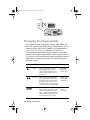
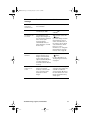
Problem
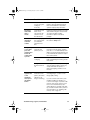
A yellow light
appears next
to the
viewfinder
when I press
the shutter
button
halfway
down.
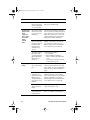
My image is
blurry.
58
Possible cause
Solution
The memory card
that you have in the
camera is damaged
or is not formatted.
Format the memory card or replace it
with a new, formatted card.
The camera cannot
find a focus because
you are too close to
the subject.
The camera’s automatic focus range is
20 cm (~8 inches) to infinity and focuses
on the object in the center of the frame.
Make sure you are not too close to the
subject and that you have placed the
subject in the middle of the frame.
The camera cannot
find a focus because
the subject does not
provide enough
contrast for the
automatic focus
system.
Try a different angle or change the
lighting on your subject. You can also
use focus lock to set the focus on a
different subject. For more information,
see “Using focus lock” on page 10.
The exposure will be
longer than 1/30
second because the
light is dim and the
flash has been
turned off.
Try the following solutions:
• Use the flash.
• Wait for lighting conditions to
improve or turn on the lights in the
room.
• Use a tripod to steady the camera
for the longer exposure.
Your subject was too
close to the camera
lens.
The camera’s automatic focus range is
20 cm (~8 inches) from the front of the
lens to infinity. For a clear, sharp image,
make sure your subject is within this
range.
The subject wasn’t
centered in the
frame, or the subject
did not provide
enough contrast for
the camera to focus
properly.
If you do not want your subject in the
middle of the image, or if the subject
lacks contrast, use focus lock to set the
camera’s automatic focus using a
different subject. For more information,
see “Using focus lock” on page 10.
The subject moved
while you took the
picture.
If you are photographing a moving
object, try using focus lock.
You moved the
camera while you
took the picture.
Hold the camera steady as you press
the SHUTTER button, or use a tripod.
HP photosmart 318 User Guide