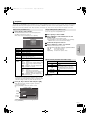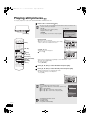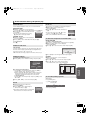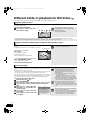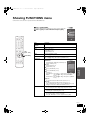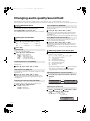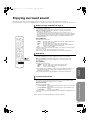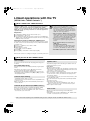
1
SC-BT100P-ENG.book 1 ページ
2008年2月20日 水曜日 午後6時22分
Operating Instructions
P4 Quick Start Guide
Blu-ray Disc Home Theater Sound System
Model No. SC-BT100
Dear customer
Thank you for purchasing this product.
For optimum performance and safety, please read these instructions carefully.
Before connecting, operating or adjusting this product, please read the instructions completely. Please keep this manual for future reference.
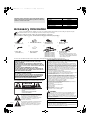
BD-Video
This unit plays BD-Video marked with labels containing the region code A.
Example:
DVD-Video
This unit plays DVD-Video marked with labels containing the region number “1” or “ALL”.
Example:
1
®
As an ENERGY STAR Partner,
Panasonic has determined that
®
this product meets the ENERGY STAR
guidelines for energy efficiency.
For Canada only: The word “Participant” is used in place of the word
“Partner”.
P
1
2
ALL
4
If you have any questions contact
[[U.S.A.]:1-800-211-PANA(7262)
[Canada]:1-800-561-5505
[[U.S.A.]:The warranty can be found on page 46.
[Canada]:The warranty can be found on page 47.
RQT9129-P
PC
until
2008/3/3
P27 Enjoying surround sound
Region management information
SC-BT100P-ENG.book 2 ページ
2008年2月21日 木曜日 午前11時13分
Operations in these instructions are described mainly with the
remote control, but you can perform the operations on the main
unit if the controls are the same.
System
Main unit
Front speakers
Center speaker
Surround speakers
Subwoofer
Digital transmitter
Wireless system
SC-BT100
SA-BT100
SB-HF100
SB-HC100
SB-HS100
SB-HW560
SH-FX67T
SE-FX67
Accessory information
Please check and identify the supplied accessories. Use numbers indicated in parentheses when asking for replacement parts.
(Product numbers correct as of February 2008. These may be subject to change.)
Only for U.S.A.: To order accessories, refer to “Accessory Purchases” on page 46.
Only for Canada: To order accessories, call the dealer from whom you have made your purchase.
∏
∏
∏
∏
1 Remote control
(N2QAKB000061)
2 Remote control batteries
1 AM loop antenna
(N1DAAAA00002)
1 FM indoor antenna
(RSA0007-M)
∏
∏
∏
∏
1 Video cable
(K2KA2BA00001)
1 Sheet of speaker
cable stickers
5 Speaker cables
[REEX0859-L (White)]
[REEX0867A-L (Red)]
[REEX0858-L (Green)]
[REEX0860A-L (Blue)]
[REEX0868A-L (Gray)]
2 AC power supply cords
(K2CB2CB00021)
≥For use with this unit only. Do not use
them with other equipment. Also, do not
use cords for other equipment with this
unit or wireless system.
The enclosed Canadian French label sheet corresponds to the English display on the front and back side of the unit.
THE FOLLOWING APPLIES ONLY IN THE U.S.A.
WARNING:
TO REDUCE THE RISK OF FIRE, ELECTRIC SHOCK OR
PRODUCT DAMAGE,
≥DO NOT EXPOSE THIS APPARATUS TO RAIN, MOISTURE,
DRIPPING OR SPLASHING AND THAT NO OBJECTS FILLED
WITH LIQUIDS, SUCH AS VASES, SHALL BE PLACED ON THE
APPARATUS.
≥USE ONLY THE RECOMMENDED ACCESSORIES.
≥DO NOT REMOVE THE COVER (OR BACK); THERE ARE NO
USER SERVICEABLE PARTS INSIDE. REFER SERVICING TO
QUALIFIED SERVICE PERSONNEL.
CAUTION!
THIS PRODUCT UTILIZES A LASER.
USE OF CONTROLS OR ADJUSTMENTS OR PERFORMANCE
OF PROCEDURES OTHER THAN THOSE SPECIFIED HEREIN
MAY RESULT IN HAZARDOUS RADIATION EXPOSURE.
DO NOT OPEN COVERS AND DO NOT REPAIR YOURSELF.
REFER SERVICING TO QUALIFIED PERSONNEL.
(For wireless system)
The following mark and symbols are located on bottom of the unit.
CAUTION
RISK OF ELECTRIC SHOCK
DO NOT OPEN
CAUTION: TO REDUCE THE RISK OF ELECTRIC
SHOCK, DO NOT REMOVE SCREWS.
NO USER-SERVICEABLE PARTS
INSIDE.
REFER SERVICING TO QUALIFIED
SERVICE PERSONNEL.
The lightning flash with arrowhead symbol, within
an equilateral triangle, is intended to alert the user
to the presence of uninsulated “dangerous
voltage” within the product’s enclosure that may be
of sufficient magnitude to constitute a risk of
electric shock to persons.
RQT9129
2
The exclamation point within an equilateral triangle
is intended to alert the user to the presence of
important operating and maintenance (servicing)
instructions in the literature accompanying the
appliance.
FCC Note:
This equipment has been tested and found to comply with the limits for a Class
B digital device, pursuant to Part 15 of the FCC Rules.
These limits are designed to provide reasonable protection against harmful
interference in a residential installation. This equipment generates, uses and
can radiate radio frequency energy and, if not installed and used in accordance
with the instructions, may cause harmful interference to radio communications.
However, there is no guarantee that interference will not occur in a particular
installation. If this equipment does cause harmful interference to radio or
television reception, which can be determined by turning the equipment off and
on, the user is encouraged to try to correct the interference by one or more of
the following measures:
≥ Reorient or relocate the receiving antenna.
≥ Increase the separation between the equipment and receiver.
≥ Connect the equipment into an outlet on a circuit different from that to which
the receiver is connected.
≥ Consult the dealer or an experienced radio/TV technician for help.
FCC caution: To maintain compliance with FCC regulations, shielded interface
cables must be used with this equipment. Operation with non-approved
equipment or unshielded cables may result in interference to radio and TV
reception. Any changes or modifications not approved by the party responsible
for compliance could void the user’s authority to operate this equipment.
This device complies with Part 15 of the FCC Rules.
Operation is subject to the following two conditions:
(1) This device may not cause harmful interference, and
(2) this device must accept any interference received, including interference
that may cause undesired operation.
Responsible Party:
Panasonic Corporation of North America
One Panasonic Way
Secaucus, NJ 07094
Support Contact:
Panasonic Consumer Electronics Company
Telephone No.: 1-800-211-PANA (7262)
WARNING:
To satisfy FCC RF exposure requirements for mobile transmitting devices, a
separation distance of 20 cm or more should be maintained between the
antenna of this device and persons during device operation. To ensure
compliance, operations at closer than this distance is not recommended. The
antenna used for this transmitter must not be co-located in conjunction with any
other antenna or transmitter.
THE FOLLOWING APPLIES ONLY IN CANADA.
(For wireless system)
This Class B digital apparatus complies with Canadian ICES-003.
This device complies with RSS-210 of the IC Rules.
Operation is subject to the following two conditions:
(1) This device may not cause harmful interference,
(2) This device must accept any interference received, including interference
that may cause undesired operation of the device.
SC-BT100P-ENG.book 3 ページ
2008年2月20日 水曜日 午後6時22分
Getting started
Advanced operations
Accessory information ..................................... 2
Preparing the remote control........................... 3
IMPORTANT SAFETY INSTRUCTIONS............ 3
Playing still pictures ....................................... 22
Different kinds of playback for BD-Video ..... 24
Showing FUNCTIONS menu........................... 25
Changing audio quality/sound field .............. 26
Enjoying surround sound .............................. 27
Linked operations with the TV
(VIERA LinkTM “HDAVI ControlTM”)............... 28
Changing settings with the on-screen menu ... 30
Changing settings with the setup menu ....... 32
Quick Start Guide
STEP 1 Positioning ....................................4
STEP 2 Basic connections........................6
STEP 3 Setting up the unit ........................9
Control reference guide.................................. 10
Disc and card information.............................. 12
Getting started
Table of contents
Basic operations
Optional connections and settings ............... 35
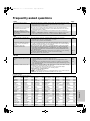
Frequently asked questions........................... 37
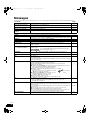
Messages ......................................................... 38
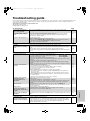
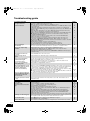
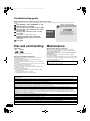
Troubleshooting guide ................................... 39
Disc and card handling................................... 42
Maintenance .................................................... 42
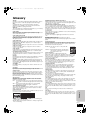
Glossary........................................................... 43
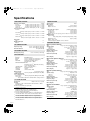
Specifications.................................................. 44
Limited Warranty (ONLY FOR U.S.A.) ........... 46
Limited Warranty (ONLY FOR CANADA) ...... 47
Product Service............................................... 47
Index.................................................. Back cover
Basic play (Playing video contents).............. 14
Enjoying TV with this unit’s speakers........... 17
Enjoying the FM/AM radio .............................. 18
Playing music .................................................. 19
Playing an iPod on this unit ........................... 20
Basic
operations
Reference
Preparing the remote control
Batteries
Insert so the poles (i and j) match those in the remote control.
When closing the lid, insert it from the j (minus) side.
Mishandling of batteries can cause electrolyte leakage which can
damage items the fluid contacts and may cause a fire.
Remove batteries if the remote control is not going to be used for a
long period of time. Store in a cool, dark place.
Use
R6/LR6, AA
≥Do not use rechargeable type batteries.
≥Do not mix old and new batteries.
≥Do not use different types at the same time.
≥Do not heat or expose to flame.
≥Do not leave the battery(ies) in an automobile exposed to direct
sunlight for a long period of time with doors and windows closed.
≥Do not take apart or short circuit.
≥Do not attempt to recharge alkaline or manganese batteries.
≥Do not use batteries if the covering has been peeled off.
30˚
Advanced
operations
Remote control signal sensor
10˚
30˚
30˚
7 m (23 ft.) directly in front of the unit
If you cannot operate the unit using the remote control after
changing the batteries, please re-enter the codes (> 42).
Read these operating instructions carefully before using the unit. Follow the safety instructions on the unit and the applicable safety instructions
listed below. Keep these operating instructions handy for future reference.
1) Read these instructions.
10) Protect the power cord from being walked on or pinched
2) Keep these instructions.
particularly at plugs, convenience receptacles, and the point
3) Heed all warnings.
where they exit from the apparatus.
4) Follow all instructions.
11) Only use attachments/accessories specified by the
5) Do not use this apparatus near water.
manufacturer.
6) Clean only with dry cloth.
12) Use only with the cart, stand, tripod, bracket, or
7) Do not block any ventilation openings. Install in accordance with
table specified by the manufacturer, or sold with
the manufacturer’s instructions.
the apparatus. When a cart is used, use caution
8) Do not install near any heat sources such as radiators, heat
when moving the cart/apparatus combination to
registers, stoves, or other apparatus (including amplifiers) that
avoid injury from tip-over.
produce heat.
13) Unplug this apparatus during lightning storms or
9) Do not defeat the safety purpose of the polarized or
when unused for long periods of time.
grounding-type plug. A polarized plug has two blades with one
14) Refer all servicing to qualified service personnel. Servicing is
wider than the other. A grounding-type plug has two blades and
required when the apparatus has been damaged in any way,
a third grounding prong. The wide blade or the third prong are
such as power-supply cord or plug is damaged, liquid has been
provided for your safety. If the provided plug does not fit into your
spilled or objects have fallen into the apparatus, the apparatus
outlet, consult an electrician for replacement of the obsolete
has been exposed to rain or moisture, does not operate
outlet.
normally, or has been dropped.
Reference
IMPORTANT SAFETY INSTRUCTIONS
RQT9129
3
SC-BT100P-ENG.book 4 ページ
STEP
2008年2月20日 水曜日 午後6時22分
1 Positioning
Caution
≥The main unit and supplied speakers are to be used only as indicated in this setup. Failure to do so may lead to damage
to the amplifier and/or the speakers, and may result in the risk of fire. Consult a qualified service person if damage has
occurred or if you experience a sudden change in performance.
≥Do not attempt to attach these speakers to walls using methods other than those described in this manual.
How you set up your speakers can affect the bass and the sound field.
Note the following points:
≥Place speakers on flat secure bases.
≥Placing speakers too close to floors, walls, and corners can result in
excessive bass. Cover walls and windows with thick curtains.
[Note]
Keep your speakers at least 10 mm (13/32q) away from the system for
proper ventilation.
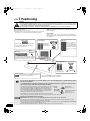
Setup example
Place the front, center, and surround speakers at approximately the
same distance from the seating position. The angles in the diagram
are approximate.
Front speakers
Center speaker
Left and right
speakers are
interchangeable
Put on a rack or shelf. Vibration caused by
the speaker can disrupt the picture if it is
placed directly on the TV.
Subwoofer
Place to the right or
left of the TV, on the
floor or a sturdy shelf
so that it will not cause
vibration. Leave about
30 cm (1113/16q) from the
TV.
60º
Digital
transmitter§
Main unit
To allow for proper ventilation and to maintain
good airflow around the main unit, position it
with at least 5 cm (2q) of space on all sides.
Surround speakers
Left and right
speakers are
interchangeable.
120º
Wireless system§
Place the wireless system within approximately
10 m (33 ft.) from the main unit.
§
Do not use the wireless system or the digital
transmitter in a metal cabinet or bookshelf.
Do not use a front speaker as a surround speaker or vice versa. Verify the type of speaker with the label on
the rear of the speaker.
NOTE
To avoid interference, maintain the following distances between the wireless system and other electronic
devices that use the same radio frequency (2.4 GHz band).
The wireless system will automatically seek a clear channel if any of these Wireless
other devices interfere with its communication. When this happens, the
system
wireless link indicator (“ [W2S] ” or “ [W4S] ”) flashes on the main unit, and
there is a brief interruption in audio coming from the surround speakers.
This is the normal operation of the product working to assure the best
possible performance of your home theater system.
If the interference persists, try moving the other devices to another location
outside the range of the wireless system or move the wireless system nearer to the main unit.
Wireless LAN:
approx. 2 m (6 1/2 ft.)
Cordless phone and other
electronic devices:
approx. 2 m (6 1/2 ft.)
Enjoying 7.1-channel surround sound
RQT9129
4
Optional Panasonic wireless accessory SH-FX67/Optional Panasonic speaker system SB-HS100A
You can enjoy 7.1ch surround sound when you use the optional Panasonic wireless system SH-FX67 and speaker system
SB-HS100A. Refer to the relevant operating instructions for details.
≥You can also enjoy 7.1ch surround sound by connecting an amplifier using audio cable via the SURROUND and SURROUND
BACK terminals on the back of the main unit (> 36).
≥System speaker settings will need to be changed in order to enjoy 7.1ch surround sound (> 34).
2008年2月20日 水曜日 午後6時22分
∫ Notes on speaker use
≥Use only supplied speakers
Using other speakers can damage the unit, and sound quality will be
negatively affected.
≥You can damage your speakers and shorten their useful life if you
play sound at high levels over extended periods.
≥Reduce the volume in the following cases to avoid damage:
– When playing distorted sound.
– When the speakers are reverberating due to a record player, noise
from FM broadcasts, or continuous signals from an oscillator, test
disc, or electronic instrument.
– When adjusting the sound quality.
– When turning the unit on or off.
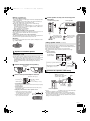
3 Fit the speaker securely onto the screw(s) with
the hole(s).
Center speaker
Front/Surround speaker
Getting started
SC-BT100P-ENG.book 5 ページ
∫ If irregular coloring occurs on your TV
e.g.,
∫ Caution
Do not touch the front netted area of the speakers. Hold by the sides.
e.g., Center speaker
Do not
In this position, the
speaker will likely fall
if moved to the left or
right.
Move the speaker
so that the screw is
in this position.
Quick Start Guide
The front and center speakers are designed to be used close to a TV,
but the picture may be affected with some TVs and setup
combinations.
If this occurs, turn the TV off for about 30 minutes.
The demagnetizing function of the TV should correct the problem. If it
persists, move the speakers further away from the TV.
Do
Fitting speaker stands (not included)
Do not
Do
Speaker installation options
(Except subwoofer)
Ensure the stands meet these conditions before purchasing them.
Note the diameter and length of the screws and the distance between
screws as shown in the diagram.
≥The stands must be able to support over 10 kg (22 lbs).
≥The stands must be stable even if the speakers are in a high
position.
e.g., Center speaker
Metal screw holes
For attaching to
speaker stands
Attaching to a wall
You can attach all of the speakers (except subwoofer) to a wall.
≥The wall or pillar on which the speakers are to be attached should
be capable of supporting 10 kg (22 lbs) per screw. Consult a
qualified building contractor when attaching the speakers to a wall.
Improper attachment may result in damage to the wall and
speakers.
5.0 mm (3/16q), pitch 0.8 mm (1/32q)
1 Detach stand (Front/Surround speakers).
Plate thickness plus 7 mm to
10 mm (plus 9/32q to 13/32q)
Remove the
3 screws
60 mm (23/8q)
Speaker stand
(not included)
Prevent the speakers from falling
e.g., Front speaker
2 Drive a screw (not included) into the wall.
At least 30 mm (13/16q)
‰4.0 mm (5/32q)
Wall or pillar
String (not included)
Thread from the wall to the
speaker and tie tightly.
Wall
‰7.5 mm to 9.4 mm
(19/64q to 3/8q)
7.0 mm to 9.4 mm (9/32q to 3/8q)
≥Center/Front/Surround speaker
Ensure that the screw is positioned at least 70 mm (23/4q) away
from the ceiling.
≥Center speaker
Ensure that the screw is positioned at least 100 mm (315/16q)
away from the wall.
Fixing the position for the center speaker screws.
1 Drive in a screw 50.5 mm (2q) left of
the right side of the center speaker
as seen directly from the front.
2 Drive another screw 160 mm
(6 5/16q) left of the first screw.
Screw eye
(not included)
Approx.
150 mm
(529/32z)
Rear of the speaker
≥You will need to obtain the appropriate screw eyes to match the walls
and pillars to which they are going to be fastened.
≥Consult a qualified housing contractor concerning the appropriate
procedure when attaching to a concrete wall or a surface that may
not have strong enough support. Improper attachment may result in
damage to the wall or speakers.
RQT9129
5
SC-BT100P-ENG.book 6 ページ
STEP
2008年2月20日 水曜日 午後6時22分
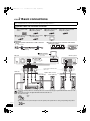
2 Basic connections
≥Do not place the unit on amplifiers or equipment that may become hot. The heat can damage the unit.
≥Turn off all equipment before connection and read the appropriate operating instructions.
Speaker cables and transmitter connection
Sheet of speaker cable
stickers
Speaker cable for front
speaker (L) (White)
Speaker cable for front
speaker (R) (Red)
Speaker cable for surround
speaker (R) (Grey)
Speaker cable for center
speaker (Green)
Digital transmitter
Speaker cable for surround
speaker (L) (Blue)
Preparation
∫ Attach the speaker cable stickers to make connection
easier.
∫ Set the surround selector at the rear of the wireless
system to its center.
e.g., Center speaker
SURR
SURR
SURR
SPEAKERS
NCEINTES
LS / RB LB / RS
AC IN
センター
CENTER
5
Speaker cable sticker
(included)
I/D SET
SURR
センター
CENTER
Do
5
SURROUND (3 – 6 )
L
R
SIDE SIDE AMBIOPHONIQUES
Do not Do not
7 Digital transmitter
Insert fully until you
hear a click.
Main unit
SURROUND
SURROUND
BACK
OPTICAL IN VIDEO OUT
PR
AUX
Wireless system
AM ANT
EXT
OUT
L
SPEAKERS
SPEAKERS
ENCEINTES
LS / RB LB / RS
LOOP
DIGITAL
Y
PB
COMPONENT VIDEO OUT
R
DIGITAL
TRANSMITTER
LOOP
ANT
GND
AC IN
FM ANT
75ǡ
AC IN
I/D SET
SURR
2
1
6
5
6ǡ 6ǡ R 6ǡ L FRONT
SUBWOOFER CENTER
Purple Green
Red
SURROUND (3 – 6 )
L
R
SIDE SIDE AMBIOPHONIQUES
AV OUT
Blue
White
Grey
Connect to the terminals of the
same color.
Subwoofer
Speaker cables (included)
Front speaker (R)
Front
Front speaker (L)
Front
Surround
speaker (L)
Surround
Surround
speaker (R)
Surround
Center speaker
Center
≥Do not use a front speaker as a surround speaker or vice versa. Verify the type of speaker with the label on the rear of the
speaker.
≥Do not insert or remove the digital transmitter while the main unit is on.
NOTE ≥Insert the wires fully.
i: White
j: Blue
Push!
≥Be careful not to cross (short-circuit) or reverse the polarity of the speaker wires as doing so may damage the speakers.
RQT9129
6
Do not
SC-BT100P-ENG.book 7 ページ
2008年2月20日 水曜日 午後6時22分
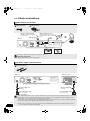
Connection to a TV
Getting started
≥Do not connect through the video cassette recorder. Due to copy guard protection, the picture may not display properly.
With an HDMI cable
OPTICAL
OUT
AUDIO OUT
AV IN
L
Audio cable §
(not included)
≥The optical digital
audio cable can be
used when connecting
to televisions with
optical out terminals
(> right).
R
HDMI cable (not included)
Main unit
SURROUND
SURROUND
BACK
OPTICAL IN VIDEO OUT
PR
AUX
AM ANT
EXT
OUT
L
SPEAKERS
Optical
digital audio
cable §
(not included)
OPTICAL IN VIDEO OUT
PR
AUX
AM ANT
EXT
L
LOOP
Y
PB
LOOP
LOOP
ANT
GND
DIGITAL
R
COMPONENT VIDEO OUT
Quick Start Guide
HDMI
compatible
TV
LOOP
ANT
GND
DIGITAL
Y
PB
R
COMPONENT VIDEO OUT
FM ANT
75ǡ
FM ANT
75ǡ
AC IN
2
1
6
5
6ǡ 6ǡ R 6ǡ L FRONT
SUBWOOFER CENTER
1
L FRONT
AV OUT
AV OUT
Please use High Speed HDMI cables that have the HDMI logo (as shown on the cover).
It is recommended that you use Panasonic’s HDMI cable.
Recommended part number:
NOTE RP-CDHG10 (1.0 m/3.3 ft.), RP-CDHG15 (1.5 m/4.9 ft.), RP-CDHG20 (2.0 m/6.6 ft.),
RP-CDHG30 (3.0 m/9.8 ft.), RP-CDHG50 (5.0 m/16.4 ft.), etc.
NECESSARY SETTINGS
“HDMI Video Mode” : “On”/“HDMI Audio Output” : “Off” (> 33)
With this connection, you can use VIERA Link “HDAVI Control” (> 28).
§
These audio connections will enable you to play audio from your television through your home theater system (> 17).
With Video cable
Video cable
VIDEO IN
OPTICAL
OUT
TV
AUDIO IN
AUDIO OUT
L
L
R
R
Video cable (included)
Main unit
SURROUND
SURROUND
BACK
OPTICAL IN VIDEO OUT
PR
AUX
AM ANT
EXT
OUT
L
SPEAKERS
LOOP
DIGITAL
Y
PB
COMPONENT VIDEO OUT
R
LOOP
ANT
GND
Optical
digital audio
cable §
(not included)
Audio cable §
(not included)
≥The optical digital
audio cable can be
used when connecting
to televisions with
optical out terminals
(> right).
OPTICAL IN VIDEO OUT
PR
AUX
AM ANT
EXT
L
LOOP
DIGITAL
Y
PB
R
COMPONENT VIDEO OUT
FM ANT
75ǡ
LOOP
ANT
GND
FM ANT
75ǡ
AC IN
2
1
6
5
6ǡ 6ǡ R 6ǡ L FRONT
SUBWOOFER CENTER
1
AV OUT
L FRONT
AV OUT
Optional connections
≥For those who want to enjoy higher picture quality and have a TV equipped with an HDMI terminal (> above)
≥For those who want to enjoy higher picture quality and have a TV equipped with a COMPONENT VIDEO IN terminal (> 35)
≥For those who have a Set Top Box (Satellite receiver, Cable box, etc) or video cassette recorder (> 35)
NOTE
§
These audio connections will enable you to play audio from your television through your home theater system (> 17).
RQT9129
(Continued on the next page)
7
SC-BT100P-ENG.book 8 ページ
STEP 2
2008年2月20日 水曜日 午後6時22分
Basic connections
Radio antenna connections
FM Indoor antenna
AM loop antenna
AM loop antenna (included)
Stand the antenna up on its base.
Place the antenna where reception
is best.
Red
White
FM indoor antenna (included)
Affix this end of the antenna where
reception is best.
Adhesive tape
Main unit
SURROUND
SURROUND
BACK
OPTICAL IN VIDEO OUT
PR
AUX
Click!
AM ANT
EXT
OUT
L
SPEAKERS
LOOP
DIGITAL
Y
PB
R
COMPONENT VIDEO OUT
DIGITAL
TRANSMITTER
LOOP
ANT
GND
FM ANT
75ǡ
Black
AC IN
2
1
6
5
6ǡ 6ǡ R 6ǡ L FRONT
SUBWOOFER CENTER
AV OUT
Push!
≥Keep loose antenna cables away from other wires and cables.
Optional connections
NOTE ≥Using FM/AM outdoor antenna (optional) (> 36).
AC power supply cord connections
AC power supply cord
Wireless system
Main unit
SURROUND
SURROUND
BACK
OPTICAL IN VIDEO OUT
PR
AUX
AM ANT
EXT
OUT
LOOP
DIGITAL
Y
2
1
6
5
6ǡ 6ǡ R 6ǡ L FRONT
SUBWOOFER CENTER
AC power supply cord
(included)
To a household AC outlet
(AC 120 V, 60 Hz)
PB
COMPONENT VIDEO OUT
R
LOOP
ANT
GND
DIGITAL
TRANSMITTER
AC IN
FM ANT
75ǡ
SURR
AC IN
SPEAKERS
ENCEINTES
LS / RB LB / RS
L
SPEAKERS
I/D SET
SURROUND (3 – 6 )
L
R
SIDE SIDE AMBIOPHONIQUES
AV OUT
AC power supply cord
(included)
To a household AC outlet
(AC 120 V, 60 Hz)
Power consumption
The main unit and the wireless system consume a small amount of power when they are turned off (Main unit: approx. 0.3 W, wireless
system: approx. 0.2 W). To save power when they are not to be used for a long time, unplug them from the household AC outlet.
NOTE You will need to reset some memory items after plugging in the main unit.
The included AC power supply cords are for use with the main unit and wireless system only. Do not use them with other equipment.
Also, do not use cords for other equipment with the main unit or wireless system.
RQT9129
8
≥When the AC power supply cord is connected for the first time, “PLEASE WAIT” is displayed on the main unit’s display for about
30 seconds and power is turned off automatically.
SC-BT100P-ENG.book 9 ページ
STEP
2008年2月20日 水曜日 午後6時22分
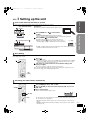
3 Setting up the unit
Getting started
Turn on the main unit and wireless system
Turn on the power of the main unit and the wireless system after all connections are complete.
POWER
AUTO OPERATION ON/OFF
indicator
Preparation
Turn on the TV and select the appropriate video input on the TV.
VIDEO1
AUTO OPERATION ON/OFF
1 Press [POWER C I, B Í] on the wireless
system.
Quick Start Guide
≥AUTO OPERATION ON/OFF indicator lights red when the
wireless system is turned on and lights green when the wireless link is activated.
2 Press [POWER Í/I] on the main unit.
≥Standby/on indicator (Í) goes out when the unit is turned on.
Standby/on indicator (Í)
≥When the link between the main unit and the wireless system is
activated, “[W2S]” or “[W4S]” is illuminated in the main unit’s display.
e.g., “[W2S]”
SD SL
W2S
≥If “[W2S]” or “[W4S]” is flashing in the main unit’s display, check that the digital transmitter
at the back of the main unit is inserted correctly.
Easy Setting
When the system is switched on for the first time, a screen for the basic settings is displayed automatically. Follow the on-screen prompts to make
basic settings for the system.
1 Press [Í].
Setup screen appears.
≥If this unit is connected to a Panasonic TV (VIERA) supporting HDAVI Control 2 or HDAVI
Control 3 via an HDMI cable, then the “On-screen Language” and “TV Aspect” setting
information on the TV are captured from the TV.
[Í]
2 Follow the on-screen instructions and make the settings with
[3, 4] and [OK].
“On-screen Language” (> 33) and “TV Aspect” (> 33) are set.
≥You can perform this setup anytime by selecting “Easy Setting” in the Setup menu. (> 32)
≥You can also change these settings individually. (> 33)
[OK]
[3, 4]
Presetting the radio stations automatically
Up to 30 stations can be set in each band, FM and AM.
1 Press [FM/AM] to select “FM” or “AM”.
2 Press [6, 5] to select the lowest frequency (FM: 87.9 or 87.5,
AM: 520).
3 Press and hold [OK].
[FM/AM]
Release the button when “M” begins to flash.
DISC iPod SD
[6, 5]
[OK]
W2S
W4S
M
D EX
PL x
96/24
D+
HD
NEO:6
The tuner tunes to the lowest frequency and starts to preset all the stations it can receive
into the channels in ascending order.
≥“SET OK” is displayed when the stations are set, and the radio tunes to the last preset
station.
≥“ERROR” is displayed when automatic presetting is unsuccessful. Preset the channels
manually (> 18).
RQT9129
9
SC-BT100P-ENG.book 10 ページ
2008年2月20日 水曜日 午後6時22分
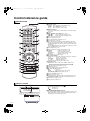
Control reference guide
Remote control
! Turn the unit on and off (> 14)
@ Select the source
[BD/SD]: Select disc drive or SD card drive (> 14)
[FM/AM]: Select FM/AM tuner (> 9, 18)
[iPod]:
Select iPod as the source (> 21)
# Numbered buttons
Select preset radio stations and title numbers, etc./Enter numbers
(> 15, 18)
$ Cancel
% Basic playback control buttons (> 14, 15)
[:, 9]:
Select preset radio stations (> 18)
[6, 5]:
Select radio station manually (> 18)
^ Show on-screen menu (> 30)
& Show Pop-up menu (> 24)
* Show Top Menu/Direct Navigator (> 14)
( Show sub menu (> 16, 23)
AJ These buttons are used when operating a BD-Video disc that
includes JavaTM applications (BD-J). For more information about
operating this kind of disc, please read the instructions that came
with the disc.
The [A] and [B] buttons are also used with the “Title View”, “Picture
View” and “Album View” screens (> 22).
AA Show Setup menu (> 32)
AB Remove interference during radio reception (> 18)
AC [SOUND]:
Set the sound effect (> 26)
[SLEEP]:
Set the sleep timer (> 16)
[CH SELECT]:
Select speaker channel (> 26)
[MUTING]:
Mute the sound (> 16)
AD Transmit the remote control signal
AE TV operation buttons
Aim the remote control at the Panasonic TV and press the button.
[Í TV]:
Turn the TV on and off
[TV/VIDEO]:
Switch the input channel
[i j VOL]:
Adjust the TV volume
≥This may not work properly with some models.
AF Select the source
BD/DVD/CD,) SD,) FM,)AM,)IPOD,)D-IN,)AUX
AG
AH
AI
BJ
BA
BB
BC
BD
Adjust the volume of the main unit (> 15)
Select audio (> 16)
Start up and play a disc automatically (> 28)
[3, 4, 2, 1]: Menu selection
[OK]:
Selection
[2, 1]:
Select preset radio station (> 18)
[2] (2;), [1] (;1):Frame-by-frame (> 16)
Show FUNCTIONS menu (> 25)
Return to previous screen
[PIP]: Switch on/off Secondary Video (Picture-in-picture) (> 24)
[SECONDARY AUDIO]: Switch on/off Secondary Audio (> 24)
Show status messages (> 16)
BE Enjoy surround sound (> 27)
Wireless system
POWER
RQT9129
10
AUTO OPERATION ON/OFF
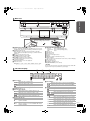
! Unit on/off button [POWER C I, B Í] (> 9)
Use this button to turn the unit on and off.
C I:
This unit is on.
B Í: This unit is off.
@ AUTO OPERATION ON/OFF indicator
The indicator lights red when the wireless system is turned on and
lights green when the wireless link is activated. When the wireless
link is inactive for a long time, it turns red.
SC-BT100P-ENG.book 11 ページ
2008年2月20日 水曜日 午後6時22分
Main unit
7.1CH
D.S.P.
SELECTOR
Getting started
SW
BOOST
Place your finger on the 4 section
and open it diagonally downwards.
! POWER button (POWER Í/I) (> 14)
Press to switch the unit from on to standby mode or vice-versa. In
standby mode, the unit is still consuming a small amount of power.
@ Standby/on indicator (Í)
When the unit is connected to the household AC outlet, this
indicator lights up in standby mode and goes out when the unit is
turned on.
# Open or close the disc tray (> 14)
$ SW BOOST (Subwoofer boost) button
Turn Subwoofer boost on/off (> 26)
% SW BOOST (Subwoofer boost) indicator
Lights when Subwoofer boost is on (> 26)
^ 7.1CH D.S.P. indicator
Illuminated during 7.1ch source playback.
& Select the source
BD/DVD/CD") SD") FM")AM")IPOD")D-IN")AUX
^"""""""""""""""""""""""""""""""b
* Select the radio station manually (> 18)
Search/Slow-motion/Skip (> 15)
Search:
Press and hold (During play)
Slow-motion: Press and hold (During pause)
Skip:
Press
( Stop (> 15)
AJ Start play (> 14)
AA Disc tray (> 14)
AB Remote control signal sensor
AC Display
AD Adjust the volume of the main unit (> 14)
AE Volume indicator
≥It is possible to set the indicator to turn on/off. (> 33, FL Display)
AF SD card slot (> 14)
AG Connect iPod (> 20)
AH Headphone terminal (> 14)
Rear panel terminals (> 6–8, 35–36)
CAUTION
Do not place objects in front of the unit. The disc tray may collide with
objects when it is opened, and this may cause injury.
The unit’s display
DISC iPod SD SLP TUNED
MONO ST M DTS
D
PL x
W2S
W4S
! Drive indicator
Lights when disc is ready to play.
DISC
iPod
SD
Lights when iPod is ready to play.
Lights when SD card is ready to play.
≥The indicator blinks when reading data.
@ SLEEP indicator (> 16)
# Radio broadcast display
TUNED Lights when receiving a radio broadcast (> 18)
MONO
ST
M
Lights when set to monaural reception (> 18)
Lights when set to stereo broadcast reception (> 18)
Flashes during preset channel registration (> 9)
$ Wireless link indicator
Lights when speaker setting (> 33, Speaker, 34,
Speaker settings) is set to 5.1ch and link with wireless
W2S
system is activated
Lights when speaker setting (> 33, Speaker, 34,
Speaker settings) is set to 7.1ch and link with wireless
W4S
system is activated
≥The indicator blinks when the wireless link is inactive for a long time.
96/24
D+
HD
NEO:6
% Main display section
^ iPod indicator
Illuminated during iPod repeat playback (EXTENDED
mode only, > 21)
Illuminated during iPod shuffle playback (EXTENDED
mode only, > 21)
& Audio signal indicator
Lights when DTS decoder is being used.
DTS
Lights when DTS-HD decoder is being used.
DTS
DTS
DTS
Lights when DTS-ES decoder is being used.
96/24
D
D+
PL
PL x
HD
NEO:6
Lights when DTS 96/24 decoder is being used.
Lights when Dolby Digital decoder is being used.
Lights when Dolby Digital Plus decoder is being
used.
Lights when Dolby Pro Logic II decoder is being
used.
Lights when Dolby Pro Logic IIx decoder is being
used.
Lights when Dolby TrueHD decoder is being
used.
Lights when DTS NEO:6 matrix decoder is being
used.
RQT9129
11
SC-BT100P-ENG.book 12 ページ
2008年2月20日 水曜日 午後6時22分
Disc and card information
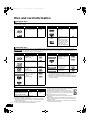
Packaged discs
This chart shows the different type of retail/commercial discs you can use, and also includes the industry-standard logos that should appear on
the discs and/or packaging.
Type of media/
Logo
BD-Video
Features
High Definition (HD)
movie and music discs
Indicated as
Type of media/
Logo
[BD-V]
DVD-Video
CD
Features
High quality movie and
music discs
Compact Discs (CD’s)
that contain audio and
music
≥Operation and sound
quality of CDs that do
not conform to CD-DA
specifications (copy
control CDs, etc.)
cannot be guaranteed.
Indicated as
[DVD-V]
[CD]
Recorded discs
This chart shows the different type of discs recorded with DVD recorders, DVD video cameras, personal computers, etc. that you can use.
Finalized
Type of media/
Logo
BD-RE
This mark means you must finalize the disc with the DVD recorder, etc. before playback. For details about finalizing, refer to
the operating instructions for your equipment.
Formats
≥Version 3 of the
BD-RE Recording
Format
≥JPEG format
Indicated as
Type of media/
Logo
Formats
Indicated as
[BD-V]
DVD-R DL
Finalized
[DVD-V]
[DVD-VR]
[JPEG]
≥DVD-Video Format
≥Version 1.2 of the DVD
Video Recording
Format
≥AVCHD format
≥+VR (+R/+RW Video
Recording) Format
≥AVCHD format
[DVD-V]
BD-R
≥Version 2 of the BD-R
Recording Format
[BD-V]
DVD-RAM
≥Version 1.1 of the DVD
Video Recording
Format
≥JPEG format
≥AVCHD format
[DVD-VR]
+R/+RW/+R DL
DVD-R/RW
Finalized
≥DVD-Video Format
≥Version 1.1 of the DVD
Video Recording
Format
≥AVCHD format
[JPEG]
[AVCHD]
[DVD-V]
[DVD-VR]
[AVCHD]
Finalized
[AVCHD]
[AVCHD]
[CD]
CD-R/RW
[MP3]
Finalized
[JPEG]
≥It may not be possible to play the above discs in some cases
due to the type of discs, the condition of the recording, the
recording method and how the files were created.
≥When a disc recorded in the AVCHD format is being played, the
video may be paused for a few seconds at portions spliced, due
to deletion or editing.
≥CD-DA format
≥MP3 format
≥JPEG format
SD cards
This chart shows the different type of cards recorded with Panasonic High Definition Video Camera or personal computers, etc. that you can use.
≥A miniSD Card and a microSD Card must be used with the
Type of media
Formats
Indicated as
attached adaptor that comes with the card.
≥JPEG format
[JPEG]
≥Useable memory is slightly less than the card capacity.
SD Memory Card§
≥AVCHD
≥If the SD card is formatted on a PC, you may not be able to
[AVCHD]
(from 8 MB to 2 GB)
format
use it on this unit. In this case, format the card on this unit
SDHC Memory Card
(> 24).
(from 4 GB to 16 GB)
≥We recommend using a Panasonic SD card.
§ Including miniSD Card and microSD Card
≥Keep the Memory Card out of reach of children to prevent
swallowing.
≥When using from 4 GB to 16 GB SD cards, only SD cards that
≥When a card recorded in the AVCHD format is being played, the
display the SDHC logo can be used.
video may be paused for a few seconds at portions spliced, due to
≥This unit is compatible with SD Memory Cards that meet SD Card
deletion or edition.
Specifications FAT12 and FAT16 formats, as well as SDHC Memory
≥Switch the write-protect switch to the “LOCK” position to protect the
Cards in FAT32 format.
content from accidental erasure.
≥In these operating instructions, the cards shown in the table
(D above) are comprehensively called SD cards.
ADAPTER
RQT9129
12
2008年2月20日 水曜日 午後6時22分
Regarding BD-Video
≥Enjoy Final Standard Profile functions (> 24), such as picture-in-picture. The various functions differ depending on the disc.
≥When playing a set of two or more BD-Video discs, the menu screen may continue to display even if the disc has been ejected.
≥Dolby TrueHD, Dolby Digital Plus, DTS-HD Master Audio and DTS-HD High Resolution Audio are output as Dolby Digital when “BD-Video
Secondary Audio” (> 33) is set to “On”.
Note about using a DualDisc
Getting started
SC-BT100P-ENG.book 13 ページ
The digital audio content side of a DualDisc does not meet the technical specifications of the Compact Disc Digital Audio (CD-DA) format so play
may not be possible.
Tips for making MP3/JPEG discs
File format
MP3
JPEG
Playable media
CD-R/RW§1
CD-R/RW§1, DVD-RAM§2, BD-RE§3, SD card
Extension
Files must have the extension “.mp3” or “.MP3”.
Files must have the extension “.jpg” or “.JPG”.
Picture resolution
—
between 34k34 and 5120k3840 pixels
(sub sampling is 4:2:2 or 4:2:0)
Bit rates
32 kbps to 320 kbps
—
Sampling frequency
44.1 kHz/48 kHz
—
Reference
ID3 tags: version 1, 2.2, 2.3, 2.4
ID3 is a tag embedded in MP3 track to provide information
about the track.
This unit supports the versions listed above but only titles
and the names of artists can be displayed.
≥If there is a large amount of still picture data etc. within a
MP3 file, play may not be possible.
≥MOTION JPEG: not supported
≥SD card: JPEG conforming DCF§4 (Design rule for
Camera File system)
Thawing Time: approx. 2 sec. (7M pixels)
≥English alphabet and Arabic numerals are displayed correctly. Other characters may not be displayed correctly.
≥The display order on this unit may differ from how the order is displayed on a computer.
≥Depending on how you create the media (writing software), files and folders may not play in the order you numbered
them.
≥This unit is not compatible with packet-write format.
≥Depending on the recording conditions, the media may not play.
≥Operation may take time to complete when there are many files and/or folders and some files may not display or be
playable.
§1
§2
ISO9660 level 1 or 2 (except for extended formats), Joliet
This unit is compatible with multi-session.
This unit is not compatible with packet writing.
Discs must conform to UDF 2.0.
§3
§4
Discs must conform to UDF 2.5.
Design rule for Camera File system: unified standard established
by Japan Electronics and Information Technology Industries
Association (JEITA).
Structure of MP3 and still pictures (JPEG) folders
You can play MP3 and still pictures (JPEG) with this unit by making folders on disc as shown
(D right).
≥Folder structure created on a DVD-RAM, BD-RE or an SD card is not displayed.
e.g.,
Root
P0000001.jpg
P0000002.jpg
001
MP3 files and folders in CD-R/RW
Prefix with 3-digit numbers in the order you want to play them.
002 Folder
P0000003.jpg
P0000004.jpg
P0000005.jpg
Still pictures (JPEG) in CD-R/RW
Files inside a folder are displayed in the order they were updated or taken.
When the highest level folders are “DCIM” folders, they are displayed first on the tree.
003 Folder
004 Folder
Order of play
P0000006.jpg
P0000007.jpg
P0000008.jpg
P0000009.jpg
P0000010.jpg
P0000011.jpg
P0000012.jpg
Discs that cannot be played
≥BD-Video discs recorded at a rate of 50 frame per second
≥BD-RE with the cartridge
≥DVD-RAM that cannot be removed from their cartridges
≥2.6 GB and 5.2 GB DVD-RAM
≥3.95 GB and 4.7 GB DVD-R for Authoring
≥Version 1.0 of DVD-RW
≥+R 8 cm (3z), DVD-ROM, CD-ROM, CDV, SACD, Photo CD,
MV-Disc and PD
≥DVD-Audio
≥Video CD and SVCD
≥WMA discs
≥DivX discs
≥PAL discs
≥HD DVD
≥Other discs that are not specifically supported
RQT9129
13
SC-BT100P-ENG.book 14 ページ
2008年2月20日 水曜日 午後6時22分
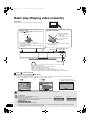
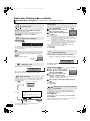
Basic play (Playing video contents)
Preparation
VIDEO1
Turn on the TV and select the appropriate video input on the TV.
Insert a disc.
Insert an SD card.
Press [< OPEN/CLOSE] to open the disc tray
and load the disc.
Insert the card label up
with the cut-off corner
on the right.
≥Press on the center of
the card until it clicks
into place.
Label facing up
≥Press the button again to close the tray.
≥Load double-sided discs so the label for the side you
want to play is facing up.
≥DVD-RAM: Remove the discs from their cartridges
before use.
≥To remove the card, press on the center of the card
and pull it straight out.
Skip/Search/Slow-motion
SELECTOR
Stop
Play
`,_VOLUME
Headphones (not included)
Headphone plug type: ‰3.5 mm (1/8z) stereo mini plug
≥Reduce the volume before connecting.
≥Audio is automatically switched to 2-channel stereo.
≥To prevent hearing damage, avoid listening for prolonged periods of time.
Excessive sound pressure from earphones and headphones can cause hearing loss.
1 Press [Í] to turn on the unit.
2 Insert a disc or an SD card (B see above).
≥If play does not start, press [1] (PLAY).
≥If the screen prompting you to use the color buttons appears, continue to operate with the color buttons on the remote control.
≥If the menu is displayed, press [3, 4, 2, 1] to select the item and press [OK].
e.g., [DVD-VR]
e.g., [BD-V]
e.g., SD card containing pictures
(JPEG) and HD movies (AVCHD)
SD Card
DIRECT NAVIGATOR Title View
DVD-RAM(VR)
No.
01
02
03
04
05
06
07
08
09
10
Rec. Length
0:15 (SP)
Date
9/ 5
9/ 5
9/ 5
9/ 6
9/ 6
9/ 6
9/ 7
9/ 7
9/ 7
9/ 7
Video Picture
Day
Wed
Wed
Wed
Thu
Thu
Thu
Fri
Fri
Fri
Fri
Channel
IN 2
IN 2
VHS
VHS
IN 2
IN 2
Start
10:00AM
11:30AM
11:59PM
10:00AM
11:30AM
11:59PM
10:00AM
10:30AM
11:30AM
11:59PM
Title Name
Picture (JPEG) Navigator
Playback HD Movie (AVCHD)
Select an action or press [RETURN].
SUB
MENU
Page 01/02
MAIN MENU
LANGUAGES
SCENE SELECTION
SPECIAL FEATURES
SUB
MENU
Previous
Play
RETURN
A Video
Next
OK
RETURN
B Picture
≥DISCS CONTINUE TO ROTATE WHILE MENUS ARE DISPLAYED.
Press [∫] when you have finished playback to protect the unit’s motor, your TV screen and so on.
NOTE
TIPS
RQT9129
14
To switch drives
Press [BD/SD] to select “BD/DVD/CD” or “SD”.
Main unit: Press [SELECTOR].
e.g., “BD/DVD/CD”
e.g., “SD”
≥If a disc or an SD card is inserted while the unit is stopped, the drive switches
automatically depending on the inserted media.
To display menus
[BD-V] [AVCHD] [DVD-VR] [DVD-V]
Press [TOP MENU/DIRECT NAVIGATOR].
≥The producers of the disc can control how discs are played. So you may not always be able to control play as described in these
operating instructions. Read the disc’s instructions carefully.
SC-BT100P-ENG.book 15 ページ
2008年2月20日 水曜日 午後6時22分
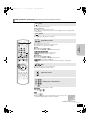
Other operations during play (These functions may not work depending on the disc.)
STOP
Stop
The stopped position is memorized.
Resume play function
Press [1] (PLAY) to restart from this position.
≥The position is cleared if the tray is opened or you press [∫] several times to display “STOP”
on unit’s display.
PAUSE
Pause
≥Press [;] again or [1] (PLAY) to restart play.
SLOW/SEARCH
The speed increases up to 5 steps.
≥Press [1] (PLAY) to revert to normal playback speed.
≥For some discs, the speed may not change.
Basic
operations
Search/Slow-motion
Search
While playing, press [6] or [5].
≥Press and hold [:/6] or [9/5] on the main unit.
≥[BD-V] [AVCHD] [DVD-VR] [DVD-V]:
Audio is heard during first level of forward search.
≥[CD] [MP3]: The speed is fixed to a single step.
Slow-motion
While paused, press [6] or [5].
≥Press and hold [:/6] or [9/5] on the main unit.
≥[BD-V] [AVCHD]: Forward direction [5] only.
≥[DVD-VR]: If continued for approx. 5 minutes, slow-motion play pauses automatically.
SKIP
Skip
Skip to the title, chapter or track you want to play.
≥Each press increases the number of skips.
Adjust the volume
Starting from a selected item
Play starts from the selected title or chapter.
[BD-V] [AVCHD]
e.g., 5: [0] B [0] B [5]
15: [0] B [1] B [5]
[DVD-V]
e.g., 5: [0] B [5]
15: [1] B [5]
≥While stopped (the image on the right is displayed on the screen), the title
is designated. While playing, the chapter is designated.
(Continued on the next page)
RQT9129
15
SC-BT100P-ENG.book 16 ページ
2008年2月20日 水曜日 午後6時22分
Basic play (Playing video contents)
Other operations during play (These functions may not work depending on the disc.)
Screen Aspect
OK
Frame-by-frame
When black bars are shown at the top, bottom, left, and right sides
of the screen, you can enlarge the image to fill the screen.
While paused, press [2] (2;) or [1] (;1).
Each press shows the next frame.
≥Press and hold to change in succession forward or backward.
≥Press [1] (PLAY) to revert to normal playback speed.
≥[BD-V] [AVCHD]: Forward direction [1] (;1) only.
AUDIO
Changing audio during play
[BD-V] [AVCHD] [DVD-V]
e.g., [DVD-V]
Soundtrack
1 ENG
Digital 3/2.1ch
English is selected.
You can change the audio channel number each time you press
the button. This allows you to change the soundtrack language
(> 30, Soundtrack), etc.
[BD-V]
When “BD-Video Secondary Audio” (> 33) is set to “On”, Dolby
TrueHD, Dolby Digital Plus, DTS-HD Master Audio and DTS-HD
High Resolution Audio are output as Dolby Digital regardless of
this setting.
[DVD-VR]
DVD-RAM(VR)
AudioLR>AudioL>Audio R
Play
^---------------------------------}
“AudioLR” is
selected
1 Press [SUB MENU].
2 Press [3, 4] to select “Screen
Aspect” and press [OK].
3 Press [2, 1] to select “Side cut”
or “Zoom”.
e.g., [BD-V]
Screen Aspect
Top Menu
Pop-up Menu
OK
SUB
MENU S
RETURN
Normal: Normal output
Side cut: The black bars on the right and left sides of the 16:9
image disappear and the image is enlarged. Please note
that the right and left sides of the image are cut off when
the black bar is not displayed.
Zoom: The black bars on the top and bottom sides of the 4:3
image disappear and the image is enlarged. Please note
that the top and bottom sides of the image are cut off
when the black bar is not displayed.
≥When “TV Aspect” (> 33) is set to “4:3 Pan & Scan” or “4:3
Letterbox”, the “Zoom” effect is disabled.
To exit the screen
Press [RETURN].
SLEEP
Setting the sleep timer
Press [SLEEP] to select the time (in minutes).
SLEEP 30 ) SLEEP 60 ) SLEEP 90 )SLEEP 120 )OFF
^""""""""""""""""""""""""""""""""b
SLP
AudioLR
To confirm the remaining time
Press [SLEEP] again.
Muting the sound
“MUTING” flashes on the unit’s display.
Chapter playback [DVD-VR]
1
≥To cancel, press [MUTING] again or adjust the volume.
≥Muting is canceled when you switch the unit to standby.
While “Title View” screen is displayed
Press [3, 4] to select the title
and press [SUB MENU].
Properties
View Chapters
To picture
2 Press [3, 4] to select “View
Chapters” and press [OK].
Status messages
The status messages give you information about what is currently
being played. Each time you press [STATUS], the information
displayed will change.
Type of disc
Play status
e.g., [BD-V]
BD-Video
Properties: To display the title properties (recording date, etc.)
To picture: Playing still pictures (> 22)
3 Press [2, 1] to select the chapter and press
[OK].
To exit the screen
Press [SUB MENU].
Play
Enjoying stereo sources with surround
sound effect
You can enhance stereo sources with surround sound effect.
No display
T: Title
C: Chapter
PL: Playlist
To enjoy stereo sources in surround sound with Dolby Pro
Logic II/Dolby Pro Logic IIx
Items change depending on the disc
played.
Elapsed time in the title
T1
C1
0:05.14
0:20.52
Current position
RQT9129
16
Total time
Depending on the kind of disc or the playback status,
this display may not appear.
Press [ÎPLIIx].
To enjoy stereo sources in surround sound with DTS NEO:6
Press [NEO:6].
For more detailed information on this operation, please refer to the
“Enjoying surround sound” section on page 27.
SC-BT100P-ENG.book 17 ページ
2008年2月20日 水曜日 午後6時22分
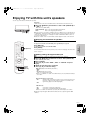
Enjoying TV with this unit’s speakers
You can enjoy TV broadcasts with this unit’s speakers.
Preparation
Confirm the audio connection to the OPTICAL IN or AUX terminal on the main unit (> 7).
1 Press [N, O SELECT] several times to select “D-IN” (DIGITAL IN) or
“AUX”.
Main unit: Press [SELECTOR].
≥D-IN (DIGITAL IN): When connecting using OPTICAL IN terminal.
≥AUX:
When connecting using AUX terminal.
[SELECTOR]
≥When the system is connected to an HDAVI Control 2 or HDAVI Control 3-compatible TV via
an HDMI cable, TV broadcast audio is output through the system speakers if the TV input is
switched to TV tuner mode. See “Setting the TV audio for VIERA Link “HDAVI Control”” on
page 28 for setting method.
≥Reduce the volume on the TV to its minimum, and then adjust the volume of the main unit.
Enjoying TV sound from all speakers
You can enhance stereo sources with surround sound effect.
To enjoy TV in surround sound with Dolby Pro Logic II/Dolby Pro Logic IIx
To enjoy TV in surround sound with DTS NEO:6
[N, O SELECT]
Press [NEO:6].
For more detailed information on this operation, please refer to the “Enjoying surround sound”
section on page 27.
Basic
operations
Press [ÎPLIIx].
Making settings for digital audio input
Select to suit the type of audio from the OPTICAL IN terminal on the main unit.
[OK]
[3, 4]
[SETUP]
[NEO:6]
[ÎPLIIx]
1 Press [N, O SELECT] several times to select “D-IN” (DIGITAL IN).
Main unit: Press [SELECTOR].
2 Press [SETUP].
3 Press [3, 4] to select “DUAL”, “DRC” or “PCM FIX” and press
[OK].
4 While the selected mode is displayed
Press [3, 4] to make the setting.
DUAL mode (Only works with Dolby Dual Mono)
MAIN
SAP
M+S (MAIN+SAP) (stereo audio)
“SAP” = Secondary Audio Program
≥If this is set to “MAIN” or to “SAP”, the PCM FIX modes (> below) will automatically be
set to “OFF”.
DRC (Dynamic Range Compression)
ON:
Adjust for clarity even when the volume is low by compressing the range of
the lowest sound level and the highest sound level. Convenient for late
night viewing. (Only works with Dolby Digital)
OFF
PCM FIX modes
ON:
Select when receiving only PCM signals.
OFF:
Select when receiving Dolby Digital and PCM signals.
≥If this is set to “ON”, the DUAL mode (> above) will automatically be set to “M+S”.
≥Audio that is input through the OPTICAL IN terminal cannot be output through the HDMI
terminal.
RQT9129
17
SC-BT100P-ENG.book 18 ページ
2008年2月20日 水曜日 午後6時22分
Enjoying the FM/AM radio
Manual tuning
1 Press [FM/AM] to select “FM” or “AM”.
Main unit: Press [SELECTOR].
2 Press [6, 5] to select the frequency.
[SELECTOR]
[X], [W]
Main unit: Press [X] or [W].
≥When a radio broadcast is being received, “TUNED” lights in the
display.
TUNED
≥When a stereo broadcast is being received, “ST” lights in the
display.
TUNED
ST
≥To start automatic tuning, press and hold [6, 5] until the frequency
starts scrolling. Tuning stops when a station is found.
Presetting stations manually
Up to 30 stations can be set in each band, FM and AM.
[FM/AM]
Numbered
buttons
1 Press [FM/AM] to select “FM” or “AM”.
2 Press [6, 5] to select the frequency.
3 Press [OK].
“P” and “M” begin to flash.
M
[6, 5]
[:, 9]
[OK]
[2, 1]
4 Press the numbered buttons to enter
preset channel number.
e.g., “12”
≥To select a 1-digit number
e.g., “1”: [1] > [OK].
≥To select a 2-digit number
e.g., “12”: [1] > [2].
≥A station previously stored is overwritten when another station is stored in the same
channel preset.
≥Repeat steps 2 to 4 to set other stations.
Selecting the preset channels
[FM MODE]
[AM BP]
1 Press [FM/AM] to select “FM” or “AM”.
2 Press the numbered buttons to select the channel.
≥To select a 1-digit number
e.g., “1”: [1] > [OK].
≥To select a 2-digit number
e.g., “12”: [1] > [2].
Alternatively, press [:, 9] or [2, 1] to select the
channel.
e.g., “12”
If noise is excessive
NOTE
When “FM” is selected
TUNED
MONO
Press [FM MODE] to display “MONO”.
≥Press the button again to cancel the mode.
≥The mode is also canceled when you change the frequency.
≥This setting can be preset for each broadcasting station. When
“MONO” appears follow procedures 3 and 4 in “Presetting stations manually”
(> above).
When “AM” is selected
Press [AM BP] to select “AM BP1” or “AM BP2” that receives good reception.
Each time you press the button:
e.g., “AM BP1” is selected.
AM BP1(.AM BP2 (BP=Beat Proof)
TUNED
FM frequency step
Main unit only
The step is factory-set to 0.2-MHz (200-kHz), but you can change it to receive
broadcasts allocated in 0.1-MHz (100-kHz) steps.
1 Press [SELECTOR] to select “FM”.
2 Press and hold [SELECTOR].
RQT9129
18
After a few seconds the display changes to show the current minimum frequency.
Continue to hold the button down. The minimum frequency changes and the step is
changed.
To return to the original step, repeat steps 1 and 2.
After changing the setting, previously preset frequencies will be cleared. Preset them
again.
SC-BT100P-ENG.book 19 ページ
2008年2月20日 水曜日 午後6時22分
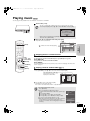
Playing music
[CD] [MP3]
You can play generally available music CD or MP3 files recorded onto a CD-R/RW.
1 Insert a disc (>14).
≥If a disc containing data in different file formats is inserted, the file selection
menu may be displayed. Press [3, 4] to select “MP3 Music” and press [OK].
TIPS
CD
Pictures
MP3 Music
[SELECTOR]
Select an action or press [RETURN].
OK
SUB
MENU
RETURN
≥If the menu is not displayed, press [BD/SD] to select “BD/DVD/CD”.
Main unit: Press [SELECTOR].
2 Press [3, 4] to select the track and press [OK].
Play starts on the selected track.
e.g., [CD]
“
” indicates the track currently playing.
No
01
02
03
04
05
4.30
Track1
5 Tracks / Total Play Time 20min54sec
Track Name
Play Time
4min30sec
Track1
3min41sec
Track2
Track3
4min30sec
Track4
3min11sec
5min 2sec
Track5
Basic
operations
[BD/SD]
0.09
Music list
DIRECT NAVIGATOR
CD
Play
RETURN
Enjoying music in surround sound
[OK]
[3, 4, 2, 1]
[FUNCTIONS]
You can enhance stereo sources with surround sound effect.
To enjoy music in surround sound with Dolby Pro Logic II/Dolby Pro Logic IIx
Press [ÎPLIIx].
To enjoy music in surround sound with DTS NEO:6
[RETURN]
Press [NEO:6].
[SUB MENU]
For more detailed information on this operation, please refer to the “Enjoying surround sound”
section on page 27.
[NEO:6]
[ÎPLIIx]
Playing a track in another folder ([MP3] only)
1 While the “Music list” is displayed
Press [SUB MENU], press [3, 4] to select “Select Folder” and press [OK].
Selected folder No. /Total folders
If the folder has no track, “– –” is
DIRECT NAVIGATOR Select Folder
CD(MP3)
displayed as folder number.
MP3 music
F 7/25
001 My favorite
002 Brazilian pops
003 Chinese pops
004 Czech pops
005 Hungarian pops
006 Liner notes
007 Japanese pops
008 Mexican pops
009 Philippine pops
010 Swedish pops
011 Momoko
012 Standard number
013 Piano solo
014Vocal
OK
RETURN
2 Press [3, 4] to select a folder and press [OK].
The “Music list” for the folder appears.
≥You cannot select folders that contain no compatible tracks.
≥To return to the previous screen
Press [RETURN].
TIPS
≥Discs containing data in different file formats.
To switch from the JPEG menu to MP3 menu, perform steps
below.
1 Press [FUNCTIONS].
2 Press [3, 4] to select “Menu” and press [OK].
3 Press [3, 4] to select “MP3 Music” and press [OK].
≥You can use search and skip functions (> 15).
≥When the “Screen Saver Function” is set to “On” (> 33), the
screen switches to Screen Saver mode if there is no
operation for 10 minutes after starting playback. (Playback
continues.)
Home theater
FUNCTIONS
CD(MP3/JPEG)
Menu
Input Select
Other Functions
OK
RETURN
RQT9129
19
SC-BT100P-ENG.book 20 ページ
2008年2月20日 水曜日 午後6時22分
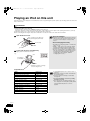
Playing an iPod on this unit
iPod videos/photos can be displayed on TV, and iPod music can be enjoyed through the system speakers, by connecting your iPod to the Dock for
iPod on the main unit.
Connection
Preparation
≥To view videos/photos from the iPod.
– Ensure the video connection to the VIDEO OUT terminal on this unit (> 7).
– Operate the iPod menu to make the appropriate video/photo output settings for your TV. (Refer to the operating instructions of your iPod.)
≥To display the picture, turn on the TV and select the appropriate video input mode.
≥Before connecting/disconnecting the iPod, turn the main unit off or reduce the volume of the main unit to its minimum.
1 Open the Dock for iPod.
Place your finger on the 4 section
and open it diagonally downwards.
Dock for iPod
Main unit
2 Connect the iPod (not included) firmly.
Recharging starts when the iPod is inserted.
e.g.,
About dock adapter
NOTE
≥Attach the dock adapter which should be supplied
with your iPod to the dock for the stable use of the
iPod. If you need an adapter, consult your iPod
dealer.
About recharging the battery
≥iPod will start recharging regardless of whether this
unit is on or off.
≥“IPOD ¢” will be shown on the main unit’s display
during iPod charging in main unit standby mode.
≥Check iPod to see if the battery is fully recharged.
≥If you are not using iPod for an extended period of
time after recharging has completed, disconnect it
from main unit, as the battery will be depleted
naturally. (Once fully recharged, additional
recharging will not occur.)
iPod
Dock adapter
(not included)
Main unit
≥Hold the dock when connecting/
disconnecting the iPod.
Compatible iPod
RQT9129
20
Name
Memory size
iPod touch
8 GB, 16 GB
iPod nano 3rd generation (video)
4 GB, 8 GB
iPod classic
80 GB, 160 GB
iPod nano 2nd generation (aluminum)
2 GB, 4 GB, 8 GB
iPod 5th generation (video)
60 GB, 80 GB
iPod 5th generation (video)
30 GB
iPod nano 1st generation
1 GB, 2 GB, 4 GB
iPod 4th generation (color display)
40 GB, 60 GB
iPod 4th generation (color display)
20 GB, 30 GB
iPod 4th generation
40 GB
iPod 4th generation
20 GB
iPod mini
4 GB, 6 GB
≥Compatibility depends on the software version of
your iPod.
≥Audio/video cannot be recorded or transmitted to
NOTE iPods via this system.
≥Panasonic makes no warranty over iPod data
management.
≥For more information, refer to the operating
instructions for iPod.
≥The contents of the operating instructions and
those displayed on iPod may differ partially, but this
will not fundamentally affect use of music
playback.
SC-BT100P-ENG.book 21 ページ
2008年2月20日 水曜日 午後6時22分
Playback
This system features two different iPod playback modes.
The first of these is EXTENDED mode, for playback of music contents. With this mode, the menu screen on the system can be used to search for
playlists and artist names, and to play music. The second mode is SIMPLE mode, which can be used for playback of three types of contents –
music, photos, and videos. With this mode, simple operations such as play, stop, and search can be performed on the display of your iPod.
Enjoy music (EXTENDED mode)
Enjoy videos/photos (SIMPLE mode)
1 Press [iPod] to select “IPOD”.
You can also play music using SIMPLE mode.
The iPod automatically switches to this unit’s display mode.
iPod Music menu appears on the TV.
≥If the menu screen is not displayed, press [SETUP].
iPod Music
1 Press [iPod] to select “IPOD”.
2 Press [SETUP] to switch the iPod to its own
display mode.
Proceed operations through display of iPod.
≥If the iPod Music menu (> left) is displayed, press [SETUP].
“SIMPLE” will be shown on the main unit’s display.
Playlists
Artists
Albums
Songs
3 Switch the TV input to video in.
Podcasts
Audiobooks
Playback Mode
4 Play a slideshow or video on your iPod.
OK
Playlists
Selection/playback method
Search from all playlists.
Artists
Search by artist name.
Albums
Search by album title.
Songs
Podcasts
Search from all songs registered on iPod.
Search by episode for radio programs
downloaded from iTunes store.
Audiobooks Search by title from audiobooks purchased from
iTunes store or audible.com.
Playback
Mode§
Shuffle
≥Off:
Cancel
≥Songs: Play all songs on iPod in random order.
≥Albums: Play all songs on album in random
order.
“
” is displayed on the unit’s display when
“Songs” or “Albums” is selected.
Repeat
≥Off:
≥One:
≥All:
Cancel
Play single song repeatedly.
Play all songs from selected item (e.g.,
Playlists, Albums, etc.) repeatedly.
“
” is displayed on the unit’s display when
“One” or “All” is selected.
§
You can also use the remote control to operate iPod menu.
≥[3, 4]:
To navigate menu items
≥[OK]:
To go to the next menu
≥[RETURN]: To return to the previous menu
Basic
operations
Items
The picture will be displayed on your TV.
Playback modes during connection/when disconnected
System may be operated in same playback mode as set with
iPod when connected. Playback may also be continued on iPod
with same settings as made on system after disconnection.
Basic controls (For music and videos only)
Buttons
[1] (PLAY)
Functions
Play
[∫]
Pause
[;]
≥Press [1] (PLAY) to restart play.
≥Playback start position may not be
stored in memory in certain cases.
[:, 9]
(Press and hold)
[6, 5]
Skip
Search
You can enjoy surround sound effect when you press [ÎPLIIx] or
[NEO:6] (> 27).
2 Press [3, 4] to select an item and press [OK].
≥Play will start from the selected song if this operation is
repeated several times.
≥Press [RETURN] to return to the previous screen.
e.g.,
Playing condition
iPod
Song
Artist
Album
Good morning
Ronaldo
Happy days
2:43
Playing
position
45 of 1230
Pause Play
Skip
Skip
RETURN
Clear/display iPod Music menu during playback.
Press [TOP MENU].
RQT9129
21
SC-BT100P-ENG.book 22 ページ
2008年2月20日 水曜日 午後6時22分
Playing still pictures
[JPEG]
You can play still pictures recorded onto a BD-RE, DVD-RAM, CD-R/RW and SD card.
1 Insert a disc or an SD card (> 14).
≥If a disc or an SD card containing data in different file formats is inserted, the file
selection menu may be displayed.
TIPS
SD card:
Press [3, 4] to select “Picture (JPEG)
Navigator” and press [OK].
e.g., SD card
SD Card
Picture (JPEG) Navigator
CD-R/RW:
Press [3, 4] to select “Pictures” and press [OK].
[SELECTOR]
Playback HD Movie (AVCHD)
Select an action or press [RETURN].
OK
SUB
MENU
[BD/SD]
BD-RE, DVD-RAM
“Album View” screen is displayed.
≥When the “Title View” screen is displayed, press the [B]
button to switch to the “Album View” screen.
RETURN
e.g.,
Album View
DIRECT NAVIGATOR
DVD-RAM(VR)
Picture
Video
ᧂ
106_DVD
Total 8
2006 9 12
Total 13
Page 02/02
SUB
MENU
[:, 9]
[∫]
[1] (PLAY)
CD-R/RW, SD Card
“Picture View” screen is displayed.
B Go to step 3
[STATUS]
RETURN
A Video
B Picture
Next
Slideshow
Press [OK] to go to Picture View
e.g.,
Picture View
Pictures
CD(JPEG)
penguin_jpg
[OK]
[3, 4, 2, 1]
[FUNCTIONS]
[DIRECT NAVIGATOR]
[RETURN]
[SUB MENU]
[B]
Previous
OK
001
002
003
004
005
006
007
008
009
From SUB MENU you can select a folder.
SUB
MENU
Page 01/01
Play
RETURN
≥If the menu is not displayed, press [BD/SD] to select “BD/DVD/CD” or “SD”.
Main unit: Press [SELECTOR].
≥To show other pages
Press [:, 9].
2 Press [3, 4, 2, 1] to select the album and press [OK].
3 Press [3, 4, 2, 1] to select the still picture and press [OK].
≥Small-sized still pictures are displayed with a frame.
≥To display the previous or next still picture
Press [2, 1].
e.g.,
Picture View
DIRECT NAVIGATOR
DVD-RAM(VR)
Picture
Video
2006 9 12
0001
0002
0003
0004
0005
0006
0007
0008
0009
Page 001/001
SUB
MENU
TIPS
Play
RETURN
CD-R/RW
Discs containing data in different file formats.
To switch from the MP3 menu to JPEG menu, perform steps
below.
1 Press [FUNCTIONS].
2 Press [3, 4] to select “Menu” and press [OK].
3 Press [3, 4] to select “Pictures” and press [OK].
Home theater
FUNCTIONS
CD(MP3/JPEG)
Menu
Input Select
Other Functions
OK
RETURN
NOTE
RQT9129
22
To return to the previous screen
Press [RETURN].
To exit the screen
Press [DIRECT NAVIGATOR].
SC-BT100P-ENG.book 23 ページ
2008年2月20日 水曜日 午後6時22分
Useful functions during still picture play
Start Slideshow
Zoom out
You can display still pictures one by one at a constant interval.
This function is only available for small-sized still pictures.
1 While playing (except for slideshows)
Press [SUB MENU].
2 Press [3, 4] to select “Zoom out” and press
Rotate Right
[OK].
BD-RE, DVD-RAM
1 While the “Album View” screen is displayed
Press [3, 4, 2, 1] to select the album and press [SUB MENU].
2 Press [3, 4] to select “Start Slideshow” and
Start Slideshow
press [OK].
Slideshow settings
≥You can also start slideshow by pressing
[1] (PLAY) after selecting the album.
To video
≥To cancel “Zoom out”, press [3, 4] to select
“Zoom in” in step 2 and press [OK].
≥The zoom-out information will not be stored.
Rotate Left
Zoom out
OK
SUB
MENU S
RETURN
CD-R/RW, SD card
1 While the “Picture View” screen is displayed
Press [SUB MENU].
2 Press [3, 4] to select “Start Slideshow” and press [OK].
To select the still pictures in another folder
BD-RE, DVD-RAM
To switch to another higher folder
(Only if there is a multiple number of higher folders recognizable)
1 While the “Album View” screen is displayed
Press [SUB MENU].
2 Press [3, 4] to select “Select Root folder” and press [OK].
To stop slideshow
Press [∫].
Slideshow with music
SD card only
Select Root folder
If a music CD is inserted in the disc tray while playing slideshows,
the music CD starts playing automatically as background music.
Changes the Album folder to be accessed.
≥You cannot search or skip on a music CD.
≥When the slideshow stops, playback of the music CD also stops.
\DCIM
Press [OK] to confirm
OK
3 Press [2, 1] to select the higher folder and press [OK].
Slideshow settings
CD-R/RW
In step 2 in “Start Slideshow” above,
1 Press [3, 4] to select “Slideshow settings” and press [OK].
Slideshow settings
Set time delay between pictures and
continuous ( wrap around ) play.
1 While the “Picture View” screen is displayed
Press [SUB MENU].
2 Press [3, 4] to select “Select Folder” and press [OK].
3 Press [3, 4] to select a folder and press [OK].
The “Picture View” screen for the folder appears.
Normal
Pictures
CD(JPEG)
On
Folder selection
021216_0026
Set
Cancel
001
002
003
004
005
006
007
008
009
010
RETURN
2 To change the display interval
Press [3, 4] to select “Display Interval” and press [2, 1] to
select the interval (“Long”, “Normal” or “Short”).
≥When a still picture with large number of pixels is played, the
display interval may become longer. Even if the setting is
changed, the display interval may not become shorter.
To repeat slideshow
Press [3, 4] to select “Repeat Play” and press [2, 1] to select
“On” or “Off”.
103
104
105
OK
RETURN
To show the picture properties
3 Press [3, 4, 2, 1] to select “Set” and press [OK].
While playing
Press [STATUS] twice.
Rotate
e.g., JPEG on DVD-RAM
Shooting date
1 While playing (except for slideshow)
Press [SUB MENU].
2 Press [3, 4] to select “Rotate Right” or
“Rotate Left” and press [OK].
≥The rotation information will be stored until the
unit is turned off or the media is removed.
Folder - picture No.
Photo 11/12/2007
Rotate Right
F 7/25
Advanced
operations
Display Interval
Repeat Play
102 - 0001
Total
3/9
To exit, press [STATUS].
Rotate Left
Zoom out
OK
SUB
MENU S
RETURN
RQT9129
23
SC-BT100P-ENG.book 24 ページ
2008年2月20日 水曜日 午後6時22分
Different kinds of playback for BD-Video
[BD-V]
Some discs permit a variety of interactive functions in addition to the ordinary playback operation.
Showing Pop-up menu
The Pop-up menu is a special feature available with some BD-Video discs. This menu may vary with discs. For the operating method, refer to
the instructions for the disc.
1 Press [POP-UP MENU].
2 Press [3, 4, 2, 1] to select the
item and press [OK].
e.g.,
≥Pop-up menu also appears by pressing
[SUB MENU] and selecting “Pop-up Menu”.
TIPS
To exit the screen
≥Press [POP-UP MENU].
≥The Final Standard Profile [“Picture-in-picture”, “Virtual Package” (> below), etc.] is a new playback function of BD-Video. Contents of
playback and the operating method may vary with the disc. For details, refer to the instructions for the disc.
Playing secondary video (picture-in-picture) and secondary audio
Secondary video can be played from a disc compatible with the picture-in-picture
function.
For the playback method, refer to the instructions for the disc.
Secondary video
≥Only the primary video is played during search/
slow-motion or frame-by-frame.
NOTE
To turn on/off secondary video
Press [PIP].
Secondary video is played.
≥“PiP ON” is displayed.
≥Press the button to turn it ON and OFF.
To turn on/off audio with the secondary video
Primary video
Press [SECONDARY AUDIO].
The secondary audio is played.
≥“Secondary Audio ON” is displayed.
≥Press the button to turn it ON and OFF.
Virtual package
For a disc compatible with the virtual package (> 43), data is copied to other media
(> 43, Local storage) from the disc to use the different functions while playing the
data.
For this unit, data is copied to an SD card.
The methods for copy and playback and the required available capacity on the card
may vary with the disc. For details, refer to the instructions for the disc.
NOTE
To use the above functions, it is recommended that you format the card on this unit.
Format the card using the following procedures. BD-Video data, such as secondary
video recorded on the card, can also be erased with the following procedures.
Formatting SD cards/Deleting data
1 Insert an SD card (> 14).
2 Press [FUNCTIONS].
3 Press [3, 4] to select “Other Functions” and press [OK].
TIPS
4 Press [3, 4] to select “Card Management” and press
[OK].
5 Press [3, 4] to select “BD-Video
Data Erase” or “Format SD Card”
and press [OK].
6 Press [2, 1] to select “Yes” and
NOTE
press [OK].
7 Press [2, 1] to select “Start” and
press [OK].
Card Management
SD card
Format SD Card
RETURN
RQT9129
24
≥If an SD card with files in different formats is
used, images and audio may not play back
properly. It is recommended that you use an SD
card with no data or an SD card formatted on this
unit.
No. of Files 6
Free space 300 MB
BD-Video Data Erase
OK
≥If the SD card is removed from this unit when
using data that was copied with the virtual
package function, disc playback stops.
≥Images and audio may freeze momentarily
during playback.
≥Data cannot be copied in the following cases.
– The card is protected.
– Available capacity on the card is too small.
Delete unnecessary data or use a new card.
≥When the function fails to work properly, even if
the data is copied, format the card again with this
unit. (In this case, all data will be erased.)
Format this SD Card.
≥It is impossible to restore data after formatting
the card or erasing the data.
Once a card is formatted, all data including those
recorded on the PC is erased as well, even if the
data were protected with other equipment.
Confirm whether the card can be formatted.
SC-BT100P-ENG.book 25 ページ
2008年2月20日 水曜日 午後6時22分
Showing FUNCTIONS menu
Some functions of this unit can be operated from the FUNCTIONS menu.
1 Press [FUNCTIONS].
e.g., [DVD-V]
≥Items displayed vary according to the chosen selector and media.
2 Press [3, 4] to select the item and press [OK].
Home theater
FUNCTIONS
DVD-Video
Playback DISC
Top Menu
Menu
Input Select
Other Functions
OK
RETURN
Items
Functions
Playback DISC
Playback
Starts playing disc/SD Card.
Top Menu
Shows a disc top menu.
Menu
Shows a disc menu.
To play AVCHD (> 14)
To play MP3 (> 19)
To play JPEG (> 22)
Music
Select to play Music on iPod
>21, Step 2 in “Enjoy music (EXTENDED mode)”
Videos/Photos
Select to play Videos/Photos on iPod
>21, Step 3 in “Enjoy videos/photos (SIMPLE mode)”
Input Select
Select the source.
[FUNCTIONS]
e.g., [DVD-V]
Home theater FUNCTIONS
BD/DVD/CD:
Input Select
To play BD-Video, DVD-Video, AVCHD (> 14)
DVD-Video
To play CD, MP3 (> 19)
BD/DVD/CD
SD card:
SD card
To play AVCHD (> 14)
FM
To play JPEG (> 22)
AM
FM:
iPod
To enjoy the FM radio (> 18)
Digital in
AM:
AUX (TV)
To enjoy the AM radio (> 18)
iPod:
To play iPod
Press [3, 4] to select “Music” or “Videos/Photos” and press [OK].
≥Music:
>21, Step 2 in “Enjoy music (EXTENDED
mode)”
≥Videos/Photos:>21, Step 3 in “Enjoy videos/photos (SIMPLE
mode)”
Digital in §:
To enjoy TV broadcasts with this unit’s speakers (> 17)
AUX (TV)§:
To enjoy TV broadcasts with this unit’s speakers (> 17)
§
“(TV)” is displayed next to items set for TV SOUND input. (> 28,
Setting the TV audio for VIERA Link “HDAVI Control”)
OK
RETURN
Other Functions
Advanced
operations
[OK]
[3, 4, 2, 1]
Setup:
You can change the unit’s settings using Setup menu (> 32).
Card Management:
Formatting SD cards/Deleting data (> 24)
Playlists:
You can play playlists created on DVD-VR.
Press [3, 4, 2, 1] to select the playlist and press [OK].
RQT9129
25
SC-BT100P-ENG.book 26 ページ
2008年2月20日 水曜日 午後6時22分
Changing audio quality/sound field
≥The following sound effects may not be available or have no effect with some sources, or when headphones are used (> 14).
≥You may experience a reduction in sound quality when these sound effects are used with some sources. If this occurs, turn the sound effects off.
Using Subwoofer boost
Main unit only
Surround Enhancer (SRD ENH)
You can enhance the subwoofer effect with strong bass.
This function automatically makes speaker adjustment to enhance the
surround sound effect.
Press [SW BOOST] on the main unit.
4 Press [3, 4] to select “ON” or “OFF”.
≥The SW BOOST indicator lights when Subwoofer Boost is turned on.
≥This function is effective when playing audio containing surround
channel sound or when Dolby Pro Logic IIx/Dolby Pro Logic II or
DTS NEO:6 is on.
≥This sound effect have no effect when receiving AM radio broadcast.
Setting the sound effects
1 Press [SOUND].
2 Press [3, 4] and select item for setting.
EQ """"""") H.BASS """""""") REAL CF
f
v
W. S. ("""""" SRD ENH(""""""" SW. LEVEL
3 Press [OK].
Equalizer (EQ)
You can select sound quality settings.
4 Press [3, 4] to select the item.
Each time you press the button:
HEAVY:
Adds punch to rock.
CLEAR:
Clarifies higher sounds.
SOFT:
For background music.
FLAT:
Cancel (no effect is added).
Enhancing the bass sound (H.BASS)
You can enhance low-frequency sound so that heavy bass sound can
be heard clearly.
4 Press [3, 4] to select “ON” or “OFF”.
Real Center Focus (REAL CF)
You can make the sound of the center speaker seem like it is coming
from within the TV.
4 Press [3, 4] to select “ON” or “OFF”.
≥This function is effective when playing audio containing center
channel sound or when Dolby Pro Logic IIx/Dolby Pro Logic II or
DTS NEO:6 is on.
Using Whisper-mode Surround (W. S.)
You can enhance the surround effect for low volume 5.1-channel
sound. (Convenient for late night viewing.)
4 Press [3, 4] to select “ON” or “OFF”.
≥This function is effective when playing audio containing surround
channel sound or when Dolby Pro Logic IIx/Dolby Pro Logic II or
DTS NEO:6 is on.
≥This sound effect have no effect when receiving AM radio broadcast.
Adjusting speaker level during play
1 Press [CH SELECT] to select the speaker.
Each time you press the button:
L R—) C_) RS_) RB_) LB_) LS_) SW
^"""""""""""""""""""""""""""""b
L R: Front speaker (left and right)
C:
Center speaker
RS:
Surround speaker (right)
RB:
Surround back speaker (right)
LB:
Surround back speaker (left)
LS:
Surround speaker (left)
SW: Subwoofer
≥Speakers with settings (> 34) set to “
” will not be displayed.
≥The channels not included in the playing audio will not be
displayed (Subwoofer is displayed even if not included).
Adjusting the balance of the front speakers
(When “L R” selected)
2 Press [2, 1] to adjust the balance of the front
speakers.
e.g.,
96/24
W2SD+
PL x W4S
HD
NEO:6
Adjusting the subwoofer level (SW. LEVEL)
You can adjust the amount of bass. The unit automatically selects the
most suitable setting according to the type of playback source.
4 Press [3, 4] to select the item.
SUB W 1: Weakest effect
SUB W 2: Middle effect
SUB W 3: Strongest effect
Standard balance
Front right: s11 to s12 dB
Adjusting the speaker level
(When other option selected)
2 Press [3] (increase) or [4] (decrease) to adjust
the speaker level for each speaker.
C, SW:
r6 dB to s6 dB
RS, RB, LB, LS: r10 dB to s10 dB
e.g., Subwoofer
RQT9129
26
SC-BT100P-ENG.book 27 ページ
2008年2月20日 水曜日 午後6時22分
Enjoying surround sound
≥The following sound effects may not be available or have no effect with some sources, or when headphones are used (> 14).
≥You may experience a reduction in sound quality when these sound effects are used with some sources. If this occurs, turn the sound effects off.
Dolby Pro Logic IIx/Dolby Pro Logic II
When 5.1ch speakers connected
Dolby Pro Logic II will be used.
The technology enables you to play 2-channel stereo sources on 5.1-channel.
When 7.1ch speakers connected (> 4, Enjoying 7.1-channel surround sound)
Dolby Pro Logic IIx will be used.
The technology enables you to play 2-channel stereo or 5.1-channel sources on
7.1-channels (sounds assigned to surround back channels become stereo in playback).
The technology also makes surround back channels available for the playback of Dolby
Digital Surround EX sources (sounds assigned to surround back channels become
monaural in playback).
Press [ÎPLIIx].
Each time you press the button:
MOVIE:
This mode produces good effects when you play commercial film titles in
the Dolby Surround format.
MUSIC:
This mode produces good effects when you play music.
EX:
This mode produces good effects when you play commercial film titles
recorded in the Dolby Digital Surround EX format.
OFF:
Cancel (no effect is added)
≥“EX” may only be selected when speaker setting (> 33, Speaker, 34, Speaker settings)
is set to 7.1-channel.
≥You cannot select “EX” when playing 2-channel stereo sources.
≥You cannot use this function when playing titles recorded in the DTS-ES format.
DTS NEO:6
Press [NEO:6].
≥The “CINEMA” mode is available for 2-channel stereo Dolby Digital and DTS sources
containing surround data. The “MUSIC” mode is available for the same sources
containing no surround data.
≥You cannot use this function when playing titles recorded in the DTS-ES format.
Advanced
operations
Each time you press the button:
CINEMA: This mode produces good effects when playing movies.
MUSIC:
This mode produces good effects when playing music.
OFF:
Cancel (no effect is added)
7.1ch Virtual Surround
You can enjoy 7.1-channel surround-like effect using 5.1-channel speakers.
This function is effective only when playing 6ch sources or above and speaker setting
(> 33, Speaker, 34, Speaker settings) is set to 5.1-channel.
Press [7.1CH VS].
Each time you press the button:
7.1CH VS SIDE-SP: Effective when surround speakers are placed either side of the
seat position.
7.1CH VS REAR-SP: Effective when surround speakers are placed behind the seat
position.
7.1CH VS OFF:
Cancel (no effect is added)
≥You cannot use this function when playing titles recorded in the Dolby Digital Surround
EX format.
≥These functions only work during playback through system speakers.
Enjoying surround sound
[ÎPLIIx]
[NEO:6]
[7.1CH VS]
When 5.1ch speakers connected
The technology enables you to play 2-channel stereo sources on 5.1-channel.
When 7.1ch speakers connected (> 4, Enjoying 7.1-channel surround sound)
The technology enables you to play 2-channel stereo or 5.1-channel sources on
6.1-channels.
RQT9129
27
SC-BT100P-ENG.book 28 ページ
2008年2月20日 水曜日 午後6時22分
Linked operations with the TV
(VIERA LinkTM “HDAVI ControlTM”)
What is VIERA Link “HDAVI Control”?
VIERA LinkTM is a new name for EZ SyncTM.
VIERA Link “HDAVI Control” is a convenient function that offers linked
operations of this unit, and a Panasonic TV (VIERA) under “HDAVI
Control”. You can use this function by connecting the equipment with an
HDMI cable. See the operating instructions for connected equipment for
operational details.
Preparation
1 Confirm that the HDMI connection has been made (> 7).
2 Set “VIERA Link” to “On” (> 33).
3 To complete and activate the connection correctly, turn on all VIERA Link
“HDAVI Control” compatible equipment and set the TV to the corresponding
HDMI input mode for this unit.
Setting the TV audio for VIERA Link “HDAVI Control”
Select between “AUX” and “D-IN” to work with the linked operations. Confirm
the audio connection to the AUX terminal (for “AUX”) or OPTICAL IN terminal
(for “D-IN”) (> 7).
1 Press [N, O SELECT] to select “AUX” or “D-IN”.
2 Press [SETUP].
3 (When “D-IN” is selected)
Press [3, 4] to select “TV SOUND”.
4 Press [OK].
5 Press [3, 4] to switch “AUX” or “D-IN” and press [OK].
≥VIERA Link “HDAVI Control”, based on the control
functions provided by HDMI which is an industry
NOTE standard known as HDMI CEC (Consumer
Electronics Control), is a unique function that we
have developed and added. As such, its operation
with other manufacturers’ equipment that supports
HDMI CEC cannot be guaranteed.
≥This unit supports “HDAVI Control 3” function.
“HDAVI Control 3” is the newest standard (current as
of December, 2007) for Panasonic’s HDAVI Control
compatible equipment. This standard is compatible
with Panasonic’s conventional HDAVI equipment.
≥Please refer to individual manuals for other
manufacturers’ equipment supporting VIERA Link
function.
≥It is recommended that you use Panasonic’s
HDMI cable.
Recommended part number:
RP-CDHG10 (1.0 m/3.3 ft.), RP-CDHG15 (1.5 m/
4.9 ft.),RP-CDHG20 (2.0 m/6.6 ft.), RP-CDHG30
(3.0 m/9.8 ft.), RP-CDHG50 (5.0 m/16.4 ft.), etc.
≥Non-HDMI-compliant cables cannot be utilized.
Whenever the connection or settings are changed, reconfirm the points above.
What you can do with “HDAVI Control”
One touch play
You can turn on this unit and TV, and start playing with a single press
of a button.
Press [ONE TOUCH PLAY].
This unit’s speakers will be automatically activated (> right, Speaker
control).
≥This function also works if you press [1] (PLAY) on this unit’s
remote control when this unit is in standby mode.
≥Playback may not be immediately displayed on the TV. If you miss
the beginning portion of playback, press [:] or [6] to go back to
where playback started.
Automatic input switching
≥When you switch the TV input to TV tuner mode, this unit will
automatically switch to “AUX”§ or “D-IN”§.
[This function does not work when the iPod selector (SIMPLE mode)
is chosen. (> 21)]
≥When you start disc play, the TV will automatically switch its input
mode for this unit.
Automatic lip-sync function (for HDAVI Control 3)
Delay between audio and video is automatically adjusted, enabling
you to enjoy smooth audio for the picture (> 33, Time Delay).
≥This function works only when “BD/DVD”, “SD”, “AUX”§ or “D-IN”§ is
selected as the source on this unit.
Speaker control
You can select whether audio is output from the unit’s speakers or the
TV speakers by using the TV menu settings. For details, refer to the
operating instructions of your TV.
Home theater
This unit’s speakers are active.
≥When this unit is in standby mode, changing the TV speakers to this
unit’s speakers in the TV menu will automatically turn the unit on and
select “AUX”§ or “D-IN”§ as the source.
≥The TV speakers are automatically muted.
≥You can control the volume setting using the volume or mute button
on the TV’s remote control. (The volume level is displayed on the
main unit’s FL display.)
≥To cancel muting, you can also use the home theater remote control
(> 16, Muting the sound).
≥If you turn off this unit, TV speakers will be automatically activated.
TV
TV speakers are active.
≥The volume of this unit is set to “0”.
– This function works only when “BD/DVD/CD”, “SD”, “AUX”§ or
“D-IN”§ is selected as the source on the home theater system.
≥Audio output is 2-channel audio.
Power off link
When the TV is turned off, this unit goes into standby mode
automatically.
≥This function works only when “BD/DVD/CD”, “SD”, “IPOD”, “AUX”§
or “D-IN”§ is selected as the source on this unit.
§ “AUX” or “D-IN” works depending on the “TV SOUND” setting (> above, Setting the TV audio for VIERA Link “HDAVI Control”).
RQT9129
28
SC-BT100P-ENG.book 29 ページ
2008年2月20日 水曜日 午後6時22分
Easy control only with VIERA remote control
If you connect this unit to a TV that has “HDAVI Control 2” or “HDAVI Control 3” function with an HDMI cable, you can operate this unit using the
following buttons on the TV remote control.
[3, 4, 2, 1], [OK], [RETURN], [SUB MENU] and colored buttons
Use the remote control for this unit to operate any other buttons (numbered buttons, etc.) that are not listed above.
≥Refer to the TV operating instructions for operating TV.
Using the FUNCTIONS menu to operate this unit
By using the TV remote control, you can play media using the
FUNCTIONS menu.
1 Press the button for VIERA Link
on the TV remote control.
2 Select the home theater.
e.g.,
Home theater
FUNCTIONS
3 Select the desired items on the
FUNCTIONS menu (> 25).
By using the TV remote control, you can play discs using the “Control
Panel” and display the Top Menu (for BD-Video and DVD-Video) or
Pop-up Menu (for BD-Video).
≥This works only during “BD/DVD” or “SD” playback and resume
modes.
1 Press [SUB MENU].
DVD-Video
≥The FUNCTIONS menu is displayed
Using the sub menu to operate this unit
Playback DISC
Top Menu
Menu
≥You cannot use the sub menu while the
Top Menu for BD-Video or DVD-Video is
displayed.
Input Select
e.g.,
Control Panel
Screen Aspect
Top Menu
Other Functions
Pop-up Menu
OK
OK
RETURN
SUB
MENU
RETURN
2 Select an item, then press [OK].
Control Panel
Control Panel is displayed.
Follow the indications on the
screen (> below).
Screen Aspect
(> 16)
Top Menu [BD-V] [AVCHD] [DVD-V] Top menu is displayed.
Menu [DVD-V]
Menu is displayed.
Pop-up Menu [BD-V] [AVCHD]
Pop-up menu is displayed.
Rotate Right [JPEG]
Rotate the still picture.
Rotate Left [JPEG]
Zoom in [JPEG]
Enlarge or shrink the still
picture.
Zoom out [JPEG]
You can operate the playback with the indicated controls.
e.g.,
Pause
Play
Search
Search
RETURN
Advanced
operations
∫ Using the Control Panel
Stop
[Note]
≥Depending on the menu, some button operations cannot be
performed from the TV’s remote control.
≥You cannot input numbers with the numbered buttons on the TV’s
remote control ([0] to [9]). Use this unit’s remote control to select the
playlist etc.
∫ When you want to leave the TV on and set only this unit to standby mode
Press [Í] on this unit’s remote control and set to standby mode.
∫ When not using “HDAVI Control”
Set “VIERA Link” in the Setup menu to “Off”. (> 33)
RQT9129
29
SC-BT100P-ENG.book 30 ページ
2008年2月20日 水曜日 午後6時22分
Changing settings with the on-screen menu
On-screen menu operations
1 Press [BD/SD] to select “BD/DVD/CD” or “SD”.
2 Press [DISPLAY].
e.g., BD-Video
3 Press [3, 4] to select
the menu and press [1].
4 Press [3, 4] to select
the item and press [1].
5 Press [3, 4] to select
the setting.
Disc
Play
Video
NOTE
Signal Type
Subtitle
Off
Subtitle Style
Menus
-
Items
Main
1ENG
Angle
-
Settings
≥Depending on the condition of the
unit (playing, stopped, etc.) and
disc contents, there may be some
items that you cannot select or
change.
≥Some items can be changed by
pressing [OK].
TIPS
To exit the on-screen menu
Press [DISPLAY].
What you can change with the on-screen menu
Menus
Disc
Items
Signal Type
Settings and details
[BD-V]
≥Primary Video
Video:
The video recording method appears. (D below, Video recording method)
Soundtrack: Select the type of audio or language. (D below, Language, Audio attribute)
≥Secondary Video
Video:
Select on/off of images.
The video recording method appears. (D below, Video recording method)
Soundtrack: Select on/off of audio and the language. (D below, Language, Audio attribute)
Video
[AVCHD]
The video recording method appears. (D below, Video recording method)
Soundtrack
[AVCHD] [DVD-V]
Select the type of audio or language. (D below, Language, Audio attribute)
[DVD-VR]
The disc’s audio attributes appear. (D below, Audio attribute)
Subtitle
[BD-V] [AVCHD] [DVD-V]
Turn the subtitle on/off and select the language. (D below, Language)
[DVD-VR] (Only discs that contain subtitle on/off information)
Turn the subtitle on/off.
Subtitle Style
[BD-V]
Select the subtitle style.
Audio channel
[DVD-VR]
(> 16, Changing audio during play)
Angle
[BD-V] [DVD-V]
Select the number of the angle.
Some items may be changed only on the disc specific menu. (> 14, 24)
Language
ENG:
FRA:
DEU:
ITA:
ESP:
NLD:
SVE:
NOR:
English
French
German
Italian
Spanish
Dutch
Swedish
Norwegian
Audio attribute
DAN:
POR:
RUS:
JPN:
CHI:
KOR:
MAL:
VIE:
Danish
Portuguese
Russian
Japanese
Chinese
Korean
Malay
Vietnamese
THA:
POL:
CES:
SLK:
HUN:
FIN:
¢:
Thai
Polish
Czech
Slovak
Hungarian
Finnish
Others
LPCM/Î Digital/Î Digital+/
Î TrueHD/DTS/DTS-HD
Signal type
ch (channel)
Number of channels
k (kHz)
Sampling frequency
b (bit)
Number of bits
Video recording method
MPEG-2
MPEG-4 AVC
RQT9129
30
VC-1
This is a standard for compressing and decompressing color motion pictures efficiently. This compression method is
used for DVDs, etc.
These are standards for compressing and decompressing color motion pictures more efficiently than MPEG-2 and used
for Blu-ray Discs, etc.
SC-BT100P-ENG.book 31 ページ
2008年2月20日 水曜日 午後6時22分
Menus
Video
Settings and details
Repeat Play
(Only when the elapsed time is being displayed on the unit’s display.)
Selects the item which you want to repeat. The items displayed differ depending on the type of
disc.
≥All tracks
All tracks
≥Chapter
Chapter
≥Playlists
Playlist
≥Title
Title
≥One track
Track
≥Off
Select “Off” to cancel.
Random
[CD] [MP3]
While playing, press [3, 4] to select “On”.
Random playback starts from the next track.
≥On
≥Off
Picture
[BD-V] [AVCHD] [DVD-VR] [DVD-V]
Select the picture quality mode during play.
≥Normal: Default setting
≥Soft:
Soft picture with fewer video artifacts
≥Fine:
Details are sharper
≥Cinema: Mellows movies, enhances detail in dark scenes.
≥User:
You can make further adjustments. (> below)
1 Press [1] to select “Picture Adjustment” and press [OK].
2 Select the item using [3, 4] and adjust it with [2, 1].
Contrast:
Increases the contrast between light and dark parts of the picture (j7 to
i7).
Brightness:
Brightens the picture (0 to i15).
Sharpness:
Adjusts the sharpness of the edges of the horizontal lines (j6 to i6).
Color:
Adjusts the shade of the picture’s color (j7 to i7).
Gamma:
Adjusts the brightness of dark portions of the screen (0 to i5).
3D NR:
Reduces the rough noise in the background to give a greater feeling of
depth (0 to i4).
When “BD-Video 24p Output” is set to “On”, this function may not
operate. (> 33)
Integrated NR: Smooths block noise and reduces the smudging that appears around
contrasting sections of the picture (0 to i3).
Progressive
If images are stretched from right to left, set to “Off”.
[Only when you have selected “480p” in “Component Video Resolution” (> 33)]
≥Depending on the type of TV used, the video may be stretched horizontally when video is
output in progressive mode. When this occurs, select “Off” and the video will then be output as
“480i”.
≥This setting will be fixed to “On” if you connect with an HDMI cable and set “HDMI Video Mode”
to “On” (> 33).
≥When using a component video cable and progressive output is on, closed captions cannot be
displayed.
Transfer
[When “Progressive” (> above) is set to “On”.]
Select the method of conversion for progressive output to suit the type of material being played
(> 43, Film and video).
≥Auto (normal): Automatically detects the film and video content, and appropriately converts it.
≥Video:
Select when using “Auto”, and the content is distorted.
Advanced
operations
Play
Items
RQT9129
31
SC-BT100P-ENG.book 32 ページ
2008年2月20日 水曜日 午後6時22分
Changing settings with the setup menu
Change the unit’s settings, if necessary. The settings remain intact even if you switch the unit to standby.
Setup menu operations
1 Press [BD/SD] to select “BD/DVD/CD” or “SD”.
2 While stopped
Setup
Press [SETUP].
Setup
Disc
3 Press [3, 4] to select the tab and
Video
press [OK].
Audio
4 Press [3, 4] to select the menu
Display
TV / Device Connection
and press [OK].
5 Press [3, 4, 2, 1] to select the
OK
option and press [OK].
NOTE
≥There may be differences in
operation methods. If this happens,
follow the on-screen instructions
for the operation.
To return to the previous screen
Press [RETURN].
TIPS
To exit the screen
Press [SETUP].
RETURN
Summary of settings
Underlined items are the factory presets.
“Setup” tab
Off Timer
Select how long the unit remains on when it is not being used.
≥Effective only when “BD/DVD/CD” or “SD” is selected as source.
≥2 Hours
≥6 Hours
≥Off
≥Set Code 2
Remote Control Code (> 42)
≥Set Code 1
Easy Setting
You can execute basic settings (On-screen Language, TV Aspect).
≥When you select “Yes”, follow the on-screen instructions.
≥Yes
≥No
Restore Default Settings
This returns all values in the Setup menu and the on-screen menu,
except for “Remote Control Code”, “On-screen Language”,
“DVD-Video Ratings”, “BD-Video Ratings” and “Speaker” to the default
settings.
≥Yes
≥No
“Disc” tab
DVD-Video Ratings
Set a ratings level to
limit DVD-Video play.
BD-Video Ratings
Set an age limit of
BD-Video play.
≥8 No Limit:
≥1 to 7:
Follow the on-screen instructions. Enter a
4-digit password with the numbered buttons
when the password screen is shown. It will be
the common password for both “DVD-Video
Ratings” and “BD-Video Ratings”.
≥Do not forget your password.
≥0 Lock All:
≥Unlock Player
≥Change Level
Subtitle
Language
Menu Language
Choose the language for audio, subtitle and
disc menus.
[BD-V] [DVD-V]
≥Some discs start in a certain language
despite any changes you make here.
≥When the selected language is not available
on the disc, the default language is played.
There are discs where you can only switch
the language from the menu screen.
(> 14, 24)
≥Enter a code (> 37) with the numbered
buttons when you select “Other ¢¢¢¢”.
≥Change Password
≥Temporary Unlock
All BD-Video can be played.
≥No Limit:
≥0 to 254 year(s): Prohibits play of BD-Video with corresponding
ratings recorded on them.
≥Unlock Player
≥Change Level
Audio Language
All DVD-Video can be played.
Prohibits play of DVD-Video with corresponding
ratings recorded on them.
Prohibits play of all DVD-Video.
≥Change Password
≥Temporary Unlock
≥Spanish
≥English ≥French
≥Original: The original language of each disc will be selected.
≥Other ¢¢¢¢
≥Automatic:
If the language selected for “Audio Language” is not available,
subtitles of that language will automatically appear if available on
that disc.
≥English ≥French
≥Spanish ≥Other ¢¢¢¢
≥English
≥French
≥Spanish
≥Other ¢¢¢¢
“Video” tab
Still Mode (paused video) [BD-V] [AVCHD] [DVD-V]
Select the type of picture shown when you pause playback
(> 43, Frames and fields).
≥Auto
≥Field:
Seamless Play [DVD-VR]
Select the play mode between playlist chapter segments and partially
deleted titles.
≥On:
≥Frame:
≥Off:
RQT9129
32
Black Level Control
Select lighter or darker for adjusting the black level control to the
desired setting for picture enhancement.
≥Lighter:
≥Darker:
Select if jittering occurs when “Auto” is selected. (The
picture is coarser.)
Select if small text or fine patterns cannot be seen clearly
when “Auto” is selected. (The picture is clearer and finer.)
The chapters in playlists are played seamlessly. This does
not work while searching or when there are several audio
types included on the playlist. Additionally, the positioning
of chapter segments may change slightly.
The points where chapters in playlists change are played
accurately, but the picture may freeze for a moment.
When video is output from VIDEO OUT terminal.
When video is output from COMPONENT VIDEO OUT
terminal.
SC-BT100P-ENG.book 33 ページ
2008年2月20日 水曜日 午後6時22分
“Audio” tab
Dynamic Range Compression
[BD-V] [AVCHD] [DVD-V] (Dolby Digital, Dolby Digital Plus and Dolby
TrueHD only)
Change the dynamic range (> 43) for late night viewing.
Speaker
BD-Video Secondary Audio [BD-V]
Turn on/off the clicking sound on the menu and audio with
secondary video in picture-in-picture mode.
≥When this is set to “On”, Dolby TrueHD, Dolby Digital Plus,
DTS-HD Master Audio and DTS-HD High Resolution Audio are
output as Dolby Digital.
≥On
≥Off
Make settings for your speakers. (> 34)
≥On: The primary audio and secondary audio are mixed and output.
The sampling frequency is converted to 48 kHz.
≥Off: The clicking sound on the menu and secondary audio are not
output.
“Display” tab
Status Messages
Choose whether to show status messages automatically.
On-screen Language
Choose the language for these menus and on-screen messages.
Screen Saver Function
This is to prevent burn-in on the screen.
≥When this is set to “On”, the masked-off area on the screen
becomes gray.
[Only when connecting with an HDMI cable or a component video
cable and “HDMI Resolution” (> below) is set to any other mode
than “480p”, or “Component Video Resolution” (> below) is set to
“720p” or “1080i”.]
FL Display
Changes the brightness of the unit’s display.
≥The brightness of the volume indicator (> 11) is also changed.
License
≥Automatic
≥English
≥Off
≥Français ≥Español
≥On:
If there is no operation for 10 minutes or more, the displayed screen
switches to the other states automatically.
– When the Direct Navigator or FUNCTIONS menu is displayed, the
display returns to the screen saver mode.
– When CD or MP3 is played, the display returns to the screen saver
mode. (Playback continues.)
– When still pictures are shown (except for slideshows), the display
returns to the Direct Navigator screen.
– During FM/AM radio broadcast reception, the display returns to the
screen saver mode. (Reception continues.)
≥Off
≥Bright
≥Dim: The display is dimmed.
≥Auto: The display is dimmed, but brightens when you perform some
operations.
Information about the software used by this unit is displayed.
“TV/Device Connection” tab
TV Aspect
Set to match the type of TV connected.
When connected to a 4:3 aspect TV:
≥4:3 Pan & Scan:Video recorded for a widescreen is played as Pan & Scan
(unless prohibited by the producer of the disc). When playing
BD-Video, video is output as “4:3 Letterbox”.
≥4:3 Letterbox: Video recorded for a widescreen is played in the letterbox style.
Time Delay
When connected with a Plasma display, adjust if you notice When using VIERA Link “HDAVI Control” with “HDAVI Control 3” compatible TV
(> 28), select “Auto”. Audio and video will automatically be set in sync. (This works
the audio is out of sync with the video.
only when “BD/DVD”, “SD”, “AUX” or “D-IN” is selected as the source.)
HDMI Connection
≥Press [OK] to show the following settings.
HDMI Video Mode
≥On: Images are output from the HDMI terminal in the resolution set in “HDMI
Resolution”. Video from COMPONENT VIDEO OUT terminal is output as “480i”.
Select “On” when video is output from HDMI AV OUT
≥Off
Images are output in the resolution set in “Component Video Resolution”.
terminal.
HDMI Resolution
Automatically selects the output resolution best suited to the
≥Auto:
connected TV (1080p, 1080i, 720p or 480p).
The items supported by the connected devices are
≥480p
≥720p
indicated on the screen as “¢”. When any item without
≥1080i
≥1080p
“¢” is selected, the images may be distorted.
BD-Video 24p Output
≥On: Images in 24p are output in 24p as they are.
When playing BD-Video recorded in 24 frames, this unit
(This is effective only when “HDMI Resolution” is set to “Auto” or “1080p”
and “TV Aspect” is set to “16:9” or “16:9 Full”.)
displays each frame at 1/24 second intervalssthe same
However,
interval originally shot with the film movie.
– when video is being output at 24 frames, images from any other terminal
≥This item can be set only when the unit is connected to
than the HDMI terminal may not be output properly.
a TV with an HDMI terminal that supports 1080/24p
– when images other than 24p are played, images are output at 60p.
input.
≥Off
HDMI RGB Output Range
≥Standard:
Effective when connected to a device that only supports ≥Enhanced: When the black and white images are not distinct.
RGB output.
≥On: To output audio through TV speakers (output as 2ch PCM, regardless of
HDMI Audio Output
source audio format channel number).
This setting selects whether or not to output audio from HDMI.
≥Off: To output audio through system speakers. (The audio is output using the
≥When this is set to “On”, Dolby TrueHD, Dolby Digital
settings of the main unit.)
Plus, DTS-HD Master Audio, DTS-HD High Resolution
Audio are output as Dolby Digital from system speakers.
VIERA Link
Select when you want to use “HDAVI Control”.
≥On
Set to use “HDAVI Control” function when connected with ≥Off: Select when you do not want to use “HDAVI Control”.
an HDMI cable to a device that supports “HDAVI Control”.
Component Video Resolution
≥480i ≥480p ≥720p ≥1080i
Even if you select “720p” or “1080i”, images are output in 480p when you play
This sets the video output resolution when using
DVD-Video.
COMPONENT VIDEO OUT terminals.
Advanced
operations
When connected to a 16:9 widescreen TV:
Video recorded for 4:3 aspect screen is displayed as a 4:3 ratio
≥16:9:
image in the center of the screen.
≥16:9 Full:
Video recorded for 4:3 aspect screen is displayed as a
horizontally stretched 16:9 image.
≥Auto ≥0ms ≥20ms ≥40ms ≥60ms ≥80ms ≥100ms ≥120ms ≥140ms
RQT9129
33
SC-BT100P-ENG.book 34 ページ
2008年2月20日 水曜日 午後6時22分
Changing settings with the setup menu
Speaker settings
Speaker presence settings
Changing the delay time
(Center, surround and surround back speakers only)
1 Press [3, 4, 2, 1] to select the speaker icon and press [OK].
ms
0.0
L
C
RS
Surround
If either distance A or B is less than C, find the difference in the
relevant table and change to the recommended setting.
dB
0.0
Surround back§1
R
dB
0.0
Test
dB
0.0
LS
dB
0.0
Center
For optimum listening with 7.1/5.1-channel sound, all the speakers,
except for the subwoofer, should be the same distance from the
seating position. If you have to place the center, surround and
surround back speakers closer to the seating position, adjust the delay
time to make up for the difference.
dB
0.0
Complete
LB
ms
0.0
SW
dB
0.0
ms
0.0
RB
(Effective when playing multi-channel audio)
(Center, surround and surround back speakers only)
5.1ch speaker connection
2 Press [3, 4] to select the setting and press [OK].
Icon examples:
C
L
Select when the surround back speakers
are not connected or not in use.
§1
Surround back speakers are set to “
§2
You can select “
” only when surround speakers are set to “
e.g.,
5.1ch speaker connection
L
ms
0.0
C
Test
LS
dB
0.0
dB
0.0
dB
0.0
Complete
dB
0.0
LB
ms
0.0
ms
0.0
” by default.
dB
0.0
RB
7.1ch speaker connection
R
SW
L
ms
0.0
C
dB
0.0
Complete
Test
RS
LS
dB
0.0
dB
0.0
dB
0.0
dB
0.0
LB
ms
0.0
ms
0.0
dB
0.0
RB
:
:
R
SW
RS
LB
RS
RS RS
RB
RB
Actual speaker position
Ideal speaker position
ABC:
Primary listening distance
1 Press [3, 4, 2, 1] to select the delay time box and press [OK].
2 Press [3, 4] to select the setting and press [OK].
L
ms
0.0
C
dB
0.0
R
Center
dB
0.0
Complete
Test
LS
”.
Circle of constant primary listening distance
Select when the surround speakers are
not connected or not in use.
LB
LB
RS
LS
Surround
Surround
back§1
LS LS
SW
SW
LS
Select when
– using the optional Panasonic
wireless system SH-FX67 and
speaker system SB-HS100A to
enjoy 7.1ch surround sound.
– connecting an amplifier to the
SURROUND BACK terminal at the
back of the main unit to enjoy 7.1ch
surround sound.
R
Select when the center speaker is not
connected or not in use.
Select when the surround speakers are
connected and in use.
LS
C
L
R
Center
§2
C
C
Select when the center speaker is
connected and in use.
C
7.1ch speaker connection
Approximate room dimensions
SW
Surround
dB
0.0
ms
0.0
dB
0.0
RS
Surround back
dB
0.0
LB
ms
0.0
RB
dB
0.0
A Center speaker
Difference
Approx. 34 cm (1 ft. 1 in.)
Approx. 68 cm (2 ft. 2 in.)
Approx. 102 cm (3 ft. 4 in.)
Approx. 136 cm (4 ft. 5 in.)
Approx. 170 cm (5 ft. 6 in.)
B Surround/Surround back
speakers
Setting
1.0 ms
Difference
Setting
2.0 ms Approx. 170 cm (5 ft. 6 in.) 5.0 ms
3.0 ms Approx. 340 cm (11 ft. 1 in.) 10.0 ms
4.0 ms Approx. 510 cm (16 ft. 8 in.) 15.0 ms
5.0 ms
dB
0.0
Adjusting speaker level
(Effective when playing multi-channel audio)
Center
1 Select “Test” and press [OK].
A test signal is output.
Front (L) ——)Center ——)Front (R) ——) Surround (RS)
:
;
Surround (LS)(— Surround back (LB) (— Surround back (RB)
2 While listening to the test signal, press [3, 4] to adjust the volume
of each speaker.
Center speaker: (r6 dB to s6 dB)
Surround and Surround back speakers: (r10 dB to s10 dB)
≥Set each speaker level according to the volume of the Front (L)
and Front (R) speaker volume respectively.
3 Press [OK].
The test signal stops.
≥No signal is output for the subwoofer. To adjust its volume, see
page 26, Adjusting speaker level during play.
RQT9129
34
∫ To finish the speaker setting
Press [3, 4, 2, 1] to select “Complete” and press [OK].
L
Test
C
Test
dB
0.0
dB
0.0
dB
0.0
Complete
LS
Surround
(LS)
ms
0.0
dB
0.0
LB
ms
0.0
ms
0.0
dB
0.0
RB
R
SW
Surround (RS)
RS
dB
0.0
Surround back (RB)
Surround back (LB)
SC-BT100P-ENG.book 35 ページ
2008年2月20日 水曜日 午後6時22分
Optional connections and settings
Connection to Set Top Box (Satellite receiver, Cable box, etc) or video cassette
recorder
Use the following connections when you want to output audio of your cable TV or VCR through this unit’s speakers.
≥Do not connect through the video cassette recorder.
Due to copy guard protection, the picture may not be displayed properly.
≥Turn off all equipment before connection and read the appropriate operating instructions.
To your cable TV service or TV antenna
Optical digital audio cable§
(not included)
RF cable
(not included)
Set Top Box (Satellite
receiver, Cable box, etc) or
video cassette recorder
(not included)
RF IN
OPTICAL
OUT
OPTICAL IN VIDEO OUT
SURROUND
PR
AUX
RF OUT
AM ANT
EXT
L
AKERS
LOOP
DIGITAL
Y
PB
R
COMPONENT VIDEO OUT
2
ER
LOOP
ANT
GND
FM ANT
75ǡ
RF cable (not included)
1
R 6ǡ L FRONT
AV OUT
RF IN
Main unit
TV
AUDIO
IN
AUDIO
OUT
L
L
R
R
Audio cable§ (not included)
VIDEO IN
Video cable (included)
This unit can decode the surround signal from the Set Top Box (Satellite receiver, Cable box, etc).
Press [N, O SELECT] several times to select “D-IN” (DIGITAL IN).
NOTE
§
These audio connections will enable you to play audio from your television through your home theater system (> 17).
COMPONENT
VIDEO IN
TV
AUDIO OUT
Y
L
PB
R
OPTICAL
OUT
PR
Main unit
Component Video cable (not included)
SURROUND
SURROUND
BACK
OPTICAL IN VIDEO OUT
PR
AUX
AM ANT
EXT
L
SPEAKERS
Advanced
operations
Connection to a TV with component video cable
Audio cable§
(not included)
≥The optical digital
audio cable can be
used when connecting
to televisions with
optical out terminals
(> right).
Optical
digital audio
cable§
(not included)
OPTICAL IN VIDEO OUT
PR
AUX
AM ANT
EXT
L
LOOP
DIGITAL
Y
PB
COMPONENT VIDEO OUT
R
LOOP
LOOP
ANT
GND
DIGITAL
Y
PB
COMPONENT VIDEO OUT
FM ANT
75ǡ
R
LOOP
ANT
GND
FM ANT
75ǡ
2
1
6
5
6ǡ 6ǡ R 6ǡ L FRONT
SUBWOOFER CENTER
1
AV OUT
L FRONT
AV OUT
≥Connect terminals of the same color.
≥Set “Black Level Control” to “Darker”. (> 32)
≥Some discs prohibit high definition video output from COMPONENT VIDEO OUT terminals. In this case, video resolution is converted
NOTE to 480p.
§
These audio connections will enable you to play audio from your television through your home theater system (> 17).
To enjoy high definition/progressive video
≥Connect to a TV that supports 480p or higher.
≥Set “Component Video Resolution” to “480p”, “720p” or “1080i”. (> 33)
TIPS ≥Set “HDMI Video Mode” to “Off”. (> 33) Otherwise, the video is output as 480i.
Reference
AC IN
RQT9129
35
SC-BT100P-ENG.book 36 ページ
2008年2月20日 水曜日 午後6時22分
Optional connections and settings
Using FM/AM outdoor antenna (optional)
Use outdoor antennas if FM/AM radio reception is poor.
≥Disconnect the antenna when the unit is not in use.
≥Do not use the outdoor antenna during an electrical storm.
FM outdoor antenna
AM outdoor antenna
[Using a TV antenna (not included)]
≥Disconnect the FM indoor antenna.
≥The antenna should be installed by a
competent technician.
[Using a vinyl wire (not included)]
Run a piece of vinyl wire horizontally
across a window or other convenient
location.
Leave the AM loop
antenna connected.
Main unit
OPTICAL IN VIDEO OUT
75 ≠ coaxial cable§
5 m to 12 m (16 ft. to 39 ft.)
(not included)
PR
AM ANT
EXT
L
LOOP
DIGITAL
Y
PB
COMPONENT VIDEO OUT
R
LOOP
ANT
GND
FM ANT
75ǡ
AV OUT
Antenna plug (not included)
§
AUX
Rework your outdoor antenna’s 75 ≠ coaxial cable as follows.
1 Remove a piece of the outer
vinyl insulator.
2 Carefully pull the tabs apart
to remove the cover.
10 mm (13/32z)
10 mm (13/32z)
3 Install the coaxial cable.
Clamp the cable conductor, and
wind it on so that it does not
contact anything else.
4 Attach the cover.
Peel back
7 mm (9/32z)
Clamp with pliers
Connection to an amplifier via the SURROUND and SURROUND BACK terminals
You can enjoy 7.1ch surround sound by connecting an amplifier using audio cable via the SURROUND and SURROUND BACK terminals.
Amplifier
SURROUND
SURROUND
BACK
Surround back speakers
L
L
R
R
Surround speakers
Audio cable
(not included)
SURROUND
SURROUND
BACK
OPTICAL IN VIDEO OUT
PR
AUX
≥“[W2S]” or “[W4S]” blinks if you do not use
the wireless system. In this case, remove
the digital transmitter.
AM ANT
EXT
OUT
L
SPEAKERS
LOOP
DIGITAL
Y
AC IN
Main unit
RQT9129
36
2
1
6
5
6ǡ 6ǡ R 6ǡ L FRONT
SUBWOOFER CENTER
PB
COMPONENT VIDEO OUT
AV OUT
R
LOOP
ANT
GND
FM ANT
75ǡ
SC-BT100P-ENG.book 37 ページ
2008年2月20日 水曜日 午後6時22分
Frequently asked questions
Setup
Page
Can I connect other speakers?
≥Speakers other than those supplied cannot be used. This system achieves ideal audio
properties through the combination of the main unit and the supplied speakers. Using
other speakers may damage the system and will not produce correct audio
characteristics (e.g., no bass sounds).
—
What equipment is necessary to play
7.1-channel surround sound?
≥You can enjoy 7.1-channel surround sound when you use the optional Panasonic
wireless accessory SH-FX67 and speaker system SB-HS100A. Refer to the relevant
operating instructions for details.
—
My TV has a VIDEO IN terminal,
COMPONENT VIDEO IN terminals
and HDMI IN terminal. Which should
I connect with?
≥The different levels of picture quality input are listed below in order from highest to
lowest.
HDMI IN )COMPONENT VIDEO IN )VIDEO IN. However, it will take longer for the
picture output to start up when this unit is connected with the HDMI IN terminal.
—
Disc
Can I play BD-Video and DVD-Video
bought in another country?
≥You can play them if the video standard is NTSC, however, you cannot play:
– BD-Video discs that do not include region “A”.
– DVD-Video discs that do not include region “1” or “ALL”.
Refer to the disc’s jacket for more information.
Can BD-Video/DVD-Video that does
not have a region code/number be
played?
≥The region management information for BD-Video/DVD-Video indicates that the disc
conforms to industry standards. You cannot play discs that do not conform to industry
standards or do not have a region code or number.
—
Please tell me about disc
compatibility with this unit.
≥This unit plays BD-Video, DVD-Video, CD, BD-RE (BD-RE Recording Format/JPEG),
BD-R (BD-R Recording Format), DVD-RAM (DVD Video Recording format/AVCHD
format/JPEG), DVD-R/RW (DVD-Video format/DVD Video Recording format/AVCHD
format), DVD-R DL (DVD-Video format/DVD Video Recording format/AVCHD format),
+R, +RW and +R DL.
≥This unit also plays CD-R/RW discs which have been recorded in one of the following
standards: CD-DA, MP3 and JPEG. Close the session after recording.
≥You cannot write to a disc with this unit.
12
Cover
12, 13
—
SD card
What kinds of cards can be used?
≥The following operations are available.
– Playback JPEG data recorded with a digital camera, etc.
– Playback AVCHD motion pictures recorded with Panasonic High Definition Video
Camera
– If a BD-Video disc supporting this function is used, it is possible to copy secondary
video recorded on the disc to the card and play it back together with the images on the
disc. (Virtual package)
≥SD Memory Cards (from 8 MB to 2 GB), SDHC Memory Cards (from 4 GB to 16 GB),
miniSD Cards§, and microSD Cards§ can be used.
§
A miniSD Card and a microSD Card must be used in the attached adaptor.
Please confirm the latest information on the following website.
http://panasonic.co.jp/pavc/global/cs
(This site is in English only.)
≥[BD-V] To play the virtual package, it is recommended that you use a card that supports
SD Speed Class Rating Class 2 and has 256 MB or more free space.
Language code list
Enter the code with the numbered buttons.
Abkhazian:
6566 Chinese:
9072
22
14
24
12
—
Hausa:
7265
Lithuanian:
7684
Romanian:
8279
Telugu:
Afar:
6565
Corsican:
6779
Hebrew:
7387
Macedonian:
7775
Russian:
8285
Thai:
8469
8472
Afrikaans:
6570
Croatian:
7282
Hindi:
7273
Malagasy:
7771
Samoan:
8377
Tibetan:
6679
Albanian:
8381
Czech:
6783
Hungarian:
7285
Malay:
7783
Sanskrit:
8365
Tigrinya:
8473
Ameharic:
6577
Danish:
6865
Icelandic:
7383
Malayalam:
7776
Scots Gaelic:
7168
Tonga:
8479
Arabic:
6582
Dutch:
7876
Indonesian:
7378
Maltese:
7784
Serbian:
8382
Turkish:
8482
Armenian:
7289
English:
6978
Interlingua:
7365
Maori:
7773
Serbo-Croatian:8372
Turkmen:
8475
Assamese:
6583
Esperanto:
6979
Irish:
7165
Marathi:
7782
Shona:
8378
Twi:
8487
Aymara:
6589
Estonian:
6984
Italian:
7384
Moldavian:
7779
Sindhi:
8368
Ukrainian:
8575
Azerbaijani:
6590
Faroese:
7079
Japanese:
7465
Mongolian:
7778
Singhalese:
8373
Urdu:
8582
Bashkir:
6665
Fiji:
7074
Javanese:
7487
Nauru:
7865
Slovak:
8375
Uzbek:
8590
Basque:
6985
Finnish:
7073
Kannada:
7578
Nepali:
7869
Slovenian:
8376
Vietnamese:
8673
8679
Bengali; Bangla:6678
French:
7082
Kashmiri:
7583
Norwegian:
7879
Somali:
8379
Volapük:
Bhutani:
6890
Frisian:
7089
Kazakh:
7575
Oriya:
7982
Spanish:
6983
Welsh:
6789
Bihari:
6672
Galician:
7176
Kirghiz:
7589
Pashto, Pushto:8083
Sundanese:
8385
Wolof:
8779
Breton:
6682
Georgian:
7565
Korean:
7579
Persian:
7065
Swahili:
8387
Xhosa:
8872
Bulgarian:
6671
German:
6869
Kurdish:
7585
Polish:
8076
Swedish:
8386
Yiddish:
7473
Burmese:
7789
Greek:
6976
Laotian:
7679
Portuguese:
8084
Tagalog:
8476
Yoruba:
8979
Byelorussian:
6669
Greenlandic:
7576
Latin:
7665
Punjabi:
8065
Tajik:
8471
Zulu:
9085
Cambodian:
7577
Guarani:
7178
Latvian, Lettish:7686
Quechua:
8185
Tamil:
8465
Catalan:
6765
Gujarati:
7185
Lingala:
Rhaeto-Romance:8277
Tatar:
8484
7678
Reference
What kinds of operations are
available on the SD card slot on this
unit?
RQT9129
37
SC-BT100P-ENG.book 38 ページ
2008年2月20日 水曜日 午後6時22分
Messages
The following messages or service numbers appear on the TV or unit’s display when something unusual is detected during startup and use.
On the TV
Page
Cannot play.
≥You inserted an incompatible disc (Discs recorded in PAL video, etc.).
Cannot display on this unit.
≥You tried to play a non-compatible image.
≥Confirm “SD” on the unit’s display is not blinking and re-insert the card.
No disc
≥The disc may be upside down.
This disc is incompatible.
≥You inserted an incompatible disc.
$ This operation is currently
disabled.
≥The operation is prohibited by the unit or disc.
—
ERROR
≥Incorrect operation performed. Read the instructions and try again.
—
F99
≥The unit fails to operate properly. Press [POWER Í/I] on the main unit to switch the unit to
standby for 3 seconds. Now press [POWER Í/I] on the main unit again to turn the unit on.
—
HDMI ONLY
≥Some BD-Video discs can only be output with HDMI.
—
No PLAY
≥There is a viewing restriction on a BD-Video or DVD-Video.
32
12, 13
13
—
—
12, 13
On the unit’s display
No READ
≥The disc is dirty or badly scratched. The unit cannot play.
—
PLEASE WAIT
≥Displayed when the unit is started and turned off. This is not a malfunction.
≥The unit is carrying out its recovery process. You cannot operate the unit while “PLEASE
WAIT” is displayed.
—
—
SET
(“ ” stands for a number.)
≥The remote control and main unit are using different codes. Change the code on the
remote control.
Press and hold [OK] and the indicated number button at the same
time for more than 5 seconds.
42
UNFORMAT
≥You inserted an unformatted DVD-RAM, DVD-RW, +RW, an unused +R, +R DL or
DVD-RW (DVD-Video format).
—
UNSUPPORT
≥You have inserted a disc the unit cannot play.
U59
≥The unit is hot.
The unit switches to standby for safety reasons. Wait for about 30 minutes until the
message disappears.
Select a position with good ventilation when installing the unit. Do not block the cooling fan
on the rear of the unit.
—
“[W2S]” or “[W4S]” is flashing.
≥There is no link between the main unit and the wireless system. Check that the wireless
system is plugged into the AC outlet and is turned on.
≥Ensure that the digital transmitter is fully inserted into the slot of the main unit.
≥Perform the steps bellow.
1 While pressing the [9/5] on the main unit, press the numbered button [3] on the
remote control until “P” lights in the main unit’s display.
≥The indicator on the wireless system turns green.
2 While “P” is displayed, press [I/D SET] on the rear of the I/D SET
wireless system.
≥If “P” goes off before you press [I/D SET], repeat step
Use a pointed
1 and then continue the procedure.
object.
3 While pressing [9/5] on the main unit, press the
8
12, 13
6
—
numbered button [3] on the remote control.
≥“[W2S]” or “[W4S]” lights on the main unit.
4 Turn off and on the wireless system.
≥Make sure the indicator on the wireless system lights up green.
U72
U73
≥The HDMI connection acts unusually.
– The connected equipment is not HDMI compatible.
– Please use HDMI cables that have the HDMI logo (as shown on the cover).
– The HDMI cable is damaged.
—
Hor F
≥Check and correct the speaker cable connections.
≥There is something unusual. (The service number displayed after H and F depends on the
unit’s condition.)
≥Check the unit using the troubleshooting guide. If the service number does not disappear,
do the following.
1 Disconnect the plug from the AC outlet, wait a few seconds, then reconnect it.
2 Press [POWER Í/I] to turn the power on. (The unit may be fixed.)
If the service number does not disappear despite doing the above, request service from
the dealer. Inform the dealer of the service number when requesting service.
6
—
NOT CONDITIONAL
NO SURROUND SPEAKER
RQT9129
38
≥7.1ch Virtual Surround is available only when playing 6ch sources or above.
≥7.1ch Virtual Surround is available only when speaker setting is set to 5.1-channel.
39–42
27
27, 33, 34
SC-BT100P-ENG.book 39 ページ
2008年2月20日 水曜日 午後6時22分
Troubleshooting guide
Before requesting service, make the following checks. If you are in doubt about some of the check points, or if the solutions indicated in the chart
do not solve the problem, refer to “Customer Services Directory” on page 46 if you reside in the U.S.A., or refer to “Product information” on
page 47 if you reside in Canada.
The following do not indicate a problem with this unit:
≥Regular disc rotating sounds.
≥Image disturbance during search.
To reset this unit
Page
To restore the unit if it freezes
due to one of the safety
devices being activated
≥Press and hold [POWER Í/I] on the main unit for 10 seconds. (The settings remain
unchanged.)
—
To return all settings other than
some settings to the factory
preset
≥Select “Yes” in “Restore Default Settings” in the Setup menu.
This returns all values in the Setup menu and the on-screen menu, except for “Remote
Control Code”, “On-screen Language”, “DVD-Video Ratings”, “BD-Video Ratings” and
“Speaker” to the default settings.
32
To return to the factory preset
≥Reset the unit as follows:
1 Press [POWER Í/I] on the unit to turn off the unit.
2 Press and hold [9/5], [∫] and [< OPEN/CLOSE] on the unit at the same time for
more than 5 seconds until “PLEASE WAIT” is displayed on the unit.
3 The power is turned off automatically.
—
No power.
≥Insert the AC power supply cord securely into a known active AC outlet.
8
The unit switches to standby
mode.
≥This is a power saving feature. It can be changed if desired using “Off Timer” in the Setup
menu.
≥When the time set for the sleep timer has passed, the power will be turned off.
≥One of the unit’s safety devices is activated. Press [POWER Í/I] on the main unit to turn the
unit on.
32
≥The remote control and main unit are using different codes.
Change the code on the remote control.
Press and hold [OK] and the indicated number button at the
same time for more than 5 seconds.
≥The batteries are depleted. Replace them with new ones.
≥You are not pointing the remote control at the main unit’s remote control signal sensor during
operation.
≥Colored glass may obstruct the signal reception/transmission.
≥Don’t place the signal sensor in direct sunlight or in areas that may be subject to sunlight
exposure.
≥It may be necessary to set the code on the remote control again after changing the batteries.
≥Confirm the correct source is selected.
≥Some operations may be prohibited by the disc.
≥The unit is hot (“U59” appears on the display). Wait for “U59” to disappear.
≥One of the unit’s safety devices may have been activated.
Reset the unit as follows:
1 Press [POWER Í/I] on the main unit to switch the unit to standby.
If the unit doesn’t switch to standby, press and hold [POWER Í/I] on the main unit for
about 10 seconds.
Alternatively, disconnect the AC power supply cord, wait one minute, then reconnect it.
2 Press [POWER Í/I] on the main unit to switch it on. If the unit still cannot be operated,
consult the dealer.
≥Condensation has formed: Wait 1 to 2 hours for it to evaporate.
≥Insert the disc correctly with the label facing up.
≥The disc is dirty.
≥You tried to play a blank disc or unplayable disc on this unit.
≥The producers of the disc can control how discs are played. So you may not always be able
to control play as described in these operating instructions. Read the disc’s instructions
carefully.
≥The unit may have a problem. While the unit is off, press and hold [:/6] and
[< OPEN/CLOSE] on the main unit at the same time for about 5 seconds. Remove the disc
and consult the dealer.
≥Startup takes time in the following situations.
– Immediately after a power failure or the AC power supply cord is connected.
– When the unit is connected with an HDMI cable.
42
Power
16
—
Operation
The unit is on but cannot be
operated.
Play fails to start even when
[1] (PLAY) is pressed.
Play starts but then stops
immediately.
Cannot eject disc.
Startup is slow.
When the unit is turned on,
audio and video output takes a
long time.
Cannot set “On” in “BD-Video
24p Output”.
3
3
—
—
42
10
—
38
—
—
14
42
12, 13
—
—
—
≥Only when the unit is connected to the HDMI terminal of a TV supporting 24p can you select
“On”.
33
The display is dim.
≥Change “FL Display” in the Setup menu.
33
The elapsed time displayed is
actually less than the playtime.
≥The displayed play time is converted from the number of frames at 29.97 frames (equal to
0.999 seconds) to one second. There will be a slight difference between the time displayed
and the actual elapsed time (e.g., actual one-hour elapsed time may display as
approximately 59 minutes 56 seconds).
—
Displays
Reference
The remote control doesn’t
work properly.
RQT9129
39
SC-BT100P-ENG.book 40 ページ
2008年2月20日 水曜日 午後6時22分
Troubleshooting guide
TV screen and video
Page
≥Make sure that the TV is connected to the VIDEO OUT terminal, COMPONENT VIDEO OUT
terminals or HDMI AV OUT terminal on this unit.
≥Make sure that the TV’s input setting (e.g., VIDEO 1) is correct.
≥To output video from a device connected with an HDMI cable, set “HDMI Video Mode” to “On”
in the Setup menu.
≥If “BD-Video 24p Output” is turned “On” when the unit is connected to a TV through any
terminal other than HDMI, images may not display properly. In this case, turn “BD-Video 24p
Output” to “Off”.
≥When “BD-Video 24p Output” is set to “On”, HDMI authentication takes place where 24p
images switch to other images, and a black screen is displayed.
≥When you use the HDMI AV OUT terminal for video output, press and hold [1] (PLAY) and
[∫] simultaneously on the unit for more than 5 seconds to shift the mode to one more
compatible with HDMI equipment.
≥Picture may not be seen when more than 3 devices are connected with HDMI cables.
Reduce the number of connected devices.
≥An incorrect resolution is selected in “Component Video Resolution”, when the TV is
connected to COMPONENT VIDEO OUT terminals. While stopped, press and hold
[1] (PLAY) and [∫] on the main unit at the same time for more than 5 seconds to cancel this
setting. Set the item again.
≥Mobile telephone chargers can cause some disturbance.
≥If you are using an indoor TV antenna, change to an outdoor antenna.
≥The TV antenna wire is too close to the unit. Move it away from the unit.
7, 35
The screen changes
automatically.
≥When the “Screen Saver Function” in the Setup menu is set to “On”, the display may return to
the screen saver mode automatically if there is no operation for 10 minutes or more.
33
Video is not output in high
definition.
≥High definition video cannot be output through the VIDEO OUT terminal.
≥Confirm that the “HDMI Video Mode”, “HDMI Resolution”, and “Component Video
Resolution” in the Setup menu are set properly.
≥Depending on the BD-Video, output from the COMPONENT VIDEO OUT terminals may be
restricted to 480p.
—
33
The Setup menu cannot be
accessed.
≥Select “BD/DVD/CD” or “SD” as the source.
—
Status messages do not
appear.
≥Select “Automatic” in “Status Messages” in the Setup menu.
33
The 4:3 aspect ratio picture
expands left and right.
≥Use the TV to change the aspect. Refer to your TV’s operating instructions.
≥When using an HDMI cable, set “TV Aspect” to “16:9”.
≥When using a component video cable, set “Progressive” to “Off”. If the situation is not
restored after that, set “TV Aspect” to “4:3 Pan & Scan”.
The images from this unit do
not appear on the TV.
Picture is distorted.
Screen size is wrong.
—
33
33
33
—
—
33
—
—
—
—
—
33
31, 33
There is a lot of after-image
when playing video.
≥Turn “3D NR” or “Integrated NR” off if it is on.
31
When playing DVD-Video using
progressive output, one part of
the picture momentarily
appears to be doubled up.
≥When you use the COMPONENT VIDEO OUT terminal for video output, set “Progressive” of
“Video” menu on the on-screen menu to “Off”. This problem is caused by the editing method
or material used on DVD-Video, but should be corrected if you use interlace output.
≥When you use the HDMI AV OUT terminal for video output, follow the steps below for setting.
1 Connect this unit to the TV with any cable except the HDMI cable.
2 When you connect with the Component Video cable, set “HDMI Video Mode” to “Off” and
“Component Video Resolution” to “480i” in the Setup menu.
31
7, 35
33
There is no apparent change in
picture quality when adjusted
with the Video menu in the
on-screen menu.
≥The effect is less perceivable with some types of video.
—
The masked-off area is masked
in gray.
≥If the “Screen Saver Function” in the Setup menu is set to “Off”, the masked-off area is
displayed in black.
33
Sound
≥Turn the volume up.
≥Turn the muting off.
≥Check connections to speakers and other equipment.
≥Press [N, O SELECT] to select the corresponding source.
≥Press [AUDIO] to select the audio.
≥Ensure the speaker settings for your speakers are correct.
≥To output audio from a device connected with an HDMI cable, set “HDMI Audio Output” to
“On” in the Setup menu.
≥When “BD-Video Secondary Audio” is set to “On”, Dolby TrueHD, Dolby Digital Plus,
DTS-HD Master Audio and DTS-HD High Resolution Audio are output as Dolby Digital.
≥Audio may not be heard when more than 3 devices are connected with HDMI cables.
Reduce the number of connected devices.
≥Ensure that surround selector at the rear of the wireless system is set to the center position.
14–15
16
6–8, 35–36
10
16
33, 34
33
Humming is heard during play.
≥An AC power supply cord or fluorescent light is near the main unit or wireless system. Keep
other appliances and cables away from the main unit and wireless system.
—
No surround sound.
≥Press [ÎPLIIx] to turn on Dolby Pro Logic IIx/Dolby Pro Logic II.
≥Press [NEO:6] to turn on DTS NEO:6.
27
27
Cannot switch audio.
≥There are discs for which audio cannot be changed because of how the disc was created.
—
No sound.
Low volume.
Distorted sound.
Cannot hear the desired audio
type.
RQT9129
40
33
—
6
SC-BT100P-ENG.book 41 ページ
2008年2月20日 水曜日 午後6時22分
Card
The capacity of the SD card
decreased.
MPEG-2 motion pictures and
music on an SD card cannot be
played.
The contents of the card
cannot be read.
Page
≥When a BD-Video that supports the virtual package is used, and an SD card is in the slot,
data may be written to the SD card. Erase the data by using “BD-Video Data Erase”, format
the card or use a new card.
≥Data that can be played from an SD card are AVCHD and JPEG data.
24
≥The card is not compatible or the contents on the card may be damaged.
≥Turn off and then turn on the unit again.
12
—
≥Check that the iPod is connected firmly.
≥The battery of the iPod is depleted. Charge the iPod, and then operate again.
≥Make sure that TV is connected to the VIDEO OUT terminal on this unit.
≥Operate the iPod menu to make the appropriate video/photo output settings for your TV.
(Refer to operating instructions for your iPod.)
20
—
7
—
≥Adjust the position of the FM or AM antenna.
≥Use an outdoor antenna.
—
36
≥Turn the TV off or move it away from the unit.
≥Separate the antenna from other cables.
—
—
12
iPod operation
Cannot charge or operate.
Cannot display iPod videos/
photos on the TV.
Radio
Distorted sound or noise is
heard. “ST” flickers or does not
light.
A beat sound is heard.
A low hum is heard during AM
broadcasts.
Wireless system
No sound.
The indicator on the wireless
system keeps flashing between
red and green.
≥Ensure that the digital transmitter is fully inserted into the slot of the main unit.
≥Ensure that the wireless system is plugged into the house hold AC outlet and is turned on.
Then, check that “[W2S]” or “[W4S]” is displayed on the main unit’s display.
≥Ensure that surround selector at the rear of the wireless system is set to the center position.
≥Perform the steps bellow.
1 While pressing the [9/5] on the main unit, press the numbered button [3] on the
remote control until “P” lights in the main unit’s display.
≥The indicator on the wireless system turns green.
2 While “P” is displayed, press [I/D SET] on the rear of the
I/D SET
wireless system.
≥If “P” goes off before you press [I/D SET], repeat step 1
Use a pointed
and then continue the procedure.
object.
3 While pressing [9/5] on the main unit, press the
numbered button [3] on the remote control.
≥“[W2S]” or “[W4S]” lights on the main unit.
4 Turn off and on the wireless system.
≥Make sure the indicator on the wireless system lights up green.
≥There is a power supply problem. Consult the dealer.
6
8, 9
6
—
—
Other difficulties with playback
BD-Video or DVD-Video is not
played.
Picture-in-picture is not played
with BD-Video.
The virtual package is not
played with BD-Video.
Alternative soundtrack and
subtitles cannot be selected.
No subtitles.
The subtitles overlap closed
captions recorded on discs.
Angle cannot be changed.
The resume play function does
not work.
≥This occurs between playlist chapters or scenes ([AVCHD]).
≥When playing a title recorded on both layers, the unit automatically switches between layers
and plays the title in the same way as a normal program. However, video and audio may
momentarily cut out when the unit is switching layers.
≥Ensure the disc is for the correct BD-Video region code or DVD-Video region number, and is
not defective.
≥You have set a ratings level to limit BD-Video or DVD-Video play. Change this setting.
≥Some BD-Video can only be output with HDMI.
≥Confirm whether the disc supports picture-in-picture.
≥Confirm whether the disc supports the virtual package.
≥The inserted SD card does not have sufficient available capacity.
≥The SD card is write-protected.
≥Sub contents copied to an SD card are provided by the disc producer as a part of the
BD-Video content. Even if you record images and audio onto an SD card, it cannot be played
as a virtual package.
≥The languages are not recorded on the disc.
≥You may not be able to use the on-screen menu to change the soundtrack and subtitles on
some discs. Use the disc’s menus to make changes.
≥Subtitles are not recorded on the disc.
≥Turn the subtitles on. Set “Subtitle” on the on-screen menu to “On”.
≥When progressive output is on, closed captions cannot be displayed.
≥Turn off the subtitles or turn off the closed caption setting on the TV.
≥Angles can only be changed during scenes where different angles are recorded.
≥Memorized positions are canceled when
– pressing [∫] several times.
– opening the disc tray.
≥The resume play function may not work depending on the disc.
—
—
Cover
32
—
—
24
—
12
24
—
14, 24
—
30
—
30
Reference
Audio and video momentarily
pause.
—
—
—
RQT9129
41
SC-BT100P-ENG.book 42 ページ
2008年2月20日 水曜日 午後6時22分
Troubleshooting guide
When other Panasonic products respond to this remote control
Change the remote control code on the main unit and the remote control (the two must match) if you place other Panasonic products close
together.
When the following indicator
1 Press [BD/SD] to select “BD/DVD/CD” or “SD”.
appears on the unit’s display and
2 While stopped, press [SETUP].
you are unable to operate the unit
3 Press [3, 4] to select “Setup” and press [OK].
4 Press [3, 4] to select “Remote Control Code”
and press [OK].
5 Press [3, 4] to select the code (1 or 2) and
press [OK].
6 To change the code on the remote control
While pressing [OK], press and hold the
numbered button ([1] or [2]) for more than
5 seconds.
7 Press [OK].
NOTE
Remote Control Code
Set Code 1
Set Code 2
Press [] and [OK] together
for more than 5 seconds on
the remote.
The unit’s remote control code
Press and hold [OK] and the
indicated number button at the same
time for more than 5 seconds.
Disc and card handling
Maintenance
Clean discs
Clean this unit with a soft, dry cloth
DO
DO NOT
Wipe with a damp cloth and then wipe dry.
Disc and card handling precautions
≥Handle discs by the edges to avoid inadvertent scratches or
fingerprints on the disc.
≥Do not attach labels or stickers to discs (This may cause disc
warping, rendering it unusable).
≥Do not write on the label side with a ball-point pen or other writing
instrument.
≥Do not use record cleaning sprays, benzine, thinner, static electricity
prevention liquids or any other solvent.
≥Do not use scratch-proof protectors or covers.
≥Clean any dust, water, or foreign matter from the terminals on the
rear side of the card.
≥Do not use the following discs:
– Discs with exposed adhesive from removed stickers or labels
(rented discs etc).
– Discs that are badly warped or cracked.
– Irregularly shaped discs, such as heart shapes.
≥Never use alcohol, paint thinner or benzine to clean this unit.
≥Before using chemically treated cloth, read the instructions that
came with the cloth carefully.
Observe the following points to ensure continued listening and
viewing pleasure.
Dust and dirt may adhere to the unit’s lens over time, making it
impossible to play discs.
Use the lens cleaner (not included) about once every year, depending
on frequency of use and the operating environment. Carefully read the
lens cleaner’s instructions before use.
Lens cleaner: RP-CL720PP
≥This lens cleaner is sold as specific for DIGA, but can be used
without problem on this unit as well.
Java and all Java-based trademarks and logos are trademarks or registered trademarks of Sun Microsystems, Inc. in the United States and
other countries.
Manufactured under license from Dolby Laboratories. Dolby, Pro Logic, and the double-D symbol are trademarks of Dolby Laboratories.
“DTS” is a registered trademark of DTS, Inc. and “DTS-HD Master Audio” ia a trademark of DTS, Inc.
U.S. Patent Nos. 6,836,549; 6,381,747; 7,050,698; 6,516,132; and 5,583,936.
This product incorporates copyright protection technology that is protected by U.S. patents and other intellectual property rights. Use of this
copyright protection technology must be authorized by Macrovision, and is intended for home and other limited viewing uses only unless
otherwise authorized by Macrovision. Reverse engineering or disassembly is prohibited.
HDMI, the HDMI logo and High-Definition Multimedia Interface are trademarks or registered trademarks of HDMI Licensing LLC.
This product is licensed under the AVC patent portfolio license and VC-1 patent portfolio license for the personal and non-commercial use of a
consumer to (i) encode video in compliance with the AVC Standard and VC-1 Standard (“AVC/VC-1 Video”) and/or (ii) decode AVC/VC-1
Video that was encoded by a consumer engaged in a personal and non-commercial activity and/or was obtained from a video provider
licensed to provide AVC/VC-1 Video. No license is granted or shall be implied for any other use. Additional information may be obtained from
MPEG LA, LLC. See http://www.mpegla.com.
HDAVI Control™ is a trademark of Matsushita Electric Industrial Co., Ltd.
VIERA Link™ is a trademark of Matsushita Electric Industrial Co., Ltd.
EZ Sync™ is a trademark of Matsushita Electric Industrial Co., Ltd.
“AVCHD” and the “AVCHD” logo are trademarks of Matsushita Electric Industrial Co., Ltd. and Sony Corporation.
SDHC Logo is a trademark.
Portions of this product are protected under copyright law and are provided under license by ARIS/SOLANA/4C.
RQT9129
42
iPod is a trademark of Apple Inc., registered in the U.S. and other countries.
SC-BT100P-ENG.book 43 ページ
2008年2月20日 水曜日 午後6時22分
Glossary
u
r
Frame
Field
Field
≥A frame still shows two fields, so there may be some blurring, but
picture quality is generally better.
≥A field still shows less picture information so it may be rougher, but
there is no blurring.
HDMI (High-Definition Multimedia Interface)
HDMI is a digital interface for consumer electronic products. Unlike
conventional connections, it transmits uncompressed digital video and
audio signals on a single cable.
JPEG (Joint Photographic Experts Group)
This is a system used for compressing/decoding color still pictures. If
you select JPEG as the storage system on digital cameras, etc., the
data will be compressed to 1/10–1/100 of its original size. The benefit
of JPEG is less deterioration in picture quality considering the degree
of compression.
Local storage
This storage area is used as a destination for sub contents for playing
virtual packages on BD-Video.
LPCM (Linear PCM)
These are uncompressed digital signals, similar to those found on
CDs.
MP3 (MPEG Audio Layer 3)
An audio compression method that compresses audio to
approximately one tenth of its size without any significant loss of audio
quality.
Pan&Scan/Letterbox
In general, DVD-Video are produced with the intention that they be
viewed on a widescreen TV (16:9 aspect ratio), so images often don’t
fit regular (4:3 aspect ratio) TVs. Two styles of picture, “Pan & Scan”
and “Letterbox”, deal with this problem.
Pan&Scan: The sides are cut off so the picture fills
the screen.
Letterbox: Black bands appear at the top and bottom
of the picture so the picture itself appears
in an aspect ratio of 16:9.
Picture-in-picture
This is a new function of BD-Video that plays the
primary video and secondary video simultaneously. For instance, the
function is capable of playing the original movie as the primary video
while playing video commentary from the film director on a small
screen as a secondary video.
Progressive/Interlace
The video signal standard of NTSC has 480 interlaced (i) scan lines,
whereas progressive (p) scanning uses twice the number of scan
lines, and this is referred to as 480p. Using progressive output, you
can enjoy watching high resolution video.
Sampling frequency
Sampling is the process of converting the heights of sound wave
(analog signal) samples taken at set periods into digits (digital
encoding). Sampling frequency is the number of samples taken per
second, so larger numbers mean more faithful reproduction of the
original sound.
Virtual package
Some BD-Video discs copy data to other media (local storage) and
then play the secondary video, secondary audio, and subtitles (sub
contents) simultaneously.
These functions are called virtual packages.
Sub contents are automatically recorded to other media from the disc
prior to playing the virtual package. The playback methods vary
depending on discs.
1080i (1125i)
In one high definition image, 1080 (1125) alternating scan lines pass
to create an interlaced image. Because 1080i (1125i) more than
doubles current TV broadcasts of 480i, the detail is much clearer and
creates a more realistic and rich image.
1080p (1125p)
In one high definition image, 1080 (1125) scan lines pass at the same
time to create a progressive image. Since progressive video does not
alternate scan lines like interlace, there is a minimal amount of screen
flicker.
24p
This is a progressive image recorded at a rate of 24 frames per
second.
720p (750p)
In one high definition image, 720 (750) scan lines pass at the same
time to create a progressive image. Since progressive video does not
alternate scan lines like interlace, there is a minimal amount of screen
flicker.
Reference
AVCHD
AVCHD is a new format (standard) for high definition video cameras
that can be used to record and play high-resolution HD images.
BD-J
Some BD-Video discs contain Java applications, and these
applications are called BD-J. You can enjoy various interactive
features in addition to playing normal video.
Bitstream
This is the digital form of multi-channel audio data (e.g., 5.1-channel)
before it is decoded into its various channels.
Dolby Digital
This is a method of coding digital signals developed by Dolby
Laboratories. Apart from stereo (2-channel) audio, these signals can
also be multi-channel audio.
Dolby Digital Surround EX
This is the digital surround system developed by Dolby Laboratories.
Dolby Digital Surround EX adds a surround back channel to the
traditional 5.1-channel format of Dolby Digital. This creates a sound
with greater presence.
Dolby Digital Plus
Multi-channel audio and higher audio quality is made possible using
Dolby Digital Plus. BD-Video supports up to 7.1-channel output.
Dolby Pro Logic II
Dolby Pro Logic II enables you to play stereo sources on 5.1-channel.
Dolby Pro Logic IIx
Dolby Pro Logic IIx enables you to play stereo and 5.1-channel
sources on 7.1-channel.
Dolby TrueHD
Dolby TrueHD is a very high quality audio format that reproduces the
studio master audio. BD-Video supports up to 7.1-channel output.
DTS (Digital Theater Systems)
This surround system is used in many movie theaters. There is good
separation between the channels, so realistic sound effects are
possible.
DTS-ES
DTS-ES adds a surround back channel to the traditional 5.1-channel
format of DTS. This creates a sound with greater presence.
DTS-HD
DTS-HD is a high-quality, sophisticated audio format used in movie
theaters. Previous DTS Digital Surround-compatible equipment can
play DTS-HD as DTS Digital Surround audio. BD-Video supports up to
7.1-channel output.
DTS NEO:6
DTS NEO:6 enables you to play stereo and 5.1-channel sources on
6.1-channel.
DTS 96/24
DTS 96/24 provides 96 kHz sound at up to 24 bits. The 96 kHz/24 bit
high frequency sounds are played through multiple channels.
Dynamic range
Dynamic range is the difference between the lowest level of sound
that can be heard above the noise of the equipment and the highest
level of sound before distortion occurs.
Dynamic range compression means reducing the gap between the
loudest and softest sounds. This means you can listen at low volumes
but still hear dialog clearly.
Film and video
DVD-Video are recorded using either film or video. This unit can
determine which type has been used, then uses the most suitable
method of progressive output.
Film: Recorded at 24 frames per second. (Recorded at 30 frames
per second as well). Generally appropriate for motion picture
films.
Video: Recorded at 30 frames/60 fields per second. Generally
appropriate for TV drama programs or animation.
Final Standard Profile (FSP)
This is a BD-Video [BD-ROM version 2 (Profile 1 version 1.1)] that
supports the new functions such as Picture-in-picture, Secondary
Audio, and Virtual Package, etc.
Frames and fields
Frames refer to the single images that constitute the video you see on
your TV. Each frame consists of two fields.
RQT9129
43
SC-BT100P-ENG.book 44 ページ
2008年2月20日 水曜日 午後6時22分
Specifications
AMPLIFIER SECTION
VIDEO SECTION
RMS TTL Power Output
1250 W
Front Ch
250 W per channel (6 ≠), 1 kHz, 10 % THD
Surround Ch
125 W per channel (3 ≠), 1 kHz, 10 % THD
Center Ch
250 W per channel (6 ≠), 1 kHz, 10 % THD
Subwoofer Ch
250 W per channel (6 ≠), 100 Hz, 10 % THD
FTC TTL Power Output
472 W
Front Ch
104 W per channel (6 ≠), 120 Hz to 20 kHz, 1.0 % THD
Surround Ch
34 W per channel (3 ≠), 120 Hz to 20 kHz, 1.0 % THD
Center Ch
101 W per channel (6 ≠), 120 Hz to 20 kHz, 1.0 % THD
Subwoofer Ch
95 W per channel (6 ≠), 45 Hz to 120 Hz, 1.0 % THD
Audio Input
AUX
Digital Audio Input
Optical
k1
k1
Antenna terminals
87.9 to 107.9 MHz (200-kHz step)
87.5 to 108.0 MHz (100-kHz step)
75 ≠ (unbalanced)
AM TUNER SECTION
AM Frequency range
520 to 1710 kHz (10-kHz step)
DISC SECTION
Playable disc:
BD-Video:
BD-RE:
BD-R
DVD-RAM:
BD-ROM Version 2
Version 3 (Single Layer, Dual Layer), JPEG§6
Version 2 (Single Layer, Dual Layer)
DVD Video Recording format,
AVCHD format§7, JPEG§4
DVD-R/DVD-RW/DVD-R DL:
DVD-Video format§1, DVD-Video Recording
format, AVCHD format§1, 7
+R/+RW/+R DL:
Video§1, AVCHD format§1, 7
DVD-Video:
DVD-Video format
CD-Audio:
CD-DA
CD-R/RW:
CD-DA, JPEG§5, MP3
Optical pick-up:
System with 2 lenses
Wave length:
782 nm (CDs)/662 nm (DVDs)/405 nm (BDs)
LASER Specification:
Class 1 LASER Product
Wave length:
782 nm (CDs)/662 nm (DVDs)/405 nm (BDs)
Laser power:
No hazardous radiation is emitted with the safety protection
SD CARD SECTION
SD card slot:
Output connector (1 system)
SD card:
§2
SD Memory Card formatted FAT12, FAT16, FAT32§3: JPEG§4,
AVCHD format§7
≥Usable capacity will be less (SD Card).
§1
§2
§3
§4
§5
§6
§7
RQT9129
44
NTSC
1.0 Vp-p (75 ≠)
Pin jack (1 system)
Component video output
(1080i/720p/480p/480i)
Y output level
1.0 Vp-p (75 ≠)
0.7 Vp-p (75 ≠)
PB output level
0.7 Vp-p (75 ≠)
PR output level
Output connector Pin jack (Y: green, PB: blue, PR: red) (1 system)
HDMI AV output
Output format:
480p (525p)/1080i (1125i)/720p (750p)/1080p (1125p)
Output connector:
Type A (19 pin)
HDMITM (Deep color)
≥This unit supports “HDAVI Control 3” function.
SPEAKER SECTION
∫ Front speakers SB-HF100
FM TUNER SECTION
Frequency range
Signal system
Video output
Output level
Output connector
Finalizing is necessary.
includes SDHC card
includes miniSD cards (need a miniSD Adaptor)
includes microSD cards (need a microSD Adaptor)
Does not support long file name
The total combined maximum number of recognizable picture
contents and folders: 3000 picture contents and 300 folders.
The total combined maximum number of recognizable picture
contents and folders: 999 picture contents and 99 folders.
The total combined maximum number of recognizable picture
contents and folders: 9999 picture contents and 300 folders.
AVCHD format V1.0
Type
Speaker unit(s)
1. Woofer
2. Tweeter
Input power (IEC)
Output sound pressure
Frequency range
Dimensions (WtHtD)
Mass (Weight)
2 way, 3 speaker system (Bass reflex)
Impedance 6 ≠
6.5 cm (21/2z) Cone type k 2
6 cm (23/8z) Cone type
250 W (Max) §8
83 dB/W (1 m)
80 Hz to 25 kHz (j16 dB)
93 Hz to 22 kHz (j10 dB)
121 mmt328 mmt129 mm
(425/32zk1215/16zk53/32z)
Approx. 1.7 kg (3.7 lbs)
∫ Surround speakers SB-HS100
Type
Speaker unit(s)
Full range
Input power (IEC)
Output sound pressure
Frequency range
Dimensions (WtHtD)
Mass (Weight)
1 way, 1 speaker system (Bass reflex)
Impedance 3 ≠
6.5 cm (21/2z) Cone type
125 W (Max) §8
80 dB/W (1 m)
82 Hz to 25 kHz (j16 dB)
92 Hz to 22 kHz (j10 dB)
121 mmk328 mmk129 mm
(425/32zk1215/16zk53/32z)
Approx. 1.0 kg (2.2 lbs)
∫ Center speaker SB-HC100
Type
Speaker unit(s)
1. Woofer
2. Tweeter
Input power (IEC)
Output sound pressure
Frequency range
Dimensions (WkHkD)
Mass (Weight)
2 way, 3 speaker system (Bass reflex)
Impedance 6 ≠
6.5 cm (21/2z) Cone type k 2
6 cm (23/8z) Cone type
250 W (Max) §8
83 dB/W (1 m)
80 Hz to 25 kHz (j16 dB)
93 Hz to 22 kHz (j10 dB)
301 mmk111 mmk134 mm
(117/8zk43/8zk59/32z)
Approx. 1.6 kg (3.5 lbs)
∫ Subwoofer SB-HW560
Type
Speaker unit(s)
1. Woofer
2. Passive Radiator
Input power (IEC)
Output sound pressure
Frequency range
Dimensions (WkHkD)
Mass (Weight)
§8
1 way, 1 speaker system (Kelton type)
Impedance 6 ≠
16 cm (61/2z) Cone type
25 cm (10z)
250 W (Max)
78 dB/W (1 m)
35 Hz to 200 Hz (j16 dB)
40 Hz to 198 Hz (j10 dB)
181 mmk361 mmk315 mm
(71/8zk147/32zk1213/32z)
Approx. 4.7 kg (10.4 lbs)
Rating with the low cut filter equipped amplifier.
SC-BT100P-ENG.book 45 ページ
2008年2月20日 水曜日 午後6時22分
Listening caution
GENERAL
Power supply
AC 120 V, 60 Hz
iPod Connector
DC OUT 5 V 500 mA MAX
Power consumption
140 W
Dimensions (WtHtD)
With transmitter
430 mmk96 mmk327 mm (1615/16zk325/32zk127/8z)
Without transmitter
430 mmk90 mmk327 mm (1615/16zk39/16zk127/8z)
Mass (Weight)
Approx. 4.1 kg (9.1 lbs)
(Dimensions and Mass do not include the speakers.)
Operating temperature range 0 oC to r40 oC (r32 oF to r104 oF)
Operating humidity range
35 % to 80 % RH (no condensation)
Power consumption in standby mode
Approx. 0.3 W
EST. 1924
Selecting fine audio equipment such as the unit you’ve just
purchased is only the start of your musical enjoyment. Now it’s time
to consider how you can maximize the fun and excitement your
equipment offers. This manufacturer and the Electronic Industries
Association’s Consumer Electronics Group want you to get the most
out of your equipment by playing it at a safe level. One that lets the
sound come through loud and clear without annoying blaring or
distortion—and, most importantly, without affecting your sensitive
hearing.
We recommend that you avoid prolonged exposure to excessive
noise.
Sound can be deceiving. Over time your hearing “comfort level”
adapts to higher volumes of sound. So what sounds “normal” can
actually be loud and harmful to your hearing.
WIRELESS SYSTEM AND DIGITAL TRANSMITTER
∫ AMPLIFIER SECTION
RMS TTL Power Output
250 W
Surround Ch
125 W per channel (3 ≠), 1 kHz, 10 % THD
FTC TTL Power Output
68 W
Surround Ch
34 W per channel (3 ≠), 120 Hz to 20 kHz, 1 % THD
∫ RF SECTION
Wireless module
Frequency range
No. of channels
2.400 GHz to 2.4835 GHz
3
Guard against this by setting your equipment at a safe level
BEFORE your hearing adapts.
To establish a safe level:
≥Start your volume control at a low setting.
≥Slowly increase the sound until you can hear it comfortably and
clearly, and without distortion.
Once you have established a comfortable sound level:
≥Set the dial and leave it there.
Taking a minute to do this now will help to prevent hearing damage
or loss in the future. After all, we want you listening for a lifetime.
∫ GENERAL
Power supply
AC 120 V, 60 Hz
Power consumption
Digital transmitter
Wireless system
1.7 W
35 W
Dimensions (WtHtD)
Digital transmitter
65 mmk52 mmk8.6 mm
(29/16zk21/16zk11/32z)
165 mmk90 mmk164 mm
(61/2zk317/32zk615/32z)
Wireless system
Mass (Weight)
Digital transmitter
Wireless system
0.02 kg (0.04 lbs)
0.720 kg (1.54 lbs)
Operating temperature range 0 oC to r40 oC (r32 oF to r104 oF)
Operating humidity range
The model number and serial number of this product can be found
on either the back or the bottom of the unit.
Please note them in the space provided below and keep for
future reference.
MODEL NUMBER
SA-BT100
SERIAL NUMBER
User memo:
DATE OF PURCHASE ______________________________
DEALER NAME ____________________________________
DEALER ADDRESS ________________________________
_________________________________________________
TELEPHONE NUMBER _____________________________
20 % to 80 % RH (no condensation)
Power consumption in standby mode
approx. 0.2 W
Reference
[Note]
Specifications are subject to change without notice.
RQT9129
45
SC-BT100P-ENG.book 46 ページ
2008年2月20日 水曜日 午後6時22分
Limited Warranty (ONLY FOR U.S.A.)
Panasonic Consumer Electronics Company,
Division of Panasonic Corporation of North America
Panasonic Puerto Rico, Inc.
Ave. 65 de Infantería, Km. 9.5
San Gabriel Industrial Park, Carolina, Puerto Rico 00985
One Panasonic Way Secaucus, New Jersey 07094
Panasonic Home Theater Limited Warranty
Limited Warranty Coverage
If your product does not work properly because of a defect in materials or
workmanship, Panasonic Consumer Electronics Company or Panasonic
Puerto Rico, Inc. (collectively referred to as “the warrantor”) will, for the
length of the period indicated on the chart below, which starts with the date
of original purchase (“Limited Warranty period”), at its option either (a)
repair your product with new or refurbished parts, or (b) replace it with a
new or a refurbished product. The decision to repair or replace will be made
by the warrantor.
Product or Part Name
Home Theater System
Parts
Labor
One (1) Year
One (1) Year
Rechargeable Batteries
Ten (10) Days
(in exchange for defective item)
Not Applicable
During the “Labor” Limited Warranty period there will be no charge for
labor. During the “Parts” warranty period, there will be no charge for
parts. You must mail-in your product during the warranty period. If
non-rechargeable batteries are included, they are not warranted. This
Limited Warranty only applies to products purchased and serviced in
the United States or Puerto Rico. This Limited Warranty is extended
only to the original purchaser and only covers product purchased as
new. A purchase receipt or other proof of original purchase date is
required for Limited Warranty service.
For assistance in Puerto Rico call Panasonic Puerto Rico, Inc.
(787)-750-4300 or fax (787)-768-2910.
When shipping the unit carefully pack and send it prepaid, adequately
insured and preferably in the original carton. Include a letter detailing
the complaint and provide a day time phone and/or email address
where you can be reached.
IF REPAIR IS NEEDED DURING THE LIMITED WARRANTY
PERIOD THE PURCHASER WILL BE REQUIRED TO FURNISH A
SALES RECEIPT/PROOF OF PURCHASE INDICATING DATE OF
PURCHASE, AMOUNT PAID AND PLACE OF PURCHASE.
CUSTOMER WILL BE CHARGED FOR THE REPAIR OF ANY UNIT
RECEIVED WITHOUT SUCH PROOF OF PURCHASE.
Limited Warranty Limits And Exclusions
This Limited Warranty ONLY COVERS failures due to defects in materials
or workmanship, and DOES NOT COVER normal wear and tear or
cosmetic damage. The Limited Warranty ALSO DOES NOT COVER
damages which occurred in shipment, or failures which are caused by
products not supplied by the warrantor, or failures which result from
accidents, misuse, abuse, neglect, mishandling, misapplication, alteration,
faulty installation, set-up adjustments, misadjustment of consumer
controls, improper maintenance, power line surge, lightning damage,
modification, or commercial use (such as hotel, office, restaurant, or other
business), rental use of the product, or service by anyone other than a
Factory Servicenter or other Authorized Servicer, or damage that is
attributable to acts of God.
THERE ARE NO EXPRESS WARRANTIES EXCEPT AS LISTED
UNDER “LIMITED WARRANTY COVERAGE”. THE WARRANTOR IS
NOT LIABLE FOR INCIDENTAL OR CONSEQUENTIAL DAMAGES
RESULTING FROM THE USE OF THIS PRODUCT, OR ARISING OUT
OF ANY BREACH OF THIS WARRANTY. (As examples, this excludes
damages for lost time, cost of having someone remove or re-install an
installed unit if applicable, travel to and from the servicer, loss of or
damage to media or images, data or other recorded content. The items
listed are not exclusive, but are for illustration only.)
ALL EXPRESS AND IMPLIED WARRANTIES, INCLUDING THE
WARRANTY OF MERCHANTABILITY, ARE LIMITED TO THE
PERIOD OF THE LIMITED WARRANTY.
Some states do not allow the exclusion or limitation of incidental or
consequential damages, or limitations on how long an implied Limited
Warranty lasts, so the exclusions may not apply to you.
This Limited Warranty gives you specific legal rights and you may also
have other rights which vary from state to state. If a problem with this
product develops during or after the Limited Warranty period, you may
contact your dealer or Servicenter. If the problem is not handled to your
satisfaction, then write to the warrantor’s Consumer Affairs Department
at the addresses listed for the warrantor.
PARTS AND SERVICE, WHICH ARE NOT COVERED BY THIS
LIMITED WARRANTY, ARE YOUR RESPONSIBILITY.
Customer Services Directory
Obtain Product Information and Operating Assistance; purchase Parts, Accessories, or obtain Literature by visiting our Web Site at:
http://www.panasonic.com/consumersupport
or, contact us via the web at:
http://www.panasonic.com/contactinfo
You may also contact us directly at:
1-800-211-PANA (7262),
Monday-Friday 9 am-9 pm; Saturday-Sunday 10 am-7 pm, EST.
For hearing or speech impaired TTY users, TTY: 1-877-833-8855
Accessory Purchases
Purchase Parts, Accessories and Instruction Books online for all Panasonic Products by visiting our Web Site at:
http://www.pstc.panasonic.com
or, send your request by E-mail to:
[email protected]
You may also contact us directly at:
1-800-332-5368 (Phone) 1-800-237-9080 (Fax Only) (Monday – Friday 9 am to 9 pm, EST.)
Panasonic Service and Technology Company
20421 84th Avenue South, Kent, WA 98032
(We Accept Visa, MasterCard, Discover Card, American Express, and Personal Checks)
For hearing or speech impaired TTY users, TTY: 1-866-605-1277
Product Repairs
MAIL TO:
Centralized Factory Servicenter
Panasonic Service and Technology Company
410B Airport Road
Elgin, IL 60123-9333
Attention: BD/DVD Repair
Please carefully pack and ship, prepaid and insured, to the Elgin Centralized Factory Servicenter. Customers in Puerto Rico, please ship or carry in
to location below (“Service in Puerto Rico”).
Service in Puerto Rico
RQT9129
46
Panasonic Puerto Rico, Inc.
Ave. 65 de Infantería, Km. 9.5, San Gabriel Industrial Park, Carolina, Puerto Rico 00985
Phone (787)750-4300, Fax (787)768-2910
As of January 2007
SC-BT100P-ENG.book 47 ページ
2008年2月20日 水曜日 午後6時22分
Limited Warranty (ONLY FOR CANADA)
Panasonic Canada Inc.
PANASONIC PRODUCT—LIMITED WARRANTY
Panasonic Canada Inc. warrants this product to be free from defects in material and workmanship and agrees to remedy any such defect for a
period as stated below from the date of original purchase.
Technics Audio Product
Panasonic Portable/Clock Radio (without Tape, CD, MD)
Panasonic Audio/SD Audio Product
Panasonic BD/DVD Product
Panasonic Combination DVD Player/VCR
Panasonic Combination DVD Recorder/VCR
Accessories including rechargeable batteries
One (1) year, parts and labour
One (1) year, parts and labour
One (1) year, parts and labour
One (1) year, parts and labour
One (1) year, parts and labour
One (1) year, parts and labour
Ninety (90) days
LIMITATIONS AND EXCLUSIONS
This warranty does not apply to products purchased outside Canada or to any product which has been improperly installed, subjected to usage
for which the product was not designed, misused or abused, damaged during shipping, or which has been altered or repaired in any way that
affects the reliability or detracts from the performance, nor does it cover any product which is used commercially. Dry cell batteries are also
excluded from coverage under this warranty.
This warranty is extended to the original end user purchaser only. A purchase receipt or other proof of date of original purchase is required before
warranty service is performed.
THIS EXPRESS, LIMITED WARRANTY IS IN LIEU OF ALL OTHER WARRANTIES, EXPRESS OR IMPLIED, INCLUDING ANY IMPLIED
WARRANTIES OF MERCHANTABILITY AND FITNESS FOR A PARTICULAR PURPOSE.
IN NO EVENT WILL PANASONIC CANADA INC. BE LIABLE FOR ANY SPECIAL, INDIRECT OR CONSEQUENTIAL DAMAGES.
In certain instances, some jurisdictions do not allow the exclusion or limitation of incidental or consequential damages, or the exclusion of implied
warranties, so the above limitations and exclusions may not be applicable.
WARRANTY SERVICE
FOR PRODUCT OPERATION ASSISTANCE, please contact:
Our Customer Care Centre:
Telephone #:
1-800 #:
Fax #:
Email link:
(905) 624-5505
1-800-561-5505
(905) 238-2360
“Customer support” on www.panasonic.ca
FOR PRODUCT REPAIRS, please locate your nearest Authorized Servicentre at www.panasonic.ca :
Link : “ServicentresTM locator” under “Customer support”
IF YOU SHIP THE PRODUCT TO A SERVICENTRE
Carefully pack and send prepaid, adequately insured and preferably in the original carton.
Include details of the defect claimed, and proof of date of original purchase.
Product Service
3. Replacement parts—When parts need replacing ensure the
servicer uses parts specified by the manufacturer or parts that
have the same characteristics as the original parts.
Unauthorized substitutes may result in fire, electric shock, or
other hazards.
4. Safety check—After repairs or service, ask the servicer to
perform safety checks to confirm that the unit is in proper
working condition.
The servicer will require all components to service your system.
Therefore, should service ever be necessary, be sure to bring the
entire system.
Product information
For product information or assistance with product operation:
In the U.S.A., refer to “Customer Services Directory” on page 46.
In Canada, contact the Panasonic Canada Inc. Customer Care
Centre at 1-800-561-5505, or visit the website (www.panasonic.ca),
or an authorized Servicentre closest to you.
Reference
1. Damage requiring service—The unit should be serviced by
qualified service personnel if:
(a) The AC power supply cord or AC adaptor has been
damaged; or
(b) Objects or liquids have gotten into the unit; or
(c) The unit has been exposed to rain; or
(d) The unit does not operate normally or exhibits a marked
change in performance; or
(e) The unit has been dropped or the cabinet damaged.
2. Servicing—Do not attempt to service the unit beyond that
described in these operating instructions. Refer all other
servicing to authorized servicing personnel.
RQT9129
47
SC-BT100P-ENG.book 48 ページ
2008年2月20日 水曜日 午後6時22分
Index
A Angle . . . . . . . . . . . . . . . . . . . . . . . . . . 30
Audio
Attribute . . . . . . . . . . . . . . . . . . . . . . 30
Changing audio. . . . . . . . . . . . . . . . . 16
Channel . . . . . . . . . . . . . . . . . . . . . . 30
Language . . . . . . . . . . . . . . . . . . 30, 32
AVCHD . . . . . . . . . . . . . . . . . . . . . . . . . 43
B BD-J . . . . . . . . . . . . . . . . . . . . . . . . . . . 43
BD-Video Ratings . . . . . . . . . . . . . . . . 32
C Chapter . . . . . . . . . . . . . . . . . . . . . . . . 16
Cleaning
Disc . . . . . . . . . . . . . . . . . . . . . . . . . . 42
Lens . . . . . . . . . . . . . . . . . . . . . . . . . 42
Main unit . . . . . . . . . . . . . . . . . . . . . . 42
Connection
Amplifier . . . . . . . . . . . . . . . . . . . . . . 36
Antenna . . . . . . . . . . . . . . . . . . . . 8, 36
AUX . . . . . . . . . . . . . . . . . . . . . . . 7, 35
Cable box, satellite receiver . . . . . . . 35
COMPONENT VIDEO OUT . . . . . . . 35
Digital transmitter . . . . . . . . . . . . . . . . 6
HDMI. . . . . . . . . . . . . . . . . . . . . . . . . . 7
iPod. . . . . . . . . . . . . . . . . . . . . . . . . . 20
OPTICAL IN . . . . . . . . . . . . . . . . . 7, 35
Speaker . . . . . . . . . . . . . . . . . . . . . . . 6
TV . . . . . . . . . . . . . . . . . . . . . . . . . 7, 35
Video cassette recorder . . . . . . . . . . 35
Wireless system . . . . . . . . . . . . . . . . . 6
D Direct Navigator . . . . . . . . . . . . . . . . . 14
Dolby Digital . . . . . . . . . . . . . . . . . 30, 43
Dolby Digital Plus . . . . . . . . . . . . . 30, 43
Dolby Pro Logic II . . . . . . . . . . . . 27, 43
Dolby Pro Logic IIx . . . . . . . . . . . 27, 43
Dolby TrueHD . . . . . . . . . . . . . . . . 30, 43
DTS. . . . . . . . . . . . . . . . . . . . . . . . . 30, 43
DTS-HD . . . . . . . . . . . . . . . . . . . . . 30, 43
DTS NEO:6. . . . . . . . . . . . . . . . . . . 27, 43
DVD-Video Ratings . . . . . . . . . . . . . . . 32
E Equalizer (EQ). . . . . . . . . . . . . . . . . . . . 26
F Finalize . . . . . . . . . . . . . . . . . . . . . . . . 12
Final Standard Profile . . . . . . . . . 24, 43
FM/AM outdoor antenna . . . . . . . . . . 36
Format . . . . . . . . . . . . . . . . . . . . . . . . . 24
FUNCTIONS menu . . . . . . . . . . . . . . . 25
H H.Bass . . . . . . . . . . . . . . . . . . . . . . . . . . 26
Headphone . . . . . . . . . . . . . . . . . . . . . 14
HDMI . . . . . . . . . . . . . . . . . . . . . . . . 7, 43
I iPod . . . . . . . . . . . . . . . . . . . . . . . . . . . 20
Connection . . . . . . . . . . . . . . . . . . . . 20
Playback . . . . . . . . . . . . . . . . . . . . . . 21
J JPEG . . . . . . . . . . . . . . . . . . . . 13, 22, 43
L Language
Audio . . . . . . . . . . . . . . . . . . . . . 30, 32
Code list . . . . . . . . . . . . . . . . . . . . . . 37
On-screen . . . . . . . . . . . . . . . . . . . . . 33
Soundtrack . . . . . . . . . . . . . . . . . . . . 30
Subtitle . . . . . . . . . . . . . . . . . . . . 30, 32
Local storage . . . . . . . . . . . . . . . . . . . 43
LPCM . . . . . . . . . . . . . . . . . . . . . . . . . . 43
M Maintenance . . . . . . . . . . . . . . . . . . . . 42
Menu
On-screen . . . . . . . . . . . . . . . . . . . . . 30
Pop-up . . . . . . . . . . . . . . . . . . . . . . . 24
Setup . . . . . . . . . . . . . . . . . . . . . . . . 32
Sub . . . . . . . . . . . . . . . . . . . . . . . 16, 23
MP3 . . . . . . . . . . . . . . . . . . . . . 13, 19, 43
Muting . . . . . . . . . . . . . . . . . . . . . . . . . 16
N Noise reduction (NR)
Integrated NR . . . . . . . . . . . . . . . . . . 31
3D NR . . . . . . . . . . . . . . . . . . . . . . . . 31
O Off Timer . . . . . . . . . . . . . . . . . . . . . . . 32
On-screen
Language . . . . . . . . . . . . . . . . . . . . . 33
Menu. . . . . . . . . . . . . . . . . . . . . . . . . 30
Status messages . . . . . . . . . . . . . . . 16
OPTICAL IN . . . . . . . . . . . . . . . . . . . 7, 35
P Picture-in-picture . . . . . . . . . . . . . 24, 43
Picture quality adjustment . . . . . . . . 31
Playlist. . . . . . . . . . . . . . . . . . . . . . 21, 25
Pop-up Menu. . . . . . . . . . . . . . . . . . . . 24
Power consumption . . . . . . . . . . . . . . . 8
Progressive. . . . . . . . . . . . . . . . . . 31, 43
Properties
Chapter. . . . . . . . . . . . . . . . . . . . . . . 16
Still picture . . . . . . . . . . . . . . . . . . . . 23
R Radio
Listening to the radio . . . . . . . . . . . . 18
Presetting stations . . . . . . . . . . . . 9, 18
Random . . . . . . . . . . . . . . . . . . . . . . . . 31
Ratings level . . . . . . . . . . . . . . . . . . . . 32
Remote control code . . . . . . . . . . . . . 42
Repeat play . . . . . . . . . . . . . . . . . . 21, 31
Restore Default Settings . . . . . . . . . . 32
Resume play function . . . . . . . . . . . . 15
S SD card . . . . . . . . . . . . . . . . . . . . . 12, 24
Setup menu. . . . . . . . . . . . . . . . . . . . . 32
Shuffle . . . . . . . . . . . . . . . . . . . . . . . . . 21
Sleep timer . . . . . . . . . . . . . . . . . . . . . 16
Slideshow . . . . . . . . . . . . . . . . . . . . . . 23
Soundtrack . . . . . . . . . . . . . . . . . . . . . 30
Speakers . . . . . . . . . . . . . . . . 5, 6, 33, 34
Status Messages . . . . . . . . . . . . . . . . 16
Still pictures . . . . . . . . . . . . . . . . . . . . 22
Subtitle . . . . . . . . . . . . . . . . . . . . . . . . 30
Subwoofer boost . . . . . . . . . . . . . . . . 26
Subwoofer level . . . . . . . . . . . . . . . . . 26
Surround Enhancer . . . . . . . . . . . . . . 26
T Transfer . . . . . . . . . . . . . . . . . . . . . . . . 31
U Unit care . . . . . . . . . . . . . . . . . . . . . . . 42
V VIERA Link “HDAVI ControlTM” . . . . . 28
Virtual package. . . . . . . . . . . . . . . 24, 43
w Whisper-mode Surround . . . . . . . . . . 26
Z Zoom . . . . . . . . . . . . . . . . . . . . . . . . . . 23
24p . . . . . . . . . . . . . . . . . . . . . . . . . . . 33, 43
-If you see this symbolInformation on Disposal in other
Countries outside the European Union
This symbol is only valid in the
European Union.
If you wish to discard this
product, please contact your
local authorities or dealer and
ask for the correct method of
disposal.
CAUTION
Danger of explosion if battery is incorrectly
replaced. Replace only with the same or
equivalent type recommended by the
manufacturer. Dispose of used batteries
according to the manufacturer’s instructions.
The socket outlet shall be installed near the
equipment and easily accessible. The mains
plug of the power supply cord shall remain
readily operable.
To completely disconnect this apparatus
from the AC Mains, disconnect the power
supply cord plug from AC receptacle.
CAUTION!
DO NOT INSTALL OR PLACE THIS UNIT
IN A BOOKCASE, BUILT-IN CABINET OR
IN ANOTHER CONFINED SPACE.
ENSURE THE UNIT IS WELL
VENTILATED. TO PREVENT RISK OF
ELECTRIC SHOCK OR FIRE HAZARD
DUE TO OVERHEATING, ENSURE THAT
CURTAINS AND ANY OTHER MATERIALS
DO NOT OBSTRUCT THE VENTILATION
VENTS.
For wireless system
Product Identification Marking is located on
the bottom of unit.
[For\U.S.A.]
Panasonic Consumer Electronics
Company, Division of Panasonic
Corporation of North America
One Panasonic Way Secaucus,
New Jersey 07094
http://www.panasonic.com
(Inside of product)
[For\Canada]
Panasonic Puerto Rico, Inc.
Panasonic Canada Inc.
Ave. 65 de Infantería, Km. 9.5
San Gabriel Industrial Park, Carolina,
Puerto Rico 00985
5770 Ambler Drive
Mississauga, Ontario
L4W 2T3
www.panasonic.ca
C 2008 Matsushita Electric Industrial Co., Ltd.
Printed in Malaysia
p
RQT9129-P
F0208AK0