1
Introduction
This section introduces the Extron® GSS 100 Graphic Still Store, including:
zz
About this Guide
zz
About the GSS 100 Graphic Still Store
zz
Features
About this Guide
This manual contains installation and operating information for the Extron GSS 100 Graphic
Still Store.
NOTE: Throughout this guide, the unit is identified as either "GSS 100," the “GSS,” or
the “graphic still store.”
About the GSS 100 Graphic Still Store
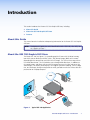
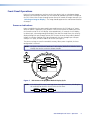
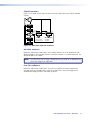
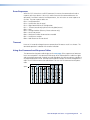
The Extron GSS 100 (see figure 1) is a portable graphic still store with 16 MB of memory,
into which you can load up to 6 XGA (1024 x 768) bitmap images (BMP) or 32 or more
(depending on the compression rate) XGA JPG still images. The GSS can then output them
in an RGB video format. The GSS provides a pass-through RGB video input, in addition to
the stored images, and allows you to switch the output between the input and one of the
stored images. This allows you to display a still image of your own choosing, such as a logo,
text, or a landscape, during meeting breaks or while you load or make last minute edits to a
presentation on a laptop computer.
TCP/IP
Network
Graphics PC
-23
2
RS
V
LAN
RES
ET
H
RU
-TH
SS B
B PA
RG
V
G
H
R
B
.1A
MA
X
G
TP
UT
OU
0V
-24
100
Extron
GSS 100
R
60
50/
Hz
Graphic Still Store
Multiple Images
(for recall during
presentations)
Projector
Laptop
Figure 1. Typical GSS 100 Application
GSS 100 Graphic Still Store • Introduction
1