1
2.4.1 Connecting Cables and Adapters
Although the DEClaser 5100 printer has only one serial port, it can use one
of two distinct serial interfaces: EIA-232 or EIA-422. These interfaces require
different cables. The interface and cables you choose depend on your printer
distance and speed requirements, and whether your system supports EIA-422.
Use EIA-232 if:
•
The printer is less than 15 meters (50 feet) from the host.
•
You do not require (guaranteed) speeds greater than 19200 bps.
Use EIA-422 if:
•
It is supported by your host system.
•
The printer is up to 61 meters (200 feet) from the host.
•
You require reliable communication at speeds up to 57.6K baud.
All Digital host systems and DECservers with a built-in DECconnect interface
or built-in OpenDECconnect interface are EIA-422 compatible.
CAUTION
To prevent possible damage to your printer, do not use H8571 or H8575
adapters on your host system if you are using the EIA-422 interface.
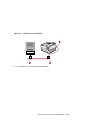
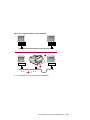
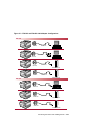
Figure 2–3 shows typical cable and adapter configurations for EIA-232 and
EIA-422 interfaces. This figure shows the H8575-x adapter for use in some
configurations. You can also substitute the older H8571-x adapters for the
H8575-x if you have them.
2–18 Connecting the Printer and Installing Drivers