1
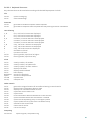
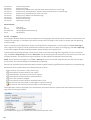
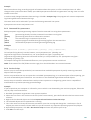
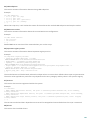
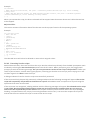
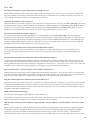
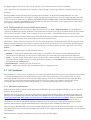
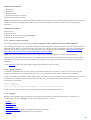
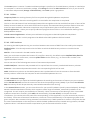
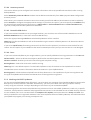
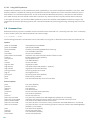
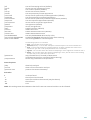
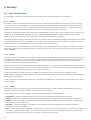
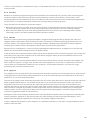
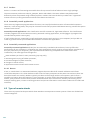
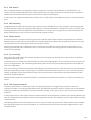
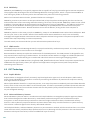
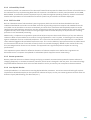
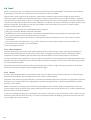
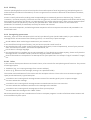
Contents
4.1.3.2
Adding
..................................................................................35
Device control rules
1. ESET Smart
.......................................................5
Security
4.1.4
HIPS ..............................................................................36
1.1 What's
....................................................................................................6
new in version 8
4.1.5
Gamer
..............................................................................38
mode
4.2 Network
....................................................................................................39
1.2 System
....................................................................................................6
requirements
1.3 Prevention
....................................................................................................7
2. Installation
.......................................................8
2.1 Live....................................................................................................8
installer
2.2 Offline
....................................................................................................9
installation
2.2.1
Advanced
..............................................................................10
settings
2.3 Product
....................................................................................................10
activation
2.4 Entering
....................................................................................................11
username and password
4.2.1
Filtering
..............................................................................40
modes
4.2.1.1
Learning
..................................................................................41
mode
4.2.2
Firewall
..............................................................................42
profiles
4.2.3
Configuring
..............................................................................42
and using rules
4.2.3.1
Rules
..................................................................................43
setup
view of all rules
4.2.3.1.1 Detailed........................................................................44
4.2.3.2
Editing
..................................................................................45
rules
4.2.4
Configuring
..............................................................................45
zones
4.2.4.1
Network
..................................................................................46
authentication
2.5 Upgrading
....................................................................................................11
to a more recent version
........................................................................46
- Client configuration
4.2.4.1.1 Zone authentication
2.6 First
....................................................................................................12
scan after installation
........................................................................48
- Server configuration
4.2.4.1.2 Zone authentication
3. Beginner's
.......................................................13
guide
4.2.5
Establishing
..............................................................................49
connection - detection
4.2.6
Logging
..............................................................................50
3.1 The
....................................................................................................13
main program window
4.2.7
System
..............................................................................50
integration
3.2 Updates
....................................................................................................15 4.3 Web
....................................................................................................51
and email
3.3 Trusted
....................................................................................................16
zone setup
Email..............................................................................52
client protection
4.3.1
Integration
..................................................................................52
with email clients
3.4 Anti-Theft
....................................................................................................17
4.3.1.1
3.5 Parental
....................................................................................................17
control tools
........................................................................53
protection configuration
4.3.1.1.1 Email client
4. Work.......................................................18
with ESET Smart Security
4.1 Computer
....................................................................................................19
4.3.1.2
IMAP,
..................................................................................53
IMAPS scanner
4.3.1.3
POP3,
..................................................................................54
POP3S filter
4.3.1.4
Antispam
..................................................................................55
protection
4.1.1
Antivirus
..............................................................................20
and antispyware
........................................................................56
to whitelist and blacklist
4.3.1.4.1 Adding addresses
4.1.1.1
Real-time
..................................................................................20
file system protection
........................................................................56
as spam
4.3.1.4.2 Marking messages
4.1.1.1.1
Advanced
........................................................................21
scan options
4.3.2
Web..............................................................................57
access protection
4.1.1.1.2
Cleaning........................................................................22
levels
4.3.2.1
HTTP,
..................................................................................57
HTTPs
4.1.1.1.3
When to........................................................................23
modify real-time protection configuration
4.3.2.2
URL
..................................................................................58
address management
4.1.1.1.4
Checking........................................................................23
real-time protection
4.3.3
Protocol
..............................................................................59
filtering
4.1.1.1.5
What to do
........................................................................23
if real-time protection does not work
4.3.3.1
Web
..................................................................................59
and email clients
4.1.1.2
Computer
..................................................................................23
scan
4.3.3.2
Excluded
..................................................................................60
applications
4.1.1.2.1
Custom scan
........................................................................24
launcher
4.3.3.3
Excluded
..................................................................................61
IP addresses
4.1.1.2.2
Scan progress
........................................................................25
address
4.3.3.3.1 Add IPv4 ........................................................................61
4.1.1.2.3
Scan profiles
........................................................................26
address
4.3.3.3.2 Add IPv6 ........................................................................61
4.1.1.3
Startup
..................................................................................26
scan
4.3.3.4
4.1.1.3.1
Automatic
........................................................................27
startup file check
........................................................................62
4.3.3.4.1 Certificates
4.1.1.4
Idle-state
..................................................................................27
scanning
........................................................................62
4.3.3.4.1.1 Trusted certificates
4.1.1.5
Exclusions
..................................................................................27
certificates
4.3.3.4.1.2 Excluded........................................................................63
4.1.1.6
ThreatSense
..................................................................................29
engine parameters setup
SSL communication
4.3.3.4.1.3 Encrypted........................................................................63
4.1.1.6.1
Objects ........................................................................29
4.3.4
4.1.1.6.2
Options ........................................................................29
4.1.1.6.3
Cleaning........................................................................30
4.4.1
Web..............................................................................67
page content filtering
4.1.1.6.4
Extensions
........................................................................30
4.4.2
Blocked
..............................................................................68
and allowed web pages
4.1.1.6.5
Limits
........................................................................30
4.1.1.6.6
Other
........................................................................31
4.5.1
Update
..............................................................................71
settings
4.1.1.7
An..................................................................................31
infiltration is detected
4.5.1.1
Update
..................................................................................72
profiles
4.1.1.8
Document
..................................................................................33
protection
4.5.1.2
Advanced
..................................................................................72
update setup
4.1.2
Removable
..............................................................................33
media
........................................................................72
4.5.1.2.1 Update mode
4.1.3
Device
..............................................................................33
control
........................................................................73
4.5.1.2.2 Proxy server
4.1.3.1
Device
..................................................................................34
control rules
........................................................................73
to the LAN
4.5.1.2.3 Connecting
SSL..................................................................................62
protocol checking
Anti-Phishing
..............................................................................63
protection
4.4 Parental
....................................................................................................64
control
4.5 Updating
....................................................................................................68
the program