1
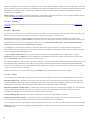
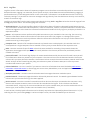
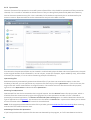
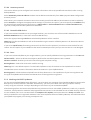
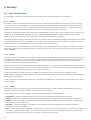
5.7.5.1 Using ESET SysRescue
Suppose that computers in the network have been infected by a virus which modifies executable (.exe) files. ESET
Security solution is capable of cleaning all infected files except for explorer.exe, which cannot be cleaned, even in
Safe mode. This is because explorer.exe, as one of the essential Windows processes, is launched in Safe mode as
well. ESET Security solution would not be able to perform any action with the file and it would remain infected.
In this type of scenario, you could use ESET SysRescue to solve the problem. ESET SysRescue does not require any
component of the host operating system, and is therefore capable of processing (cleaning, deleting) any file on the
disk.
5.8 Command Line
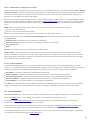
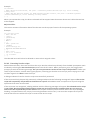
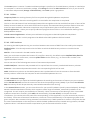
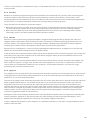
ESET Smart Security's antivirus module can be launched via the command line – manually (with the “ecls” command)
or with a batch (“bat”) file. ESET Command-line scanner usage:
ecls [OPTIONS..] FILES..
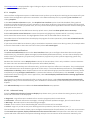
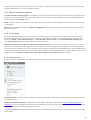
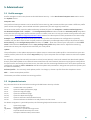
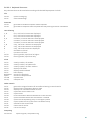
The following parameters and switches can be used while running the on-demand scanner from the command line:
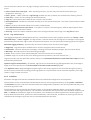
Options
/base-dir=FOLDER
/quar-dir=FOLDER
/exclude=MASK
/subdir
/no-subdir
/max-subdir-level=LEVEL
/symlink
/no-symlink
/ads
/no-ads
/log-file=FILE
/log-rewrite
/log-console
/no-log-console
/log-all
/no-log-all
/aind
/auto
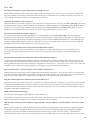
load modules from FOLDER
quarantine FOLDER
exclude files matching MASK from scanning
scan subfolders (default)
do not scan subfolders
maximum sub-level of folders within folders to scan
follow symbolic links (default)
skip symbolic links
scan ADS (default)
do not scan ADS
log output to FILE
overwrite output file (default – append)
log output to console (default)
do not log output to console
also log clean files
do not log clean files (default)
show activity indicator
scan and automatically clean all local disks
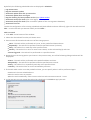
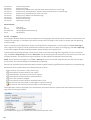
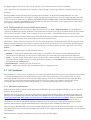
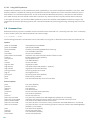
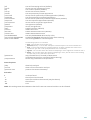
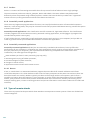
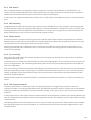
Scanner options
/files
/no-files
/memory
/boots
/no-boots
/arch
/no-arch
/max-obj-size=SIZE
/max-arch-level=LEVEL
/scan-timeout=LIMIT
/max-arch-size=SIZE
/max-sfx-size=SIZE
/mail
/no-mail
/mailbox
/no-mailbox
110
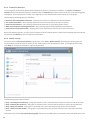
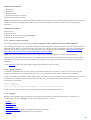
scan files (default)
do not scan files
scan memory
scan boot sectors
do not scan boot sectors (default)
scan archives (default)
do not scan archives
only scan files smaller than SIZE megabytes (default 0 = unlimited)
maximum sub-level of archives within archives (nested archives) to scan
scan archives for LIMIT seconds at maximum
only scan the files in an archive if they are smaller than SIZE (default 0 = unlimited)
only scan the files in a self-extracting archive if they are smaller than SIZE megabytes
(default 0 = unlimited)
scan email files (default)
do not scan email files
scan mailboxes (default)
do not scan mailboxes