1
Sun StorageTek™ Common Array
Manager Software Release Notes
Release 6.1
Sun Microsystems, Inc.
www.sun.com
Part No. 820-4191-10
Apri 25, 2008, Revision A
Submit comments about this document at: http://www.sun.com/hwdocs/feedback
Copyright 2008 Sun Microsystems, Inc., 4150 Network Circle, Santa Clara, California 95054, U.S.A. All rights reserved.
Sun Microsystems, Inc. has intellectual property rights relating to technology that is described in this document. In particular, and without
limitation, these intellectual property rights may include one or more of the U.S. patents listed at http://www.sun.com/patents and one or
more additional patents or pending patent applications in the U.S. and in other countries.
This document and the product to which it pertains are distributed under licenses restricting their use, copying, distribution, and
decompilation. No part of the product or of this document may be reproduced in any form by any means without prior written authorization of
Sun and its licensors, if any.
Third-party software, including font technology, is copyrighted and licensed from Sun suppliers.
Parts of the product may be derived from Berkeley BSD systems, licensed from the University of California. UNIX is a registered trademark in
the U.S. and in other countries, exclusively licensed through X/Open Company, Ltd.
Sun, Sun Microsystems, the Sun logo, AnswerBook2, docs.sun.com, Sun StorEdge, Solaris, Java, Sun StorageTek, and Solstice DiskSuite are
trademarks or registered trademarks of Sun Microsystems, Inc. in the U.S. and in other countries.
All SPARC trademarks are used under license and are trademarks or registered trademarks of SPARC International, Inc. in the U.S. and in other
countries. Products bearing SPARC trademarks are based upon an architecture developed by Sun Microsystems, Inc.
Legato Networker is a registered trademark of Legato Systems Inc.
Netscape Navigator and Mozilla are trademarks or registered trademarks of Netscape Communications Corporation in the United States and
other countries.
The OPEN LOOK and Sun™ Graphical User Interface was developed by Sun Microsystems, Inc. for its users and licensees. Sun acknowledges
the pioneering efforts of Xerox in researching and developing the concept of visual or graphical user interfaces for the computer industry. Sun
holds a non-exclusive license from Xerox to the Xerox Graphical User Interface, which license also covers Sun’s licensees who implement OPEN
LOOK GUIs and otherwise comply with Sun’s written license agreements.
U.S. Government Rights—Commercial use. Government users are subject to the Sun Microsystems, Inc. standard license agreement and
applicable provisions of the FAR and its supplements.
DOCUMENTATION IS PROVIDED “AS IS” AND ALL EXPRESS OR IMPLIED CONDITIONS, REPRESENTATIONS AND WARRANTIES,
INCLUDING ANY IMPLIED WARRANTY OF MERCHANTABILITY, FITNESS FOR A PARTICULAR PURPOSE OR NON-INFRINGEMENT,
ARE DISCLAIMED, EXCEPT TO THE EXTENT THAT SUCH DISCLAIMERS ARE HELD TO BE LEGALLY INVALID.
Copyright 2007 Sun Microsystems, Inc., 4150 Network Circle, Santa Clara, Californie 95054, Etats-Unis. Tous droits réservés.
Sun Microsystems, Inc. a les droits de propriété intellectuels relatants à la technologie qui est décrit dans ce document. En particulier, et sans la
limitation, ces droits de propriété intellectuels peuvent inclure un ou plus des brevets américains énumérés à http://www.sun.com/patents et
un ou les brevets plus supplémentaires ou les applications de brevet en attente dans les Etats-Unis et dans les autres pays.
Ce produit ou document est protégé par un copyright et distribué avec des licences qui en restreignent l’utilisation, la copie, la distribution, et la
décompilation. Aucune partie de ce produit ou document ne peut être reproduite sous aucune forme, par quelque moyen que ce soit, sans
l’autorisation préalable et écrite de Sun et de ses bailleurs de licence, s’il y en a.
Le logiciel détenu par des tiers, et qui comprend la technologie relative aux polices de caractères, est protégé par un copyright et licencié par des
fournisseurs de Sun.
Des parties de ce produit pourront être dérivées des systèmes Berkeley BSD licenciés par l’Université de Californie. UNIX est une marque
déposée aux Etats-Unis et dans d’autres pays et licenciée exclusivement par X/Open Company, Ltd.
Sun, Sun Microsystems, le logo Sun, AnswerBook2, docs.sun.com, Sun StorEdge, Solaris, Java, Sun StorageTek, et Solstice DiskSuite sont des
marques de fabrique ou des marques déposées de Sun Microsystems, Inc. aux Etats-Unis et dans d’autres pays.
Netscape Navigator et Mozilla est une marques de Netscape Communications Corporation aux Etats-Unis et dans d’autres pays.
Toutes les marques SPARC sont utilisées sous licence et sont des marques de fabrique ou des marques déposées de SPARC International, Inc.
aux Etats-Unis et dans d’autres pays. Les produits portant les marques SPARC sont basés sur une architecture développée par Sun
Microsystems, Inc.
L’interface d’utilisation graphique OPEN LOOK et Sun™ a été développée par Sun Microsystems, Inc. pour ses utilisateurs et licenciés. Sun
reconnaît les efforts de pionniers de Xerox pour la recherche et le développement du concept des interfaces d’utilisation visuelle ou graphique
pour l’industrie de l’informatique. Sun détient une license non exclusive de Xerox sur l’interface d’utilisation graphique Xerox, cette licence
couvrant également les licenciées de Sun qui mettent en place l’interface d’utilisation graphique OPEN LOOK et qui en outre se conforment aux
licences écrites de Sun.
LA DOCUMENTATION EST FOURNIE “EN L’ÉTAT” ET TOUTES AUTRES CONDITIONS, DECLARATIONS ET GARANTIES EXPRESSES
OU TACITES SONT FORMELLEMENT EXCLUES, DANS LA MESURE AUTORISEE PAR LA LOI APPLICABLE, Y COMPRIS NOTAMMENT
TOUTE GARANTIE IMPLICITE RELATIVE A LA QUALITE MARCHANDE, A L’APTITUDE A UNE UTILISATION PARTICULIERE OU A
L’ABSENCE DE CONTREFAÇON.
Contents
Sun StorageTek Common Array Manager Software Release Notes
Common Array Manager Software Features
New Features
2
2
Release Contents
2
Licensing Optional Premium Features
Release Documentation
3
5
System Requirements
5
Supported Arrays
6
iSCSI Support
6
Supported Platforms and Required Packages
Required Patches
7
9
File Space Requirements
10
Open Ports Required on Management Host
10
Supported Platforms for the Remote CLI Client
Supported Web Browsers
Supported Languages
11
12
Best Practices for Browser Performance
12
13
Installing Packages and Patches
Prerequisites
1
14
14
Contents
1
Supported Upgrades
Installation Logs
15
15
Uninstalling a Previous CAM Version
16
Installing and Upgrading Common Array Manager Software
Command-Line (Minimal) Installation
16
17
Performing a (Minimal) CLI Common Array Manager Software Installation
17
Uninstalling a (Minimal) CLI Common Array Manager Software
Installation 18
Firmware
19
CSM200 Best Practices
19
Supported Expansion Modules
Firmware Files
20
21
Sun StorageTek 2500 Series Array and Disk Firmware Version
Information 22
Sun StorageTek 6130, 6140, 6540, FLX240, FLX280, and FLX380 Array and
Disk Firmware Version Information 23
Installing the Firmware Baseline: Upgrading Array Firmware
Prerequisites:
27
Upgrading Firmware for Additional Expansion Trays
Third Expansion Tray (48-Drive) Cabling
Upgrading Expansion Modules
27
27
28
Upgrading Firmware for Additional Expansion Modules
Firmware Rollbacks
Common Array Manager-Specific Issues
Configuration Issues
Documentation Issues
28
29
Known Issues and Operational Information
Firmware Issues
26
30
30
35
40
43
In-Band Array Management Issues
44
Contents
2
About the In-Band Proxy Agent
Known Proxy Agent Limitations
44
44
Solaris: Checking the UTM LUN's and Start/Stop of the Proxy Agent
45
Linux: Checking The UTM LUNs and Start/Stop of the Proxy Agent
45
Windows: Checking The UTM LUN's and Start/Stop of the Proxy
Agent 46
Localization Issues
Solaris Issues
49
50
Service Contact Information
Third-Party Web Sites
52
52
Contents
3
4
Sun StorageTek Common Array Manager Software Release Notes, Release 6.1 • April 2008
Sun StorageTek Common Array
Manager Software Release Notes
This document contains important information about Release 6.1 of the Sun
StorageTek™ Common Array Manager software, including issues and requirements
that can affect installation and operation.
These Release Notes include the following sections:
■
“Common Array Manager Software Features” on page 2
■
“Release Documentation” on page 5
■
“System Requirements” on page 6
■
“Installing Packages and Patches” on page 15
■
“Firmware” on page 20
■
“Known Issues and Operational Information” on page 32
■
“Service Contact Information” on page 54
■
“Third-Party Web Sites” on page 54
1
Common Array Manager Software
Features
The Sun StorageTek Common Array Manager software provides an easy-to-use
interface from which you can configure, manage, and monitor Sun StorageTek
storage arrays.
New Features
2
■
Support for 7.10.xx.xx firmware for the 6140, 6540, and FLX380 arrays
■
7.10 Firmware Update (For 6140, 6540 and FLX380 arrays) includes the following:
■
RAID 6 (6140 arrays only)
■
>2TB LUN Support
■
Portable Volume Groups
■
Batch Volume Operations
■
8K Cache Block size
■
Support for in-band management for Solaris x86 and Microsoft Windows
■
CLI Minimal Installation
■
Third Expansion Tray (48-Drive) Cabling patch for the 2500 series
Sun StorageTek Common Array Manager 6.1 Release Notes • April 2008
Release Contents
TABLE 1 lists the version information for the software included in this release.
TABLE 1
Sun StorageTek Common Array Manager CD Contents
Type
Version
Common Array Manager
6.1.0
Java Web Console software
3.0.4
Java 2 Software Development Kit
1.5.0
Firmware files, as listed in “Firmware Files”
on page 22
06.60.11.10
06.70.54.10
06.60.11.20
Remote scripting CLI client
2.1.4
Licensing Optional Premium Features
To use optional premium features, you must purchase licenses. When you order
licenses, they will be sent to you with instructions on how to activate the features.
For more information, search for these topics in the online Help:
■
About Licensed Features
■
Adding a License
■
Displaying License Information
■
Managing Licenses
The following licenses for premium features are available from Sun:
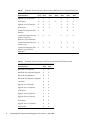
TABLE 2
Premium Feature Licenses: 06.nn.nn.nn and 07.nn.nn.nn Controller Firmware
Premium Feature
6540
Array
6140
Array
6130
Array
2500
Arrays
FLX240
Array
FLX280
Array
FLX380
Array
Data Snapshot
X
X
X
X
X
X
X
Data Volume Copy
X
X
X
X
X
X
Data Replicator
X
X
X
X
X
X
4 Domains
X
X
X
X
X
Upgrade 4 to 8 Domains
X
X
X
X
X
8 Domains
X
X
X
X
X
X
X
Sun StorageTek Common Array Manager Software Release Notes
3
TABLE 2
Premium Feature
6540
Array
6140
Array
6130
Array
Upgrade 8 to 16 Domains
X
X
X
16 Domains
X
X
X
Upgrade 16 to 64 Domains
X
X
64 Domains
X
X
Combo Data Snapshot and 8
Domains
X
X
Combo Data Snapshot, Data
Volume Copy, Data
Replicator, and 64 Domains
X
X
X
Combo Data Snapshot, Data
Volume Copy
X
X
Combo Data Snapshot, Data
Volume Copy, and Data
Replicator
X
X
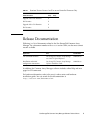
TABLE 3
4
Premium Feature Licenses: 06.nn.nn.nn and 07.nn.nn.nn Controller Firmware
2500
Arrays
FLX240
Array
FLX280
Array
FLX380
Array
X
X
X
X
X
X
X
X
X
X
X
X
X
X
X
X
X
X
X
X
X
X
X
X
X
X
X
X
Premium Feature Licenses for 07.nn.nn.nn Controller Firmware Only
Premium Feature
6540
Array
6140
Array
Enhanced Data Snapshot
X
X
Enhanced Data Snapshot Upgrade
X
X
Enhanced Data Replicator
X
X
Enhanced Data Replicator Upgrade
X
X
2 Domains
X
X
Upgrade 2 to 4 Domains
X
X
Upgrade 16 to 32 Domains
X
X
32 Domains
X
X
Upgrade 32 to 64 Domains
X
X
Upgrade 64 to 96 Domains
X
X
96 Domains
X
X
Upgrade 96 to 128 Domains
X
X
128 Domains
X
X
Sun StorageTek Common Array Manager 6.1 Release Notes • April 2008
TABLE 3
Premium Feature Licenses for 07.nn.nn.nn Controller Firmware Only
Premium Feature
6540
Array
Upgrade 128 to 256 Domains
X
256 Domains
X
Upgrade 256 to 512 Domains
X
512 Domains
X
6140
Array
Release Documentation
Following is a list of documents related to the Sun StorageTek Common Array
Manager. For a document number with nn as a version suffix, use the most current
version available.
Application
Title
Part Number
CLI command reference
Sun StorageTek Common Array Manager
sscs (1M) CLI Quick Reference
820-4192-nn
Installation and initial
configuration instructions
Sun StorageTek Common Array Manager
Software Installation Guide
820-4193-nn
In addition, the Common Array Manager software includes online Help and man
pages for CLI commands.
For hardware information, refer to the array’s release notes and hardware
installation guide. You can search for this documentation at
http://www.sun.com/documentation.
Sun StorageTek Common Array Manager Software Release Notes
5
System Requirements
System requirements for the Sun StorageTek Common Array Manager software are
described in the following sections:
■
“Supported Arrays” on page 6
■
“iSCSI Support” on page 7
■
“Supported Platforms and Required Packages” on page 8
■
“Required Patches” on page 10
■
“File Space Requirements” on page 11
■
“Open Ports Required on Management Host” on page 11
■
“Supported Platforms for the Remote CLI Client” on page 12
■
“Supported Web Browsers” on page 13
■
“Supported Languages” on page 14
Supported Arrays
Common Array Manager software supports the following Sun storage systems:
6
■
Sun StorageTek Flexline 240 Array
■
Sun StorageTek Flexline 280 Array
■
Sun StorageTek Flexline 380 Array
■
Sun StorageTek 2510 (iSCSI)
■
Sun StorageTek 2530 Array (SAS)
■
Sun StorageTek 2540 Array (FC)
■
Sun StorEdge 6130 Array
■
Sun StorageTek 6140 Array
■
Sun StorageTek 6540 Array
Sun StorageTek Common Array Manager 6.1 Release Notes • April 2008
iSCSI Support
Sun StorageTek CAM software features Internet Small Computer Systems Interface
(iSCSI) support for the Sun StorageTek 2510 storage system. Initiators are the clients
of the iSCSI interface, issuing requests for services from components or logical units
called targets. One iSCSI target is supported per array.
The iSCSI port is used for communication between the iSCSI initiator and the iSCSI
target. The array supports two iSCSI ports per controller, for a total of four per array.
An iSCSI session consists of up to four connections between an initiator and its
target. The iSCSI initiator and target send and receive data over an Ethernet
connection, using the SCSI protocol. Across all connections within a session, an
initiator sees the same target. Multiple initiators may be connected to the iSCSI
target.
For initial installation and configuration of iSCSI on the 2510, see the Sun StorageTek
2500 Series Array Installation Guide.
Note – In this release, SAS is not an available drive type for the 6xxxx and Flexline
arrays. It will be available in future firmware releases and documented as such in
Release Notes. However, SAS is an available drive type for the 2500 Series arrays.
For the complete list of drives, refer to Table 5 in the Sun StorageTek 2500 Series Array
Release Notes, Version 1.3.
Consult the Sun StorageTek Common Array Manager software online Help for
further information and procedures, such as configuring iSCSI targets and ports,
mutual authentication for an iSCSI session, unnamed discovery sessions, and
Internet Storage Name Service (iSNS), and more.
Sun StorageTek Common Array Manager Software Release Notes
7
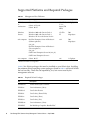
Supported Platforms and Required Packages
TABLE 4
Management Host Platforms
Platform
Operating System
CPU
Memory
SPARC server
or
workstation
Solaris 8 OS 4/01
Solaris 9 OS 8/03
Solaris 10 OS
UltraSPAR
C 3 or
better (750
MHz)
1 Gigabyte
Windows
Servers
Windows 2000 with Service Pack 4
Windows 2003 with Service Pack 1
Windows XP Pro with Service Pack 2*
1.5 GHz
PC
500
Megabytes
x64 computer
Red Hat Enterprise Linux AS Release 4
(Nahant update 4)
(x86_64)
Red Hat Enterprise Linux AS Release 3
(Taroon update 8)
(x86_64)
SuSE Linux Enterprise Server 10 (x86_64)
SuSE Linux Enterprise Server 9
x64
500
Megabytes
x86 computer
Solaris 10 OS
x86
1 Gigabyte
* Windows XP Home is not supported.
TABLE 5 lists Solaris packages that must be installed on your Solaris host. Installing
the minimum Solaris operating system package as listed in TABLE 4 will install all but
the last four files. Those files are required by Java, but are not used by the
management software.
TABLE 5
8
Required Solaris Packages
File
Description
SUNWtcatu
Tomcat Servlet/JSP Container
SUNWcar
Core Architecture, (Root)
SUNWcsd
Core Solaris Devices
SUNWcsl
Core Solaris, (Shared Libs)
SUNWcsr
Core Solaris, (Root)
SUNWcsu
Core Solaris, (Usr)
SUNWkvm
Core Architecture, (Kvm)
SUNWlibC
Sun Workshop Compilers Bundled libC
Sun StorageTek Common Array Manager 6.1 Release Notes • April 2008
TABLE 5
Required Solaris Packages
File
Description
SUNWmfrun
Motif RunTime Kit
SUNWxwice
X Window System Inter-Client Exchange (ICE) Components
SUNWxwplt
X Window System platform software
SUNWxwrtl
X Window System & Graphics Runtime Library Links in /usr/lib
TABLE 6 lists Linux packages and libraries that must be installed on your Linux host.
The 32-bit versions of the packages and files are required.
TABLE 6
Required Linux Packages
File
Version
fileutils
4.0-8
gawk
3.0.4-1
glibc
2.1.2-11
ld-linux.so.2
-
libc.so.6
-
libc.so.6
(GLIBC_2.0)
libc.so.6
(GLIBC_2.1)
libc.so.6
(GLIBC_2.1.2)
libc.so.6
(GLIBC_2.1.3)
libcrypt.so.1
-
libcrypt.so.1
(GLIBC_2.0)
libdl.so.2
-
libpam.so.0
-
sh-utils
2.0-1
textutils
2.0-2
Sun StorageTek Common Array Manager Software Release Notes
9
Required Patches
For the latest patches available for your system, check SunSolve at
http://www.sunsolve.sun.com
TABLE 7
10
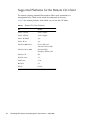
Patch Number and Platform
Patch Number
Platform
125950-06
Solaris 9 Sparc
125951-06
Solaris 9 x86
125952-06
Solaris 10 Sparc
125953-06
Solaris 10 x86
125954-06
Linux
125955-06
Windows (JES only
installations)
127534-02
Windows (standalone Lockhart
deployments)
128270-xx
Windows (2500 SATA Support
Patch for 2530 and 2540 storage
array firmware)
128269-xx
Solaris Sparc/x86/x64 (2500
SATA Support Patch for 2530
and 2540 storage arrays)
128271-xx
Linux (2500 SATA Support Patch
for 2530 and 2540 storage array
firmware)
Sun StorageTek Common Array Manager 6.1 Release Notes • April 2008
File Space Requirements
TABLE 8
File Space Requirements: Sun StorageTek Common Array Manager 6.1
Operating System
Disk Space
Directory Space
Solaris 8 OS 4/01
Solaris 9 OS 8/03
Solaris 10 OS
555 Mbytes
root
/tmp
/usr
/var
/opt
Windows 2000 with
Service Pack 4
Windows 2003 with
Service Pack 1
Windows XP Pro with
Service Pack 2*
690 MBytes on system
drive
Not Applicable
Red Hat Enterprise
Linux AS Release 3 and 4
SuSE Linux 10 and 9
560 Mbytes
root
/tmp
/usr
/var
/opt
–
–
–
–
–
–
–
–
–
–
5 Mbytes
165 Mbytes
40 Mbytes
95 Mbytes
460 Mbytes
5 Mbytes
120 Mbytes
155 Mbytes
100 Mbytes
395 Mbytes
* Windows XP Home is not supported.
Open Ports Required on Management Host
Open the following incoming and outgoing ports for secure-by-default Solaris,
Linux, and Windows platforms:
■
■
Incoming Ports
■
TCP 6788 - console HTTP port that redirects to 6789
■
TCP 6789 - console HTTPS port
Outgoing Ports
■
TCP 25 - SMTP used for email event notification from FMS
■
UDP 161 - SNMP used for event notification traps from FMS
■
TCP 2463 - used for RPC (remote procedure calls) with the arrays
For Windows, refer to the documentation for instructions on how to open a port
through the firewall.
Sun StorageTek Common Array Manager Software Release Notes
11
Supported Platforms for the Remote CLI Client
The remote scripting command-line interface client sends commands to a
management host, which in turn sends the commands to the array.
TABLE 9 lists remote platforms from which you can run the CLI client:
TABLE 9
12
Remote CLI Client Platforms
OS
Version
Solaris 8 SPARC
4/01 or higher
Solaris 9 SPARC
8/03 or higher
Solaris 10 SPARC
any
Solaris 10 x86
any
Windows 2000 Server
Server (SP4) and
Advanced Server (SP4)
Windows Server 2003
Standard/Web/
Enterprise Edition; SP2
Windows XP
SP2
Red Hat Linux
3, 4
SuSE Linux
9, 10
IBM AIX
3.5
HP-UX
B.11.23
Sun StorageTek Common Array Manager 6.1 Release Notes • April 2008
Supported Web Browsers
TABLE 10
Supported Web Browsers
Browser
Minimum Version
Netscape Navigator
6.2
Mozilla
1.4
Firefox
1.0
Microsoft Internet Explorer
5.5 (7 is not supported)
Best Practices for Browser Performance
For best web browser performance while using the Sun StorageTek Common Array
Manager software, do the following:
■
Enable pop-up windows.
■
Specify No Proxy for the Common Array Manager host, to avoid situations where
your browser might hang, time out, or generate incorrect error messages. From
Preferences > Advanced > Proxies (or a similar path, depending on your
browser), add the Common Array Manager management host name to the “No
Proxy for” section.
■
Be aware that Firefox and Mozilla browsers share session information: If you log
in to Common Array Manager and then open another browser instance or tab
pointed to the same URL, you access it through the same user session, so there is
no need to log in again. The Current Logins field in the Common Array Manager
does not increment to include the new window as another login. Therefore, if you
require a different user session, you must define a different profile or log in from
a different machine. This does not happen with Microsoft Internet Explorer
browsers, so you can also open a new session using that browser.
Note – Microsoft Internet Explorer version 7 is not supported.
Sun StorageTek Common Array Manager Software Release Notes
13
Supported Languages
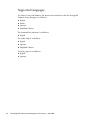
For Solaris, Linux and Windows, the browser user interface for the Sun StorageTek
Common Array Manager is available in:
■
English
■
French
■
Japanese
■
Simplified Chinese
The command-line interface is available in:
■
English
The online Help is available in:
■
English
■
Japanese
■
Simplified Chinese
The man pages are available in:
14
■
English
■
Japanese
Sun StorageTek Common Array Manager 6.1 Release Notes • April 2008
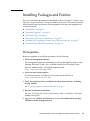
Installing Packages and Patches
The array installation procedures are described in the Sun StorageTek Common Array
Manager Software Installation Guide (part number 820-4193-nn). This section describes
release-specific steps for firmware and management software patch upgrades that
you must perform:
■
“Prerequisites” on page 15
■
“Supported Upgrades” on page 16
■
“Installation Logs” on page 16
■
“Uninstalling a Previous CAM Version” on page 17
■
“Installing and Upgrading Common Array Manager Software” on page 17
■
“Command-Line (Minimal) Installation” on page 18
Prerequisites
Before you perform an installation procedure, do the following:
1. Locate the management software.
The management software is distributed on the Sun StorageTek Common Array
Manager Software CD and is also available from the Sun Download Center
(Systems Administration > Storage Management) here:
http://www.sun.com/download/
2. Locate the most current patches.
For the latest patches available for your system, check SunSolve at
http://www.sunsolve.sun.com
3. Verify that you have license certificates for all premium features, including
storage domains.
See “Licensing Optional Premium Features” on page 3.
4. Read the installation instructions.
See your Sun StorageTek Common Array Manager Software Installation Guide (part
number 820-4193-nn)
5. Log in as root (Solaris and Linux) or as a user with administrator privilege
(Windows) on the management host.
Sun StorageTek Common Array Manager Software Release Notes
15
6. Note that before starting the installation script, the CD verifies host
requirements, such as the following:
■
Unsupported versions of related software such as Common Array Manager 4.x,
Storage Automated Diagnostic Environment 2.x and unsupported versions of the
sscs CLI
■
Unsupported versions of operating systems or software
■
Insufficient disk space (see “File Space Requirements: Sun StorageTek Common
Array Manager 6.1” on page 11)
If the host meets the requirements, the script will search for earlier versions and
determine if a new installation or an upgrade/baseline installation is necessary. If
the script detects that there is no earlier version installed, it will perform a
complete new installation.
Prerequisites regarding Zones
■
Before you install CAM in a sparse-root zone, install Lockhart 3.0.5 with its L10N
(Localization) packages in the global zone.
■
For Solaris 10, do not attempt to run the Lockhart setup script when logged into
the local zone. The CAM installation prevents this. Either install Lockhart into a
whole root zone or install/upgrade Lockhart in the global zone before installing
CAM into the local zone.
For more information, contact Sun Microsystems Support Services. (“Service Contact
Information” on page 54)
Supported Upgrades
Solaris: Upgrades from CAM 5.0.0.8, 5.0.1.1, 5.0.2.1, 5.1.0.10, 5.1.0.11, 5.1.1.2, 5.1.2.2,
5.1.3.2, and 6.x to this release are supported. You are not required to uninstall the
existing CAM version before installing this release.
Linux: Upgrades are supported.
Windows: Upgrade to this build is not supported in 64-bit Windows 2003. Uninstall
of previous CAM version is required before installing this build in 64-bit Windows
2003. In other Windows platforms, upgrade to this build is supported.
Installation Logs
If installation failure occurs, check the available disk space.
16
Sun StorageTek Common Array Manager 6.1 Release Notes • April 2008
For more information, consult the installation log:
Solaris: /var/sadm/install/se6000/se6000_Host_SW.log
Linux: /var/opt/cam
Windows: \Program Files\Common Files\Sun Microsystems\se6000
Uninstalling a Previous CAM Version
1. Log in to the CLI on the management host or using the remote CLI client as
documented in the Sun StorageTek Common Array Manager Software Installation
Guide (part number 820-4193-nn).
2. Navigate to the appropriate directory for your operating system:
For Windows, navigate to:
%systemdrive%\Sun\CommonArrayManager\Host_Software_6.0.0.10\
bin\uninstall.bat
For Solaris and Linux, navigate to:
/var/opt/CommonArrayManager/Host_Software_6.0.0.10/bin/uninsta
ll
For the Suse 9 platform, CLI uninstall requires the following rpm packages:
■
libgcj-3.3.3-43.24.x86_64.rpm
■
getttext-0.1.14.1-30.1.x86_64.rpm
3. Enter the command uninstall -f
The command will remove the current installation.
Installing and Upgrading Common Array
Manager Software
If you are installing the management software on a new host, follow the entire
installation and configuration procedure described in the Sun StorageTek Common
Array Manager Software Installation Guide (part number 820-4193-nn).
After initial installation and configuration, you can upgrade the management
software and firmware with each release.
The installer also installs the firmware update bundle on the host server. To upgrade
the firmware on the array, see “Installing the Firmware Baseline: Upgrading Array
Firmware” on page 27.
Sun StorageTek Common Array Manager Software Release Notes
17
Command-Line (Minimal) Installation
You can perform a minimal installation that enables one of two options: a command-line
interface only or a command-line interface with firmware.
The CLI in previous versions of Sun StorageTek Common Array Manager software
required the web server in order to run. Minimal installation does not require the web
server to be running in order to function and is limited to calls on the management host
where the management software is installed.
The sscs command behaves normally, with the following exceptions:
■
The local-only version of sscs requires administrator privileges in order to run.
There is no guest version of the local sscs command for read-only data.
■
The local-only version of 'sscs login' and 'sscs logout' commands do not provide
value since the function is no longer required.
■
The sscs login command will not query for the user name or password.
■
The local-only sscs version command will only print the version of the current
CAM installation.
■
CLI-only install options will not install or configure the Sun Web Console
software. Even when the Sun Web Console is already installed and running on the
host system, the installation will not modify or configure the Sun Web Console.
■
CLI-only installation will not allow any remote CLI clients to connect to the CAM
host.
Note – Minimal Installation can stand alone, whereas Remote Client installation
requires a fully installed image on a separate host.
Performing a (Minimal) CLI Common Array
Manager Software Installation
1. From the Common Array Manager Installation page, select one of these options
in the Select a feature bundle list:
18
■
Command-Line Only with Firmware (management host software; CLI for local
users, remote users, and remote management host; array firmware)
OR
■
Command-Line Only (management host software; CLI for local users, remote
users, and remote management host)
Sun StorageTek Common Array Manager 6.1 Release Notes • April 2008
Note – Array firmware files are not installed with the Command-Line Only
option. Because firmware is not installed, the firmware analysis feature is not
available with this installation.
2. Click Next and follow the prompts by pressing 1 for Next, 3 to Cancel, or 5 to
Redisplay.
The software will notify you as it checks your system and does any or all of the
following:
■
uninstalls any old features
■
installs Java 2 Standard Edition
■
installs Sun StorageTek Configuration Service BUI
■
installs Sun StorageTek Fault Management Services
■
installs Sun StorageTek Array Firmware
■
installs Sun StorageTek Common Array Manager
■
creates uninstaller
■
finalizes the Vital Product Data Registry.
The system will notify you that the installation has been successful.
3. Press 3 to Finish or 5 to Redisplay.
Uninstalling a (Minimal) CLI Common Array
Manager Software Installation
1. From the host software installer, select Uninstall.
2. Click Next and follow the prompts by pressing 1 for Next, 3 to Cancel, or 5 to
Redisplay.
The software will notify you as it checks your system and does any or all of the
following:
■
prepares for uninstallation
■
uninstalls Java 2 Standard Edition
■
uninstalls Sun StorageTek Fault Management Services
■
finalizes the Vital Product Data Registry
■
post-uninstallation action
The system will notify you that the un-installation has been successful.
3. Press 3 to Finish or 5 to Redisplay.
Sun StorageTek Common Array Manager Software Release Notes
19
Firmware
This section describes the main features of the firmware, including the following:
■
“CSM200 Best Practices” on page 20
■
“Firmware Files” on page 22
■
“Installing the Firmware Baseline: Upgrading Array Firmware” on page 27
To add trays with data already on them, contact your service representative for
assistance to avoid data loss.
Refer to “Upgrading Firmware for Additional Expansion Trays” on page 29 for the
procedure to upgrade trays without data.
Controller firmware 06.19.x.x or higher allows tray mixing of 6540, 6140, 6130,
FLX240, FLX280, and FLX380 array controllers modules and the Sun StorageTek
CSM100, CSM200, FLA200, FLC200, and FLA3 expansion modules. After installing
the firmware, 6130 controllers can use CSM200 expansion modules and CSM100
expansion modules can be used with 6540 and 6140 controllers.
CSM200 Best Practices
When you add a new CSM200 expansion module to an existing array in a
production or active environment, it is best practice to cable and add the trays while
the RAID controller module is powered on.
Before connecting any replacement drive or additional expansion module to an
existing functioning array, it is best practice to contact Sun Microsystems Support
Services (see “Service Contact Information” on page 54). One reason for this is to
avoid issues related to DACstore, the configuration and status database maintained
by the array firmware, that stores its information on each of the disk drives.
Because corrective actions for a DACstore issue may require a configuration
restoration, it is important to maintain a current image of the configuration. And, as
always, it is best practice to maintain recoverable backups of your data.
Affected arrays are:
20
■
Sun StorEdge 6130 Array
■
Sun StorageTek 6140 Array
■
Sun StorageTek 6540 Array
■
StorageTek FLX280 Array
■
StorageTek FLX380 Array
Sun StorageTek Common Array Manager 6.1 Release Notes • April 2008
Contact Sun Microsystems Support Services (see “Service Contact Information” on
page 54) promptly upon experiencing any of the following symptoms:
■
loss of management or data access
■
inability to apply feature licenses
■
inability to upgrade/install the baseline for array firmware
■
incorrect component details in the management tool
■
host operating system reports the wrong product identifier
■
array registration or discovery fails to complete
■
persistent or unrecoverable multipathing failover
Supported Expansion Modules
The following tables list the supported expansion modules:
TABLE 11
Supported Expansion Modules: 6000 Series Arrays
Supported Expansion
Modules with Controller
Firmware 06.19.25.16
Array Controller
Original Supported
Expansion Modules
Sun StorageTek 6540 Array
CSM200
CSM100, CSM200,
FLA200, FLC200, FLA300
Sun StorageTek 6140 Array
CSM200
CSM100, CSM200,
FLA200, FLC200, FLA300
Sun StorageTek 6130 Array
CSM100
CSM100, CSM200,
FLA200, FLC200, FLA300
TABLE 12
Supported Expansion Module: 2500 Series Array
Array Controller
Supported Expansion Modules
Sun StorageTek 2500 Series Arrays
2501
Sun StorageTek Common Array Manager Software Release Notes
21
TABLE 13
Supported Expansion Module: Sun StorageTek FLX240, FLX280, and FLX380
Arrays
Array Controller
Supported Expansion Modules
Sun StorageTek FLX240 Array
CSM100, CSM200, FLA200,
FLC200, FLA300
Sun StorageTek FLX280 Array
CSM100, CSM200, FLA200,
FLC200, FLA300
Sun StorageTek FLX380 Array
CSM100, CSM200, FLA200,
FLC200, FLA300
Firmware Files
For the latest patches available for your system, check SunSolve at:
http://www.sunsolve.sun.com.
Common Array Manager firmware is installed in the following locations:
■
Solaris: /opt/SUNWstkcam/share/fw
■
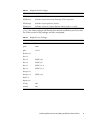
Windows: <system drive>:\Program Files\Sun\Common Array Manager\
Component\SunStorageTekArrayFirmware\
■
Linux: /opt/sun/cam/share/fw/
■
Firmware files are located in the images subdirectory.
■
Controller firmware is located in images/nge.
■
Drive firmware is in images/sun.
Within the directory where you installed the firmware, a README file for each
array type define the firmware baseline.
22
■
README_2500.txt defines the firmware baseline for the Sun StorageTek 2500
Series Arrays.
■
README_6000.txt defines the firmware baseline for the Sun StorageTek 6130,
6140, 6540, FLX240, FLX280, and FLX380 arrays.
Sun StorageTek Common Array Manager 6.1 Release Notes • April 2008
Note – After an upgrade to the 7.10 firmware version, the Cache Block size will
reset to a default of 4KB. In previous firmware levels, the default size was 16K.
Therefore, after a firmware upgrade to Release 6.1, the default Cache Block size
might need to be changed back to the previous 16KB size if this was the size
previously used with the firmware.
TABLE 14
Release Firmware Level
Array
Firmware Version
Sun StorageTek 6540, 6140, and 6130 Arrays
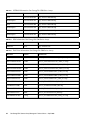
06.60.11.10
Sun StorageTek 2500 Series Arrays
06.70.54.10
Sun StorageTek Flexline 240, 280, and 380 Arrays
06.60.11.10
Check the build notes file distributed with the software for the exact firmware build.
The Sun StorageTek Common Array Manager software will support one prior
version of the firmware for legacy features on previously supported arrays. (This
does yet apply to the new Sun StorageTek 2500 Series Arrays).
For information about how to install firmware, see “Installing the Firmware
Baseline: Upgrading Array Firmware” on page 27.
Sun StorageTek 2500 Series Array and Disk Firmware
Version Information
For the latest patches available for your system, check SunSolve at:
http://www.sunsolve.sun.com.
In the following tables, the paths listed in the Firmware File column is relative to the
images subdirectory where firmware files are located.
TABLE 15
Controller Information: Sun StorageTek 2500 Series Arrays
Controller
Version
Firmware File
2510
06.70.54.10
nge/RC_06704210_desperado_apollo_1532.dlp
2530
06.70.54.10
nge/RC_06704210_desperado_apollo_133x.dlp
2540
06.70.54.10
nge/RC_06704210_desperado_apollo_1932.dlp
Sun StorageTek Common Array Manager Software Release Notes
23
TABLE 16
NVSRAM Information: Sun StorageTek 2500 Series Arrays
NVSRAM
Version
Firmware File
2510
N1532-670843-001
nge/N1532-670843-001.dlp
2510-Simplex
N1532-670843-901
nge/N1532-670843-901.dlp
2530
N133X-670843-001
nge/N133X-670843-001.dlp
2530-Simplex
N133X-670843-901
nge/N133X-670843-901.dlp
2540
N1932-670843-001
nge/N1932-670843-001.dlp
2540-Simplex
N1932-670843-901
nge/N1932-670843-901.dlp
TABLE 17
IOM Information: Sun StorageTek 2500 Series Arrays
IOM
Version
Firmware File
2500 SAS
0186
nge/esm0186.esm
TABLE 18
Disk Drive Information: Sun StorageTek 2500 Series Arrays
Disk Drive
Version
Firmware File
HDS7250SASUN500G
AJ0A
sun/D_HDS7250SASUN500G_AJ0A_LCA.dlp
HUA7210SASUN1.0T
A90A
sun/D_HUA7210SASUN1.0T_A90A_LCA.dlp
HUA7250SBSUN500G
A90A
sun/D_HUA7250SBSUN500G_A90A_LCA.dlp
HUA7275SASUN750G
A90A
sun/D_HUA7275SASUN750G_A90A_LCA.dlp
HUS1514SBSUN146G
SA02
sun/D_HUS1514SBSUN146G_SA02_LCA.dlp
HUS1530SBSUN300G
SA02
sun/D_HUS1530SBSUN300G_SA02_LCA.dlp
HUS1573SBSUN72G
SA02
sun/D_HUS1573SBSUN72G_SA02_LCA.dlp
ST314655SSUN146G
0B92
sun/D_ST314655SSUN146G_0B92.dlp
ST330055SSUN300G
0B92
sun/D_ST330055SSUN300G_0B92.dlp
ST340008SSUN0.4T
0543
sun/D_ST340008SSUN0.4T_0543.dlp
ST373455SSUN72G
0B92
sun/D_ST373455SSUN72G_0B92.dlp
ST37500NSSUN750G
3AZQ
sun/D_ST37500NSSUN750G_3AZQ_LCA.dlp
24
Sun StorageTek Common Array Manager 6.1 Release Notes • April 2008
Sun StorageTek 6130, 6140, 6540, FLX240, FLX280, and
FLX380 Array and Disk Firmware Version Information
For the latest patches available for your system, check SunSolve at:
http://www.sunsolve.sun.com.
In the following tables, the path listed in the Firmware File column is relative to the
images subdirectory where firmware files are located.
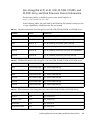
TABLE 19
Controller Information: Sun StorageTek 6130, 6140, 6540, FLX240, FLX280, and FLX380 Arrays
Controller
Version
Firmware File
6130
06.60.11.10
nge/RC_06601110_chromium2_apollo_288x.dlp
6140
06.60.11.10
nge/RC_06601110_chromium2_apollo_399x.dlp
6540
06.60.11.10
nge/RC_06601110_chromium2_apollo_6091.dlp
FLX240
06.60.11.20
nge/RC_06601120_chromium2_silverado_288x.dlp
FLX280
06.60.11.20
nge/RC_06601120_chromium2_silverado_588x_06600100.dl
p
FLX380
06.60.11.20
nge/RC_06601120_chromium2_silverado_6091.dlp
TABLE 20
NVSRAM Information: Sun StorageTek 6130, 6140, 6540, FLX240, FLX280, and FLX380 Arrays
NVSRAM
Version
Firmware File
6130
N288X-660843-001
nge/N288X-660843-001.dlp
6140
N399X-660843-001
nge/N399X-660843-001.dlp
6540
N6091-660843-001
nge/N6091-660843-001.dlp
FLX240
N288X-660855-001
nge/N288X-660855-001.dlp
FLX280
N588X-660855-001
nge/N588X-660855-001.dlp
FLX380
N6091-660855-001
nge/N6091-660855-001.dlp
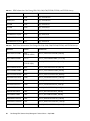
TABLE 21
IOM Information: Sun StorageTek 6130, 6140, 6540, FLX240, FLX280, and FLX380 Arrays
IOM
Version
Firmware File
6130 FC
9643
nge/esm9643.s3r
6130 FC crystal
9673
nge/esm9673.s3r
6130 iSATA
9726
nge/esm9726.dl
6130 iSATA crystal
9728
nge/esm9728.dl
Sun StorageTek Common Array Manager Software Release Notes
25
TABLE 21
IOM Information: Sun StorageTek 6130, 6140, 6540, FLX240, FLX280, and FLX380 Arrays
IOM
Version
Firmware File
6140
98B4
nge/esm98B4.esm
6140 crystal
98B4
nge/esm98B4.esm
FLA300
9643
nge/esm9643.s3r
FLA200
9330
nge/esm9330.s3r
FLC200 iSATA
9726
nge/esm9726.dl
FLC200 iSATA crystal
9728
nge/esm9728.dl
FLC200 dSATA
9565
nge/esm9565.dl
FLC200 dSATA crystal
9566
nge/esm9566.dl
TABLE 22
Disk Drive Information: Sun StorageTek 6130, 6140, 6540, FLX240, FLX280, and FLX380 Arrays
Disk Drive
Version
Firmware File
HDS7225SCSUN250G
0603
(LP1153-A5DA)
sun/D_HDS7225SCSUN250G_0603.dlp
HDS7240SBSUN400G
AC7A
sun/D_HDS7240SBSUN400G_AC7A.dlp
HDS7250SASUN500G
0604
(LP1153-AJ0A)
sun/D_HDS7250SASUN500G_0604.dlp
HUA7210SASUN1.0T
0605
sun/D_HUA7210SASUN1.0T_0605.dlp
HUA7250SBSUN500G
0605
sun/D_HUA7250SBSUN500G_0605.dlp
HUA7275SASUN750G
0605
sun/D_HUA7275SASUN750G_0605.dlp
HUS1014FASUN146G
2A08
sun/D_HUS1014FASUN146G_2A08.dlp
HUS1030FASUN300G
2A08
sun/D_HUS1030FASUN300G_2A08.dlp
HUS1073FASUN72G
2A08
sun/D_HUS1073FASUN72G_2A08.dlp
MAT3073FSUN72G
1403
sun/D_MAT3073FSUN72G_1403.dlp
MAT3147FSUN146G
1403
sun/D_MAT3147FSUN146G_1403.dlp
MAT3300FSUN300G
1403
sun/D_MAT3300FSUN300G_1403.dlp
MAW3073FCSUN72G
1303
sun/D_MAW3073FCSUN72G_1303.dlp
MAW3147FCSUN146G
1303
sun/D_MAW3147FCSUN146G_1303.dlp
MAW3300FCSUN300G
1303
sun/D_MAW3300FCSUN300G_1303.dlp
26
Sun StorageTek Common Array Manager 6.1 Release Notes • April 2008
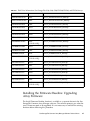
TABLE 22
Disk Drive Information: Sun StorageTek 6130, 6140, 6540, FLX240, FLX280, and FLX380 Arrays
Disk Drive
Version
Firmware File
MAX3073FDSUN72G
0403
sun/D_MAX3073FDSUN72G_0403.dlp
MAX3147FDSUN146G
0403
sun/D_MAX3147FDSUN146G_0403.dlp
ST314655FSUN146G
3092
sun/D_ST314655FSUN146G_3092.dlp
ST314670FSUN146G
055A
sun/D_ST314670FSUN146G_055A.dlp
ST314680FSUN146G
0407
sun/D_ST314680FSUN146G_0407.dlp
ST314685FSUN146G
042D
sun/D_ST314685FSUN146G_042D.dlp
ST314695FSUN146G
0409
sun/D_ST314695FSUN146G_0409.dlp
ST32500NSSUN250G
0605
(LP1153-3AZQ)
sun/D_ST32500NSSUN250G_0605.dlp
ST330000FSUN300G
055A
sun/D_ST330000FSUN300G_055A.dlp
ST330055FSUN300G
3092
sun/D_ST330055FSUN300G_3092.dlp
ST340008FSUN0.4T
0343
sun/D_ST340008FSUN0.4T_0343.dlp
ST35000NSSUN500G
0605
(LP1153-3AZQ)
sun/D_ST35000NSSUN500G_0605.dlp
ST373207FSUN72G
055A
sun/D_ST373207FSUN72G_055A.dlp
ST373307FSUN72G
0407
sun/D_ST373307FSUN72G_0407.dlp
ST373453FSUN72G
0449
sun/D_ST373453FSUN72G_0449.dlp
ST373454FSUN72G
042D
sun/D_ST373454FSUN72G_042D.dlp
ST373455FSUN72G
3092
sun/D_ST373455FSUN72G_3092.dlp
ST373554FSUN72G
0409
sun/D_ST373554FSUN72G_0409.dlp
ST37500NSSUN750G
0605
(LP1153-3AZQ)
sun/D_ST37500NSSUN750G_0605.dlp
Installing the Firmware Baseline: Upgrading
Array Firmware
The Install Firmware Baseline function is available as a separate feature in the Sun
StorageTek Common Array Manager software. The software prompts you when the
array’s firmware needs to be upgraded. It is not necessary to uninstall the existing
firmware before following this procedure.
Sun StorageTek Common Array Manager Software Release Notes
27
For optimal performance, Sun Microsystems recommends that the firmware on all
arrays be at the level of the current firmware baseline. New features are not
supported with non-baseline firmware. You can update your array firmware by
clicking the Install Baseline Firmware button on the Storage System Summary page
or the array’s Administration page.
As part of the installation of the Common Array Manager software, the script puts
the array firmware files in a directory on the management host. When you upgrade
the firmware, the software analyzes the firmware installed on the array. If the
baseline firmware on the host is newer, and you choose to install, the software
installs the baseline firmware on the array.
Note – After an upgrade to the 7.10 firmware version, the Cache Block size will
reset to a default of 4KB. In previous firmware levels, the default size was 16K.
Therefore, after a firmware upgrade to Release 6.1, the default Cache Block size
might need to be changed back to the previous 16KB size if this was the size
previously used with the firmware.
New 07.1.0.x.xx Firmware Supported in 6.1
You must contact Sun Microsystems Support Services (see “Service Contact
Information” on page 54) to install the new 07.10.x.xx firmware for the 6140, 6540,
and FLX380 arrays. After the initial installation, you can install future changes to the
07 baseline firmware using the procedure that follows.
Note – 07.10.x.xx is not available for the FLX240, 280, and 2500 arrays.
Prerequisites:
■
Before you perform this task, be sure the array is not in a degraded state. If it is
degraded, the upgrade will fail. If the array is degraded because it is not at the
baseline, you can upgrade the array.
■
Using Service Advisor, check to see if there are any alarms and resolve them.
1. Log in to the management software as documented in the Sun StorageTek
Common Array Manager Software Installation Guide (part number 820-4193-nn).
2. From the Java Web Console page, click Sun StorageTek Common Array
Manager.
3. From the Storage System Summary page, select the array for which the
firmware needs to be installed/upgraded.
28
Sun StorageTek Common Array Manager 6.1 Release Notes • April 2008
4. Click Install Firmware Baseline, and follow the prompts.
Upgrading Firmware for Additional Expansion Trays
Controller firmware 06.19.nn.nn allows tray mixing of array controllers modules,
two versions of expansion modules for the Sun StorageTek 6130, 6140, and 6540
arrays, and the FLX240, FLX280, and FLX380 arrays.
■
To add trays with data already on them, contact your service representative for
assistance to avoid data loss.
■
Mixing trays is not supported for the Sun StorageTek 2500 Series Arrays.
■
Refer to TABLE 11, TABLE 12, and TABLE 13 for a list of the supported modules for
intermixing trays without data.
Third Expansion Tray (48-Drive) Cabling
Support has been added for a third expansion tray and 48 drives.
For the most current cabling information, see the Sun StorageTek 2500 Series Release Notes.
Sun StorageTek Common Array Manager Software Release Notes
29
Upgrading Expansion Modules
Prerequisite:
Before discovering a Sun StorageTek FLX240, FLX280, FLX380 array using Common
Array Manager and before performing any tray migration (for example, adding
FLA300 expansion trays behind an existing 6130, 6140 or 6540 controller), you must
use existing management software to upgrade the arrays and associated trays to the
firmware version 6.19.25.00 or later. After you register the arrays using Common
Array Manager, you can upgrade to the current baseline firmware.
To add a newly supported expansion module to an existing array:
1. Before cabling the newly supported expansion module, upgrade the existing
controller and trays.
2. Add the expansion module.
3. Upgrade the array again.
To add an existing expansion tray to a new array, it is safest to follow a similar
procedure:
1. Install the new controller and trays.
2. Perform the firmware upgrade.
3. Add the expansion tray.
4. Upgrade the array again.
Upgrading Firmware for Additional Expansion Modules
For adding trays to arrays managed by Sun StorageTek Common Array Manager
Software:
1. Do not cable the additional expansion tray.
2. Install the Common Array Manager release following the standard installation
procedure.
■
There are separate procedures for Solaris, Windows, and Linux management
hosts. The software update places a copy of the latest firmware on the
management software server.
■
Any tray ID other than the CSM200 tray must be manually set. For example, you
must manually set the ID for a CSM100 tray.
3. Register the array, if needed.
30
Sun StorageTek Common Array Manager 6.1 Release Notes • April 2008
4. From the Storage Summary page or Array Administration page, click the Install
Firmware Baseline button.
5. Accept the upgrade.
6. Use Service Advisor to cable the additional expansion tray and add it to the
array.
7. Upgrade the array again to update the firmware on the new tray.
Firmware Rollbacks
Each release or patch of the Sun StorageTek Common Array Manager software
spools the latest firmware on the management host during the software or patch
installation. When you register an array with the management software, it sends an
alarm if you need to upgrade/install the baseline for the firmware. To begin the
procedure: From the Storage System Summary page or Array Administration page,
click the Install Firmware Baseline button. (For more information, see “Installing the
Firmware Baseline: Upgrading Array Firmware” on page 27).
In the unlikely event that updating the firmware on an array results in a
performance or operational issue, you may want to revert back to the previous
version of the array firmware by either rolling back to the previous version of the
management software or backing out the firmware patch and then performing the
Update Array function. Rollbacks or backouts must be planned in advance and
implemented using tools and functions of the operating system on the management
software host.
Each host platform that supports the Sun StorageTek Common Array Manager
software offers its own facilities and methods (some by third-party) for applying and
backing out updates to installed software. On Solaris, for example, Live Upgrade can
be used to perform upgrades of installed software such that the user can revert back
to the previous version of the software by re-activating the previous environment
and rebooting. Solaris also can apply and backout patches through the use of the
patchadd and patchrm commands.
Refer to the operating system documentation for more information about
implementing software rollback features. Such practices should be part of
comprehensive software lifecycle management procedures and policies for your
production environment.
Note – Firmware rollbacks between 07.xx.xx.xx versions will be supported by Sun
Microsystems Support Services when available.
Sun StorageTek Common Array Manager Software Release Notes
31
Known Issues and Operational
Information
The following sections provide information about known issues and recommended
workarounds, as well as operational information not found elsewhere in the
documentation:
■
“Common Array Manager-Specific Issues” on page 32
■
“Configuration Issues” on page 37
■
“Documentation Issues” on page 42
■
“Firmware Issues” on page 45
■
“In-Band Array Management Issues” on page 46
■
“Localization Issues” on page 51
Common Array Manager-Specific Issues
6130 Battery does not have a Unique Identifier Listed
Bug 6590617 –Since the Sun StorageTek 6130 array does not report asset data for the
cache backup batteries, the management software inserts a dash (-) instead of a
value in the Unique Identifier field on Component Summary for Battery page
(Troubleshooting > FRUs > Battery).
Workaround –Use the sscs CLI service command to manage data channels 3 and 4.
Array Registration Wizard Improved - Scan Local Network
Bug 6621713 –The first step of the array registration wizard has changed from “Scan
Network” to “Scan Local Network” and the auto-discovery mechanism has been
improved to be faster and more versatile. The system scans the local network for
available storage systems that are not yet registered. This shortens the time it takes
to scan the local network for storage systems, depending on the given IP addresses.
When the process is complete, a list of discovered storage systems is displayed.
32
Sun StorageTek Common Array Manager 6.1 Release Notes • April 2008
Cache Stop % Cannot be Greater than Cache Start %
Bug 6590637 –Attempting to modify the Cache Start% and Cache Stop% parameters
from the array’s Administration page so that the value assigned to Cache Stop% is
greater than the value assigned to Cache Start% results in the error message
“setCacheParams operation failed:43”.
Workaround – Use valid values. Since the Cache Stop% is the percentage of
unwritten data in the cache that will stop a cache flush that is currently in progress,
it must not be greater than the value for Cache Start%, which is the percentage of
unwritten data in the cache that will trigger a cache flush.
Cannot Cancel Some Jobs
Bug 6600387 –Some jobs, like volume creation jobs, cannot be cancelled on the array
once they have started. However, if multiple jobs are queued up for an array, any job
in the queue can be cancelled before the array actually starts the job.
CLI - Addition of Two or More Unnamed or Unlabeled Arrays
Indeterminate
Bug 6681173 –List devices can show multiple unlabeled entries. List storage systems
can show multiple unlabeld entries as well. The CLI user is unable to differentiate
between unlabeled entries.
Workaround –Rename each unlabeled device to a unique Temporary Name. Use list
controller to determine IP address for the TN. Then rename TN to desired.
CLI - When Performing an Array Import, Do Not Modify Management
Objects
If you create management objects while an “import array” job is running, it might
interfere with the import. Be sure that everyone who uses the destination array does
not modify or create any objects (including volumes, initiators, mappings, and so
on) while the import is in progress.
Sun StorageTek Common Array Manager Software Release Notes
33
Defragmentation Jobs may not Display in the Jobs Summary Page
Bug 6592811 –For small virtual disks, disk defragmentation jobs may complete too
quickly for a job task to be created and listed on the Jobs Summary page. If an error
does occur during execution, the user will be notified.
Workaround –This should have no impact but if the status needs to be seen, run
defragmentation jobs using the CLI.
Disk Failure - Reconstruct Attempt Results in “error.reason.100404”
Bug 6682034 –Attempting to reconstruct a disk results in message
“error.reason.100404.” The vdisk to which the drive belongs is in an invalid state and
cannot be reconstructed.
This occurs because of the loss of redundancy that results from more disk failures
than a given RAID level can recover. This fix is in progress and will be available by
release 6.2.
Drive Order Cannot Be Specified During Volume Creation
Bug 6515237 –Common Array Manager does not allow the disk drive order to be
specified during volume creation.
Workaround – Use the CLI to specify disk drive order.
Error Message During Data Replication Configuration is Misleading
Bug 6498717 –When creating a data replication set, if the primary array cannot
communicate with the secondary array, a misleading error message displays stating
that it is “unable to get volume candidate list from array.”
Workaround – Verify that the arrays can communicate before replicating data.
Errors - General Password Mismatch
Bug 6590097, 6577775, 6592717, 6592703 –Using an invalid array password may
result in configuration error messages.
Workaround – Use the correct array password.
34
Sun StorageTek Common Array Manager 6.1 Release Notes • April 2008
Install Lockhart and its L10N Packages before installing CAM in a
Sparse-Root Zone
Bug 6661200 – Lockhart 3.0.4 cannot be installed or upgraded in a sparse-root zone.
Workaround – Before you install CAM in a sparse-root zone, install Lockhart 3.0.5
with its L10N packages in the global zone.
iSCSI Array: Unable to Modify Gateway Port Number
Bug 6669499 –After installing CAM, registering an iSCSI array, and setting the
discovery address for Port A/1, you cannot change the Gateway port number from
the Port Details page in the GUI. This problem is intermittent and a fix is in
progress.
Workaround –Retry the operation. If the problem continues, modify the port using
the CLI instead of the GUI.
Jobs Checkbox does not Display; Job will not Cancel
Bug 6600387 –When a long job is running, such as large volume creation, the Cancel
checkbox does not display on current job status. Some jobs cannot be cancelled once
they have started on the array.
Workaround –If the queue includes multiple jobs for the array to perform, the job
can be cancelled at the point where the GUI sends the next job to the array.
Registration Page Displays Upon Initial Installation
When you install the Common Array Manager software for the first time, upon
logging into the browser user interface, a registration page will display. Fill out the
information before continuing.
During the initial storage array registration process, Common Array Manager
prompts you to register with the Auto Service Request service by displaying the
Auto Service Request (ASR) Setup page. This page continues to display until you
either fill out the page and click OK, or click Decline to either decline or defer ASR
service registration.
Note – You must register the array with ASR before using the Test button.
Sun StorageTek Common Array Manager Software Release Notes
35
Service Advisor does not Contain Information about Disk Initialization
Bug 6602902 –When a virtual disk is in a failed state and the drive causing the
failure has been replaced, for the recommended action, the management software
refers the user to access Service Advisor to initialize the disk. However, Service
Advisor does not contain information about disk initialization and the link
erroneously accesses the Collect Support Data page.
Service Advisor does not Manage Data Channels 3 and 4
Bug 6604026 –Data channels 3 and 4 cannot be managed using Service Advisor; only
channels 1 and 2 are available for management.
Upgrading from Existing 5.1.x Removes Non-Default Users
Bug 6620034 –Upgrading from an existing 5.1.x installation causes non-default users
to be removed. Default users are: root, storage, and guest.
Workaround –To add non-default users to the system:
1. Create a temporary “root” or “storage” user on host.
2. Log into the Web console as the temporary “root” or “storage” user.
3. Select Common Array Manager > General Administration > User Roles.
4. Click Add, and add non-default users back into the system.
5. Remove the temporary users as necessary.
Volume Copy License Not Enabled in Microsoft Internet Explorer 7
Bug 6684322 –Cannot enable volume copy license by specifying the license file using
Internet Explorer 7.
Workaround –Internet Explorer version 7 is not supported. Use a supported browser
listed in TABLE 10.
36
Sun StorageTek Common Array Manager 6.1 Release Notes • April 2008
Volumes with Persistent Reservations Cause Array Configuration Resets
to Fail
Bug 6569930 –Attempting to reset the array configuration while a volume has a
persistent reservation appears successful; however, the job status displays as in error,
indicating that the configuration reset failed.
Workaround –Release the persistent reservation on the volume and retry the array
configuration reset.
Configuration Issues
Access Volume Cannot be Mapped Using the CLI
Bug 6577194 –The sscs CLI client does not allow mapping to the access volume for
in-band management.
Workaround –To map the access volume, use the Common Array Manager user
interface.
CLI Commands - Special Characters Enclosed in Quotes
Bug 654985 –In the sscs CLI, special shell characters (or phrases that use them) have
to be enclosed in double quotes.
For Windows only, the comma (,) is a special character. Options separated by
commas should be enclosed in quotes, as shown in the following example:
sscs create -p Default -s 100MB -d “t1d01, t1d02, t1d03” volume dhamo_new_vdisk
CLI Remote Login Might Fail Using NIS
Bug 659945 –Logging into the sscs CLI client remotely may fail when a Solaris
machine is configured to use NIS for name resolution if the login host is not
contained in the NIS map.
CLI - sscs Manpage Delivered on the Solaris Platform Only
Bug 661094 –The sscs manpage was delivered only on the Solaris platform.
Workaround –Refer to the CLI Quick Reference Guide (part number 820-4192-nn) for a
command list and command syntax.
Sun StorageTek Common Array Manager Software Release Notes
37
CLI - sscs list fru Command does not list FLX240 and FLX280 Fans
Bug 6587666 –The CLI command sscs list fru does not list the number of fans
installed on the Sun StorageTek FLX240 and FLX280 arrays.
Workaround –Use the Common Array Manager user interface to view the number of
fans installed.
CLI Command sscs switch type Command Options not yet
Implemented
Bug 6584193 –Although type generic and type vlac are listed as options with the CLI
sscs switch command, these options are not yet implemented.
Communication Test May Return False Results
Bug 6597344 –Clicking the Test Communications button for an offline controller may
erroneously report that the communications test has passed.
Workaround –Verify a controller’s offline state by viewing its alarms.
Disabled Snapshot will be Reenabled after a Firmware Update
Bug 6529172 –A snapshot volume that is disabled will be automatically reenabled
after a firmware update occurs. If the snapshot volume is full, it can start generating
warning events.
Workaround–Disable the snapshot again after the firmware update.
Event List Shows Different Events but Alarms are Consistent
Bug 6612858 –The Event list from two different hosts against the same array shows
different events, even though the alarms generated are consistent.
Workaround –To display results based on the polling frequency and polling times of
the arrays, select the Advanced Aggregation Filter option from the CAM Events
page. When this option is de-selected, all hosts show consistent output. Therefore,
this is working as designed.
38
Sun StorageTek Common Array Manager 6.1 Release Notes • April 2008
Firmware Upgrade can Lock Volumes While Appearing Completed and
Array Showing Optimal State.
Bug 6595884 –A firmware upgrade/baseline installation can lock volumes longer
than the process indicates. The array can report the upgrade completed and show an
optimal state but the process can still lock the volumes.
Workaround –Wait an extra five to ten minutes and try again.
Primary Volume Create Commands do not Display
Bug 6608890 –The array is limited in commands it can process simultaneously and
CAM is not doing validation and queuing of (primarily volume create) commands.
Workaround –Check scripts for volume modification status before you issue new
volume modification commands.
Primary Volume in a Replication Set Cannot Exceed the Size of the
Secondary Volume
Bug 6596281 – If a data replication set is created between two volumes with the
primary volume having a size less than the secondary volume, the primary volume
can be expanded till it reaches the size of the secondary volume.
Replication Status May be Listed Incorrectly when the Primary Volume
Fails
Bug 6561709 –When the primary volume in a replication set fails, the management
software may incorrectly list the volume as replicating.
Replication Set Detail Page Shows Incorrect Dedicated Port
Bug 6684018 –Replication Set Detail page shows an incorrect replication dedicated
port for 6540 array.
The fix will be delivered with the 6.2 release of the Common Array Manager
software.
Sun StorageTek Common Array Manager Software Release Notes
39
Service Advisor Does Not Verify Disk is Ready to be Removed
Bug 6501029 –When the management software lists a disk as failed and the Service
Advisor procedure for replacing drives is followed, the step to verify that the disk is
ready to remove may not list the failed disk.
Workaround –Use an alternative menu option, Array Troubleshooting and Recovery,
to view the status of the disk.
Snapshot Quantity Incorrect: Snapshot Details and License Summary
Pages
Bug 6681459 –There is a discrepancy in the snapshot quantity shown on Snapshot
details and License summary pages.
Workaround –Use the License page for accurate snapshot quantity details.
Snapshot Reserve Space is Insufficient and Fails Resnap
Bug 6523608 –Refreshing a snapshot does not update the filesystem if there is
insufficient reserve space, yet a message displays indicating success. The array’s
event log says the resnap completed successfully.
Workaround –In the snapshot feature of the management software, configure
snapshots to fail if sufficient reserve space is not available. The fail message will
prompt you to increase the reserve space.
Snapshot Volumes do not Support Read-ahead
Bug 6560461 –Although both the base volume and the snapshot reserve volume
support read-ahead, the snapshot volume itself does not support read-ahead. As a
result, the Read-ahead Enabled Option is set to False on the Snapshot Details page.
This works as designed.
40
Sun StorageTek Common Array Manager 6.1 Release Notes • April 2008
Volumes not Created Using Fractional Sizes
Bug 6665635 –Creating volumes with sizes that contain a fraction does not work in
locales using a comma as decimal point. The check for a legal numeric value is not
localized, but the interpretation of the number afterwards is. If you correctly enter
the locale with a comma as 17,352, you will get this error message: “You must
provide a numeric capacity value.”
Example –When you create a volume with 17.352GB under the standard “en” locale,
you can enter the size as 17.352 and select GB as unit. However, under the “de”
locale, the dot is interpreted as 1000-separator. A 17.352 size with a 1GB unit would
try to create a ~17 TB volume and likely fail with this error message: “The size
entered for the new volume exceeds the maximum space available on the selected
pool.”
Workaround –For GB and TB values you can multiply by 1024 and enter as MB or
GB.
Volume Segment Size Associated Requires a New Profile with a Variable
Number of Disks when Changed
Bug 6599933 –Changing a volume created with a one segment size to one with a
different segment size requires that you create a new profile with the desired
segment size, create a pool using that profile, and apply the new pool to the volume.
However, if the original profile was created using a fixed number of disks instead of
a variable number of disks, then an error is returned.
Workaround –Adjust the new profile so that the number of disks is variable instead
of fixed.
Write Consistency Group Members Not All Consistent
Bug 6598844 –Members of a replication write consistency group should all have
matching attributes and roles.
Sun StorageTek Common Array Manager Software Release Notes
41
Documentation Issues
Accessing CLI from Windows
The path from which you can access sscs from Windows is missing from some of the
Common Array Manager documentation:
C:\Program Files\Sun\Common Array Manager\Component
CLI Command Changes for sscs map initiator and sscs map
snapshot
Bug 6599146 –Although the CLI command sscs map initiator is listed in the
CLI manpage, it is not implemented. And, although the CLI manpage lists the -i
option for use with the CLI commands sscs map volume and sscs map
initiator, this option is not yet implemented.
CLI - sscs modify firmware Command -p Option Requires the
File Path of the Firmware Image
The CLI Quick Reference Guide and the CLI manpage docs do not specify that when
using the -p option with the sscs modify firmware command, you must
supply the file path of the firmware image file.
CLI - sscs modify volume Command Correction
Bug 6592776 – The manpage for the CLI command sscs modify volume should
define the usage for the -c option, which enables you to select a controller, as
follows:
[ -c,--controller A | B ]
CLI - List Firmware Command Correction
In “list firmware,” “-x unit-type” should be “-x fru-type.”
In synopsis and options, fru-type and unit-type are used in an interchangeable way.
For both -t and -x, use “fru-type” instead of “unit-type” to be consistent.
42
Sun StorageTek Common Array Manager 6.1 Release Notes • April 2008
Disk Drive Failure Affects Vdisk Redundancy
Bug 6592877–When a drive fails, the vdisk to which it belongs is no longer
redundant. A stand-by hot-spare drive is chosen and integrated into that volume
group automatically if possible.
The drive is chosen to satisfy the following conditions:
■
The chosen drive must be <PRESENT, STANDBY-HOT-SPARE, OPTIMAL>.
■
The chosen drive must be of the same technology (FC, SATA, etc.) as the FAILED
drive.
■
The chosen drive must have adequate capacity to contain the piece(s) of the
volume(s) defined on that volume group in addition to all required metadata.
■
The chosen drive should match the spindle speed of other drives in the volume
group if possible.
■
If the volume group to which the failed drive belongs had Tray-Loss Protection
(TLP), it is best to choose a hot spare drive that provides TLP for the volume
group.
GUI Label Changes - “Upgrade” is now “Install”
Bug 652123 –All documentation might not yet reflect changes made in the graphical
user interface. Mainly, the “forced firmware upgrade” option has been removed, and
the term “Upgrade” has been replaced with “Install,” as described in the following
instances:
■
For Storage Summary and Administration pages, the “Upgrade Firmware...”
button has been changed to the “Install Firmware Baseline” button
■
In the Firmware Upgrade wizard, “Analyze and Upgrade Array Firmware” has
been changed to “Analyze and Install Array Firmware Baseline”
■
In Step 2 of the Firmware Upgrade wizard, the action menu label has changed
from “Upgrade” to “Install Baseline” or “Install,” as shown in the following
examples:
■
Install Baseline, all
■
Install Baseline, no disks
■
Install Baseline, disk only
■
Do not install Baseline (this is the only option when firmware is already up-todate)
Installation Guide says “Solaris” instead of “SSCS” on page 44
Page 44 of the Sun StorageTek Common Array Manager Software Installation Guide,
v.6.0 (part number 820-4193-nn) should state:
Sun StorageTek Common Array Manager Software Release Notes
43
“...remotely logging in to a management software station or by using the SSCS
remote client on a remote host.” The Installation Guide currently says “Solaris”
instead of “SSCS.”
Online Help Does not Define the Type Field on the Snapshot Summary
Page
Bug 6593949 –The online Help does not provide a description for the Type field on
the Snapshot Summary page. The Type field refers to the model number of the array.
For example, 6140, 6130, 6540, 2530, 2540, FLX240, FLX280, FLX380, etc.
SSCS CLI Command Paths
Some distributed versions of the Sun StorageTek Common Array Manager CLI Quick
Reference had the wrong paths to the SSCS CLI command line.
These paths should be stated as follows:
Solaris: /opt/SUNWsesscs/cli/bin/sscs
Linux: /opt/sun/cam/se6x20/bin/sscs
Windows:
%Program Files%\Sun\Common Array Manager\Component\sscs\bin
Volumes Supported on the Sun StorageTek 6130 Array up to 1022
Bug 6540170 – Common Array Manager can be used to create up to 1022 volumes
(volumes 0 through 1021) on the Sun StorageTek 6130 array. However, if the Access
LUN is in use, up to 1023 volumes (volumes 0-1022) can be created. If you attempt to
create more than the supported number of volumes, an error message is returned.
Volume-Copy not Supported for 2500 Arrays
Sun StorageTek 2500 series does not support volume-copy. Any instances in the user
interface or documentation that imply there is a command or function for this task is
misleading.
44
Sun StorageTek Common Array Manager 6.1 Release Notes • April 2008
Firmware Issues
New 7.1.0.x.xx Firmware Supported in 6.1
To avoid issues regarding the new 7.1.0.x.xx firmware:
■
Contact Sun Microsystems Support Services (see “Service Contact Information”
on page 54) to install the new 07.10.x.xx firmware for the 6140, 6540, and FLX380
arrays.
■
After the initial installation, you can install future changes to the 07 baseline
firmware using the procedure above.
■
Be aware that the firmware upgrade utilities provided with CAM 6.1 are not able
to perform the upgrade operation to the 7.10.xx.xx firmware release.
Install Wizard Might Display a False Warning
Bug 6593508 – The review step of firmware Install wizard might display a false
warning that the array health is not optimal.
Workaround –Check the Alarm Summary page to verify the alarm.
SAS not Available Drive Type for 6xxxx and FLX Arrays
In this release, SAS is not an available drive type for the 6xxxx and Flexline arrays. It
will be available in future firmware releases and documented as such in Release
Notes. However, SAS is an available drive type for the 2500 Series arrays.
For the complete list of drives, refer to Table 5 in the Sun StorageTek 2500 Series Array
Release Notes, Version 1.3.
Sun StorageTek Common Array Manager Software Release Notes
45
In-Band Array Management Issues
In-band management is supported on the Sun StorageTek 6130, 6140, 6540, 2530 and
2540 arrays. Whereas release 6.0.0 of the Sun StorageTek Common Array Manager
software was only qualified with Solaris (SPARC) and Linux (5.1) agents, release
6.0.1 added in-band management support for Solaris x86 and Windows.
About the In-Band Proxy Agent
The in-band management proxy agent is a package which is added to a host (or
group of hosts) with in-band connectivity via Fibre Channel to the storage array. An
external management station can then talk to this proxy host via an out-of-band
connection and the management commands are then relayed to the storage device
via the in-band path. This is a transparent proxy agent which simply converts the
RPC request packets to UTM SCSI- specific messages. The API CAM uses to manage
the arrays is identical whether the array is managed via the in-band or out-of-band
path.
Multiple in-band proxy hosts may be used to access the same array and multiple
arrays are allowed behind a single proxy host.
Installation of the proxy agents is accomplished via the standard package addition
tools inherent to the specific operating system. For example, the pkgadd(1M)
command would be used to install the Solaris agent and the associated Java Runtime
package should also be installed. For Linux, the packages are RPM based and a
runtime package is also needed. For windows, the installation packages are
executable files that include their own “Install Anywhere” installer.
Note – CAM 6.1 added support for Solaris (x86) and Windows proxy agents.
Known Proxy Agent Limitations
A proxy agent restart is required after disruptive changes to the storage
configuration. This does not apply to changes in volumes exposed from a single
array but it does apply if storage arrays are re-cabled differently or if the storage
array configuration has changed (i.e. adding new storage arrays to the
configuration).
The in-band proxy agents will start when the host boots, but they will terminate if
storage is not immediately seen. A restart of the agent (instructions below) will force
a re-scan for storage arrays and, if any are found, the agent will remain running.
46
Sun StorageTek Common Array Manager 6.1 Release Notes • April 2008
Solaris: Checking the UTM LUN's and Start/Stop of the
Proxy Agent
Download CAM in-band proxy agents for Solaris from here:
http://www.sun.com/download/products.xml?id=471e7573
To verify the host sees the arrays management (UTM) LUN, do the following:
1. Start / Stop the Agent (Solaris):
/opt/SMgr/agent/SMagent start
If the agent is already running, this will stop and then restart it.
2. Check the status of the agent:
# ps -ef | grep SMagent | grep -v grep
root 5144
1
0 11:58:24 pts/3
/opt/SMgr/agent/jre/bin/java -classpath
0:01
/opt/SMgr/agent/SMagent.jar devmgr.launch
Linux: Checking The UTM LUNs and Start/Stop of the
Proxy Agent
Note – The SMagent requires Red Hat 5.1 (also known as “5 update 1”) or higher. It
is not supported on Red Hat 5.0.
Download CAM in-band proxy agents for Linux here:
http://www.sun.com/download/products.xml?id=471e7573
To verify the host sees the arrays management (UTM) LUN:
1. Start/Stop Agent
[root@nsvr-150 agent]# /opt/SMgr/agent/SMagent start
Stopping Agent process 12632.
SMagent started.
[root@nsvr-150 agent]# SANtricity Storage Array Host Agent,
Version 09.17.A0.03
Built Tue Dec 05 14:52:38 CST 2006
Copyright (C) 1999-2006 LSI Logic Corporation. All rights
reserved.
Sun StorageTek Common Array Manager Software Release Notes
47
Checking device /dev/sda (/dev/sg0): Skipping
Checking device /dev/sdb (/dev/sg1): Skipping
Checking device /dev/sdc (/dev/sg2): Activating
Running...
2. Checking for UTM LUN
[root@nsvr-150 agent]# java -classpath
/opt/SMgr/agent/SMagent.jar
devmgr.versioned.agent.DeviceIdentifier | grep “Volume
Access” /dev/sdc
(/dev/sg2) [Storage Array fms-lca1, Volume Access, LUN 31,
Volume ID <600a0b80002fc0740000000000000000>]
Windows: Checking The UTM LUN's and Start/Stop of
the Proxy Agent
To verify the host sees the arrays management (UTM) LUN, do the following:
1.Start/Stop Agent
E:\Program Files (x86)\StorageManager\agent>net start
“SANtricity Storage Manager Agent”
The Storage Manager Agent service is starting.
The Storage Manager Agent service was started successfully.
2. Checking for UTM LUN
E:\Program Files (x86)\StorageManager\agent>C:\Java\
jdk1.5.0_11\bin\java -classpath SMagent.jar
devmgr.versioned.agent.DeviceIdentifier |
findstr Access
\\.\PHYSICALDRIVE0 [Storage Array fms-lca1, Volume Access,
LUN 31, Volume ID <600a0b80002458d20000000000000000>]
\\.\PHYSICALDRIVE1 [Storage Array fms-lca1, Volume Access,
LUN 31, Volume ID <600a0b80002fc074
48
Sun StorageTek Common Array Manager 6.1 Release Notes • April 2008
Access LUN does not Correlate with Host to which it is Mapped
Bug 6584815 –When an access LUN is mapped to a proxy agent host for in-band
management use, you must correlate the mappings between the LUNs and the host
by using the format command at the UNIX prompt. The system will list the access
LUNs and the array ports from the UI or the CLI, and it will then compare the
results.
For example:
a. format
7. c8t0d31 <SUN-UniversalXport-9617 cyl 8 alt 2 hd 64 sec 64>
/pci@8,700000/fibre-channel@2/fp@0,0/ssd@w200500a0b82fbc3c,1f
13. c9t0d31 <SUN-UniversalXport-9617 cyl 8 alt 2 hd 64 sec 64>
/pci@8,700000/fibre-channel@2,1/fp@0,0/ssd@w200400a0b82fbc3c,1f
b. List the array ports using the UI or CLI:
A/1 A Up FC 2 Gbps 20:04:00:A0:B8:2F:BC:3B
A/2 A Up FC 2 Gbps 20:04:00:A0:B8:2F:BC:3C
B/1 B Up FC 2 Gbps 20:05:00:A0:B8:2F:BC:3B
B/2 B Up FC 2 Gbps 20:05:00:A0:B8:2F:BC:3C
c. Correlate WWN’s
In this example, Port A/2 exposes c9t0d31 and Port B/2 exposes c8t0d31
Array Removal Might Not Complete Successfully
Bug 6593318 – When a number of in-band managed arrays are selected for removal,
the operation appears to complete successfully. However, one array may still be
listed on the Storage System Summary page.
Controller Resetting Issues on an In-band Managed Array
Note – For best performance, ensure both controllers are connected during
configuration.
Bug 6603978 –The controller for an in-band managed array cannot not be reset even
when physical connectivity between the array and the management host has been
verified.
Sun StorageTek Common Array Manager Software Release Notes
49
Workaround –If physical connectivity is valid, un-register and then re-register the
array.
Error: Could not Communicate with Controller to Complete Request
Bugs 6610504, 6609734, 6609155, 6607104, 6609732, 6612120 –An occasional problem
exists where the in-band proxy agent may return the paths to the controllers in
reverse order. This error can occur on any platform.
The net result is an immediate communications error. The error message will
typically read “Error: Could not communicate with the controller to complete this
request. Possible causes include network or connection problems, controller
problems, or no power to the host or storage array. Check these possible causes, then
retry the operation.”
This error might occur when performing the following operations:.
■
volume expansion
■
snapshot copy, re-snap and disable
■
virtual disk defragmentation
Workaround –Change the Current Volume Ownership when a “communication
error” is encountered during volume expansion: From the Volumes page, select the
“Specific Volume” and then change the value of the “Owning Controller.”
Changing the Current Volume Ownership will create an Alarm because the volume
is not on the preferred controller. Select one of two actions:
■
Change the Volume back to the original owner after performing the desired
command.
OR
■
Change the Preferred Volume Ownership of the desired volumes via sscs(1m).
Note – For best performance, ensure both controllers are connected during
configuration.
In-band Managed Array Listed as Managed Out-of-band When
Communication is Lost
Bug 6588699 – When an in-band managed array loses communication with
management host, the network address listed in the Storage Summary page displays
as an out-of-band address instead of an in-band address.
Workaround – If communication is lost with the array, view the alarms to determine
if an in-band or out-of-band connection is lost.
50
Sun StorageTek Common Array Manager 6.1 Release Notes • April 2008
Linux (Red Hat) 5.1 Version is Required - 5.0 not Supported
Bug 6661742 – SMagent-LINUX-10.00.A2.02-1.i386.rpm will not load. SMagent is not
supported on Redhat 5.0.
Workaround – The SMagent requires Red Hat 5.1 (also known as “5 update 1”) or
higher.
Network Address Column Shows Change from Out-of-band to In-band
when Registering an In-band Array
Bug 6612214 – When one of the arrays behind an in-band management proxy is
removed in Common Array Manager, the Common Array Manager software will
change the management of the other arrays behind the proxy to out-of-band
management if that path exists. An in-band discovery of the proxy agent would
return them to in-band management in this case.
Performance Monitoring Page Does Not Display In-band Statistics
Bug 6681582 –Performance Monitoring page lists the Performance statistics as
Unavailable.
Workaround –Check the physical connectivity from the management host to the
array. If the connectivity is good, try un-registering and then re-registering this array.
Localization Issues
“Alarm function after replacing drive” Information Not Localized
Bug 6687922 –Some information is unlocalized in the solution section of “Alarm
function after replacing drive.”
Workaround –Please set your browser language to en-us instead.
Apostrophe Displays Incorrectly for French
Bug 6648569 –Apostrophes display incorrectly in the browser user interface in some
cases for the French language.
Workaround –Please set your browser language to en-us instead.
Sun StorageTek Common Array Manager Software Release Notes
51
Copyright and License Information Issues in French
Bug 6490238 –When installing the French version of Common Array Manager on
Solaris and LINUX platforms, non-ASCII characters display as garbled text in the
copyright and license sections when the correct locale is not used.
Workaround –Use the correct locale (for example, fr_CA.ISO8859-1 for Solaris and
fr_FR.iso88591 for LINUX) or use the browser in the English locale.
Service Advisor for Disk Drive Contents Not Localized
Bug 6688583 –CAM 6.1.0.15 Service Advisor for Disk Drive has unlocalized contents.
Workaround –Please set your browser language to en-us instead.
Solaris Issues
SES vs. SD Paths for UTM LUNs
Bug 6500605 –For Solaris 10u4 and Solaris 8 and 9, the host cannot see the storage
device's management UTM LUN.
Workaround –Perform the following commands on the data host:
# setenv LD_LIBRARY_PATH /opt/SMgr/agent
# java -classpath /opt/SMgr/agent/SMagent.jar
devmgr.versioned.agent.DeviceIdentifier | grep “Volume
Access”
You should then receive output like the following, indicating which arrays have
access LUNs visible to the agent:
/dev/rdsk/c5t200600A0B82458D4d31s2 [Storage Array fms-lca1,
Volume
Access, LUN 31, Volume ID <600a0b80002458d20000000000000000>]
/dev/rdsk/c5t200700A0B82458D3d31s2 [Storage Array fms-lca1,
Volume
Access, LUN 31, Volume ID <600a0b80002fc0740000000000000000>]
52
Sun StorageTek Common Array Manager 6.1 Release Notes • April 2008
UTM LUNs Controlled by “Solaris Traffic Manager”
Bug 6594360 –After you upgrade to S10U3 (or later), the in-band management UTM
LUN's are controlled by Solaris Traffic Manager (MPxIO). In most cases, in-band
management will not fail as a result of this; however, it is best practice to ensure that
the UTM LUN's are not controlled by MPxIO. Performing the following workaround
task will help prevent problems.
Workaround –Use the format inquire command to get the Vendor and Product
IDs. (The VID needs to be 8 characters.)
1. Edit the file /kernel/drv/scsi_vhci.conf
The following line should read:
device-type-scsi-options-list = "SUN Universal Xport",
"disable-option"; disable-option = 0x7000000
2. Run the stmsboot -u command.
Respond to the prompts as follows:
WARNING: This operation will require a reboot.
Do you want to continue? [y/n] (default: y) y
The changes will come into effect after rebooting the system.
Reboot the system now? [y/n] (default: y) y
Sun StorageTek Common Array Manager Software Release Notes
53
Service Contact Information
If you need help installing or using this product, go to:
http://www.sun.com/service/contacting
Note – For the latest patches available for your system, check SunSolve at:
http://www.sunsolve.sun.com
Third-Party Web Sites
Sun is not responsible for the availability of third-party Web sites mentioned in this
document. Sun does not endorse and is not responsible or liable for any content,
advertising, products, or other materials available on or through such sites or
resources. Sun will not be responsible or liable for any actual or alleged damage or
loss caused by or in connection with the use of or reliance on any such content,
goods, or services available on or through such sites or resources.
54
Sun StorageTek Common Array Manager 6.1 Release Notes • April 2008