1
Getting started
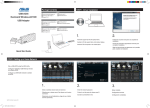
Setting up your EA-N66R
English
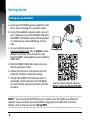
a.Insert your EA-N66R’s power adapter to the
DC-In port and plug it to a power outlet.
b.Using the bundled network cable, connect
your computer to your EA-N66R’s LAN port.
EA-N66R’s LED blinks slowly indicating that
it is booting up and establishing connection.
c. In your web browser, key in
www.asusrouter.com. Key in admin as the
default username and password to log
into EA-N66R’s web graphical user interface
(Web GUI).
d.From EA-N66R’s Web GUI, select your preferred operation mode.
e.Follow the onscreen instructions to complete the wireless connection setup.
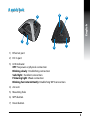
f. Check if EA-N66R’s LED indicator turns a
solid light, which indicates that EA-N66R
has successfully connected to the wireless
network.
b
Wall Power Outlet
a
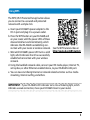
See the setup tutorial video at
http://youtu.be/MseyzQVjaPY
NOTE: You can use the WPS function to connect your EA-N66R as an Ethernet
adapter to your wireless network without logging into its Web GUI. For more
details, refer to the next section Using WPS.