1
¨
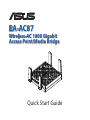
EA-AC87
Wireless-AC 1800 Gigabit
Access Point/Media Bridge
Quick Start Guide
English................................................................................................................................. 3
Français............................................................................................................................... 15
Español................................................................................................................................ 27
NA9417 / First Edition / June 2014
English
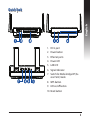
Quick look
1. DC In port
2. Power button
3. Ethernet ports
4. Power LED
5. LAN LED
6. Signal Indicator
7.Switch for Media bridge/AP (Access Point) mode
8. WPS button
9. LED on/off button
10.Reset button
3
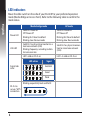
LED indicators
Move the slide switch on the side of your EA-AC87 to your preferred operation
mode (Media Bridge or Access Point). Refer to the following table to confirm the
mode status.
English
Media bridge mode
Power LED
Solid On: Power on
Off: Power off
Blinking fast: Reset to default
Blinking slow: Rescue mode
LAN LED
Solid On: has physical connection to a
local area network (LAN)
Blinking frequency: according to data
transmission rate
Solid On: has physical connection to a local area network
(LAN)
LED1 solid on: Wi-Fi on
LED1~5 solid on: Wi-Fi on
LED action
Signal Indicator
Signal
Excellent
Good
Weak
Blinking sequentially back and forth:
Wi-Fi site
survey / WPS
connection
4
AP mode
Solid On: Power on
Off: Power off
Blinking fast: Reset to default
Blinking slow: Rescue mode
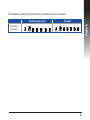
The following table lists the LED status when boot up completes.
AP mode
English
Media bridge mode
LED Status
(Solid on)
5
Operation modes
ASUS EA-AC87 provides two operation modes: Media Bridge and Access Point
(AP).
English
IMPORTANT:
•For the best wireless performance, place EA-AC87 at a distance of more than 1.5
meters away from the parent Access Point (AP).
•Check the slide switch on the side of EA-AC87 to confirm the mode status.
Media Bridge mode
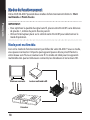
By default, EA-AC87 is set to the media bridge mode. In this mode, you can connect any Ethernet-enabled device to your wireless home network via the wireless
router. This mode is perfect for home theater devices such as smart TV, set-top
box and HD media player.
POW
ER
smart TV
HD media player
STB (Set-top box)
6
Access Point (AP) mode
English
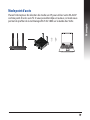
You can also turn your EA-AC87 into access point (AP) mode by switching the side
switch. If you already have a router, you can upgrade your router to the latest 4x4
AC1800 5Ghz Wi-Fi.
7
English
Media Bridge mode
We recommend that you connect your EA-AC87 to a wireless router by pressing
the WPS (Wi-Fi Protected Setup) button.
8
Setting up with WPS
English
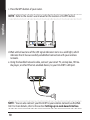
a.Adjust the slide switch to media bridge mode and plug in the power adapter.
b. Press the WPS button on your EA-AC87 for more than three seconds until the
signal indicator LED1 to LED5 blink sequentially back and forth.
9
c. Press the WPS button of your router.
NOTE: Refer to the router’s user manual for the location of its WPS button.
English
d. Wait until at least one of the LED signal indicators turns to a solid light, which
indicates that it has successfully established connection with your wireless
network.
e. Using the bundled network cable, connect your smart TV, set-top box, HD media player, or other Ethernet-enabled device, to your EA-AC87’s LAN port.
NOTE: You can also connect your EA-AC87 to your wireless network via the Web
GUI. For more details, refer to the section Setting up via web-based interface.
10
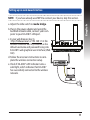
Setting up via web-based interface
NOTE: If you have already used WPS to connect your device, skip this section.
English
a.Adjust the slide switch to media bridge.
b.Plug in the power adapter and using the
bundled network cable, connect your computer to your EA-AC87’s LAN port.
c. In your web browser, key in
http://findasus.local or 192.168.1.1 in the
browser’s address bar. Key in admin as the
default username and password to log into
EA-AC87’s web graphical user interface (Web
GUI).
d. Follow the onscreen instructions to complete the wireless connection setup
e. Check if EA-AC87’s LED indicator turns a
solid light, which indicates that EA-AC87
has successfully connected to the wireless
network.
11
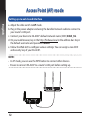
Access Point (AP) mode
Setting up via web-based interface
English
a.Adjust the slide switch to AP mode.
b.Plug in the power adapter and using the bundled network cable to connect to
your router’s LAN port.
c. Connect your device to EA-AC87’s default network name (SSID) ASUS_5G.
d.On your web browser, key in the http://findasus.local in the address bar. Key in
the default username and password: admin.
e.Follow the Web GUI to configure various settings. You can assign a new SSID
and security key of your EA-AC87.
NOTE:
• In AP mode, you can use the WPS button to connect other devices.
• Ensure to connect EA-AC87 to a router's LAN port before setting up.
12
Frequently Asked Questions
Media
bridge
mode
Access
point
mode
IP before
setting
192.168.1.1
Assigned by
connected
router
IP after
settings
Assigned by
connected
router
Assigned by
connected
router
URL for
setup*
Default
SSID
http://
findasus.local
N/A
http://
findasus.local
ASUS_5G
Login username
and password
username: admin
password: admin
* Windows® XP does not support findasus.local. If you use Windows® XP operating
system, please download the device discovery utility from ASUS website
www.asus.com to find the IP of EA-AC87.
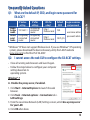
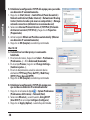
Q2: I cannot access the web GUI to configure the EA-AC87 settings.
• Close all running web browsers and launch again.
• Follow the steps below to configure your computer
settings based on its
operating system.
Windows® 7
A. Disable the proxy server, if enabled.
1.Click Start > Internet Explorer to launch the web
browser.
2.Click Tools > Internet options > Connections tab >
LAN settings.
3.From the Local Area Network (LAN) Settings screen, untick Use a proxy server
for your LAN.
4.Click OK when done.
13
English
Q1: W
hat are the default IP, SSID, and login name password for
EA-AC87?
B. Set the TCP/IP settings to automatically obtain an
IP address.
English
1.Click Start > Control Panel > Network and Internet
> Network and Sharing Center > Manage network
connections.
2.Select Internet Protocol Version 4 (TCP/IPv4), then
click Properties.
3.Tick Obtain an IP address automatically.
4.Click OK when done.
Mac 10.5.8
A. Disable the proxy server, if enabled.
1.From the menu bar, click Safari >
Preferences... > Advanced tab.
2.Click Change Settings... in the Proxies field.
3.From the list of protocols, deselect FTP Proxy
and Web Proxy (HTTP).
4.Click OK when done.
B. Set the TCP/IP settings to automatically
obtain an IP address.
1.Click the Apple icon
> System Preferences > Network.
2.Select Ethernet and select Using DHCP in
the Configure field.
3.Click Apply when done.
14
Français
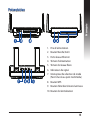
Présentation
1. Prise d’alimentation
2. Bouton Marche/Arrêt
3. Ports réseau Ethernet
4. Témoin d’alimentation
5. Témoin de réseau filaire
6. Indicateurs de signal
7.Interrupteur de sélection de mode
(Point d’accès ou pont multimédia)
8. Bouton WPS
9. Bouton d’état des témoins lumineux
10.Bouton de réinitialisation
15
Témoins lumineux
Utilisez l’interrupteur placé sur le côté de votre EA-AC87 pour sélectionner le
mode d’opération (Pont multimédia ou point d’accès sans fil). Consultez le tableau
suivant pour plus de détails sur les différents états des témoins lumineux.
Français
Mode pont multimédia
Mode point d’accès
Témoin
d’alimentation
Allumé : appareil prêt à être utilisé
Éteint : appareil éteint
Clignotement rapide : restauration de la
configuration d’usine
Clignotement lent : appareil en mode
Secours
Allumé : appareil prêt à être
utilisé
Éteint : appareil éteint
Clignotement rapide : restauration de la configuration
d’usine
Clignotement lent : appareil
en mode Secours
Témoin de
réseau filaire
Allumé : connexion établie à un réseau
local
Fréquence de clignotement : varie en
fonction du débit de transmission des
données
Allumé : connexion établie à
un réseau local
Témoin 1 allumé : connexion Wi-Fi
activée
Témoin 1 à 5 allumé :
connexion Wi-Fi activée
État des témoins
Indicateurs de
signal
Signal
Excellent
Correct
Faible
Clignotement séquentiel alterné :
Connexion
Wi-Fi / WPS en
cours
16
Le tableau suivant liste l’état des témoins suivant la mise en route de l’appareil.
Mode point d’accès
Français
Mode pont multimédia
États des
témoins
(Allumés)
17
Modes de fonctionnement
Votre ASUS EA-AC87 possède deux modes de fonctionnement distincts : Pont
multimédia et Point d’accès.
Français
IMPORTANT :
•Pour optimiser la qualité du signal sans fil, placez votre EA-AC87 à une distance
de plus de 1, mètres du point d'accès parent.
•Utilisez l’interrupteur placé sur le côté de votre EA-AC87 pour sélectionner le
mode d’opération.
Mode pont multimédia
Ceci est le mode de fonctionnement par défaut de votre EA-AC87. Sous ce mode,
vous pouvez connecter n’importe quel appareil pourvu d’une prise Ethernet à
votre réseau sans fil via un routeur sans fil. Ce mode est idéal pour les appareils
multimédia tels que les téléviseurs connectés, les décodeurs et les lecteurs HD.
POW
ER
Téléviseur connecté
Décodeur
18
Lecteur multimédia HD
Mode point d’accès
Français
Placez l’interrupteur de sélection de mode sur AP pour utiliser votre EA-AC87
comme point d’accès sans fil. Si vous possédez déjà un routeur, ce mode vous
permet de profiter de la technologie Wi-Fi AC1800 sur la bande des 5Ghz.
19
Français
Mode pont multimédia
Il est recommandé de connecter votre EA-AC87 à un routeur sans fil par le biais du
bouton WPS (Wi-Fi Protected Setup).
20
Configuration WPS
Français
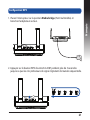
1.Placez l’interrupteur sur la position Media bridge (Pont multimédia) et
branchez l’adaptateur secteur.
2. Appuyez sur le bouton WPS de votre EA-AC87 pendant plus de 3 secondes
jusqu’à ce que les cinq indicateurs de signal clignotent de manière séquentielle.
21
3. Appuyez sur le bouton WPS de votre routeur.
REMARQUE : Consultez le mode d’emploi de votre routeur pour localiser
l’emplacement de son bouton WPS.
Français
4. Patientez le temps qu’au moins un indicateur de signal reste allumé, pour
indiquer que la connexion à votre réseau sans fil a bien été établie.
5. Utilisez le câble réseau fourni pour connecter votre appareil multimédia
(téléviseurs connecté, décodeur, lecteur multimédia HD ou tout autre dispositif
externe doté d’une prise Ethernet) au port réseau de votre EA-AC87.
REMARQUE : Vous pouvez également connecter votre EA-AC87 à un réseau sans
fil par le biais de son interface utilisateur. Pour plus de détails, consultez la section
Configuration via l’interface utilisateur.
22
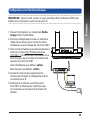
Configuration via l’interface utilisateur
Français
REMARQUE : Ignorez cette section si vous avez déjà utilisé le bouton WPS pour
établir une connexion à votre réseau sans fil.
1.Placez l’interrupteur sur la position Media
bridge (Pont multimédia).
2.Branchez l’adaptateur secteur et utilisez le
câble réseau fourni pour connecter votre
ordinateur au port réseau de votre EA-AC87.
3. Dans la barre d’adresse de votre explorateur
Internet, entrez http://findasus.local ou
192.168.1.1. Entrez le nom d’utilisateur et le
mot de passe pour accéder à l’interface de
gestion de votre EA-AC87.
Nom d’utilisateur par défaut : admin
Mot de passe par défaut : admin
4. Suivez les instructions apparaissant à
l’écran pour finaliser la configuration de la
connexion sans fil.
5. Vérifiez que le témoin sans fil de votre
EA-AC87 est allumé pour confirmer que
la connexion au réseau sans fil a bien été
établie.
23
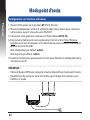
Mode point d’accès
Configuration via l’interface utilisateur
Français
1.Placez l’interrupteur sur la position AP (Point d’accès).
2.Branchez l’adaptateur secteur et utilisez le câble réseau fourni pour connecter
votre routeur au port réseau de votre EA-AC87.
3.Connectez votre appareil au réseau sans fil par défaut ASUS_5G.
4. Dans la barre d’adresse de votre explorateur Internet, entrez http://findasus.
local.Entrez le nom d’utilisateur et le mot de passe pour accéder à l’interface de
gestion de votre EA-AC87.
Nom d’utilisateur par défaut : admin
Mot de passe par défaut : admin
4. Suivez les instructions apparaissant à l’écran pour finaliser la configuration de la
connexion sans fil.
REMARQUE :
•Utilisez le bouton WPS pour connecter d'autres dispositifs en mode point d'accès.
•N'oubliez pas de connecter votre EA-AC87 au port réseau d'un routeur avant
d'utiliser ce mode.
24
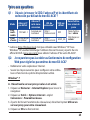
Foire aux questions
Mode
Pont
multimédia
Point
d’accès
Adresse IP
par défaut
Adresse IP
suite à une
connexion
URL de
connexion*
SSID par
défaut
192.168.1.1
Assignée par
le routeur
http://
findasus.local
N/D
Assignée par
le routeur
Assignée par
le routeur
http://
findasus.local
ASUS_5G
Nom d’utilisateur et mot de
passe
Nom d’utilisateur : admin
Mot de passe :
admin
* L’adresse http://findasus.local n’est pas utilisable sous Windows® XP. Sous
Windows® XP, veuillez télécharger l’utilitaire Device Discovery à partir du site
officiel d’ASUS (www.asus.com) pour obtenir l’adresse IP de votre EA-AC87.
Q2: Je ne parviens pas à accéder au Gestionnaire de configuration
Web pour régler les paramètres de mon EA-AC87
• Redémarrez votre explorateur Internet.
• Suivez les étapes suivantes pour configurer votre ordinateur en fonction du système d’exploitation utilisé.
Windows® 7
A. Désactivez le serveur proxy si celui-ci est activé.
1.Cliquez sur Démarrer > Internet Explorer pour lancer le
navigateur.
2.Cliquez sur Outils > Options Internet > onglet
Connexions > Paramètres réseau.
3.À partir de l’écran Paramètres du réseau local, décochez l’option Utiliser un
serveur proxy pour votre réseau local.
4.Cliquez sur OK une fois terminé.
25
Français
Q1 : Où puis-je trouver le SSID, l’adresse IP et les identifiants de
connexion par défaut de mon EA-AC87 ?
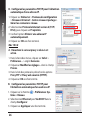
B. Configurez les paramètres TCP/IP pour l’obtention
automatique d’une adresse IP.
Français
1.Cliquez sur Démarrer > Panneau de configuration
> Réseau et Internet > Centre réseau et partage >
Gérer les connexions réseau.
2.Sélectionnez Protocole Internet version 4 (TCP/
IPv4), puis cliquez sur Propriétés.
3.Cochez l’option Obtenir une adresse IP
automatiquement.
4.Cliquez sur OK une fois terminé.
Mac 10.5.8
A. Désactivez le serveur proxy si celui-ci est
activé.
1.Dans la barre des menus, cliquez sur Safari >
Préférences... > onglet Avancées.
2. Cliquez sur Modifier les réglages... dans le champ
Proxies.
3. Dans la liste des protocoles, décochez les options
Proxy FTP et Proxy web sécurisé (HTTPS).
4. Cliquez sur OK une fois terminé.
B. Configurez les paramètres TCP/IP pour
l’obtention automatique d’une adresse IP.
1.Cliquez sur la Pomme
> Préférences Système > Réseau.
2.Sélectionnez Ethernet puis Via DHCP dans le
champ Configurer.
3.Cliquez sur Appliquer une fois terminé.
26
Español
Contenido del paquete
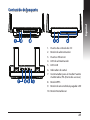
1. Puerto de entrada de CC
2. Botón de alimentación
3. Puertos Ethernet
4. LED de alimentación
5. LED LAN
6. Indicador de señal
7.Conmutador para el modo Puente
multimedia /PA (Punto de acceso)
8. Botón WPS
9. Botón de encendido/apagado LED
10.Botón Restablecer
27
Indicadores LED
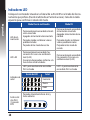
Coloque el conmutador situado en el lateral de su EA-AC87 en el modo de funcionamiento que prefiera (Puente multimedia o Punto de acceso). Consulte la tabla
siguiente para confirmar el estado del modo.
Español
Modo Puente multimedia
Modo PA
LED de alimentación
Permanentemente encendido: alimentación conectada
Apagado: alimentación desconectada
Parpadeo rápido: restablecer valores
predeterminados
Parpadeo lento: modo de rescate.
Permanentemente encendido:
alimentación conectada
Apagado: alimentación desconectada
Parpadeo rápido: restablecer
valores predeterminados
Parpadeo lento: modo de
rescate.
LED LAN
Permanentemente encendido: hay
conexión física con una red de área
local (LAN).
Frecuencia de parpadeo: conforme a la
tasa de transmisión de datos.
Permanentemente encendido:
hay conexión física con una
red de área local (LAN).
LED1 permanentemente encendido:
Wi-Fi activado
LED1~5 permanentemente
encendido: Wi-Fi activado
Indicador de
señal
Acción de LED
Señal
Excelente
Buena
Débil
Análisis del
sitio Wi-Fi
/ Conexión
WPS
28
Parpadeo intermitente hacia atrás y
hacia adelante:
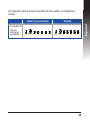
En la siguiente tabla se muestra el estado del LED cuando se completa el arranque.
Modo PA
Español
Modo Puente multimedia
Estado del LED
(Permanentemente
encendido)
29
Modos de funcionamiento
ASUS EA-AC87 ofrece dos modos de funcionamiento: Puente multimedia y
Punto de acceso (PA).
Español
IMPORTANTE:
•Para obtener el mejor rendimiento inalámbrico, coloque el dispositivo EA-AC87
a una distancia superior a 1,5 m del punto de acceso (PA) principal.
•Compruebe el conmutador situado en el lateral de su EA-AC87 para confirmar
el estado del modo.
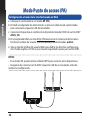
Modo Puente multimedia
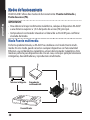
De forma predeterminada, su EA-AC87 se establece en el modo Puente multimedia. En este modo, puede conectar cualquier dispositivo con funcionalidad
Ethernet a su red doméstica inalámbrica a través del enrutador inalámbrico. Este
modo es perfecto para dispositivos de cine en casa, como por ejemplo televisores
inteligentes, descodificadores y reproductores multimedia.
POW
ER
Televisor inteligente
Reproductor
multimedia HD
Descodificador
30
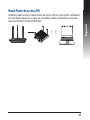
Modo Punto de acceso (PA)
Español
También puede activar el modo Punto de acceso (PA) en su EA-AC87 cambiando
el conmutador lateral. Si ya tiene un enrutador, puede actualizarlo a la versión
más reciente Wi-Fi 5 Ghz AC1800 4x4.
31
Español
Modo Puente multimedia
Le recomendamos que conecte su EA-AC87 a un enrutador inalámbrico presionando el botón de configuración protegida Wi-Fi (WPS, Wi-Fi Protected Setup).
32
Configuración con WPS
Español
a.Coloque el conmutador en el modo puente multimedia y enchufe el adaptador de alimentación.
b. Presione el botón WPS de su EA-AC87 durante más de tres segundos hasta
que los indicadores de señal LED1 a LED5 parpadeen secuencialmente hacia
adelante y hacia atrás.
33
c. Presione el botón WPS del enrutador:
NOTA: Consulte el manual del usuario del enrutador para conocer la ubicación
de su botón WPS.
Español
d. Espere a que al menos uno de los indicadores de señal LED se ilumine permanentemente, lo que significará que ha establecido una conexión con la red
inalámbrica correctamente.
e. Mediante el cable de red incluido, conecte el televisor inteligente, el descodificador, el reproductor multimedia HD u otro dispositivo Ethernet al puerto LAN
de su EA-AC87.
NOTA: También puede conectar su EA-AC87 a la red inalámbrica a través de la
interfaz gráfica del usuario Web. Para obtener más detalles, consulte la sección
Configuración a través de la interfaz basada en Web.
34
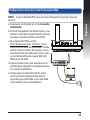
Configuración a través de la interfaz basada en Web
NOTA: Si ya ha utilizado WPS para conectar el dispositivo, pase por alto esta
sección.
Español
a.Coloque el conmutador en el modo puente
multimedia.
b.Enchufe el adaptador de alimentación y, mediante el cable de red suministrado, conecte
el equipo al puerto LAN de su EA-AC87.
c. En el explorador Web, escriba
http://findasus.local un 192.168.1.1 en la
barra de direcciones del explorador. Escriba
admin como el nombre de usuario y la contraseña predeterminados para iniciar sesión
en la interfaz gráfica de usuario Web (GUI
Web) de su EA-AC87.
d. Siga las instrucciones que aparezcan en la
pantalla para completar la configuración de
la conexión inalámbrica.
e. Compruebe si el indicador LED de su EAac87u se ilumina permanentemente, lo
que indica que su EA-N66 se ha conectado
correctamente a la red inalámbrica.
35
Modo Punto de acceso (PA)
Configuración a través de la interfaz basada en Web
Español
a.Coloque el conmutador en el modo AP (PA).
b.Enchufe el adaptador de alimentación y utilice el cable de red suministrado
para conectarlo al puerto LAN del enrutador.
c. Conecte el dispositivo al nombre de red predeterminado (SSID) de su EA-AC87
ASUS_5G.
d.En el explorador Web, escriba http://findasus.local en la barra de direcciones.
Escriba el nombre de usuario y la contraseña predeterminados: admin.
e.Siga la interfaz gráfica del usuario Web para definir las distintas configuraciones. Puede asignar un SSID y una clave de seguridad nuevos para su EA-AC87.
NOTA:
• En el modo PA, puede utilizar el botón WPS para conectar otros dispositivos.
• Asegúrese de conectar su EA-AC87 al puerto LAN de un enrutador antes de
realizar la configuración.
36
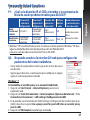
Frequently Asked Questions
Dirección IP
antes de la
configuración
Modo
Puente mul- 192.168.1.1
timedia
por
Modo Punto Asignado
el enrutador
de acceso
conectado
Dirección IP
después de la
configuración
Asignado por
el enrutador
conectado
Asignado por
el enrutador
conectado
Dirección URL SSID prepara la con- determifiguración*
nado
http://
findasus.local
N/D
http://
findasus.local
ASUS_5G
Nombre de usuario
y contraseña para
inicio de sesión.
nombre de usuario:
admin
contraseña: admin
* Windows® XP no admite findasus.local. Si utiliza el sistema operativo Windows® XP, descargue la utilidad de detección de dispositivos del sitio Web de ASUS
www.asus.com para buscar la dirección IP de su EA-AC87.
Q2: No puedo acceder a la interfaz GUI web para configurar los
parámetros del router inalámbrico
• Cierre todos los exploradores web en ejecución e inicie de nuevo
uno de ellos.
• Siga los pasos descritos a continuación para configurar el equipo
según el sistema operativo instalado.
Windows® 7
A.Deshabilite el servidor proxy si se encuentra habilitado.
1. Haga clic en Start (Inicio) > Internet Explorer para iniciar el
explorador web.
2. Haga clic en Tools (Herramientas) > Internet options (Opciones de Internet) > ficha
Connections (Conexiones) > LAN settings (Configuración de LAN).
3.En la pantalla Local Area Network (LAN) Settings (Configuración de la red de área local
(LAN)), desactive la opción Use a proxy server for your LAN (Usar un servidor proxy
para la LAN).
4. Haga clic en OK (Aceptar) cuando haya terminado.
37
Español
P1: ¿Cuál es la dirección IP, el SSID, el nombre y la contraseña de
inicio de sesión predeterminados para EA-AC87?
Español
B.Establezca la configuración TCP/IP del equipo para que reciba
una dirección IP automáticamente.
1. Haga clic en Start (Inicio) > Control Panel (Panel de control) >
Network and Internet (Red e Internet) > Network and Sharing
Center (Centro de redes y de recursos compartidos) > Manage
network connections (Administrar conexiones de red).
2.Seleccione Internet Protocol Version 4 (TCP/IPv4) (Protocolo
de Internet versión 4 (TCP/IPv4)) y haga clic en Properties
(Propiedades).
3. Active la opción Obtain an IP address automatically (Obtener
una dirección IP automáticamente).
4. Haga clic en OK (Aceptar) cuando haya terminado.
Mac 10.5.8
A.Deshabilite el servidor proxy si se encuentra
habilitado.
1.En la barra de menús, haga clic en Safari > Preferences...
(Preferencias...) > ficha Advanced (Avanzado).
2. En el campo Proxies, haga clic en Change Settings...
(Cambiar ajustes...).
3. En la lista de protocolos, anule la selección de los
elementos FTP Proxy (Proxy de FTP) y Web Proxy
(HTTP) (Proxy de web (HTTP).
4. Haga clic en OK (Aceptar) cuando haya terminado.
B.Establezca la configuración TCP/IP del equipo para
que reciba una dirección IP automáticamente.
1. Haga clic en el icono de Apple > System Preferences
(Preferencias del Sistema) > Network (Red).
2.Seleccione Ethernet y, a continuación, Using DHCP
(Usar DHCP) en el campo Configure (Configurar).
3. Haga clic en Apply (Aplicar) cuando haya terminado.
38
SUPPORT HOTLINE
USA/ CANADA
Hotline Number: 1-812-282-2787
Language: English
Availability: Mon. to Fri.
8:30-12:00am EST
(5:30am-9:00pm PST)
Sat. to Sun.
9:00am-6:00pm EST
(6:00am-3:00pm PST)
BRAZIL
Hotline Number: 4003 0988 (Capital) /
0800 880 0988 (demais localidades)
Language: Portuguese
Availability: Mon. to Fri.
9:00am-18:00
Manufacturer
ASUSTeK Computer Inc.
Tel: +886-2-2894-3447
Address: No. 150, LI-TE RD., PEITOU, TAIPEI 112, TAIWAN
Authorised representative in Europe
ASUS Computer GmbH
Address: HARKORT STR. 21-23, 40880 RATINGEN, GERMANY
Authorised distributors in Turkey
BOGAZICI BIL GISAYAR SAN. VE TIC. A.S.
Tel: +90 212 3311000
Address: AYAZAGA MAH. KEMERBURGAZ CAD. NO.10 AYAZAGA/ISTANBUL
CIZGI Elektronik San. Tic. Ltd. Sti.
Tel: +90 212 3567070
Address: CEMAL SURURI CD. HALIM MERIC IS MERKEZI
No: 15/C D:5-6 34394 MECIDIYEKOY/ ISTANBUL
KOYUNCU ELEKTRONiK BiLGi iSLEM SiST. SAN. VE DIS TIC. A.S.
Tel: +90 216 5288888
Address: EMEK MAH.ORDU CAD. NO:18, SARIGAZi, SANCAKTEPE ISTANBUL
AEEE Yönetmeliğine Uygundur.
ASUS Recycling/Takeback Services
ASUS recycling and takeback programs come from our commitment to the highest standards for protecting our environment. We believe in providing solutions
for you to be able to responsibly recycle our products, batteries, other components, as well as the packaging materials. Please go to
http://csr.asus.com/english/Takeback.htm for the detailed recycling information
in different regions.
REACH
Complying with the REACH (Registration, Evaluation, Authorisation, and Restriction of Chemicals) regulatory framework, we published the chemical substances
in our products at ASUS REACH website at http://csr.asus.com/english/REACH.htm
Federal Communication Commission Interference Statement
This equipment has been tested and found to comply with the limits for a Class
B digital device, pursuant to Part 15 of the FCC Rules. These limits are designed
to provide reasonable protection against harmful interference in a residential
installation. This equipment generates, uses and can radiate radio frequency
energy and, if not installed and used in accordance with the instructions, may
cause harmful interference to radio communications. However, there is no guarantee that interference will not occur in a particular installation. If this equipment
does cause harmful interference to radio or television reception, which can be
determined by turning the equipment off and on, the user is encouraged to try to
correct the interference by one of the following measures:
• Reorient or relocate the receiving antenna.
• Increase the separation between the equipment and receiver.
• Connect the equipment into an outlet on a circuit different from that to which
the receiver is connected.
• Consult the dealer or an experienced radio/TV technician for help.
CAUTION: Any changes or modifications not expressly approved by the party
responsible for compliance could void the user’s authority to operate this equipment.
WARNING:
•Any changes or modifications not expressly approved by the party responsible
for compliance could void the user’s authority to operate the equipment.
Prohibition of Co-locationThis device and its antenna(s) must not be co-located
or operating in conjunction with any other antenna or transmitter.
•Users must not modify this device. Modification by anyone other than the
party responsible for compliance with the rules of the Federal Communications
Commission (FCC) may void the authority granted under FCC regulations to
operate this device.
This device complies with Part 15 of the FCC Rules. Operation is subject to the
following two conditions: (1) This device may not cause harmful interference, and
(2) this device must accept any interference received, including interference that
may cause undesired operation.
This device and it's antennas(s) must not be co-located or operating in
conjunction with any other antenna or transmitter except in accordance with FCC
multi-transmitter product procedures.
This device is going to be operated in 5.15~5.25GHz frequency range, it is
restricted in indoor environment only.
IMPORTANT NOTE:
FCC Radiation Exposure Statement: This equipment complies with FCC radiation exposure limits set forth for an uncontrolled environment. This equipment
should be installed and operated with minimum distance 20cm between the
radiator & your body.
Declaration of Conformity for R&TTE directive 1999/5/EC
Essential requirements – Article 3
Protection requirements for health and safety – Article 3.1a
Testing for electric safety according to EN 60950-1 has been conducted. These are
considered relevant and sufficient.
Protection requirements for electromagnetic compatibility – Article 3.1b
Testing for electromagnetic compatibility according to EN 301 489-1 and EN 301
489-17 has been conducted. These are considered relevant and sufficient.
Effective use of the radio spectrum – Article 3.2
CE Mark Warning
This is a Class B product, in a domestic environment, this product may cause radio
interference, in which case the user may be required to take adequate measures.
IC Statement
This device complies with Industry Canada license-exempt RSS standard(s).
Operation is subject to the following two conditions: (1) this device may not cause
interference, and (2) this device must accept any interference, including interference that may cause undesired operation of the device.
Le présent appareil est conforme aux CNR d’Industrie Canada applicables aux appareils radio exempts de licence. L’exploitation est autorisée aux deux conditions suivantes : (1) l’appareil ne doit pas produire de brouillage, et (2) l’utilisateur de l’appareil doit
accepter tout brouillage radioélectrique subi, même si le brouillage est susceptible
d’en compromettre le fonctionnement.
This device and it’s antennas(s) must not be co-located or operating in conjunction with any other antenna or transmitter except in accordance with IC
multi-transmitter product procedures.
Cet appareil et son antenne (s) ne doit pas être co-localisés ou fonctionnement en
association avec une autre antenne ou transmetteur.
The device for the band 5150-5250 MHz is only for indoor usage to reduce potential for harmful interference to co-channel mobile satellite systems.
les dispositifs fonctionnant dans la bande 5150-5250 MHz sont réservés uniquement
pour une
utilisation à l’intérieur afin de réduire les risques de brouillage préjudiciable aux
systèmes de satellites mobiles utilisant les mêmes canaux;
IC Radiation Exposure Statement:
This equipment complies with IC RSS-102 radiation exposure limits set forth for an
uncontrolled environment. This equipment should be installed and operated with
minimum distance 20cm between the radiator & your body.
Cet équipement est conforme aux limites d’exposition aux rayonnements IC établies
pour un environnement non contrôlé. Cet équipement doit être installé et utilisé avec
un minimum de 20 cm de distance entre la source de rayonnement et votre corps.
Industry Canada Statement
This device complies with RSS-210 of the industry Canada Rules. Operation is
subject to the following two conditions:
• This device may not cause harmful interference.
• This device must accept any interference received, including interference that
may cause undesired operation.
IMPORTANT NOTE:
Radiation Exposure Statement: This equipment complies with IC radiation exposure limits set forth for an uncontrolled environment. End users must follow the
specific operating instructions for satisfying RF exposure compliance. To maintain
compliance with IC RF exposure compliance requirement, please follow operation
instruction as documented in this manual.
NCC 警語
經型式認證合格之低功率射頻電機,非經許可,公司、商號或使用者均不得擅
自變更頻率、加大功率或變更原設計之特性及功能。
低功率射頻電機之使用不得影響飛航安全及干擾合法通信;經發現有干擾現象
時,應立即停用,並改善至無干擾時方得繼續使用。
前項合法通信,指依電信法規定作業之無線電通信。
低功率射頻電機須忍受合法通信或工業、科學及醫療用電波輻射性電機設備
之干擾。
Safety Warning
SAFE TEMP: This wireless router should be only used in environments with ambient temperatures between 50C (410F) and 400C (1040F).
DO NOT expose to or use near liquids, rain, or moisture. DO NOT use during
electrical storms.