1
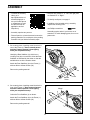
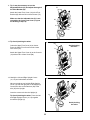
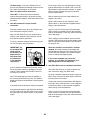
8. Orient the Handlebar (5) as shown.
8
Avoid pinching
the wires
Tip: Avoid pinching the Pulse Wire (17) and
the Main Wire (58). Attach the Handlebar (5)
to the Pivot Bracket (35) with six M8 x 13mm
Screws (72).
72
5
17
72
35
58
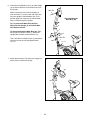
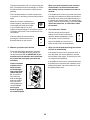
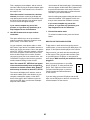
9. Untie and discard the wire tie (not shown) on the
Main Wire (58).
9
Have a second person hold the Console (13)
near the Pivot Bracket (35).
Wires
13
35
17
Insert all the wires on the Console (13)
downward through the hole in the center of the
Pivot Bracket (35).
58
4
Connect the Main Wire (58) and the Pulse Wire
(17) to the matching wires on the Console (13).
A
Insert the remaining wire (A) downward into the
Upright (4) and pull it out of the hole in the left
side of the Upright.
10. Tip: Avoid pinching the wires. It may be necessary to turn the Adjustment Knob (27) and
adjust the angle of the Pivot Bracket (35).
10
13
35
Attach the Console (13) to the Pivot Bracket (35)
with four M4 x 12mm Screws (75).
75
27
Avoid pinching
the wires
9