1
PRINTING FROM AN MS-DOS APPLICATION
You can execute printing from an MS-DOS application which has been executed from the MSDOS prompt in Windows.
This machine can only print from applications run from the MS-DOS prompt in
Windows. It cannot print when running in native MS-DOS mode.
2
Print setting from the MS-DOS prompt
Printing
Windows 95/Windows 98 has the item, “Spool MS-DOS print jobs” in the port settings. If this
setting is not selected, the machine will not operate properly. Use the following procedure to
check the setting.
1
Click the Start button.
2
Select Settings and then click Printers.
3
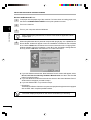
Right-click the AL-841 icon in the printer dialog box and click Properties.
For this description, it is assumed that the mouse is configured for right hand
operation.
16
4
Click the Details tab in the Properties dialog box.
5
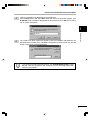
Click the Port Settings button.
6
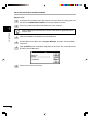
Check that “Spool MS-DOS print jobs” is checked in the port setting dialog box.