1
Cabling
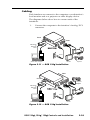
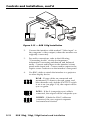
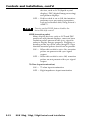
Each interface can connect to the computer or workstation’s
local monitor and to a projector or other display device.
The diagrams below show how to connect each of the
interfaces.
Connect the computer to the interface’s Analog/ECL
connector.
Front
AU
DI
O
INP
UT
MB
PO
C
WE
UN
IVE
R
H.
RS
AL
SH
IFT
INT
Rear
RG
FA
CE B 130
xi
W
/AD
SP
MIN
/MA
X
ER
H.
SH
IFT
SOG OUT
DDSP
SERR
SPARE
1.
0.5A
V
MBC Buffer
or
MBC/LBC
Cable
UT
TP
OU
EL/
LEV K
PEA 50%
-240
100
0.8V
TY
%
UNI
100
0.9V
0 Hz
50/6
Audio
Power
or
Monitor
SUN or SGI Computer
Projector
Figure 2-11 — RGB 130xi
xi installation
Rear
Front
AU
DI
O
INP
UT
MB
PO
C
WE
UN
IVE
R
H.
RS
AL
SH
IFT
INT
RG
FA
CE B 134
xi
W
/AD
SP
MIN
/MA
X
ER
H.
SH
IFT
Projector
SOG OUT
DDSP
SERR
SPARE
UT
0.5A
100
-240
V
TP
OU
Output 2
EL/
LEV K
PEA 50%
0.8V
MBC Buffer
or
MBC/LBC
Cable
UNI
TY
100
%
0.9V
50/6
0 Hz
Output 1
Audio
Power
or
SUN or SGI Computer
Monitor
Figure 2-12 — RGB 134xi
xi installation
xi , 134xi
xi , 150xi
xi Controls and Installation
RGB 130xi
2-10