1
Chapter 3
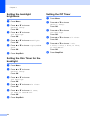
Setting the backlight
brightness
a
b
c
d
a
b
Press a or b to choose
General Setup.
Press OK.
Press a or b to choose
LCD Settings.
Press OK.
Press a or b to choose Backlight.
Press OK.
Press a or b to choose Light, Med or
Dark.
Press OK.
f
Press Stop/Exit.
Setting the Dim Timer for the
backlight
Press Menu.
Press a or b to choose
General Setup.
Press OK.
c
Press a or b to choose
LCD Settings.
Press OK.
d
Press a or b to choose Dim Timer.
Press OK.
e
Press a or b to choose 10 Secs,
20 Secs, 30 Secs or Off.
Press OK.
f
Press Stop/Exit.
10
3
Press Menu.
e
a
b
Setting the Off Timer
3
Press Menu.
Press a or b to choose
General Setup.
Press OK.
c
Press a or b to choose
LCD Settings.
Press OK.
d
Press a or b to choose Off Timer.
Press OK.
e
Press a or b to choose 1 Min,
2 Mins, 3 Mins, 5 Mins, 10 Mins,
30 Mins or Off.
Press OK.
f
Press Stop/Exit.
3