1
DivX Connected User Guide
DivX Connected User Guide
Downloading and Playing Video on Stage6 ................................................................... 13
Logging In to PIN Protected Media ................................................................................. 14
DivX Video-on-Demand Activation................................................................................... 15
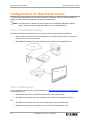
Configurations for Best Performance ..........................................................16
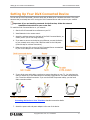
Recommended Network Setup......................................................................................... 16
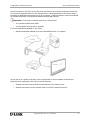
Other Possible Setups......................................................................................................... 16
Configuring the DivX Connected Server......................................................18
Configuring Media on the Server ..................................................................................... 18
Adding a Media Folder................................................................................................. 18
Removing a Media Folder ........................................................................................... 18
Setting Privacy............................................................................................................... 19
Setting PIN Protection ................................................................................................. 19
Removing PIN Protection............................................................................................ 19
Working with Folders ................................................................................................... 19
Configuring Server Settings .............................................................................................. 19
Changing the DivX Connected Server Name .......................................................... 20
Changing General Server Settings ............................................................................ 20
Using PIN Protection........................................................................................................... 20
Setting Up PIN Protection........................................................................................... 20
Modifying Additional Settings ........................................................................................... 21
Access Control via Privacy Settings ................................................................................. 21
Changing the Privacy Settings ................................................................................... 22
Managing Devices on the Server ..................................................................................... 23
Allowing or Denying Connected Device Access ..................................................... 23
Removing a Non-Connected Device ......................................................................... 23
Renaming Devices in the Device List ....................................................................... 24
Editing File Data................................................................................................................... 24
Editing Video Metadata ........................................................................................ 24
Editing Music Metadata ............................................................................................... 27
Resetting Music Metadata........................................................................................... 28
Changing Music Artwork ............................................................................................. 29
Viewing Picture Metadata ........................................................................................... 29
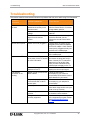
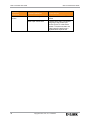
Troubleshooting...............................................................................................31
Updating Your Firmware ................................................................................33
Sending Feedback to DivX .............................................................................34
iv
Copyright © 2007, DivX, Inc., Confidential
W





![LL STAGE 6-06D W - [2013.07.04]](http://vs1.manualzilla.com/store/data/005734810_1-c52217095191e9110aa67fdeef6b5f60-150x150.png)