1
English
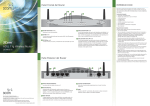
The Home screen
Search bar
Status bar
Application
menu
Command bar
Touchpad keys
Use the Wacom pen to tap the status bar, search bar, application menu, or
the command bar. Use your finger to press the touchpad keys.
• Status bar: Tap the icons to proceed with the corresponding settings
of your device or display the status of your device.
• Search bar: Tap to search for the documents in your device.
• Application menu: Tap an application to launch it.
• Command bar: Tap a command button to perform its corresponding
function.