1
3.5.3.2 Update Drive Unit Number for RRD-Series Function
The Update Drive Unit Number function lets you update the unit number
for an RRD-series disc drive connected to a KRQ50 controller. Refer to the
appropriate RRD-series disc drive owner’s manual for instructions.
3.5.4 Display the Service Menu Option
The Display the Service Menu option is available only if you purchased the
MicroVAX Maintenance Kit. That kit contains service diagnostics and the
system maintenance guide.
CAUTION: Only qualified service personnel should use the MicroVAX
Maintenance Kit.
3.5.5 Display the Connect/Ignore Menu Option
NOTE: The Connect/Ignore Menu is for users of Industrial VAX systems.
Its options are described in the Industrial VAX troubleshooting manual.
The Display the Connect/Ignore Menu option lets you customize MDM
diagnostics. You can load your own diagnostics on a device, as well as
load MDM diagnostics on a device with a nonstandard CSR address and
interrupt vector.
See the Industrial VAX Troubleshooting manual; use this option with
caution.
3.5.6 Select Single Device Tests Option
The Select Single Device Tests option lets you run tests for a single device.
•
A functional test is performed on the device circuits.
•
An exerciser test ensures that the device works properly.
After you select this option, the diagnostics are prepared for testing. If this
is the first option you selected, the diagnostics are loaded. Loading takes
several minutes. After loading completes, you are prompted to press Return .
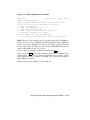
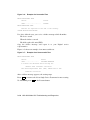
After you press Return , a list of the devices in your system is displayed.
Figure 3–5 shows an example of such a display.
3–14 VAX 4000 Model 200 Troubleshooting and Diagnostics