1
Cayman 3220-H
User’s Guide
Release 5.6.2
November 2000
Copyrights
Copyright © 1999-2000 Cayman Systems
All rights reserved
Printed in the United States of America
Portions of this software copyright 1988, 1991 by Carnegie Mellon University.
All rights reserved. Permission to use, copy, modify, and distribute this software
and its documentation for any purpose and without fee is hereby granted,
provided that the above copyright notice and this permission notice appear in
supporting documentation, and that the name of Carnegie Mellon University
not be used in advertising or publicity pertaining to distribution of the software
without specific, written prior permission.
CARNEGIE MELLON UNIVERSITY DISCLAIMS ALL WARRANTIES WITH
REGARD TO THIS SOFTWARE, INCLUDING ALL IMPLIED WARRANTIES OF
MERCHANTABILITY AND FITNESS. IN NO EVENT SHALL CMU BE LIABLE
FOR ANY SPECIAL, INDIRECT, OR CONSEQUENTIAL DAMAGES OR ANY
DAMAGES WHATSOEVER RESULTING FROM LOSS OF USE, DATA, OR
PROFITS, WHETHER IN AN ACTION OF CONTRACT, NEGLIGENCE, OR
OTHER TORTIOUS ACTION, ARISING OUT OF OR IN CONNECTION WITH
THE USE OR PERFORMANCE OF THIS SOFTWARE.
Trademarks
Cayman Systems is a registered trademark of Cayman Systems, Inc. SWIFT-IP,
SafetyNet, Zero Configuration, and the Cayman Systems logo are trademarks of
Cayman Systems, Inc.
UNIX is a registered trademark of UNIX System Laboratories, Inc. Ethernet is a
registered trademark of Xerox Corporation. Microsoft and Windows are
registered trademarks of Microsoft Corporation.
Mention of third-party products is for informational purposes only and
constitutes neither an endorsement nor a recommendation. Cayman assumes
no responsibility with regard to the performance or use of these products.
Contents
Preface
About This Manual . . . . . . . . . . . . . . . . . . . . . . . . . . . . . . . . . . . vii
Who Should Read This Manual . . . . . . . . . . . . . . . . . . . . . . . . . . vii
What This Manual Covers . . . . . . . . . . . . . . . . . . . . . . . . . . . . . . vii
Documentation Conventions . . . . . . . . . . . . . . . . . . . . . . . . . . viii
1 About Your
Cayman 3220-H
What’s New in Release 5.6.2. . . . . . . . . . . . . . . . . . . . . . . . . . .
Cayman 3220-H Features. . . . . . . . . . . . . . . . . . . . . . . . . . . . . .
Cayman 3220-H Front Panel . . . . . . . . . . . . . . . . . . . . . . . . . . .
Cayman 3220-H Back Panel. . . . . . . . . . . . . . . . . . . . . . . . . . . .
1-1
1-1
1-4
1-4
2 Setting Up Your
Cayman 3220-H
Unpacking Your Cayman 3220-H . . . . . . . . . . . . . . . . . . . . . . .
Connecting Your Cayman 3220-H. . . . . . . . . . . . . . . . . . . . . . .
Step 1: Position the Cayman 3220-H . . . . . . . . . . . . . . . . .
Step 2: Connect Your Local Devices . . . . . . . . . . . . . . . . .
Step 3: Connect Your Wide Area Network . . . . . . . . . . . .
Step 4: Power On the Cayman 3220-H. . . . . . . . . . . . . . . .
Disconnecting Your Cayman 3220-H . . . . . . . . . . . . . . . . . . . .
2-1
2-2
2-2
2-3
2-4
2-4
2-5
3 Configuring
Your Cayman
3220-H
Gathering Configuration Information . . . . . . . . . . . . . . . . . . . . 3-2
QuickStart Information. . . . . . . . . . . . . . . . . . . . . . . . . . . . 3-2
Ethernet (LAN) Port Information (Optional) . . . . . . . . . . . 3-3
ATM Port Information (Optional). . . . . . . . . . . . . . . . . . . . 3-5
Configuring Your Computer . . . . . . . . . . . . . . . . . . . . . . . . . . . 3-7
Opening a Web Connection . . . . . . . . . . . . . . . . . . . . . . . . . . . 3-9
Entering Basic Settings . . . . . . . . . . . . . . . . . . . . . . . . . . . . . . 3-11
Cayman 3220-H User’s Guide
December 2000
Contents
iii
Default QuickStart Window . . . . . . . . . . . . . . . . . . . . . . . 3-11
RFC-1483 QuickStart Window . . . . . . . . . . . . . . . . . . . . . 3-13
Entering Ethernet (LAN) Settings . . . . . . . . . . . . . . . . . . . . . . . 3-15
Entering ATM Settings . . . . . . . . . . . . . . . . . . . . . . . . . . . . . . . 3-17
PPP over Ethernet (LLC-SNAP Encapsulation) . . . . . . . . . 3-19
PPP over Ethernet (VC-Muxed) . . . . . . . . . . . . . . . . . . . . . 3-23
Ethernet over RFC 1483 (LLC-SNAP Encapsulation) . . . . . 3-27
Ethernet over RFC 1483 (VC-Muxed) . . . . . . . . . . . . . . . . 3-31
PPP over ATM (LLC-SNAP Encapsulation). . . . . . . . . . . . . 3-34
PPP over ATM (VC-Muxed) . . . . . . . . . . . . . . . . . . . . . . . . 3-39
IP over RFC 1483 (LLC-SNAP Encapsulation) . . . . . . . . . . 3-43
IP over RFC 1483 (VC-Muxed) . . . . . . . . . . . . . . . . . . . . . 3-46
Configuring Password Settings . . . . . . . . . . . . . . . . . . . . . . . . 3-50
Configuring Pinhole Settings . . . . . . . . . . . . . . . . . . . . . . . . . . 3-52
Configuring Bridge Settings . . . . . . . . . . . . . . . . . . . . . . . . . . . 3-56
Configuring SNMP Settings . . . . . . . . . . . . . . . . . . . . . . . . . . . 3-57
4 Using the
Command Line
Interface
Contents
iv
Overview . . . . . . . . . . . . . . . . . . . . . . . . . . . . . . . . . . . . . . . . . . 4-1
Starting and Ending a CLI Session . . . . . . . . . . . . . . . . . . . . 4-1
Using the CLI Help Facility . . . . . . . . . . . . . . . . . . . . . . . . . 4-4
Saving Settings. . . . . . . . . . . . . . . . . . . . . . . . . . . . . . . . . . . 4-4
About Root Commands . . . . . . . . . . . . . . . . . . . . . . . . . . . . . . . 4-4
ROOT Prompt . . . . . . . . . . . . . . . . . . . . . . . . . . . . . . . . . . . 4-4
ROOT Command Shortcuts. . . . . . . . . . . . . . . . . . . . . . . . . 4-5
ROOT Commands . . . . . . . . . . . . . . . . . . . . . . . . . . . . . . . . 4-5
About CONFIG Commands . . . . . . . . . . . . . . . . . . . . . . . . . . . 4-15
CONFIG Mode Prompt . . . . . . . . . . . . . . . . . . . . . . . . . . . 4-15
Navigating the CONFIG Hierarchy . . . . . . . . . . . . . . . . . . 4-15
Entering Commands in CONFIG Mode . . . . . . . . . . . . . . . 4-17
Displaying Current Router Settings. . . . . . . . . . . . . . . . . . 4-18
Stepping Through Cayman 3220-H Configuration . . . . . . 4-18
Validating Your Configuration . . . . . . . . . . . . . . . . . . . . . 4-19
CONFIG Commands. . . . . . . . . . . . . . . . . . . . . . . . . . . . . . . . . 4-20
ATM Settings . . . . . . . . . . . . . . . . . . . . . . . . . . . . . . . . . . . 4-20
BNCP Settings . . . . . . . . . . . . . . . . . . . . . . . . . . . . . . . . . . 4-21
Bridging Settings . . . . . . . . . . . . . . . . . . . . . . . . . . . . . . . . 4-21
DHCP Settings . . . . . . . . . . . . . . . . . . . . . . . . . . . . . . . . . . 4-22
Domain Name System Settings . . . . . . . . . . . . . . . . . . . . . 4-23
IP Settings . . . . . . . . . . . . . . . . . . . . . . . . . . . . . . . . . . . . . 4-24
Network Address Translation (NAT) Default Settings. . . . 4-35
Network Address Translation (NAT) Pinhole Settings . . . 4-36
Cayman 3220-H User’s Guide
December 2000
PPP Settings . . . . . . . . . . . . . . . . . . . . . . . . . . . . . . . . . . .
Command Line Interface Preference Settings . . . . . . . . .
Port Renumbering Settings. . . . . . . . . . . . . . . . . . . . . . . .
SNMP Settings. . . . . . . . . . . . . . . . . . . . . . . . . . . . . . . . . .
System Settings . . . . . . . . . . . . . . . . . . . . . . . . . . . . . . . . .
Traffic Shaping Settings . . . . . . . . . . . . . . . . . . . . . . . . . .
4-37
4-42
4-42
4-43
4-44
4-46
5 Monitoring
Your Cayman
3220-H
Displaying the Overview Status . . . . . . . . . . . . . . . . . . . . . . . . 5-2
Displaying Memory Statistics. . . . . . . . . . . . . . . . . . . . . . . . . . . 5-3
Displaying DHCP Client Statistics . . . . . . . . . . . . . . . . . . . . . . . 5-4
Displaying DHCP Server Statistics . . . . . . . . . . . . . . . . . . . . . . . 5-5
Displaying DSL Statistics . . . . . . . . . . . . . . . . . . . . . . . . . . . . . . 5-6
Displaying PPP Statistics . . . . . . . . . . . . . . . . . . . . . . . . . . . . . . 5-7
Displaying PPPoE Statistics . . . . . . . . . . . . . . . . . . . . . . . . . . . . 5-8
Displaying Ethernet Statistics . . . . . . . . . . . . . . . . . . . . . . . . . . 5-9
Displaying ATM Statistics . . . . . . . . . . . . . . . . . . . . . . . . . . . . 5-10
Displaying the Diagnostic Log. . . . . . . . . . . . . . . . . . . . . . . . . 5-11
Displaying IP Interface Statistics . . . . . . . . . . . . . . . . . . . . . . . 5-12
Displaying IP ARP Statistics . . . . . . . . . . . . . . . . . . . . . . . . . . . 5-13
Displaying IP Routes . . . . . . . . . . . . . . . . . . . . . . . . . . . . . . . . 5-14
Displaying Bridge Interface Statistics . . . . . . . . . . . . . . . . . . . 5-15
Displaying Bridge Table Statistics . . . . . . . . . . . . . . . . . . . . . . 5-16
Using the Diagnose Utility. . . . . . . . . . . . . . . . . . . . . . . . . . . . 5-17
6 Updating Your
System
Software
Using the Home Page to Install a New Image . . . . . . . . . . . . . . 6-1
Using the Installer to Install a New Image . . . . . . . . . . . . . . . . 6-3
Using TFTP to Install a New Image . . . . . . . . . . . . . . . . . . . . . . 6-4
A Technical
Specifications
Components . . . . . . . . . . . . . . . . . . . . . . . . . . . . . . . . . . . . . . . A-1
Interfaces. . . . . . . . . . . . . . . . . . . . . . . . . . . . . . . . . . . . . . . . . . A-1
Power . . . . . . . . . . . . . . . . . . . . . . . . . . . . . . . . . . . . . . . . . . . . A-1
Size . . . . . . . . . . . . . . . . . . . . . . . . . . . . . . . . . . . . . . . . . . . . . . A-2
Environment . . . . . . . . . . . . . . . . . . . . . . . . . . . . . . . . . . . . . . . A-2
Certifications . . . . . . . . . . . . . . . . . . . . . . . . . . . . . . . . . . . . . . . A-2
Cayman 3220-H User’s Guide
December 2000
Contents
v
B Diagnostic
Console
About the Diagnostic Console . . . . . . . . . . . . . . . . . . . . . . . . . . B-1
Connecting a Terminal to the Console Port . . . . . . . . . . . . . . . B-2
Using the Diagnostic Console . . . . . . . . . . . . . . . . . . . . . . . . . . B-3
Diagnostic Console Commands . . . . . . . . . . . . . . . . . . . . . . . . . B-3
Basic Commands . . . . . . . . . . . . . . . . . . . . . . . . . . . . . . . . . B-4
Administration Commands . . . . . . . . . . . . . . . . . . . . . . . . . B-5
Boot Setting Commands . . . . . . . . . . . . . . . . . . . . . . . . . . . B-7
C How Your
Cayman 3220-H
Works
About ATM . . . . . . . . . . . . . . . . . . . . . . . . . . . . . . . . . . . . . . . . .C-1
About Network Address Translation . . . . . . . . . . . . . . . . . . . . .C-2
About Bridging and Routing. . . . . . . . . . . . . . . . . . . . . . . . . . . .C-3
TCP/IP Routing . . . . . . . . . . . . . . . . . . . . . . . . . . . . . . . . . .C-3
Bridging . . . . . . . . . . . . . . . . . . . . . . . . . . . . . . . . . . . . . . . .C-3
About DHCP. . . . . . . . . . . . . . . . . . . . . . . . . . . . . . . . . . . . . . . .C-4
Cayman 3220-H as DHCP Server . . . . . . . . . . . . . . . . . . . . .C-4
Cayman 3220-H as DHCP Client . . . . . . . . . . . . . . . . . . . . .C-5
About PPP . . . . . . . . . . . . . . . . . . . . . . . . . . . . . . . . . . . . . . . . .C-5
How PPP Works . . . . . . . . . . . . . . . . . . . . . . . . . . . . . . . . .C-5
Phases of a PPP Link . . . . . . . . . . . . . . . . . . . . . . . . . . . . . .C-6
PPP and Routing Tables. . . . . . . . . . . . . . . . . . . . . . . . . . .C-10
Static and Dynamic Routes . . . . . . . . . . . . . . . . . . . . . . . .C-11
Selecting the Most Efficient Route . . . . . . . . . . . . . . . . . .C-11
Dealing with Unavailable Routes . . . . . . . . . . . . . . . . . . .C-12
About PPP over Ethernet (PPPoE) . . . . . . . . . . . . . . . . . . . . . .C-13
Advantages of PPPoE . . . . . . . . . . . . . . . . . . . . . . . . . . . . .C-13
PPP over Ethernet Stages. . . . . . . . . . . . . . . . . . . . . . . . . .C-14
Glossary
Index
Contents
vi
Cayman 3220-H User’s Guide
December 2000
Preface
About This
Manual
This manual describes how to connect your Cayman 3220-H to your
local area network (LAN) and wide area network (WAN) and how to
configure it to function as an Ethernet hub/router.You should read
this manual completely before you connect your Cayman 3220-H to
your Ethernet networks.
Who Should Read
This Manual
This manual is intended for network or system administrators
responsible for setting up and maintaining the hardware and
software to connect Ethernet networks.
What This
Manual Covers
Here’s what you will find in this manual:
Chapter 1, “About Your Cayman 3220-H,” presents an
overview of the features, ports, and LEDs on your Cayman 3220H.
Chapter 2, “Setting Up Your Cayman 3220-H,” describes
how to unpack your Cayman 3220-H and how to connect and
disconnect it from your Ethernet networks.
Chapter 3, “Configuring Your Cayman 3220-H,” describes
how to use the web-based configuration interface to enter
operating settings for your Cayman 3220-H.
Cayman 3220-H User’s Guide
December 2000
Preface
vii
Documentation
Conventions
Chapter 4, “Using the Command Line Interface,” describes
how to use the text-based command line interface to enter
operating settings for your Cayman 3220-H.
Chapter 5, “Monitoring Your Cayman 3220-H,” describes
how to monitor the performance of your Cayman 3220-H.
Chapter 6, “Updating Your System Software,” describes
how to install a new version of the Cayman 3220-H operating
software in your router.
Appendix A, “Technical Specifications,” details hardware
specifications and certifications for the Cayman 3220-H.
Appendix B, “Diagnostic Console,” describes how to
connect a terminal to the Cayman 3220-H maintenance console
port and how to use the Cayman 3220-H diagnostic console to
display and modify the device’s boot settings.
Appendix C, “How Your Cayman 3220-H Works,” presents
background information on how the Cayman 3220-H supports
address mapping, bridging, and the Dynamic Host Control
Protocol (DHCP).
This manual uses the following conventions to present information:
Menu commands and button names appear in bold italic sans
serif type face.
Computer display text appears in terminal type face.
User-entered text appears in bold terminal type face.
Syntax conventions for the Cayman 3220-H command line interface
are as follows:
Preface
viii
Optional command arguments are presented in straight ([ ])
brackets.
Cayman 3220-H User’s Guide
December 2000
Alternative values for an argument are presented in curly ({ })
brackets, with values separated with vertical bars (|).
Variables for which you must supply your own values are
presented in italic terminal type face.
Cayman 3220-H User’s Guide
December 2000
Preface
ix
Preface
x
Cayman 3220-H User’s Guide
December 2000
1
About Your Cayman
3220-H
The Cayman 3220-H combines a four-port Ethernet hub with an
Asymmetric Digital Subscriber Line (ADSL) router. The Cayman
3220-H connects the personal computers, printers, and other
network devices in a workgroup to a remote network or the
Internet.
What’s New in
Release 5.6.2
Cayman 3220-H
Features
Support for RIP version 2 with MD5 authentication provides a
secure method of exchanging routing information with other
trusted routers while detecting and ignoring forged routing
messages sent from
Support for Alcatel multimode Asymmetric Digital Subscriber
Line (ADSL) , which allows your Cayman 3220-H to detect and
establish a connection over all industry-standard forms of
asynchronous DSL (ANSI T1.413 Issue2, G.dmt, and G.lite)
automatically.
ADSL technology supports throughput of up to eight megabits
per second.
Asynchronous Transfer Mode (ATM) supports up to eight
simultaneous virtual circuits (VCs) for reliable high-speed data
transmission.
Cayman 3220-H User’s Guide
December 2000
About Your Cayman 3220-H
1-1
About Your Cayman 3220-H
1-2
Integrated 10BaseT Ethernet hub on the Cayman 3220-H front
panel lets you add or move workgroup network connections
quickly and easily.
SWIFT-IP™ means that installing the Cayman 3220-H consists of
connecting the device to your networks and entering a few basic
settings.You can install and configure the Cayman 3220-H in less
than 10 minutes.
Web-based browser configuration makes configuration and
management easy from anywhere on your network.
Command-line configuration lets you monitor the 3220-H
through a Telnet or VT100 connection.
Full-featured wide-area network bridge supports non-TCP/IP
protocols.
Network Address Translation (NAT) lets your workgroup
network share one IP address when communicating with other
hosts on your corporate network or the Internet.
Dynamic Host Configuration Protocol (DHCP) client
functionality lets your Internet Service Provider (ISP) or a host
on your Wide Area Network configure the IP address and other
network settings for the WAN interface on your Cayman 3220-H
automatically.
DHCP server functionality lets the Cayman 3220-H automatically
configure the IP address and other network settings for
computers on your Local Area Network.
DHCP relay agent functionality lets devices on the Local Area
Network obtain network address information from a DHCP
server on the WAN without any user setup at the workstation.
IP pinholes let you provide web services from your Local Area
Network without sacrificing network security.
Bandwidth shaping lets carriers and service providers regulate
the amount of WAN traffic.
Alcatel access concentrator interoperability.
Cayman 3220-H User’s Guide
December 2000
Support for Point-to-Point Protocol over Ethernet (PPPoE) lets
you connect to an Internet Service Provider using well-defined
protocols.
Diagnose utility simplifies identification and resolution of
network problems.
Cayman 3220-H configuration pages automatically warn you if
an administrator password has not been set.
Security features include restrictions on access to the Cayman
3220-H through its WAN port, limitations on packets addressed
to an interface’s broadcast address, and enhanced handling of
“spoofed” IP addresses.
Ability to install new software images from the Cayman 3220-H
Home page.
Support for Checkpoint and Nortel Contivity virtual private
networks.
Support for negotiation of IPCP subnet allocation from a Remote
Access Server.
Enhanced security, diagnostics, and error reporting for PPP and
PPPoE connections.
Support for a NAT default server lets your Cayman 3220-H direct
NAT traffic to a specified host on your network.
Cayman 3220-H User’s Guide
December 2000
About Your Cayman 3220-H
1-3
Cayman 3220-H
Front Panel
The front panel of your Cayman 3220-H (Figure 1-1) includes the
following LEDs and ports.
ETHERNET
POWER
DSL
STATUS
DSL
Figure 1-1 Cayman 3220-H Front Panel
Cayman 3220-H
Back Panel
The power LED remains steadily on when you connect your
Cayman 3220-H to a power supply.
Four 10BaseT Ethernet hub ports lets you connect network
devices within a workgroup. Each hub port has an integrated
LED that remains on when the Cayman 3220-H is connected to
the device and that flashes when a packet is sent or received
over the associated hub port.
The DSL LED flashes when a packet is sent or received over the
DSL port.
The Status LED remains on steadily when the DSL link is
functioning.
The back panel of your Cayman 3220-H (Figure 1-2) includes three
ports.
DSL
MAINTENANCE
CONSOLE
9VDC
Figure 1-2 Cayman 3220-H Back Panel
About Your Cayman 3220-H
1-4
Cayman 3220-H User’s Guide
December 2000
The DSL port lets you connect your Cayman 3220-H to one or
more remote networks over a DSL connection.
The maintenance console port lets you connect the Cayman
3220-H to a terminal or personal computer running a terminal
emulation application to configure its operating settings with
the command line interface (described in Chapter 4.)
The power port lets you connect the Cayman 3220-H to an
electrical power supply.Transformers for standard U.S. and
international power sources are available from your router vendor.
Using a transformer that has not been approved by Cayman Systems
will void your warranty. While non-approved power supplies may
appear compatible with the Cayman 3220-H power jack, they may
result in damage to your Cayman 3220-H.
Cayman 3220-H User’s Guide
December 2000
About Your Cayman 3220-H
1-5
About Your Cayman 3220-H
1-6
Cayman 3220-H User’s Guide
December 2000
2
Setting Up Your
Cayman 3220-H
Unpacking Your Cayman 3220-H
Connecting Your Cayman 3220-H
Disconnecting Your Cayman 3220-H
Unpacking Your
Cayman 3220-H
The first thing you should do when you receive the Cayman 3220-H
package is confirm that you have everything you should. Remove all
the materials from the shipping carton and verify that you have the
following:
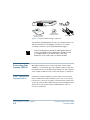
The Cayman 3220-H server in a protective bag
Power transformer (U.S. or international)
Cayman 3220-H QuickStart and other documentation
Cayman 3220-H installation CD-ROM
Blue and green DSL data cables
Cayman 3220-H User’s Guide
December 2000
Setting Up Your Cayman 3220-H
2-1
ETHERNET
POWER
DSL
STATUS
DSL
Power Transformer
Cayman Gateway
rted
g Sta
Gettin with the 220-H
an 3
Caym
Cayman QuickStart &
Other Documentation
Cayman Software
and Documentation
DSL Data Cables
Figure 2-1 Cayman 3220-H Package Components
Your Cayman 3220-H shipping carton may also include release notes
and other materials. If your shipping carton does not contain
everything on this list, contact Cayman Technical Support.
Keep the shipping carton and all the packing materials used
to ship your Cayman 3220-H. Repack your Cayman 3220-H
in its original carton if you have to move it over long
distances or if you need to ship it to another location.
Connecting Your
Cayman 3220-H
The 10Base-T Ethernet ports on the front panel of the Cayman
3220-H let you connect the personal computers, printers, and other
network devices in your workgroup.The DSL port on the rear panel
of the Cayman 3220-H is used to connect the device to a DSL jack.
Step 1: Position the
Cayman 3220-H
Position the Cayman 3220-H in a location where air can circulate
freely around it.The Cayman 3220-H case has vents on its top and
bottom. Leave at least two (2) inches of clearance between the vents
on the top of the Cayman 3220-H and any object that might restrict
air flow. Never operate the Cayman 3220-H when its vents are
covered or obstructed.
Setting Up Your Cayman 3220-H
2-2
Cayman 3220-H User’s Guide
December 2000
Step 2: Connect
Your Local Devices
Insert one end of a twisted-pair cable in one of the ports labeled LAN
10BT on the Cayman 3220-H front panel until you feel it lock (Figure
2-1). Connect the other end of the cable to the Ethernet port on a
personal computer or other networked device.You can connect
your network devices to any of the Cayman 3220-H Ethernet hub
ports.
DSL
BT
LAN 10
1
2
3
S
4
TATU
DSL S
POWER
To PC, Printer, or
Other Networked Device
Figure 2-1 Connecting the Cayman 3220-H to Your LAN
If you require more than four Ethernet hub ports, you can connect
your Cayman 3220-H to another Ethernet hub.To do so, use a
standard twisted-pair Ethernet cross-over cable to connect any LAN
port on the Cayman 3220-H to any Ethernet port on the other hub.
Cayman 3220-H User’s Guide
December 2000
Setting Up Your Cayman 3220-H
2-3
Step 3: Connect
Your Wide Area
Network
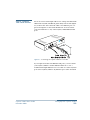
Insert one end of the green DSL data cable in the port labeled DSL
on the Cayman 3220-H back panel until you feel it lock (Figure 2-2).
Connect the other end of the cable to your DSL wall jack. If the DSL
status LED does not come on after you power your Cayman 3220-H,
replace the green DSL data cable with the blue one.
9VDC
E
NANC
MAINTE LE
CONSO
DSL
To Your
DSL Jack
Figure 2-2 Connecting Your Cayman 3220-H to Your WAN
Step 4: Power On
the Cayman
3220-H
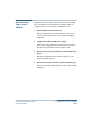
Plug the round end of the transformer cord into the power jack on
the back panel of the Cayman 3220-H (Figure 2-3).
9VDC
DSL
E
NANC
MAINTEOLE
CONS
To Power
Outlet
Figure 2-3 Connecting Your Cayman 3220-H to a Power Supply
After you have connected the transformer to the Cayman 3220-H,
plug the pronged end of the transformer cord into a 110-120 volt AC
outlet (or the electrical power outlet appropriate to your location).
Users outside the United States may need a transformer compatible
with local electrical power specifications. Contact your authorized
router vendor for information on appropriate transformers.
Setting Up Your Cayman 3220-H
2-4
Cayman 3220-H User’s Guide
December 2000
Disconnecting
Your Cayman
3220-H
Complete the following steps to disconnect your Cayman 3220-H
from your Ethernet networks. Return the Cayman 3220-H to its
original carton if you are moving it to a different location.
1. Warn and disconnect network users.
Before you disconnect the Cayman 3220-H, let your network
users know that remote access services will be interrupted
temporarily.
2. Unplug the Cayman 3220-H power supply.
Unplug the Cayman 3220-H transformer from the wall outlet.
After you have unplugged the transformer from its wall outlet,
disconnect the transformer from the Cayman 3220-H.
3. Disconnect the Cayman 3220-H from your local Ethernet
devices.
Disconnect the Ethernet cables from the LAN ports on the
Cayman 3220-H front panel.
4. Disconnect the cable from the Cayman 3220-H DSL port.
Disconnect the cable from the DSL port on the Cayman 3220-H
back panel.
Cayman 3220-H User’s Guide
December 2000
Setting Up Your Cayman 3220-H
2-5
Setting Up Your Cayman 3220-H
2-6
Cayman 3220-H User’s Guide
December 2000
3
Configuring Your
Cayman 3220-H
Gathering Configuration Information
Configuring Your Computer
Opening a Web Connection
Entering Basic Settings
Entering Ethernet (LAN) Settings
Entering ATM Settings
Configuring Password Settings
Configuring Pinhole Settings
Configuring Bridge Settings
Configuring SNMP Settings
Cayman 3220-H User’s Guide
December 2000
Configuring Your Cayman 3220-H
3-1
Gathering
Configuration
Information
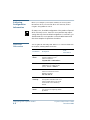
Before you configure your Cayman 3220-H, you need to gather
information about your networks. Most users will only need to
complete the QuickStart section.
For many users, the default configuration of the product will provide
all the necessary services. Some DSL service providers may require
settings that vary from the default configuration. In such cases, you
should contact the service provider or network administrator and
have them complete the Quickstart form below.
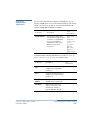
QuickStart
Information
You can print the following table and use it to enter information in
the Cayman 3220-H QuickStart window.
Your
Information
Field Name
Description
System
Name
The name used to identify your
Cayman 3220-H on your
network. Default is
Cayman-DSL<serialnumber>
IP Address
The IP address your Cayman
3220-H uses on virtual circuit 1
(VCC1). Default is 0.0.0.0.
Net Mask
Subnet mask in use for the
network connected to VCC1.
Default is typically
255.255.255.0.
Default
Gateway
IP address of the host to which
the Cayman 3220-H should send
network traffic when it can't find
the destination host. Blank by
default.
Domain
Name
The name of the DNS domain
you access most frequently. Blank
by default.
Configuring Your Cayman 3220-H
3-2
Cayman 3220-H User’s Guide
December 2000
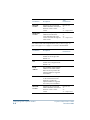
Ethernet (LAN)
Port Information
(Optional)
Your
Information
Field Name
Description
Primary
Nameserver
Address
The IP address of the primary
DNS name server for your
network. Default is 0.0.0.0.
Secondary
Nameserver
Address
The IP address of the backup
DNS name server for your
network. Default is 0.0.0.0.
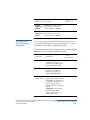
If you want to customize the settings for the Ethernet interface on
your Cayman 3220-H, print the following table and use it to enter
information in the Cayman 3220-H Ethernet window.
Some fields listed in the table only appear after you click the Expert
Mode button on the Cayman 3220-H Home window.
Your
Information
Field Name
Description
Local Address
The IP address of the Cayman
3220-H on the network
connected to its LAN interface.
Default is 192.168.1.254.
Net Mask
Subnet mask in use for the
network connected to the
Ethernet port. Default is
typically 255.255.255.0.
DHCP Mode
Off – Disable DHCP server.
Server – Your Cayman 3220-H
(expert mode)
uses DHCP to provide network
configuration information to
hosts on the Local Area
Network. Server is the default
setting.
Relay-agent – Your Cayman
3220-H forwards DHCP
requests and responses to a
remote DHCP server.
Cayman 3220-H User’s Guide
December 2000
Configuring Your Cayman 3220-H
3-3
Description
Start Address
The first IP address the
Cayman 3220-H should assign
for Dynamic Host Control
Protocol clients. Applicable
when DHCP Mode is set to
Server. Default is
192.168.1.1.
(expert mode)
End Address
(expert mode)
Lease Time
(expert mode)
Server
Address
(expert mode)
Configuring Your Cayman 3220-H
3-4
Your
Information
Field Name
The last IP address the Cayman
3220-H should assign for
Dynamic Host Control
Protocol clients. Applicable
when DHCP Mode is set to
Server. Default is
192.168.1.254.
The time period, in
DD:HH:MM:SS format, for
which a configuration issued
by the Cayman 3220-H DHCP
server is valid. Applicable when
DHCP Mode is set to Server.
Default is 00:01:00:00 (one
hour).
The IP address the remote
DHCP server to which your
Cayman 3220-H will relay
Dynamic Host Control
Protocol address requests.
Applicable when DHCP Mode
is set to Relay-agent.
Cayman 3220-H User’s Guide
December 2000
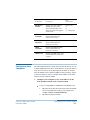
ATM Port
Information
(Optional)
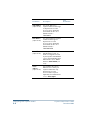
If you want to customize the settings for the ATM port on your
Cayman 3220-H, print a copy of the following table for each virtual
circuit you want to set up and use it to enter information in the
Cayman 3220-H ATM Configuration window.
Field Name
Description
Encapsulation
The manner in which data
transported through the ATM
connection is encapsulated.
You can select different
encapsulation methods for
different virtual circuit
connections.
Your
Information
Choose one:
None
ether-llc
ether-vcmux
ip-llc
ip-vcmux
ppp-llc
ppp-vcmux
pppoe-llc
pppoe-vcmux
You will need the following information if you choose ether-llc,
ether-vcmux, ip-llc, or ip-vcmux for a virtual circuit.
Cayman 3220-H User’s Guide
December 2000
Your
Information
Field Name
Description
VPI
Virtual path identifier. Enter a
number in the range 0-255.
Default is 0.
VCI
Virtual circuit identifier. Enter a
number in the range 0-65535.
Default is 35.
Local
Address
The IP address of the Cayman
3220-H on the virtual circuit.
Net Mask
Subnet mask in use for the
network connected to the
virtual circuit. Default is
typically 255.255.255.0.
Configuring Your Cayman 3220-H
3-5
Field Name
Description
Your
Information
RIP-Send
Version
Specifies how your Cayman
3220-H distributes information
about its routes to other
routers.
Choose one:
V1
V2
V1-compatible
RIP-Receive
Version
Specifies how your Cayman
3220-H learns about the
routes maintained by other
routers accessible through the
virtual circuit.
Choose one:
V1
V2
V1-compatible
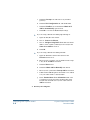
You will need the following information if you choose ppp-llc,
ppp-vcmux, pppoe-llc, or pppoe-vcmux for a virtual circuit.
Description
VPI
Virtual path identifier. Enter a
number in the range 0-255.
Default is 0.
VCI
Virtual circuit identifier. Enter a
number in the range 0-65535.
Default is 35.
Local
Address
The IP address of the Cayman
3220-H on the virtual circuit.
Enter 0.0.0.0 if you want the
Cayman 3220-H to negotiate
its IP address.
Peer Address
The IP address of the PPP peer
on the virtual circuit. Enter
0.0.0.0 if you want the
Cayman 3220-H to negotiate
the remote peer’s IP address.
RIP-Send
Version
Specifies how your Cayman
3220-H distributes information
about its routes to other
routers.
Configuring Your Cayman 3220-H
3-6
Your
Information
Field Name
Choose one:
V1
V2
V1-compatible
Cayman 3220-H User’s Guide
December 2000
Configuring Your
Computer
Your
Information
Field Name
Description
RIP-Receive
Version
Specifies how your Cayman
3220-H learns about the
routes maintained by other
routers accessible through the
virtual circuit.
PAP
Username
Specifies the PAP username
used to authenticate the
connection on VCC1.
PAP
Password
Specifies the PAP password
used to authenticate the
connection on VCC1.
CHAP
Username
Specifies the CHAP username
used to authenticate the
connection on VCC1.
CHAP Secret
Specifies the CHAP secret used
to authenticate the connection
on VCC1.
Choose one:
V1
V2
V1-compatible
The following instructions assume that you want all devices on your
workgroup Ethernet network to use IP addresses on the 192.168.1.0
local area network. If your workgroup network must use another
network number, refer to Entering Ethernet (LAN) Settings on page
3-15 for information on how to change the IP address of the LAN
interface for the Cayman 3220-H.
1. Configure your computer to use an IP address on the
same TCP/IP network as the Cayman 3220-H.
If you are using Windows 95/Windows 98/Windows NT:
a.
Open the Network Control Panel and select the TCP/IP
service for the Ethernet card in your computer (for
example, TCP/IP ->3Com EtherLink III).
b. Open the Properties window.
Cayman 3220-H User’s Guide
December 2000
Configuring Your Cayman 3220-H
3-7
c.
Click the Gateways tab, and remove any installed
gateways.
d. Click the DNS Configuration tab, and disable DNS.
e.
Click the IP Address tab, and click the Obtain an IP
Address Automatically option button.
f.
Click OK to save the modified TCP/IP settings.
If you are using a Macintosh running Open Transport:
a.
Open the TCP/IP Control Panel.
b. Choose Connect via Ethernet.
c.
Choose Configure Using DHCP Server and enter the IP
address of the Cayman 3220-H (192.168.1.254) in the
Name Server Address text box.
d. Click OK.
If you are using a Macintosh running MacTCP:
a.
Open the MacTCP Control Panel and select the
Ethernet interface icon.
b. Enter 192.168.1.x (where x is any number in the range
1-253) in the IP Address text field.
c.
Click the More button.
d. Click the Obtain Address Manually radio button.
e.
Enter 192.168.1.254 in the Gateway Address text field.
f.
Pull down the Class dropdown list and choose C, which
sets your subnet mask to 255.255.255.0.
g.
In the Domain Name Server Information fields, enter
your Internet Service Provider’s domain name in the
Domain text field and enter 192.168.1.254 in the IP
Address text field.
2. Restart your computer.
Configuring Your Cayman 3220-H
3-8
Cayman 3220-H User’s Guide
December 2000
3. Configure each computer that will use the Cayman
3220-H’s address sharing feature to use DHCP, as
described in Step 1, above.
Configure devices that will not use DHCP with static IP
addresses on the same network as the Cayman 3220-H. Restart
each device after you have updated its TCP/IP configuration.
Opening a Web
Connection
You use a Web browser, such as Netscape Navigator or Microsoft
Internet Explorer, to open a connection to your Cayman 3220-H.
To open a connection to your Cayman 3220-H:
1. Run your Web browser.
2. Enter the name or IP address of your Cayman 3220-H in
the browser's Open Location window and press Enter.
For example, you would enter http://192.168.1.254/ if your
Cayman 3220-H is using its default IP address.You can enter
http://cayman-dsl./ (including the final period and slash) if
your computer has been configured to obtain its network
configuration from a DHCP server.
3. If an administrator or user password has been assigned to
the Cayman 3220-H, enter your name and the appropriate
password and click OK.
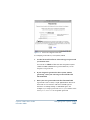
The Cayman 3220-H Home window (Figure 3-1) opens. By
default, you are in Novice Mode, which is appropriate for most
users.
Cayman 3220-H User’s Guide
December 2000
Configuring Your Cayman 3220-H
3-9
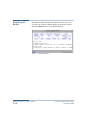
Figure 3-1 Cayman 3220-H Home Window (Novice Mode)
4. Use the buttons on the Cayman 3220-H Home Page to
issue a command or open a window.
The Quickstart button opens the QuickStart window,
which lets you enter basic settings for your Cayman 3220-H.
The Monitor button opens the Monitor window, which lets
you display operating statistics for your Cayman 3220-H.
The Install Software button opens the Install New Cayman
Software window, which lets you install new operating
system software in your Cayman 3220-H.
The Restart Cayman-DSL button restarts your Cayman
3220-H, causing it to load any updated configuration
information.
The Help button opens a window explaining how to access
the Cayman 3220-H online help system.
The Ethernet A (LAN) button opens the Ethernet window,
which lets you configure TCP/IP address settings for the
Ethernet hub ports on the Cayman 3220-H.
The DSL Port button opens the DSL window, which lets you
configure TCP/IP address settings for the DSL port on the
Cayman 3220-H.
The Expert Mode button adds four additional buttons
(Passwords, Pinhole, Bridge, and SNMP) to the Cayman
3220-H Home page (Figure 3-2). Under normal
circumstances, you do not need to modify these settings.
Configuring Your Cayman 3220-H
3-10
Cayman 3220-H User’s Guide
December 2000
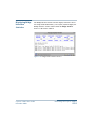
Figure 3-2 Cayman 3220-H Home Window (expert mode)
Entering Basic
Settings
The Cayman 3220-H QuickStart window lets you enter basic
configuration information for your Cayman 3220-H. If you use the
default settings for IP address information for the device's WAN (DSL)
port, the Cayman 3220-H QuickStart window asks you only for the
name you want to assign your Cayman 3220-H. If you have
overridden the default settings for IP address information for VCC1
on the WAN (DSL) port and entered IP address information manually,
you can use the Cayman 3220-H QuickStart window to display and
modify those settings.
Default QuickStart
Window
To display the QuickStart window, click the QuickStart button on
the Cayman 3220-H Home Page. If you are using the default settings
(PPPoE) for your WAN (DSL) port, the default Cayman-DSL PPP
Quickstart window (Figure 3-3) opens.
Cayman 3220-H User’s Guide
December 2000
Configuring Your Cayman 3220-H
3-11
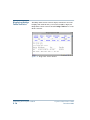
Figure 3-3 QuickStart Window
To configure the QuickStart window:
1. Enter the name of your Cayman 3220-H in the System
Name field.
Each Cayman 3220-H is assigned a name as part of its factory
initialization.The default name for a Cayman 3220-H consists of
the word “Cayman-DSL” and the serial number of the device. A
device name can be 1-32 characters long and cannot include
spaces or special characters.
2. Enter the identifier you want your Cayman 3220-H to
send when the PPP link is being established in the
Username field.
This is the username the Cayman 3220-H sends in a PAP or CHAP
response packet.The information you enter must match the
CHAP username configured in the remote PPP peer's
authentication database.
3. Enter the password you want your Cayman 3220-H to
send when the PPP link is being established in the
Password field.
This is the PAP password or CHAP secret the Cayman 3220-H
sends.The information you enter must match the PAP
password/CHAP secret configured in the remote PPP peer's
authentication database.
Configuring Your Cayman 3220-H
3-12
Cayman 3220-H User’s Guide
December 2000
4. Click the Save button to store your modified
configuration in the Cayman 3220-H memory.
5. Click the Restart Cayman-DSL button to restart your
Cayman 3220-H with its new configuration.
RFC-1483
QuickStart
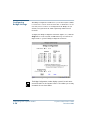
Window
If you have configured your WAN port to use IP or Ethernet framing,
a window similar to the one in Figure 3-4 opens when you click the
QuickStart button.
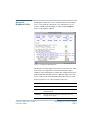
Figure 3-4 RFC-1483 QuickStart Window
To configure the Manual QuickStart window:
1. Enter the name of your Cayman 3220-H in the System
Name field.
Each Cayman 3220-H is assigned a name as part of its factory
initialization.The default name for a Cayman 3220-H consists of
the word “Cayman-DSL” and the serial number of the device. A
device name can be 1-32 characters long and cannot include
spaces or special characters.
Cayman 3220-H User’s Guide
December 2000
Configuring Your Cayman 3220-H
3-13
2. Enter the IP address for virtual circuit 1 (VCC1) on the
DSL port in the WAN IP Address field.
The IP address you assign to VCC1 must not be used by another
device on your wide area network.
3. Enter the subnet mask for virtual circuit 1 (VCC1) in the
Net Mask field.
The subnet mask specifies which bits of the 32-bit binary IP
address represent network information. Most sites should use
255.255.255.0 for their subnet mask.
4. Enter the IP address of the default gateway for your
network in the Default Gateway field.
The default gateway is the host to which the Cayman 3220-H will
send packets if it does not know how to reach a destination host.
5. Enter your domain name in the Domain Name field.
Domain names identify organizations on the Internet. Enter the
domain name you use most frequently in the Domain Name
field.
6. Enter the IP address of your primary domain name server
in the Primary Nameserver Address field.
A domain name server is a network computer responsible for
matching host names to numeric IP addresses so that network
traffic can be routed correctly.Your Internet Service Provider
can provide the IP address of their domain nameserver.
7. Enter the IP address of your backup domain name server
in the Secondary Nameserver Address field.
The secondary nameserver is consulted when the primary
nameserver cannot be reached.
8. Click the Save button to store your modified
configuration in the Cayman 3220-H memory.
The Cayman 3220-H Home Page opens.
Configuring Your Cayman 3220-H
3-14
Cayman 3220-H User’s Guide
December 2000
9. Click the Restart Cayman-DSL button on the Cayman
3220-H Home Page to restart your Cayman 3220-H with its
new configuration.
Entering
Ethernet (LAN)
Settings
The Ethernet Port Configuration window lets you enter TCP/IP
configuration information for the LAN (Ethernet A) interface on your
Cayman 3220-H.The Cayman 3220-H provides default settings that
are appropriate for networks that do not already have TCP/IP
addresses. If your network falls into this category, do not change the
LAN Ethernet settings.
To display the Ethernet Port (LAN) Configuration window (Figure
3-5), click the Ethernet button on the Cayman 3220-H Home Page.
Figure 3-5 Ethernet Port (LAN) Configuration Window (expert mode)
Cayman 3220-H User’s Guide
December 2000
Configuring Your Cayman 3220-H
3-15
To configure your Ethernet settings:
1. Enter the IP address of the Cayman 3220-H’s LAN Ethernet
interface in the Local Address field.
The IP address you assign to your Cayman 3220-H’S LAN
interface must not be used by another device on your LAN
network.The IP address you assign the Cayman 3220-H LAN
interface does not correspond to the IP address associated with
any of the device’s hub ports.
2. Enter the subnet mask for the network connected to the
LAN Ethernet interface in the Net Mask field.
The subnet mask specifies which bits of the 32-bit binary IP
address represent network information. Most sites should use
255.255.255.0 for their subnet mask.
If you have turned on Expert Mode on the Cayman 3220-H Home
window, you will see a set of DHCP fields on the Ethernet Port
Configuration (LAN) window. If you did not turn on Expert Mode,
you can skip to Step 8, below.
If you use the Cayman 3220-H as a DHCP server, you should assign
IP addresses outside the DHCP address range to devices requiring
static IP addresses. Before the Cayman 3220-H assigns an IP address
to a DHCP client, it verifies that no other device is using that address.
However, network conflicts can result when the Cayman 3220-H
assigns an address in its DHCP range to one device and then another
device configured to use that address is turned on.
3. Use the DHCP Mode buttons to specify whether you want
your Cayman 3220-H to act as a DHCP server or DHCP
relay agent for other devices on your local area network.
Options are:
Off – Disable DHCP server functions in the Cayman 3220-H.
Server – Cayman 3220-H uses DHCP to provide network
configuration information to hosts on the Local Area
Network. Server is the default setting.
Configuring Your Cayman 3220-H
3-16
Cayman 3220-H User’s Guide
December 2000
Relay-agent – Cayman 3220-H forwards DHCP requests and
responses to a remote DHCP server.
4. If you chose Server in Step 3, enter the first IP address the
Cayman 3220-H should assign for Dynamic Host Control
Protocol clients in the Start Address field.
The default starting IP address is 192.168.1.1.
5. If you chose Server in Step 3, enter the last IP address the
Cayman 3220-H should assign for Dynamic Host Control
Protocol clients in the End Address field.
The default ending IP address is 192.168.1.254.
6. If you chose Server in Step 3, specify the default duration
for DHCP leases in the Lease Time field.
Enter the lease duration in day:hour:minute:second
(DD:HH:MM:SS) format.The default duration for DHCP leases is
one hour (00:01:00:00).
7. If you chose Relay-agent in Step 3, specify the IP address
the remote DHCP server to which your Cayman 3220-H
will relay Dynamic Host Control Protocol address
requests in the Server Address field.
8. Click the Save button to store your modified
configuration in the Cayman 3220-H memory.
9. Click the Restart Cayman-DSL button on the Cayman
3220-H Home Page to restart your Cayman 3220-H with its
new configuration.
Entering ATM
Settings
The ATM Configuration window lets you configure as many as eight
virtual circuits on the Cayman 3220-H ATM connection.
To display the ATM Configuration window (Figure 3-6), click the DSL
Port (WAN) button on the Cayman 3220-H Home Page.
Cayman 3220-H User’s Guide
December 2000
Configuring Your Cayman 3220-H
3-17
Figure 3-6 ATM Configuration Window
To configure ATM settings for each virtual circuit:
1. Use the VCC dropdown list to select the encapsulation
setting you want for the applicable virtual circuit.
You can choose one of the following options for each virtual
circuit you want the Cayman 3220-H to maintain.The selection
made for one virtual circuit does not affect other virtual circuits.
pppoe-llc – (default) PPP over Ethernet (LLC/SNAP
encapsulation)
pppoe-vcmux – PPP over Ethernet (VC-muxed)
ether-llc – Ethernet over RFC 1483 (LLC/SNAP
encapsulation)
ether-vcmux – Ethernet over RFC 1483 (VC-Muxed)
ppp-llc – PPP over ATM (LLC/SNAP encapsulation)
ppp-vcmux – PPP over ATM (VC-muxed)
ip-llc – IP over RFC1483 (LLC/SNAP encapsulation)
ip-vcmux – IP over RFC1483 (VC-muxed)
Off – Do not use this virtual circuit
Configuring Your Cayman 3220-H
3-18
Cayman 3220-H User’s Guide
December 2000
2. Click the Config button to enter the settings for the virtual
circuit.
The screen that appears depends on the type of encapsulation
you selected in Step 1.The following sections describe the
settings applicable for each type of encapsulation.
3. Click the Restart Cayman-DSL button on the Cayman
3220-H Home Page to restart your Cayman 3220-H with its
new configuration.
PPP over Ethernet
(LLC-SNAP
Encapsulation)
If you choose pppoe-llc on the ATM Configuration window (Figure
3-6 on page 3-18) for a virtual circuit and click the Configure button,
the PPP over Ethernet (LLC-SNAP Encapsulation) window (Figure
3-7) lets you configure how the virtual circuit uses PPP framing and
LLC-SNAP encapsulation.
Cayman 3220-H User’s Guide
December 2000
Configuring Your Cayman 3220-H
3-19
Figure 3-7 PPP over Ethernet (LLC-SNAP Encapsulation) Window
1. Enter the number of the virtual path identifier in the VPI
field.
The VPI is a number in the range 0-255. Consult your ATM
transport administrator for what number you should enter in
this field.
2. Enter the number of the virtual circuit identifier in the
VCI field.
The VCI is a number in the range 0-65535. Consult your ATM
transport administrator for what number you should enter in
this field.
Configuring Your Cayman 3220-H
3-20
Cayman 3220-H User’s Guide
December 2000
3. Specify whether you want the connection to be
maintained constantly or only when it is needed.
If you choose a connection type of Instant On, the Cayman
3220-H shuts down the PPP link if it is not being used for the
number of seconds specified in the Idle Timeout field. If you
choose a connection type of Always On, the Cayman 3220-H
never shuts down the PPP link.
4. If you specified a connection type of Instant On, specify
the number of seconds, in the range 30-600, you want the
Cayman 3220-H to wait before shutting down the PPP
link.
The default is 300 seconds.
5. If you use the Password Authentication Protocol (PAP) to
authenticate connections over the virtual circuit, click the
On radio button, enter your user name in the Username
field, and enter your access password in the
Password/Secret field.
6. If you use the Challenge Handshake Authentication
Protocol (CHAP) to authenticate connections over the
virtual circuit, click the On radio button, enter your user
name in the Username field, and enter your access secret
in the Password/Secret field.
7. Use the IP Interface radio buttons to enable or disable IP
traffic over this virtual circuit.
8. Use the NAT radio buttons to enable or disable network
address translation for this virtual circuit.
9. Enter the IP address the Cayman 3220-H will use on this
virtual circuit in the Local Address field.
The IP address you enter must not be in use by other devices on
this virtual circuit. Enter 0.0.0.0 if you want the Cayman
3220-H to negotiate its IP address with the remote peer.
Cayman 3220-H User’s Guide
December 2000
Configuring Your Cayman 3220-H
3-21
10. Enter the IP address for the remote peer in the Peer
Address field.
Enter 0.0.0.0 if you want the Cayman 3220-H to negotiate the
IP address for the remote peer.
11. Use the Admin Restrictions list to specify whether the
Cayman 3220-H accepts administrative commands
received over this virtual circuit.
Options are:
None – All traffic is accepted over this port.
Admin-Disabled – Router traffic is accepted over this port
but administration commands are ignored.
Admin-Only – Administration commands are accepted over
this port but router traffic is ignored.
12. Use the RIP-Send list to specify whether you want the
Cayman 3220-H to send Routing Information Protocol
(RIP) messages to other routers.
RIP lets your Cayman 3220-H inform other routers of routes
available through its interfaces. Options are:
Off – Do not send RIP messages to other routers.
RIP-1 – Broadcast routing information in RIP version 1
format.
RIP-2– Multicast routing information in RIP version 2
format.
RIP-1 Compatibility – Broadcast routing information in RIP
version 2 format.
You cannot use RIP when network address translation is turned
on.
13. Use the RIP-Receive list to specify whether you want the
Cayman 3220-H to accept Routing Information Protocol
(RIP) messages from other routers.
RIP lets your Cayman 3220-H learn about routes available
through other routers. Options are:
Configuring Your Cayman 3220-H
3-22
Cayman 3220-H User’s Guide
December 2000
Off – Do not accept RIP messages from other routers.
RIP-1 – Accept routing information in RIP version 1 format
from other routers.
RIP-2– Accept multicast routing information in RIP version
2 format multicast by other routers.
RIP-1 Compatibility – Accept routing information in RIP
version 2 format broadcast by other routers.
You cannot use RIP when network address translation is turned
on.
14. Use the IP Gateway radio buttons to specify whether you
want this virtual circuit to use a gateway.
15. If you selected On in Step 14, use the Gateway Type list to
specify the type of gateway.
Options are:
Fixed IP Address – The IP gateway for this virtual circuit has
a fixed IP address.
PPP Port (VCC #) – The IP gateway for this virtual circuit is
accessible over the specified point-to-point link.
16. If you selected Fixed IP Address in Step 15, use the Gateway
Address field to specify the IP address of the default IP
gateway.
17. Click the Save button to store your modified
configuration in the Cayman 3220-H memory.
18. Click the Restart Cayman-DSL button on the Cayman
3220-H Home Page to restart your Cayman 3220-H with
the new configuration.
PPP over Ethernet
(VC-Muxed)
If you choose pppoe-vcmux on the ATM Configuration window
(Figure 3-6 on page 3-18) for a virtual circuit and click the Configure
button, the PPP over Ethernet (VC-Muxed) window (Figure 3-8) lets
you configure how the virtual circuit uses PPP framing and VC-based
multiplexing.
Cayman 3220-H User’s Guide
December 2000
Configuring Your Cayman 3220-H
3-23
Figure 3-8 PPP over Ethernet (VC-Muxed) Window
1. Enter the number of the virtual path identifier in the VPI
field.
The VPI is a number in the range 0-255. Consult your ATM
transport administrator for what number you should enter in
this field.
2. Enter the number of the virtual circuit identifier in the
VCI field.
The VCI is a number in the range 0-65535. Consult your ATM
transport administrator for what number you should enter in
this field.
Configuring Your Cayman 3220-H
3-24
Cayman 3220-H User’s Guide
December 2000
3. Specify whether you want the connection to be
maintained constantly or only when it is needed.
If you choose a connection type of Instant On, the Cayman
3220-H shuts down the PPP link if it is not being used for the
number of seconds specified in the Idle Timeout field. If you
choose a connection type of Always On, the Cayman 3220-H
never shuts down the PPP link.
4. If you specified a connection type of Instant On, specify
the number of seconds, in the range 30-600, you want the
Cayman 3220-H to wait before shutting down the PPP
link.
The default is 300 seconds.
5. If you use the Password Authentication Protocol (PAP) to
authenticate connections over the virtual circuit, click the
PAP On radio button, enter your user name in the
Username field, and enter your access password in the
Password/Secret field.
6. If you use the Challenge Handshake Authentication
Protocol (CHAP) to authenticate connections over the
virtual circuit, click the CHAP On radio button, enter your
user name in the Username field, and enter your access
secret in the Password/Secret field.
7. Use the IP Interface radio buttons to enable or disable IP
traffic over this virtual circuit.
8. Use the NAT radio buttons to enable or disable or disable
network address translation for this virtual circuit.
9. Enter the IP address the Cayman 3220-H will use on this
virtual circuit in the Local Address field.
The IP address you enter must not be in use by other devices on
this virtual circuit. Enter 0.0.0.0 if you want the Cayman
3220-H to negotiate its IP address with the remote peer.
Cayman 3220-H User’s Guide
December 2000
Configuring Your Cayman 3220-H
3-25
10. Enter the IP address for the remote peer in the Peer
Address field.
Enter 0.0.0.0 if you want the Cayman 3220-H to negotiate the
IP address for the remote peer.
11. Use the Admin Restrictions list to specify whether the
Cayman 3220-H accepts administrative commands
received over this virtual circuit.
Options are:
None – All traffic is accepted over this port.
Admin-Disabled – Router traffic is accepted over this port
but administration commands are ignored.
Admin-Only – Administration commands are accepted over
this port but router traffic is ignored.
12. Use the RIP-Send list to specify whether you want the
Cayman 3220-H to send Routing Information Protocol
(RIP) messages to other routers.
RIP lets your Cayman 3220-H inform other routers of routes
available through its interfaces. Options are:
Off – Do not send RIP messages to other routers.
RIP-1 – Broadcast routing information in RIP version 1
format.
RIP-2– Multicast routing information in RIP version 2
format.
RIP-1 Compatibility – Broadcast routing information in RIP
version 2 format.
You cannot use RIP when network address translation is turned
on.
13. Use the RIP-Receive list to specify whether you want the
Cayman 3220-H to accept Routing Information Protocol
(RIP) messages from other routers.
RIP lets your Cayman 3220-H learn about routes available
through other routers. Options are:
Configuring Your Cayman 3220-H
3-26
Cayman 3220-H User’s Guide
December 2000
Off – Do not accept RIP messages from other routers.
RIP-1 – Accept routing information in RIP version 1 format
from other routers.
RIP-2– Accept multicast routing information in RIP version
2 format multicast by other routers.
RIP-1 Compatibility – Accept routing information in RIP
version 2 format broadcast by other routers.
You cannot use RIP when network address translation is turned
on.
14. Use the IP Gateway radio buttons to specify whether you
want this virtual circuit to use a gateway.
15. If you selected On in Step 10, use the Gateway Type list to
specify the type of gateway.
Options are:
Fixed IP Address – The IP gateway for this virtual circuit has
a fixed IP address.
PPP Port (VCC #) – The IP gateway for this virtual circuit is
accessible over the specified point-to-point link.
16. If you selected Fixed IP Address in Step 11, use the Gateway
Address field to specify the IP address of the default IP
gateway.
17. Click the Save button to store your modified
configuration in the Cayman 3220-H memory.
18. Click the Restart Cayman-DSL button on the Cayman
3220-H Home Page to restart your Cayman 3220-H with
the new configuration.
Ethernet over RFC
1483 (LLC-SNAP
Encapsulation)
If you choose ether-llc on the ATM Configuration window (Figure 3-6
on page 3-18) for a virtual circuit and click the Configure button, the
Ethernet over RFC1483 (LLC-SNAP Encapsulation) window (Figure
3-9) lets you configure how the virtual circuit uses Ethernet framing
and LLC-SNAP encapsulation.
Cayman 3220-H User’s Guide
December 2000
Configuring Your Cayman 3220-H
3-27
Figure 3-9 Ethernet over RFC1483 (VC-Muxed) Window
1. Enter the number of the virtual path identifier in the VPI
field.
The VPI is a number in the range 0-255. Consult your ATM
transport administrator for what number you should enter in
this field.
2. Enter the number of the virtual circuit identifier in the
VCI field.
The VCI is a number in the range 0-65535. Consult your ATM
transport administrator for what number you should enter in
this field.
Configuring Your Cayman 3220-H
3-28
Cayman 3220-H User’s Guide
December 2000
3. Use the IP Interface radio buttons to enable or disable IP
traffic over this virtual circuit.
4. Use the NAT radio buttons to enable or disable network
address translation for this virtual circuit.
5. Enter the IP address the Cayman 3220-H will use on this
virtual circuit in the IP Address field.
The IP address you enter must not be in use by other devices on
this virtual circuit. Enter 0.0.0.0 if you want the Cayman
3220-H to receive the IP address information for this interface
from a DHCP server on the other end of the ATM connection.
6. Enter the subnet mask for the network connected to this
virtual circuit in the Net Mask field.
The subnet mask specifies which bits of the 32-bit binary IP
address represent network information. Most sites should use
255.255.255.0 for their subnet mask.
7. Use the Admin Restrictions list to specify whether the
Cayman 3220-H accepts administrative commands
received over this virtual circuit.
Options are:
None – All traffic is accepted over this port.
Admin-Disabled – Router traffic is accepted over this port
but administration commands are ignored.
Admin-Only – Administration commands are accepted over
this port but router traffic is ignored.
8. Use the RIP-Send list to specify whether you want the
Cayman 3220-H to send Routing Information Protocol
(RIP) messages to other routers.
RIP lets your Cayman 3220-H inform other routers of routes
available through its interfaces. Options are:
Cayman 3220-H User’s Guide
December 2000
Off – Do not send RIP messages to other routers.
RIP-1 – Broadcast routing information in RIP version 1
format.
Configuring Your Cayman 3220-H
3-29
RIP-2– Multicast routing information in RIP version 2
format.
RIP-1 Compatibility – Broadcast routing information in RIP
version 2 format.
You cannot use RIP when network address translation is turned
on.
9. Use the RIP-Receive list to specify whether you want the
Cayman 3220-H to accept Routing Information Protocol
(RIP) messages from other routers.
RIP lets your Cayman 3220-H learn about routes available
through other routers. Options are:
Off – Do not accept RIP messages from other routers.
RIP-1 – Accept routing information in RIP version 1 format
from other routers.
RIP-2– Accept multicast routing information in RIP version
2 format multicast by other routers.
RIP-1 Compatibility – Accept routing information in RIP
version 2 format broadcast by other routers.
You cannot use RIP when network address translation is turned
on.
10. Use the IP Gateway radio buttons to specify whether you
want this virtual circuit to use a gateway.
11. If you selected On in Step 10, use the Gateway Type list to
specify the type of gateway.
Options are:
Fixed IP Address – The IP gateway for this virtual circuit has
a fixed IP address.
PPP Port (VCC #) – The IP gateway for this virtual circuit is
accessible over the specified point-to-point link.
12. If you selected Fixed IP Address in Step 11, use the Gateway
Address field to specify the IP address of the default IP
gateway.
Configuring Your Cayman 3220-H
3-30
Cayman 3220-H User’s Guide
December 2000
13. Click the Save button to store your modified
configuration in the Cayman 3220-H memory.
14. Click the Restart Cayman-DSL button on the Cayman
3220-H Home Page to restart your Cayman 3220-H with
the new configuration.
Ethernet over RFC
1483 (VC-Muxed)
If you choose ether-vcmux on the ATM Configuration window
(Figure 3-6 on page 3-18) for a virtual circuit and click the Configure
button, the Ethernet over RFC1483 (VC-Muxed) window (Figure
3-10) lets you configure how the virtual circuit uses Ethernet framing
and VC-based multiplexing.
Figure 3-10 Ethernet over RFC1483 (VC-Muxed) Window
Cayman 3220-H User’s Guide
December 2000
Configuring Your Cayman 3220-H
3-31
1. Enter the number of the virtual path identifier in the VPI
field.
The VPI is a number in the range 0-255. Consult your ATM
transport administrator for what number you should enter in
this field.
2. Enter the number of the virtual circuit identifier in the
VCI field.
The VCI is a number in the range 0-65535. Consult your ATM
transport administrator for what number you should enter in
this field.
3. Use the IP Interface radio buttons to enable or disable IP
traffic over this virtual circuit.
4. Use the NAT radio buttons to enable or disable network
address translation for this virtual circuit.
5. Enter the IP address the Cayman 3220-H will use on this
virtual circuit in the IP Address field.
The IP address you enter must not be in use by other devices on
this virtual circuit. Enter 0.0.0.0 if you want the Cayman
3220-H to receive the IP address information for this interface
from a DHCP server on the other end of the ATM connection.
6. Enter the subnet mask for the network connected to this
virtual circuit in the Net Mask field.
The subnet mask specifies which bits of the 32-bit binary IP
address represent network information. Most sites should use
255.255.255.0 for their subnet mask.
7. Use the Admin Restrictions list to specify whether the
Cayman 3220-H accepts administrative commands
received over this virtual circuit.
Options are:
Configuring Your Cayman 3220-H
3-32
None – All traffic is accepted over this port.
Cayman 3220-H User’s Guide
December 2000
Admin-Disabled – Router traffic is accepted over this port
but administration commands are ignored.
Admin-Only – Administration commands are accepted over
this port but router traffic is ignored.
8. Use the RIP-Send list to specify whether you want the
Cayman 3220-H to send Routing Information Protocol
(RIP) messages to other routers.
RIP lets your Cayman 3220-H inform other routers of routes
available through its interfaces. Options are:
Off – Do not send RIP messages to other routers.
RIP-1 – Broadcast routing information in RIP version 1
format.
RIP-2– Multicast routing information in RIP version 2
format.
RIP-1 Compatibility – Broadcast routing information in RIP
version 2 format.
You cannot use RIP when network address translation is turned
on.
9. Use the RIP-Receive list to specify whether you want the
Cayman 3220-H to accept Routing Information Protocol
(RIP) messages from other routers.
RIP lets your Cayman 3220-H learn about routes available
through other routers. Options are:
Off – Do not accept RIP messages from other routers.
RIP-1 – Accept routing information in RIP version 1 format
from other routers.
RIP-2– Accept multicast routing information in RIP version
2 format multicast by other routers.
RIP-1 Compatibility – Accept routing information in RIP
version 2 format broadcast by other routers.
You cannot use RIP when network address translation is turned
on.
Cayman 3220-H User’s Guide
December 2000
Configuring Your Cayman 3220-H
3-33
10. Use the IP Gateway radio buttons to specify whether you
want this virtual circuit to use a gateway.
11. If you selected On in Step 10, use the Gateway Type list to
specify the type of gateway.
Options are:
Fixed IP Address – The IP gateway for this virtual circuit has
a fixed IP address.
PPP Port (VCC #) – The IP gateway for this virtual circuit is
accessible over the specified point-to-point link.
12. If you selected Fixed IP Address in Step 11, use the Gateway
Address field to specify the IP address of the default IP
gateway.
13. Click the Save button to store your modified
configuration in the Cayman 3220-H memory.
14. Click the Restart Cayman-DSL button on the Cayman
3220-H Home Page to restart your Cayman 3220-H with
the new configuration.
PPP over ATM
(LLC-SNAP
Encapsulation)
If you choose ppp-llc on the ATM Configuration window (Figure 3-6
on page 3-18) for a virtual circuit and click the Configure button, the
PPP over ATM (LLC-SNAP Encapsulation) window (Figure 3-11) lets
you configure how the virtual circuit uses PPP framing and LLC-SNAP
encapsulation.
Configuring Your Cayman 3220-H
3-34
Cayman 3220-H User’s Guide
December 2000
Figure 3-11 PPP over ATM (LLC-SNAP Encapsulation) Window
1. Enter the number of the virtual path identifier in the VPI
field.
The VPI is a number in the range 0-255. Consult your ATM
transport administrator for what number you should enter in
this field.
Cayman 3220-H User’s Guide
December 2000
Configuring Your Cayman 3220-H
3-35
2. Enter the number of the virtual circuit identifier in the
VCI field.
The VCI is a number in the range 0-65535. Consult your ATM
transport administrator for what number you should enter in
this field.
3. Specify whether you want the connection to be
maintained constantly or only when it is needed.
If you choose a connection type of Instant On, the Cayman
3220-H shuts down the PPP link if it is not being used for the
number of seconds specified in the Idle Timeout field. If you
choose a connection type of Always On, the Cayman 3220-H
never shuts down the PPP link.
4. If you specified a connection type of Instant On, specify
the number of seconds, in the range 30-600, you want the
Cayman 3220-H to wait before shutting down the PPP
link.
The default is 300 seconds.
5. If you use the Password Authentication Protocol (PAP) to
authenticate connections over the virtual circuit, click the
On radio button, enter your user name in the Username
field, and enter your access password in the
Password/Secret field.
6. If you use the Challenge Handshake Authentication
Protocol (CHAP) to authenticate connections over the
virtual circuit, click the On radio button, enter your user
name in the Username field, and enter your access secret
in the Password/Secret field.
7. Use the IP Interface radio buttons to enable or disable IP
traffic over this virtual circuit.
8. Use the NAT radio buttons to enable or disable network
address translation for this virtual circuit.
Configuring Your Cayman 3220-H
3-36
Cayman 3220-H User’s Guide
December 2000
9. Enter the IP address the Cayman 3220-H will use on this
virtual circuit in the Local Address field.
The IP address you enter must not be in use by other devices on
this virtual circuit. Enter 0.0.0.0 if you want the Cayman
3220-H to negotiate its IP address with the remote peer.
10. Enter the IP address for the remote peer in the Peer
Address field.
Enter 0.0.0.0 if you want the Cayman 3220-H to negotiate the
IP address for the remote peer.
11. Use the Admin Restrictions list to specify whether the
Cayman 3220-H accepts administrative commands
received over this virtual circuit.
Options are:
None – All traffic is accepted over this port.
Admin-Disabled – Router traffic is accepted over this port
but administration commands are ignored.
Admin-Only – Administration commands are accepted over
this port but router traffic is ignored.
12. Use the RIP-Send list to specify whether you want the
Cayman 3220-H to send Routing Information Protocol
(RIP) messages to other routers.
RIP lets your Cayman 3220-H inform other routers of routes
available through its interfaces. Options are:
Off – Do not send RIP messages to other routers.
RIP-1 – Broadcast routing information in RIP version 1
format.
RIP-2– Multicast routing information in RIP version 2
format.
RIP-1 Compatibility – Broadcast routing information in RIP
version 2 format.
You cannot use RIP when network address translation is turned
on.
Cayman 3220-H User’s Guide
December 2000
Configuring Your Cayman 3220-H
3-37
13. Use the RIP-Receive list to specify whether you want the
Cayman 3220-H to accept Routing Information Protocol
(RIP) messages from other routers.
RIP lets your Cayman 3220-H learn about routes available
through other routers. Options are:
Off – Do not accept RIP messages from other routers.
RIP-1 – Accept routing information in RIP version 1 format
from other routers.
RIP-2– Accept multicast routing information in RIP version
2 format multicast by other routers.
RIP-1 Compatibility – Accept routing information in RIP
version 2 format broadcast by other routers.
You cannot use RIP when network address translation is turned
on.
14. Use the IP Gateway radio buttons to specify whether you
want this virtual circuit to use a gateway.
15. If you selected On in Step 10, use the Gateway Type list to
specify the type of gateway.
Options are:
Fixed IP Address – The IP gateway for this virtual circuit has
a fixed IP address.
PPP Port (VCC #) – The IP gateway for this virtual circuit is
accessible over the specified point-to-point link.
16. If you selected Fixed IP Address in Step 11, use the Gateway
Address field to specify the IP address of the default IP
gateway.
17. Click the Save button to store your modified
configuration in the Cayman 3220-H memory.
18. Click the Restart Cayman-DSL button on the Cayman
3220-H Home Page to restart your Cayman 3220-H with
the new configuration.
Configuring Your Cayman 3220-H
3-38
Cayman 3220-H User’s Guide
December 2000
PPP over ATM
(VC-Muxed)
If you choose ppp-vcmux on the ATM Configuration window (Figure
3-6 on page 3-18) for a virtual circuit and click the Configure button,
the PPP over ATM (VC-Muxed) window (Figure 3-12) lets you
configure how the virtual circuit uses PPP framing and VC-based
multiplexing.
Figure 3-12 PPP over ATM (VC-Muxed) Window
1. Enter the number of the virtual path identifier in the VPI
field.
The VPI is a number in the range 0-255. Consult your ATM
transport administrator for what number you should enter in
this field.
Cayman 3220-H User’s Guide
December 2000
Configuring Your Cayman 3220-H
3-39
2. Enter the number of the virtual circuit identifier in the
VCI field.
The VCI is a number in the range 0-65535. Consult your ATM
transport administrator for what number you should enter in
this field.
3. Specify whether you want the connection to be
maintained constantly or only when it is needed.
If you choose a connection type of Instant On, the Cayman
3220-H shuts down the PPP link if it is not being used for the
number of seconds specified in the Idle Timeout field. If you
choose a connection type of Always On, the Cayman 3220-H
never shuts down the PPP link.
4. If you specified a connection type of Instant On, specify
the number of seconds, in the range 30-600, you want the
Cayman 3220-H to wait before shutting down the PPP
link.
The default is 300 seconds.
5. Enter the number of the virtual circuit identifier in the
VCI field.
The VCI is a number in the range 0-65535. Consult your ATM
transport administrator for what number you should enter in
this field.
6. If you use the Password Authentication Protocol (PAP) to
authenticate connections over the virtual circuit, click the
PAP On radio button, enter your user name in the
Username field, and enter your access password in the
Password/Secret field.
7. If you use the Challenge Handshake Authentication
Protocol (CHAP) to authenticate connections over the
virtual circuit, click the CHAP On radio button, enter your
user name in the Username field, and enter your access
secret in the Password/Secret field.
Configuring Your Cayman 3220-H
3-40
Cayman 3220-H User’s Guide
December 2000
8. Use the IP Interface radio buttons to enable or disable IP
traffic over this virtual circuit.
9. Use the NAT radio buttons to enable or disable network
address translation for this virtual circuit.
10. Enter the IP address the Cayman 3220-H will use on this
virtual circuit in the Local Address field.
The IP address you enter must not be in use by other devices on
this virtual circuit. Enter 0.0.0.0 if you want the Cayman
3220-H to negotiate its IP address with the remote peer.
11. Enter the IP address for the remote peer in the Peer
Address field.
Enter 0.0.0.0 if you want the Cayman 3220-H to negotiate the
IP address for the remote peer.
12. Use the Admin Restrictions list to specify whether the
Cayman 3220-H accepts administrative commands
received over this virtual circuit.
Options are:
None – All traffic is accepted over this port.
Admin-Disabled – Router traffic is accepted over this port
but administration commands are ignored.
Admin-Only – Administration commands are accepted over
this port but router traffic is ignored.
13. Use the RIP-Send list to specify whether you want the
Cayman 3220-H to send Routing Information Protocol
(RIP) messages to other routers.
RIP lets your Cayman 3220-H inform other routers of routes
available through its interfaces. Options are:
Cayman 3220-H User’s Guide
December 2000
Off – Do not send RIP messages to other routers.
RIP-1 – Broadcast routing information in RIP version 1
format.
Configuring Your Cayman 3220-H
3-41
RIP-2– Multicast routing information in RIP version 2
format.
RIP-1 Compatibility – Broadcast routing information in RIP
version 2 format.
You cannot use RIP when network address translation is turned
on.
14. Use the RIP-Receive list to specify whether you want the
Cayman 3220-H to accept Routing Information Protocol
(RIP) messages from other routers.
RIP lets your Cayman 3220-H learn about routes available
through other routers. Options are:
Off – Do not accept RIP messages from other routers.
RIP-1 – Accept routing information in RIP version 1 format
from other routers.
RIP-2– Accept multicast routing information in RIP version
2 format multicast by other routers.
RIP-1 Compatibility – Accept routing information in RIP
version 2 format broadcast by other routers.
You cannot use RIP when network address translation is turned
on.
15. Use the IP Gateway radio buttons to specify whether you
want this virtual circuit to use a gateway.
16. If you selected On in Step 10, use the Gateway Type list to
specify the type of gateway.
Options are:
Fixed IP Address – The IP gateway for this virtual circuit has
a fixed IP address.
PPP Port (VCC #) – The IP gateway for this virtual circuit is
accessible over the specified point-to-point link.
17. If you selected Fixed IP Address in Step 11, use the Gateway
Address field to specify the IP address of the default IP
gateway.
Configuring Your Cayman 3220-H
3-42
Cayman 3220-H User’s Guide
December 2000
18. Click the Save button to store your modified
configuration in the Cayman 3220-H memory.
19. Click the Restart Cayman-DSL button on the Cayman
3220-H Home Page to restart your Cayman 3220-H with
the new configuration.
IP over RFC 1483
(LLC-SNAP
Encapsulation)
If you choose ip-llc on the ATM Configuration window (Figure 3-6 on
page 3-18) for a virtual circuit and click the Configure button, the IP
over RFC1483 (LLC-SNAP Encapsulation) window (Figure 3-9) lets
you configure how the virtual circuit uses IP framing and LLC-SNAP
encapsulation.
Figure 3-13 IP over RFC1483 (LLC-SNAP Encapsulation) Window
Cayman 3220-H User’s Guide
December 2000
Configuring Your Cayman 3220-H
3-43
1. Enter the number of the virtual path identifier in the VPI
field.
The VPI is a number in the range 0-255. Consult your ATM
transport administrator for what number you should enter in
this field.
2. Enter the number of the virtual circuit identifier in the
VCI field.
The VCI is a number in the range 0-65535. Consult your ATM
transport administrator for what number you should enter in
this field.
3. Use the IP Interface radio buttons to enable or disable IP
traffic over this virtual circuit.
4. Use the NAT radio buttons to enable or disable network
address translation for this virtual circuit.
5. Enter the IP address the Cayman 3220-H will use on this
virtual circuit in the IP Address field.
The IP address you enter must not be in use by other devices on
this virtual circuit. Enter 0.0.0.0 if you want the Cayman
3220-H to receive the IP address information for this interface
from a DHCP server on the other end of the ATM connection.
6. Enter the subnet mask for the network connected to this
virtual circuit in the Net Mask field.
The subnet mask specifies which bits of the 32-bit binary IP
address represent network information. Most sites should use
255.255.255.0 for their subnet mask.
7. Use the Admin Restrictions list to specify whether the
Cayman 3220-H accepts administrative commands
received over this virtual circuit.
Options are:
Configuring Your Cayman 3220-H
3-44
None – All traffic is accepted over this port.
Cayman 3220-H User’s Guide
December 2000
Admin-Disabled – Router traffic is accepted over this port
but administration commands are ignored.
Admin-Only – Administration commands are accepted over
this port but router traffic is ignored.
8. Use the RIP-Send list to specify whether you want the
Cayman 3220-H to send Routing Information Protocol
(RIP) messages to other routers.
RIP lets your Cayman 3220-H inform other routers of routes
available through its interfaces. Options are:
Off – Do not send RIP messages to other routers.
RIP-1 – Broadcast routing information in RIP version 1
format.
RIP-2– Multicast routing information in RIP version 2
format.
RIP-1 Compatibility – Broadcast routing information in RIP
version 2 format.
You cannot use RIP when network address translation is turned
on.
9. Use the RIP-Receive list to specify whether you want the
Cayman 3220-H to accept Routing Information Protocol
(RIP) messages from other routers.
RIP lets your Cayman 3220-H learn about routes available
through other routers. Options are:
Off – Do not accept RIP messages from other routers.
RIP-1 – Accept routing information in RIP version 1 format
from other routers.
RIP-2– Accept multicast routing information in RIP version
2 format multicast by other routers.
RIP-1 Compatibility – Accept routing information in RIP
version 2 format broadcast by other routers.
You cannot use RIP when network address translation is turned
on.
Cayman 3220-H User’s Guide
December 2000
Configuring Your Cayman 3220-H
3-45
10. Use the IP Gateway radio buttons to specify whether you
want this virtual circuit to use a gateway.
11. If you selected On in Step 10, use the Gateway Type list to
specify the type of gateway.
Options are:
Fixed IP Address – The IP gateway for this virtual circuit has
a fixed IP address.
PPP Port (VCC #) – The IP gateway for this virtual circuit is
accessible over the specified point-to-point link.
12. If you selected Fixed IP Address in Step 11, use the Gateway
Address field to specify the IP address of the default IP
gateway.
13. Click the Save button to store your modified
configuration in the Cayman 3220-H memory.
14. Click the Restart Cayman-DSL button on the Cayman
3220-H Home Page to restart your Cayman 3220-H with
the new configuration.
IP over RFC 1483
(VC-Muxed)
If you choose ip-vcmux on the ATM Configuration window (Figure
3-6 on page 3-18) for a virtual circuit and click the Configure button,
the IP over RFC1483 (VC-Muxed) window (Figure 3-14) lets you
configure how the virtual circuit uses IP framing and VC-based
multiplexing.
Configuring Your Cayman 3220-H
3-46
Cayman 3220-H User’s Guide
December 2000
Figure 3-14 IP over RFC1483 (VC-Muxed) Window
1. Enter the number of the virtual path identifier in the VPI
field.
The VPI is a number in the range 0-255. Consult your ATM
transport administrator for what number you should enter in
this field.
2. Enter the number of the virtual circuit identifier in the
VCI field.
The VCI is a number in the range 0-65535. Consult your ATM
transport administrator for what number you should enter in
this field.
Cayman 3220-H User’s Guide
December 2000
Configuring Your Cayman 3220-H
3-47
3. Use the IP Interface radio buttons to enable or disable IP
traffic over this virtual circuit.
4. Use the NAT radio buttons to enable or disable network
address translation for this virtual circuit.
5. Enter the IP address the Cayman 3220-H will use on this
virtual circuit in the IP Address field.
The IP address you enter must not be in use by other devices on
this virtual circuit. Enter 0.0.0.0 if you want the Cayman
3220-H to receive the IP address information for this interface
from a DHCP server on the other end of the ATM connection.
6. Enter the subnet mask for the network connected to this
virtual circuit in the Net Mask field.
The subnet mask specifies which bits of the 32-bit binary IP
address represent network information. Most sites should use
255.255.255.0 for their subnet mask.
7. Use the Admin Restrictions list to specify whether the
Cayman 3220-H accepts administrative commands
received over this virtual circuit.
Options are:
None – All traffic is accepted over this port.
Admin-Disabled – Router traffic is accepted over this port
but administration commands are ignored.
Admin-Only – Administration commands are accepted over
this port but router traffic is ignored.
8. Use the RIP-Send list to specify whether you want the
Cayman 3220-H to send Routing Information Protocol
(RIP) messages to other routers.
RIP lets your Cayman 3220-H inform other routers of routes
available through its interfaces. Options are:
Off – Do not send RIP messages to other routers.
RIP-1 – Broadcast routing information in RIP version 1
format.
Configuring Your Cayman 3220-H
3-48
Cayman 3220-H User’s Guide
December 2000
RIP-2– Multicast routing information in RIP version 2
format.
RIP-1 Compatibility – Broadcast routing information in RIP
version 2 format.
You cannot use RIP when network address translation is turned
on.
9. Use the RIP-Receive list to specify whether you want the
Cayman 3220-H to accept Routing Information Protocol
(RIP) messages from other routers.
RIP lets your Cayman 3220-H learn about routes available
through other routers. Options are:
Off – Do not accept RIP messages from other routers.
RIP-1 – Accept routing information in RIP version 1 format
from other routers.
RIP-2– Accept multicast routing information in RIP version
2 format multicast by other routers.
RIP-1 Compatibility – Accept routing information in RIP
version 2 format broadcast by other routers.
You cannot use RIP when network address translation is turned
on.
10. Use the IP Gateway radio buttons to specify whether you
want this virtual circuit to use a gateway.
11. If you selected On in Step 10, use the Gateway Type list to
specify the type of gateway.
Options are:
Fixed IP Address – The IP gateway for this virtual circuit has
a fixed IP address.
PPP Port (VCC #) – The IP gateway for this virtual circuit is
accessible over the specified point-to-point link.
12. If you selected Fixed IP Address in Step 11, use the Gateway
Address field to specify the IP address of the default IP
gateway.
Cayman 3220-H User’s Guide
December 2000
Configuring Your Cayman 3220-H
3-49
13. Click the Save button to store your modified
configuration in the Cayman 3220-H memory.
14. Click the Restart Cayman-DSL button on the Cayman
3220-H Home Page to restart your Cayman 3220-H with
the new configuration.
Configuring
Password
Settings
You can establish different levels of access security to protect your
Cayman 3220-H settings from unauthorized display or modification.
Admin level access lets you display and modify all settings in
the Cayman 3220-H.
User level access lets you display (but not change) settings in
the Cayman 3220-H.You must assign the Cayman 3220-H an
Admin password before you can assign it a User password.
You will see a warning on the Cayman 3220-H configuration screens
until you set an administrative password.
To prevent anyone from observing the password you enter,
characters in the old and new passwords are not displayed as you
type them.
Passwords go into effect immediately. You do not have to
restart the Cayman 3220-H for the password to take effect.
Assigning a password to a Cayman 3220-H does not affect ongoing
communications through the device.
To display the Password Configuration window (Figure 3-15), click
the Passwords button on the Cayman 3220-H Home Page.You must
be in Expert Mode to open the Password Configuration window.
Configuring Your Cayman 3220-H
3-50
Cayman 3220-H User’s Guide
December 2000
Figure 3-15 Password Configuration Window
To configure passwords for your Cayman 3220-H:
1. Use the Password Level list to select the type of password
you want to enter.
You can choose Admin or User.You must assign the Cayman
3220-H an Admin (administrator) password before you can
assign it a User password.
2. If you assigned a password to the Cayman 3220-H
previously, enter your current password in the Old
Password field.
3. Enter your new password in the New Password field.
A password can be as many as eight alphanumeric characters.
Passwords are case-sensitive and cannot include special
characters or leading, trailing, or embedded spaces. For
example, if you assign a password of GatoR, you could not enter
GATOR, gator, or Gator as an acceptable password.
Cayman 3220-H User’s Guide
December 2000
Configuring Your Cayman 3220-H
3-51
4. Enter your new password again in the Repeat Password
field.
You repeat the new password to verify that you entered it
correctly the first time.
5. When you are finished, click the Save button to store your
modified configuration in the Cayman 3220-H memory.
Configuring
Pinhole Settings
Network Address Translation (NAT) pinholes let you pass specific
types of network traffic through the router's NAT interfaces. NAT
pinholes allow you to route selected types of network traffic, such as
FTP requests or HTTP (Web) connections, to a specific host on the
Cayman 3220-H’s LAN network transparently.
To set up NAT pinholes, you identify the type(s) of traffic you want
to redirect by port number, and you specify the internal host to
which each specified type of traffic should be directed.
The following list identifies protocol type and port number for
common TCP/IP protocols:
FTP (TCP 21)
Telnet (TCP 23)
SMTP (TCP 25),
TFTP (UDP 69)
SNMP (TCP 161, UDP 161)
Establishing pinholes to allow access through the router to internal
hosts can create potential security risks. You should implement
internal network security measures to prevent unauthorized access by
outside users.
To display the Pinhole Configuration window (Figure 3-16), click the
Pinhole button on the Cayman 3220-H Home Page.You must be in
Expert Mode to open the Pinhole Configuration window.
Configuring Your Cayman 3220-H
3-52
Cayman 3220-H User’s Guide
December 2000
Figure 3-16 Pinhole Configuration Window
To configure pinhole settings:
1. Enter the number identifying the port used by the
Cayman 3220-H to listen for Web-based configuration
connection requests in the Web-HTTP Port field.
If you set up a NAT pinhole for HTTP traffic (port 80), enter a
number other than 80 in this field.
After you have made this change, you will need to use this port
number to open a Web connection to the Cayman 3220-H. For
example, if you change the Web-HTTP port to 1080 on a Cayman
3220-H using its default IP address (192.168.1.254), you would
open a web connection to the device by entering the URL
http://192.168.1.254:1080.
2. Enter the number identifying the port used by the router
to listen for Telnet-based configuration connection
requests in the Telnet Port field.
If you set up a NAT pinhole for Telnet traffic (port 23), enter a
number other than 23 in this field.
Cayman 3220-H User’s Guide
December 2000
Configuring Your Cayman 3220-H
3-53
After you have made this change, you will need to include this port
number when you open a Telnet connection to the Cayman 3220-H.
For example, if you change the Telnet port to 1023 on a Cayman
3220-H using its default IP address (192.168.1.254), you would
open a Telnet connection to the device by entering telnet
192.168.1.254 1023 in a DOS window or command line.
3. Use the NAT Default Host radio buttons to specify whether
you want your Cayman 3220-H to send NAT traffic it
would otherwise drop to a host on your network.
The NAT default host function is useful in situations where you
cannot create a specific NAT pinhole for a traffic stream because
you cannot anticipate what port number an application might
use. For example, some network games select arbitrary port
numbers when a connection is being opened. By identifying
your computer (or another host on your network) as a NAT
default server, you can specify that NAT traffic that would
otherwise be discarded by the Cayman 3220-H should be
directed to a specific hosts.
4. Use the Default Host Address field to specify the IP address
of the internal host to which NAT traffic should be
directed.
5. If you are finished, click the Save button to store your
modified configuration in the Cayman 3220-H memory.
6. Enter an identifier for the pinhole table entry in the Name
field.
You can identify table entries by protocol name (ftp, Telnet,
http), sequentially (1, 2, 3), by port number (21, 80, 23), or by
some other naming scheme.
7. Use the Protocol dropdown menu to select the type of
protocol (TCP, UDP, ICMP, or PPTP) you want to redirect.
If you want to redirect a protocol type other than TCP, UDP,
ICMP, or PPTP, use the second line of the table to enter the
protocol type name.
Configuring Your Cayman 3220-H
3-54
Cayman 3220-H User’s Guide
December 2000
8. Enter the starting number of the external port range over
which incoming traffic will be received in the Ext Port
Start field.
For example, you would enter 21 to indicate you want FTP
traffic forwarded to another host.
9. Enter the ending number of the external port range over
which incoming traffic will be received in the Ext Port End
field.
For example, you would enter 23 to indicate you want Telnet
traffic forwarded to another host.
10. Enter the IP address of the internal host to which traffic
of the specified type(s) should be transferred in the Int IP
Addr field.
11. Enter the port number your router should use when
forwarding traffic of the specified type(s) in the Int Port
field.
Under most circumstances, you would use the same number for
the external and internal ports.
12. Click the Add button in the left column of the pinhole
table.
The configuration page adds a new row to the Pinhole Entries
table.
13. When you are finished adding pinhole table entries, click
the Home button.
Your router saves the new pinhole information and return you
to the Cayman 3220-H home page.
14. Click the Restart Cayman-DSL button on the Cayman
3220-H Home Page to restart your Cayman 3220-H with its
new configuration.
Cayman 3220-H User’s Guide
December 2000
Configuring Your Cayman 3220-H
3-55
Configuring
Bridge Settings
The Bridge Configuration window lets you use the Cayman 3220-H
to connect two or more local area networks, so that devices on one
can easily access resources on a bridged network. Bridges let you
extend your logical network, while segmenting traffic between
networks.
To display the Bridge Configuration window (Figure 3-17), click the
Bridge button on the Cayman 3220-H Home Page.You must be in
Expert Mode to open the Bridge Configuration window.
Figure 3-17 Bridge Configuration Window
The Bridge Configuration window displays controls for each active
network interface on the Cayman 3220-H. The window you see may
not match the one shown above.
Configuring Your Cayman 3220-H
3-56
Cayman 3220-H User’s Guide
December 2000
To configure bridging:
1. Click the Bridge Option On button.
You must enable bridging to enter other bridge settings.
2. Click the On for each network interface you want to
include in the bridged network.
The list of interfaces on which you can enable bridging is
created dynamically, based on which network interfaces and
virtual circuit connections you have set up in the Cayman
3220-H.You must enable at least two interfaces when you use
bridging.
3. If you want to restrict bridged traffic over an interface to
PPP over Ethernet packets, click the PPPoE-Only Filter On
button for the appropriate network interface.
If bridging over an interface is enabled but the filter setting for
an interface is off, all packets are passed across the interface.
4. If you want to bridge traffic between virtual circuit
connections, click the VC-to-VC Bridging On button.
For example, if you want to set up a bridged network to connect
several locations, you would enable bridging for each virtual
circuit connecting your location to the other locations.
5. Click the Save button to store your modified
configuration in the Cayman 3220-H memory.
6. Click the Restart Cayman-DSL button on the Cayman
3220-H Home Page to restart your Cayman 3220-H with its
new configuration.
Configuring
SNMP Settings
The Simple Network Management Protocol (SNMP) lets a network
administrator monitor problems on a network by retrieving settings
on remote network devices.The network administrator typically
runs an SNMP management station program on a local host to obtain
Cayman 3220-H User’s Guide
December 2000
Configuring Your Cayman 3220-H
3-57
information from an SNMP agent such as the Cayman 3220-H.The
SNMP Setup window lets you enter SNMP configuration information
for your Cayman 3220-H.
To display the SNMP Setup window (Figure 3-18), click the SNMP
button on the Cayman 3220-H Home Page.You must be in Expert
Mode to open the SNMP Setup window.
Figure 3-18 SNMP Setup Window
To configure the SNMP settings for your Cayman 3220-H:
1. Enter information about the system contact in the System
Contact field.
For example, you might enter the name, phone number, beeper
number, or email address of the person responsible for the
Cayman 3220-H.
Configuring Your Cayman 3220-H
3-58
Cayman 3220-H User’s Guide
December 2000
2. Enter information about the system location in the System
Location field.
For example, you might enter the building, floor, or room
number where the Cayman 3220-H is located.
3. If you want the Cayman 3220-H to use authentication
traps, click the Authentication Traps On radio button.
If SNMP trapping is enabled, your Cayman 3220-H sends
authentication traps to all SNMP trap destinations.You must
enable trap authentication before you set up your trap
destinations.
4. Identify the SNMP communities to which the Cayman
3220-H belongs by entering a community name in the
Communities field and clicking the Add button.
By default, the Cayman 3220-H is associated with the public
community.You can associate as many as 16 communities with
the Cayman 3220-H.
5. If your Cayman 3220-H is using authentication traps,
identify the destinations to which the Cayman 3220-H
should send SNMP trap messages.
Enter the IP address of a host acting as an SNMP console in the
IP Address field.
6. Optionally, enter the name of the community for which
the trap destination is responsible in the Community field.
The optional community name identifies the name of the
Cayman 3220-H community, which is included in the trap
message the device sends to the management console.This
name, which is not used for authentication, does not have to
match a predefined community name.
7. Click the Add button.
8. Click the Save button to store your modified
configuration in the Cayman 3220-H memory.
Cayman 3220-H User’s Guide
December 2000
Configuring Your Cayman 3220-H
3-59
9. Click the Restart Cayman-DSL button on the Cayman
3220-H Home Page to restart your Cayman 3220-H with its
new configuration.
Configuring Your Cayman 3220-H
3-60
Cayman 3220-H User’s Guide
December 2000
4
Using the Command
Line Interface
Overview
About Root Commands
About CONFIG Commands
CONFIG Commands
Overview
The Cayman 3220-H operating software includes a command line
interface (CLI) that lets you monitor and configure your Cayman
3220-H over a Telnet or console connection.You can use the
command line interface to enter and update a Cayman 3220-H’s
configuration settings, monitor its performance, and restart it.
Starting and
Ending a CLI
Session
You can open a command line interface session by opening a Telnet
connection from a workstation on your network or by connecting a
terminal to the console port on the Cayman 3220-H.
Connecting from Telnet
You initiate a Telnet connection by issuing the following command
from an IP host that supports Telnet (or a personal computer running
a Telnet application such as NCSA Telnet).
Cayman 3220-H User’s Guide
December 2000
Using the Command Line Interface
4-1
telnet ip_address
You must know the IP address of the Cayman 3220-H before you can
make a Telnet connection to it. By default, your Cayman 3220-H uses
192.168.1.254 as the IP address for its LAN interface.You can use a
Web browser or the maintenance console to configure the Cayman
3220-H IP address.
Connecting from the Maintenance Console Port
You can connect a terminal or terminal emulator to the maintenance
console port on the Cayman 3220-H to configure, administer, and
monitor your Cayman 3220-H.
To use the Cayman 3220-H console, you need a serial cable and
either a terminal or terminal emulator (such as a personal computer
with a terminal emulation application that supports 9600-baud
communication).
To connect your Cayman 3220-H to a terminal or terminal emulator:
1. Plug the DB-9 end of a serial cable into the maintenance
console port on the Cayman 3220-H back panel.
9VDC
DSL
C
ENAN
MAINT OLE
CONS
E
To Your
Terminal or
Terminal Emulator
Figure 4-1. Connecting Your Cayman 3220-H to a Terminal
Using the Command Line Interface
4-2
Cayman 3220-H User’s Guide
December 2000
2. Connect the other end of the serial cable to the serial port
on your terminal (or terminal emulator) or the modem
port of your computer.
3. Turn on the terminal or run the terminal emulator
program on your computer.
Use the following settings to configure your terminal emulation
session:
Setting
Set To
Speed
9600 bps
Parity
None
Databits
8
Stopbits
1
Duplex
Full
Flow Control
None
The console interface uses the same command line interface as the
Telnet interface.
Logging In
The command line interface log-in process emulates the log-in
process for a UNIX host. If your Cayman 3220-H has been assigned
an administrator password or user password, you must enter a
username (up to 32 characters) and your password.
Entering your username lets the Cayman 3220-H record your
access; your username is not used to validate your authorization.
Entering the administrator password lets you display and update
all Cayman 3220-H settings.
Entering a user password lets you display (but not update)
Cayman 3220-H settings.
Cayman 3220-H User’s Guide
December 2000
Using the Command Line Interface
4-3
When you have logged in successfully, the command line interface
lists the username and the security level associated with the
password you entered in the diagnostic log.
Ending a CLI Session
You end a command line interface session by typing quit from the
ROOT node of the command line interface hierarchy.
Using the CLI Help
Facility
The help command lets you display on-line help for ROOT and
CONFIG commands.To display a list of the commands available to
you from your current location in the command line interface
hierarchy, enter help.
To obtain help for a specific CLI command, type help command.You
can truncate the help command to h or a question mark when you
request help for a CLI command.
Saving Settings
The save command saves the working copy of the settings to restart
values.You can save the changes you have entered for a specific
function or for all functions in the Cayman 3220-H.The Cayman
3220-H automatically validates its settings when you save and
displays a warning message if the configuration is not correct.
About Root
Commands
You begin in ROOT mode when you start a CLI session. ROOT mode
lets you monitor the performance of your Cayman 3220-H, display
and reset Cayman 3220-H statistics, and issue administrative
commands to restart Cayman 3220-H functions.
ROOT Prompt
When you are in ROOT mode, the CLI prompt is the name of the
Cayman 3220-H followed by a right angle bracket (>). For example,
if you open a CLI connection to the Cayman 3220-H named
“Dogzilla,” you would see Dogzilla> as your CLI prompt.
Using the Command Line Interface
4-4
Cayman 3220-H User’s Guide
December 2000
ROOT Command
Shortcuts
You can truncate most commands in the CLI to their shortest unique
string. For example, you can use the truncated command q in place
of the full quit command to exit the CLI. However, you would need
to enter rese for the reset command, since the first characters of
reset are common to the restart command.
The only command you cannot truncate is restart.To prevent
accidental interruption of communications, you must enter the
restart command in its entirety.
You can use the Up and Down arrow keys to scroll backward and
forward through recent commands you have entered. Alternatively,
you can use the !! command to repeat the last command you
entered.
ROOT Commands
arp nnn.nnn.nnn.nnn
Sends an Address Resolution Protocol (ARP) request to match the
nnn.nnn.nnn.nnn IP address to an Ethernet hardware address.
atmping vpi vci [ segment | end-to-end ]
Lets you check ATM connection reachability and network
connectivity.The atmping command sends five OAM (operation,
administration, and maintenance) loopback cells to the specified
VPI/VCI destination.
Use the segment argument to ping a neighbor switch. Use the
end-to-end argument to ping a remote end node.
clear [yes]
Clears the configuration settings in a Cayman 3220-H. If you do not
use the optional yes qualifier, you are prompted to confirm the
clear command.
Cayman 3220-H User’s Guide
December 2000
Using the Command Line Interface
4-5
configure
Puts the command line interface into Configure mode, which lets
you configure your Cayman 3220-H with Config commands. Config
commands are described starting on page 4-15.
diagnose
Runs a diagnostic utility to conduct a series of internal checks and
loopback tests to verify network connectivity over each interface on
your Cayman 3220-H.The console displays the results of each test as
the diagnostic utility runs. If one test is dependent on another, the
diagnostic utility indents its entry in the console window. For
example, the diagnostic utility indents the Check IP connect to
Ethernet (LAN) entry, since that test will not run if the Check
Ethernet LAN Connect test fails.
Each test generates one of the following result codes:
PASS
The test was successful.
FAIL
The test was unsuccessful.
SKIPPED
The test was skipped because a test on which it
depended failed.
PENDING
The test timed out without producing a result. Try
running the test again.
download [server_address] [filename] [confirm]
Copies the current configuration settings of the Cayman 3220-H
from a TFTP (Trivial File Transfer Protocol) server.The TFTP server
must be accessible on your Ethernet network.
You can include one or more of the following arguments with the
download command. If you omit arguments, the console prompts
you for this information.
The server_address argument identifies the IP address of the
TFTP server from which you want to copy the Cayman 3220-H
configuration file.
Using the Command Line Interface
4-6
Cayman 3220-H User’s Guide
December 2000
The filename argument identifies the path and name of the
configuration file on the TFTP server.
If you include the optional confirm keyword, the download
begins as soon as all information is entered.
install [server_address] [filename] [confirm]
Downloads a new version of the Cayman 3220-H operating software
from a TFTP (Trivial File Transfer Protocol) server, validates the
software image, and programs the image into the Cayman 3220-H
memory. After you install new operating software, you must restart
the Cayman 3220-H.
The TFTP server must be accessible on your Ethernet network.The
server_address argument identifies the IP address of the TFTP
server on which your Cayman 3220-H operating software is stored.
The filename argument identifies the path and name of the
operating software file on the TFTP server.
If you include the optional confirm keyword, you will not be
prompted to identify a TFTP server or file name.Your Cayman
3220-H begins the software installation using its default boot
settings.
log message_string
Adds the message in the message_string argument to the Cayman
3220-H diagnostic log.
loglevel [level]
Displays or modifies the types of log messages you want the Cayman
3220-H to record. If you enter the loglevel command without the
optional level argument, the command line interface displays the
current log level setting.
You can enter the loglevel command with the level argument to
specify the types of diagnostic messages you want to record. All
messages with a level number equal to or greater than the level you
specify are recorded. For example, if you specify loglevel 3, the
Cayman 3220-H User’s Guide
December 2000
Using the Command Line Interface
4-7
diagnostic log will retain high-level informational messages (level 3),
warnings (level 4), and failure messages (level 5).
Use the following values for the level argument:
1 or low – Low-level informational messages or greater; includes
trivial status messages.
2 or medium – Medium-level informational messages or greater;
includes status messages that can help monitor network traffic.
3 or high – High-level informational messages or greater;
includes status messages that may be significant but do not
constitute errors.
4 or warning – Warnings or greater; includes recoverable error
conditions and useful operator information.
5 or failure – Failures; includes messages describing error
conditions that may not be recoverable.
netstat -i
Displays the IP interfaces for your Cayman 3220-H.
netstat -r
Displays the IP routes stored in your Cayman 3220-H.
nslookup { hostname | ip_address }
Performs a domain name system lookup for a specified host.
The hostname argument is the name of the host for which you
want DNS information; for example, nslookup klaatu.
The ip_address argument is the IP address, in dotted decimal
notation, of the device for which you want DNS information.
ping [-s size] [-c count]{ hostname | ip_address }
Causes the Cayman 3220-H to issue a series of ICMP Echo requests
for the device with the specified name or IP address.
Using the Command Line Interface
4-8
Cayman 3220-H User’s Guide
December 2000
The hostname argument is the name of the device you want to
ping; for example, ping ftp.cayman.com.
The ip_address argument is the IP address, in dotted decimal
notation, of the device you want to locate. If a host using the
specified name or IP address is active, it returns one or more
ICMP Echo replies, confirming that it is accessible from your
network.
The -s size argument lets you specify the size of the ICMP
packet.
The -c count argument lets you specify the number of ICMP
packets generated for the ping request.
You can use the ping command to determine whether a hostname
or IP address is already in use on your network.You cannot use the
ping command to ping the Cayman 3220-H’s own IP address.
quit
Exits the Cayman 3220-H command line interface.
reset arp
Clears the Address Resolution Protocol (ARP) cache on your Cayman
3220-H.
reset atm
Resets ATM statistics to zero.
reset crash
Clears crash-dump information, which identifies the contents of the
c registers at the point of system malfunction.
reset dhcp client release [ vcc-id ]
Releases the DHCP lease the Cayman 3220-H is currently using to
acquire the IP settings for the specified DSL port.The vcc-id
identifier is a letter in the range B–I. Enter the reset dhcp client
Cayman 3220-H User’s Guide
December 2000
Using the Command Line Interface
4-9
release without the variable to see the letter assigned to each virtual
circuit.
reset dhcp client renew [ vcc-id ]
Renews the DHCP lease the Cayman 3220-H is currently using to
acquire the IP settings of the specified DSL port.The vcc-id
identifier is a letter in the range B–I. Enter the reset dhcp client
renew without the variable to see the letter assigned to each virtual
circuit.
reset dhcp server
Clears the DHCP lease table in the Cayman 3220-H.
reset dsl
Resets any open DSL connection.
reset dsl counters
Resets DSL statistics to zero.
reset enet
Resets Ethernet statistics to zero.
reset ipmap
Clears the IP mapping table.
reset log
Rewinds the diagnostic log display to the top of the existing Cayman
3220-H diagnostic log.The reset log command does not clear the
diagnostic log.The next show log command will display information
from the beginning of the log file.
Using the Command Line Interface
4-10
Cayman 3220-H User’s Guide
December 2000
reset ppp vccn
Resets the point-to-point connection over the specified virtual
circuit.The command only applies to virtual circuits that use PPP
framing.
restart [seconds]
Restarts your Cayman 3220-H. If you include the optional seconds
argument, your Cayman 3220-H will restart when the specified
number of seconds have elapsed.You must enter the complete
restart command to initiate a restart.
show atm [all]
Displays ATM statistics for your Cayman 3220-H. If you include the
optional all argument, your Cayman 3220-H will display a more
detailed set of ATM statistics.
show bridge interfaces
Displays bridge interfaces maintained by the Cayman 3220-H.
show bridge table
Displays the bridging table maintained by the Cayman 3220-H.
show crash
Displays the most recent crash information, if any, for your Cayman
3220-H.
show dhcp agent
Displays the DHCP relay-agent leases being administered by your
Cayman 3220-H.
show dhcp client
Displays the DHCP address information being used by your Cayman
3220-H for each WAN interface.
Cayman 3220-H User’s Guide
December 2000
Using the Command Line Interface
4-11
show dhcp server leases [ used | free ]
Displays the DHCP leases stored in RAM by your Cayman 3220-H.
You can include the used argument to see the list of DHCP leases that
are in use or that have been used since your Cayman 3220-H was
restarted.You can include the free argument to see the list of DHCP
leases that are available for use.
show dhcp server store
Displays the DHCP leases stored in NVRAM by your Cayman 3220-H.
show dsl
Displays DSL port statistics, such as upstream and downstream
connection rates and noise levels.
show enet
Displays the Ethernet statistics for your Cayman 3220-H.
show ip arp
Displays the Ethernet address resolution table stored in your Cayman
3220-H.
show ip igmp
Displays the contents of the IGMP Group Address table and the IGMP
Report table maintained by your Cayman 3220-H.
show ip interfaces
Displays the IP interfaces for your Cayman 3220-H.
show ip routes
Displays the IP routes stored in your Cayman 3220-H.
show log
Displays blocks of information from the Cayman 3220-H diagnostic
log.To see the entire log, you can repeat the show log command or
you can enter show log all and scroll through the complete log.
Using the Command Line Interface
4-12
Cayman 3220-H User’s Guide
December 2000
show memory [all]
Displays memory usage information for your Cayman 3220-H. If you
include the optional all argument, your Cayman 3220-H will display
a more detailed set of memory statistics.
show ppp [{ stats | lcp | ipcp
|
lastconnect }] [ vccn ]
Displays information about open PPP links.You can display a subset
of the PPP statistics by including an optional stats, lcp, ipcp, or
lastconnect argument for the show ppp command.The optional
vccn argument lets you specify the virtual circuit for which you want
statistics.
show pppoe
Displays status information for each PPP socket, such as the socket
state, service names, and host ID values.
show status
Displays the current status of a Cayman 3220-H, the device's
hardware and software revision levels, a summary of errors
encountered, and the length of time the Cayman 3220-H has been
running since it was last restarted. Identical to the status command.
start ppp vccn
Opens a PPP link on the specified virtual circuit.
status
Displays the current status of a Cayman 3220-H, the device's
hardware and software revision levels, a summary of errors
encountered, and the length of time the Cayman 3220-H has been
running since it was last restarted. Identical to the show status
command.
telnet { hostname | ip_address } [port]
Lets you open a Telnet connection to the specified host through your
Cayman 3220-H.
Cayman 3220-H User’s Guide
December 2000
Using the Command Line Interface
4-13
The hostname argument is the name of the device to which you
want to connect; for example, telnet ftp.cayman.com.
The ip_address argument is the IP address, in dotted decimal
notation, of the device to which you want to connect.
The port argument is the number of t he port over which you
want to open a Telnet session.
traceroute { hostname | ip_address }
Lets you trace the route between the Cayman 3220-H and the
specified host.
The hostname argument is the name of the device you want to
trace; for example, traceroute ftp.cayman.com.
The ip_address argument is the IP address, in dotted decimal
notation, of the device you want to trace.
Dogzilla> traceroute 192.168.1.10
Traceroute to 192.168.1.10 from local address
192.168.1.254 (timer gran. 100 ms)
...
traceroute to 192.168.1.10, 30 hops max, 56 byte packets
1 192.168.1.10 0 ms! 0 ms! 0 ms!
upload [server_address] [filename] [confirm]
Copies the current configuration settings of the Cayman 3220-H to a
TFTP (Trivial File Transfer Protocol) server.The TFTP server must be
accessible on your Ethernet network.The server_address argument
identifies the IP address of the TFTP server on which you want to
store the Cayman 3220-H settings.The filename argument identifies
the path and name of the configuration file on the TFTP server. If you
include the optional confirm keyword, you will not be prompted to
identify a TFTP server or file name.
who
Displays the names of the current shell users.
Using the Command Line Interface
4-14
Cayman 3220-H User’s Guide
December 2000
About CONFIG
Commands
You reach the configuration mode of the command line interface by
typing configure (or any truncation of configure, such as c or
config) at the CLI ROOT prompt.
CONFIG Mode
Prompt
When you are in CONFIG mode, the CLI prompt consists of the
name of the Cayman 3220-H followed by your current node in the
hierarchy and two right angle brackets (>>). For example, when you
enter CONFIG mode (by typing config at the ROOT prompt), the
Dogzilla (top)>> prompt reminds you that you are at the top of the
CONFIG hierarchy. If you move to the ip node in the CONFIG
hierarchy (by typing ip at the CONFIG prompt), the prompt changes
to Dogzilla (ip)>> to identify your current location.
Some CLI commands are not available until certain conditions are
met. For example, you must enable IP for an interface before you can
enter IP settings for that interface.
Navigating the
CONFIG Hierarchy
Moving from CONFIG to ROOT — You can navigate from
anywhere in the CONFIG hierarchy back to the ROOT level by
entering quit at the CONFIG prompt and pressing RETURN.
Dogzilla (top)>> quit
Dogzilla >
Moving from top to a subnode — You can navigate from the
top node to a subnode by entering the node name (or the
significant letters of the node name) at the CONFIG prompt and
pressing RETURN. For example, you move to the IP subnode by
entering ip and pressing RETURN.
Dogzilla (top)>> ip
Dogzilla (ip)>>
As a shortcut, you can enter the significant letters of the node
name in place of the full node name at the CONFIG prompt.The
significant characters of a node name are the letters that
uniquely identify the node. For example, since no other
Cayman 3220-H User’s Guide
December 2000
Using the Command Line Interface
4-15
CONFIG node starts with I, you could enter one letter (“i”) to
move to the IP node.
Dogzilla (top)>> i
Dogzilla (ip)>>
Jumping down several nodes at once — You can jump
down several levels in the CONFIG hierarchy by entering the
complete path to a node.
Dogzilla (top)>> ip static-routes
Dogzilla (ip static-routes)>>
Moving up one node — You can move up through the
CONFIG hierarchy one node at a time by entering the up
command.
Dogzilla (ip static-routes)>> up
Dogzilla (ip>>
Jumping to the top node — You can jump to the top level
from anywhere in the CONFIG hierarchy by entering the top
command.
Dogzilla (ip static-routes)>> top
Dogzilla (top)>>
Moving from one subnode to another — You can move from
one subnode to another by entering a partial path that identifies
how far back to climb.
Dogzilla (ip)>> bridge
Dogzilla (bridge)>>
Moving from any subnode to any other subnode — You
can move from any subnode to any other subnode by entering a
partial path that starts with a top-level CONFIG command.
Dogzilla (ip ethernet)>> ip gateway
Dogzilla (ip gateway)>>
Scrolling backward and forward through recent
commands — You can use the Up and Down arrow keys to
scroll backward and forward through recent commands you
have entered. When the command you want appears, press
Enter to execute it.
Using the Command Line Interface
4-16
Cayman 3220-H User’s Guide
December 2000
Entering
Commands in
CONFIG Mode
CONFIG commands consist of keywords and arguments. Keywords
in a CONFIG command specify the action you want to take or the
entity on which you want to act.Arguments in a CONFIG command
specify the values appropriate to your site. For example, the
CONFIG command
set ip ethernet address ip_address
consists of three keywords (ip, ethernet, and address) and one
argument (ip_address). When you use the command to configure
your router, you would replace the argument with a value
appropriate to your site.
set ip ethernet address 192.31.222.57
The following table provides guidelines for entering and formatting
CONFIG commands.
Command
component
Cayman 3220-H User’s Guide
December 2000
Rules for entering CONFIG commands
Command verbs
CONFIG commands must start with a command
verb (set, view, delete).
You can truncate CONFIG verbs to three
characters (set, vie, del).
CONFIG verbs are case-insensitive. You can
enter “SET,” “Set,” or “set.”
Keywords
Keywords are case-insensitive. You can enter
“Ethernet,” “ETHERNET,” or “ethernet” as a
keyword without changing its meaning.
Keywords can be abbreviated to the length that
they are differentiated from other keywords.
Argument Text
Text strings can be as many as 32 characters
long, unless otherwise specified.
Special characters are represented using
backslash notation.
Text strings may be enclosed in double (“) or
single (‘) quote marks. If the text string includes
an embedded space, it must be enclosed in
quotes.
Special characters are represented using
backslash notation.
Using the Command Line Interface
4-17
Command
component
Rules for entering CONFIG commands
Numbers
Enter numbers as integers.
IP addresses
Enter IP addresses in dotted decimal notation (0
to 255).
If a command is ambiguous or miskeyed, the CLI prompts you to
enter additional information. For example, you must specify which
virtual circuit you are configuring when you are setting up a Cayman
3220-H.
Dogzilla (ip)>> ip-ppp
ip-ppp (?) [vcc1 | vcc2 | vcc7 | vcc8]: vcc1
Dogzilla (ip ip-ppp [vcc1])>>
Displaying Current
Router Settings
You can use the view command to display the current CONFIG
settings for your Cayman 3220-H. If you enter the view command at
the top level of the CONFIG hierarchy, the CLI displays the settings
for all enabled functions. If you enter the view command at an
intermediate node, you see settings for that node and its subnodes.
Stepping Through
Cayman 3220-H
Configuration
The Cayman 3220-H command line interface includes a step mode to
automate the process of entering configuration settings. When you
use the CONFIG step mode, the command line interface prompts
you for all required and optional information.You can then enter the
configuration values appropriate for your site without having to
enter complete CLI commands.
When you are in step mode, the command line interface prompts
you to enter required and optional settings. If a setting has a default
value or a current setting, the command line interface displays the
default value for the command in parentheses. If a command has a
limited number of acceptable values, those values are presented in
brackets, with each value separated by a vertical line. For example,
the following CLI step command indicates that the default value is
off and that valid entries are limited to on and off.
Using the Command Line Interface
4-18
Cayman 3220-H User’s Guide
December 2000
option (off) [on | off]: on
You can accept the default value for a field by pressing the Return
key.To use a different value, enter it and press Return.
You can enter the CONFIG step mode by entering set from the top
node of the CONFIG hierarchy.You can enter step mode for a
particular service by entering set service_name. For example:
Dogzilla (top)>> set system
Stepping set mode (press Control-X <Return/Enter> to
exit)
...
system
name (“Dogzilla”): Mycroft
Diagnostic Level (High): medium
Stepping mode ended.
Validating Your
Configuration
You can use the validate CONFIG command to make sure that your
configuration settings have been entered correctly. If you use the
validate command, the Cayman 3220-H verifies that all required
settings for all services are present and that settings are consistent.
Dogzilla (top)>> validate
Error: Subnet mask is incorrect
Global Validation did not pass inspection!
You can use the validate command to verify your configuration
settings at any time.Your Cayman 3220-H automatically validates
your configuration any time you save a modified configuration.
Cayman 3220-H User’s Guide
December 2000
Using the Command Line Interface
4-19
CONFIG
Commands
This section describes the keywords and arguments for the various
CONFIG commands.
ATM Settings
You can use the command line interface to set up each ATM virtual
circuit.
set atm option { on | off }
Enables or disables ATM services in the Cayman 3220-H.You must
enable ATM services before you can enter other ATM settings for the
Cayman 3220-H. If you turn off ATM services and save the new
configuration, the Cayman 3220-H clears its ATM settings.
set atm vcc n option { on | off }
Enables or disables a virtual circuit in the Cayman 3220-H (where n
is a number in the range 1-8).You must enable a virtual circuit before
you can enter other settings for it.
set atm vcc n vpi vpi
Specifies the virtual path identifier for the circuit. Enter a number in
the range 0-255.
set atm vcc n vci vci
Specifies the virtual circuit identifier for the circuit. Enter a number
in the range 0-65535.
set atm vcc n encap { ppp-vcmux | ppp-llc | ether-vcmux |
ether-llc | ip-vcmux | ip-llc }
Specifies the encapsulation method for the circuit. Options are:
ppp-vcmux - PPP over ATM, VC-multiplexed
ppp-llc - PPP over ATM, LLC-SNAP
ether-vcmux - RFC 1483 bridged Ethernet, VC-multiplexed
Using the Command Line Interface
4-20
Cayman 3220-H User’s Guide
December 2000
ether-llc - RFC 1483 bridged Ethernet, LLC-SNAP
ip-vcmux - RFC 1483 routed IP, VC-multiplexed
ip-llc - RFC 1483 routed IP, LLC-SNAP
pppoe-vcmux - PPP over Ethernet, VC-multiplexed
pppoe-llc - PPP over Ethernet, LLC-SNAP
set atm vcc n tx-priority { low | high }
Determines the routing priority among virtual circuits.The Cayman
3220-H transmits traffic for high-priority virtual circuits before it
transmits traffic for low-priority virtual circuits. If two virtual circuits
have the same priority (high or low), the Cayman 3220-H splits the
available bandwidth between them.
set atm vcc n tx-max-kbps { 0 | 1-1000 }
Specifies the maximum upstream (transmission) rate of the virtual
circuit (measured in kilobytes per second). If you enter 0, the
Cayman 3220-H does not restrict the transmission rate of the virtual
circuit. If you enter a number in the range 1-1000, the Cayman
3220-H restricts transmission through the virtual circuit to the
specified rate.
BNCP Settings
set bncp option {on | off }
Enables or disables bridging over a PPP link.Typically used when the
PPP peer doesn't support IPCP encapsulation.
Bridging Settings
Bridging lets the Cayman 3220-H use MAC (Ethernet hardware)
addresses to forward non-TCP/IP traffic from one network to
another. When bridging is enabled, the Cayman 3220-H maintains a
table of up to 255 MAC addresses. Entries that are not used within 10
minutes are dropped. If the bridging table fills up, the oldest table
entries are dropped to make room for new entries.
Cayman 3220-H User’s Guide
December 2000
Using the Command Line Interface
4-21
You cannot bridge virtual circuits that use IP framing.
set bridge option {on | off }
Enables or disables bridging services in the Cayman 3220-H.You
must enable bridging services within the Cayman 3220-H before you
can enable bridging for a specific interface.
set bridge ethernet option { on | off }
Enables or disables bridging services for the Ethernet interface.
set bridge dsl vccn option { on | off }
Enables or disables bridging services for the specified virtual circuit.
using Ethernet framing.
set bridge wan vccn option { on | off }
Enables or disables bridging services for the specified virtual circuit
using PPP framing.
set bridge interwan-bridging { on | off }
Enables or disables bridging between virtual circuit connections.
DHCP Settings
As a Dynamic Host Control Protocol (DHCP) server, your Cayman
3220-H can assign IP addresses and provide configuration
information to other devices on your network dynamically. A device
that acquires its IP address and other TCP/IP configuration settings
from the Cayman 3220-H can use the information for a fixed period
of time (called the DHCP lease).
set dhcp option { off | server | relay-agent }
Enables or disables DHCP services in the Cayman 3220-H.You must
enable DHCP services before you can enter other DHCP settings for
the Cayman 3220-H.
If you turn off DHCP services and save the new configuration, the
Cayman 3220-H clears its DHCP settings.
Using the Command Line Interface
4-22
Cayman 3220-H User’s Guide
December 2000
set dhcp start-address ip_address
If you selected server, specifies the first address in the DHCP
address range.The Cayman 3220-H can reserve a sequence of up to
253 IP addresses within a subnet, beginning with the specified
address for dynamic assignment.
set dhcp end-address ip_address
If you selected server, specifies the last address in the DHCP address
range.
set dhcp lease-time lease-time
If you selected server, specifies the default length for DHCP leases
issued by the Cayman 3220-H. Enter lease time in dd:hh:mm:ss
(day/hour/minute/second) format.
set dhcp relay-agent ip_address
If you selected relay-agent, specifies the IP address in the remote
DHCP server to which your Cayman 3220-H relays DHCP requests.
Domain Name
System Settings
Domain Name System (DNS) is an information service for TCP/IP
networks that uses a hierarchical naming system to identify network
domains and the hosts associated with them.You can identify a
primary DNS server and one secondary server.
set dns domain-name domain-name
Specifies the default domain name for your network. When an
application needs to resolve a host name, it appends the default
domain name to the host name and asks the DNS server if it has an
address for the “fully qualified host name.”
set dns primary-address ip_address
Specifies the IP address of the primary DNS name server.
Cayman 3220-H User’s Guide
December 2000
Using the Command Line Interface
4-23
set dns secondary-address ip_address
Specifies the IP address of the secondary DNS name server. Enter
0.0.0.0 if your network does not have a secondary DNS name
server.
IP Settings
You can use the command line interface to specify whether TCP/IP
is enabled, identify a default gateway, and to enter TCP/IP settings for
the Cayman 3220-H LAN and WAN ports.
Basic Settings
set ip option { on | off }
Enables or disables TCP/IP services in the Cayman 3220-H.You must
enable TCP/IP services before you can enter other TCP/IP settings for
the Cayman 3220-H. If you turn off TCP/IP services and save the new
configuration, the Cayman 3220-H clears its TCP/IP settings.
DSL Settings
Use the following commands to configure settings for routing IP over
a virtual circuit using Ethernet framing.
set ip dsl vccn option { on | off }
Specifies whether virtual circuit n on Cayman 3220-H is active
(where n is a number in the range 1-8).You must enable a virtual
circuit before you can enter other settings for it.
set ip dsl vccn address ip_address
Assigns an IP address to the virtual circuit. Enter 0.0.0.0 if you want
the virtual circuit to obtain its IP address from a remote DHCP server.
set ip dsl vccn broadcast broadcast_address
Specifies the broadcast address for the TCP/IP network connected to
the virtual circuit. IP hosts use the broadcast address to send
messages to every host on your network simultaneously.
Using the Command Line Interface
4-24
Cayman 3220-H User’s Guide
December 2000
The broadcast address for most networks is the network number
followed by 255. For example, the broadcast address for the
192.168.1.0 network is 192.168.1.255.
set ip dsl vccn netmask netmask
Specifies the subnet mask for the TCP/IP network connected to the
virtual circuit.The subnet mask specifies which bits of the 32-bit
binary IP address represent network information.The default subnet
mask for most networks is 255.255.255.0 (Class C subnet mask).
set ip dsl vccn restriction
{ admin-disabled | admin-only | none }
Specifies restrictions on the types of traffic the Cayman 3220-H
accepts over the DSL virtual circuit. For security reasons, the
admin-disabled argument is the default; it means that router traffic
is accepted but that administrative commands are ignored.The
admin-only argument means that router traffic is ignored but that
administrative commands are accepted.The none argument means
that all traffic is accepted.
set ip dsl vccn addr-mapping { on | off }
Specifies whether you want the Cayman 3220-H to use network
address translation (NAT) when communicating with remote
routers. Address mapping lets you conceal details of your network
from remote routers. By default, address mapping is turned on.
For more information on network address translation, see “About
Network Address Translation” on page C-2..
set ip dsl vccn proxy-arp { on | off }
Specifies whether you want the Cayman 3220-H to respond when it
receives an address resolution protocol for devices behind it. By
default, proxy ARP is turned off.
Cayman 3220-H User’s Guide
December 2000
Using the Command Line Interface
4-25
set ip dsl vccn rip-send { off | v1 | v2 | v1-compat |
v2-MD5 }
Specifies whether the Cayman 3220-H should use Routing
Information Protocol (RIP) broadcasts to advertise its routing tables
to other routers on your wide area network (WAN). RIP Version 2
(RIP-2) is an extension of the original Routing Information Protocol
(RIP-1) that expands the amount of useful information in the RIP
packets.While RIP-1 and RIP-2 share the same basic algorithms, RIP-2
supports several new features, including inclusion of subnet masks
in RIP packets and implementation of multicasting instead of
broadcasting (which reduces the load on hosts which do not
support routing protocols). RIP-2 with MD5 authentication is an
extension of RIP-2 that increases security by requiring an
authentication key when routes are advertised.
Depending on your network needs, you can configure your Cayman
3220-H to support RIP-1, RIP-2, or both.
set ip dsl vccn rip-receive { off | v1 | v2 | v1-compat |
v2-MD5 }
Specifies whether the Cayman 3220-H should use Routing
Information Protocol (RIP) broadcasts to update its routing tables
with information received from other routers on your wide area
network.
set ip dsl vccn rip-send-keyid keyid
Specifies the authentication key that will be included with all
outgoing RIP packets if v2-MD5 is selected for rip-send.This
authentication key must match the key the remote router is
expecting, or the RIP update will be ignored. RIP authentication
keys can be 1-16 characters long, and can include spaces and special
characters.You must enclose the authentication key string in double
quotes (““).
set ip dsl vccn rip-receive-keyid keyid
Specifies the key that will be used to authenticate all incoming RIP
packets if v2-MD5 is selected for rip-send. When your Cayman
Using the Command Line Interface
4-26
Cayman 3220-H User’s Guide
December 2000
3220-H receives a RIP packet, it uses the expected key to create an
MD-5 digest of the RIP message. It then compares this calculated
digest to the MD-5 digest sent with the RIP packet. If the calculated
digest does not match the received digest, the RIP message is
discarded. If the two digests match, the packet is processed as a
normal RIP-2 packet.
IP authentication keys can be 1-16 characters long, and can include
spaces and special characters.You must enclose the authentication
key string in double quotes (““).
Ethernet Settings
set ip ethernet option { on | off }
Enables or disables communications on the local area network for
the Cayman 3220-H.You must enable TCP/IP functions for the local
Ethernet interface before you can configure its network settings.
set ip ethernet address ip_address
Assigns an IP address to the Cayman 3220-H on the local area
network.The IP address you assign to the local Ethernet interface
must be unique on your network. By default, the Cayman 3220-H
uses 192.168.1.254 as its LAN IP address.
set ip ethernet broadcast broadcast_address
Specifies the broadcast address for the local Ethernet interface. IP
hosts use the broadcast address to send messages to every host on
your network simultaneously.
The broadcast address for most networks is the network number
followed by 255. For example, the broadcast address for the
192.168.1.0 network would be 192.168.1.255.
set ip ethernet netmask netmask
Specifies the subnet mask for the local Ethernet interface.The subnet
mask specifies which bits of the 32-bit binary IP address represent
Cayman 3220-H User’s Guide
December 2000
Using the Command Line Interface
4-27
network information.The default subnet mask for most networks is
255.255.255.0 (Class C subnet mask).
set ip ethernet restrictions { none | admin-disabled }
Specifies whether an administrator can open a Telnet connection to
the Cayman 3220-H over the Ethernet interface to monitor and
configure the Cayman 3220-H.
set ip ethernet proxy-arp { on | off }
Specifies whether you want the Cayman 3220-H to respond when it
receives an address resolution protocol for devices behind it. By
default, proxy ARP is turned off.
set ip ethernet rip-send { off | v1 | v2 | v1-compat |
v2-MD5 }
Specifies whether the Cayman 3220-H should use Routing
Information Protocol (RIP) broadcasts to advertise its routing tables
to other routers on your network. RIP Version 2 (RIP-2) is an
extension of the original Routing Information Protocol (RIP-1) that
expands the amount of useful information in the RIP packets. While
RIP-1 and RIP-2 share the same basic algorithms, RIP-2 supports
several new features, including inclusion of subnet masks in RIP
packets and implementation of multicasting instead of broadcasting
(which reduces the load on hosts which do not support routing
protocols. RIP-2 with MD5 authentication is an extension of RIP-2
that increases security by requiring an authentication key when
routes are advertised.
Depending on your network needs, you can configure your Cayman
3220-H to support RIP-1, RIP-2, or both.
set ip ethernet rip-receive { off | v1 | v2 | v1-compat |
v2-MD5 }
Specifies whether the Cayman 3220-H should use Routing
Information Protocol (RIP) broadcasts to update its routing tables
with information received from other routers on your network.
Using the Command Line Interface
4-28
Cayman 3220-H User’s Guide
December 2000
set ip ethernet rip-send-keyid keyid
Specifies the authentication key that will be included with all
outgoing RIP packets if v2-MD5 is selected for rip-send.This
authentication key must match the key the remote router is
expecting, or the RIP update will be ignored. RIP authentication
keys can be 1-16 characters long, and can include spaces and special
characters.You must enclose the authentication key string in double
quotes (““).
set ip ethernet rip-receive-keyid keyid
Specifies the key that will be used to authenticate all incoming RIP
packets if v2-MD5 is selected for rip-send. When your Cayman
3220-H receives a RIP packet, it uses the expected key to create an
MD-5 digest of the RIP message. It then compares this calculated
digest to the MD-5 digest sent with the RIP packet. If the calculated
digest does not match the received digest, the RIP message is
discarded. If the two digests match, the packet is processed as a
normal RIP-2 packet.
IP authentication keys can be 1-16 characters long, and can include
spaces and special characters.You must enclose the authentication
key string in double quotes (““).
Default IP Gateway Settings
set ip gateway option { on | off }
Specifies whether the Cayman 3220-H should send packets to a
default gateway if it does not know how to reach the destination
host.
set ip gateway interface { ip-address | ppp-vccn }
Specifies whether the gateway is reached using a fixed IP address or
through a PPP virtual circuit.
Cayman 3220-H User’s Guide
December 2000
Using the Command Line Interface
4-29
set ip gateway default ip_address
Specifies the IP address of the default IP gateway. Only used if you
specify that the gateway can be reached at a fixed IP address and not
through a PPP virtual circuit.
WAN-to-WAN Routing Settings
Use the following command to configure settings for routing
between WAN connections.
set ip interwan-routing { on | off }
Enables or disables routing between WAN connections.
IP-over-PPP Settings
Use the following commands to configure settings for routing IP over
a virtual PPP interface.
set ip ip-ppp vccn option { on | off }
Enables or disables IP routing through the virtual PPP interface. By
default, IP routing is turned off.You must enable IP routing before
you can enter other IP routing settings for the virtual PPP interface.
If you turn off IP routing and save the new configuration, the
Cayman 3220-H clears IP routing settings.
set ip ip-ppp vccn address ip_address
Assigns an IP address to the virtual PPP interface. If you specify an IP
address other than 0.0.0.0, your Cayman 3220-H will not negotiate
its IP address with the remote peer. If the remote peer does not
accept the IP address specified in the ip_address argument as valid,
the link will not come up.
The default value for the ip_address argument is 0.0.0.0, which
indicates that the virtual PPP interface will use the IP address
assigned to it by the remote peer. Note that the remote peer must be
configured to supply an IP address to your Cayman 3220-H if you
enter 0.0.0.0 for the ip_address argument.
Using the Command Line Interface
4-30
Cayman 3220-H User’s Guide
December 2000
set ip ip-ppp vccn peer-address ip_address
Specifies the IP address of the peer on the other end of the PPP link.
If you specify an IP address other than 0.0.0.0, your Cayman 3220-H
will not negotiate the remote peer's IP address. If the remote peer
does not accept the address in the ip_address argument as its IP
address (typically because it has been configured with another IP
address), the link will not come up.
The default value for the ip_address argument is 0.0.0.0, which
indicates that the virtual PPP interface will accept the IP address
returned by the remote peer. If you enter 0.0.0.0, the peer system
must be configured to supply this address.
set ip ip-ppp vccn restriction
{ admin-disabled | admin-only | none }
Specifies restrictions on the types of traffic the Cayman 3220-H
accepts over the PPP virtual circuit. For security reasons, the
admin-disabled argument is the default; it means that router traffic
is accepted but that administrative commands are ignored.The
admin-only argument means that router traffic is ignored but that
administrative commands are accepted.The none argument means
that all traffic is accepted.
set ip ip-ppp vccn addr-mapping { on | off }
Specifies whether you want the Cayman 3220-H to use network
address translation (NAT) when communicating with remote
routers. Network address translation lets you conceal details of your
network from remote routers. By default, address mapping is turned
on.
For more information on network address translation, see “About
Network Address Translation” on page C-2.
set ip ip-ppp vccn vj-compression { on | off }
Specifies whether you want to negotiate Van Jacobson header
compression for asynchronous PPP links. By default,TCP/IP header
compression is turned on.
Cayman 3220-H User’s Guide
December 2000
Using the Command Line Interface
4-31
When Van Jacobson header compression is turned on, your Cayman
3220-H allocates memory for 16 slots (headers) by default.The
number of slots may be reduced during link configuration if the
remote peer can only support a lower number.
set ip ip-ppp ipcp-subnet { on | off }
Specifies whether you want your Cayman 3220-H to negotiate
allocation of an IP subnet, rather than a single IP address, from a
remote access server.You should only enable this feature if you are
told to do so by your Internet Service Provider.
sset ip ip-ppp vccn rip-send { off | v1 | v2 | v1-compat }
Specifies whether the Cayman 3220-H should use Routing
Information Protocol (RIP) broadcasts to advertise its routing tables
to routers on the other side of the PPP link. RIP Version 2 (RIP-2) is
an extension of the original Routing Information Protocol (RIP-1)
that expands the amount of useful information in the RIP packets.
While RIP-1 and RIP-2 share the same basic algorithms, RIP-2
supports several new features, including inclusion of subnet masks
in RIP packets and implementation of multicasting instead of
broadcasting (which reduces the load on hosts which do not
support routing protocols).
This command is only available when address mapping for the
specified virtual circuit is turned off.
set ip ip-ppp vccn rip-receive
{ off | v1 | v2 | v1-compat }
Specifies whether the Cayman 3220-H should use Routing
Information Protocol (RIP) broadcasts to update its routing tables
with information received from other routers on the other side of
the PPP link.
This command is only available when address mapping for the
specified virtual circuit is turned off.
Using the Command Line Interface
4-32
Cayman 3220-H User’s Guide
December 2000
set ip ip-ppp vccn flush-routes { on | off }
Specifies whether the Cayman 3220-H should flush (delete) entries
from its routing table when the specified virtual circuit is down and
those routes are inaccessible.This command is only available when
address mapping for the specified virtual circuit is turned off.
Static ARP Settings
Your Cayman 3220-H maintains a dynamic Address Resolution
Protocol (ARP) table to map IP addresses to Ethernet (MAC)
addresses.Your Cayman 3220-H populates this ARP table
dynamically, by retrieving IP address/MAC address pairs only when
it needs them. Optionally, you can define static ARP entries to map
IP addresses to their corresponding Ethernet MAC addresses. Unlike
dynamic ARP table entries, static ARP table entries do not time out.
You can configure as many as 16 static ARP table entries for a Cayman
3220-H. Use the following commands to add static ARP entries to the
Cayman 3220-H static ARP table:
set ip static-arp ip-address ip_address
Specifies the IP address for the static ARP entry. Enter an IP address
in the ip_address argument in dotted decimal format.The
ip_address argument cannot be 0.0.0.0.
set ip static-arp hardware-address MAC_address
Specifies the Ethernet hardware address for the static ARP entry.
Enter an Ethernet hardware address in the MAC_address argument in
nn.nn.nn.nn.nn.nn (hexadecimal) format.
Static Route Settings
A static route identifies a manually configured pathway to a remote
network. Unlike dynamic routes, which are acquired and confirmed
periodically from other routers, static routes do not time out.
Consequently, static routes are useful when working with PPP, since
an intermittent PPP link may make maintenance of dynamic routes
problematic.
Cayman 3220-H User’s Guide
December 2000
Using the Command Line Interface
4-33
You can configure as many as 16 static IP routes for a Cayman
3220-H. Use the following commands to maintain static routes to the
Cayman 3220-H routing table:
set ip static-routes destination-network net_address
Specifies the network address for the static route. Enter a network
address in the net_address argument in dotted decimal format.The
net_address argument cannot be 0.0.0.0.
set ip static-routes destination-network net_address
netmask netmask
Specifies the subnet mask for the IP network at the other end of the
static route. Enter the netmask argument in dotted decimal format.
The subnet mask associated with the destination network must
represent the same network class (A, B, or C) or a lower class (such
as a class C subnet mask for class B network number) to be valid.
set ip static-routes destination-network net_address
interface { ip-address | ppp-vccn }
Specifies the interface through which the static route is accessible.
set ip static-routes destination-network net_address
gateway-address gate_address
Specifies the IP address of the gateway for the static route.The
default gateway must be located on a network connected to the
Cayman 3220-H configured interface.
set ip static-routes destination-network net_address
metric integer
Specifies the metric (hop count) for the static route.The default
metric is 1. Enter a number from 1 to 15 for the integer argument to
indicate the number of routers (actual or best guess) a packet must
traverse to reach the remote network.
Using the Command Line Interface
4-34
Cayman 3220-H User’s Guide
December 2000
You can enter a metric of 1 to indicate either:
The remote network is one router away and the static route is
the best way to reach it;
The remote network is more than one router away but the static
route should not be replaced by a dynamic route, even if the
dynamic route is more efficient.
delete ip static-routes destination-network net_address
Deletes a static route. Deleting a static route removes all information
associated with that route.
WAN Settings
set ip wan vccn option { on | off }
Enables or disables communications through the specified VCC
interface on the Cayman 3220-H.You must enable BNCP functions
before you can configure WAN settings.
set ip wan vccn address ip_address
Assigns an IP address to the Cayman 3220-H on the specified VCC.
The IP address you assign must be unique on your network.
set ip wan vccn broadcast broadcast_address
Specifies the broadcast address for the TCP/IP network connected to
the specified VCC. IP hosts use the broadcast address to send
messages to every host on your network simultaneously.
The broadcast address for most networks is the network number
followed by 255. For example, the broadcast address for the
192.168.1.0 network would be 192.168.1.255.
set ip wan vccn netmask netmask
Specifies the subnet mask for the TCP/IP network connected to the
specified VCC.The subnet mask specifies which bits of the 32-bit
Cayman 3220-H User’s Guide
December 2000
Using the Command Line Interface
4-35
binary IP address represent network information.The default subnet
mask for most networks is 255.255.255.0 (Class C subnet mask).
set ip wan vccn restrictions
{ admin-disabled | admin-only | none }
Specifies whether an administrator can open a Telnet connection to
the Cayman 3220-H over the specified VCC interface to monitor and
configure the Cayman 3220-H. For security reasons, administrative
access is disabled by default, meaning an administrator cannot open
a Telnet connection through the WAN port.The admin-only
argument means that router traffic is ignored but that administrative
commands are accepted.The none argument means that all traffic is
accepted.
If you specify admin-only access for the Cayman 3220-H,
you will turn off routing services through that interface.
Do not turn on admin-only access without consulting your
network administrator.
set ip wan vccn addr-mapping { off | on }
Specifies whether network address translation (NAT) is enabled for
the specified VCC interface on the Cayman 3220-H.
set ip wan vccn proxy-arp { on | off }
Specifies whether you want the Cayman 3220-H to respond when it
receives an address resolution protocol for devices behind it. By
default, proxy ARP is turned off.
Network Address
Translation (NAT)
Default Settings
NAT default settings let you specify whether you want your Cayman
3220-H to forward NAT traffic to a default server when it doesn’t
know what else to do with it.The NAT default host function is useful
in situations where you cannot create a specific NAT pinhole for a
traffic stream because you cannot anticipate what port number an
application might use. For example, some network games select
arbitrary port numbers when a connection is being opened. By
identifying your computer (or another host on your network) as a
NAT default server, you can specify that NAT traffic that would
Using the Command Line Interface
4-36
Cayman 3220-H User’s Guide
December 2000
otherwise be discarded by the Cayman 3220-H should be directed to
a specific hosts.
set nat-default option { off | on }
Specifies whether you want your Cayman 3220-H to forward NAT
traffic to a default server when it doesn’t know what else to do with
it.
set nat-default address ip-address
Specifies the IP address of the default NAT server.
Network Address
Translation (NAT)
Pinhole Settings
NAT pinholes let you pass specific types of network traffic through
the NAT interfaces on the Cayman 3220-H. NAT pinholes allow you
to route selected types of network traffic, such as FTP requests or
HTTP (Web) connections, to a specific host behind the Cayman
3220-H transparently.
To set up NAT pinholes, you identify the type(s) of traffic you want
to redirect by port number, and you specify the internal host to
which each specified type of traffic should be directed.
The following list identifies protocol type and port number for
common TCP/IP protocols:
FTP (TCP 21)
Telnet (TCP 23)
SMTP (TCP 25),
TFTP (UDP 69)
SNMP (TCP 161, UDP 161)
set pinhole name name
Specifies the identifier for the entry in the router's pinhole table.You
can name pinhole table entries sequentially (1, 2, 3), by port number
(21, 80, 23), by protocol, or by some other naming scheme.
Cayman 3220-H User’s Guide
December 2000
Using the Command Line Interface
4-37
set pinhole protocol-select { tcp | udp | icmp | pptp |
other }
Specifies the type of protocol being redirected.
set pinhole numerical-protocol [ 0 - 65535 ]
If you select other, specifies the number of the protocol you want to
translate.
set pinhole external-port-start [ 0 - 65535 ]
Specifies the first port number in the range being translated.
set pinhole external-port-end [ 0 - 65535 ]
Specifies the last port number in the range being translated.
set pinhole internal-ip internal-ip
Specifies the IP address of the internal host to which traffic of the
specified type should be transferred.
set pinhole internal-port internal-port
Specifies the port number your Cayman 3220-H should use when
forwarding traffic of the specified type. Under most circumstances,
you would use the same number for the external and internal port.
PPP Settings
You can use the following commands to configure basic settings,
port authentication settings, and peer authentication settings for PPP
interfaces on your Cayman 3220-H.
Basic PPP Settings
Perform the following steps to configure basic PPP settings for a
virtual circuit.
set PPP module vccn option { on | off }
Enables PPP on a virtual PPP interface. By default, PPP is turned off.
Using the Command Line Interface
4-38
Cayman 3220-H User’s Guide
December 2000
set PPP module vccn mru integer
Specifies the Maximum Receive Unit for the virtual PPP interface.
The integer argument can be any number between 128 and 2048.
By default, the MRU value for the virtual PPP interface is 1500.
set PPP module vccn async-map map
Specifies the asynchronous control character map for the PPP link.
The default value for the map argument is 0x00000000.
set PPP module vccn magic-number { on | off }
Enables or disables LCP magic number negotiation. By default, magic
number negotiation is turned on.
set PPP module vccn protocol-compression { on | off }
Specifies whether you want the Cayman 3220-H to compress the PPP
Protocol field when it transmits datagrams over the PPP link. By
default, protocol field compression is turned on.
set PPP module vccn address-compression { on | off }
Specifies whether you want the Cayman 3220-H to compress the
HDLC Address and Control fields when it transmits datagrams over
the PPP link. By default, address field compression is turned on.
set PPP module vccn lcp-echo-requests { on | off }
Specifies whether you want your Cayman 3220-H to send LCP echo
requests. By default, LCP echoing is turned on.You should turn off
LCP echoing if you do not want the Cayman 3220-H to drop a PPP
link to a nonresponsive peer.
set PPP module vccn failures-max integer
Specifies the maximum number of Configure-NAK messages the PPP
module can send without having sent a Configure-ACK message.The
integer argument can be any number between 1 and 20.The default
value for the maximum failure count is 10.
Cayman 3220-H User’s Guide
December 2000
Using the Command Line Interface
4-39
set PPP module vccn configure-max integer
Specifies the maximum number of unacknowledged configuration
requests that your Cayman 3220-H will send.The integer argument
can be any number between 1 and 10.The default value for the
integer argument is 10.
set PPP module vccn terminate-max integer
Specifies the maximum number of unacknowledged termination
requests that your Cayman 3220-H will send before terminating the
PPP link.The integer argument can be any number between 1 and
10.The default value for the integer argument is 2.
set PPP module vccn restart-timer integer
Specifies the number of seconds the Cayman 3220-H should wait
before retransmitting a configuration or termination request.The
integer argument can be any number between 1 and 30.The default
value for the integer argument is 3 seconds.You can reduce the
restart timer value if your link is relatively fast (28,800 bps or
greater). Conversely, you should increase the restart timer value for
slow links.
set PPP module vccn connection-type
{ instant-on | always-on }
Specifies whether a PPP connection is maintained by the Cayman
3220-H when it is unused for extended periods. If you specify
always-on, the Cayman 3220-H never shuts down the PPP link. If
you specify instant-on, the Cayman 3220-H shuts down the PPP
link after the number of seconds specified in the time-out setting
(below) if no traffic is moving over the circuit.
set PPP module vccn time-out integer
If you specified a connection type of instant-on, specifies the
number of seconds, in the range 30-600, the Cayman 3220-H should
wait for communication activity before terminating the PPP link.The
default is 300 seconds.
Using the Command Line Interface
4-40
Cayman 3220-H User’s Guide
December 2000
Port Authentication
You can use the following commands to specify how your Cayman
3220-H should respond when it receives an authentication request
from a remote peer.
The settings for port authentication on the local Cayman 3220-H
must match the authentication that is expected by the remote peer.
For example, if the remote peer requires CHAP authentication and
has a name and CHAP secret for the Cayman 3220-H, you must
enable CHAP and specify the same name and secret on the Cayman
3220-H before the link can be established.
set PPP module vccn port-authentication chap-option
{ on | off }
Specifies whether CHAP authentication is enabled. By default, CHAP
authentication is turned off. CHAP authentication must be enabled
before you can enter other CHAP information. If CHAP is turned on,
it will be the first authentication method offered to the remote peer
during link negotiation.
If you turn port authentication off and peer authentication on, the
PPP software still uses the port authentication chap-name and
pap-name for authentication. As a result, the port authentication
names for PAP and CHAP must be identical to the peer names for
your Cayman 3220-H on the remote peer. If you do not configure a
chap-name or pap-name, then the authentication packets sent by the
local peer will have blank name values.This may cause
authentication to fail for some PPP implementations.
set PPP module vccn port-authentication chap-name chap_name
Specifies the name the Cayman 3220-H sends in a CHAP response
packet.The chap_name argument is 1-32 alphanumeric characters.
The information you enter must match the CHAP username
configured in the remote PPP peer's authentication database.
Cayman 3220-H User’s Guide
December 2000
Using the Command Line Interface
4-41
set PPP module vccn port-authentication chap-secret secret
Specifies the CHAP secret for CHAP authentication.The secret
argument is 1-32 alphanumeric characters.The information you
enter must match the CHAP secret used by the PPP peer.
set PPP module vccn port-authentication pap-option
{ on | off }
Specifies whether PAP authentication is enabled for a port. By
default, PAP authentication is turned off. PAP authentication must be
enabled before you can enter other PAP information. If you disable
PAP authentication and save the modified configuration, your
Cayman 3220-H retains its PAP settings.
set PPP module vccn port-authentication pap-name pap_name
Specifies the name the Cayman 3220-H sends in a PAP response
packet.The pap_name argument is 1- 32 alphanumeric characters.
The information you enter must match the PAP username configured
in the PPP peer's authentication database.
set PPP module vccn port-authentication pap-password
password
Specifies the password the Cayman 3220-H sends when a PPP peer
sends a PAP authentication request.The password argument is 1-32
alphanumeric characters.The information you enter must match the
PAP password used by the PPP peer.
Configuring Peer Authentication
You can specify that your Cayman 3220-H will use PAP, CHAP, or both
to authenticate a remote peer as a PPP link is being completed.
Perform the following steps to specify how your Cayman 3220-H
should authenticate remote peers.
Using the Command Line Interface
4-42
Cayman 3220-H User’s Guide
December 2000
set PPP module vccn peer-authentication chap-option
{ on | off }
Specifies whether the Cayman 3220-H will use CHAP to authenticate
connections to PPP peers. By default, CHAP authentication is turned
off.
set PPP module vccn peer-authentication pap-option
{ on | off }
Specifies whether the Cayman 3220-H will use PAP to authenticate
connections to PPP peers. By default, PAP authentication is turned
off.
set PPP peer-database peer-name hostname
Specifies the hostname for an authorized PPP peer.The hostname
argument is 1-32 alphanumeric characters.The information you
enter must match the username that will be returned by the PPP
peer when it is being authenticated.
set PPP peer-database peer-name hostname chap-secret secret
Specifies the secret associated with a PPP peer.The secret argument
is 1-32 alphanumeric characters.The information you enter must
match the secret that will be returned by the PPP peer when it is
being authenticated.
set PPP peer-database peer-name hostname pap-password
password
Specifies the password associated with a PPP peer.The password
argument is 1-32 alphanumeric characters.The password you enter
for that peer must match the password that will be returned by the
PPP peer when it is being authenticated.
Command Line
Interface
Preference
Settings
You can set command line interface preferences to customize your
environment.
Cayman 3220-H User’s Guide
December 2000
Using the Command Line Interface
4-43
set preference verbose { on | off }
Specifies whether you want command help and prompting
information displayed. By default, the command line interface
verbose preference is turned off. If you turn it on, the command line
interface displays help for a node when you navigate to that node.
set preference more lines
Specifies how many lines of information you want the command line
interface to display at one time.The lines argument specifies the
number of lines you want to see at one time. By default, the
command line interface shows you 16 lines of text before displaying
the prompt More …[y|n] ?. If you enter 0 for the lines argument, the
command line interface displays information as an uninterrupted
stream (which is useful for capturing information to a text file).
Port Renumbering
Settings
If you use NAT pinholes to forward HTTP or Telnet traffic through
your Cayman 3220-H to an internal host, you must change the port
numbers the Cayman 3220-H uses for its own configuration traffic.
For example, if you set up a NAT pinhole to forward network traffic
on Port 80 (HTTP) to another host, you would have to tell the
Cayman 3220-H to listen for configuration connection requests on a
port number other than 80, such as 6080.
After you have changed the port numbers the Cayman 3220-H uses
for its configuration traffic, you must use those port numbers instead
of the standard numbers when configuring the Cayman 3220-H. For
example, if you move the router's Web service to port 6080 on a box
with a DNS name of superbox, you would enter the URL
http://superbox:6080 in a Web browser to open the Cayman 3220-H
graphical user interface. Similarly, you would have to configure your
Telnet application to use the appropriate port when opening a
configuration connection to your Cayman 3220-H.
set servers web-http [ 0 - 32767 ]
Specifies the port number for HTTP (web) communication with the
Cayman 3220-H. Because port numbers in the range 0-1024 are used
by other protocols, you should use numbers in the range 2000-32767
Using the Command Line Interface
4-44
Cayman 3220-H User’s Guide
December 2000
when assigning new port numbers to the Cayman 3220-H web
configuration interface.
set servers telnet-tcp [ 0 - 32767 ]
Specifies the port number for Telnet (CLI) communication with the
Cayman 3220-H. Because port numbers in the range 0-1024 are used
by other protocols, you should use numbers in the range 2000-32767
when assigning new port numbers to the Cayman 3220-H Telnet
configuration interface.
SNMP Settings
The Simple Network Management Protocol (SNMP) lets a network
administrator monitor problems on a network by retrieving settings
on remote network devices.The network administrator typically
runs an SNMP management station program on a local host to obtain
information from an SNMP agent such as the Cayman 3220-H.
set snmp community name
Adds the specified name to the list of communities associated with
the Cayman 3220-H. By default, the Cayman 3220-H is associated
with the public community.You can associate as many as 16
communities with the Cayman 3220-H.
set snmp traps authentication-traps { on | off }
Enables or disables SNMP trapping. If SNMP trapping is enabled,
your Cayman 3220-H sends authentication traps to all SNMP trap
destinations.You must enable trap authentication before you set up
your trap destinations.
set snmp traps ip-traps ip-address [ community
community-name ]
Identifies the destination for SNMP trap messages.The ip-address
argument is the IP address of the host acting as an SNMP console.
The optional community community-name identifies the name of the
Cayman 3220-H community, which is included in the trap message
the device sends to the management console.This name, which is
not used for authentication, does not have to match a predefined
community name.
Cayman 3220-H User’s Guide
December 2000
Using the Command Line Interface
4-45
set snmp sysgroup contact contact_info
Identifies the system contact, such as the name, phone number,
beeper number, or email address of the person responsible for the
Cayman 3220-H.You can enter up to 256 characters for the
contact_info argument.You must put the contact_info argument
in double-quotes if it contains embedded spaces.
set snmp sysgroup location location_info
Identifies the location, such as the building, floor, or room number,
of the Cayman 3220-H.You can enter up to 256 characters for the
location_info argument.You must put the location_info
argument in double-quotes if it contains embedded spaces.
System Settings
You can configure system settings to assign a name to your Cayman
3220-H and to specify what types of messages you want the
diagnostic log to record.
set system name name
Specifies the name of your Cayman 3220-H. Each Cayman 3220-H is
assigned a name as part of its factory initialization.The default name
for a Cayman 3220-H consists of the word “Cayman-DSL” and the
serial number of the device; for example, Cayman-DSL810700. A
device name can be 1-16 characters long and cannot include spaces
or special characters. Once you have assigned a name to your
Cayman 3220-H, you can enter that name in the Open Location text
field of your browser to open a connection to your Cayman 3220-H.
set system diagnostic-level level
Specifies the types of log messages you want the Cayman 3220-H to
record.All messages with a level number equal to or greater than the
level you specify are recorded. For example, if you specify set system
diagnostic-level 3, the diagnostic log will retain high-level
informational messages (level 3), warnings (level 4), and failure
messages (level 5).
Use the following values for the level argument:
Using the Command Line Interface
4-46
Cayman 3220-H User’s Guide
December 2000
1 or low - Low-level informational messages or greater; includes
trivial status messages.
2 or medium - Medium-level informational messages or greater;
includes status messages that can help monitor network traffic.
3 or high - High-level informational messages or greater; includes
status messages that may be significant but do not constitute
errors.
4 or warning - Warnings or greater; includes recoverable error
conditions and useful operator information.
5 or failure - Failures; includes messages describing error
conditions that may not be recoverable.
set system password { admin | user }
Specifies the administrator or user password for a Cayman 3220-H.
When you enter the set system password command, you are
prompted to enter the old password (if any) and new password.You
are prompted to repeat the new password to verify that you entered
it correctly the first time.To prevent anyone from observing the
password you enter, characters in the old and new passwords are not
displayed as you type them.
A password can be as many as eight alphanumeric characters.
Passwords are case-sensitive and cannot include special characters or
leading, trailing, or embedded spaces. For example, if you assign a
password of “GatoR” to a Cayman 3220-H, you could not enter
“GATOR”,“gator”,“Gator”, or “GatoR ” (with a trailing space) as an
acceptable password.
Passwords go into effect immediately.You do not have to restart the
Cayman 3220-H for the password to take effect. Assigning an
administrator or user password to a Cayman 3220-H does not affect
communications through the device.
Traffic Shaping
Settings
Traffic shaping lets you control how much traffic can flow through
an Ethernet interface by limiting the size of the WAN “pipe.”This
function is most suitable for Internet Service Providers or
multi-interface routers.
Cayman 3220-H User’s Guide
December 2000
Using the Command Line Interface
4-47
When you use the traffic-shaping option to set the maximum speed
for a router port, the router will silently discard any packets that
exceed the maximum port speed.
set trafficshape option { on | off }
Enables or disables traffic-shaping in the Cayman 3220-H.
set trafficshape ethernet option { on | off }
Enables or disables traffic-shaping on the designated Ethernet
interface.
set trafficshape ethernet rate [ 56000 - 10000000 ]
Specifies the maximum number of bits that can be transmitted.
Options are 56000, 384000, and 1000000.
Using the Command Line Interface
4-48
Cayman 3220-H User’s Guide
December 2000
5
Monitoring Your
Cayman 3220-H
Displaying the Overview Status
Displaying Memory Statistics
Displaying DHCP Client Statistics
Displaying DHCP Server Statistics
Displaying DSL Statistics
Displaying PPP Statistics
Displaying PPPoE Statistics
Displaying Ethernet Statistics
Displaying ATM Statistics
Displaying the Diagnostic Log
Displaying IP ARP Statistics
Displaying IP Interface Statistics
Displaying IP Routes
Displaying Bridge Interface Statistics
Displaying Bridge Table Statistics
Using the Diagnose Utility
Cayman 3220-H User’s Guide
December 2000
Monitoring Your Cayman 3220-H
5-1
The Monitor window lets you display information about the status of
your Cayman 3220-H.To open the Monitor window, click the
Monitor button on the Cayman 3220-H Home Page. When the
Monitor window opens, click the button for the type of information
you want.
Displaying the
Overview Status
The Overview Status window displays the current status of your
Cayman 3220-H, the device's hardware and software revision levels,
a summary of the errors encountered, and the time elapsed since the
Cayman 3220-H was restarted.
To display the Overview Status window, click the Overview button
on the Monitor window.
Figure 5-1 Overview Status Window
Monitoring Your Cayman 3220-H
5-2
Cayman 3220-H User’s Guide
December 2000
Displaying
Memory
Statistics
The Memory monitor window displays information about memory
allocation in your Cayman 3220-H.To display the Memory monitor
window, click the Memory button on the Monitor window.
Figure 5-2 Memory Monitor
Cayman 3220-H User’s Guide
December 2000
Monitoring Your Cayman 3220-H
5-3
Displaying DHCP
Client Statistics
As a DHCP client, your Cayman 3220-H can accept IP address
information from a DHCP server on your network.To display the
DHCP Client Statistics window, click the DHCP Client button on the
Monitor window.
Figure 5-3 DHCP Client Monitor
Monitoring Your Cayman 3220-H
5-4
Cayman 3220-H User’s Guide
December 2000
Displaying DHCP
Server Statistics
The Dynamic Host Configuration Protocol (DHCP) lets your Cayman
3220-H assign IP addresses and network configuration information
to computers on your network.The DHCP monitor window displays
the Ethernet hardware address that corresponds to each IP address
your Cayman 3220-H has assigned to a device on your network.
To display the DHCP Server Statistics window, click the DHCP Server
button on the Monitor window.
Figure 5-4 DHCP Server Statistics
Cayman 3220-H User’s Guide
December 2000
Monitoring Your Cayman 3220-H
5-5
Displaying DSL
Statistics
The DSL Statistics window (Figure 5-5) displays information about
the upstream and downstream traffic traveling over the ADSL port.
To display the DSL Statistics window, click the DSL button on the
Monitor window.
Figure 5-5 DSL Statistics Monitor
Monitoring Your Cayman 3220-H
5-6
Cayman 3220-H User’s Guide
December 2000
Displaying PPP
Statistics
The PPP Statistics monitor window (Figure 5-6) displays information
about the PPP connection maintained over an ATM link.
To display the PPP Statistics window, click the PPP button on the
Monitor window.
Figure 5-6 PPP Statistics
Cayman 3220-H User’s Guide
December 2000
Monitoring Your Cayman 3220-H
5-7
Displaying PPPoE
Statistics
The PPPoE Statistics monitor window (Figure 5-7) displays
information about the PPPoE connection maintained over an ATM
link.
To display the PPPoE Statistics window, click the PPPoE button on
the Monitor window.
Figure 5-7 PPPoE Statistics
Monitoring Your Cayman 3220-H
5-8
Cayman 3220-H User’s Guide
December 2000
Displaying
Ethernet
Statistics
The Ethernet Statistics monitor window displays information about
each Ethernet interface for your Cayman 3220-H.To display the
Ethernet Statistics window, click the Ethernet button on the Monitor
window.
Figure 5-8 Ethernet Statistics
Cayman 3220-H User’s Guide
December 2000
Monitoring Your Cayman 3220-H
5-9
Displaying ATM
Statistics
The ATM Statistics monitor window displays information about the
ATM traffic traveling over the ADSL port.
To display the ATM Statistics window, click the ATM button on the
Monitor window.
Figure 5-9 ATM Statistics
Monitoring Your Cayman 3220-H
5-10
Cayman 3220-H User’s Guide
December 2000
Displaying the
Diagnostic Log
Your Cayman 3220-H maintains a log file consisting of diagnostic and
error messages it generates during operation.The Diagnostic Log
window (Figure 5-10) displays the contents of the Cayman 3220-H
diagnostic log.To display the Diagnostic Log window, click the Log:
Show button on the Monitor window.
The Diagnostic Log window does not update itself automatically. If
you want to view messages added after the Diagnostic Log window
was opened, click the Show button again.
If you want to view a complete updated list of diagnostic messages,
you must set the log file back to the top.To scroll the Diagnostic Log
window back to the first message, click the Reset button on the
Monitor window and then click the Show button.
Figure 5-10 Log Monitor
Cayman 3220-H User’s Guide
December 2000
Monitoring Your Cayman 3220-H
5-11
Displaying IP
Interface
Statistics
The IP Interfaces monitor window displays information about the
Ethernet ports on your Cayman 3220-H.To display the IP Interfaces
Statistics window, click the IP Interfaces button on the Monitor
window.
Figure 5-11 IP Interface Monitor
Monitoring Your Cayman 3220-H
5-12
Cayman 3220-H User’s Guide
December 2000
Displaying IP ARP
Statistics
The IP ARP table displays the address resolution information
maintained by the Cayman 3220-H.To display the IP ARP Statistics
window, click the IP ARP button on the Monitor window.
Figure 5-12 IP ARP Monitor
Cayman 3220-H User’s Guide
December 2000
Monitoring Your Cayman 3220-H
5-13
Displaying IP
Routes
The IP Routes window displays information about the IP routes
stored in your Cayman 3220-H.To display the IP Routes window,
click the IP Routes button on the Monitor window.
Figure 5-13 IP Routes Monitor
Monitoring Your Cayman 3220-H
5-14
Cayman 3220-H User’s Guide
December 2000
Displaying Bridge
Interface
Statistics
The Bridge Interface Statistics window displays information about
the bridge traffic maintained by your Cayman 3220-H.To display the
Bridge Interface Statistics window, click the Bridge: Interfaces
button on the Monitor window.
Figure 5-14 Bridge Interface Statistics Monitor
Cayman 3220-H User’s Guide
December 2000
Monitoring Your Cayman 3220-H
5-15
Displaying Bridge
Table Statistics
The Bridge Table Statistics window displays information about the
bridging table maintained by your Cayman 3220-H.To display the
Bridge Table Statistics window, click the Bridge: Table button on the
Monitor window.
Figure 5-15 Bridge Table Statistics Window
Monitoring Your Cayman 3220-H
5-16
Cayman 3220-H User’s Guide
December 2000
Using the
Diagnose Utility
The Diagnose utility runs a series of internal checks and loopback
tests to verify network connectivity over each interface on your
Cayman 3220-H.To run the Diagnose utility, click the Diagnose
button on the Monitor window.
Figure 5-16 Diagnose Utility Window
The Diagnose window displays the results of each test as the utility
runs. If one test is dependent on another, the Diagnose utility
indents its entry in the Diagnose window. For example, the Diagnose
utility indents the Check IP connect to Ethernet (LAN) entry, since
that test will not run if the Check Ethernet LAN Connect test fails.
Each test generates one of the following result codes:
Cayman 3220-H User’s Guide
December 2000
PASS
The test was successful.
FAIL
The test was unsuccessful.
SKIPPED
The test was skipped because a test on which it
depended failed.
PENDING
The test timed out without producing a result. Try
running the test again.
Monitoring Your Cayman 3220-H
5-17
Monitoring Your Cayman 3220-H
5-18
Cayman 3220-H User’s Guide
December 2000
6
Updating Your System
Software
Using the Home Page to Install a New Image
Using the Installer to Install a New Image
Using TFTP to Install a New Image
Using the Home
Page to Install a
New Image
You can install a new operating system image in your Cayman 3220-H
from the Home Page.To do so, the computer you are using to
connect to the Cayman 3220-H must be on the same local area
network as the Cayman 3220-H.
To install new operating system software in your Cayman 3220-H
from the Home Page:
1. Download the software image from
http://www.cayman.com and copy it to a computer on your
local area network.
2. Open a web connection to your Cayman 3220-H from the
computer on your LAN.
Cayman 3220-H User’s Guide
December 2000
Updating Your System Software
6-1
3. If necessary, save the configuration settings on your
Cayman 3220-H.
If you have not previously saved your configuration (that is, if
you are running the factory default configuration your Cayman
3220-H came with), click the Ethernet button on the Cayman
3220-H home page. When the Ethernet window appears, click
Save.
If you have previously saved your Cayman 3220-H configuration,
you can skip this step.
4. Click the Install Software button on the Cayman 3220-H
home page.
The Install New Cayman Software window (Figure 6-1) opens.
Figure 6-1 Install New Cayman Software Window
5. Enter the name and path of the software image you want
to install in the text field.
To locate the file on your computer, click the Browse button,
select the file you want, and click Open.
6. Click the Install button.
The Cayman 3220-H copies the image file from your computer
and installs it into its memory storage.You will see a series of
dots appear on your screen as the image is copied and installed.
Updating Your System Software
6-2
Cayman 3220-H User’s Guide
December 2000
7. When the Please Click Restart message appears, click the
Restart button.
Your Cayman 3220-H restarts with its new image.
Note: When you install a new image file into your Cayman
3220-H, your existing configuration is not modified. If you
save a configuration that includes default settings and a
subsequent release of the image software uses a different
value for that setting, your configuration retains the saved
setting and is not updated to use the new default value.
Using the
Installer to Install
a New Image
You must run the Installer utility from a computer running Windows
95, Windows 98, or Windows NT on the Cayman 3220-H local area
network.
To install new operating system software in your Cayman 3220-H
from a Windows computer:
1. Close any open applications running on your computer.
2. Insert the Cayman 3220-H installation CD-ROM.
3. Run the setup.exe program.
Double-click the setup.exe icon in the Explorer or choose Run
from the Start menu and select the setup.exe program.
4. When the Welcome screen appears, click OK.
5. When the Installation window appears, click the large
button with the icon of a computer to install the Cayman
3220-H operating system files.
By default, the setup.exe program copies the cayminst.exe
installation program, the Cayman 3220-H operating system file,
and the Cayman 3220-H documentation to a directory called
C:\Program Files\Cayman Installer\ on your computer. If
you want to put the Cayman 3220-H files in another directory,
Cayman 3220-H User’s Guide
December 2000
Updating Your System Software
6-3
click the Change Directory button, select the directory you
want to use, and click OK.
6. When the setup.exe program finishes running, click OK.
7. Run the cayminst.exe program to install the new
operating system software in your Cayman 3220-H.
8. Double-click the Installer icon in the Cayman Installer
directory or choose Cayman from the Start menu and
choose the Installer program.
9. When the Installation Target Selection window appears,
enter the name or IP address of your Cayman 3220-H in
the IP Address or Name text field.
The default IP address is 192.168.1.254.
10. If you set an administrator password, enter it in the
Password text field. Click Connect.
11. When the Installer window appears, select the operating
system file you want to install in your Cayman 3220-H
and click Install.
12. When a dialog box asks you to confirm the installation,
click Yes.
The Installer program installs the operating system software and
restarts your Cayman 3220-H.When the installation is complete,
the program closes the Installer window and returns you to the
Installation Target Selection window.
13. Click Exit.
Using TFTP to
Install a New
Image
You can install new operating system software in a Cayman 3220-H
from any computer capable of functioning as a Trivial File Transfer
Protocol (TFTP) server.Your TFTP server must be on the same
Ethernet network as the LAN interface of your Cayman 3220-H.
Updating Your System Software
6-4
Cayman 3220-H User’s Guide
December 2000
To install new operating system software in your Cayman 3220-H
from a TFTP server:
1. Download the software image from
http://www.cayman.com.
2. Copy the file to the TFTP server for your location.
3. Use the install command in the Cayman 3220-H
command line interface to install the new software in
your Cayman 3220-H.
For information on the install command, refer to page 4-7.
Cayman 3220-H User’s Guide
December 2000
Updating Your System Software
6-5
Updating Your System Software
6-6
Cayman 3220-H User’s Guide
December 2000
A
Technical Specifications
Technical specifications and certifications subject to change.
Changes or modifications not expressly approved by Cayman
Systems can void your authority to operate the equipment.
Components
Processor
Motorola MPC 850
Memory
4 MB DRAM
1 MB Flash EPROM
LAN Hub Interface
Four RJ-45 (10Base-T) Ethernet ports
WAN (ADSL)
Interface
RJ-11 (ADSL) port
Console Interface
DB-9 (female) port
9600 bps 8-N-1
Power
External AC Adapter
Input: 110-120VAC 60 Hz
Output: 9VDC
Interfaces
Power
Cayman 3220-H User’s Guide
December 2000
Technical Specifications
A-1
Size
Dimensions
1.75” (H) x 8.0” (W) x 9.0” (D)
Weight
2.10 lbs
Operating
Temperature
32-105° F
0-40° C
Humidity
5%-95% non-condensing
Environment
Certifications
ETL to UL 1950
cETL to CSA C22.2 No. 950
CE Markings to:
EN60950/A3:1995
EN55022:1994 Class A
EN50082-1:1992
FCC Part 15, Subpart J Class B
FCC Part 68
CS03, Issue 8
FCC Class B Notice
This equipment has been tested and found to comply with the limits
for a Class B digital device, pursuant to Part 15 of the FCC Rules.
These limits are designed to provide reasonable protection against
harmful interference in a residential installation.This equipment
generates, uses, and can radiate radio frequency energy and, if not
installed and used in accordance with the instruction manual, may
cause harmful interference to radio communications. However,
there is no guarantee that interference will not occur in a particular
installation. If this equipment does cause harmful interference to
radio or television reception, which can be determined by turning
Technical Specifications
Cayman 3220-H User’s Guide
December 2000
A-2
the equipment off and on, the user is encouraged to try to correct
the interference by one or more of the following measures:
FCC Part 68 Notice
Reorient or relocate the receiving antenna
Increase the separation between the equipment and receiver
Connect the equipment into an outlet on a circuit different from
that to which the receiver is connected
Consult the dealer or an experienced radio/TV technician for
help
This equipment complies with FCC rules, Part 68. On the RJ11
connection of this equipment is a label that contains, among other
information, the FCC Registration Number (6TWUSA-35508-DL-N)
and Ringer Equivalence Number (REN: 0) for this equipment. If
requested, provide this information to your telephone company.
The REN is useful to determine the quantity of devices you may
connect to your telephone line and still have all of those devices ring
when your number is called. In most, but not all, areas, the sum of
the RENs of all devices should not exceed five (5).To be certain of
the number of devices you may connect to you line, as determined
by the REN, you should call your local telephone company to
determine the maximum REN for your calling area.
If this equipment causes harm to the telephone network, the
Telephone Company may discontinue your service temporarily. If
possible, they will notify you in advance. But if advance notice isn’t
practical, you will be notified as soon as possible.You will be advised
of your right to file a complaint with the FCC.
Your telephone company may make changes in its facilities,
equipment, operations, or procedures that could affect the proper
operation of your equipment. If they do, you will be given advance
notice so as to give you an opportunity to maintain uninterrupted
service.
If you experience trouble with this equipment, please contact the
manufacturer for warranty/repair information.The telephone
company may ask that you disconnect this equipment from the
Cayman 3220-H User’s Guide
December 2000
Technical Specifications
A-3
network until the problem has been corrected or until you are sure
that the equipment is not malfunctioning.
Canadian
Interference
Notice
This Class B digital apparatus meets all requirements of the Canadian
Interference-Causing Equipment Regulations.
Cet appareil numérique de la classe B respecte toutes les exigences
du Reglement sur le matériel brouilleur du Canada.
Notice
The Industry Canada label identifies certified equipment.This
certification means that the equipment meets telecommunications
network protective, operation, and safety requirements, as
prescribed in the appropriate Terminal Equipment Technical
Requirements document(s).The Department does not guarantee the
equipment will operate to the user’s satisfaction. Before installing
this equipment, users should ensure that it is permissible to be
connected to the facilities of the local telecommunications company.
The equipment must also be installed using an acceptable method of
connection.The customer should be aware that compliance with the
above conditions may not prevent degradation of service in some
situations.
Repairs to certified equipment should be coordinated by a
representative designated by the supplier. Any repairs or alterations
made by the user to this equipment, or equipment malfunctions,
may give the telecommunications company cause to request the user
to disconnect the equipment.
Users should ensure for their own protection that the electrical
ground connections of the power utility, telephone lines, and
internal metallic water pipe system, if present, are connected
together.This precaution may be particularly important in rural
areas.
Caution: Users should not attempt to make such connections
themselves, but should contact the appropriate electric inspection
authority, or electrician, as appropriate.
Technical Specifications
A-4
Cayman 3220-H User’s Guide
December 2000
Notice
The Ringer Equivalence Number (REN) assigned to each terminal
device provides an indication of the maximum number of terminals
allowed to be connected to a telephone interface.The termination
on an interface may consist of any combination of devices subject
only to the requirement that the sum of the Ringer Equivalence
Numbers of all the devices does not exceed five (5).
Cayman 3220-H User’s Guide
December 2000
Technical Specifications
A-5
Technical Specifications
A-6
Cayman 3220-H User’s Guide
December 2000
B
About the
Diagnostic
Console
Diagnostic Console
The Cayman 3220-H diagnostic console lets you configure a Cayman
3220-H to boot and/or download its software from various sources.
The diagnostic console also lets you clear or program the Cayman
3220-H flash EPROM, which stores the main system software.
WARNING: Because you can accidentally erase or overwrite
the Cayman 3220-H boot settings or flash EPROM when you
use the diagnostic console, you should not use the diagnostic
console without conferring with Cayman Technical Support.
You communicate with the diagnostic console by connecting a
terminal or terminal emulator to the Cayman 3220-H maintenance
console port and restarting into diagnostic (EPROM) mode.To use
the Cayman 3220-H diagnostic console, you need a serial cable and
either a terminal or terminal emulator (such as a personal computer
with a terminal emulation application that supports 9600-baud
communication).
You can save the settings configured via the diagnostic console in
non-volatile memory so that they need not be entered at every boot.
An autoboot option lets you configure the Cayman 3220-H once:
after that, it will download or load the specified image every time it
is turned on.
Cayman 3220-H User’s Guide
December 2000
Diagnostic Console
B-1
Connecting a
Terminal to the
Console Port
To connect your Cayman 3220-H to a terminal or terminal emulator:
1. Turn off the Cayman 3220-H.
2. Plug one end of the serial cable into the maintenance
console port on the Cayman 3220-H back panel.
9VDC
DSL
C
ENAN
MAINT OLE
CONS
E
To Your
Terminal or
Terminal Emulator
3. Connect the other end of the serial cable to the serial port
on your terminal (or terminal emulator) or the modem
port of your computer.
4. Turn on the terminal or run the terminal emulator
program on your computer.
You should use the following settings to configure your terminal
emulation session:
Diagnostic Console
B-2
Setting
Set To
Speed
9600 bps
Parity
None
Databits
8
Stopbits
1
Duplex
Full
Cayman 3220-H User’s Guide
December 2000
5. Turn on the Cayman 3220-H.
The terminal console window will begin displaying startup
messages from the Cayman 3220-H.
6. When the console displays STAY IN EPROM?, type Y.
The Cayman 3220-H console prompt (BootPROM>) appears,
indicating that the Cayman 3220-H is now operating in
diagnostic (EPROM) mode.
Using the
Diagnostic
Console
You communicate with the diagnostic console via a simple
command-line interface.You must enter commands in their entirety;
you cannot truncate commands to the first three characters or to
some shorter “first match” string. IP addresses are entered in “dotted
decimal” notation. IP addresses, filenames, and server names may
all be “de-configured” by specifying them as 0 (zero).You can use the
help command to obtain on-line information about the diagnostic
console commands.
When you finish using the diagnostic console, turn your Cayman
3220-H off and on to return it to normal operation.
Diagnostic
Console
Commands
This section presents the commands you will use to enter, modify, or
clear settings in the Cayman 3220-H EPROM.
Optional command arguments are presented in straight brackets
[ ].
Alternative values for an argument are presented in curly
brackets { }, with values separated with vertical bars ( | ).
Variable for which you must supply your own values are presented
in italics. For example, ipgateway ip_address means that you
must supply an ip_address argument for the ipgateway
command.
Cayman 3220-H User’s Guide
December 2000
Diagnostic Console
B-3
If a text string includes spaces or tabs, you must enclose the string
with double quote marks.
Basic Commands
The defaults and help commands are especially useful for users
not familiar with the diagnostic console.
defaults
The defaults command sets the EPROM settings in the Cayman
3220-H to their factory default values. After you reset the Cayman
3220-H EPROM values to their defaults, you must save them to
non-volatile storage with the save command.
The default boot settings for the Cayman 3220-H are presented in the
following table.
Setting
Explanation
flash on
Use the image in flash memory if possible.
ip 0
The IP address of the Cayman 3220-H has not
been specified. TFTP download will not be
attempted.
bootp on
The Cayman 3220-H will use BOOTP as part
of its autoboot sequence.
autoboot 10
Use autoboot on startup and try 10 times
before giving up.
autoprog
never
Do not reprogram the Cayman 3220-H flash
memory automatically.
The default settings cause the Cayman 3220-H to boot from flash if
possible. If the flash image is corrupt or unusable, the Cayman
3220-H tries the BOOTP protocol 10 times to find IP configuration
and a TFTP download server. If the Cayman 3220-H server succeeds
in downloading an image from a TFTP server, it copies the
downloaded image to flash memory.
Diagnostic Console
B-4
Cayman 3220-H User’s Guide
December 2000
help [command] or command ?
The help command displays a summary of the available commands.
The help command displays the syntax and function of the
command you specify.
To access an overview of the diagnostic console commands, type
help or ? at the console prompt.To access on-line help for a specific
command, type help command or command ? at the console
prompt. For example, the console command file ? returns the
following:
BootPROM> file ?
usage: file <file-name>
specifies the file to be retrieved from a server.
Filenames containing whitespace may be enclosed in
double quotes (``). Also, whitespace may be quoted with
a ^ character, and special characters may be entered in
hex, following a leading ^x sequence.
Administration
Commands
The following commands configure the Cayman 3220-H restart
settings.
boot [{ flash | tftp | bootp }] [nogo]
If you do not enter an argument, the boot command causes the
Cayman 3220-H to behave as if it had been powered up with
autoboot enabled.That is, it will try to download its image from flash,
TFTP, and BOOTP (if enabled) in that order.
If you enter a flash, tftp, or bootp argument for the boot
command, the Cayman 3220-H attempts to download its image from
the specified download source.
If you include the optional nogo argument for a boot command,
control is not transferred to the image after it is loaded.
Cayman 3220-H User’s Guide
December 2000
Diagnostic Console
B-5
clear
The clear command clears the current and non-volatile copies of
the Cayman 3220-H EPROM settings. Compare the erase options
command, which clears the contents of the parameter flash.
erase [ code | options | headers ]
[yes]
The erase command completely erases the specified flash memory
area in the Cayman 3220-H.
erase code clears the code flash in the Cayman 3220-H.
erase options clears the parameter flash (not the EPROM
settings). Compare to the clear command, which clears the
current and non-volatile copies of the Cayman 3220-H EPROM
settings.
erase headers clears the setting headers, which is a quick
way of invalidating the code flash and forcing an image
download.
The optional yes argument suppresses the “Are you sure?”
confirmation message.
install [yes]
The install command tells the Cayman 3220-H to download an
image and program the code flash memory with the new image.
The optional yes argument suppresses the “Are you sure?”
confirmation message.
program [yes]
The program command tells the Cayman 3220-H to copy a
downloaded image to flash memory.
The optional yes argument suppresses the “Are you sure?”
confirmation message.
Diagnostic Console
B-6
Cayman 3220-H User’s Guide
December 2000
revert
The revert command retrieves the saved version of settings from
non-volatile storage and overwrites any changes made since the last
save.
save
The save command saves the EPROM settings you have entered or
changed to non-volatile storage in the Cayman 3220-H.
show
The show command displays the current EPROM settings for the
Cayman 3220-H and a brief explanation of those settings. For
example, the show command produces the following:
BootPROM> show
flash on
ip 0
file <unset>
bootp on
autoboot 10
autoprog never
(flash will be tried)
(no ip address; tftp will not be tried)
(must be set for tftp download)
(will attempt configuration via bootp)
(will autoboot on powerup, and will try
10 times)
(will never program a downloaded
image into flash)
Cayman 3220-H serial no. 800700, h/w rev. 1, eprom v1.3
Last install status: code flash successfully programmed
flash image 1: Cayman 3220-H 5.3.0
Boot Setting
Commands
The following commands specify boot settings for the Cayman
3220-H.
autoboot { retry_count | off }
The autoboot retry_count command (where retry_count is any
whole number) sets the number of times the Cayman 3220-H should
attempt to start an image and run it when powered up. If you enable
autoboot with the autoboot retry_count command, the
Cayman 3220-H User’s Guide
December 2000
Diagnostic Console
B-7
autoboot sequence tries to load an image from download sources in
the following order:
1.
If flash is enabled, start an image from the Cayman 3220-H code
flash memory, using the configured image number; else
2.
If ip is enabled, load an image via IP TFTP using the configured
IP server, IP gateway, netmask and filename; else
3.
If bootp is enabled, load an image from a BOOTP server on your
IP network.
The Cayman 3220-H alternates steps 2 and 3 at 10-second intervals
for the number of attempts specified in the retry_count argument,
trying each download source that is enabled.
bootp { on | off }
The bootp command enables/disables BOOTP downloading. If
BOOTP is enabled, the Cayman 3220-H broadcasts a BOOTP request.
It will use the response as the source of its IP address, the server and
gateway IP addresses, and the name of the file to TFTP-download.
The EPROM recognizes the CMU and RFC-1048 “vendor extensions”
to the basic BOOTP format, and uses the netmask and gateway
address provided by BOOTP if available.
file file_name
The file command specifies the name of the EPROM software file
the Cayman 3220-H should download.
flash { on | off }
The flash command enables/disables flash booting. If the specified
boot image in flash memory is valid, it will be used as the source of
the image to run when the box autoboots or when the command
boot flash is given.
Diagnostic Console
B-8
flash on enables downloading from flash.
Cayman 3220-H User’s Guide
December 2000
flash off disables downloading from flash (which removes
the flash step from the boot and autoboot sequence).
ip ip_address
The ip ip_address command enables TFTP downloading and
specifies the IP address of the Cayman 3220-H in dotted-decimal
notation. Enter ip 0 to disable IP TFTP downloading.
Changing the IP address of a Cayman 3220-H may result in
ARP cache inconsistencies on your IP hosts.
ipgateway ip_address
The ipgateway ip_address command specifies the IP address of
the router (if any) between the Cayman 3220-H and its IP TFTP server
in dotted decimal notation. Enter ipgateway 0 to disable the IP
gateway function.
ipnetmask netmask
The ipnetmask netmask command specifies the subnet mask for
your IP interface in dotted decimal format. If you specify an IP
gateway but do not enter a subnet mask, your Cayman 3220-H uses
the class A, B, or C netmask appropriate to its own IP address.The IP
gateway is only used if, after application of the netmask, the gateway
and the Cayman 3220-H appear to be on different networks.
ipserver tftp_ip_address
The ipserver tftp_ip_address command specifies the IP address
of the TFTP download server in dotted-decimal notation.
Cayman 3220-H User’s Guide
December 2000
Diagnostic Console
B-9
Diagnostic Console
B-10
Cayman 3220-H User’s Guide
December 2000
C
How Your Cayman
3220-H Works
About ATM
About Network Address Translation
About Bridging and Routing
About DHCP
About PPP
About PPP over Ethernet
About ATM
Asynchronous Transfer Mode (ATM) is a connection-oriented
cell-based transport mechanism that allows very high-speed transfer
of data, voice, and video from one point to another.An ATM network
consists of a series of switches that connect one end of a virtual
circuit to another.These switches use virtual path identifiers and
virtual circuit identifiers to direct cells as they travel. Cells are
switched onto paths operating at up to gigabit-per-second
transmission speeds.
Cayman 3220-H User’s Guide
December 2000
How Your Cayman 3220-H Works
C-1
ATM uses fixed-length cells to transport data. When data, such as an
Ethernet packet, is passed to ATM, the data is segmented into a series
of small (53-byte) cells. Each ATM cell consists of 5 bytes of header
information (virtual path identifier, virtual circuit identifier, and CRC
checksum) and 48 bytes of data. Information in the header identifies
cells belonging to the same virtual channel, which is used to route
the cell to its intended destination.
Each end-point on an ATM virtual circuit generates a constant stream
of cells to the circuit's other end-point. When there is no data to
transport, ATM sends a stream of empty cells from one end of a
virtual circuit to the other. When a user at one end-point sends a
message or file to a user at the other end,ATM incorporates the data
into the stream of cells. If several users want to transfer data
simultaneously,ATM uses multiplexing to let each user share the data
stream dynamically.
About Network
Address
Translation
Network address translation (NAT) lets a Cayman 3220-H conceal the
topology of an Ethernet network connected to its LAN interface
from routers on networks connected to its WAN interface.
When NAT is enabled, the Cayman 3220-H “proxies” for computers
on your network by pretending to be the originating host for
network communications from non-originating networks.The
Cayman 3220-H tracks which local hosts are communicating with
which remote hosts, and routes packets received from remote
networks to the correct computer on the LAN (Ethernet A) interface.
Sites communicating through an Internet service provider typically
enable NAT, since they often receive one IP address from the ISP.
When NAT is disabled, the Cayman 3220-H acts as a traditional
TCP/IP router. It uses RIP (Routing Information Protocol) to
advertise the networks connected to its Ethernet ports to the routers
on the other end of the network connection.
How Your Cayman 3220-H Works
C-2
Cayman 3220-H User’s Guide
December 2000
About Bridging
and Routing
Your Cayman 3220-H device functions as a network router for TCP/IP
traffic and as a network bridge for other traffic, such as NetWare,
DECnet, or AppleTalk.
TCP/IP Routing
As a TCP/IP router, your Cayman 3220-H keeps track of the networks
that are accessible through each network interface. If you have
configured your Cayman 3220-H to use the Routing Information
Protocol (RIP), the Cayman 3220-H exchanges information with
other routers to learn about the best routes to remote networks and
to advertise the networks for which the Cayman 3220-H is the
appropriate route.
When it receives a TCP/IP packet, the Cayman 3220-H looks up the
network portion of the packet's destination IP address in its routing
table, and then forwards the packet through the network interface
that will let the packet reach its destination most efficiently.
Bridging
Bridges let you join two local area networks, so that they appear to
be part of the same physical network.As a bridge for protocols other
than TCP/IP, your Cayman 3220-H keeps track of as many as 255 MAC
(Ethernet hardware) addresses, each of which uniquely identifies an
individual host on a network.Your Cayman 3220-H uses this bridging
table to identify which hosts are accessible through which of its
network interfaces.The Cayman 3220-H builds its bridging table by
storing the MAC address of each packet it sees, along with the
interface over which it received the packet. Over time, the Cayman
3220-H learns which hosts are available through its Ethernet A port,
which hosts are available through its Ethernet B port, and which
hosts are available through its serial port.
When the Cayman 3220-H receives a packet, it looks up the packet's
MAC address in its bridging table. If the packet is addressed to a MAC
address in its bridging table, the Cayman 3220-H forwards the packet
on the appropriate network interface. (If the appropriate interface is
the one over which the packet was received, the Cayman 3220-H
ignores it, since no action would be required.) If the packet is
Cayman 3220-H User’s Guide
December 2000
How Your Cayman 3220-H Works
C-3
addressed to a MAC address that isn't in its bridging table, the
Cayman 3220-H relays the packet to all network interfaces other than
the one from which it received the packet. If it later receives a reply
from the destination host, it adds that host's MAC address and the
interface appropriate for reaching that host to its bridging table.
The Cayman 3220-H tracks the age of each entry in its bridging table,
and deletes entries that aren't used after 10 minutes. If more than
255 entries are active at the same time, the Cayman 3220-H discards
the oldest entries to make room for new ones.
Bridging of non-TCP/IP protocols is disabled by default.You must use
the set bridge CLI commands if you want your Cayman 3220-H to
function as a network bridge.
About DHCP
The Dynamic Host Configuration Protocol (DHCP) allows one host
on a TCP/IP network to provide configuration information to other
hosts on that network. DHCP is built on a client-server model, where
designated DHCP servers allocate network addresses and deliver
configuration parameters to dynamically configured hosts. When
DHCP is enabled, the DHCP client requests configuration
information, such as an IP address and network information, from a
DHCP server each time it is restarted.The DHCP server responds to
the request by sending the client an IP address and information
about a network, such as the network's subnet mask, broadcast
address, name service information, authentication information, and
routing information.
Cayman 3220-H as
DHCP Server
The Cayman 3220-H can provide IP addresses for as many as 253
devices on the subnet connected to its Ethernet hub ports.When the
Cayman 3220-H receives a DHCP request from a client computer, it
determines what address to assign by checking its DHCP lease table
to identify an unused address in its DHCP range. When it finds an
address that should be free, the Cayman 3220-H sends a broadcast
message on the network to verify that no other host is using the same
IP address. If another host indicates that it is using the selected
How Your Cayman 3220-H Works
C-4
Cayman 3220-H User’s Guide
December 2000
address, the Cayman 3220-H selects another address and repeats the
sequence until it finds an address that is not in use.
Dynamic allocation of IP addresses means that an IP address can be
reused when it is not longer needed by the client to which it is
assigned. Dynamic IP address allocation is particularly useful in
situations where clients connect to a network temporarily or where
a site needs to share a limited pool of IP addresses among a group of
clients that do not need permanent IP addresses.
Cayman 3220-H as
DHCP Client
The Cayman 3220-H is configured at the factory to act as a DHCP
client on its WAN port.This means that, if substitute IP address
information is not configured for the WAN port, the Cayman 3220-H
will send a DHCP broadcast message asking for configuration
information from any available DCHP server. If a DHCP server is
active on the network connected to the WAN port, the Cayman
3220-H will accept and use the network configuration settings the
DCHP server provides to configure the Ethernet settings for the WAN
port.
About PPP
The Point-to-Point Protocol (PPP) is a set of network protocols that
enables you to connect TCP/IP hosts and networks over serial
telephone connections. Extensions to the PPP protocol suite enable
a PPP link to support other network protocols, including IPX,
AppleTalk, and DECnet.
The nodes at each end of a PPP link are referred to as peers. Unlike
client-server networks, where one device is responsible for
providing services to another, peer-to-peer networks function as
equals, providing services to one another as needed.
How PPP Works
PPP provides a standard method of encapsulating network protocol
information over point-to-point links. PPP also defines a Link Control
Protocol (LCP), which provides for link configuration, peer
authentication, and link quality monitoring. Finally, PPP includes
Cayman 3220-H User’s Guide
December 2000
How Your Cayman 3220-H Works
C-5
several Network Control Protocols (NCPs), which establish how
datagrams for a specific higher-level protocol using PPP as a data link
should be encapsulated. Network control protocols establish and
configure different network-layer protocols, such as TCP/IP.
PPP encapsulation provides for transmission of different
network-layer protocols simultaneously over the same link. Once a
PPP link is established, a PPP peer can negotiate the exchange of
TCP/IP, IPX, or AppleTalk packets over standard telephone lines.
Phases of a PPP
Link
When one PPP peer opens a link to another peer, the PPP link moves
through several phases:
Link establishment
Link configuration
Authentication
Network configuration
Link up
Link termination
Each phase is described separately below.
Link Establishment
The manner in which a PPP link is opened depends on whether the
router's serial port is configured as a dial-in, dial-out, or dedicated
interface:
Dial-in -- If a port is configured as a dial-in interface, the router
sends an initialization string to the modem when it is turned on
to prepare it to accept calls. When the local modem receives an
incoming call and negotiates the serial connection settings, the
serial connection is established and the link peers begin
negotiating the link configuration.
How Your Cayman 3220-H Works
C-6
Cayman 3220-H User’s Guide
December 2000
Dial-out -- If a port is configured as a dial-out interface, the router
opens a PPP link when an internal Network Protocol routes a
packet out the PPP interface. If PPP determines that the serial
connection is not open, the router passes a telephone number
and modem configuration information to the modem, which
calls the modem connected to the remote peer. When the two
modems establish a connection, the two peers begin negotiating
the link configuration.
Dedicated -- If a port is configured as a dedicated interface, the
router maintains a PPP link, typically over a leased telephone
line, at all times.
Link Configuration
Link Control Protocol (LCP) configuration options allow
modification to the standard characteristics of a PPP link to be
negotiated. Negotiable options include settings for the maximum
receive unit (MRU), asynchronous control character mapping, and
link authentication. If a configuration option is not negotiated (that
is, if a Configure-Request packet does not include a value for a
particular option), the default value for that option is assumed.
Once a serial connection is made, each peer negotiates its side of the
link's configuration by sending a Configure-Request message that
lists its complete set of proposed configuration settings. When one
peer sends a Configure-Request, the other peer responds in one of
three ways:
Configure-Ack -- If every configuration option in the
Configure-Request packet is both recognizable and acceptable,
the second peer returns a Configure-Ack message that lists the
complete set of proposed settings and indicates that the peer
accepts the settings.All configuration options are acknowledged
simultaneously.
Configure-Nak -- If every configuration option in the
Configure-Request is recognizable but some values are not
acceptable, then the second peer returns a Configure-Nak
message that identifies the unacceptable option settings and
Cayman 3220-H User’s Guide
December 2000
How Your Cayman 3220-H Works
C-7
proposes new settings acceptable to the second peer. A
Configure-Nak message may also include proposed
configuration settings for options that the second peer requires
but that the first peer did not include in its Configure-Request.
Configure-Reject -- If one or more of the configuration options in
a Configure-Request are not recognizable or are not acceptable
for negotiation, the second peer returns a Configure-Reject
message that identifies the rejected options.The first peer can
then send another Configure-Request that does not include any
of the options listed in the Configure-Reject.
The negotiation mechanism is conducted independently in each
direction: a setting negotiated for one peer does not apply to the
other peer until it negotiates that option for itself. For example, if
Peer A negotiates that it has a maximum receive unit of 1600 bytes
with Peer B but Peer B does not negotiate its own MRU (implying
that it uses the default value of 1500), then Peer A can send frames
up to 1500 bytes long to Peer B but Peer B can send frames up to
1600 bytes long to Peer A.
Authentication
The PPP protocol suite includes two optional methods (Password
Authentication Protocol (PAP) and Challenge Handshake
Authentication Protocol (CHAP)) to ensure that unauthorized users
do not access network services. By default, authentication is not
required as part of the PPP link process. However if a peer requires
authentication, it must negotiate the use of an authentication
protocol during the link establishment phase.
The manner in which each peer will authenticate the other is
negotiated during the link configuration phase, when each peer
specifies whether it requires authentication and, if it does, the
authentication method it uses. If a link peer requires authentication
(if it is an authenticator, in the terminology of RFC 1334), the other
peer must submit its name and authentication information before
the link can proceed. If the peer fails to send valid authentication
information, the authenticator terminates (closes) the PPP link.
How Your Cayman 3220-H Works
C-8
Cayman 3220-H User’s Guide
December 2000
The authentication method used by one peer can be different from
the authentication method used by the other peer. For example, a
peer at one end of a link may require authentication while the other
end of the link may not. Similarly, one end of a link may use PAP to
authenticate peers while the other end uses CHAP.
A PPP interface can support one or both authentication methods. If
you specify that a serial port must use one method but not the other,
the remote peer must authenticate itself according to the specified
authentication protocol. If you specify that a serial port can use
either CHAP or PAP to authenticate a remote peer (that is, both
CHAP and PAP are enabled), the router tries to use CHAP to
authenticate connection requests. If the remote peer does not
support CHAP, the router requires that the remote peer use PAP to
authenticate itself.
Password Authentication Protocol (PAP) – The Password
Authentication Protocol (PAP) provides a simple method for a
peer to establish its identity. A peer being authenticated with
PAP sends Authentication Request messages that contain its
name and PAP password until the authenticator acknowledges
and accepts the information or until the connection is
terminated. Passwords are sent in clear text format, which offers
no protection from interception and playback by unauthorized
users.
Challenge Handshake Authentication Protocol (CHAP) – The
Challenge Handshake Authentication Protocol (CHAP) is a more
secure authentication method than PAP. CHAP authentication
involves three entities: a “secret” known to both link peers, a
random challenge value, and a sequential challenge identifier.
The authenticator sends a numbered message that includes a
challenge value to the remote peer.The remote peer uses the
secret to encrypt the challenge value and challenge identifier
using a one-way hash function, ensuring that the response
cannot be intercepted and used by an unauthorized user to
obtain a legal password.The challenge identifier ensures that the
encrypted authentication information cannot be recorded and
played back later to gain access by an unauthorized user.
Cayman 3220-H User’s Guide
December 2000
How Your Cayman 3220-H Works
C-9
Network Configuration
After a PPP link has been established and authentication has been
satisfied, PPP sends Network Control Protocol (NCP) packets to
configure one or more network layer protocols, such as TCP/IP.
Link Up
Once a network-layer protocol is configured, the PPP link is
considered up (open), and datagrams for that protocol are
exchanged over the link. Either peer can close a network-layer
connection without interfering with other network-layer
connections or the LCP connection.
A PPP peer discards any packets received when the corresponding
NCP is not open.
Link Termination
A link can be terminated during initialization because a configuration
or authentication failure occurs. Once a PPP link is established, it
remains configured for communication unless explicit LCP or NCP
packets close the link or until some external event, such as the
expiration of an activity time or intervention by a network
administrator, occurs.
When a peer no longer needs a link, it sends a Terminate-Request
packet to the remote peer and closes any open NCP sessions. When
a peer sending a Terminate-Request receives a Terminate-Ack packet
(or after a specified number of unacknowledged Terminate-Request
packets are sent), it signals the physical layer to disconnect to
enforce the termination of the link.
PPP and Routing
Tables
Your 3220-H maintains a routing table for its IP routing service.The
routing table identifies the networks a router can reach, the interface
and gateway through which the router must forward a packet to
reach its destination, and the number of routers (metric or hop
count) through which a packet must travel to reach a remote
How Your Cayman 3220-H Works
C-10
Cayman 3220-H User’s Guide
December 2000
network. When the router receives a packet, it consults its routing
table to decide where to send the packet.
Static and Dynamic
Routes
Selecting the Most
Efficient Route
Routes to other networks can be entered and maintained manually
(static routes) or acquired from other routers interactively (dynamic
routes):
Static routes identify pathways to destination networks that are
stable over time or to networks that must always be available,
even if a link is not currently open.These static routes let each
router recognize how to reach the other, even if one router
hasn't heard from the other recently. Static routes are usually
required for a PPP link to be established “on demand,” since,
without it, the router does not know which interface to route a
packet over to reach the remote network.
Dynamic routes identify pathways to destination networks that
may change over time. Dynamic routes are created and
configured when routers broadcast RIP (Routing Information
Protocol) packets advertising the networks they can reach and
the distance (number of routers) to each network.
The efficiency of a route is expressed in terms of the route's metric,
or hop count, which measures the number of routers a packet must
pass through to reach its destination.A route to a network connected
directly to the router has a metric of 1, a route to a network
reachable through one other gateway has a metric of 2, and so on.
Routes with metrics greater than 16 are considered unreachable and
are discarded.
The PPP interface tries to use the most efficient path to reach a
remote destination network. When only one route (static or
dynamic) to a remote network is available, the router uses that route
to reach the network. When more than one route to a network is
available (for example, when the router has one route to a network
but learns of another one from a new router), the router selects the
more efficient route (that is, the one with the lower metric, or hop
count) and discards the less-efficient one.
Cayman 3220-H User’s Guide
December 2000
How Your Cayman 3220-H Works
C-11
If the router has a static route and a dynamic route with the same
metric, it uses the static route and discards the dynamic route. If a
router has one dynamic route to a remote network but learns of
another with the same metric, it retains the existing route and
discards the new route.
Under some circumstances, you may want your router to use the
same path consistently to reach a remote network, even if another,
more efficient route to the remote network exists. To accomplish this,
set up a static route for the preferred pathway and assign it a metric
of 1 (even if the actual destination to that network is more than 1).
This will ensure the route cannot be replaced by a dynamic route.
Dealing with
Unavailable Routes
A router acquiring dynamic routes from other gateways needs to be
able to identify routes that are no longer available.A router considers
a route unavailable when the route times out or a PPP link goes
down:
Timing out -- When a router adds a dynamic route to its routing
table, it starts a timer for that route.This timer is restarted
whenever the router receives another RIP packet advertising the
router. If the router does not see the route advertised for three
minutes, it considers the route unreachable and deletes it from
its routing table.
Link down -- When a PPP link goes down, the router is informed
immediately by the network layer.The router does not time out
routes accessible over a PPP link when the link goes down.
Instead, how a router handles a route available over a PPP
interface when the link goes down depends on whether route
flushing is turned on:
How Your Cayman 3220-H Works
C-12
If route flushing is turned on, the router begins advertising
the unreachable route as having a metric of 16 (telling
other interfaces and routers that those routes are no longer
reachable) for two minutes. At the end of two minutes, the
unavailable dynamic route is removed from the routing
table. If the deleted dynamic route replaced a less-efficient
static route, the static route is re-activated.
Cayman 3220-H User’s Guide
December 2000
Route flushing is especially important when a port is
configured as a dial-in PPP interface, since the router will
not be able to dial out to re-establish a link after it goes
down.
If route flushing is turned off, the router does not change
the route's status or metric when the link goes down.
Instead, it maintains its routing table entry and freezes the
RIP timer for the route. When the link comes back up, the
router continues aging the route without restarting its RIP
timer.
Turning route flushing off is most appropriate for dial-out
PPP interfaces, since you may want the router to hold onto
routes it acquired dynamically over a PPP link and not time
them out after the link closes. If the router receives a
packet destined for a network on the other side of the
down PPP link, it dials out to re-establish the link.
About PPP over
Ethernet (PPPoE)
PPP (Point-to-Point Protocol) over Ethernet is an emerging
technology that lets a personal computer or network connect with
a high-speed data network over a cable or xDSL modem.
Advantages of
PPPoE
PPPoE simplifies deployment of high-speed networks. PPPoE
provides access to high-speed (xDSL or cable modem) networks
while preserving familiar dial-up models for Internet access.
Consequently, users and ISPs can transition from dial-up
network access to PPPoE network access quickly and
inexpensively.
PPPoE integrates easily into dial-up ISP infrastructure. Carriers
and ISPs who are moving from a dial-up network base to a
broadband network base can continue using their existing
authentication, billing, access control, and IP address
management models.
Cayman 3220-H User’s Guide
December 2000
How Your Cayman 3220-H Works
C-13
PPP over Ethernet
Stages
PPPoE requires no additional knowledge on the part of the end
user other than that needed for traditional dial-up Internet
access. Multiple users can share a broadband connection
without additional support or training costs, making it PPPoE
ideal for small offices/home offices.
Cayman’s implementation of PPPoE is compatible with
networking products from Shasta/Nortel, Redback Networks,
and other standard industry servers.
A PPPoE connection has two stages: a Discovery stage and a PPP
Session stage.
Discover Stage
The Discovery stage of a PPPoE session consists of four steps:
1.
Initiation – When a host wants to open a PPPoE session, it
sends out a PPPoE Active Discovery Initiation (PADI) broadcast
asking any available Access Concentrators to respond. If a host
does not receive a response within the timeout period, it
resends its PADI packet and doubles its timeout period.
2.
Offer – If an Access Concentrator for the network can serve the
request, it sends a PPPoE Active Discovery Offer (PADO) packet
to the host identifying its name and the services it can offer to
the host. If more than one Access Concentrator is available, a
host may receive multiple PADO packets.
3.
Request – The initiating host chooses an Access Concentrator
(based on its name or the services it offered in its PADO packet)
and sends a PPPoE Active Discovery Request (PADR) message
identifying the service it wants.
4.
Confirmation – After the Access Concentrator receives the
PADR message, it generates a unique identifier for the PPPoE
session and replies to the host with a PPPoE Active Discovery
Session-confirmation (PADS) message.The PADS message
identifies the service under which the Access Concentrator has
accepted the PPPoE session.
How Your Cayman 3220-H Works
C-14
Cayman 3220-H User’s Guide
December 2000
When the host receives the Confirmation packet from the Access
Concentrator, negotiations are concluded and they can proceed to
the PPP Session stage.
PPP Session Stage
Once the PPPoE session is operative, the host and Access
Concentrator exchange PPP packets using the unique session
identifier they negotiated during discovery.
An Access Concentrator may periodically send ICMP Echo-Request
packets to the host to verify connectivity.This serves to identify
situations where a host terminates a session without sending a
Terminate-Request packet (described in the next section), since the
Access Concentrator might not otherwise be able to determine that
the session is no longer functional.
At any time after they have established a PPP session, either the host
or the Access Concentrator can terminate the session by sending the
other a PPPoE Active Discovery Terminate (PADT) packet.When this
occurs, no further PPP traffic, including standard PPP termination
traffic, is permitted between the host and the Access Concentrator.
Cayman 3220-H User’s Guide
December 2000
How Your Cayman 3220-H Works
C-15
How Your Cayman 3220-H Works
C-16
Cayman 3220-H User’s Guide
December 2000
Glossary
10Base2
IEEE 802.3 specification for Ethernet that uses thin coaxial cable to
run at 10 Mbps. Limited to 185 meters per segment. 10Base5 IEEE
802.3 baseband physical layer specification for Ethernet that uses
thick coaxial cable to run at 10 Mbps. Limited to 500 meters per
segment.
10Base-T
IEEE 802.3 specification for Ethernet that uses unshielded twisted
pair (UTP) wiring with RJ-45 eight-conductor plugs at each end.
Runs at 10 Mbps.
ACK
Acknowledgment. Message sent from one network device to
another to indicate that some event has occurred. See NAK.
access rate
Transmission speed, in bits per second, of the circuit between the
end user and the network.
adapter
Board installed in a computer system to provide network
communication capability to and from that computer system.
address mask
See subnet mask.
ADSL
Asymmetric Digital Subscriber Line. Modems attached to twisted
pair copper wiring that transmit 1.5-9 Mbps downstream (to the
subscriber) and 16 -640 kbps upstream, depending on line distance.
ANSI
American National Standards Institute.
ASCII
American Standard Code for Information Interchange (pronounced
ASK-ee). Code in which numbers from 0 to 255 represent individual
characters, such as letters, numbers, and punctuation marks; used
in text representation and communication protocols.
Cayman 3220-H User’s Guide
December 2000
Glossary
1
asynchronous
communication
Network system that allows data to be sent at irregular intervals by
preceding each octet with a start bit and following it with a stop bit.
Compare synchronous communication.
AUI
Attachment Unit Interface. Connector by which a thick (802.3)
Ethernet transceiver cable is attached to a networked device.
backbone
The segment of the network used as the primary path for
transporting traffic between network segments.
baud rate
Unit of signaling speed equal to the number of number of times per
second a signal in a communications channel varies between states.
Baud is synonymous with bits per second (bps) if each signal
represents one bit.
binary
Numbering system that uses only zeros and ones.
bps
Bits per second. A measure of data transmission speed.
BRI
Basic Rate Interface. ISDN standard for provision of low-speed
ISDN services (two B channels (64 kbps each) and one D channel
(16 kbps)) over a single wire pair.
bridge
Device that passes packets between two network segments
according to the packets' destination address.
broadcast
Message sent to all nodes on a network.
broadcast address
Special IP address reserved for simultaneous broadcast to all
network nodes.
buffer
Storage area used to hold data until it can be forwarded.
carrier
Signal suitable for transmission of information.
CCITT
Comité Consultatif International Télégraphique et Téléphonique or
Consultative Committee for International Telegraph and Telephone.
An international organization responsible for developing
telecommunication standards.
CD
Carrier Detect.
Glossary
2
Cayman 3220-H User’s Guide
December 2000
CHAP
Challenge-Handshake Authentication Protocol. Security protocol in
PPP that prevents unauthorized access to network services. See RFC
1334 for PAP specifications Compare PAP.
client
Network node that requests services from a server.
CPE
Customer Premises Equipment. Terminating equipment such as
terminals, telephones and modems that connects a customer site to
the telephone company network.
CO
Central Office. Typically a local telephone company facility
responsible for connecting all lines in an area.
compression
Operation performed on a data set that reduces its size to improve
storage or transmission rate.
crossover cable
Cable that lets you connect a port on one Ethernet hub to a port on
another Ethernet hub. You can order an Ethernet crossover cable
from network supply companies such as Black Box.
CSU/DSU
Channel Service Unit/Data Service Unit. Device responsible for
connecting a digital circuit, such as a T1 link, with a terminal or data
communications device.
CTS
Clear to Send. Circuit activated in hardware flow control when a
modem (or other DCE) is ready to accept data from the computer
(or other DTE). Compare RTS, xon/xoff.
data bits
Number of bits used to make up a character.
datagram
Logical grouping of information sent as a network-layer unit.
Compare frame, packet.
DCE
Digital Communication Equipment. Device that connects the
communication circuit to the network end node (DTE). A modem
and a CSU/DSU are examples of a DCE.
dedicated line
Communication circuit that is used exclusively to connect two
network devices. Compare dial on demand.
Cayman 3220-H User’s Guide
December 2000
Glossary
3
DHCP
Dynamic Host Configuration Protocol. A network configuration
protocol that lets a router or other device assign IP addresses and
supply other network configuration information to computers on
your network.
dial in
Port setting that specifies that other routers can initiate a connection
to the local router but that the local router cannot initiate a
connection to other routers. A port can be set as both dial in and
dial out. Compare dial out.
dial on demand
Communication circuit opened over standard telephone lines when
a network connection is needed.
dial out
Port setting that specifies that it can initiate a connection to other
routers but that other routers cannot initiate a connection to it. A
port can be set as both dial in and dial out. Compare dial in.
domain name
Name identifying an organization on the Internet. Domain names
consists of sets of characters separated by periods (dots). The last
set of characters identifies the type of organization (.GOV, .COM,
.EDU) or geographical location (.US, .SE).
domain nameserver
Network computer that matches host names to IP addresses in
response to Domain Name System (DNS) requests.
Domain Name System
(DNS)
Standard method of identifying computers by name rather than by
numeric IP address.
DSL
Digital Subscriber Line. Modems on either end of a single twisted
pair wire that delivers ISDN Basic Rate Access.
DTE
Data Terminal Equipment. Network node that passes information to
a DCE (modem) for transmission. A computer or router
communicating through a modem is an example of a DTE device.
DTR
Data Terminal Ready. Circuit activated to indicate to a modem (or
other DCE) that the computer (or other DTE) is ready to send and
receive data.
echo interval
Frequency with which the router sends out echo requests.
Glossary
4
Cayman 3220-H User’s Guide
December 2000
encapsulation
Technique used to enclose information formatted for one protocol,
such as AppleTalk, within a packet formatted for a different
protocol, such as TCP/IP.
encryption
The application of a specific algorithm to a data set so that anyone
without the encryption key cannot understand the information.
Ethernet crossover cable
See crossover cable.
FCS
Frame Check Sequence. Data included in frames for error control.
flow control
Technique using hardware circuits or control characters to regulate
the transmission of data between a computer (or other DTE) and a
modem (or other DCE). Typically, the modem has buffers to hold
data; if the buffers approach capacity, the modem signals the
computer to stop while it catches up on processing the data in the
buffer. See CTS, RTS, xon/xoff.
fragmentation
Process of breaking a packet into smaller units so that they can be
sent over a network medium that cannot transmit the complete
packet as a unit.
frame
Logical grouping of information sent as a link-layer unit. Compare
datagram, packet.
FTP
File Transfer Protocol. Application protocol that lets one IP node
transfer files to and from another node.
FTP server
Host on network from which clients can transfer files.
hardware handshake
Method of flow control using two control lines, usually Request to
Send (RTS) and Clear to Send (CTS).
HDLC
High-level Data Link Control.
HDSL
High-data-rate Digital Subscribe Line. Modems on either end of one
or more twisted pair wires that deliver T1 or E1 speeds. T1 requires
two lines and E1 requires three. Compare ADSL, SDSL.
header
The portion of a packet, preceding the actual data, containing
source and destination addresses and error-checking fields.
Cayman 3220-H User’s Guide
December 2000
Glossary
5
hop
A unit for measuring the number of routers a packet has passed
through when traveling from one network to another.
hop count
Distance, measured in the number of routers to be traversed, from
a local router to a remote network. See metric.
hub
Another name for a repeater.
interface
A connection between two devices or networks.
internet address
IP address. A 32-bit address used to route packets on a TCP/IP
network. In dotted decimal notation, each eight bits of the 32-bit
number are presented as a decimal number, with the four octets
separated by periods.
IPCP
Internet Protocol Control Protocol. A network control protocol in
PPP specifying how IP communications will be configured and
operated over a PPP link.
ISDN
Integrated Services Digital Network. A digital network with circuit
and packet switching for voice and data communications at data
rates up to 1.544 or 2.048 Mbps over telephone networks.
LCP
Link Control Protocol. Protocol responsible for negotiating
connection configuration parameters, authenticating peers on the
link, determining whether a link is functioning properly, and
terminating the link. Documented in RFC 1331.
LQM Link Quality
Monitoring
Optional facility that lets PPP make policy decisions based on the
observed quality of the link between peers. Documented in RFC
1333.
loopback test
Diagnostic procedure in which data is sent from a devices's output
channel and directed back to its input channel so that what was
sent can be compared to what was received.
magic number
Random number generated by a router and included in packets it
sends to other routers. If the router receives a packet with the same
magic number it is using, the router sends and receives packets with
new random numbers to determine if it is talking to itself.
Glossary
6
Cayman 3220-H User’s Guide
December 2000
metric
Distance, measured in the number of routers a packet must
traverse, that a packet must travel to go from a router to a remote
network. A route with a low metric is considered more efficient,
and therefore preferable, to a route with a high metric. See hop
count.
modem
Modulator/demodulator. Device used to convert a digital signal to
an analog signal for transmission over standard telephone lines. A
modem at the other end of the connection converts the analog
signal back to a digital signal.
MRU
Maximum Receive Unit. The maximum packet size, in bytes, that a
network interface will accept.
MTU
Maximum Transmission Unit. The maximum packet size, in bytes,
that can be sent over a network interface.
NAK
Negative acknowledgment. See ACK.
NCP
Network Control Protocol.
null modem
Cable or connection device used to connect two computing devices
directly rather than over a network.
packet
Logical grouping of information that includes a header and data.
Compare frame, datagram.
PAP
Password Authentication Protocol. Security protocol within the PPP
protocol suite that prevents unauthorized access to network
services. See RFC 1334 for PAP specifications. Compare CHAP.
parity
Method of checking the integrity of each character received over a
communication channel.
PING
Packet INternet Groper. Utility program that uses an ICMP echo
message and its reply to verify that one network node can reach
another. Often used to verify that two hosts can communicate over
a network.
Cayman 3220-H User’s Guide
December 2000
Glossary
7
PPP
Point-to-Point Protocol. Provides a method for transmitting
datagrams over serial router-to-router or host-to-network
connections using synchronous or asynchronous circuits.
protocol
Formal set of rules and conventions that specify how information
can be exchanged over a network.
PSTN
Public Switched Telephone Network.
repeater
Device that regenerates and propagates electrical signals between
two network segments. Also known as a hub.
RFC
Request for Comment. Set of documents that specify the
conventions and standards for TCP/IP networking.
RIP
Routing Information Protocol. Protocol responsible for distributing
information about available routes and networks from one router to
another.
RJ-45
Eight-pin connector used for 10BaseT (twisted pair Ethernet)
networks.
route
Path through a network from one node to another. A large
internetwork can have several alternate routes from a source to a
destination.
routing table
Table stored in a router or other networking device that records
available routes and distances for remote network destinations.
RTS
Request to Send. Circuit activated in hardware flow control when a
computer (or other DTE) is ready to transmit data to a modem (or
other DCE). See CTS, xon/xoff.
serial communication
Method of data transmission in which data bits are transmitted
sequentially over a communication channel.
SLIP
Serial Line Internet Protocol. Predecessor to PPP that allows
communication over serial point-to-point connections running
TCP/IP. Defined in RFC 1055.
static route
Route entered manually in a routing table.
Glossary
8
Cayman 3220-H User’s Guide
December 2000
subnet mask
A 32-bit address mask that identifies which bits of an IP address
represent network address information and which bits represent
node identifier information.
synchronous
communication
Method of data communication requiring the transmission of timing
signals to keep PPP peers synchronized in sending and receiving
blocks of data.
T1 link
Digital transmission link capable of speeds up to 1544 kilobits per
second.
TA
Terminal adaptor. Device that connects a network or terminal to an
ISDN network.
Telnet
IP protocol that lets a user on one host establish and use a virtual
terminal connection to a remote host.
twisted pair
Cable consisting of two copper strands twisted around each other.
The twisting provides protection against electromagnetic
interference.
UTP
Unshielded twisted pair cable.
VJ
Van Jacobson. Abbreviation for a compression standard
documented in RFC 1144.
WAN
Wide Area Network. Private network facilities, usually offered by
public telephone companies but increasingly available from
alternative access providers (sometimes called Competitive Access
Providers, or CAPs), that link business network nodes.
WWW
World Wide Web.
xon/xoff
Special characters used for software flow control to regulate
communication between a device and a modem.
Cayman 3220-H User’s Guide
December 2000
Glossary
9
Glossary
10
Cayman 3220-H User’s Guide
December 2000
Index
Symbols
B
!! command 4-5
back panel, Cayman3220-H 1-4
bandwidth shaping 1-2
boot command B-5
bootp command B-8
bridge 1-2, 3-56
Bridge button 3-10
bridged network 3-56
bridging 4-21, C-3
broadcast address 4-24, 4-26, 4-34
browser configuration 1-2
A
address compression 4-38
address mapping 1-2, 4-25, 4-35
address resolution protocol (ARP) 5-13
address resolution table 4-12
administrative restrictions 3-22, 3-26, 3-29, 332, 3-37, 3-41, 3-44, 3-48, 4-25, 4-26, 4-30
administrator password 3-9, 3-50, 4-3, 4-45, 6-4
ADSL 1-1
air circulation 2-2
Alcatel 1-2
AppleTalk C-3
arguments, CLI 4-17
arp command 4-5
ARP table 5-13
ARP, proxy 4-25, 4-27, 4-35
Asymmetric Digital Subscriber Line, see ADSL
asynchronous control character map 4-37
Asynchronous Transfer Mode (ATM) 1-1
ATM 1-1
ATM Configuration window 3-17
ATM statistics 4-9
authentication 4-39
authentication trap 3-59, 4-43
autoboot command B-7
Cayman 3220-H User’s Guide
December 2000
C
Cayman 3220-H 1-1
back panel 1-4
connecting 2-3
disconnecting 2-5
front panel 1-4
Home window 3-9
name 3-12, 3-13
QuickStart 2-1
QuickStart window 3-11
cayminst.exe program 6-4
Challenge Handshake Authentication Protocol
3-21, 3-25, 3-36, 3-40, 4-40
CHAP 3-21, 3-25, 3-36, 3-40, 4-40
CHAP secret 4-40
clear command 4-5, B-6
CLI 4-1
!! command 4-5
arguments 4-17
Index
1
command shortcuts 4-5
command truncation 4-15
configuration mode 4-15
keywords 4-17
navigating 4-15
prompt 4-4, 4-15
restart command 4-5
ROOT mode 4-4
view command 4-18
command
arp 4-5
clear 4-5
configure 4-6
download 4-6
install 4-7
log 4-7
loglevel 4-7
netstat 4-8
ping 4-8
quit 4-9
reset 4-9
restart 4-11
show 4-11
start 4-13
status 4-13
telnet 4-13
traceroute 4-14
upload 4-14
who 4-14
command line interface (see CLI)
community 3-59, 4-43
components A-1
compression, address 4-38
compression, protocol 4-38
configuration 1-2
configuration mode 4-15
configure command 4-6
control character map 4-37
crash 4-11
D
databits 4-3
Index
2
DB-9 4-2
DECnet C-3
default gateway 3-14
default IP address 3-9
defaults command B-4
DHCP 4-22, C-4
client 1-2
end address 3-16, 4-22
lease time 3-16, 4-23
relay agent 3-16, 4-22
server 1-2
server address 3-16
start address 3-16, 4-22
statistics 5-5
DHCP lease table 4-10
DHCP relay-agent lease 4-11
Diagnose utility 1-3
diagnostic console B-1
diagnostic log 4-7, 4-10, 4-12, 5-11
diagnostic log level 4-45
disconnecting your Cayman 3220-H 2-5
DNS 4-23
documentation conventions viii
domain name 3-14, 4-23
domain name server 3-14
Domain Name System (DNS) 4-23
download command 4-6
DSL cable 2-1, 2-4
DSL Port button 3-10
duplex 4-3
Dynamic Host Configuration Protocol (DHCP)
1-2, 5-5, C-4
Dynamic Host Control Protocol (DHCP) 4-22
E
echo request 4-38
encapsulation 3-18, 3-27, 4-20
end address, DHCP 3-16, 4-22
environment for using 2-2
erase command B-6
error messages 5-11
Ethernet address 4-21
Cayman 3220-H User’s Guide
December 2000
Ethernet button 3-10
Ethernet encapsulation 4-20
Ethernet hub 1-2
Ethernet over RFC 1483 3-18
Ethernet over RFC 1483 (LLC-SNAP
Encapsulation) 3-27
Ethernet over RFC 1483 (VC-Muxed) 3-31
Ethernet Port (LAN) Configuration window 315
Ethernet statistics 4-10, 4-12, 5-9
expert mode 3-16
Expert Mode button 3-10
F
file command B-8
filter 3-57
flash command B-8
flow control 4-3
flush routes 4-31
front panel, Cayman 3220-H 1-4
FTP 3-52, 4-35, 4-36
G
IP address 4-26, 4-34
default 3-9
default gateway 3-14
LAN 3-16
IP address, WAN 3-14
ip command B-8
IP encapsulation 4-20
IP framing 3-43
IP gateway 4-28
IP interfaces 4-12
IP mapping table 4-10
IP over RFC 1483 (LLC-SNAP Encapsulation) 343
IP over RFC 1483 (VC-Muxed) 3-46
IP over RFC1483 3-18
IP pinholes 1-2, 3-52
IP routes 4-12, 5-14
IPCP subnet allocation 4-30
ipgateway command B-9
ipnetmask command B-9
ipserver command B-9
K
keywords, CLI 4-17
gateway 3-27, 3-30, 3-34, 3-38, 3-42, 3-49, 4-28
H
hardware address 4-21
hardware revision level 5-2
Help button 3-10
Home window 3-9
hop count 4-33
HTTP traffic 4-42
hub 1-2
I
ICMP Echo 4-8
install command 4-7, B-6
Install Software button 3-10
Installer program 6-3
interfaces A-1
Cayman 3220-H User’s Guide
December 2000
L
LAN 1-2
IP address 3-16
subnet mask 3-16
LCP echo request 4-38
lease 4-11
lease time 3-16, 4-23
LED
power 1-4
WAN 1-4
line display 4-42
LLC-SNAP encapsulation 3-19, 3-27, 3-34, 3-43
Local Area Network (LAN) 1-2
location, SNMP 4-43, 4-44
log 4-12, 5-11
log command 4-7
Index
3
logging in 4-3
loglevel command 4-7
M
Macintosh 3-8
magic number 4-38
maintenance console port 4-2
management station 3-57
maximum receive unit (MRU) 4-37
memory 4-13
memory statistics 5-3
metric 4-33
Microsoft Internet Explorer 3-9
mode
expert 3-16
Monitor button 3-10
Monitor window 5-2
MRU 4-37
multiplexing 3-23, 3-31, 3-39, 3-46
N
name 3-12, 3-13, 4-45
nameserver 3-14, 4-23
NAT 1-2, 3-21, 3-25, 3-29, 3-36, 3-41, 3-44, 3-48,
3-52, 4-25, 4-30, 4-35, 4-36, C-2
negotiation, IP subnet 4-30
netmask 4-26, 4-34
Netscape Navigator 3-9
netstat command 4-8
NetWare C-3
Network Address Translation 1-2, 3-52
Network address translation (NAT) C-2
network address translation, see NAT
network configuration information 4-22
novice mode 3-9
P
PAP 3-21, 3-25, 3-36, 3-40, 4-40
password 3-50
administrator 3-9, 3-50, 4-3, 4-45
Index
4
user 3-9, 3-50, 4-3, 4-45
Password Authentication Protocol 3-21, 3-25,
3-36, 3-40, 4-40
Passwords button 3-10
peer address 4-29
ping command 4-8
pinhole 3-52, 4-35, 4-36
Pinhole button 3-10
pinholes 1-2, 3-52
Point-to-Point Protocol over Ethernet, see
PPPoE
port authentication 4-39
port renumbering 4-42
port, maintenance console 4-2
power LED 1-4
power requirements A-1
power supply 1-5
power transformer 2-1, 2-4
PPP 4-13
PPP encapsulation 4-20
PPP framing 3-19, 3-23
PPP over ATM 3-18
PPP over ATM (LLC-SNAP Encapsulation) 3-34
PPP over ATM (VC-Muxed) 3-39
PPP over Ethernet 3-18
PPP over Ethernet (LLC-SNAP Encapsulation) 319
PPP over Ethernet (VC-Muxed) 3-23
PPPoE 1-3
PPPoE filter 3-57
primary nameserver 3-14, 4-23
priority 4-21
program command B-6
prompt, CLI 4-4, 4-15
protocol compression 4-38
proxy ARP 4-25, 4-27, 4-35
Q
QuickStart 2-1
Quickstart button 3-10
QuickStart window 3-11
quit command 4-9
Cayman 3220-H User’s Guide
December 2000
R
relay agent 3-16, 4-22
relay-agent 4-11
release notes 2-2
reset arp 4-9
reset atm 4-9
reset crash 4-9
reset dhcp client release 4-9
reset dhcp client renew 4-10
reset dhcp server 4-10
reset dsl 4-10
reset enet 4-10
reset ipmap 4-10
reset log 4-10
reset ppp 4-11
Restart Cayman-DSL button 3-10
restart command 4-5, 4-11
restart timer 4-39
restrictions 3-22, 3-26, 3-29, 3-32, 3-37, 3-41, 344, 3-48, 4-25, 4-26, 4-30
retry count B-7
revert command B-7
RFC 1483 4-20
RIP 3-22, 3-26, 3-29, 3-33, 3-37, 3-41, 3-45, 3-48,
4-27, 4-31
ROOT level 4-15
ROOT mode 4-4
route flushing 4-31
routes 5-14
Routing Information Protocol (RIP) 4-27, 4-31
Routing Information Protocol, see RIP
S
save command B-7
secondary nameserver 3-14, 4-23
secret 4-40
serial cable 4-2
server address 3-16
set atm commands 4-20
set bncp command 4-21
set bridge commands 4-22
Cayman 3220-H User’s Guide
December 2000
set dhcp commands 4-22
set dns commands 4-23
set ip commands 4-24
set ip dsl commands 4-24
set ip ethernet commands 4-26
set ip gateway commands 4-28
set ip ip-ppp commands 4-29
set ip static-routes commands 4-32
set pinhole commands 4-36, 4-37
set PPP commands 4-37
set preference more command 4-42
set preference verbose command 4-42
set servers commands 4-43
set snmp commands 4-43
set system diagnostic-level command 4-45
set system name command 4-45
set system password command 4-45
set trafficshape commands 4-46
setup.exe program 6-3
show atm 4-11
show bridge interfaces 4-11
show bridge table 4-11
show command B-7
show crash 4-11
show dhcp agent 4-11
show dhcp client lease 4-11
show dhcp server leases 4-12
show dhcp server store 4-12
show dsl 4-12
show enet 4-12
show ip arp 4-12
show ip igmp 4-12
show ip interfaces 4-12
show ip routes 4-12
show log 4-12
show memory 4-13
show ppp 4-13
show pppoe 4-13
show status 4-13
Simple Network Management Protocol (SNMP)
3-57, 4-43
SMTP 3-52, 4-35, 4-36
SNMP 3-52, 3-57, 4-35, 4-36, 4-43
Index
5
authentication trap 3-59
system contact 3-58
system location 3-59
SNMP button 3-10
SNMP community 3-59
SNMP Setup Window 3-58
software revision level 5-2
start address, DHCP 3-16, 4-22
start command 4-13
static route 4-32
status 4-13, 5-2
status command 4-13
stopbits 4-3
subnet allocation 4-30
subnet mask 3-29, 3-32, 3-44, 3-48, 4-25, 4-26,
4-34
LAN 3-16
WAN 3-14
SWIFT-IP 1-2
system contact 3-58
system contact, SNMP 4-43, 4-44
system diagnostics 4-45
system location 3-59
system name 3-12, 3-13, 4-45
system password 4-45
T
technical specifications A-1
Telnet 3-52, 4-1, 4-35, 4-36
telnet command 4-13
Telnet traffic 4-42
temperature 2-2
terminal 4-2
terminal emulator 4-2, 4-3
TFTP 3-52, 4-35, 4-36
TFTP server 4-7
traceroute command 4-14
traffic shaping 1-2, 4-46
transformer 1-5, 2-1, 2-4
transmission priority 4-21
trap 4-43
Trivial File Transfer Protocol 4-7
Index
6
truncation 4-15
U
upload command 4-14
user name 4-3
user password 3-9, 3-50, 4-3, 4-45
V
Van Jacobson header compression 4-30
VC-based multiplexing 3-23, 3-31, 3-39, 3-46
VCI, see virtual circuit identifier
verbose mode 4-42
view command 4-18
virtual circuit identifier 3-20, 3-24, 3-28, 3-32, 336, 3-40, 3-44, 3-47, 4-20
virtual path identifier 3-20, 3-24, 3-28, 3-32, 335, 3-39, 3-44, 3-47, 4-20
VPI, see virtual path identifier
W
WAN 1-2
IP address 3-14
subnet mask 3-14
WAN LED 1-4
who command 4-14
Wide Area Network (WAN) 1-2
Windows 95 3-7
Windows 98 3-7
Windows NT 3-7
Cayman 3220-H User’s Guide
December 2000