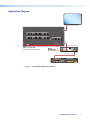
1
•
HDCP compliance — Fully supports HDCP-encrypted sources with selectable
authorization for unencrypted content.
•
HDCP authentication and signal presence confirmation — Provides real-time
verification of HDCP status for the digital video input and output
•
HDMI to DVI interface format conversion — Automatically enables or disables
embedded audio and infoframes and sets the correct color space for proper
connection to HDMI and DVI displays.
•
EDID emulation — Provides selectable resolutions and refresh rates and a means
for specifying the rate of the incoming signal, ensuring proper communication with
the video source.
•
EDID Minder — Manages EDID communication between connected devices,
ensuring that the source powers up properly and reliably outputs content for display.
•
Aspect ratio control of video output — Enables selection of a fill mode, which
provides a full screen output, or a follow mode, which preserves the original aspect
ratio of the input signal.
•
HDCP visual confirmation — A full-screen green signal is sent when HDCPencrypted content is transmitted to a non-HDCP compliant display.
•
Windows-based configuration program — The Product Configuration Software
(PCS) program enables configuration and control of the scaler from a computer via a
USB connection.
•
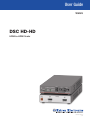
Front panel LED indicators — Indicate signal presence, HDCP status, audio
format, and power for real-time feedback and monitoring of key performance
parameters.
•
On-screen display (OSD)— Provides a menu system that lets you set up the DSC
using the front panel buttons.
•
Output Standby Mode — Automatically mutes the video and sync output to the
display device when no active input signal is detected. This allows the projector
or flat-panel display to automatically enter into standby mode to save energy and
enhance lamp or panel life.
•
Automatic 3:2 and 2:2 pulldown detection — These advanced film mode
processing techniques help maximize image detail and sharpness for 480i, 576i, and
HDTV 1080i sources that originated from film.
•
LockIt HDMI cable lacing bracket is provided.
•
Internal test patterns — Offers crop, grayscale, color bars, alternating pixels, and
crosshatch patterns, and audio pink noise.
•
Signal presence confirmation — Provides real-time verification of status for the
digital video input and output through front panel LEDs.
•
Front panel security lockout (executive mode) — Locks out all front panel
functions. All functions remain available through the configuration software or SIS
commands via the USB connection.
•
USB control port — The front panel USB Config port enables firmware updates and
configuration of the DSC via SIS commands and the PCS software.
•
Rack and furniture mounting
DSC HD-HD • Introduction
2