1
Amber Rapid Flashing
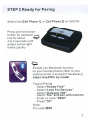
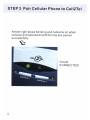
Indicates the selected cell phone line is in pairing mode. Use your cell
phone to search and pair to the Ce 112Tel.
Amber Uneven Flash
Indicates the selected cell phone line is connected to a cell phone and
there is an incoming call on this line.
Amber Slow Flashing
Indicates the selected cell phone line is paired but the cell phone is
currently out of range and/or temporarily not connected. Cell2Tei is
actively searching for this cell phone.
Amber Off
Indicates the selected cell phone line is not paired or not searching
for a cell phone (Manual Connection Mode)
USING
Cel12Tei
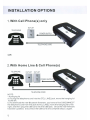
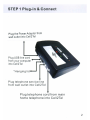
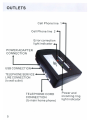
To use the Ce112Tel, connect your normal corded or cordless telephone
into the phone connection on the back of the Cell2Tei with a standard
telephone cable. This phone is now your extension telephone. To
use your telephone service line (Iandline), connect the telephone
service line to the designated tel. line connection on the back of the
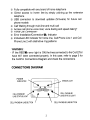
Cell2Tei (refer to CONNECTIONS DIAGRAM on page 2)
Placing a Call
Cell2Tei is designed to work either with your standalone phone,
independently of your telephone service, or with your telephone
service. If you have connected your telephone service line to the
Cell2Tel, your calls will default to the service line (Iandline). Simply pick
up the phone and dial the desired number.
If you wish to dial out on a cell phone line, select the appropriate cell
phone line, "one" or "two" by pressing [1 ][Flash] or [2][Flash] and dial
the desired telephone number.
8