1
FOURSTAR Electronic Technology Co., Ltd. DeYang China
Siemens S7-200PLC Ethernet Adapter
FS-ETH-PPI
USER MANUAL
All rights reserved
____________________________________________________________________________________________________
TEL:+86-838-2515543
FAX:+86-838-2515546
http://www.fourstar-dy.com
FOURSTAR Electronic Technology Co., Ltd. DeYang China
INDEX
Preface ……………………………………………………………………………………………………… 3
Copyright Statement
.…………………………………………………………………………………….....3
Version Info ……………………………………………………………………….………………………….3
Related Documents ………………………………………………………………………..………………….3
Product Content……………………………………………………………………………………………….3
(1)Characteristics & Technical Parameters……………………………………………………….…………..4
(2) External Structure &Pin Definition……………………………………………………………...………..5
(3)Inner Diagram ……………………………………………………………………………………………..8
(4)Parameters Setting ….….…………………………………………………………………………...……..8
(5)The usage in the LAN ……………….……………………………………………………………...……13
1.STEP7 Micro/WIN software setting
…………………………………………………………………13
2. The communication between the PC and a S7-200PLC……………………………...…………..………16
3. The communication between the PC and multiple S7-200PLCs……….………………………………...19
4.The intercommunication among the multiple S7-200PLCs……………………………………………….23
(6) Remote communication in the internet …………………………………………………………..………...24
1.STEP7 Micro/WIN software setting ……………………………………………………………...………25
2.Remote communication between PC and S7-200PLC …………………………………...….……………28
3.Remote communication between two PCS S7-200PLCs …………………………………..……………..33
(7) Remote wireless communication in the 3G wireless internet………………………………..…………..37
1.STEP7 Micro/WIN software setting …………………………………...38
2. Remote wireless communication between PC and S7-200PLC………………………………..…………38
3. Remote wireless communication between two PCS S7-200PLCs …………………………...…………..39
(8)Ordering Info………………………………………………………………………………..……………40
(9)Appendix: basic knowledge of Ethernet …………………………………………………………………40
1、TCP mode ………………………………………………………………………………………..40
2、UDP mode ……………………………………………………………………………….……….41
___________________________________________________________________________________________________
-2TEL:+86-838-2515543
FAX:+86-838-2515546
http://www.fourstar-dy.com
FOURSTAR Electronic Technology Co., Ltd. DeYang China
Preface
Thanks a lot for your choosing our products.
Before you use,please be sure to read this manual carefully, you will know its powerful and perfect function
and simple use.
This adapter is used for the communication between Siemens S7-200PLC and Ethernet, Internet or 3G
wireless network by the programming interface (RS485 interface) of S7-200 PLC.Please use according to
the manual,we won’t assume any liability of property damage or personal injury due to your improper use.
We have the right to revise this maual at any time according to the needs of technology development and it
won’t be noticed before the revising.
Copyright Statement
Any people and institutions copy all or part will assume the corresponding legal responsibility without prior
written consent.
Version Info
Document Name:《FS-ETH-PPI user manual》
Version:V2.0
Revising Date: September, 20,2010
Related Documents
In order to use this adapter better, please also read the following two documents:
1.《Device Manager Parameter Setting Software Manual》
2.《VCOMM Virtual Serial Port Software Manual》
Product Content
1. FS-ETH-PPI
1PC
2. RJ45 Cable 1 PC,2 M
3.CD 1PC
___________________________________________________________________________________________________
-3TEL:+86-838-2515543
FAX:+86-838-2515546
http://www.fourstar-dy.com
FOURSTAR Electronic Technology Co., Ltd. DeYang China
(1) Characteristics & Technical Parameters
FS-ETH-PPI is the industrial product which use the Ethernet and Internet or 3G wirelss network to
achieve Siemens S7-200PLC networking communication. It integrates many complex network protocols,
support TCP Server,TCP Client,UDP Unicast,UDP Multicast etc many modes.It has 10M/100M adaptive
Ethernet interface and 10-bit and 11-bit RS485 interface which meets Siemens technical specifications.You
only need to go on simple setting and then let the S7-200PLC go on network communication.
The RJ45 port,RS485 interface and power supply port are all isolated in order to suit harsh
environment in the industrial situations. Especially the isolated power supply port and each signal pin
has anti-static protection and surge protection which can solve the communication port easily damaged
problem for Siemens S7-200PLC.
Notice: When FS-ETH-PPI is used to communicate between PC and S7-200 PLC,you need to set the
local connection as “Modem connection” in the STEP7 Micro/WIN software.When it’s used
to communicate between PLC and PLC,you only can use the free port RS485 communication
mode,can’t use Siemens PPI,multi-master PPI or advanced PPI protocol,also MPI and profibus
protocol.
◆ High-speed, reliable industry standard, anti-interference design suit for the harsh electromagnetic
environment
◆32 bit RISC (NP7 series) ARM7TDMI 55DMIPS
◆ 128KB SRAM,128KB Code + 32KB Boot
◆10M/100M adaptive Ethernet interface
◆Support Siemens technical specifications 10-bit and 11-bit RS485 communication mode
◆Support RS485 data bits 5,6,7,8 settable
◆Support RS485 stop bit 1,1.5,2 settable
◆Support RS485 Parity NONE,ODD,EVEN,MARK,SPACE settable
◆Support RS485 baud rate 110~115200bps standard baud rate settable,not support 187.5Kbps baud rate
◆Support PPI communication of RF modem and free port RS485 communication, not support advanced PPI
___________________________________________________________________________________________________
-4TEL:+86-838-2515543
FAX:+86-838-2515546
http://www.fourstar-dy.com
FOURSTAR Electronic Technology Co., Ltd. DeYang China
and multi-master PPI protocol
◆Protocols: TCP,UDP,ARP,IP,ICMP,DHCP,BOOTP,DNS
◆Support Dynamic DNS
◆Working mode can be chose TCP Server、TCP Client、UDP multicast and UDP unicast.
◆Built-in Flash memory, can save the setted parameters
◆Support Windows 95/98/ME/NT/2000/XP/2003/XP/Vista/Win7
◆RJ45 port 1500VDC electromagnetic isolated, RS485 interface 1000VDC electromagnetic isolated,
power supply 1000VDC electromagnetic isolated
◆Interface protection: power supply port has the reverse polarity protection and over current
protection,RS485 interface has the 500W anti-lightning surge protection and overcurrent protection; all pins
and terminals have anti-static protection
◆24V±10% DC power supply from PLC RS485 socket,1W power
◆Dimension: 65mm×51mm×26mm, 35mm standard rail installation
◆Temperature: -40°C to +80°C (-40°F to 176°F),5% to 95% RH
(2)External structure &pin definition
___________________________________________________________________________________________________
-5TEL:+86-838-2515543
FAX:+86-838-2515546
http://www.fourstar-dy.com
FOURSTAR Electronic Technology Co., Ltd. DeYang China
Ethernet interface: Standard RJ45 socket, automatically adapt 10M/1000M Ethernet .Use the standard
network cable, not crossover cable
whether you connect the switch or directly connect the PC.
The network status LED indicator on the RJ45 socket
LINK LED (LEFT,GREEN)
ACT LED (RIGHT,YELLOW)
State
description
State
description
Light on
Network cable is connected correctly, work
Flash
Sending and receiving data through the
properly.
Flash
RJ45 port
Network cable is not plugged in, no
available network
Extinguish
No data transceiving
Ethernet interface RJ45 socket signal array
Pin
Signal name
1
Tx+
Function
Positive phase Ethernet data sending differential
Type
output
signal line
2
Tx-
negative phase Ethernet data sending differential
output
signal line
3
Rx+
Positive phase Ethernet data receiving differential
input
signal line
4
Not used
-
5
Not used
-
6
Rx-
Negative phase Ethernet data receiving differential
input
signal line
7
Not used
-
8
Not used
-
Default Button: Restore the default setted parameters. Insert the penpoint into the hole to press the button for
about 1 second, the internal Flash memory parameters will restore to factory default parameters: IP =
192.168.0.250, Username = admin, Password = admin. When you forget the IP address,user name or password,
you can restore to the factory default parameters,and then reset the parameters.
___________________________________________________________________________________________________
-6TEL:+86-838-2515543
FAX:+86-838-2515546
http://www.fourstar-dy.com
FOURSTAR Electronic Technology Co., Ltd. DeYang China
RS485 Interface: RS485 interface is the DB9M-pin plug which meets the Siemens S7-200 Series PLC PPI
interface technical specifications, the signal array match
S7-200 series PLC PPI interface, and has a 0.5 meter
cable, you just simply plug the DB9M directly into the S7-200PLC PPI interface outlet.
The signal array of RS485 socket(DB9M pin)
Pin No.
Signal
name
Description
Input/output
1
NC
No use
-
2
M24V
24VDC power negative
input
3
LTG_B
RS485 signal positive
input/output
4
NC
No use
-
5
M5V
RS485 signal ground
input
6
NC
No use
-
7
P24V
24VDC power positive
input
8
LTG_A
RS485 signal negative
input/output
9
RTS_PG
RS485 communication mode selection
input
Shell
Shielding
Shield ground (chassis ground)
RS485 communication mode selection switch: you need to set the local connection as “modem
connection” in the STEP7 Micro/WIN software when you use the FS-ETH-PPI . At this time, you need to
choose 11-bit or 10-bit data communication mode.
11-bit mode
10-bit mode
8E1 communication mode with even parity, is usually used for
LAN(intranet)communication.
8N1 communication mode without parity , is usually used for Internet
(Extranet) or 3G wireless network communication.
RS485 communication indicator: there are three LED indicators on the panel, and its working state
as the following table:
Indicator
Light on
Flash
Extinguish
PWR (Red)
Power supply normal
Fault
Fault or no power
TxD(Yellow)
Fault or signal polarity
reversal
Serial port is
receiving the date
Fault or no
communication
RxD (Green)
Fault or signal polarity
reversal
Serial port is sending
the date
Fault or no
communication
___________________________________________________________________________________________________
-7TEL:+86-838-2515543
FAX:+86-838-2515546
http://www.fourstar-dy.com
FOURSTAR Electronic Technology Co., Ltd. DeYang China
(3)Inner Diagram
(4)FS-ETH-PPI parameters setting
FS-ETH-PPI needs to be configured the parameters to work correctly, the configuration parameters including
the network parameters, communication protocols, connection, serial port parameters; it can be very flexible to
satisfy your application. Configuration parameters are stored in the Flash memory, and they can be permanently
stored without loss. Use the standard RJ45 cable to connect the FS-ETH-PPI and router or switch, at the same
time make sure that the router or switch is connected to a computer in order to run the parameters setting
software .You also can use a standard RJ45 cable to directly connect FS-ETH-PPI and the computer, no need
crossover cable, this product has auto-polarity discrimination function for the RJ45 cable.
Plug the RS485(DB9M)of FS-ETH-PPI into the S7-200PLC RS485 socket and power on the PLC.
The same local area network (router) can connect multiple FS-ETH-PPI, but the same IP address is not allowed,
there will be conflicts if the same IP , and it only shows one of IP and abnormality.
You can press the Default button on the FS-ETH-PPI any time that could make it restore to the factory
dafault.
IP=192.168.0.250,Username=admin,Password=admin
___________________________________________________________________________________________________
-8TEL:+86-838-2515543
FAX:+86-838-2515546
http://www.fourstar-dy.com
FOURSTAR Electronic Technology Co., Ltd. DeYang China
You need to check your computer's IP address and gateway address, and confirm your computer is in the
normal Internet access, in the next setting, you need to set the gateway of FS-ETH-PPI as same as the gateway of
computer and router, that is to say, the FS-ETH-PPI and computer are in the same subnet, all equipments in this
subnet and routers have the same gateway.
Right-click Network Neighborhood> View Network Connection> Properties, then pop up “Local Area
Connection Properties” window:
Select the General page; click the Properties then pop-up the following window, record the IP address and
the gateway of the computer for later use:
___________________________________________________________________________________________________
-9TEL:+86-838-2515543
FAX:+86-838-2515546
http://www.fourstar-dy.com
FOURSTAR Electronic Technology Co., Ltd. DeYang China
Copy the OEM Device Manager_SPCNML.rar file on the CD to your hard disk and extract it to the current
folder, do not modify the
folder name
“OEM Device Manager_SPCNML” which store the setting software.
Double click the following icon in the OEM Device Manager_SPCNML folder to run setting software:
Click the Search button in the upper left corner, and then search out all FS-ETH-PPI connected to the router
after a few seconds, as shown below:
Double-click the FS-ETH-PPI, pop-up dialog box, enter your user name and password to enter the setting
interface. The factory default setting: Username = admin, Password = admin
Click "Login" to enter the configuration interface.
___________________________________________________________________________________________________
- 10 TEL:+86-838-2515543
FAX:+86-838-2515546
http://www.fourstar-dy.com
FOURSTAR Electronic Technology Co., Ltd. DeYang China
You must firstly click”OK” to effect the modified parameters(parameters not saved at this time) after you
modify the parameters in every interface ,then click the "Apply Settings / Restart" to save parameters and restart
the FS-ETH-PPI to work with the new parameters and then exit the setting software. As shown below:
About the parameters configuration details, please read the "Device Manager Parameters setting
software manual”.
After you configure the FS-ETH-PPI parameters, you need to run VCOMM virtual serial port software on the
PC, simulate the ethernet interface of FS-ETH-PPI
as serial port (COM port) on the PC, then choose this
serial port in the local connection of STEP7 Micro/WIN software ,as the same as
you use the traditional
PC/PPI programming cable.
Notice:The COM port of local connection in the “set PG/PC interface” menu of
Siemens programming software STEP7 Micro / WIN can most support COM8, even though
it can display above COM8, in fact it can’t use.
About the detailed instructions of the VCOMM virtual serial port software, please read "
VCOMM virtual Serial Port software Manual.”
Siemens S7-200PLC 11-bit RS485 interface communication parameters: data bits = 8 bits, parity =
EVEN (even parity), stop bit = 1, referred to as: 8E1. This is the PLC default mode.
___________________________________________________________________________________________________
- 11 TEL:+86-838-2515543
FAX:+86-838-2515546
http://www.fourstar-dy.com
FOURSTAR Electronic Technology Co., Ltd. DeYang China
Siemens S7-200PLC 10-bit RS485 interface communication parameters: data bits
= 8 bits, parity = NONE (no parity), stop bit = 1, referred to as: 8N1.This mode
is used in the Internet communication.
S7-200PLC baud rate = 9.6Kbps or 19.2Kbps , FS-ETH-PPI does not support
187.5Kbps baud rate. Firstly please use such as PC / PPI programming cable to
check the PLC baud rate,and the FS-ETH-PPI serial port parameters must be set
as the same parameters with the PLC, so we set S7-200PLC baud rate as 9.6Kbps
in the following examples.
Firstly set FS-ETH-PPI serial port parameters in parameters setting software , where the serial port protocol
box "RS232" option is supporting RS232/RS485/RS422 communication and must ensure that this serial port
parameters and the S7-200PLC RS485 interface parameters are the same, Otherwise, It can’t normally
communicate.
The
application of FS-ETH-PPI is very flexible and diverse, not limited to examples described below.
You can use the FS-ETH-PPI to connect the S7-200PLC to the Ethernet
in order to achieve the data
communication from PLC to PC,PLC to PLC, multiple PLCs to PC and among multiple PLCs etc.It can also be
achieved the worldwide data communication through the Internet, or wireless data communication through wireless
LAN, 3G network card, 3G router.
___________________________________________________________________________________________________
- 12 TEL:+86-838-2515543
FAX:+86-838-2515546
http://www.fourstar-dy.com
FOURSTAR Electronic Technology Co., Ltd. DeYang China
(5)The usage in the LAN
LAN communication generally refers to the same gateway, that is to say, the communication is among multiple
Ethernet devices which are connected to a same router.
The FS-ETH-PPI communication in the LAN needs to ensure that PC, FS-ETH-PPI and routers have the
same gateway, The gateway: 192.168.1.1, the computer IP address: 192.168.1.108, FS-ETH-PPI IP address:
192.168.1.250 in the following examples.
1.STEP7 Micro/WIN software setting
Select RS485 communication mode switch on the FS-ETH-PPI to "11bit" , use the even parity 11 bit
communication mode,then use the setting software to set FS-ETH-PPI serial port parameters as 9600bps,
8E1(8 data bits, even parity, 1 stop bit).
When the VCOMM virtual serial port software running on the PC simulate FS-ETH-PPI
as the COM port on the PC, the next using is just like PC / PPI programming cable, but you
should set the local connection in the “set PG/PC interface” menu of STEP7 Micro / WIN
software as “modem connection” mode.
___________________________________________________________________________________________________
- 13 TEL:+86-838-2515543
FAX:+86-838-2515546
http://www.fourstar-dy.com
FOURSTAR Electronic Technology Co., Ltd. DeYang China
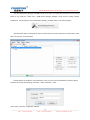
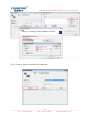
Click the "Communication" button to enter the communication settings, double-click
"connection" to set the modem parameters.
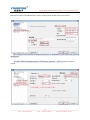
Select the "modem connection" and configure serial port parameters, choose even parity 11
bit mode.
___________________________________________________________________________________________________
- 14 TEL:+86-838-2515543
FAX:+86-838-2515546
http://www.fourstar-dy.com
FOURSTAR Electronic Technology Co., Ltd. DeYang China
Click “Connect" button to establish the connection.
___________________________________________________________________________________________________
- 15 TEL:+86-838-2515543
FAX:+86-838-2515546
http://www.fourstar-dy.com
FOURSTAR Electronic Technology Co., Ltd. DeYang China
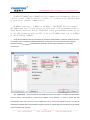
Double-click the "Refresh" to search the PLC, and then you can find the all PLCs
connected to the network,then select the PLC which you want to operate , in the next step you
can upload, download the data.
2. The communication between the PC and a S7-200PLC
___________________________________________________________________________________________________
- 16 TEL:+86-838-2515543
FAX:+86-838-2515546
http://www.fourstar-dy.com
FOURSTAR Electronic Technology Co., Ltd. DeYang China
Set the FS-ETH-PPI network parameters, the gateway of FS-ETH-PPI, PC and router must be same, the
DNS server needn’t to be setted because you don’t use the dynamic domain name on the Internet.
The setting of FS-ETH-PPI serial port parameters is omitted here, you can see the previous
description.
Set FS-ETH-PPI working mode as TCP Server, port No. = 27011, waiting for clients to
connect.
___________________________________________________________________________________________________
- 17 TEL:+86-838-2515543
FAX:+86-838-2515546
http://www.fourstar-dy.com
FOURSTAR Electronic Technology Co., Ltd. DeYang China
Run the VCOMM virtual serial port software on the PC, set the simulated virtual serial port on the PC. Select
VCOMM as Client mode, initiatively to connect the server-side equipment. Choose the device detector to create the
virtual serial port.
Add a virtual serial port, the remote server IP address = FS-ETH-PPI IP address, remote server monitoring
port = FS-ETH-PPI port.
Click OK and exit the software and re-run VCOMM, the client side VCOMM will take the initiative to connect
the server side with IP address 192.168.1.250, port number 27011, it will create a new serial port COM3 after
establishing the connection, and it will appear in the Device Manager of the Windows system, then you choose this
serial port in your application software, such as STEP7 Micro/WIN.
___________________________________________________________________________________________________
- 18 TEL:+86-838-2515543
FAX:+86-838-2515546
http://www.fourstar-dy.com
FOURSTAR Electronic Technology Co., Ltd. DeYang China
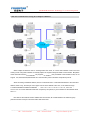
Of course you can use FS-ETH-PPI to simulate each PLC as a COM port on the PC in order to achieve the
data communication and monitoring operation between PC and multiple PLC s
3. The communication between the PC and multiple S7-200PLCs
When multiple PLCs communicate with a PC via Ethernet, you need to set every FS-ETH-PPI connected
with PLC as TCP Client, set the PC as the TCP Server, let every client FS-ETH-PPI takes initiative to connect the
server PC. When VCOMM Virtual Serial Port Software work as TCP Server,it allows unlimited number of
connected clients.
___________________________________________________________________________________________________
- 19 TEL:+86-838-2515543
FAX:+86-838-2515546
http://www.fourstar-dy.com
FOURSTAR Electronic Technology Co., Ltd. DeYang China
Set the FS-ETH-PPI network parameters, the gateway of FS-ETH-PPI,PC and router must be same, the
DNS server needn’t to be setted because you don’t use the dynamic domain name on the Internet. The picture
below is a FS-ETH-PPI setted parameters, when there are multiple FS-ETH-PPI, please note that each
FS-ETH-PPI IP address must be set to the different addresses.
The setting of each FS-ETH-PPI serial port parameters are the same with PLC and they
are omitted here, you can see the previous description.
Set each FS-ETH-PPI as the TCP Client, the remote host IP = PC IP address, host port = VCOMM software
port number. That is to say, each FS-ETH-PPI have to connect to server-side VCOMM with IP = 192.168.1.108,
port = 8000.
___________________________________________________________________________________________________
- 20 TEL:+86-838-2515543
FAX:+86-838-2515546
http://www.fourstar-dy.com
FOURSTAR Electronic Technology Co., Ltd. DeYang China
Run the VCOMM virtual serial port software on the PC, set the simulated virtual serial port on the PC. Select
VCOMM as Server (server side) mode, accept client connection. Choose the device detector to create a virtual
serial port.
Add a new virtual serial port, the monitoring IP address = PC IP address, client mode device try to connect the
port = VCOMM software port, this is 8000.
Click OK and exit the software and re-run VCOMM, server side VCOMM will accept as many as client side
FS-ETH-PPI connections, and it’s unlimited. A new serial port COM3 will appear on the PC after the connection
is established. And this serial port will also appear in the Windows System Device Manager, then you can choose
this serial port in your applications,like STEP7 Micro/WIN.
___________________________________________________________________________________________________
- 21 TEL:+86-838-2515543
FAX:+86-838-2515546
http://www.fourstar-dy.com
FOURSTAR Electronic Technology Co., Ltd. DeYang China
You can find the all PLCs via communication search of STEP7 Micro/WIN,as shown below.
___________________________________________________________________________________________________
- 22 TEL:+86-838-2515543
FAX:+86-838-2515546
http://www.fourstar-dy.com
FOURSTAR Electronic Technology Co., Ltd. DeYang China
4.The intercommunication among the multiple S7-200PLCs
When multiple S7-200PLC need to exchange data each other, of course UDP multicast mode is the best
working mode. Using UDP multicast can directly replace the original multi-point RS485 communication. But please
notice that at this time the FS-ETH-PPI only supports S7-200PLC free port RS485 communication mode, do not
support PPI,advanced PPI,Multi-master PPI communication protocol and MPI and profibus protocol.
About the setting of Multicast address, here is a brief introduction. In fact Multicast address is the Class D IP
address, that’s to say, the first byte of the upper 4 bits of the IP address is the 1110, so the multicast range:
11100000.00000000.00000000.00000000 ~ 11101111.11111111.11111111.11111111, 224.0.0.0 ~
239.255.255.255.Some addresses have been occupied by the system,so you had better use the address above
224.1.1.1.
Here We use the multicast section address 224.224.224.224, all modules added in the multicast group
(224.224.224.224:27011)can send and receive data each other.
___________________________________________________________________________________________________
- 23 TEL:+86-838-2515543
FAX:+86-838-2515546
http://www.fourstar-dy.com
FOURSTAR Electronic Technology Co., Ltd. DeYang China
This mode is well suitable for upgrading the original RS485 network to Ethernet, the key of the mode is that all
the FS-ETH-SC09 multicast section address of the same group must keep identical
to local port and remote host
port number, that is to say, multicast section address and the port number is same,then these FS-THE-SC09
belong to the same group, the data sent out by any one will be received by other FS-ETH-SC09 of the same group,
and there is no master-slave distinction. Under the Multicast mode, the FS-ETH-SC09 grouping is only
logic, no
need physical grouping, that is to say, there can be multiple groups in the same network, they are Independent of
each other.
Of course, you still need to set each FS-ETH-PPI as a different IP address, every FS-ETH-PPI
serial port
parameters are the same as PLC serial port parameters.
(6) Remote communication in the internet
FS-ETH-PPI can achieve the worldwide remote communication through the Internet, it will use the external
network IP address of the router, the router external network address is different when the router is started every
time, because the router will be randomly assigned to one IP address from the Internet when it ‘s powered every
time, so this will result in trouble for remote communication through the Internet, There are two following methods to
solve this problem:
___________________________________________________________________________________________________
- 24 TEL:+86-838-2515543
FAX:+86-838-2515546
http://www.fourstar-dy.com
FOURSTAR Electronic Technology Co., Ltd. DeYang China
Apply to buy a fixed IP address from the telecom, the fee will be higher.
Use the domain name resolution.you can apply for a free or paid domain name from dynamic domain name
service provider, then use domain name instead of IP address; so that regardless of changes in IP address, domain
name will point to IP addresses in real time, like as we usually visit the website .
Some providers such as peanut shells and other dynamic domain name (DNS) service providers offer free
and paid dynamic domain name service, you can consult them for their dynamic domain name service and charges
issue. Firstly you need to apply a dynamic
domain from DNS service provider , and download the Dynamic DNS
client software, run this software on the host of Server mode.After the client software has been successfully started,
Server host has solved the problem of dynamic IP address. Input the dynamic domain name in the IP input box
of Client remote host, set the DNS server IP address as the local DNS server IP addresses, then you can use the
dynamic domain name to visit the internet.
In the following example, use our free dynamic domain name: fourstar.vicp.cc, use the PC in Server-side and
run the dynamic domain name client software, you can also use a router with the function of dynamic domain
name .
1.STEP7 Micro/WIN software setting
Select RS485 communication mode switch on the FS-ETH-PPI to "10bit" , use the no parity 10 bit
communication mode,then use the setting software to set FS-ETH-PPI serial port parameters as
9600bps,8N1 (8 data bits, no parity, 1 stop bit).
When the VCOMM virtual serial port software running on the PC simulate FS-ETH-PPI as
the COM port on the PC, the next using is just like PC / PPI programming cable, but you
should set the local connection in the “set PG/PC interface” menu of STEP7 Micro / WIN
software as “modem connection” mode.
___________________________________________________________________________________________________
- 25 TEL:+86-838-2515543
FAX:+86-838-2515546
http://www.fourstar-dy.com
FOURSTAR Electronic Technology Co., Ltd. DeYang China
Click the "Communication" button to enter the communication settings, double-click "connection" to
set the modem parameters.
Select the "Radio / RF modem" and configure serial port parameters, choose no parity 10 bit mode.
___________________________________________________________________________________________________
- 26 TEL:+86-838-2515543
FAX:+86-838-2515546
http://www.fourstar-dy.com
FOURSTAR Electronic Technology Co., Ltd. DeYang China
Click “Connect" button to establish the connection.
Double-click the "Refresh" to search the PLC, and then you can find the all PLCs connected to the
network,then select the PLC which you want to operate , in the next step you can upload, download the data.
___________________________________________________________________________________________________
- 27 TEL:+86-838-2515543
FAX:+86-838-2515546
http://www.fourstar-dy.com
FOURSTAR Electronic Technology Co., Ltd. DeYang China
2.Remote communication between PC and S7-200PLC
___________________________________________________________________________________________________
- 28 TEL:+86-838-2515543
FAX:+86-838-2515546
http://www.fourstar-dy.com
FOURSTAR Electronic Technology Co., Ltd. DeYang China
The most economical way to achieve the remote communication in the Internet between the PC and
S7-200PLC is that set the FS-ETH-PPI as the client, set the PC as the server, install and run the DNS software on
the PC, and set the port simulated for PC on the router of PC side. As shown below:
Set FS-ETH-PPI network parameters, the gateway must be the same as the router connected with the
FS-ETH-PPI, here you still need to properly set the IP address of DNS, different cities have different DNS Server
IP, you can use all, but usually choose the local DNS,you can search these addresses from Internet, also can find
them from the router which you are using.
Set the serial port parameters of FS-ETH-PPI, please note that you should use 10-bit communication
mode: 8 data bits, no parity, 1 stop bit, that is 8N1.
Set FS-ETH-PPI as TCP Client; remote host IP =domain name of remote PC, here is: fourstar.vicp.cc;
host port = VCOMM software port number.
___________________________________________________________________________________________________
- 29 TEL:+86-838-2515543
FAX:+86-838-2515546
http://www.fourstar-dy.com
FOURSTAR Electronic Technology Co., Ltd. DeYang China
Input the IP address of the router in the IE browser address bar of the remote PC and then appear the router
setting interface, set the port simulation for PC, as shown below. If your PC does not use the router to access
Internet, then this step can be omitted.
The meaning of the above settings is that when the client FS-ETH-PPI visit and access the router's external
network IP address (this address is automatically resolved by the domain name, you no longer cares about its
___________________________________________________________________________________________________
- 30 TEL:+86-838-2515543
FAX:+86-838-2515546
http://www.fourstar-dy.com
FOURSTAR Electronic Technology Co., Ltd. DeYang China
change),router will automatically transfer this visiting to the VCOMM virtual serial port software on the PC
IP address 192.168.1.108, port 8000
with
which is connected to the router
After setting, click "Restart Router" button or re-power the router to work with the new parameters.
Run the client software on the PC, as shown below, the domain name fourstar.vicp.cc has been pointed to the
external network IP address of the router.
Run the VCOMM virtual serial port software on the PC, set the simulated virtual serial port on the PC. Select
VCOMM as Server mode, accept client connections. Choose to use the device detector to create a virtual serial
port.
___________________________________________________________________________________________________
- 31 TEL:+86-838-2515543
FAX:+86-838-2515546
http://www.fourstar-dy.com
FOURSTAR Electronic Technology Co., Ltd. DeYang China
Add a new virtual serial port, the monitoring IP address = PC IP address, client mode device try to connect the
port = VCOMM software port, this is 8000.
Click OK and exit the software and re-run VCOMM, the server VCOMM will wait the connection of client
FS-ETH-PPI,then it will create a new serial port COM3 after establishing the connection, and it will appear in the
Device Manager of the Windows system, then you choose this serial port in your application software, such as
STEP7 Micro/WIN.
You can also set the FS-ETH-PPI as the server, set VCOMM as the client, but the router connected with
FS-ETH-PPI need to have the DNS function, or you can use a PC connected to the router which is connected with
the FS-ETH-PPI to run the peanut shell software to resolve the domain name.When the VCOMM software
work as the client,you also could input the domain name directly in the remote server IP address, support DNS
resolution.
___________________________________________________________________________________________________
- 32 TEL:+86-838-2515543
FAX:+86-838-2515546
http://www.fourstar-dy.com
FOURSTAR Electronic Technology Co., Ltd. DeYang China
Of course you can use multiple FS-ETH-PPI to simulate multiple PLC as multiple COM port on the PC (set
the connection with multiple different ports), in order to achieve the data communication and control operation of
the PC and multiple PLC respectively.
3.Remote communication between two PCS S7-200PLCs
Two pcs S7-200PLC can achieve remote communication on the Internet via the FS-ETH-PPI, you need
a router which supports dynamic domain name (DNS),in order to avoid the high cost of fixed IP address
from the local telecom, and this router is very common now, please notice the instructions on the package
when you purchase it.
Please notice that when the two PLCs are communicated via FS-ETH-PPI, you only can use the RS485
free port communication protocol,not support PPI, advanced PPI, multi-master PPI protocol, MPI and
PROFIBUS protocol.
Use two pcs FS-ETH-PPI to connect with two pcs S7-200PLC,the switch of
___________________________________________________________________________________________________
- 33 TEL:+86-838-2515543
FAX:+86-838-2515546
http://www.fourstar-dy.com
FOURSTAR Electronic Technology Co., Ltd. DeYang China
communication mode select 11 or 10 bit, it depends on the free port RS485 protocol
communication parameters which are setted in your PLC.
11-bit mode: 8 data bits, even parity, 1 stop bit (8E1)
10-bit mode: 8 data bits, no parity, 1 stop bit (8N1)
set one of FS-ETH-PPI as client,set the other FS-ETH-PPI as server,the router
of server side needs to have the DNS function,and can normally run the domain
name on this router,as shown below.
Enter the dynamic DNS setting interface of router, input the user name and password of the
Dynamic DNS which you applied,as shown below,then you can find our domain name
fourstar.vicp.cc is connected successfully.
Click "Restart Router" button or re-power the router to work with the new parameters.
Similarly, when two pcs FS-ETH-PPI go on external network communication,you need to set the port
simulation on the router connected with the server FS-ETH-PPI,input the IP address of router in the IE
browser of PC connected with this router and then enter the virtual server setting interface of the router.
___________________________________________________________________________________________________
- 34 TEL:+86-838-2515543
FAX:+86-838-2515546
http://www.fourstar-dy.com
FOURSTAR Electronic Technology Co., Ltd. DeYang China
The server port = local port of server FS-ETH-PPI; IP address = IP address of server FS-ETH-PPI;
Select the "Enable", click "Save" button to save these configured parameters.
Set the parameters of server FS-ETH-PPI as below:
___________________________________________________________________________________________________
- 35 TEL:+86-838-2515543
FAX:+86-838-2515546
http://www.fourstar-dy.com
FOURSTAR Electronic Technology Co., Ltd. DeYang China
Set the parameters of client FS-ETH-PPI as below:
___________________________________________________________________________________________________
- 36 TEL:+86-838-2515543
FAX:+86-838-2515546
http://www.fourstar-dy.com
FOURSTAR Electronic Technology Co., Ltd. DeYang China
Please note that you need to properly set the DNS server of the client
FS-ETH-PPI, input the domain name fourstar.vicp.cc in the remote host IP box,
host port is the port number of server FS-ETH-PPI. So that when the client
FS-ETH-PPI connect the domain name of Internet, it will automatically connect
to the Internet address (the external network IP address) of the server-side
router,the router automatically transfer to the server module, achieve the
remote communication from S7-200PLC's serial port to another S7-200PLC’s serial
port.
(7) Remote wireless communication in the 3G wireless internet
Using the wireless Internet platform of telecom, all the Ethernet to Serial port modules can be very convenient to
achieve wireless communication, that is to say, you can use the wireless router to achieve the wireless
communication in the LAN, you can also use the 3G router , 3G network card to achieve the worldwide Internet
wireless communication. As long as any places where
the wireless Internet is available,then the wireless
communication between the S7-200PLC and PC, S7-200PLC and PLC can be achieved, which has extended a
broader application range.
___________________________________________________________________________________________________
- 37 TEL:+86-838-2515543
FAX:+86-838-2515546
http://www.fourstar-dy.com
FOURSTAR Electronic Technology Co., Ltd. DeYang China
In fact when you use wireless communication, the setting method is almost as same as the previous
introduction., only 3G router, wireless network card of different manufacturers may have some differences in the
usage, so please read the corresponding product manual. When the FS-ETH-PPI works as the server, it is best to
use the 3G router with the function of dynamic domain name to connect the FS-ETH-PPI.
User should pay an attention on that the current TD-SCDMA 3G Mobile and China
Unicom's WCDMA 3G network card are using a private network IP address, this can
only be used as a client, can not be accepted as a client server. and Telecom's
CDMA2000 EVDO 3G network card is using a public network IP address, and this can
be used as server or client to use.
The following are programs of wireless communication in the Internet wireless network platform.The both
parties of communication can be both 3G wireless network, but also one is 3G wireless network, the other is the
wired Internet.
1.STEP7 Micro/WIN software setting
When 3G etc other wireless network work as the external network communication,
STEP7 Micro / WIN software settings are the same as the introduction of
previous(6) -1 article. So please choose the no parity 10 bit communication mode
of "Radio / RF modem "connection.
Of course, the mode switch on the FS-ETH-PP need to select "10bit".
2. Remote wireless communication between PC and S7-200PLC
___________________________________________________________________________________________________
- 38 TEL:+86-838-2515543
FAX:+86-838-2515546
http://www.fourstar-dy.com
FOURSTAR Electronic Technology Co., Ltd. DeYang China
3. Remote wireless communication between two PCS S7-200PLCs
___________________________________________________________________________________________________
- 39 TEL:+86-838-2515543
FAX:+86-838-2515546
http://www.fourstar-dy.com
FOURSTAR Electronic Technology Co., Ltd. DeYang China
(8)Ordering Info
Product Name: Siemens S7-200PLC Ethernet Adapter
Model: FS-ETH-PPI
(9)Appendix: basic knowledge of Ethernet
TCP / IP transport layer provides two common agreements of TCP and UDP, the
two protocols provide the transmission mechanism of TCP / IP network applications.
TCP provides a guaranteed and reliable information transmission, and UDP use
non-guaranteed and non-reliable method to transmit information.
1.TCP mode
TCP is a guaranteed connection based protocol, before transmitting, the equipment must first establish
duplex connection, disconnect after data transfer is complete. Sending the data need to receive confirmation of the
host then continue sending data, if not received confirmation of the host or data error, need a certain number of
retransmissions. In this way it will be additional traffic, so slowly than UDP.
TCP communications, including the client (Client) and server (Server), the client take the initiative to connect
to the server, the server can only be a passive client connections, once establish the connection, the client and
server can be duplex data transfer at any time.
Our Ethernet to serial communication module using TCP mode including: TCP Server, TCP Client.
TCP Server (TCP Server) mode:
When the module works in the TCP Server mode, it does not take the initiative to connect to other devices, but
listening on local port, and wait for client connections, if the client can establish a connection then will go on the
duplex communications.
TCP Client (TCP Client) mode:
When the module works in the TCP Client mode, it will take the initiative to connect the setted TCP server in
advance, if the connection is not successful, it will continue to attempt to reconnect, once the connection success
the server will go on the duplex data communications.
___________________________________________________________________________________________________
- 40 TEL:+86-838-2515543
FAX:+86-838-2515546
http://www.fourstar-dy.com
FOURSTAR Electronic Technology Co., Ltd. DeYang China
2.UDP mode
UDP protocol is unreliable connectionless protocol, data transmission is not required to establish a connection,
do not need to receive confirmation form the host for data transmission, so the UDP protocol does not guarantee
the data sent to the target host packets are received correctly, for high reliability requirements of the occasion can
use the higher level of communication protocol to ensure data is correct.
UDP is a relatively simple way of communication, it will not increase too much extra traffic, it can communicate
faster than the TCP to provide real time communication. UDP does not need the server and client, both parties are
on equal communication.
Our Ethernet to serial communication module using UDP mode including: UDP Uni_Cast, UDP Multi_Cast.
UDP unicast (UDP Uni_Cast) mode:
Module in the UDP Uni_Cast mode, it can be point to point duplex data transmission, although it can send
data to several other hosts, but only one host can send data to the module back .
UDP Multicast (UDP Multicast) mode:
The modules in the network use the multicast ID is one between 224.0.0.0-239.255.255.255 address as its
multicast group address, all the modules in the multicast network can be duplex data transfer, and no master slave
distinguish, This mode is easy for old RS485 network upgrade to Ethernet.
___________________________________________________________________________________________________
- 41 TEL:+86-838-2515543
FAX:+86-838-2515546
http://www.fourstar-dy.com