1
USER GUIDE
AUDIO | VIDEO MEDIA CONTROLLER
2.2
Installation
1. If you downloaded the latest software from the web, double-click the installer.
Otherwise, insert the installation CD into your Macintosh.
NOTE: Be sure to eject the installation CD in your Mac if you downloaded the latest
software from the web.
2. Follow the instructions to install the software.
If prompted to download the most current version of EuControl, follow the
onscreen instructions.
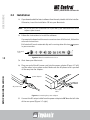
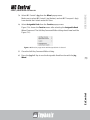
EuControl will launch automatically and is running when this icon
in your menu bar.
appears
EuControl
icon
Figure 2-6 Menu bar with EuControl icon
18
3. Shut down your Macintosh.
SETUP AND INSTALLATION
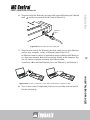
4. Plug one end of the AC power cord into the power adapter (Figure 2-7 left)
and the other into a power outlet. Make sure the AC power cord is pushed
all the way into the adapter.
power adapter
H
ITC
TSW
FOO
DC
5
In 1
V
AC power cord
DC output
cable
Figure 2-7 Connecting the power adapter
5. Connect the DC output cable from the power adapter to DC In on the left side
of the rear panel (Figure 2-7 right).