1
Advanced Features
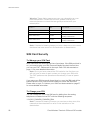
To manage
diversion of calls …
When no answer
When out of reach
All
With
Function …
Dial …
You will hear…
Activate
**61*Phone_number#
1 beep
Deactivate
##61#
3 beeps
Check status
*#61#
1 beep if activated
3 beeps if deactivated
Activate
**62*Phone_number#
1 beep
Deactivate
##62#
3 beeps
Check status
*#62#
Deactivate
##002#
1 beep if activated
3 beeps if deactivated
3 beeps
Note: If instead of hearing beeps you can hear a deep tone, this
means that there has been an error in the activation or the
deactivation.
Call Restriction / Call Barring
You can restrict certain types of calls that can be made or received. You
need a password to turn a call restriction on or off. Initially, this password
will be 0000.
0000
We recommend you to change it by dialing:
**03**OLD_PASSWORD*NEW_PASSWORD* NEW_PASSWORD#
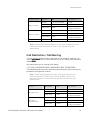
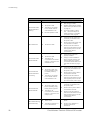
The following table shows the restriction alternatives as well as the way to
proceed to manage this function.
Note: These dialing sequences may vary depending on your
network operator. If these do not work, please consult your
network operator or check the user guide provided with your
subscription.
To manage restriction
of calls …
All outgoing calls
All outgoing
international calls
Fixed Wireless Terminal: G30 and G35 models
With Function …
Dial …
You will hear…
Activate
*33*Password#
1 beep
Deactivate
#33*Password#
3 beeps
Check status
*#33#
Activate
*331*Password#
1 beep
Deactivate
#331*Password#
3 beeps
Check status
*#331#
1 beep if activated
3 beeps if deactivated
1 beep if activated
3 beeps if deactivated
21