1
Contents
Chapter 1: Introduction ............................................................................................................................................ 3
Scan Module .............................................................................................................................................................. 4
Scanners and SCSI Adapters ..................................................................................................................................... 4
Chapter 2: Interface ................................................................................................................................................... 5
Interface Highlights ..................................................................................................................................................... 6
Top Menu .............................................................................................................................................................. 6
Control Panel ......................................................................................................................................................... 7
Checkboxes ........................................................................................................................................................ 8
Scan Options ..................................................................................................................................................... 8
Drawing List ........................................................................................................................................................... 8
Frame Preview Panel ............................................................................................................................................. 8
Image Panel ........................................................................................................................................................... 8
Chapter 3: How to Scan ........................................................................................................................................... 9
Scanning with the Harmony Scan Module ................................................................................................................. 9
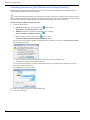
Launching the Harmony Scan Module and Loading Drawings ........................................................................... 10
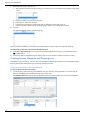
Creating Scenes, Elements and Drawing Lists .................................................................................................... 12
Creating a Scene from the Scan Module ......................................................................................................... 12
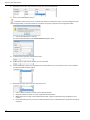
Creating Elements from the Scan Module ...................................................................................................... 13
Creating and Editing a Drawing List ................................................................................................................ 15
Setting up the Scanner ........................................................................................................................................ 16
Scanner Information ........................................................................................................................................ 17
Performing a Trial Scan ........................................................................................................................................ 17
Scanning Drawings .............................................................................................................................................. 19
Scanning with the Automatic Document Feeder ............................................................................................ 19
Scanning by Placing the Drawings Manually ................................................................................................... 21
Pegging and Scanning a Pan Cel .................................................................................................................... 22
Stopping the Scanning Process ....................................................................................................................... 23
Advanced Scanning Techniques .......................................................................................................................... 23
Scanning Drawings without Matching Frames ................................................................................................ 23
Loading Previously Scanned Drawings ............................................................................................................. 25
Setting the Vectorization Style ........................................................................................................................ 26
Chapter 4: Scan Menu Commands ................................................................................................................... 27
Scan Commands ...................................................................................................................................................... 28
About Toon Boom Scan ....................................................................................................................................... 28
Quit Toon Boom Scan ......................................................................................................................................... 28
File Commands ......................................................................................................................................................... 28
Build Manual List ................................................................................................................................................... 28
Exit ....................................................................................................................................................................... 28
Load From File ...................................................................................................................................................... 28
Open Drawings ..................................................................................................................................................... 28
Edit Commands ........................................................................................................................................................ 29
Drawing List .......................................................................................................................................................... 29
Create ScanInfo File ........................................................................................................................................... 29
Reverse Drawing List ........................................................................................................................................... 29
Vectorize Style ..................................................................................................................................................... 29
Scanner Commands .................................................................................................................................................. 29
EjectPage .............................................................................................................................................................. 29
Info ........................................................................................................................................................................ 29
Help Commands ....................................................................................................................................................... 30
About ................................................................................................................................................................... 30
Debug Mode ....................................................................................................................................................... 30
Help ..................................................................................................................................................................... 30
Index ............................................................................................................................................................................... 31
1