1
ActionLaser 1000/1500
Epson GL Identity card (C826021)
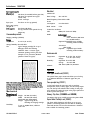
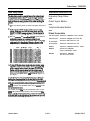
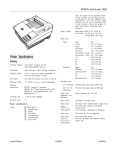
The Face-up Output Tray
If you have an ActionLaser 1000, the Epson GL identity card
allows you to use your printer in the Epson GL emulation.
The printer normally delivers paper face down on top of the
printer. The optional face-up paper tray is recommended for
print jobs of twenty pages or less and when:
EPSON Type B Interface boards
If you would like to use this printer with three computers or
use this printer to connect two serial or two parallel interfaces
at the same time, install one of these interfaces:
C823071 32 Kbyte serial interface
C823101 32 Kbyte parallel interface
C823151 Twinax interface board
C82314l Coax interface board
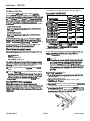
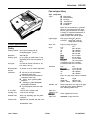
The Lower Paper Cassette Unit
Turn off the printer. Unplug the printer’s power cord from
the electrical outlet and from the printer.
P you feed single-sheet items such as envelopes
transparencies, heavy paper, or labels through your
printer.
P you prefer your printed sheets feed from the printer with
the text facing you.
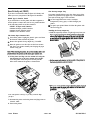
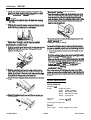
Installing the face-up output tray
1. Hold the output tray tilted at as light angle away from you.
Thninaertitintothebackoftkprin*bypkingthe
pinsonthebottomside -OftlWtrayilltOthehOk3S
oneahsideofthepaper~slot~atatimeas
slwwnbelow.
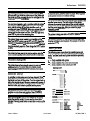
Remove the optional face-up output tray, if installed.
Move the printer to one side. Then set the lower cassette
unit where your printer normally rests keeping the paper
cassette facing you.
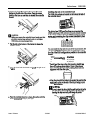
4. Lift the printer and align over the cassette unit using the
two alignment pins on the lower cassette unit as guides.
Lower the printer so that the pins fit securely into the
holes on the bottom of the printer as shown below.
2.
3. Whenyouwantprintedpagestofeedfacedownontopof
theprinter,reB3tthepaperpath-to~facedown
posih
Note: The printer is heavy, so you may someone help
you lift it.
5. Reconnect the power cord to the printer and plug it into an
electrical outlet.
6. Turn on the printer.
Laser Printers
1/19/93 REV
AL1000/1500-3