1
ActionLaser 1000/1500
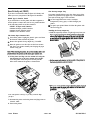
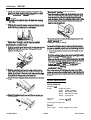
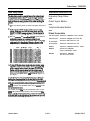
5. Rm any in&face cables you removed.
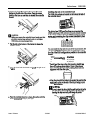
3. GentlypmsstheclGphalfwayinlothesocketIfthechip
goesinatanangle,~~itwithachippullerorasrnall
Bat-head scmvdrlver and reinsert the chip.
6. Inserttheinterfacecable(s)intotheU+hapedpartofone
cableclip.Liftthe~sideoftheprinterup~y.Then
hOOlCtlWShCEtlipOfthG!ClipiIltOdWfOlWdSlOtand
pushthebottomoftheclipuxxlertheprinteruntilitcliclcs
inplace.Repeatthisprocedurewiththeseccmdclipand
insertitintothebackslot.
CAUTION:
&I Bel.Ywejdnottosuntchthechiporthebalrdwhenremouitlg
thechip.
4. WiththchipproperlyinserM,pushdownfirmlyonboth
endsofthechiptomakesureitiswelheated.
7. Besurethepoweristumedoff;thenplugthepowercord
into an eledcal outlet.
5. Repeatsteps1thKnlgh4urrtilallchipsareinstalled.
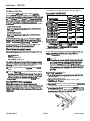
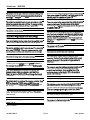
Checking the printer's memory
RehhUhgthecontroIlerboa2d
Completethefollowingstepstomakesauethatthememory
chipsetsarehtalledproperlyandareflmctioningamealy.
0 Alltheindicatorli~tscmthecontrolpanellightbriefly.
P Themessage RAN Checkappears.
h4akesurethattheamotmtofRAMdisplayedbytheRAM
chckstatusmessagematchsthenewtotalRAh4memory
(including the m&dent memoq of 0.5MB for the
Actiodaser loo0 and l.OMB for the ActionLaser 1500).
Use the tables in “selecting a memory chip set
combina~‘above.
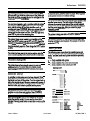
SlidetheamtrfAerboardintotheprinteruntilitloclu3in
place.Iftheamtrollerboarddoesnotfitsmoothlyhtoths
printerdonotforeeit.Removeitandaakes~theedges
fitpK@yintothegroovesirltheboardsbt.
5ectmthebaardusingthethmesihrer
earlier.
IfthecorrectamountofRAMdoesnotappear,turnoffthe
printerandremovethecontnAlerboardtochxkthatthechip
setis~~corrects~~t~~~pis~~~~
its socket.
screwByouremoved
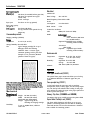
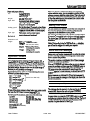
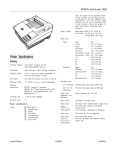
Option Specifications
Faceup output tray
Dimensions axxl
weight
Fastentheinterfaceboardawerwi~thetwo-you
removedearlier.
Paper eject
capacity:
Without the printer:
Height
36 mm (1.4 inches)
245 mm (9.6 inches)
Width
Depth
258 mm (102 inches)
Weight 0.1 Kg (0.2 lb)
20 sheets (80 g/m*)
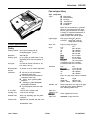
Lower paper cassette unit
Electrical
Power supply:
AL1000/1500-6
1/19/93
DC 24V supplied by the printer
Laser Printers