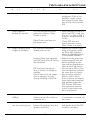
1
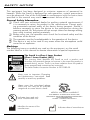
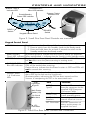
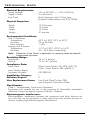
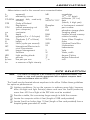
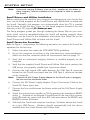
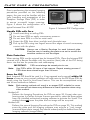
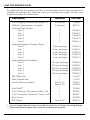
ScanX Duo DVM Digital Imaging System In-Line Erase Part Number: D1000V Ins t r u c t i o n M a n u a l FOREWORD ALLPRO Imaging has prepared this document as a guide to the proper use of the ScanX® Duo Intraoral Digital Imaging System with In-Line Erase. Refer to the following companion documents as necessary: Document Barrier Envelope (Size 0, 1, 2, 3 & 4) Instruction Sheet Phosphor Storage Plate Instruction Sheet Part Number 73473 73474 TABLE OF CONTENTS Section Page Congratulations . . . . . . . . . . . . . . . . . . . . . . . . . . . . . . . . . . 3 Warranty . . . . . . . . . . . . . . . . . . . . . . . . . . . . . . . . . . . . . . 3 On-Line Registration . . . . . . . . . . . . . . . . . . . . . . . . . . . . . . . 3 Safety Notice . . . . . . . . . . . . . . . . . . . . . . . . . . . . . . . . . . . . 4 Important Information . . . . . . . . . . . . . . . . . . . . . . . . . . . . . 7 Purpose of this Manual . . . . . . . . . . . . . . . . . . . . . . . . . . . . . 8 System Description . . . . . . . . . . . . . . . . . . . . . . . . . . . . . . . . 8 Box Contents . . . . . . . . . . . . . . . . . . . . . . . . . . . . . . . . . . . . 9 Unpacking and Inspection . . . . . . . . . . . . . . . . . . . . . . . . . . . 9 Computer System Requirements . . . . . . . . . . . . . . . . . . . . . . . 10 Controls and Indicators . . . . . . . . . . . . . . . . . . . . . . . . . . . . . 11 Technical Data . . . . . . . . . . . . . . . . . . . . . . . . . . . . . . . . . . . 12 Abbreviations . . . . . . . . . . . . . . . . . . . . . . . . . . . . . . . . . . . . 13 Site Selection . . . . . . . . . . . . . . . . . . . . . . . . . . . . . . . . . . . . 13 System Setup . . . . . . . . . . . . . . . . . . . . . . . . . . . . . . . . . . . . 14 Plate Care and Preparation . . . . . . . . . . . . . . . . . . . . . . . . . . 16 Intraoral Imaging Procedures . . . . . . . . . . . . . . . . . . . . . . . . . 18 Powering Down the System . . . . . . . . . . . . . . . . . . . . . . . . . . . 22 Maintenance . . . . . . . . . . . . . . . . . . . . . . . . . . . . . . . . . . . . 22 Scheduled Maintenance . . . . . . . . . . . . . . . . . . . . . . . . . . . . . 23 Troubleshooting . . . . . . . . . . . . . . . . . . . . . . . . . . . . . . . . . . 24 Accessories . . . . . . . . . . . . . . . . . . . . . . . . . . . . . . . . . . . . . 26 Warranty Extension . . . . . . . . . . . . . . . . . . . . . . . . . . . . . . . . 27 If You Need Assistance . . . . . . . . . . . . . . . . . . . . . . . . . . . . . 27 2 CONGRATULATIONS Congratulations on your purchase of the ScanX Duo Digital Imaging System with In-Line Erase another innovative imaging product from ALLPRO Imaging, a leading manufacturer of medical and veterinary equipment since 1962 The ScanX Duo, hereafter referred to as ScanX in this manual, is designed to process intraoral imaging plates only. The device has been designed and manufactured using state-of-the-art technology to give many years of dependable service. Using software that supports Intelligent Track Control allows the ScanX to be operated by two users at the same time with different patients. This manual covers the installation, operation and maintenance of the ScanX. Review and follow the guidelines included in this manual to ensure that your ScanX gives the highest level of service. WARRANTY The ScanX is warranted to be free from defects in material and workmanship from the date of installation for a period of one year. The ScanX is designed solely for use in an office environment and this warranty is not applicable to other applications. If your ScanX cannot be repaired in the field and turns out to be defective due to faulty materials and/or workmanship within the warranty period, ALLPRO Imaging will arrange to replace the unit at its expense within two business days. ALLPRO Imaging will ship the Customer a replacement, factory refurbished ScanX. The Customer then returns (at ALLPRO Imaging’s expense) the malfunctioning system back to ALLPRO Imaging in the same shipping container Upon determination of eligibility by ALLPRO Imaging’s Technical Support personnel, the Customer must return the malfunctioning ScanX within 15 business days or Customer will be invoiced for the replacement ScanX. Any returned units become the property of ALLPRO Imaging. In case of replacement of the product, the Warranty Period will remain in effect for 6 months or for the remaining period of the original warranty; whichever term is longer. The ScanX Standard Swap Warranty Coverage applies provided the product is handled properly for its intended use, in accordance with its operating instructions. This warranty does not apply to damage due to shipping, misuse, careless handling or repairs by non-authorized personnel. Warranty is void if installed or serviced by other than authorized service personnel. If unit fails, and the problem is determined to be caused by the lack of recommended scheduled maintenance as outlined in this Instruction Manual (i.e. worn Belt Drives or Brushes) , this failure would not be covered. This warranty does not cover accessories. The Phosphor Storage Plates (PSPs) are designed for use with the ScanX and will be replaced for a period of 30 days from the date of purchase if defective in manufacturing or packaging. ON-LINE REGISTRATION Quickly and easily register your new ScanX on-line. Just have your product model and serial numbers available. Then go to ALLPRO’s web site, www.allproimaging.com, click the Warranty Registration link and complete the registration form. This on-line registration ensures a record for the warranty period and helps us keep you informed of product updates and other valuable information. 3 SAFETY NOTICE This equipment has been designed to minimize exposure of personnel to hazards. While the ScanX is designed for safe operation, certain precautions must be observed. Use of the ScanX not in conformance with the instructions specified in this manual may result in permanent failure of the unit. General Safety Information. Check with your authorized dealer for packing material requirements if it is necessary to return the product to the manufacturer. Correct packing guarantees optimal safety of the device during transport. Should it become necessary to return the device to the manufacturer during the warranty period, Air Techniques will not accept claims for damage arising from using incorrect packing materials. Before every use, the operator must check the functional safety and the condition of the device. The operator must be knowledgeable in the operation of the device. This device is not to be used in any areas where the atmosphere could cause fire or explosion. Markings. The following terms or symbols are used on the equipment, on the serial number label or in this manual to denote information of special importance: CAUTION CLASS 1 LASER PRODUCT CLASS 3B LASER RADIATION WHEN OPEN AVOID EXPOSURE TO BEAM DANGER LASER RADIATION WHEN OPEN AVOID DIRECT EXPOSURE TO BEAM COVER REMOVED MAKES THIS DEVICE A The ScanX is a Class I Laser Product [Class 1 Laser Product (IEC)] This warning label identifies the ScanX as such a product and describes the potential danger to humans in the event the product is opened during service. There is no laser radiation from this product when operated and maintained as instructed. The Laser Product Accession Number is 0212282-00 CLASS IIIb LASER PRODUCT Alerts users to important Operating and Maintenance instructions. Read carefully to avoid any problems. CL A S S IF I ED Warns users that uninsulated voltage within the unit may be of sufficient magnitude to cause electric shock. MEDICAL ELECTRICAL EQUIPMENT 2 WITH RESPECT TO ELECTRICAL SHOCK, FIRE, MECHANICAL AND OTHER SPECIFIED HAZARDS ONLY IN ACCORDANCE WITH UL-60601-1, CAN/CSA C22.2 NO.601.1 66CA Indicates item used only once. Discard after use. Identifies the name of the manufacturer. Indicates date of manufacture. 4 SAFETY NOTICE Authorized Dealer Service Only. The interior of the ScanX is only accessible by removing hardware with tools. It should be opened and serviced only by an authorized dealer service technician. Failure to heed this warning may result in equipment damage or personal injury, and will void any and all warranties. Contact your authorized dealer for service information. Use of Accessory Equipment. The use of ACCESSORY equipment not complying with the equivalent safety requirements of this equipment may lead to a reduced level of safety of the resulting system. Use of ACCESSORIES or cables other than those specified or provided by Air Techniques may result in increased EMISSIONS or decreased IMMUNITY of the EQUIPMENT. Electrical Safety Notes. The power switch is the main power disconnect device. Use only the line cord provided with the unit. Use only grounded electrical connections. To avoid risk of electric shock, fire, short-circuit or dangerous emissions, never insert any metallic object into the equipment. Only use connection cable(s) delivered with the device. Check the device cables for possible damage before switching on. Damaged cables, plugs and sockets must be replaced before use. Never touch open supply outlets and patients simultaneously. Do not locate unit where it could be sprayed with water, or in a damp environment. 5 SAFETY NOTICE Knowledge of Warnings and Cautions. Users must exercise every precaution to ensure personnel safety, and be familiar with the warnings and cautions presented throughout this manual and summarized below. In this manual, the following definitions apply for all WARNINGS and CAUTION Statements: WARNINGS: Any operation, procedure or practice, which, if not strictly observed, may result in injury or long-term health hazards to personnel. CAUTIONS: Any operation, procedure or practice, which, if not strictly observed, may result in destruction of equipment or loss of effectiveness or damage to equipment and Phosphor Storage Plates (PSPs). DANGER: Opening the ScanX by removing any covers or components makes the equipment into a Class III b Laser Product. [Class 3B Laser Product (IEC)]. WARNINGS Only trained professionals should use this device. Federal law prohibits the sale of this device to individuals other than dental or veterinary professionals. Use of this device, other than as described in this manual, may result in injury. The ScanX contains a laser and is a Class 1 [Class 1 (IEC)] Laser Product. Use of controls or adjustments or performance of procedures other than those specified herein may result in hazardous radiation exposure. The laser is on only during an active scan. Only a trained technician from an authorized dealer should remove a cover from the ScanX. Direct eye contact with the output beam from the laser may cause serious damage and possible blindness. Do not open the ScanX to maintain it. The ScanX contains no user serviceable parts. If there is a service problem, contact your authorized dealer. Operate ScanX in dry environment. To prevent fire or electrical shock, do not expose this device to rain or moisture. Do not use damaged Phosphor Storage Plates (PSPs). Damaged PSPs may not provide reliable diagnostic images. Do not reuse the Barrier Envelopes. Dispose of used Barrier Envelopes in accordance with all local regulations. Imaging Plates (PSPs) are toxic. Never place an intraoral PSP in a patient's mouth without first enclosing it in a sealed barrier envelope. The patient should be cautioned not to bite, chew, or swallow the enveloped PSP. If a patient swallows such a PSP, contact a physician immediately. Thoroughly rinse with running water any part of the body that comes in direct contact with the wet phosphor compound of the PSP. Disposal of PSPs. Consult with your federal, national, state and local government, for rules and regulations on disposal of PSPs. 6 SAFETY NOTICE CAUTIONS Completely clean and erase PSPs before taking X-ray exposure. See the PLATE PREPARATION section of this manual. Minimize exposing an X-ray exposed PSP to light. Transfer the PSP into the Inlet slot quickly to minimize exposure to light. Use care in handling PSPs - Avoid fingerprints and scratching Refer to the instructions provided with the PSP package for further information on handling. Use of other manufacturer’s imaging plates Do not put PSPs designed for drum-type or other scanners in the ScanX. The thickness (especially thicker ones) will damage the ScanX. PSPs from another manufacturer may be used as long as the specifications are the same as those for the ScanX PSPs. IMPORTANT INFORMATION General Notes. All instructions in this manual form an integral part of the unit. They must be kept close to the unit and in readiness whenever required. Precise observance of these instructions is a pre-condition for use of the unit for the intended purpose and for its correct operation. This manual should be passed on to any future purchaser or operator. Safety of the operator as well as trouble-free operation of the unit are only ensured if use is made of original equipment parts. Moreover, use may only be made of those accessories that are specified in the technical documentation or that have been expressly approved and released by Air Techniques for the intended purpose. Air Techniques cannot warranty for the safety or proper functioning of this unit in the case where parts or accessories are used that are not supplied by Air Techniques. There is no guarantee against damage arising where parts or accessories are used that are not supplied by Air Techniques. Observe the usage and storage conditions. Appliances which accumulate condensation or become wet through a change of temperature may only be operated after they are fully dry. Air Techniques regard themselves as being responsible for the equipment with regard to safety, reliability and proper functioning only if assembly, resetting, changes or modifications and repairs have been carried out by an authorized dealer and if the equipment is used in conformity with the instructions contained in this manual. The device conforms to the relevant safety standards valid at this time. Any reprinting of the technical documentation, in whole or in part, is subject to prior written approval by Air Techniques. 7 IMPORTANT INFORMATION Correct Usage Operation of the ScanX may only be carried out by suitably qualified personnel. The ScanX is only to be used in the processing of exposed PSPs. The ScanX should be used in a room equipped for it. Room temperature should be in the range 50 to 105°F (10 to 40°C) with relative humidity between 5 and 95%. If the device is brought into the room of operation from a cooler environment, condensation can build up. Do not connect the device until it has warmed up to room temperature and is absolutely dry. This room should be free of all possible interferences (e.g. strong magnetic fields), as these could affect the operation. The ScanX may only be operated together with authorized software such as VISIX Imaging (see page 27). Correct usage includes observing all installation and operating instructions and adherence to the set-up, operation and maintenance instructions. Any use, above and beyond that described in this manual as correct usage, will invalidate the warranty. Incorrect Usage Any use that is not described in this manual as correct usage is considered as incorrect usage. The manufacturer is not to be held liable for any damage caused as a result of incorrect usage. The operator bears all risks. PURPOSE OF THIS MANUAL This manual provides the information necessary for the setup, operation and routine care and maintenance of the ScanX® Duo DVM Intraoral (P/N D1000V) Digital Imaging System with In-Line Erase. This manual is not to be used as a replacement for training in radiography. For information regarding the computer system and imaging software, refer to the appropriate documentation provided with your computer hardware and software. SYSTEM DESCRIPTION The ScanX is a digital radiography system that utilizes reusable Phosphor Storage Plates (PSP) in place of X-ray film to produce diagnostic quality intraoral digital radiographs. The ScanX produces a digital image by scanning PSPs, which have been exposed to X-rays. The ScanX allows computer storage, processing, retrieval and display of the computed radiographic images utilizing a user supplied software and computer. An additional feature of the ScanX consists of an in-line plate eraser function that removes the latent image from the plate immediately after scanning. This design provides an efficient one-operation scanning and erasing process leaving the user with a PSP ready for the next X-ray procedure. 8 BOX CONTENTS Each component of the ScanX is shipped packaged in individual protective material all packed in a single box, which includes: Accessory Kit containing: Part No. Line Cord 73096 Computer Connector Cable, USB B3554 Quick Start Instructions D1072V Size 2 Phosphor Storage Plates - Quantity 8 (2 boxes of 4) 73445-2 Barrier Envelopes (Size #2, Quantity 300) 73248-2 Plate Guides: D1159V Sizes #0, #1 and #4 Quantity 1 each and Size #2, Quantity 2 Drivers, Utilities and Instruction Manual Disk B7365 Cleaning Sheets Sample Kit D1030 Dust Cover D1300 PSP Wipes Sample Kit B8912 UNPACKING AND INSPECTION Unpack each component of the ScanX and inspect for physical damage such as scratched panels, damaged connectors, etc. If any damage is noted, immediately notify your Air Techniques authorized dealer immediately so corrective action can be taken. Save all cartons and packing materials to protect the ScanX in the event that it is to be transported or shipped in the future. Verify that all listed items were received. If any item is missing, notify your Air Techniques authorized dealer. Figure 1. ScanX Duo Digital Imaging System 9 COMPUTER SYSTEM REQUIREMENTS IMPORTANT: To operate the ScanX, it must be connected to a compliant Computer System, and the computer must be loaded with an authorized Imaging Software such as Visix. Neither the Computer System nor the Software is provided by Air Techniques. Contact your dealer for available options. Computer System Requirements The minimum computer system, computer and monitor, requirements necessary to operate the ScanX are listed below. Operating System: Windows XP Professional with Service Pack 3 or later for an Intel 32-bit processor; Microsoft Windows XP Professional 64-bit Edition with Service Pack 2 or later for an Intel 64-bit extended (x64) processor; Microsoft Windows Vista Business, Enterprise, or Ultimate with Service Pack 1 or later for an Intel 32-bit or an Intel 64-bit extended (x64) processor; or Microsoft Windows 7 Professional, Enterprise, or Ultimate for an Intel 32-bit or an Intel 64-bit extended (x64) processor. USB Port/Version: USB 2.0 or later Hard Drive: 200MB available disk space required to start scanning Image ManagementCompatible authorized third-party software (ie. VISIX) Software: (not included with product). Optical Drive: CD-ROM Capable Recommended Components The items listed below are recommended (but not required) computer system components to aid in ScanX operation CPU/Speed: 3.0 GHz Intel CORE2 System RAM: 2 GB Monitor: 20-inch SVGA, 1024 x 768 or higher resolution, contrast ratio 450:1, .22 dot pitch capability. Video Display Adapter: 32 MB RAM Peripherals: Standard Keyboard & Mouse, Backup Device External Surge Protector and Power supply backup System Properties. If unsure of the operating system version installed, check that it meets the necessary requirements by checking the System Properties window. This is done simply by right clicking the My Computer icon. Selecting Properties from the menu list displays the System Properties window as shown. The installed operating system version is listed under the General tab. The System Properties window can also be opened from the Desktop Start button. Just press the Start button and select SettingsControl Panel and then click System icon. 10 CONTROLS AND INDICATORS FLASHING OFF Blue LED Indicator Scanner Track 2 Indicator LED Scanner Track 1 Indicator LED Ready/Standby Green LED indicator READY Switch Keypad Control Panel ERASER Switch Figure 2. ScanX Duo Front Panel Controls and Indicators Keypad Control Panel READY Switch Toggles between the Standby and Ready mode as follows: 1. Press to switch from the Standby mode to the Ready mode. 2. Press and hold down for at least 2 seconds to switch to the Standby mode from the Ready mode. Ready/Standby Illuminates green to indicate that the ScanX is Ready for operation. Green LED indicator When extinguished, it indicates that the ScanX is in the Standby mode. ERASER Switch Toggles between turning the Erase function OFF and ON. This switch has no effect once the plate scanning or erasing starts. FLASHING OFF Blue LED indicator Scanner Tracks 1 & 2 Indicator LEDs Illuminates steady blue to indicate that the Erase function is ON and PSPs will be erased after scanning. Flashes blue to indicate that the Erase function is OFF and PSPs will not be erased after scanning. Illuminate green when the Scanner has been activated, indicating that a PSP can be fed into the ScanX track. Illuminate yellow, indicating the PSP has been sensed and the Scanner is transporting the PSP in the associated track. USB Connector Type B Item Function USB Connector Provides USB connection Type B from the computer via the supplied USB Computer Connector Cable Main Power Controls the application of Switch (1/0) ScanX operating power. 2A Circuit Protects against shorts in the Breakers internal electrical circuits. Main Power Switch (1/0) 2A Circuit Breakers IEC Connector IEC Connector Provides connection of Mains outlet power via supplied line cord. Figure 3. ScanX Duo Rear Panel Controls and Connectors 11 TECHNICAL DATA Electrical Requirements: Supply Voltage: Supply Current: Line Cord: Physical Properties: 100 to 240VAC +/- 10%, 50/60 Hz 2 A Maximum North American style 10 foot long Hospital Grade power cord, P/N 73096. Depth Width Height 10 3/8 inches 10 inches 12 inches Weight 21 pounds Environmental Conditions: Unit in Operation Temperature: Humidity: Heat emission Storage and Transport Temperature: Humidity: 50°F to 105°F (10°C to 40°C) 5% to 95% RH <40W -21°F to 130°F (-29°C to 54°C) 5% - 95% (Non-condensing) Note: Resolution of the ScanX is dependent on operating mode and specific imaging plate type used. Resolution Range: Horizontal: 10 to 12 (lp/mm) Vertical: 10 to 18+ (lp/mm) Compliance Data: Laser Class: Class I Laser Product (21 CFR 1040.10) Class 1 Laser Product (IEC 60825-1) Laser Product Report Accession Number: 0212282-00 Installation Category: I Pollution Degree: 2 User Replacement Items: Line Cord, Plate Guides, PSPs and Computer Connector Cable Classification: Class 1, Transportable, Continuous Operation, Equipment not suitable for use in the presence of flammable anaesthetic mixture(s). Protection against ingress of liquids -Ordinary Electromagnetic Interference: Electromagnetic interference between the equipment and other devices can occur. Do not use the equipment in close conjunction with sensitive devices, or devices creating high electromagnetic disturbances. 12 ABBREVIATIONS Abbreviations used in this manual are summarized below. A ampere(s) AC alternating current CD-ROM compact disk, read-only memory CFR Code of Federal Regulations CPU central processing unit (your computer) cm centimeter D depth GB gigabyte (230 109 bytes) GHz Gigahertz (109 of Hertz) H height Hz Hertz (cycles per second) IEC International Electro-technical Commission IMS Image Management Software LED Light emitting diode lbs. pounds lp/mm line pair per mm lux a measure of light intensity MB megabytes (220 106 bytes) millimeter (10-3 m) mm MONTH YYYY date (Month, 4 digit year) Phosphor a luminescent material PN part number PSP phosphor storage plate (imaging plate) RAM random access memory RH relative humidity SVGA Super Video Graphics Array USB Universal Serial Bus UL Underwriters Laboratories V Volts W Watts, width °C degree Celsius °F degree Fahrenheit ”, in inch SITE SELECTION Note: The ScanX is designed to be installed by your authorized dealer. The dealer or user must provide appropriate and compliant computer hardware and software such as VISIX. The ScanX may be located almost anywhere in the office. Follow these guidelines for optimum performance: Lighting conditions: Set up the scanner in ordinary room light, however, direct sunlight and light fixture(s) above and near the ScanX producing more than 400 lux of light at the PSP inlet must be avoided. Provide a stable, flat countertop large enough to hold the scanner. Locate the computer within 6 feet (length of USB cord provided). Locate ScanX no further than 10 feet (length of line cord provided) from a hospital grade grounded AC outlet. 13 SYSTEM SETUP Note: Authorized Imaging Software, such as Visix, supplied by the dealer or other company, must be installed on the computer in order to operate the ScanX. ScanX Drivers and Utilities Installation Before connecting the ScanX to your computer or attempting to use it for the first time, run the Setup program on the ScanX Drivers and Utilities Disk included with the ScanX. Normally, this program runs automatically when the CD is inserted into the drive for the first time. If not, run the Setup program located in the root directory of the CD (typically D:\Autorun.exe). The Setup program guides you through updating the library files on your computer, which must be completed before the ScanX will operate properly. More information can be found in the Installation Instructions and Notes file on the ScanX Drivers and Utilities Disk included with the ScanX. ScanX Connection Procedure Refer to Figure 1 and perform the following procedure to connect the ScanX for operation for the first time. 1. Select a location that meets the SITE SELECTION guidelines. 2. Set up the computer according to the manufacturer's recommendations. Make sure that the computer meets all requirements listed on page 10. 3. Verify that an authorized Imaging Software is installed properly on the computer. 4. Verify that the supplied ScanX Drivers and Utilities Disk which contains the USB drivers was properly installed per instructions above. 5. Connect the high speed USB cable between the USB Type B connector located on the ScanX rear panel and the USB Type A connector located on the computer. Note: Connect the 24V Power Supply Adapter to the ScanX prior to plugging the line cord into the Mains outlet. 6. Connect the 24V Power Supply Adapter Output Connection Cable to the ScanX DC Power Input Jack. 7. Connect the line cord between the Mains outlet and the 24V Power Supply Adapter. 8. Switch the scanner from standby to ON by pressing the membrane READY switch ( ) located on the Keypad Control Panel on the top of the scanner. Verify that both the green and blue LED indicators above the READY and ERASER switches illuminate. 9. With both the ScanX and computer turned on, Windows detects the ScanX as a new USB Device. Windows should automatically find the drivers installed from the ScanX Drivers and Utilities Disk. 14 SYSTEM SETUP FLASHING OFF Blue LED Indicator Ready/Standby Green LED indicator Scanner Track 2 Indicator LED Scanner Track 1 Indicator LED READY Switch Press HERE to turn ON or OFF (Standby) ERASER Switch Keypad Control Panel USB Connector Type B USB TO COMPUTER Main Power Switch (1/0) (See Note) 2 A Circuit Breakers IEC Connector Line Cord TO AC OUTLET Rear Panel Note: The Switch is the Mains disconnect device. Figure 4. Typical ScanX Duo Installation 15 PLATE CARE & PREPARATION Prior to performing the intraoral imaging procedures provided on the following pages, the user must be familiar with the care, handling and preparation of the Phosphor Storage Plate (PSP) in order to ensure successful image scanning. Figure 5 shows the configuration of a typical Intraoral Size #2 PSP. Tube or Sensitive side Figure 5. Intraoral PSP Configuration Printed side Handle PSPs with Care. Avoid scratching or soiling PSPs. Do not bend PSPs or apply unnecessary pressure. Do not store PSPs in a hot or moist area. Protect the PSPs from direct sunlight and ultraviolet rays. Pick up the PSPs using two fingers around the edges to avoid unnecessary contact with the plates. CAUTION: Always use a Barrier Envelope for each Intraoral plate. Exercise care in handling the plate so as not to scratch the sensitive surface or nick the edges. Plate Protection When storing PSPs use the original box for Intraoral PSPs. Place the Intraoral PSP covered with a Barrier Envelope with the sensitive (front) side of the PSP facing down into this box for protection and safekeeping. IMPORTANT: PSPs must always be erased prior to use. Note: Use PSPs within 24 hours of last erasure. Repeat erasing process if PSPs have been stored longer than 24 hours. Erase the PSP Each Intraoral PSP should be used (i.e. X-ray exposed and scanned) within 24 hours of erasure since natural radiation will add noise to the PSP. Erase PSPs by simply using the ScanX In-Line Erase Feature. This can be accomplished using one of two methods as follows: Note: Both erasing methods will result in an erased PSP suitable for reuse. The user will not observe any difference in ScanX operation when using either method. Method #1 Perform the Imaging Procedures for PSPs on page 20. Except when performing step 4 of either Activate Scanner procedure, select the Erase option from the installed authorized imaging software to activate the ScanX. This method does not scan the plate and no image will be acquired. Method #2. Perform the normal Imaging Procedures for PSPs on page 20. This method scans the plate and the imaging software may acquire a “junk image” (scanned latent plate image) that should subsequently be deleted from the imaging software (image folder). 16 PLATE CARE & PREPARATION Cleaning Phosphor Storage Plates For the best images, PSPs should be handled carefully and kept clean. Use the following procedure to clean plates: 1. Use lint-free, 100% cotton gauze (not cotton balls). Gently wipe the cotton gauze over the dry Plate surface. Wipe back and forth and then in a circular motion. 2. To clean any remaining stains, dampen the gauze in denatured ethyl alcohol (1% denaturant) and wipe using the same motion as above. 3. Completely dry the surface by wiping with another piece of cotton gauze. Make sure that the PSP is completely dry before use. Disinfecting the Phosphor Storage Plates IMPORTANT: Do not soak overnight. There is no reason to routinely disinfect the PSPs unless contamination is suspected. If a PSP has touched a contaminated surface, it may be immersed briefly in a cold sterilant (such as a 2% Gluteraldehyde solution.) according to sterilant manufacturers directions. Do not emerse the plate if there is any evidence of deep scratches in the surface of the plate or nicks in the edges of the plate. After disinfection, clean and dry the plate using the instructions above. Disposal of Phosphor Storage Plates Consult with your federal, national, state and local government, for rules and regulations on disposal of Phosphor Storage Plates. Barrier Envelope Handling Always guard against contamination by using standard infectious control procedures when handling individual barrier envelopes. It is best to discard suspected contaminated envelopes since no cleaning or disinfection procedure exist or are required for barrier envelopes. 2 The Barrier Envelope must be used only once and disposed of properly in accordance with local code. Preparing Intraoral Plates for Patient Use Insert the erased PSP into the Barrier Envelope so the printed side of the PSP is visible through the transparent side of the envelope. Peel off the adhesive strip and seal the envelope. See Figures 6a - 6c below. Figure 6a Insert the PSP. Figure 6b Peel off the adhesive strip. 17 Figure 6c Seal the Barrier Envelope. INTRAORAL IMAGING PROCEDURES Note: 1. The orientation letter “a”, printed on the PSP, may be used for reference as you would use the dot on an intraoral X-ray film. In addition, a backwards “a” (i.e. “a”), appearing in an image, is an indication that the image has been flipped. 2. If using holders with alligator clips, it is advisable to file down the points to avoid puncturing the Barrier Envelope. It is important to take care not to puncture the Barrier Envelope or damage the PSP. Take an X-ray Image Put an image on the PSP by performing the following procedure. 1. Place the erased intraoral PSP in the sealed Barrier Envelope into the patient's mouth exactly as you would use X-ray film. Make sure the opaque side of the Barrier Envelope is facing the tubehead. 2. Take the exposure. The X-ray dose may typically be reduced by 80 - 85% of that required for D-speed intraoral film (depending on X-ray system used; the actual X-ray dose should be determined through experimentation). 3. Wearing gloves, remove the exposed PSP from the patient's mouth and place to the side making sure the sensitive side of the barrier envelope is facing away from any light source. 4. Repeat steps 1 through 3 as necessary to complete the patient's X-ray series. When all necessary plates in the X-ray session have been exposed, prepare each plate by performing the procedure below. Preparing the Exposed Plate for Scanner Processing 1. Disinfect the Barrier Envelope (with plate still inside) and your gloves by washing with disinfectant hand soap and water. Dry the Barrier Envelope thoroughly. 2. Remove gloves and wash any powder from hands. Powder on a PSP will degrade the image, and an accumulation of powder in the scanner will lead to degradation of scanner performance. 18 INTRAORAL IMAGING PROCEDURES IMPORTANT: Be sure that the sensitive side of the PSP is facing down when it lands on the PSP Table Mat (See Figure 7, View C). If it is not sensitive side down, TURN IT OVER IMMEDIATELY. Failure to do so may result in erasure of the PSP. 3. Lay the PSP Table Mat on a flat surface near the ScanX as shown by Figure 7, View A. 4. As shown by Figure 7, View B, remove the exposed PSP from its washed and dried envelope as follows: a.Hold the enveloped exposed PSP, with the printed side facing up, parallel to and about an inch above the PSP Table Mat. b.Tear the envelope lengthwise starting at the notch to eject the PSP onto the PSP Table Mat. 5. As shown by Figure 7, View C, the PSP is now ready to be scanned to read the image from the PSP by performing the Intraoral Imaging Procedures. View A PSP Table Mat View B Ejecting PSP to Table Mat View C PSPs ready for Scanning Figure 7. Preparing the Exposed Plate for Scanning Configure the Intraoral Plate Guides. If the desired Plate Guides are not in place, install these Guides at this time. Do not operate the scanner without a full complement of two Guides in place. Any combination of Guides may be used. See Figure 8. Scanner Track 2 Plate Guide Scanner Track 1 Plate Guide Figure 8. ScanX with a full Complement of Plate Guides in Place. 19 INTRAORAL IMAGING PROCEDURES IMPORTANT: Transfer the PSP from the PSP Table Mat to the Plate Guide slot quickly. Always keep the sensitive side away from any light source to minimize image loss. Activate Scanner Activate the ScanX by performing the following procedures. 1. Make sure the ScanX and computer components are correctly connected as shown in Figure 4. 2. Switch the scanner from Standby to ON by pressing the membrane READY switch ( ) located on the Keypad Control Panel on the top of the scanner. 3. Verify that both the green and blue LED indicators above the READY and ERASER switches, respectively, illuminate. (Default mode has eraser ON.) Note: Change in motor noise pitch levels is normal when switching to different resolution setting selections. 4. Use the user-supplied authorized Imaging Software, such as VISIX, to activate the Scanner and to select the desired image type and resolution. 5. Verify that the two Scanner track indicators illuminate green when the Scanner has been activated, indicating that PSPs can be fed into the corresponding Plate Guide. Scanning and Erasing Plates Scan and erase an intraoral PSP in one operation by performing the following procedures. 1. Grasp a PSP by long edges between your thumb and index finger. See Figure 9. 2. With printed side facing you, carefully and quickly insert the PSP into the corresponding Plate Guide slot as far as possible. 3. Immediately press the PSP all the way down with your fingertip (from position Figure 9 to position Figure 11) until the scanner's transport mechanism takes over and the PSP moves down on its own. 4. Verify that the track light illuminates yellow, indicating the Plate Guide slot is in use, the PSP has been sensed and the Scanner is transporting the PSP. 20 Figure 9. PSP Pick-up. Figure 10 Feeding Intraoral Plate. Figure 11. Fully Inserted Plate. INTRAORAL IMAGING PROCEDURES Scanning and Erasing Plates (continued) Note: Up to two PSPs can be processed simultaneously. One PSP can be inserted into each Plate Guide at a time as long as the corresponding track indicator light is illuminated green. The next PSP may be fed into a Plate Guide slot only after the corresponding track indicator LED changes from yellow to green. 5. Observe that a red glow emanates from the scanner exit slot. 6. Observe that each scanned and erased PSP drops into the receiving tray at the bottom of the scanner. Since the ScanX default operation is with the erase mode enabled (blue LED indicator above the ERASER switch is steadily illuminated), each PSP is erased and ready for reuse. 7. Repeat steps 2 through 6 to process additional PSPs as necessary. Another PSP may be fed into any Plate Guide slot as long as the track indicator light illuminates green. 8. Observe that all transport indicators illuminate green and the red glow from the exit slot extinguish after the last PSP drops to the tray. CAUTION: Always use exercise care in handling the PSPs so as not to scratch the sensitive surface or nick the edges. 9. Retrieve the processed (scanned and erased) PSPs for reuse or storage. Make sure not to scratch the sensitive surface or nick the edges when removing from the scanner outlet. 10.View and save each scanned image using the user-supplied authorized Imaging Software such as VISIX. IMPORTANT: PSPs will not be erased after scanning when operating the ScanX with the eraser disabled. PSPs must always be erased prior to exposure to X-rays for new images. Scanning Plates without Erasing The ScanX can be operated with the in-line eraser feature turned off. When the eraser mode is disabled, the ScanX scans the same as when the eraser is enabled except that the PSPs are not erased after scanning. Scan an intraoral PSP without erasing the image by performing the following procedures. 1. Activate the scanner by performing the proTrack 1 GREEN cedures on previous page. LED LED Track 2 Note: Upon activation, the ScanX defaults with the eraser mode enabled. This must be disabled prior to scanning to prevent erasing of the scanned PSP. LED BLUE LED 2. Disable the eraser mode of operation by pressing the membrane ERASER switch located on the Keypad Control Panel. See Figure 12. ERASER READY 3. Verify that the blue LED indicator above the Switch Switch ERASER switch blinks blue to indicate that the Erase function is OFF. PSPs will not be Figure 12. erased after scanning. ScanX Keypad Control Panel 4. Insert the exposed PSPs to be scanned into the ScanX Plate Guides by performing the Scanning and Erasing Plates procedures provided on the previous page. 5. The scanned PSPs still contain latent images that require erasure. Make sure to erase each PSP prior to reuse for new images. 21 POWERING DOWN THE SYSTEM IMPORTANT: Never power down the system during a scanning session. The ScanX is designed to be left on continuously during the active day. At the end of the day, or whenever desired, power down the system as follows: 1. Switch the ScanX from ON to Standby by pressing and holding the membrane READY switch on the Keypad Control Panel for approximately two seconds, until the green LED above the READY switch extinguishes. 2. Turn OFF the main power to the ScanX by placing the rocker switch on the Built-In Control/Connector panel to the OFF (O) position. MAINTENANCE Maintenance Procedures The ScanX is designed for many years of trouble-free operation. Maintenance as described herein is minimal. IMPORTANT: Do not spray solvents or liquid directly on the scanner. Cleaning the ScanX Turn off the ScanX disconnect the line cord from the Mains wall outlet and disconnect the computer connection cable from the ScanX before cleaning. Wipe the outside surfaces with a soft paper towel dampened with a disinfectant solution or non-abrasive household cleaner. Be careful not to allow solvents TO RUN OR DRIP into the ScanX. This could cause damage to the ScanX. Allow to air dry before plugging in or turning back on. Disinfecting the ScanX No disinfection is required for the ScanX. Cleaning the Plate Guides Wash the Plate Guides with a non-abrasive cleaner and water. Dry thoroughly. IMPORTANT: Plate Guides must not be put in an autoclave. Note: Always use standard infection control procedures when handling devices that contact the patient. Disinfecting the Plate Guides There is no reason to routinely disinfect the Plate Guide unless contamination is suspected. If a Plate Guide has touched a contaminated surface, it may be immersed briefly in a cold sterilant according to sterilant manufacturers directions. After disinfection, clean and dry the Plate Guide using the instructions above. Cleaning the Plate Transport Over time, small debris and dust can accumulate in the plate transport mechanism causing a loss in image quality and possible damage to the PSPs. To ensure optimal ScanX performance, the plate transport should be cleaned once per week using a new ScanX Cleaning Sheet each time. Sheets can be purchased from your dealer. Refer to ACCESSORIES page 26. 22 MAINTENANCE Phosphor Storage Plates (PSPs). PSP's are subject to "wear" on the black side during normal handling and use. They can appear scratched, while the sensitive blue or white side remains relatively "smooth". This scratched look on the black side has absolutely no effect on the quality of the image and should be expected under normal conditions. If the phosphor side is scratched make sure the plates are being handled properly and not being dragged from the ScanX tray area or other surfaces that could cause scratching of the plate. Make sure to review the Plate Care and Preparation information provided on page 16 of this manual. SCHEDULED MAINTENANCE Like all precision products, the ScanX requires a certain amount of care on a regularly scheduled basis. A well-organized maintenance program aids dependable equipment operation and reduces problems to a minimum. Routine checks help to detect general overall wear, and replacement of parts can often be made before a problem occurs. Adherence to the maintenance schedule will ensure that the ScanX Digital Imaging System will continue performing at its best with uninterrupted service. Understanding this, we have established two basic maintenance kits that will help insure continuous operation of the ScanX Digital Imaging System. The kits and their associated parts number along with the recommended performance schedule are listed below. IMPORTANT: All service requiring access to the interior of the ScanX must be performed only by an authorized dealer service technician with the proper training. Service Requirement Schedule Kit Part No. Replace transport drive belts and springs 2 years D1920 Replace complete transport belt drive belt assembly 4 years D1932 23 TROUBLESHOOTING Trouble 1. No power/ No green light on membrane switch Possible Cause Corrective Action • Not plugged in. • Check the line cord connection is firmly plugged in. • Make sure outlet is grounded and has power. • No power at Mains Outlet • The ScanX has not been turned on. • Defective power supply • Make sure that the rocker switch is set to ON (1). • Call your authorized Air Techniques dealer. 2. Green, Blue or • Defective light or circuitry. Yellow indicator light does not work. • Call your authorized Air Techniques dealer. 3. Image Management • Inadequate Computer System. Software does not recognize the ScanX • The ScanX has not been turned on. when selected. • Verify Computer System requirements (Page 10). • Make sure that the READY switch is set to ON and the green indicator light is illuminated. • Reconnect the cable. Check for tightness. Replace if necessary. • Verify that the Setup program was correctly installed (Page 14). Use different USB port. • Call your authorized Air Techniques dealer. • The computer connection cable is loose or defective. • The computer does not recognize that the ScanX is connected. • ScanX hardware problem. 4. Plate does not scan properly. • The PSP was not pushed far enough into the ScanX. • Fully feed the PSP into the Plate Guide. 5. No image appears • The PSP fed backwards • If Eraser mode was dis(printed side towards ScanX). abled during scanning, after scanning. quickly refeed the plate Note: with the printed side out. There should be an image on the plate only If Eraser mode was if the in-line eraser mode was disabled enabled during scanning, during scanning. retake image. • Feed the PSPs into the •The PSP was Important: scanner immediately and erased prior to scanning. Do not allow the PSP to be exposed quickly after removal from to light between the Barrier Envelope. taking an X-ray and • Call your authorized Air • Hardware failure. scanning with the Techniques dealer. ScanX. • Call your X-ray service • X-ray source failed. dealer. 24 TROUBLESHOOTING Trouble Possible Cause Corrective Action Image is too dark. • PSP has been overexposed • Use software to adjust brightness. If this is not possible, retake image with proper (lower) exposure and a newly erased PSP. 7. Image appears skewed on monitor. • PSP was fed skewed either behind or without a Plate Guide in place. • Verify that Plate Guide is in place and PSP is fed into slot or if a Size 4 PSP, it is fed in straight behind a Guide. • Check PSP size and ensure that the correct Plate Guide is in place. 6. • Plate Guide used was not the proper size. 8. Image contains ghost • PSP was not completely images or shadows. erased prior to use. • Make sure ScanX is operating with eraser turned on (blue LED indicator above the ERASER switch is illuminated steadily). • Imaging Plate was exposed • Make sure the plates are with the back of the IP facing inserted properly into the the tubehead. barrier envelope or cassette with the proper orientation to the X-ray source. • PSP has been stored too • Do not store PSPs in barlong in barrier envelope or rier envelopes or cassettes cassette. for more than 24 hours. • Partial erasure of the image • Do not leave exposed due to exposure to light PSPs in well lit areas. during handling of the PSP Even in barrier envelopes, some light may penetrate and partially erase the PSP. Transfer PSPs from their protective barriers to the ScanX within one hour of exposure. 9. Image shows artifacts. • The PSP surface is not clean and has dirt, stains or scratches on it. • Clean the PSP. If the PSP is scratched or stained, do not reuse. 10. PSP does not drop • PSP may have clung to the • Look below transport arch into the receiving tray bottom of transport arch due and gently touch the PSP to static electricity. to allow it to drop. 25 ACCESSORIES The following lists the ordering number and description for accessory components available to maintain the ScanX to meet your professional needs. Contact your authorized dealer for information. Description Quantity Part No. VISIX Imaging Software (see page 27) 5 Licenses 74500 VISIX for Veterinarians, complete 5 Licenses B8710 1 1 1 1 1 73566-0 73566-1 73566-2 73566-3 73566-4 package package package package package 73445-0 73445-1 73445-2 73445-3 73445-4 Intraoral Plate Guides Size 0 Size 1 Size 2 Size 3 Size 4 Intraoral Phosphor Storage Plates Size 0 Size 1 Size 2 Size 3 Size 4 Intraoral Barrier Envelopes Size 0 Size 1 Size 2 Size 3 Size 4 PSP Table Mat 2 2 4 2 1 per per per per per 100 per package 100 per package 300 per package 100 per package 50 per package 1 73248-0 73248-1 73248-2 73248-3 73248-4 74579 1 74570 Box of 12 Box of 25 D1010 D1020 Line Cord** 1 73096 6-Ft Computer Connector Cable, USB 1 B3554 15-Ft Computer Connector Cable, USB 1 B5027 Dust Cover 1 D1300 PSP Wipes Box of 25 B8910 Plate Transfer Box ScanX Cleaning Sheets* * One re-usable Release Liner is included in each box of ScanX Cleaning Sheets. ** Some international power line cords are available as required. 26 WARRANTY EXTENSION Extended ScanX Swap Warranties providing for an additional 1 and 2 Year period are available for purchase. Please contact ALLPRO Imaging for details. IF YOU NEED ASSISTANCE ALLPRO Imaging ScanX systems are designed and manufactured to high standards. They are easy to install and use and typically deliver high-quality performance. If any difficulties are encountered with this product, please contact ALLPRO Imaging Technical Support at 1-800-247-8324. For additional information, please contact your authorized dealer or visit our web site, www.allproimaging.com Air Techniques, Inc., Allpro Imaging 1295 Walt Whitman Road Melville, New York 11747 USA 27 ALLPRO Imaging is a leading manufacturer of imaging systems for the medical, veterinary and security markets. Thousands of ALLPRO Imaging products have been sold globally, installed and serviced through our network of authorized dealers. 100 Plus 2010 Polaris J ScanX® 12 ScanX® 12 DVM ScanX® Discover ScanX® Duo ScanX® Fit ScanX® Quantum ScanX® Scout ScanX® Trek 1295 Walt Whitman Road, Melville, NY 11747-3062 Website: www.allproimaging.com Toll Free: 1-800-247-8324 © Copyright ALLPRO Imaging, 2007 • P/N D1105V, Rev. F - March 2011