1
Freeway ®
Server-Resident Application
(SRA)
Programmer Guide
DC 900-1325I
Protogate, Inc.
12225-R World Trade Drive
San Diego, CA 92128
March 2011
Protogate, Inc.
12225 World Trade Drive, Suite R
San Diego, CA 92128
(858) 451-0865
Freeway Server-Resident Application (SRA) Programmer Guide
© 2000 - 2011 Protogate, Inc. All rights reserved
Printed in the United States of America
This document can change without notice. Protogate, Inc. accepts no liability for any errors this
document might contain.
Freeway® is a registered trademark of Protogate, Inc.
All other trademarks and trade names are the properties of their respective holders.
Contents
List of Figures
7
Preface
9
1
Introduction
1.1
1.2
2
Freeway Server-Resident Applications (SRAs) .
Overview of Example SRA Types . . . . . . . .
1.2.1 Basic SRA Configuration. . . . . . . . . .
1.2.2 Protocol Converter Configuration. . . . .
1.2.3 NON-API Client Interface . . . . . . . . .
1.2.4 Message Filtering SRA . . . . . . . . . . .
15
.
.
.
.
.
.
.
.
.
.
.
.
.
.
.
.
.
.
.
.
.
.
.
.
.
.
.
.
.
.
.
.
.
.
.
.
.
.
.
.
.
.
.
.
.
.
.
.
.
.
.
.
.
.
.
.
.
.
.
.
.
.
.
.
.
.
.
.
.
.
.
.
.
.
.
.
.
.
.
.
.
.
.
.
.
.
.
.
.
.
Server-Resident Application Software Development
2.1
SRA Development Environment . . . . . . . . .
2.1.1 Freeway Disk Partitions . . . . . . . . . . .
2.1.2 Software Development Directory Structure.
2.2 Files Provided for Building the SRA . . . . . . .
2.2.1 Example Filter SRA. . . . . . . . . . . . . .
2.2.2 Loopback Test Programs . . . . . . . . . . .
2.3 Creating a New SRA Development Environment
2.3.1 Create the SRA Development Directory. . .
2.3.2 Edit the SRA source files . . . . . . . . . . .
2.3.3 Build the SRA binary files . . . . . . . . . .
2.4 Running the SRA . . . . . . . . . . . . . . . . .
2.5 Customizing the SRA . . . . . . . . . . . . . . .
2.6 Relocating Your SRA Files. . . . . . . . . . . . .
2.7 Starting the SRA at Freeway Boot-up. . . . . . .
2.7.1 Main SRA Startup File (rc.startsra) . . . . .
DC 900-1325I
15
16
18
18
21
22
23
.
.
.
.
.
.
.
.
.
.
.
.
.
.
.
.
.
.
.
.
.
.
.
.
.
.
.
.
.
.
.
.
.
.
.
.
.
.
.
.
.
.
.
.
.
.
.
.
.
.
.
.
.
.
.
.
.
.
.
.
.
.
.
.
.
.
.
.
.
.
.
.
.
.
.
.
.
.
.
.
.
.
.
.
.
.
.
.
.
.
.
.
.
.
.
.
.
.
.
.
.
.
.
.
.
.
.
.
.
.
.
.
.
.
.
.
.
.
.
.
.
.
.
.
.
.
.
.
.
.
.
.
.
.
.
.
.
.
.
.
.
.
.
.
.
.
.
.
.
.
.
.
.
.
.
.
.
.
.
.
.
.
.
.
.
.
.
.
.
.
.
.
.
.
.
.
.
.
.
.
.
.
.
.
.
.
.
.
.
.
.
.
.
.
.
.
.
.
.
.
.
.
.
.
.
.
.
.
.
.
23
24
25
27
27
28
30
30
31
33
34
36
37
39
39
3
Freeway Server-Resident Application (SRA) Programmer Guide
2.7.2 Secondary SRA Startup File (rc.startsra.local). . . . . . . . . . . . .
3
Interfacing to DLI/TSI and Protocol Software
43
3.1
Files Associated with DLI and TSI . . . . . . .
3.1.1 Source Files . . . . . . . . . . . . . . . . .
3.1.2 Binary Files . . . . . . . . . . . . . . . . .
3.1.3 Log and Trace Files . . . . . . . . . . . . .
3.2 DLI Normal Operation versus Raw Operation .
3.2.1 Link Configuration Parameters . . . . . .
3.2.2 Set Buffer Size . . . . . . . . . . . . . . . .
3.2.3 Enable Link . . . . . . . . . . . . . . . . .
3.2.4 Local Acks . . . . . . . . . . . . . . . . . .
3.2.5 Optional Arguments . . . . . . . . . . . .
3.3 Modifying the DLI Configuration File . . . . .
4
Managing RAM Memory . . . . . . . .
4.1.1 DLI Configuration . . . . . . . . .
4.1.2 TSI Configuration. . . . . . . . . .
4.1.3 File Management . . . . . . . . . .
4.2 Updating Files . . . . . . . . . . . . . .
4.2.1 File Transfers Across the Network .
4.2.2 Menu Update Method (5-3-3) . . .
4.2.3 CDROM Updates . . . . . . . . . .
4.2.4 Text Files: Windows vs. UNIX . . .
4.3 Message Logging . . . . . . . . . . . . .
4.3.1 Freeway Log . . . . . . . . . . . . .
4.3.2 Syslog . . . . . . . . . . . . . . . .
4.4 Miscellaneous Items . . . . . . . . . . .
4.4.1 Rotating Hard Drives . . . . . . . .
4.4.2 Non-Blocking (Asynchronous) I/O
4.4.3 Access to ICP Links . . . . . . . . .
4.4.4 Stopping the SRA . . . . . . . . . .
5
.
.
.
.
.
.
.
.
.
.
.
.
.
.
.
.
.
.
.
.
.
.
.
.
.
.
.
.
.
.
.
.
.
.
.
.
.
.
.
.
.
.
.
.
.
.
.
.
.
.
.
.
.
.
.
.
.
.
.
.
.
.
.
.
.
.
.
.
.
.
.
.
.
.
.
.
.
.
.
.
.
.
.
.
.
.
.
.
.
.
.
.
.
.
.
.
.
.
.
.
.
.
.
.
.
.
.
.
.
.
.
.
.
.
.
.
.
.
.
.
.
.
.
.
.
.
.
.
.
.
.
.
.
.
.
.
.
.
.
.
.
.
.
43
44
47
49
50
51
52
52
52
53
53
57
.
.
.
.
.
.
.
.
.
.
.
.
.
.
.
.
.
.
.
.
.
.
.
.
.
.
.
.
.
.
.
.
.
.
.
.
.
.
.
.
.
.
.
.
.
.
.
.
.
.
.
.
.
.
.
.
.
.
.
.
.
.
.
.
.
.
.
.
.
.
.
.
.
.
.
.
.
.
.
.
.
.
.
.
.
.
.
.
.
.
.
.
.
.
.
.
.
.
.
.
.
.
.
.
.
.
.
.
.
.
.
.
.
.
.
.
.
.
.
.
.
.
.
.
.
.
.
.
.
.
.
.
.
.
.
.
.
.
.
.
.
.
.
.
.
.
.
.
.
.
.
.
.
.
.
.
.
.
.
.
.
.
.
.
.
.
.
.
.
.
.
.
.
.
.
.
.
.
.
.
.
.
.
.
.
.
.
.
.
.
.
.
.
.
.
.
.
.
.
.
.
.
.
.
.
.
.
.
.
.
.
.
.
.
.
.
.
.
.
.
.
.
.
.
.
.
.
.
.
.
.
.
.
.
.
.
.
.
.
.
.
.
.
.
.
.
.
.
.
.
.
.
.
.
.
.
.
.
.
.
.
.
.
.
.
.
.
.
.
.
.
.
.
.
.
.
.
.
.
.
.
.
.
.
.
.
.
.
.
.
.
.
.
.
.
.
.
.
.
.
.
.
.
.
.
.
Interfacing with the SRA
5.1
4
.
.
.
.
.
.
.
.
.
.
.
SRA Design Tips and Restrictions
4.1
41
57
57
58
58
59
59
59
61
62
64
64
65
66
66
69
69
69
73
Initialization Files . . . . . . . . . . . . . . . . . . . . . . . . . . . . . .
73
DC 900-1325I
Contents
5.2
5.3
5.4
6
Socket Interfaces. . . . . . . . . . . . . . . . . . . . . . . . . . . . . . . . 74
NFS Mount . . . . . . . . . . . . . . . . . . . . . . . . . . . . . . . . . . 75
Web Browser Interface . . . . . . . . . . . . . . . . . . . . . . . . . . . . 77
LAN Message Filtering
6.1
6.2
6.3
6.4
6.5
6.6
msgmux Filter Hook . . . . . . .
SRA Filter Functions . . . . . . .
Freeway Server Message Buffers .
Filter Restrictions . . . . . . . . .
Example SRA Filters. . . . . . . .
Building the Example Filter Code
Index
DC 900-1325I
79
.
.
.
.
.
.
.
.
.
.
.
.
.
.
.
.
.
.
.
.
.
.
.
.
.
.
.
.
.
.
.
.
.
.
.
.
.
.
.
.
.
.
.
.
.
.
.
.
.
.
.
.
.
.
.
.
.
.
.
.
.
.
.
.
.
.
.
.
.
.
.
.
.
.
.
.
.
.
.
.
.
.
.
.
.
.
.
.
.
.
.
.
.
.
.
.
.
.
.
.
.
.
.
.
.
.
.
.
.
.
.
.
.
.
.
.
.
.
.
.
.
.
.
.
.
.
.
.
.
.
.
.
81
82
82
84
86
88
89
5
Freeway Server-Resident Application (SRA) Programmer Guide
6
DC 900-1325I
List of Figures
Figure 1–1: Freeway Server Data Flow (Without an SRA). . . . . . . . . . . . . . . . . 17
Figure 1–2: Example of a Basic SRA . . . . . . . . . . . . . . . . . . . . . . . . . . . . 19
Figure 1–3: Example of an SRA Protocol Converter . . . . . . . . . . . . . . . . . . . . 20
Figure 1–4: Example of a NON-API Client Interface . . . . . . . . . . . . . . . . . . . 21
Figure 2–1: Example rc.startsra file from Protogate . . . . . . . . . . . . . . . . . . . . 42
Figure 3–1: Connection between SRA and DLI configuration file . . . . . . . . . . . . 45
Figure 3–2: Connection between DLI and TSI configuration files . . . . . . . . . . . . 46
Figure 3–3: Example of the SRA make process. . . . . . . . . . . . . . . . . . . . . . . 48
Figure 3–4: Pathnames for Log and Trace files. . . . . . . . . . . . . . . . . . . . . . . 49
Figure 5–1: Example SRA Initialization File . . . . . . . . . . . . . . . . . . . . . . . . 74
Figure 6–1: WAN Message Filtering Example . . . . . . . . . . . . . . . . . . . . . . . 80
Figure 6–2: Freeway Server Message Buffer . . . . . . . . . . . . . . . . . . . . . . . . 83
DC 900-1325I
7
Freeway Server-Resident Application (SRA) Programmer Guide
8
DC 900-1325I
Preface
Purpose of Document
This document describes the design approaches to and constraints regarding the development of a Freeway server-resident application (referred to as “SRA” throughout this
document).
Intended Audience
This document should be read by any programmer who wishes to extend Freeway
server functionality by supplementing the server code with customer-developed software. The new functions can filter the data stream, switch messages from one WAN link
to another, or provide other application-specific requirements.
Required Equipment
You must have a Freeway server running the FreeBSD operating system and the Freeway
server software distribution. The Freeway server software contains all software development tools necessary to build an SRA under FreeBSD.
DC 900-1325I
9
Freeway Server-Resident Application (SRA) Programmer Guide
Organization of Document
Chapter 1 gives an overview of the software components necessary for the development
of a server-resident application (SRA) as well as some example SRA types.
Chapter 2 describes how to develop and build the SRA software. It also describes how to
start your server-resident application.
Chapter 3 describes how to interface the SRA with the DLI API and protocol software
on the ICP boards.
Chapter 4 outlines some suggestions and restrictions you must consider when designing the SRA.
Chapter 5 describes some ways to interface with the SRA from outside the Freeway
server.
Chapter 6 describes the example SRA filter routines which interface with MSGMUX to
filter the message stream that flows between the LAN and WAN.
11/16/99
Leslie: Add
1567 to the
“Specials”
table.
Protogate References
The following general product documentation list is to familiarize you with the available Protogate Freeway and embedded ICP products. The applicable product-specific
reference documents are mentioned throughout each document (also refer to the
“readme” file shipped with each product). Most documents are available on-line at Protogate’s web site, www.protogate.com.
Hardware Support
•
•
•
•
10
Freeway 3110 Hardware Installation Guide
DC 900-2012
Freeway 3210 Hardware Installation Guide
DC 900-2013
Freeway 3410 Hardware Installation Guide
DC 900-2014
Freeway 3610 Hardware Installation Guide
DC 900-2015
DC 900-1325I
Preface
•
•
ICP2432B Hardware Description and Theory of Operation
DC-900-2006
ICP2432B Hardware Installation Guide
DC-900-2009
Freeway Software Installation and Configuration Support
•
•
•
Freeway Message Switch User Guide
DC-900-1588
Freeway User Guide
DC-900-1333
Freeway Loopback Test Procedures
DC-900-1533
Embedded ICP Software Installation and Programming Support
•
•
•
•
•
•
ICP2432 User Guide for Digital UNIX
DC-900-1513
ICP2432 User Guide for OpenVMS Alpha
DC-900-1511
ICP2432 User Guide for OpenVMS Alpha (DLITE Interface)
DC-900-1516
ICP2432 User Guide for Solaris STREAMS
DC-900-1512
ICP2432 User Guide for Windows NT
DC-900-1510
ICP2432 User Guide for Windows NT (DLITE Interface)
DC-900-1514
Application Program Interface (API) Programming Support
•
•
•
Freeway Data Link Interface Reference Guide
DC-900-1385
Freeway Transport Subsystem Interface Reference Guide
DC-900-1386
QIO/SQIO API Reference Guide
DC-900-1355
Socket Interface Programming Support
•
Freeway Client-Server Interface Control Document
DC-900-1303
Toolkit Programming Support
•
•
OS/Protogate Programmer Guide
DC-900-2008
Protocol Software Toolkit Programmer Guide
DC-900-2007
Protocol Support
•
•
•
•
•
ADCCP NRM Programmer Guide
DC-900-1317
Asynchronous Wire Service (AWS) Programmer Guide
DC-900-1324
AUTODIN Programmer Guide
DC-908-1558
Bit-Stream Protocol Programmer Guide
DC-900-1574
BSC Programmer Guide
DC-900-1340
DC 900-1325I
11
Freeway Server-Resident Application (SRA) Programmer Guide
•
•
•
•
•
•
•
•
BSCDEMO User Guide
DC-900-1349
DDCMP Programmer Guide
DC-900-1343
Military/Government Protocols Programmer Guide
DC-900-1602
N/SP-STD-1200B Programmer Guide
DC-908-1359
SIO STD-1300 Programmer Guide
DC-908-1559
X.25 Call Service API Guide
DC-900-1392
X.25/HDLC Configuration Guide
DC-900-1345
X.25 Low-Level Interface
DC-900-1307
Other References
The following documents provide additional information on working with the UNIX
operating system. They are recommended by Protogate as excellent reference information for anyone programming on the Freeway server.
UNIX Programming Support
•
Advanced Programming in the UNIX Environment (2nd ed.) by W.
Richard Stevens and Stephen A. Rago
UNIX Network Support
•
UNIX Network Programming, volume 1:The Sockets Networking
API (3rd ed.) by W. Richard Stevens, Bill Fenner, and Andrew M.
Rudoff
•
UNIX Network Programming, volume 2:Interprocess Communications (2nd ed.) by W. Richard Stevens
Document Conventions
In all packet transfers between the client computer system and the Freeway server, the
ordering of the byte stream is preserved. Processes on the client computer are never
required to perform byte stream manipulation regardless of the hardware configuration.
12
DC 900-1325I
Preface
The term “Freeway” refers to any of the Freeway models (Freeway 3110, 3112, 3210,
3410, or 3610).
Earlier Freeway terminology used the term “synchronous” for blocking I/O and “asynchronous” for non-blocking I/O. Some parameter names reflect the previous terminology.
Physical “ports” on the Freeway ICPs are logically referred to as “links.” However, since
port and link numbers are always identical (that is, port 0 is the same as link 0), this document uses the term “link” and “port” interchangeably
Program code samples are written in the “C” programming language.
Revision History
The revision history of the Freeway Server-Resident Application (SRA) Programmer
Guide, Protogate document DC 900-1325I, is recorded below:
Revision
Release Date
DC 900-1325A
February 1995
Original release
DC 900-1325B
August 1995
Added additional information on building SRAs
Documented filter functions
DC 900-1325C
March 1996
Added Freeway 1000 information
DC 900-1325D
May 1997
Added VxWorks 5.3 information
Added Freeway 1100 and 8800 references
DC 900-1325E
June 1998
Updated for version 2.8 server release
Removed Freeway 1000 references
DC 900-1325F
December 1998
Added Server Toolkit information
Added Freeway 1150 information
DC 900-1325G
June 1999
Updated for server 2.9 release
Added Freeway 1200 and 1300 information
DC 900-1325I
Description
13
Freeway Server-Resident Application (SRA) Programmer Guide
Revision
Release Date
Description
DC 900-1325H
December 1999
Update area code and references
DC 900-1325I
March 2011
Update document for Protogate, Inc. and current
Freeway models. Update SRA development information to FreeBSD OS. Remove references to the
“Server Toolkit” which described Tornado software
tools for VxWorks. All BSD software tools are now
included on all Freeways.
Customer Support
If you are having trouble with any Protogate product, call us at (858) 451-0865 Monday
through Friday between 8 a.m. and 5 p.m. Pacific time.
You can also fax your questions to us at (877) 473-0190 any time. Please include a cover
sheet addressed to “Customer Service.”
We are always interested in suggestions for improving our products. You can use the
report form in the back of this manual to send us your recommendations.
14
DC 900-1325I
Chapter
1
Introduction
In addition to offloading interrupt-intensive communications tasks from clients, a Protogate Freeway communications server can offload additional applications processing
with its unique server-resident application (SRA) functionality. SRAs operating on a
Freeway server can execute such functions as data screening/stripping, data compression, byte swapping, character translation, protocol conversion, and encryption.
This document describes how to implement server-resident applications on a Freeway
server. It describes the environment in which your SRA application will execute and
shows examples of the Freeway server elements your application can use to access
Freeway resources.
Some of the information required to develop an SRA is in other documents such as:
•
Protogate’s Freeway Client-Server Interface Control Document
•
Protogate’s Freeway Data Link Interface Reference Guide
•
Protogate’s Freeway Transport Subsystem Interface Reference Guide
•
Protogate’s Freeway User’s Guide
This manual assumes that you are familiar with the concepts described in these other
documents.
1.1 Freeway Server-Resident Applications (SRAs)
An SRA is fundamentally an application that resides and operates in the FreeBSD environment on the Freeway server. You may build applications directly on your Freeway
DC 900-1325I
15
Freeway Server-Resident Application (SRA) Programmer Guide
server using software development tools which are installed on all Freeway servers. You
can then run these applications in two ways: when Freeway boots, or as requested from
the interactive FreeBSD command shell.
Your SRA can be designed to perform any task within the constraints of the FreeBSD
operating system and the Freeway hardware/software architecture. The SRA can interact with the LAN (Ethernet), the WAN (ICP boards), the FreeBSD operating system, or
another SRA.
A consistent application program interface (API) is provided for communicating with
the WAN and LAN from either a server-resident application or a host-resident client
application. The data link interface (DLI) and transport subsystem interface (TSI) are
available for communicating over the WAN and LAN interfaces on Freeway. The DLI
and TSI are libraries of C language programs developed and supported by Protogate
which reside on the Freeway server. These libraries can be used with specific protocols
or in a protocol-independent manner. For detailed information, see the Freeway Data
Link Interface Reference Guide and Freeway Transport Subsystem Interface Reference
Guide. Specific information on how to use these APIs in the SRA environment is
described in this document.
1.2 Overview of Example SRA Types
Your SRA will be customized to fit your specific project needs. To satisfy those needs,
you need to first visualize the basic type of SRA that best suits your project. This section
outlines some of the more common uses of Freeway SRAs in order to provide you with
a starting point for your own SRA design.
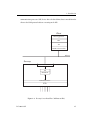
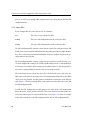
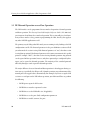
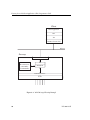
First we will review how the Freeway works without the SRA. Figure 1–1 shows a block
diagram of the typical Freeway environment with a remote client, the Freeway server,
and the connecting network when no server-resident applications are present. The client application calls DLI functions which then call TSI functions. At the Freeway server,
the TSI calls the message multiplexor (msgmux) task which then calls the intelligent
16
DC 900-1325I
1: Introduction
communications processor (ICP) device driver. In this fashion, data is moved from the
client to the WAN protocol software executing on the ICP.
Client
Client Application
DLI
TSI
TCP/IP Socket Interface
Ethernet
Freeway
TCP/IP Socket Interface
TSI
MSGMUX
ICPs
3027
ICP Device Driver
Figure 1–1: Freeway Server Data Flow (Without an SRA)
DC 900-1325I
17
Freeway Server-Resident Application (SRA) Programmer Guide
1.2.1 Basic SRA Configuration
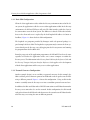
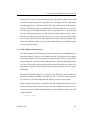
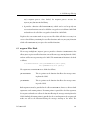
When the client application resides within the Freeway environment instead of the client system, the application is called a server-resident application or SRA. In the Freeway
environment, the DLI and TSI layers still exist. The SRA interfaces with these layer in
the same manner as on the client system. The difference is that the TCP socket interface
between the client and server is replaced by the local loopback IP address (127.0.0.1 or
localhost). Figure 1–2 shows the basic SRA configuration.
The loopback test programs provided by Protogate with each protocol package is a
good example of a basic SRA. The loopback test programs may be run on the client system or directly on the Freeway server by logging into the Freeway menus and running
the programs from the FreeBSD shell.
From the perspective of the application programmer, the DLI and TSI code are the same
regardless of whether the application resides on a remote computer or within the
Freeway server. The information in the Freeway Data Link Interface Reference Guide and
the Freeway Transport Subsystem Interface Reference Guide applies to the development
of both client applications and Freeway server-resident applications.
1.2.2 Protocol Converter Configuration
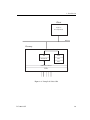
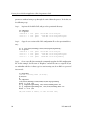
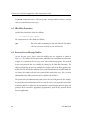
Another example design is to use an SRA as a protocol converter. In this example, the
SRA reads data packets from one protocol on ICP0 and sends the packets out on ICP1
using a different protocol. Figure 1–3 shows this configuration. Using an SRA in this
manner essentially turns the Freeway server into a standalone protocol converter box.
In addition, the SRA could also make a DLI/TSI connection to an ICP board on another
Freeway server somewhere else on the network. In this configuration, the SRA would
read packets from a local ICP and send them across the network to an ICP board on the
other Freeway server using the same or different protocol.
18
DC 900-1325I
1: Introduction
Client
Login to
Freeway Menu
Ethernet
Freeway
Loopback Network Interface
TSI
TSI
MSGMUX
DLI
SRA
ICPs
4014
ICP Device Driver
Figure 1–2: Example of a Basic SRA
DC 900-1325I
19
Freeway Server-Resident Application (SRA) Programmer Guide
Client
Login to
Freeway
(optional)
Ethernet
Freeway
Loopback Network Interface
TSI
TSI
MSGMUX
DLI
SRA
ICP 0
ICP 1
4015
ICP Device Driver
Figure 1–3: Example of an SRA Protocol Converter
20
DC 900-1325I
1: Introduction
1.2.3 NON-API Client Interface
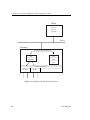
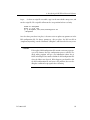
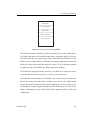
Instead of running an application on the client and using DLI/TSI to receive messages
from the Freeway server, you can program an SRA to read the messages from the ICP
boards and send them to the client via another method such as FTP or an NFS mounted
disk. Delivering the messages in this manner has the advantage of not having to do any
programming on the client system. Figure 1–4 shows this configuration.
Client
FTP or
NFS mount
Ethernet
Freeway
Loopback Network Interface
TSI
TSI
MSGMUX
DLI
SRA
ICPs
4016
ICP Device Driver
Figure 1–4: Example of a NON-API Client Interface
DC 900-1325I
21
Freeway Server-Resident Application (SRA) Programmer Guide
1.2.4 Message Filtering SRA
The MSGMUX software on the Freeway server has an additional feature that allows an
SRA to intercept packets that are exchanged between the client application and the ICP
protocol software. The purpose of this is to allow an SRA to do data filtering or format
translation on the Freeway server instead of having the client application perform this
additional task. Each Freeway server delivered by Protogate comes with an example filter SRA on the flash or hard drive. The filter SRA is described in detail in Chapter 6.
22
DC 900-1325I
Chapter
2
Server-Resident Application
Software Development
The Freeway server contains all the tools that allow you to edit, compile, link and run
your SRA. Before you begin to design your SRA, you should be familiar with C programming language. All of the example source code in written in C. It would help if you
are also familiar with the BSD make utility. However, there are example make files
included that you will be able to modify without much knowledge of the make utility.
Other documents relevant to developing an SRA include Protogate’s Freeway Data Link
Interface Reference Guide and Freeway Transport Subsystem Interface Reference Guide. If
you are using a Protogate-provided protocol on the ICPs, you should also review the
programmer’s guide to understand the protocol’s programming requirements.
2.1 SRA Development Environment
All of the SRA development is designed to be done right on the Freeway server. However, if you have a preferred text editor on another system, it may be easier for you to
transfer the SRA source files to your system, edit them, then transfer the edited files
back to the Freeway server. The transfers can be accomplished by FTP, scp, rsync, NFS,
or any other method.
Protogate has set up a directory structure for the development of SRAs on the Freeway
server which is similar to the directory structure used for the development of Freeway
client software on any other UNIX host. Protogate highly recommends that you develop
your SRA using the same structure as it helps greatly when seeking customer support.
This section describes the Freeway server disk structure in relation to the development
of an SRA.
DC 900-1325I
23
Freeway Server-Resident Application (SRA) Programmer Guide
2.1.1 Freeway Disk Partitions
The Freeway server disk drive consists of either a flash drive or a rotating disk drive. The
disk drive contains a small DOS partition for booting and a larger UNIX partition for
the Freeway server software. The UNIX partition is divided into several sub-partitions
by the FreeBSD OS. The following are the partitions that are relevant to SRA development:
/usr
This partition contains all the source code for programs developed on the Freeway server. It also contains the DLI and TSI
library source code and make files. This partition is always
mounted as READ ONLY when the Freeway server boots up
and runs. In order to develop software in this partition, it must
be mounted as READ/WRITE during development, then
mounted as READ ONLY again when development is complete.
/tmp
This partition is created as a RAM DISK partition. That is, it is
a section of RAM memory made to look like a disk partition.
This partition holds a copy of the boot and executable files used
by the Freeway server. This partition is always mounted
READ/WRITE. This is a temporary partition that is deleted
and recreated each time the Freeway server is booted.
/var
This partition is created as a READ/WRITE partition and is
mainly used for system logging, capture data storage, cron, and
similar applications. On standard Freeway servers, this partition is created in RAM memory inside the /tmp partition.
24
DC 900-1325I
2: Server-Resident Application Software Development
2.1.2 Software Development Directory Structure
Protogate has provided a directory hierarchy for the development of SRAs and other
software on the Freeway. Listed below are the directories that are important for developing software on the Freeway server:
/usr/local/freeway/client/test/sra
This directory includes the source code and make file for the sample SRA
(filter.c). The make file invokes the compiler and linker to generate the
shared object file (filter.so).
/usr/local/freeway/client/test/yoursra
You create this directory to contain the source code and make file for the
SRA that you are developing (where yoursra is the name of your SRA
project). The make file invokes the compiler and linker to generate the
object file (yoursra.o) and executable file (yoursra).
/usr/local/freeway/client/test/protocol
This directory includes the source code, DLI/TSI configuration files, and
make file for the loopback test program associated with a particular protocol software package (where protocol is the name or mnemonic of the
protocol software). An example is the Sample Protocol Software where
the subdirectory name is sps and the loopback source file name is spsalp.c.
The make file invokes the compiler and linker to generate the object file
(spsalp.o) and executable file (spsalp). The make file also generates the
binary DLI/TSI configuration files, then places them along with the executable file in the /usr/local/freeway/client/bsd/bin directory.
DC 900-1325I
25
Freeway Server-Resident Application (SRA) Programmer Guide
/usr/local/freeway/client/bsd/bin
This directory contains the executable files built as a result of the compilation of each of the source files in the SRA and loopback source directories. It also contains the binary versions of the DLI and TSI configuration
files that are used by the loopback and/or SRA executable files. Executable
files are normally run from this directory.
/usr/local/freeway/client/bsd/lib
This directory contains the DLI and TSI library files that were generated
as a result of building the DLI/TSI library on the Freeway server. These
files are used by the makefile during the linking process:
libbsdfw.a
This is the DLI/TSI library file for the BSD operating system.
libbsdcs.a
[Optional] This is the Call Service (CS) API library file
for the BSD operating system. The CS API library is only
used with programs interfacing with the X.25/HDLC
LAPB protocol software.
/usr/local/freeway/include
This directory contains the source code “include” files (.h files) for the
DLI/TSI library. These files are accessed by the C compiler when compiling any program code that uses the DLI API.
/tmp/boot
This is the main operational directory used by the Freeway during runtime. This directory contains the basic Freeway configuration and execut-
26
DC 900-1325I
2: Server-Resident Application Software Development
able files. Since this directory is located in the RAM-disk partition, it is
always mounted read-write. The files in this directory are copied from the
permanent storage directory (/usr/local/freeway/boot.src) each time the
Freeway boots. Any files placed in this directory are deleted after a reboot
unless they are copied into the permanent storage area.
/usr/local/freeway/boot.src
This directory contains a non-volatile copy of all the operational files
used by the Freeway. At boot time, the Freeway server copies all of the files
from this directory to the working directory (/tmp/boot). Note that
boot.src is a directory name, not a file name.
2.2 Files Provided for Building the SRA
Make files, configuration files, and source code are provided to build the example filter
SRA and the protocol loopback test programs. You can use any of these examples and
modify the code to create your custom SRA.
Note
The /usr partition is mounted READ_ONLY during normal Freeway operations. You must first mount the /usr partition as
READ_WRITE before editing, compiling, and linking files in the
/usr partition.
2.2.1 Example Filter SRA
The files provided with the Freeway server distribution that are used to build the example filter SRA are located in /usr/local/freeway/client/test/sra. They are described below:
filter.c
DC 900-1325I
This is the source code for the example message filtering SRA.
27
Freeway Server-Resident Application (SRA) Programmer Guide
Makefile
This is the make file that compiles and links the filter.c file into
a shared object file that is later accessed by the Freeway daemon. Refer to Chapter 6 for more information about the example filter SRA.
2.2.2 Loopback Test Programs
Each protocol software distribution CDROM includes a loopback test program
designed to work with the protocol image. In most cases these files are already installed
on the Freeway server disk drive. These files are located in the directory structure
/usr/local/freeway/client/test/protocol where protocol is the name or mnemonic of the spe-
cific protocol used. In the following list of files we will use the Sample Protocol Software
(SPS) loopback program as an example. These files are located in the directory
/usr/local/freeway/client/test/sps. Loopback programs from other protocols have a similar
file set except that the three letter mnemonic is different for each protocol and the files
reside in different (parallel) subdirectories.
spsalp.c
This is the C source file for the loopback program (in this case
Sample Protocol Software). The “alp” stands for “asynchronous
loopback program” which means that it uses non-blocking I/O
when interfacing with the DLI API.
spsaldcfg
This is the text version of the DLI configuration file used by the
SPS loopback program.
spsaltcfg
This is the text version of the TSI configuration file used by the
SPS loopback program.
makefile.bsd
This is the make file that compiles and links the loopback program and creates the executable file (spsalp). The make file also
generates the binary versions of the DLI and TSI configuration
files (spsaldcfg.bin and spsaltcg.bin). Lastly the make file takes
28
DC 900-1325I
2: Server-Resident Application Software Development
the three files created above and moves them to the bsd binary
directory (/usr/local/freeway/client/bsd/bin).
Makefile
This file is a “soft link” that points to the file makefile.bsd. This
file simply streamlines the make process such that you only
have to type make to build the loopback program as opposed to
typing make -f makefile.bsd. If this file does not exist in your
development directory, you can create the link by going to the
sub-directory containing the file makefile.bsd and using the following BSD shell command: ln -s makefile.bsd Makefile.
Note that there are many other files in the loopback program directory besides just the
files listed above. The other files are for building the loopback program on client computers with various operating systems. The files listed above pertain only to building the
loopback program under FreeBSD.
DC 900-1325I
29
Freeway Server-Resident Application (SRA) Programmer Guide
2.3 Creating a New SRA Development Environment
In this section, we will go through the steps of creating a new SRA build environment
using a loopback program as a starting point. Most SRAs developed on the Freeway
server interface with protocol software on the ICP boards. Therefore, the loopback program for the protocol you want to use is an ideal starting place for developing your own
SRA, since most of the protocol-specific logic is already set up for you.
In the following example, we will create a new SRA to interface to the Asynchronous
Wire Services (AWS) protocol. Therefore, we will start with the AWS protocol loopback
program (awsalp.c). In this example we assume that the loopback program is already
installed on the Freeway disk drive. If not, you can install the loopback program from
the protocol distribution CDROM.
The UNIX commands listed below (in bold) are commands made from the FreeBSD
shell. To get to the shell, login to the Freeway server as “root” and select menu item 6
“Run FreeBSD shell” from the main menu. From the shell you can get back to the main
menu by typing “exit”.
2.3.1 Create the SRA Development Directory
To create the SRA development directory, follow these steps:
Step 1:
Change to the base development directory by entering the following com-
mand:
cd /usr/local/freeway/client/test
Step 2:
Mount the /usr partition as read-write by entering the following command:
mount -u -o rw /usr
30
DC 900-1325I
2: Server-Resident Application Software Development
Step 3:
Create the new SRA development sub-directory by entering the following
command. In this example we will use “mysra” which will also be the name of our new
SRA module:
pwd
/usr/local/freeway/client/test
mkdir mysra
ls -l
drwxr-xr-x
2 freeway guest
drwxrwxrwx
2 root
wheel
drwxrwxr-x
3 335
protogate
drwxr-xr-x
2 root
guest
drwxrwxrwx
2 root
wheel
Step 4:
512
512
512
512
512
Apr
Aug
Feb
Mar
Aug
10 2008 aws
12 2009 icpreset
11 2006 iploop
14 22:17 mysra
12 2009 sra
Copy the loopback test program source files to the new SRA directory, renam-
ing the files during the copy process. Also, create a soft link for the make file:
pwd
/usr/local/freeway/client/test
cd mysra
cp ../aws/awsalp.c mysra.c
cp ../aws/awsaldcfg mysradcfg
cp ../aws/awsaltcfg mysratcfg
cp ../aws/makefile.bsd makefile.bsd
ln -s makefile.bsd Makefile
ls -l
lrwxr-xr-x 1 root guest
12 Mar
makefile.bsd
-rwxr-xr-x 1 root guest
1905 Mar
-rw-r--r-- 1 root guest 76222 Mar
-rw-r--r-- 1 root guest 18702 Mar
-rw-r--r-- 1 root guest
3210 Mar
14 22:30 Makefile ->
14
14
14
14
22:29
22:27
22:28
22:29
makefile.bsd
mysra.c
mysradcfg
mysratcfg
2.3.2 Edit the SRA source files
Now that the loopback program source files are copied to our custom SRA directory, we
edit the files to change the references from “aws” to “mysra”. You can edit the files right
on the Freeway server using the vi editor (or ee, ex, ed, sed, or any other text-manipulation software you like). Or if you're more comfortable with a different editor, you can
copy the source files from the Freeway disk to another system, edit the files on that system, then copy the files back to the Freeway server. You can use fetch, FTP, NFS, rsync,
DC 900-1325I
31
Freeway Server-Resident Application (SRA) Programmer Guide
scp, or any other method to copy the files. If you choose to edit the files on a Windows
machine, be sure that your editor maintains the text file type as UNIX (text lines end
with a single line-feed) rather than DOS (text lines end with a carriage-return and a
line-feed). If you can't prevent your editor from converting the files to DOS format, be
sure to convert them back to UNIX format when you transfer them to the Freeway
server (refer to Section 4.2.4 on page 62 for more information on text file formats and
file conversion). To edit the source files, follow these steps:
Step 1: Edit the SRA C source file to reflect the new DLI configuration file name:
pwd
/usr/local/freeway/client/test/mysra
vi mysra.c
[change all occurrences of “awsaldcfg” to “mysradcfg”]
Step 2: Edit the DLI configuration source file to reflect the new TSI configuration file
name, as well as the new DLI log and trace file names:
pwd
/usr/local/freeway/client/test/mysra
vi mysradcfg
[change all occurrences of “awsaltcfg” to “mysratcfg”]
[change all occurrences of “awsalpdli” to “mysradli”]
Step 3: Edit the TSI configuration source file to reflect the new TSI log and trace file
names:
pwd
/usr/local/freeway/client/test/mysra
vi mysratcfg
[change all occurrences of “awsalptsi” to “mysratsi”]
Step 4: Edit the make file to reflect the new SRA and configuration file names:
pwd
/usr/local/freeway/client/test/mysra
vi makefile.bsd
[change all occurrences of “awsalp” to “mysra”]
[change all occurrences of “awsaldcfg” to “mysradcfg”]
[change all occurrences of “awsaltcfg” to “mysratcfg”]
32
DC 900-1325I
2: Server-Resident Application Software Development
Note that the DLI and TSI log and trace files must be created on a partition which is
always writable. If the original loopback program had previously been run on the Freeway server, then the log and trace files should already have a path prepended to the file
name (for example, "/tmp/awsalpdli.log" and "/tmp/awsalpdli.trc"). If not, you need to
edit the DLI and TSI configuration files once more in order to add a path to a writable
partition for the log and trace files. Refer to Section 3.1.3 on page 49 for more information.
2.3.3 Build the SRA binary files
The make file contains all the commands to compile, link, and move the SRA binary
(executable) file to the binary directory (/usr/local/freeway/client/bsd/bin). The make
file also builds the DLI and TSI binary configuration files and moves them to the binary
directory. To build the SRA, follow these steps:
Step 1: Build the SRA binary and DLI/TSI configuration binaries by invoking the
make utility. By typing “make” without argument, the make utility will default to a make
file name of “Makefile” which in this case is the soft link to “makefile.bsd”. The equivalent
command without the soft link would be “make -f makefile.bsd”:
pwd
/usr/local/freeway/client/test/mysra
make
cc mysra.c -c -Wall -DFREEWAY -DDLI -DSUNOS -D__DLI_RAW__ D__DLI_AWS__ -I../../
../include
cc -o mysra -L../../bsd/lib mysra.o -lbsdfw
mv mysra ../../bsd/bin
../../bsd/bin/dlicfg mysradcfg
Data Link Interface (DLI). 2004(C) Protogate, Inc.
DLI Configuration Processor (dlicfg)
Input file: mysradcfg
Result file: mysradcfg.bin
mysradcfg completed successfully.
mv mysradcfg.bin ../../bsd/bin
../../bsd/bin/tsicfg mysratcfg
Transport Subsystem Interface(TSI). 2004(C) Protogate, Inc.
TSI Configuration Processor (tsicfg)
DC 900-1325I
33
Freeway Server-Resident Application (SRA) Programmer Guide
Input file: mysratcfg
Result file: mysratcfg.bin
mysratcfg completed successfully.
mv mysratcfg.bin ../../bsd/bin
Step 2: Check the output of the make utility for errors. If errors exist, edit the source
file indicated by the error, correct the error, and try the make again. Note that once the
SRA is built successfully, only the SRA object file is left in the SRA source directory. All
binary files have been moved to the binary directory. You may confirm this with the following command:
pwd
/usr/local/freeway/client/test/mysra
ls -l
lrwxr-xr-x 1 root guest
12 Mar
makefile.bsd
-rwxr-xr-x 1 root guest
1891 Mar
-rw-r--r-- 1 root guest 76101 Mar
-rw-r--r-- 1 root guest 15964 Mar
-rw-r--r-- 1 root guest 18699 Mar
-rw-r--r-- 1 root guest
3208 Mar
14 22:30 Makefile ->
14
14
14
14
14
23:54
23:55
23:56
23:55
23:55
makefile.bsd
mysra.c
mysra.o
mysradcfg
mysratcfg
Step 3: Once the SRA is built, we can now mount the /usr partition as read-only:
mount -u -o ro /usr
2.4 Running the SRA
After building the SRA, the make file moves the SRA binary (executable) file to the
binary directory (/usr/local/freeway/client/bsd/bin). The make file also moves the DLI
and TSI binary configuration files to the same directory. To run the SRA from the
binary directory, follow these steps:
Step 1: Change directory to the binary directory and check to make sure all the files
needed for SRA execution are there:
cd /usr/local/freeway/client/bsd/bin
ls -l mysra*
34
DC 900-1325I
2: Server-Resident Application Software Development
-rwxr-xr-x
-rw-r--r--rw-r--r--
1 root
1 root
1 root
guest
guest
guest
237519 Mar 14 23:56 mysra
73440 Mar 14 23:56 mysradcfg.bin
1608 Mar 14 23:56 mysratcfg.bin
Step 2: Run the SRA simply by entering “./” followed by the SRA executable filename
and then <enter>. (Note that entering just the SRA name without the “./” will also work
on the default Freeway configuration because the path is not restricted, but will not
work if the path is restricted.) Providing that you have the AWS protocol running on at
least one ICP board, and also have two ports connected with a Protogate loopback
cable, you should see results similar to the following example below (user input in
bold):
./mysra
Need help (Y/N) [N]? n
Minutes to run (1-14400) [1]? 1
Number of initial writes (0-16) [1]? 1
ICP board on which to run test (0-15) [0]? 0
Even port number (0, 2, ..., 14) [0]? 0
AWS Asynchronous Port-To-Port Loopback Program.
Test duration in minutes: 1 minute
Number of initial writes on each port: 1
ICP board number: 0
Ports: 0 & 1
OPEN SESSION server0icp0port0
OPEN SESSION server0icp0port1
>>><<><<>>><<><<>>><<><<>>><<><<>>><<><<>>><<><<>>><<><<>>><<>
[several lines omitted]
>>><<><<>>><<><<>>><<><<>>><<><<>>><<><<>>><<><<>>><<><<>>><<>
AWS Statistics Report:
server0icp0port0
server0icp0port1
--------------------------------DCD UP
0
0
CTS UP
0
0
Breaks Received
0
0
Receive overrun errors
0
0
Block check errors
0
0
Parity errors
0
0
Framing errors
0
0
Transmit underruns
0
0
Characters sent
38675
38610
Characters received
38610
38675
Frames sent
Frames received
DC 900-1325I
595
594
594
595
35
Freeway Server-Resident Application (SRA) Programmer Guide
Loopback test complete
Step 3: After the program completes, you can verify that the program created the DLI
and TSI trace and log files by looking in the /tmp directory which is a read-write partition in memory. These files will be overwritten each time the SRA is run. Also, these files
will be deleted when the Freeway is rebooted:
cd /tmp
ls -l mysra*
-rw-r--r-- 1 root
-rw-r--r-- 1 root
-rw-r--r-- 1 root
wheel
wheel
wheel
152 Mar 15 01:15 mysradli.log
0 Mar 15 01:14 mysratsi.log
31993 Mar 15 01:15 mysratsi.trc
2.5 Customizing the SRA
After completing the steps in the previous sections, you now have a working SRA that
interfaces with the AWS protocol (or whatever protocol you are using). However, the
SRA is still only a copy of the loopback program. At this point, you may begin to modify
the SRA in order to customize it to fit your own needs. Since you are starting from a
working program, you may want to rebuild the SRA between editing sessions to make
sure the SRA still compiles and runs.
The following are some starting suggestions for modifying the SRA source code
(mysra.c):
•
Change the names of the internal comments and routines to reflect the new name
of your SRA. Also, start a new “revision history” section in the comments to keep
track of future changes to the SRA source code.
•
The loopback programs use the symbols LINK0 and LINK1 as “shortcuts” to address
the two DLI sessions for each link. This is not a good programming practice when
interfacing with more than two links. You should replace all the occurrences of
LINK0
and LINK1 with the actual session ID returned from the dlOpen call. This ID
is stored in the SESS_TBL_ENTRY structure (SessTbl[].iSessID).
36
DC 900-1325I
2: Server-Resident Application Software Development
•
You need to increase the number of connections (NUM_CONNECTIONS) to the actual
number of sessions you will be using. This will create a SESS_TBL_ENTRY structure
for each connection. The current loopback program number of connections is
only 2.
•
You should disable or remove the timer function left over from the loopback program to prevent your SRA from exiting when the timer expires.
Refer to the later chapters in this document for information on how to further expand
the capabilities of your SRA.
2.6 Relocating Your SRA Files
You may run the SRA from the binary directory (/usr/local/freeway/client/bsd/bin), but
at some point in time, you may find it beneficial to run your SRA from the Freeway
server operational directory (/tmp/boot). This directory is located in the read-write
ram-disk partition. Some of the reasons for relocating your SRA to this directory are as
follows:
•
Your SRA can create files in this read-write partition.
•
You can build your DLI and TSI configuration binaries dynamically at boot time.
•
You can make software revisions to your SRA in the binary directory without
overwriting the current version in the operational directory.
To relocate your SRA to the operational directory, you need to copy the SRA and configuration binary files to the non-volatile storage location of the operational directory
(/usr/local/freeway/boot.src). When the Freeway is rebooted, these files will be copied
into the operational directory. The following steps show how to do this:
Step 1: Mount the /usr partition as read-write and copy the SRA files from the binary
directory to non-volatile storage. Then re-mount the /usr partition as read-only:
DC 900-1325I
37
Freeway Server-Resident Application (SRA) Programmer Guide
cd /usr/local/freeway/client/bsd/bin
ls -l mysra*
-rwxr-xr-x 1 root guest 237519 Mar 14 23:56 mysra
-rw-r--r-- 1 root guest
73440 Mar 14 23:56 mysradcfg.bin
-rw-r--r-- 1 root guest
1608 Mar 14 23:56 mysratcfg.bin
mount -u -o rw /usr
cp -p mysra* /usr/local/freeway/boot.src
mount -u -o ro /usr
Step 2: Reboot the Freeway server. After the Freeway server boots, log back in to the
Freeway menu and run the FreeBSD shell:
reboot
[log back in to FreeBSD shell]
Step 3: Verify the operation of the SRA in the /tmp/boot directory:
cd /tmp/boot
ls -l mysra*
-rwxr-xr-x 1 root
-rw-r--r-- 1 root
-rw-r--r-- 1 root
guest
guest
guest
237519 Mar 14 23:56 mysra
73440 Mar 14 23:56 mysradcfg.bin
1608 Mar 14 23:56 mysratcfg.bin
./mysra
Need help (Y/N) [N]? n
Minutes to run (1-14400) [1]? 1
Number of initial writes (0-16) [1]? 1
ICP board on which to run test (0-15) [0]? 0
Even port number (0, 2, ..., 14) [0]? 0
AWS Asynchronous Port-To-Port Loopback Program.
Test duration in minutes: 1 minute
Number of initial writes on each port: 1
ICP board number: 0
Ports: 0 & 1
OPEN SESSION server0icp0port0
OPEN SESSION server0icp0port1
>>><<><<>>><<><<>>><<><<>>><<><<>>><<><<>>><<><<>>><<><<>>><<>
[several lines omitted]
>>><<><<>>><<><<>>><<><<>>><<><<>>><<><<>>><<><<>>><<><<>>><<>
AWS Statistics Report:
server0icp0port0
server0icp0port1
--------------------------------DCD UP
0
0
CTS UP
0
0
Breaks Received
0
0
38
DC 900-1325I
2: Server-Resident Application Software Development
Receive overrun errors
Block check errors
Parity errors
Framing errors
Transmit underruns
Characters sent
Characters received
Frames sent
Frames received
0
0
0
0
0
38675
38610
0
0
0
0
0
38610
38675
595
594
594
595
Loopback test complete
2.7 Starting the SRA at Freeway Boot-up
Once you are able to run your modified SRA successfully from the BSD shell, you will
want to put it into use on the Freeway system. Since you probably don’t want to start the
SRA manually every time the Freeway server reboots, you need to have a method of
starting the SRA at Freeway boot time. This section shows the different methods to start
your SRA at boot time.
2.7.1 Main SRA Startup File (rc.startsra)
Instructions for starting an SRA normally reside in a file called rc.startsra in the /tmp/boot
directory. When the Freeway server boots up, it first executes the instructions in the
bootcfg file. Then it looks for the existence of the rc.startsra file. If it exists, the Freeway
will treat rc.startsra as an ordinary shell script file and will execute the commands in
that file as the root user. The rc.startsra file is used to start SRAs running on the Freeway
as well as to set up additional services on the Freeway (such as syslog, cron, etc.).
If you have the basic server software installed on your Freeway, then the rc.startsra file
does not exist. If you are not sure if this file exists on your Freeway server, you can use
the following shell commands to check:
cd /tmp/boot
ls -al rc.*
ls: rc.*: No such file or directory
DC 900-1325I
39
Freeway Server-Resident Application (SRA) Programmer Guide
If the file rc.startsra already exists on your system, then refer to Section 2.7.2 for adding
your SRA start commands. If the file doesn’t exist (you see the above results), then use
the following steps to create this file:
Step 1:
Login to the FreeBSD shell and create the file in the non-volatile storage area:
cd /usr/local/freeway/boot.src
mount -u -o rw /usr
vi rc.startsra
Step 2:
Depending on where you are running your SRA, insert one of the following
text blocks in the file to start your SRA. The first line is optional as it just writes the text
“Starting my SRA” to the Freeway console. The second line starts the SRA and diverts
any text that the SRA may generate (from printf statements) into the null device (bit
bucket). If you are unfamiliar with the vi editor, type i to start inserting text, then
<ESC> to get out of insert mode:
[If running your SRA from the operational directory, enter the
following text:]
echo Starting my SRA > /dev/console
cd /tmp/boot
./mysra > /dev/null &
- or -
[If running your SRA from the binary directory, enter the following
text:]
echo Starting my SRA > /dev/console
cd /usr/local/freeway/client/bsd/bin
./mysra > /dev/null &
Step 3:
Exit the vi editor while saving the file. Then mount the /usr partition back to
read-only and reboot:
:x [from inside vi editor]
mount -u -o ro /usr
reboot
40
DC 900-1325I
2: Server-Resident Application Software Development
When the Freeway reboots, the rc.startsra file will be copied to the /tmp/boot directory
and executed after the bootcfg file is processed.
Rather than use the vi editor, you may also create the rc.startsra file on your PC, then
transfer it to the Freeway disk drive. Refer to Section 4.2.1 on page 59 for further information on this method.
2.7.2 Secondary SRA Startup File (rc.startsra.local)
If the rc.startsra file already exists in the /tmp/boot directory, it may be because there is
already an SRA running on your system (for example: the Protogate Monitor SRA). In
this case you may simply edit the existing rc.startsra file and place the commands for
starting your SRA (from Section 2.7.1) at an appropriate place near the end of the file.
However, if you receive later updates to the existing SRA, the updates may overwrite the
existing rc.startsra file and your added commands will be deleted.
To prevent this from happening, you can place your SRA start commands in a file
named rc.startsra.local. Protogate adds commands in the rc.startsra files it distributes to
also check for “local” command files of the form rc.startsra.local*. This is done specifically so that your added SRA commands will not get deleted by future updates of Protogate SRAs.
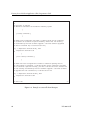
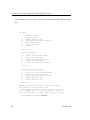
Look at the existing rc.startsra file to see what local files it calls. Figure 2–1 shows an
example of a Protogate rc.startsra file. In this example, there are two locations in the file
where local startsra files are executed. The file rc.startsra.local is executed near the start of
the file, and rc.startsra.local2 is executed near the end of the file. Using this example, you
could put your SRA startup commands in the file rc.startsra.local or in rc.startsra.local2
depending on when you want to start your SRA relative to the other commands within
the main rc.startsra file.
DC 900-1325I
41
Freeway Server-Resident Application (SRA) Programmer Guide
#!/bin/sh
#
# file name: rc.startsra
# Additional commands for the Monitor Freeway system
●
●
●
[ startup commands ]
●
●
●
#
#
#
#
Allow local configuration overrides (rc.startsra.local can be created by
customers to customize a specific Freeway, without the risk of being
overwritten by the next software upgrade -- because software upgrades
will not overwrite any rc.startsra.local* file).
if [ -f /tmp/boot/rc.startsra/local ]; then
. /tmp/boot/rc.startsra.local
fi
●
●
●
[ more startup commands ]
●
●
●
#
#
#
#
#
Allow final local configuration overrides or additions (adding lines to
/var/crontab, for example). rc.startsra.local2 can be created by customers
to customize a specific Freeway, just like rc.startsra.local can, without the
risk of being overwritten by the next software upgrade -- because software
upgrades will not overwrite any rc.startsra.local* file.
if [ -f /tmp/boot/rc.startsra/local2 ]; then
. /tmp/boot/rc.startsra.local2
fi
# end of file
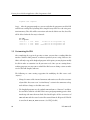
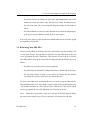
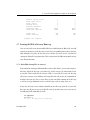
4019
Figure 2–1: Example rc.startsra file from Protogate
42
DC 900-1325I
Chapter
3
Interfacing to DLI/TSI and
Protocol Software
Most SRAs built to run on the Freeway server will need to access protocol software running on an ICP board. The Freeway server code includes an ICP device driver that coordinates moving data from the server platform to the ICP. The only server code that
interacts with the ICP device driver is the message multiplexor (msgmux) process. The
TSI code communicates with the msgmux process which makes calls to the ICP driver.
Your SRA must use the DLI or TSI functions to access the ICPs through the msgmux
process. Your application cannot make calls directly to the ICP device driver functions.
As outlined in Section 2.3, the simpliest way to build an SRA from scratch is to start
with a protocol loopback program, which already contains working code written to
interface with the DLI and TSI. This chapter contains additional information and tips
on interfacing with the DLI API and protocol software. More detailed information on
DLI and TSI can be found in the Freeway Data Link Interface Reference Guide (DC900-1385) and the Freeway Transport Subsystem Interface Reference Guide (DC900-1386), respectively.
3.1 Files Associated with DLI and TSI
When building an SRA to interface with protocol software, there are always at least three
source files involved in the build process: the SRA source code, the DLI configuration
text file, and the TSI configuration text file. These three files are inputs to the make file
which in turn generates binary versions of each of these files. The binary versions of
these files are then used in the execution of the SRA. To demonstrate the file generation
DC 900-1325I
43
Freeway Server-Resident Application (SRA) Programmer Guide
process, we will use an example SRA (simply named sra.c) along with its DLI and TSI
configuration files.
3.1.1 Source Files
In our example SRA, the source files we use are as follows:
sra.c
This is the C source file for the SRA.
sradcfg
This is the DLI configuration text file used by the SRA.
sratcfg
This is the TSI configuration text file used by the SRA.
The DLI configuration file contains sessions that are attached to serial ports on the ICP
boards. Each session contains information about specific port numbers and ICP numbers. The sessions may also contain information on how to configure the protocol-specific parameters for each port.
The TSI configuration file contains sessions that are attached to specific Freeway servers. In the simplest SRA example, the TSI file would contain just one session pointing to
the Freeway server that the SRA is running on (localhost). However, it is also possible to
have more sessions pointing to other Freeway servers on the network.
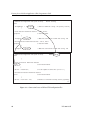
The connection between each of these three files is located in the source code. First, the
SRA source code points to the name of the DLI configuration binary file in the dlInit
call. Later in the program, the SRA points to individual session names in the dlOpen
calls. Figure 3–1 shows an example of the connection between the SRA source code and
the DLI configuration file.
Second, the DLI configuration text file points to the name of the TSI configuration
binary file in the “main” portion of the file. Then each of the DLI sessions points to a
TSI session which represents a particular Freeway server. Figure 3–2 shows an example
of the connection between the DLI configuration file and the TSI configuration file.
44
DC 900-1325I
3: Interfacing to DLI/TSI and Protocol Software
/* SRA C Source Code File
Name: sra.c */
main
{
if ( dlInit ("sradcfg.bin", (char *)work_array, callback1 ) == ERROR )
{
printf("main: dlInit failed with error (%d).\n", dlerrno);
op_state = TERMINATE;
}
●
●
●
if ( dlOpen ("icp0port0", callback2 ) == ERROR )
{
printf("main: dlOpen failed with error (%d).\n", dlerrno);
op_state = SESSION_UNAVAILABLE;
}
●
●
●
}
// SRA DLI Configuration File (text version)
main
{
Name: sradcfg
●
●
●
}
// First Session Definition Section
icp0port0
{
BoardNo = 0;
PortNo = 0;
- ICP 0, Port 0
// Session Name
// ICP board number
// ICP port number
●
●
●
}
// Second Session Definition Section - ICP 0, Port 1
icp0port1
// Session Name
{
BoardNo = 0;
// ICP board number
PortNo = 1;
// ICP port number
●
●
●
}
4021
Figure 3–1: Connection between SRA and DLI configuration file
DC 900-1325I
45
Freeway Server-Resident Application (SRA) Programmer Guide
// SRA DLI Configuration File (text version)
Name: sradcfg
main
{
TSICfgName = "sratcfg.bin";
// Name of SRA TSI config. file (binary version)
●
●
●
}
// First Session Definition Section - ICP 0, Port 0
icp0port0
// Session Name
{
●
●
●
Transport = "conn0";
// Matches connection in SRA TSI config. file
}
// Second Session Definition Section - ICP 0, Port 1
icp0port1
// Session Name
{
●
●
●
Transport = "conn0";
// Matches connection in SRA TSI config. file
// SRA TSI Configuration File (text version)
main
{
Name: sratcfg
●
●
●
}
// First Connection Definition Section
conn0
// Connection Name
{
●
●
●
Server = "localhost";
// Local loopback connection (127.0.0.1)
}
// Second Connection Definition Section
conn1
// Connection Name
{
●
●
●
Server = "192.169.1.118";
// Address of another Freeway server (optional)
}
4018
Figure 3–2: Connection between DLI and TSI configuration files
46
DC 900-1325I
3: Interfacing to DLI/TSI and Protocol Software
3.1.2 Binary Files
In our example SRA, the binary files we use are as follows:
sra
This is the executable file for the SRA.
sradcfg.bin
This is the DLI configuration binary file used by the SRA.
sratcfg.bin
This is the TSI configuration binary file used by the SRA.
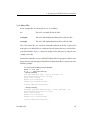
These three binary files are created by commands within the make file. As part of the
make process, the binary files are usually moved to the binary directory (/usr/local/freeway/client/bsd/bin). Figure 3–3 shows an example of the make process using the three
example source files.
You may also manually create the DLI and TSI binary files by copying the text files to the
binary directory and running the DLI and TSI configuration utilities separately as in the
following example:
cd /usr/local/freeway/client/bsd/bin
mount -u -o rw /usr
cp -p ../../test/sra/sra*cfg .
./dlicfg sradcfg
Data Link Interface (DLI). 2004(C) Protogate, Inc.
DLI Configuration Processor (dlicfg)
Input file: sradcfg
Result file: sradcfg.bin
Backup file: sradcfg.bin.BAK
sradcfg completed successfully.
./tsicfg sratcfg
Transport Subsystem Interface(TSI). 2004(C) Protogate, Inc.
TSI Configuration Processor (tsicfg)
Input file: sratcfg
Result file: sratcfg.bin
Backup file: sratcfg.bin.BAK
sratcfg completed successfully.
DC 900-1325I
47
Freeway Server-Resident Application (SRA) Programmer Guide
makefile.bsd
sra.c
cc
libbsdfw
GNU Compiler
and Linker
sradcfg
dlicfg
DLI Text
Configuration File
DLI Configuration
Preprocessor
sratcfg
tsicfg
TSI Text
Configuration File
TSI Configuration
Preprocessor
SRA Executable File
sradcfg.bin
DLI Binary
Configuration File
sratcfg.bin
4020
SRA Source File
sra
TSI Binary
Configuration File
Figure 3–3: Example of the SRA make process
mount -u -o ro /usr
Unless a specific path was specified in the source files, the DLI and TSI binary configuration files must always reside in the same directory that the SRA executable file is run
from (the user’s current working directory when the command to run the SRA is executed). If the user runs the SRA while in a directory other than /usr/local/freeway/cli48
DC 900-1325I
3: Interfacing to DLI/TSI and Protocol Software
ent/bsd/bin, then the DLI and TSI binary files must be moved or copied to the same
directory in order for the SRA to work properly.
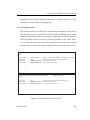
3.1.3 Log and Trace Files
DLI and TSI log and/or trace files may be created during the normal execution of your
SRA. Log and trace files are specified in the DLI and TSI configuration text file. When
running the SRA in the Freeway /usr partition, it is important to specify a file path such
that the log and trace files are created in a read-write partition (such as /tmp). Otherwise, the SRA will encounter an error when the DLI tries to open a file in the read-only
partition. Figure 3–4 shows an example of using path names for the log and trace files.
// SRA DLI Configuration File (text version)
Name: sradcfg
main
{
TSICfgName = "sratcfg.bin";
// Name of SRA TSI config. file (binary version)
AsyncIO
= "yes";
// Use asynchronous (non-blocking) I/O
logname
= "/tmp/sradli.log"; // DLI log file name
tracename
= "/tmp/sradli.trc"; // DLI trace file name
●
●
●
}
●
●
●
// SRA TSI Configuration File (text version)
Name: sratcfg
main
{
AsyncIO
= "yes";
// Use asynchronous (non-blocking) I/O
logname
= "/tmp/sratsi.log"; // TSI log file name
tracename
= "/tmp/sratsi.trc"; // TSI trace file name
●
●
●
}
●
●
●
4022
Figure 3–4: Pathnames for Log and Trace files
DC 900-1325I
49
Freeway Server-Resident Application (SRA) Programmer Guide
3.2 DLI Normal Operation versus Raw Operation
The DLI interface can be programmed in two modes of operation: Normal operation
and Raw operation. The Freeway Data Link Interface Reference Guide (DC-900-1385)
goes into more detail about these modes of operation. This section will give a brief summary of these modes as they pertain to programming the SRA, but they also apply to
any other DLI/TSI application as well.
The primary way of telling what DLI mode you are running in is by looking at the DLI
configuration text file. The Protocol parameter in the port definition sections will tell
you what mode the session is using. If the Protocol parameter is “raw”, then that session
is using Raw operation. If the Protocol parameter is the name or mnemonic of a specific
protocol (example: “AWS”), then that session is using Normal operation. Any protocol
can be opened in Raw operation, however, only those protocols pre-configured by Protogate can be opened in Normal operation. The majority of the standard protocols
offered by Protogate can be opened in Normal operation.
The major difference between Normal and Raw operations is what happens during session start-up (specifically, the dlOpen call). Normal operation can perform many of the
normal port start-up procedures automatically. For example, if you were to open a DLI
session to a serial port on the ICP in Raw operation, your SRA would have to perform
the following:
50
•
Call dlOpen to open the DLI session
•
Call dlWrite to attach to a protocol session
•
Call dlWrite to set the ICP buffer size (if applicable)
•
Call dlWrite to set the port (link) configuration parameters
•
Call dlWrite to enable (turn on) the port
DC 900-1325I
3: Interfacing to DLI/TSI and Protocol Software
If you opened the same session in Normal operation, then all of the above actions could
be performed automatically when your SRA issues the dlOpen call. The information
normally supplied by the SRA for the above calls is instead placed in the DLI configuration file. In Normal operation the DLI API takes this information and uses it to automatically generate the additional dlWrite calls at session open time. As such, many of
the protocol loopback programs use DLI Normal operation. However, what is convenient for the loopback program may not be the best way to go for your SRA. Luckily,
you can choose what actions you want and don’t want taken when using Normal operation. The following sections give some more information on the individual settings
used by Normal operation.
3.2.1 Link Configuration Parameters
One of the advantages of DLI Normal operation is being able to set individual link configuration parameters from the DLI configuration file. Each protocol that supports
Normal operation has a list of text parameter names and values that you can specify in
the port definition section of the DLI configuration file. Any link configuration parameters not set by the DLI configuration file will be assigned the default value. Refer to the
Programmer’s guide for your particular protocol for specific parameter names, values,
and defaults.
If required, the SRA may change these settings after the dlOpen by using a Set Link Configuration command (via dlWrite call). However, if the session is closed and reopened,
the parameters in the DLI configuration file will once again be sent to the port.
When using Normal operation, the DLI will set the link configuration parameters as the
default action. If you don’t want the DLI to set the link configuration parameter at session start, then put the following command in the port definition section of the DLI
configuration file:
cfgLink = “no”;
DC 900-1325I
51
Freeway Server-Resident Application (SRA) Programmer Guide
3.2.2 Set Buffer Size
If applicable to your protocol, you can set the buffer size in the DLI configuration file
port definition section as in the following example:
BufferSize = 256;
On some protocols the following format is used instead:
MsgBlkSize = 256;
The DLI will send the Buffer Size command to the ICP as the first command after the
Attach command. The Buffer Size applies to all links on the ICP, therefore, the first
Buffer Size command sent to the ICP sets the buffer size for the entire board until the
ICP is reset or reloaded.
3.2.3 Enable Link
By default, DLI automatically enables the links at session start. If you do not want DLI
to enable the link at session start, place the following line in the port definition section
of the DLI configuration file:
enable = “no”;
3.2.4 Local Acks
Local Acks are packets sent from the protocol software on the ICP in response to data
packets send by the SRA or client program. Local Acks are indications that each data
packet that the client program sent to the ICP has or has not been successfully transmitted on the serial line. The default mode in Normal operation is the for the DLI to automatically handle Local Ack packets. That is, the DLI will intercept Local Ack packets and
match them to outgoing data packets.
52
DC 900-1325I
3: Interfacing to DLI/TSI and Protocol Software
Note
When using non-blocking I/O, a read request must be queued to
receive the Local Acks. The read buffer associated with this request
remains queued.
If your SRA is using DLI Raw operation, or if you are using a protocol that requires Raw
operation, then you will need to handle the Local Ack packets from within your SRA. If
you are using Normal operation, but still want to handle the Local Ack packets within
your SRA, you need to put the following line in the port definition section of the DLI
configuration file:
localAck = “no”;
Otherwise, the DLI will “eat” each of the Local Ack packets before the SRA can see them.
3.2.5 Optional Arguments
Once the DLI session has been opened for a link, the SRA may transfer data on the link
using dlWrite and dlRead library calls. These calls normally include an “optional arguments” structure (also known as “optargs”) that contain additional parameters related
to the dlWrite or dlRead call. Normal operation will allow you to omit the optargs structure when sending and receiving data. However, Protogate recommends the use of
optional arguments in the dlWrite and dlRead calls when writing and reading data on
the serial line, especially when using the more “complex” protocols. The reason is that
most protocols provide additional information in the optional arguments structure that
may be essential to the status of the serial line. The SRA may miss this information when
using read and write calls without optional arguments.
3.3 Modifying the DLI Configuration File
If you run your SRA from the Freeway operational directory (/tmp/boot), it may be
beneficial for you to automate the regeneration of your DLI configuration binary file.
The advantage here is that you will be able to change individual link configuration
DC 900-1325I
53
Freeway Server-Resident Application (SRA) Programmer Guide
parameters without having to go through the entire SRA make process. To do this, use
the following steps:
Step 1:
Log into the FreeBSD Shell, and go to the operational directory:
cd /tmp/boot
ls -l mysra*
-rwxr-xr-x 1 root
-rw-r--r-- 1 root
-rw-r--r-- 1 root
Step 2:
guest
guest
guest
237519 Mar 14 23:56 mysra
73440 Mar 14 23:56 mysradcfg.bin
1608 Mar 14 23:56 mysratcfg.bin
Copy the text version of the DLI configuration file to the operational direc-
tory:
cp -p /usr/local/freeway/client/test/mysra/mysradcfg .
ls -l mysra*
-rwxr-xr-x 1 root guest 237519 Mar 14 23:56 mysra
-rw-r--r-- 1 root guest
73440 Mar 14 23:56 mysradcfg.bin
-rw-r--r-- 1 root guest
1608 Mar 14 23:56 mysratcfg.bin
-rw-r--r-- 1 root guest
18699 Mar 14 23:55 mysradcfg
Step 3:
Create a new file that contains the commands to update the DLI configuration
file. In this example, the file name is “dliupdate” and will be run as a script file. If you
are unfamiliar with the vi editor, type i to start inserting text, then <ESC> to get out of
insert mode:
vi dliupdate
[Add the following lines (in bold):]
#!/bin/sh
#
cd /tmp/boot
/usr/local/freeway/client/bsd/bin/dlicfg mysradcfg
mount -u -o rw /usr
cp -p /tmp/boot/mysradcfg /usr/local/freeway/boot.src
cp -p /tmp/boot/mysradcfg.bin /usr/local/freeway/boot.src
mount -u -o ro /usr
:x [from within vi editor, to exit and save file]
54
DC 900-1325I
3: Interfacing to DLI/TSI and Protocol Software
Step 4:
Set the new script file executable, copy it to the non-volatile storage area, and
run the script file. The script file will mount the /usr partition back to read-only:
chmod u+x dliupdate
mount -u -o rw /usr
cp -p dliupdate /usr/local/freeway/boot.src
./dliupdate
Once the above procedure is in place, it becomes easier to update any parameters in the
DLI configuration file. To change parameters, edit or replace the DLI text file in
(/tmp/boot/mysradcfg), run the command “./dliupdate”, and reboot the Freeway server.
Caution
DC 900-1325I
If the updated DLI configuration file contains an incorrect parameter or file format, then the configuration process will fail. The
dlicfg utility program will give you information about why it
failed, including the line number within the DLI configuration file
where the failure was detected. If this happens, you should re-edit
the DLI configuration file and correct the problem, then run the
dliupdate command script again before rebooting.
55
Freeway Server-Resident Application (SRA) Programmer Guide
56
DC 900-1325I
Chapter
4
SRA Design Tips and
Restrictions
This chapter describes some additional information that is useful to know when designing and running your SRA. Also included are some system limitations to watch out for.
4.1 Managing RAM Memory
The Freeway server utilizes RAM memory in many ways during normal operation.
Buffer pools, queues, system logging, and RAM-disk partitions all make use of the available RAM memory. The default size of the RAM-disk partition is 128 Megabytes. For
more information on the RAM-disk partition configuration, refer to the Freeway User’s
Guide.
The following tips are designed to help prevent your SRA from using up the available
memory resources.
4.1.1 DLI Configuration
A common problem is for a client application to ignore data that is available for reading,
causing data to accumulate at the ICPs and server, exhausting buffer pools, and leading
to degraded performance or failure. A good design practice is to always maintain a
queue of reads at the DLI and to service the queue of completed reads.
In the SRA DLI configuration file, the MaxSess parameter defines the maximum number of sessions to support. The default is 128. Consider modifying this number to meet
your requirements, as it increases the amount of RAM required by DLI. Similarly, the
DLI trace buffer size parameter (TraceSize) should be modified to meet your needs.
DC 900-1325I
57
Freeway Server-Resident Application (SRA) Programmer Guide
4.1.2 TSI Configuration
The TSI buffer pool can also consume a large area of memory. Two parameters in your
SRA’s TSI configuration file are of particular importance to memory utilization:
MaxBufSize and MaxBuffers. These parameters are described in the Freeway Transport
Subsystem Interface Reference Guide. If you do not specify them in your configuration
file, TSI uses the defaults (1024), which cause a large area of memory to be allocated
(about 1 megabyte per TSI application).
Other TSI configuration parameter settings can also increase the RAM resource
requirements. The MaxConns parameter default is 1024. Modify this number for your
required number of supported connections in the server TSI configuration file
(tmp/boot/muxcfg) and add the MaxConns parameter to your SRA’s TSI configuration
file. The TSI trace buffer size parameter (TraceSize) also requires RAM to save the trace
information before writing it to the RAM disk on the server.
4.1.3 File Management
Your SRA may create files for storing data and logging events in the RAM-disk partition
(/tmp). Care must be taken when storing data in files so as not to exhaust the available
memory. If you plan on storing large amounts of data, you should consider upgrading
your Freeway server to use a rotating disk drive. Then you can store your data in the
“s2g” partition which is a non-volatile read-write partition on the rotating hard drive.
(See Section 4.4.1 for details.)
While developing your SRA, you may find yourself using the /tmp/boot directory often
for updating files and transferring files between clients and the Freeway server. During
this process you may inadvertently copy temporary or backup versions of files to the
non-volatile area (/usr/local/freeway/boot.src), where they are unnecessary and needlessly
take up space. Each time the Freeway boots, these files are loaded back into the RAMdisk and take up memory space. You should periodically clean up the /usr/local/freeway/boot.src directory by removing unneeded files. If there are unused files that you still
58
DC 900-1325I
4: SRA Design Tips and Restrictions
want to save, consider using the BSD shell to create a separate directory in the read-only
/usr partition and moving the files there.
4.2 Updating Files
The Freeway server makes use of read-only partitions and RAM-disk partitions specifically so the server can be switched off at any time without damage to the disk drive.
Operational files are stored in the read-only partitions and copied to the RAM-disk partitions at boot time. The following are tips on updating files on the read-only partitions
of the disk drive.
4.2.1 File Transfers Across the Network
You may use any network file transfer method (fetch, FTP, NFS, rsync, scp, etc.) to
transfer files to the Freeway server, providing that the transfer method is not blocked by
a firewall. The most common way of updating files is to transfer the files to the /tmp/boot
read-write directory, and using the Freeway menu update method (5-3-3) to copy the
updated files to the non-volatile area as described in Section 4.2.2.
You can always transfer files from anywhere on the Freeway server disk drive to another
system. However, in order to transfer files from another system directly into a read-only
partition on the Freeway server, you must first login to the Freeway BSD shell and temporarily mount the partition as read-write. After transferring the files, remember to
mount the partition back to read-only.
4.2.2 Menu Update Method (5-3-3)
The preferred method of manually updating Freeway operational files is to first update
the files in the read-write operational directory (/tmp/boot) and then save the changes to
the non-volatile area (/usr/local/freeway/boot.src). That way if you accidentally overwrite
or delete the wrong file, you can always just reboot the Freeway server and start over.
The most convenient way to save any changes is to go to the Freeway menu and select
menu items 5, 3, and 3 which gets you to the “Build Hard Disk From Boot Server” selecDC 900-1325I
59
Freeway Server-Resident Application (SRA) Programmer Guide
tion. Then press “Y” and “<enter>” to save the changes as shown in the following example:
Main Menu
--------1)
Shutdown Options
2)
Display Options
3)
Modify Configuration
4)
Trace Functions (Trace Disabled)
5)
Disk Drive Options
6)
Run FreeBSD Shell
7)
Logout
Select: 5
Disk Drive Options
-----------------1)
Return to Interactive Menu
2)
Hard Disk Copy Options
3)
Hard Disk Maintenance Options
4)
Floppy Disk Copy Options
5)
Floppy Disk Maintenance Options
Select: 3
Hard Disk Maintenance Options
----------------------------1)
Return to Disk Drive Options Menu
2)
Display Hard Disk Directory
3)
Build Hard Disk From Boot Server
4)
Delete Hard Disk File
5)
Rename Hard Disk File
Select: 3
WARNING: Are you sure you want to rebuild the disk?.
The system was booted from this disk.
If you are sure you want to copy the temporary files back
to the permanent area of the disk, press "y", otherwise
press any other key to continue without copying files: y
Press RETURN to continue <enter>
60
DC 900-1325I
4: SRA Design Tips and Restrictions
What this menu item does is copy all of the files in the operational directory (/tmp/boot)
back to the non-volatile storage directory (/usr/local/freeway/boot.src) in one action. This
saves you from having to type BSD commands to mount the /usr partition as read-write
and manually copy each file to non-volatile storage. At this point you normally would
want to reboot the Freeway server so that it will use the updated files.
Note that since the 5-3-3 method only copies existing files, it cannot be used to delete
files in the non-volatile storage area. For example, if you used FTP or the BSD shell to
delete the file /tmp/boot/oldfile.txt and then used the 5-3-3 method, the file oldfile.txt
would still return to the /tmp/boot directory after the next reboot. In order to permanently delete files from the /tmp/boot directory, you must use the BSD shell to delete the
files directly from the non-volatile storage area as follows:
cd /usr/local/freeway/boot.src
ls -l oldfile.txt
-rw-r--r-- 1 root wheel 63 Mar 25 16:13 oldfile.txt
mount -u -o rw /usr
rm oldfile.txt
ls -l oldfile.txt
ls: oldfile.txt: No such file or directory
mount -u -o ro /usr
After the next reboot, the file oldfile.txt will no longer appear in the /tmp/boot directory.
4.2.3 CDROM Updates
Another way of updating files on the Freeway server is to create an ordinary (non-bootable) CDROM disk containing a text file called command.sh in the root directory. This
file can contain “sh” script commands similar to commands you use when logged into
the BSD shell. The Freeway server will execute the commands in this file at the end of
the boot-up sequence. You can use these commands to do anything you want, including
making changes to configuration files. When using this method to update files in the
operational directory (/tmp/boot), your commands must update the same files in the
non-volatile storage directory (/usr/local/freeway/boot.src) in order to make the changes
permanent.
DC 900-1325I
61
Freeway Server-Resident Application (SRA) Programmer Guide
The following procedure is an example of updating the bootcfg file on the Freeway
server using the CDROM update method.
Step 1:
If you have a copy of the original bootcfg file on your client system or PC, edit
this file to make the desired changes, or create a new bootcfg file from scratch.
Step 2:
Create a text file called command.sh on your client system or PC. Edit the file
such that it contains the following text (lines starting with pound sign ‘#’ are ignored by
the shell):
# update the bootcfg file from cdrom
echo “Updating bootcfg file”
mount -u -o rw /usr
cp -p /cdrom/bootcfg /usr/local/freeway/boot.src
mount -u -o ro /usr
echo “bootcfg file updated”
Step 3:
Use the CD writing software on your PC to create a CD-R with the two files
(bootcfg and command.sh) in the root directory. You may also use a CD-RW if you plan
to make several updates. That way you can just erase the CD and use it over again.
Step 4:
Place the CDROM in the Freeway’s CD/DVD drive and reboot the Freeway
server. If you watch the boot-up procedure on the Freeway console, you should be able
to see the “echo” text lines printed on the console at the end of the normal boot
sequence.
Step 5:
Remove the CDROM from the Freeway’s CD/DVD drive and reboot the
Freeway server again. The Freeway server will use the updated bootcfg file during this
boot-up procedure.
4.2.4 Text Files: Windows vs. UNIX
The format of text files differs slightly between Windows (DOS) and UNIX operating
systems. In Windows, each text line ends with two ASCII characters: line feed and carriage return. However, UNIX uses only a line feed character to end each text line. As a
consequence, some Windows text files may not work properly on UNIX systems.
62
DC 900-1325I
4: SRA Design Tips and Restrictions
This is especially true with the FreeBSD operating system on the Freeway server. When
transferring text files to the Freeway server, care must be taken to make sure that the text
files are in UNIX format. Script files, make files, and configuration files will not be executed properly under BSD if they are in Windows format. For example, if the bootcfg
file used in the update procedure in Section 4.2.3 was created in Windows format, the
Freeway server would fail to boot properly after the update.
To prevent this from happening, use the following precautions when updating text files
on the Freeway server:
•
When using FTP to transfer files to the Freeway server, be sure the text files are
transferred in ASCII format. Most FTP programs will recognize the Freeway
server as a UNIX system and automatically remove the carriage return characters
from the text files when ASCII format is specified.
•
Use a text editor on your Windows PC that allows you to save text files in either
UNIX or DOS formats. This is especially helpful when using the CDROM method
to update text files.
If you find that a boot or configuration file is not working properly on the Freeway
server, you can use the vi editor to check the text file to see if it is in Windows format.
The vi editor will display the carriage returns in Windows text files with Ctrl-m ( ^M )
characters at the end of each line. You may also use the vi editor to remove the Ctrl-m
characters from the text file using the vi commands in the example below:
cd /tmp/boot
vi dostextfile
^M
This text file was created on^M
a Windows PC and transferred^M
to the Freeway server as is.^M
^M
~
:1,$s/^M//g
[Note: To input the ^M character above, press Ctrl-v , and then
press Enter]
:x
dostextfile: 5 lines, 90 characters.
DC 900-1325I
63
Freeway Server-Resident Application (SRA) Programmer Guide
After completing the above commands, when you open the file again with the vi editor,
you will see that the Ctrl-m characters are gone. If you edited the file in the operational
directory, be sure to save the changes by using the menu (5-3-3) or other method.
4.3 Message Logging
The "C" file descriptors stdin, stdout, and stderr can be used (via the standard I/O
library functions printf, fprintf, etc.) to display information about the health and status
of an SRA. The output of printf calls, for example, will appear on the screen of the user
who started the SRA (whether that user logged in via the serial console, an ssh session,
a telnet session, etc.). However, messages written to the console are transient, and do
not become part of the Freeway message log. Also, if the SRA is started automatically at
boot time (with an rc.startsra command file, for example), then there is no user session
and the printf messages will not appear.
If your SRA needs to log messages that may be retrieved later or if it will be started automatically when the Freeway boots, it can use either the Freeway log or UNIX syslog as
described below.
4.3.1 Freeway Log
Protogate provides the function freeway_log to allow an application to write information to both the console port and the log. To use this function, an application must
include the header file sm.h, and contain the following function declaration:
extern int freeway_log( int, const char*, ... );
The first parameter indicates the type of message being written. The possible values are
LOG_ERROR, LOG_STATUS, LOG_EVENT,
or LOG_TRACE. In most cases, only the first two of
these would be used by an application for error messages and status messages, respectively.
64
DC 900-1325I
4: SRA Design Tips and Restrictions
The next parameter is a format string, equivalent to that which would be used in a printf
statement, followed by the variable-length parameter list of values that get expanded
into the formatted string. The log entry contains up to 255 characters.
Consult the Freeway User’s Guide for the procedure to display log messages.
4.3.2 Syslog
The syslogd daemon provides UNIX-style logging for applications running on the Freeway server. The syslogd daemon isn't started by default on a standard Freeway, but you
can start it by putting a few lines into your SRA startup configuration file.
Below is a simple example of how to setup the syslogd daemon so that it starts automatically when the Freeway is booted, by adding these lines to the Freeway's bootcfg file:
exec = touch /var/log/lastlog
exec = chmod 644 /var/log/lastlog
exec = echo "auth_list = passwd"
exec
exec
exec
exec
=
=
=
=
touch /var/log/all.log
chmod 644 /var/log/all.log
echo "*.* /var/log/all.log"
/usr/sbin/syslogd -s
> /etc/auth.conf
> /etc/syslog.conf
The above commands will set up syslogd to log all syslog output to the /var/log/all.log
file. Note also that if you add more than that single line to /etc/syslog.conf, you must use
">>" rather than a ">" in your added lines (all lines except the first), to append to the file
rather than re-create it.
On standard Freeway servers, /var/log/ is a RAM-disk partition, so the all.log file will be
lost every time the Freeway is rebooted. If you need access to the log files across reboots,
you should set up syslogd to log onto another machine in your network. Also, if you
keep your Freeway powered up for extended periods, you should check occasionally to
make sure the RAM-disk partition doesn't fill up with log data (or also set up the newsyslog daemon). There should be several megabytes available in the partition which
DC 900-1325I
65
Freeway Server-Resident Application (SRA) Programmer Guide
contains /var/log/, which is normally enough for several weeks of uptime. You can run
the "df /var/log" command occasionally to tell you how much free space is left.
On Freeway servers with rotating hard drives, you can set up the “s2g” partition as a
read-write partition and direct your syslog entries to be written there as outlined in
Section 4.4.1. In this case you have much more space available for your log file, and your
log file will not be lost every time the Freeway is rebooted. However, once you start writing to the hard drive during normal operations, you must heed the precautions outlined
in Section 4.4.1.
For more information about the syslogd daemon and the various options available
when setting it up, login to your Freeway, select "6" to enter the BSD shell, and type
these commands:
man syslogd
man syslog.conf
man newsyslog
(the syslogd daemon)
(the syslogd configuration file)
(maintain syslog files at specified sizes)
4.4 Miscellaneous Items
This section contains some additional information that may be useful to programmers
who are developing an SRA.
4.4.1 Rotating Hard Drives
The standard configuration of a Freeway server comes with a flash drive installed. The
Freeway BSD operating system and protocol software is pre-loaded on the flash drive at
the Protogate factory. The partitions on the flash drive are mounted read only, and all
file operations are done in read-write RAM-disk partitions in memory. The advantage
of this configuration is that you can power down the Freeway server at any time without
having to worry about disk format problems.
If your application needs a non-volatile area to store data or logs, a rotating hard drive
can be installed in the Freeway server as an option. The rotating hard drive contains
66
DC 900-1325I
4: SRA Design Tips and Restrictions
much more disk storage space than the flash drive, making it ideal for storing large
numbers of messages and/or log entries.
The Freeway Software CD pre-installs all the Freeway software on a rotating hard drive,
just as it does on a flash drive. The /usr partition is still mounted as read-only. The only
difference is that when installed onto a large rotating hard drive, an additional "s2g" filesystem is created which you can mount in read-write mode, and where your SRA can
write data or log entries during runtime. This "s2g" (or "/cache") filesystem normally
contains hundreds of gigabytes, leaving plenty of space for your SRA to store data. To
use it, simply add a command into your rc.startsra file to mount that filesystem:
mount /cache
You should do this before starting your SRA, especially if the SRA will be writing to that
filesystem. Then create your own sub-directories and files within the /cache filesystem,
either with the "mkdir" or "touch" commands in rc.startsra or with your SRA.
Below are some example commands which could be included in the rc.startsra file to
setup the syslogd daemon. This is similar to the example given in Section 4.3.2 on
page 65, but this example uses the rc.startsra file rather than the bootcfg file, and configures the syslog daemon to write the logs to the /cache filesystem on the hard drive
rather than the /var filesystem in the RAM-disk partition. These lines would have to
precede the lines which start your SRA or any other code which uses the syslog daemon:
mount /cache
mkdir -p /cache/log
touch /cache/log/lastlog
chmod 644 /cache/log/lastlog
echo "auth_list = passwd" > /etc/auth.conf
touch /cache/log/all.log
chmod 644 /cache/log/all.log
echo "*.* /cache/log/all.log" > /etc/syslog.conf
/usr/sbin/syslogd -s
DC 900-1325I
67
Freeway Server-Resident Application (SRA) Programmer Guide
Note
Some Protogate-supplied SRA installations (such as the Monitor)
will mount the “s2g” partition as “/var” instead of “/cache”. On
these systems, the /var partition on the hard drive takes the place of
the RAM-disk partition found on standard Freeway servers.
Once you start using a disk file system mounted read-write, you can no longer just
power off the Freeway server at any time. Similar to what happens with your PC when
you just power off, you run the risk of damaging the file system on the Freeway hard
drive. Therefore, you must remember to safely shut down the operating system before
powering off the Freeway server. There is no “shutdown” selection in the Freeway menu
(there is only “reboot”), but you can shut down the operating system by logging in to
the BSD shell and typing the following command:
shutdown -p now
This command will shutdown the BSD operating system immediately, and will also
automatically power down the Freeway server as long as the ACPI function is enabled in
the server.
If you accidently power off a Freeway with a hard drive, there is a chance that some of
the file paths in the read-write partition will be damaged. The BSD operating system
will try to automatically correct the damage when the Freeway server is rebooted. As
such, the boot time may be extended while the disk is being checked. If the damage to
the file system is too great, the Freeway will fail to boot up normally. In this case, you
will need to log in as “shell” and manually check the disk using the following command:
fsck -y
Any files that are lost from a power down will be the ones in the read-write partition
(usually your data or log files), as the Freeway operating files are backed up in the readonly partition.
68
DC 900-1325I
4: SRA Design Tips and Restrictions
4.4.2 Non-Blocking (Asynchronous) I/O
All DLI and TSI applications on the Freeway server must use non-blocking (asynchronous) I/O. The DLI and TSI libraries do not support blocking (synchronous) I/O on the
server. If you need a blocking I/O capability, you must develop a layer to provide the
blocking characteristics. This layer would lie between your blocking application and the
library.
4.4.3 Access to ICP Links
An application sends a DLI “Attach” command to an ICP link (serial port) in order to
begin interfacing to that link. The Attach command is sent automatically with the
dlOpen call in DLI Normal operation. In DLI Raw operation, the application must send
the Attach command using dlWrite. In either case, once the Attach command completes
successfully, the application “owns” that link until the application sends a “Detach”
command or exits. If another client program or SRA attempts to attach to that same
link, it would receive an error back from the Attach command.
Keep this in mind when designing the protocol interface in your SRA code. You must
always check for errors returning from the Attach command to be sure that your SRA
was successful in attaching to specific links. Also remember that if your SRA does not
attach to all of the links on the ICP, the remaining links are still available for use by other
client programs and SRAs. If you want to keep other applications from accessing the
remaining links on the ICP, then program your SRA to attach to all the links at startup,
but not enable the links until you are ready to use them.
4.4.4 Stopping the SRA
If you run your SRA from the BSD shell, you can stop the SRA simply by typing Ctrl-c
until the SRA exits. However, if your SRA starts automatically at boot time, you can use
the UNIX “kill” command to stop it. First you need to find out what Process ID (PID)
number was assigned to your SRA when it was started. You can find the PID from the
Freeway menus by typing menu items 2-5-3 as shown in the following example:
DC 900-1325I
69
Freeway Server-Resident Application (SRA) Programmer Guide
VI-200-3243: FWSER 5.0-0 Apr 7 2008 FreeBSD Freeway Server
Main Menu
--------1)
Shutdown Options
2)
Display Options
3)
Modify Configuration
4)
Trace Functions (Trace Disabled)
5)
Disk Drive Options
6)
Run FreeBSD Shell
7)
Logout
Select: 2
Display Options
--------------1)
Return to Interactive Menu
2)
Display Log Messages
3)
Display Configuration
4)
Display Network Information
5)
Display System Information
6)
Display Network Statistics
7)
Display User Names
8)
Display Current System Time
Select: 5
Display System Information
-------------------------1)
Return to Display Options Menu
2)
List I/O Devices
3)
Display TCB Summary
4)
List Free Memory Blocks
5)
Display Task Stack Usage
6)
Display Circular Queue of Messages
Select: 3
TCB Summary
----------USER
PID %CPU %MEM
VSZ
RSS TT
.
. [many entries deleted for brevity]
.
root 1112 0.0 0.3 5392 2576 ??
root
868 0.0 0.1 3448 1408 d0mysql 913 0.0 2.9 120760 28848 d0root
936 0.0 3.6 54112 35312 d0root 1075 0.0 3.5 37940 34560 d0root 1097 0.0 0.1 3152 1048 d0
root 1098 0.0 0.1 3152 1048 v0
root 1099 0.0 0.1 3152 1048 v1
root 1100 0.0 0.1 3152 1048 v2
root 1113 0.0 0.2 3596 1592 p0
root 1114 0.0 0.5 9748 4424 p0
root 1115 0.0 0.1 3448 1364 p0
root 1116 0.0 0.1 3220 1012 p0
STAT STARTED
Ss
I
S
S
S
Is+
Is+
Is+
Is+
Is+
S+
S+
R+
5:43PM
5:34PM
5:34PM
5:34PM
5:34PM
5:34PM
5:34PM
5:34PM
5:34PM
5:43PM
5:43PM
5:44PM
5:44PM
TIME COMMAND
0:00.01
0:00.01
0:00.30
0:00.11
0:00.07
0:00.00
0:00.00
0:00.00
0:00.00
0:00.01
0:00.01
0:00.00
0:00.00
telnetd
[sh]
[mysqld]
./monitor
/tmp/boot/mysra
/usr/libexec/ge
/usr/libexec/ge
/usr/libexec/ge
/usr/libexec/ge
login [pam] (lo
-bsdfwysh (bsdf
sh -c ps -aux
ps -aux
Press RETURN to continue
70
DC 900-1325I
4: SRA Design Tips and Restrictions
This will display all the tasks running on the Freeway server. Look for your SRA name
and note the PID number (as indicated in bold in the example display above). You can
also get the same task list above by typing “ps -aux” from the BSD shell.
Once you have found the PID of your SRA (which is 1075 in the above example), then
you can stop your SRA by using one of the kill command from the shell as listed below:
kill
kill
kill
-INT 1075
or 1075
or -9 1075
The “kill -INT 1075” command is the preferred way of stopping the SRA and loopback
programs as it is exactly the same as using Ctrl-c. The “kill 1075” command sends a
“TERM” signal to the process which will usually stop it but won’t allow the process to
clean up the links and terminate itself cleanly. The “kill -9 1075” command sends a
“KILL” signal, which is even more drastic than TERM.
DC 900-1325I
71
Freeway Server-Resident Application (SRA) Programmer Guide
72
DC 900-1325I
Chapter
5
Interfacing with the SRA
Chapter 3 discussed how the SRA interfaced with ICP protocol software using the DLI
API. This chapter outlines some of the ways that users and client systems can interface
with the SRA.
5.1 Initialization Files
The protocol loopback programs are designed to be run from the BSD shell, as such
they use the console to input data from the user pertaining to which ICP and port to run
on. In most cases, your SRA will be started at Freeway boot time without the console,
which poses the problem of how to get user input data to the SRA. The simplest way to
feed data to your SRA is through the use of initialization files. These are normally text
files that contain configuration information and/or commands for the SRA. You create
these files and place them on the Freeway disk drive. Then you program your SRA to
look for these files at startup and read the information from the files. This method
allows you to reconfigure parameters within the SRA simply by updating the initialization files and then rebooting the Freeway server.
The following list contains some suggestions on the basic information that your initialization file should contain:
•
ICP board number
•
ICP port (link) number
•
Protocol software running on the ICP board
•
Whether or not to enable the link at SRA startup
DC 900-1325I
73
Freeway Server-Resident Application (SRA) Programmer Guide
Figure 5–1 shows an example of an SRA initialization text file. In this example file, each
text field is separated with a ‘|’ separator character making it easy to use UNIX string
extraction and conversion routines such as strtok_r and strtol.
################################################################
#
#
SRA SERIAL PORT LIST (/tmp/boot/sra_init.dat)
#
#
Field positions and lengths are fixed.
#
The key field can hold 1-64.
#
The name field is space-padded to 7 characters.
#
The description field is space-padded to 31 characters.
#
The type field is one of the following protocols:
#
0=UNUSED LINE, 1=AWS, 2=CUSTOM (SPS).
#
################################################################
#
#
card (0-7)
#
| port (0-7)
# key (1-64)
| | type (0-2)
# |
| | | enable on startup?
# | name
description (31 characters)
| | | |
(0=no, 1=yes)
#-- ------- ------------------------------- - - - #
1|TTY-1
|TTY (AWS) line 1, icp0 port0
|0|0|1|1
2|TTY-2
|TTY (AWS) line 2, icp0 port1
|0|1|1|0
3|CUSTOM1|Custom line 1, icp1 port0
|1|0|2|1
4|UNUSED |Unused line, icp1 port1
|1|1|0|0
4023
Figure 5–1: Example SRA Initialization File
5.2 Socket Interfaces
One of the most common methods of interfacing with SRAs on the Freeway server is to
use TCP/IP sockets. You can program the SRA to open a listening TCP socket using
standard UNIX socket routines. Client programs can then open a socket connection
directly to your SRA and send and receive data and/or commands.
74
DC 900-1325I
5: Interfacing with the SRA
Since separate data packets in the TCP/IP stream may get sent as a single TCP/IP transmission, you would need to design your own TCP/IP packet format in order for the SRA
and client program to be able to read the data correctly. A simple packet design example
is shown below:
token
length
command
data
Where the fields of the packet could be as follows:
•
token (32-bit) - Any unique 32-bit pattern that would be recognizable as the start
of a packet (such as 0xABCDEF01).
•
length (32-bit) - The length (in bytes) of the remainder of the packet.
•
command (32-bit) - A number representing a certain command (such as start
link, stop link, data, etc.).
•
data (variable) - Data sent or received on the serial line. May also be used for additional information for certain commands.
When the SRA receives data on the socket, it would first check the token to be sure that
it is indeed the start of a packet. Then it would check the length field to find out how
long the rest of the packet is. Finally, it would check the command field to determine
what action to take on the packet.
5.3 NFS Mount
You can exchange files between a client system and your SRA without having to design
an API by using the Network File System (NFS). NFS allows the Freeway server to share
directories and files with other systems over a network. By using NFS, users and programs can access files on remote client systems as if they were local files.
DC 900-1325I
75
Freeway Server-Resident Application (SRA) Programmer Guide
The NFS configuration consists of
1. a server containing directories and files to be accessed, and
2. one or more clients that remotely access the data that is stored on the server
machine.
A Freeway can be configured as an NFS client, an NFS server, or even as both client and
server at the same time. When the Freeway acts as an NFS client, the client/server terminology may become a bit confusing, since it will be a client for NFS, but a server for the
communications links.
In order for the Freeway to function properly as an NFS client, the NFS server has to be
running the necessary software that services requests from the NFS clients. Refer to your
NFS server's network guide to determine how to set this up.
You can set up the Freeway server as an NFS client by putting the following command
in the rc.startsra file:
mount -t nfs remotehost:/filesystem /localmountpoint
It is also possible to automatically mount file systems at boot from the /etc/fstab file by
using a line like:
remotehost:/filesystem /localmountpoint nfs rw 0 0
Once you have the NFS configuration in place, your SRA can access directories and files
on the NFS server. One method of using NFS is to create two subdirectories on the NFS
server: one for transmit and one for receive. The SRA can periodically check the transmit directory for files. When a file appears, the SRA can transmit it on the serial line and
delete the file when transmit is complete. Likewise, the SRA can take messages coming
in on the serial line and put them into files in the receive directory, where the NFS server
(or any other NFS client with access to that directory) can access them.
76
DC 900-1325I
5: Interfacing with the SRA
5.4 Web Browser Interface
The Freeway can easily be configured as a web server to allow a standard web browser
on any client system to access Freeway menu functions. If you are proficient in HTML
and PHP, you can design a similar web browser interface to access your SRA. You may
use a web browser interface to do such functions as:
•
Modify your SRA configuration files
•
Access a structure within your SRA using a memory-mapped file
•
Send data to your SRA using TCP/IP sockets
The Freeway can support both normal (http) and secure (https) web access, though to
protect the data which flows between the Freeway and web browsers, Protogate recommends that you only use secure web access. You can do that simply by putting all of your
web pages underneath the /usr/local/www/dataS/ subdirectory. Also, for added security,
be sure to use the check_auth_user() function in all of your web pages. This function is
located in the required_fns.php file.
You can start a browser interface for your SRA by creating a subdirectory within the
existing secure web server area as in the following example:
cd /usr/local/www/dataS
mount -u -o rw /usr
mkdir mysra
cd mysra
pwd
/usr/local/www/dataS/mysra
[Place your html and php files in this directory.]
chown -R www:www /usr/local/www/dataS/mysra
chmod -R 555 /usr/local/www/dataS/mysra
mount -u -o ro /usr
You may use the existing html files in /usr/local/www/dataS as examples. Once you have
created your web pages, a client system can access them with the following URL:
https://<server IP address>/mysra/
DC 900-1325I
77
Freeway Server-Resident Application (SRA) Programmer Guide
78
DC 900-1325I
Chapter
6
LAN Message Filtering
This chapter describes the recommended approach to implementing a server-resident
filter that edits messages moving to and from the WAN. This approach is appropriate
regardless of whether the client application transferring data executes on the Freeway
server itself (such as an SRA) or on a remote computer connected to the Freeway server
through a LAN.
The message multiplexor (msgmux) process controls the movement of all messages to
and from the WAN. Provisions are made to allow you as the application writer to “filter” these messages, changing the message content to meet your requirements. See
Figure 6–1.
Note
In the strictest sense, the term “SRA” is inappropriate for describing the filter functions because they do not comprise a stand-alone
application program, but rather are individual functions of the
msgmux task. Also, the example filter program (filter.c) is compiled
as a shared object rather than an executable application. However,
in the rest of this chapter the term “SRA” is used to refer to either
the server-resident filter function or a server-resident application.
The Freeway performs two actions designed to make running customized filter SRAs
possible:
1. It checks for the existence of a library file called fwymod.so in the directory
/usr/local/freeway/boot.src/, and if that file exists, loads it dynamically into the Free-
DC 900-1325I
79
Freeway Server-Resident Application (SRA) Programmer Guide
Client
Client Application
DLI
TSI
TCP/IP Socket Interface
Ethernet
Freeway
TCP/IP Socket Interface
SRA
Filter Functions:
toWANFilter
fromWANFilter
TSI
MSGMUX
ICPs
3034
ICP Device Driver
Figure 6–1: WAN Message Filtering Example
80
DC 900-1325I
6: LAN Message Filtering
way's msgmux process. Once loaded, the msgmux process executes the
fwymod_init() function in that library.
2. It provides a function called muxFilterHook(), which can be used to specify two
user-written functions: one to be called for every packet received from a WAN link
and another to be called for every packet destined for a WAN link.
Together these two actions make it easy to create filter SRAs. All that is necessary is to
create a shared library containing the two filter functions and a fwymod_init() function
which calls muxFilterHook() to register the two filter functions.
6.1 msgmux Filter Hook
The message multiplexor (msgmux) process provides a function (muxFilterHook) that
allows you to register two filter functions: one to filter messages moving from the WAN,
and one to filter messages moving to the WAN. The muxFilterHook function is declared
as follows:
void muxFilterHook (int(*pFromWANFilter)(char *pBuf),
int(*pToWANFilter)(char *pBuf));
The arguments to muxFilterHook are defined as follows:
pFromWANFilter
This is a pointer to the function that filters the messages moving from the WAN.
pToWANFilter
This is a pointer to the function that filters the messages moving to the WAN.
Both arguments must be provided in the call to muxFilterHook; however, either or both
arguments can be NULL pointers. If a NULL pointer is provided as the first argument,
the msgmux task makes no calls to the function filtering the messages moving from the
WAN. Similarly, if a NULL pointer is provided as the second argument, the msgmux task
makes no calls to the function filtering the messages moving to the WAN. The
DC 900-1325I
81
Freeway Server-Resident Application (SRA) Programmer Guide
muxFilterHook function can be called at any time, and any number of times, to begin,
end, or resume filtering of messages.
6.2 SRA Filter Functions
An SRA filter function is declared as follows:
int sraFilter(char *pBuf);
The argument in the call is defined as follows:
pBuf
This is the buffer containing the data to be filtered. The address
is that of a structure referred to as the ICP header.
6.3 Freeway Server Message Buffers
On the Freeway server, data is moved in buffers that are organized as shown in
Figure 6–2. The TSI header, Freeway header, and ICP header (in addition to other information) are required for the Freeway server tasks to function properly. The protocol
header and protocol data are available for editing by the SRA filter functions. The
address provided by the message multiplexor (msgmux) task to the filters points at the
ICP header. The ICP header contains a byte count field that must be modified if the filters change the number of bytes in the protocol data and header areas. The rest of the
information in the ICP header must not be disturbed by the filters.
The protocol header information depends on the Freeway ICP protocol. For example,
the protocol header information for X.25 is not the same as the protocol header information for AWS. It is defined in the programmer’s guide Protogate provides with each
protocol. Please consult the appropriate programmer’s guide for the protocol chosen
for your application.
82
DC 900-1325I
6: LAN Message Filtering
TSI header
Freeway header
ICP header
Protocol header
.
.
.
3032
Protocol data
Figure 6–2: Freeway Server Message Buffer
The ICP header includes a field that specifies the number of bytes in the combined protocol header and data areas. If a filter function changes the number of bytes in the protocol data and header area, it must change the byte count field in the ICP header as well.
Failure to do so results in failures at the ICP or the protocol application. Note that the
ICP header is always in network (big endian) byte order. Use the ntohs library function
to examine the byte count and the htons library function to modify it.
The ICP header and protocol header structures are defined in the chapter on ClientServer Protocol in the Freeway Client-Server Interface Control Document.
If the SRA filter function changes the ICP header byte count to zero, the msgmux task
discards the message. Be careful when returning a count of zero. The validity of this
action depends on the protocol and the protocol application. We suggest that you contact Protogate’s Customer Support Department as described on page 14 as to the advisability of eliminating messages in this fashion for the protocol used by your Freeway
configuration.
DC 900-1325I
83
Freeway Server-Resident Application (SRA) Programmer Guide
6.4 Filter Restrictions
Filters are limited in what they can and can’t do, and some of these restrictions are
described in this section. Most notable among these is the issue of byte ordering.
As mentioned in Section 6.3, the pointer received as a parameter by a filter function
points at the ICP header, which is always in network byte order. The protocol header
and data, however, are in the native byte ordering of the machine on which the client
application resides. This is important because a function may only want to filter packets
that contain actual data, and bypass ICP control packets (such as configuration
requests). Thus, the command in the protocol header might need to be scanned, and
therefore the filter function must know the byte ordering of the protocol header. Also, if
the data is not a byte-oriented stream (for example, not character data), the filter might
need to perform byte swapping when modifying the data portion of the packet.
On packets being sent to the WAN, the status field of the ICP header indicates the byte
ordering. Zero indicates big-endian byte ordering, while 0x4000 indicates little-endian
byte ordering. However, on packets being received from the WAN, there is no such indication because the status field contains the ICP error indication!
If the byte ordering of the receiving machine is not known in advance, the only way for
a filter to determine “on the fly” what byte ordering is used in a packet from the WAN
is by duplicating the method used in the ICP boards. A global table should be maintained that is accessible by both filter functions (that is, the “to WAN” filter function
and the “from WAN” filter function). Attach requests to the ICPs should be intercepted,
and an entry made into the table that cross references the session with the byte order
used. The “from WAN” filter can then determine the byte ordering of any packet it
receives based on the table entries. The “from WAN” filter should also intercept
responses to detach requests, and clear the corresponding table entries when it detects
such packets. (Table entries should also be cleared if an attach request response indicates an error, in which case the attach was unsuccessful.) Contact Protogate’s Customer
84
DC 900-1325I
6: LAN Message Filtering
Support Department as described on page 14 for help in determining how to identify a
session for a given protocol.
It was mentioned earlier that the protocol command might need to be scanned to determine the type of packet being filtered. However, each protocol is different, and different
protocols use different values for their respective commands. If multiple protocols are
being run on the ICP boards, the filter functions must be smart enough to know which
protocol command values are being used in the packets being filtered. Currently, there
is no way to determine the protocol or ICP associated with a packet.
Another restriction on a filter is that it is limited to the buffer it receives as a parameter.
If a filter adds more data into this buffer, there is always the possibility of an overflow. A
filter function that expands data must therefore determine the amount of available
space in a buffer and handle the problem of overflow gracefully. The MaxBufSize parameter of the TSI configuration file can be increased to allow additional room for expansion (provided the client application doesn’t also expand the amount of data it sends in
a packet).
If a filter needs to detect and replace certain control sequences within a data stream,
these sequences should not span multiple buffers. The reason is again linked to the fact
that a filter is restricted to the buffer it receives. If one buffer contains only a partial control sequence, the filter function can perform one of two actions. On the one hand, it
could replace the partial sequence, then remove the remainder of the sequence when the
second buffer containing it is received. Suppose, however, that it wasn’t a control
sequence after all. That is, what if the second buffer doesn’t contain the trailing part of
the control sequence as expected, and the initial part was actual data? Then the client
application has received bad data because the filter function replaced something it
shouldn’t have. On the other hand, if the filter function does nothing to the partial control sequence in the first buffer, and the second buffer contains the remainder of the
control sequence, it’s too late for the filter function to remove the first part of the control sequence from the data stream, so the client application receives superfluous data.
DC 900-1325I
85
Freeway Server-Resident Application (SRA) Programmer Guide
6.5 Example SRA Filters
The source code for two example filter functions (one which filters messages to the
WAN, and another which filters messages from the WAN) is in freeway/client/test/sra.
Specifically, the filter.c file contains the source code for the two filter functions which
implement DOS to UNIX text format conversions (as described in Section 4.2.4 on
page 62).
The example filters make the following assumptions:
•
The client application is assumed to be a UNIX system, where end-of-line (EOL)
is indicated by a single newline character (an ASCII line feed character).
•
The remote application on the WAN is running on a VMS or Windows system,
where EOL is indicated by a carriage return/line feed sequence.
•
Only single-block text messages are being transferred.
•
The byte ordering in the protocol header is the same as the native byte ordering of
the CPU executing the filters. (If the client program which is sending and receiving the data also runs as an SRA, then it uses the same CPU as the filters and therefore the protocol headers will be in the correct byte order.)
•
The protocol header command that indicates a data packet (as opposed to a control packet) is DLI_PROT_SEND_NORM_DATA.
The function that filters packets coming from the WAN (function Filter_From_WAN)
first checks whether the packet contains data or whether it is a control packet. Control
packets are ignored. Note that the function checks both possible byte orders for the
DLI_PROT_SEND_NORM_DATA command.
The function next determines the amount of data contained in the packet and dumps
the data to the Freeway log file. The sole reason for dumping the data is to give visual
evidence that the filters are indeed performing their functions.
86
DC 900-1325I
6: LAN Message Filtering
Next, the function strips all carriage return characters from the data. Recall that one of
the limitations on filters is that special control sequences to be detected and replaced
must be contained entirely within a buffer. Hence, the function implicitly assumes that
there is no carriage return in the data stream unless it is part of an EOL sequence. Note
that the data size is updated whenever a carriage return is removed from the data
stream.
Finally, the packet size in the ICP header is updated to reflect any deletions that
occurred.
The function that filters packets going out to the WAN (function Filter_To_WAN) performs the exact opposite function. It inserts a carriage return whenever it encounters a
newline character (that is, an ASCII line feed). The first duty it performs is to check
whether the packet contains any actual user data. Again, control packets are ignored.
The next step it performs is important. Because carriage return characters are inserted
into the data, the function must be able to detect when the buffer overflows, and hence
needs to know the maximum size of the buffer space available. It issues a tPoll call to
obtain the system configuration. The iMaxBufSize field of the system configuration
structure contains the maximum amount of buffer space available. However, this buffer
space does not contain data alone. It also includes the Freeway header, the ICP header,
and the protocol header, so these sizes must be decremented from the total count.
Note
The filter functions are called by the message multiplexor (msgmux) task, and hence execute within the context of that task. The
msgmux task has already processed its TSI configuration file and
initialized the TSI. For this reason, the filters can make TSI calls
directly without having to perform their own TSI initialization.
The function then calculates the amount of data in the packet and dumps the data to the
Freeway log file.
DC 900-1325I
87
Freeway Server-Resident Application (SRA) Programmer Guide
Next, the function inserts carriage returns as needed, incrementing the data count and
monitoring for buffer overflow as it does so.
Finally, the packet size in the ICP header is updated to account for any insertions that
were made.
6.6 Building the Example Filter Code
This example code is intended to be compiled directly on the Freeway server. To use it,
log in to the BSD shell as the root user and type the following commands:
cd /usr/local/freeway/client/test/sra
mount -u -o rw /usr
make
make install
mount -u -o ro /usr
reboot
When the Freeway server reboots, the filter code will be loaded by the Freeway daemon
at system startup time and the fwymod_init() routine will be executed.
88
DC 900-1325I
Index
A
Asynchronous I/O 69
Attach command 69
Audience 9
B
Blocking I/O 69
Building the SRA 33
files 27
C
Creating SRA directory 30
Customer support 14
Customizing the SRA 36
D
Development
environment 23
server-resident application software 23
DLI
attach command 69
DLI configuration parameters
maxSess 57
traceSize 57
DLI/TSI
Interfacing to 43
Document conventions 12
Documents
reference 10
Drives
rotating 66
F
File management 58
DC 900-1325I
Files
filter.c 86
initialization 73
libbsdcs.a 26
libbsdfw.a 26
rc.startsra 39
rc.startsra.local 41
sm.h 64
Windows vs Unix text 62
Filter functions 82
Filter hook, msgmux 81
Filter restrictions 84
Filter_From_WAN function 86
Filter_To_WAN function 87
filter.c file 86
Filters, SRA samples 86
fprintf function 64
Freeway server data flow 17
freeway_log function 64
Functions
Filter_From_WAN 86
Filter_To_WAN 87
fprintf 64
freeway_log 64
htons 83
muxFilterHook 81
ntohs 83
printf 64
sraFilter 82
H
History of revisions 13
htons function 83
89
Freeway Server-Resident Application (SRA) Programmer Guide
I
ICP
access to links 69
iMaxBufSize 87
Interfacing to DLI and TSI 43
I/O, asynchronous 69
I/O, blocking 69
I/O, non-blocking 69
I/O, synchronous 69
L
LAN message filtering 79
libbsdcs.a 26
libbsdfw.a 26
Library files
libbsdcs.a 26
libbsdfw.a 26
Logging
Freeway log 64
syslog 65
M
maxbuffers 58
maxBufSize 85
maxbufsize 58
maxConns 58
maxSess 57
Message buffers 82
Message filtering, LAN 79
Message Logging 64
msgmux filter hook 81
muxFilterHook function 81
N
Non-blocking I/O 69
ntohs function 83
O
Overview of example SRA types 16
P
pBuf 82
pFromWANFilter 81
printf function 64
90
Product
support 14
Protocols
Interfacing to 43
pToWANFilter 81
R
RAM memory 57
Reference documents 10
Relocating SRA files 37
Restrictions
design, see SRA design hints and restrictions
filter 84
Revision history 13
Rotating hard drives 66
Running the SRA 34
S
Server message buffers 82
Server-resident application, see SRA
sm.h file 64
SRA
Compiling and linking source files 33
creating directory 30
customing 36
design restrictions
File management 58
RAM memory 57
design tips
Updating files 59
Editing source files 31
filter functions 82
initialization files 73
interfacing with 73
relocating files 37
Running the binary executable file 34
Starting at boot-up 39
SRA design tips and restrictions
SRA filters, sample 86
SRA software development 23
sraFilter function 82
Support, product 14
Synchronous I/O 69
Syslog 65
DC 900-1325I
Index
T
Technical support 14
TraceSize parameter 57
TSI configuration parameters
maxbuffers 58
maxBufSize 85
maxbufsize 58
maxConns 58
U
Updating files 59
CDROM method 61
File Transfer 59
Menu 5-3-3 method 59
DC 900-1325I
91
Freeway Server-Resident Application (SRA) Programmer Guide
92
DC 900-1325I
Freeway Server-Resident Application (SRA)
Programmer Guide
DC 900-1325I
Customer Report Form
We are constantly improving our products. If you have suggestions or problems you would
like to report regarding the hardware, software or documentation, please complete this form
and mail it to Protogate at 12225 World Trade Drive, Suite R, San Diego, CA 92128, or fax it
to (877) 473-0190.
If you are reporting errors in the documentation, please enter the section and page number.
Your Name:
Company:
Address:
Phone Number:
Product:
Problem or
Suggestion:
Protogate, Inc.
Customer Service
12225 World Trade Drive, Suite R
San Diego, CA 92128