1
SOFTWARE
Network Video Recording Software
Multi-Screen Monitoring Software
VK-64 v1.0
This highly flexible, easy to run program provides a
comprehensive solution for all video monitoring and
recording needs. Ideal for large-scale locations with
multiple cameras, multi-site businesses, and any business
in need of data custody at remote locations.
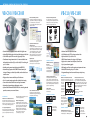
Camera
Section Area
Live Events
Window
Remote Monitoring and
Recording
Using an IP network, you can
record video captured from a
camera server. This remote data
custody can serve as a crucial back
up in the event of fire or other
damage in the server location.
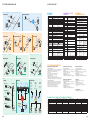
Record up to 64 Camera Servers
The program can record video from
up to 64 cameras simultaneously
from a single storage server.
Further, it can manage 3 storage
servers with a single viewer,
allowing you to manage recorded
video from a total of 192 cameras.
Location
Zone
Viewing
Area
Individualized Recording Mode
Settings
The software allows unparalleled
flexibility in recording, with a wide
range of options available to each
individual camera. There is a mode
to meet every need, including
continuous recording, recording
triggered by a sensor event
at night, pre- and post-event
recording, as well as motion
detection.
Video
Window
Date
Selector
Event Search
with Keyword
Playback Controls
Timeline
Extract
Video
Zoom In/Out
Return to
Live Video
Playhead
• Remote monitoring and remote recording.
• Record up to 64 camera servers with a single storage server.
• Easily install a new camera or change a camera’s location.
• Access for up to 5 clients at a time.
• Quickly create a custom layout for your viewing screen.
• Control camera positions and zoom while monitoring
live video.
• Extensive recording mode settings available to each camera.
• Easy event search and playback.
• Play live or recorded video in up to 24 windows
simultaneously.
• QuickTime file conversion lets you send recorded video
to anyone via email.
• Supports VB-C10/VB-C10R, VB-C50i/VB-C50iR*, VB150
and VB101.
TM
* Not all features are available at this time.
Image size
320 x 240
Frame size
10KB
1 camera
640 x 480
40KB
320 x 240
10KB
640 x 480
40KB
10 cameras
8
* Multiple screens can be created.
• Simultaneously monitor up to 16 locations on a single screen.
• VB ImageBrowser for seamless image management and display.
• Communicate with external devices.
• Supports advanced VB150 features.
• Create custom monitoring screens.
• Enjoy flexible monitoring settings.
• Monitor from multiple sites.
• Add new camera servers quickly and easily.
Simple Monitoring Software
Communicate with External
Devices
When a connected external device
(such as a window alarm sensor) is
triggered,
you’ll hear or
see an alert of
your choosing
on the screen.
Seamless Image Management
and Display
Capturing, viewing and saving
images have never been easier.
VB ImageBrowser allows you to
download still images from the
camera server, compare and
PocketPC Software
*Multiple templates can be created.
Create Custom Monitoring Screens
A Monitoring Screen Wizard lets you
choose from a wide variety of screen
templates to find one that’s perfect
for your needs.
Flexible Monitoring Settings
The program features 3 convenient
modes: • Video Relay moves
between video and still images when
multiple cameras are connected to a
single server. • Automatic Rotation
gives you a “tour” of up to 8 preset
locations. • Autoswitch automatically
switches the display between
cameras and camera servers.
Monitor from Multiple Sites
Place the monitoring screen you
created in a common directory
location, and it can be viewed by
multiple stations running the MV
software.
Free Viewer
Software
Viewer
for Java
Allows video
from the
VB150,
VB101,
VB-C10 or
VB-C50i to be
displayed on
a standard web browser. This software is automatically downloaded.
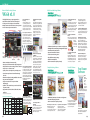
XGA 24 screen
Event Search Dialog
Event Type
Location and Zone
Specify a Date
Specify Time Code
display differences between
consecutive images, view all
images as thumbnails, and more.
Animated replays and electronic
zoom are also available.
View Event in
Camera
Search Results Area
Server Capacity / Traffic / Data Size
Number of
cameras
Event Search and Easy Playback
The software makes it easy to find
an event you’re looking for. Search
by event type, location, date and
time, time code or scroll through the
Viewer Timeline to find and select
the event you want. Then, simply
double-click the event from the Live
Event Window to playback the
requested event.
Simultaneously Display Up to
24 Windows
View live or recorded action at the
same time in up to 24 windows per
template*. For instance, a retail
storeowner could simultaneously
view the identical scene shot at
various times of day to create a
timeline analysis of store traffic.
Even customize your viewing
screen by adjusting the number,
size and layout of video windows.
Simultaneously Monitor up to
16 Locations
View images from 16 cameras per
screen*, with automatic camera
position changes and camera server
information available on screen.
Choose your own layout, and switch
between displays automatically.
Network traffic
frame/sec Traffic volume
Storage volume
1 day
1 month
1 fps
80 kbps
0.9GB
25.9GB
5 fps
400 kbps
4.3GB
129.6GB
1 fps
320 kbps
3.5GB
103.7GB
5 fps
1.6 Mbps
17.3GB
518.4GB
1 fps
800 kbps
8.6GB
259.2GB
5 fps
5 Mbps
43.2GB
1,296.0GB
1 fps
3.2 Mbps
34.6GB
1,036.8GB
5 fps
16 Mbps
172.8GB
5,184.0GB
Camera Control in Real Time
Experience interactive monitoring of
live video by controlling the position
and zoom of VB-C50i and VC-C50i
cameras connected to a VB150
server. Presets are also available.
XGA 6 screen
Convert Recorded Video to
QuickTime
The software makes it simple to
convert up to an hour of recorded
video into a QuickTime file,
allowing you to email a viewable
video file to recipients.
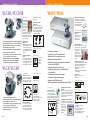
• Simultaneously monitor up to 4 locations on a single screen.
• Panoramic Viewing Image Function.
• Add new camera servers quickly and easily.
TM
TM
Monitor up to 4 Locations at Once
Watch live video from up to 4
cameras simultaneously.
Control camera pan, tilt and zoom
functions right on the screen.
Easy Camera Server Registration
A built-in search feature
automatically locates camera
servers on the same network for
quick and easy registration.
Access and control your network
cameras right from your PDA!
Supports a wide variety of Pocket
PC based PDAs. Available in a
single or 5-license pack.
Viewer for PC
Offers faster start-up and a higher
video frame rate. Installable for
frequent viewers.
9