1
MultiModemUSB User Guide
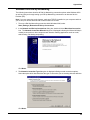
Windows 98/95 Dial-Up Networking
Note: Before beginning, make certain Dial-Up Networking and TCP/IP are installed on your
computer.
1. To begin your set up:
a. In Windows 95, Click Start | Programs | Accessories | Dial-Up Networking.
b. In Windows 98, Click Start | Programs | Accessories | Communications | Dial-Up
Networking.
2. If this is the first time you have set up a connection with Dial-Up Networking, the Welcome to
Dial-Up Networking Wizard dialog box is displayed. If the Wizard does not display, double-click
the Make New Connection icon to display the Make New Connection dialog box.
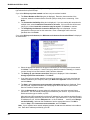
3. The Make New Connection dialog box is displayed. Enter a descriptive name for this
connection. In the Select a device: list box, select your Multi-Tech System modem from the
list.
Click Next>.
4. The Make New Connection dialog box is displayed. Enter the Area code, Telephone number
and Country code for the computer you will be calling with this connection (your ISP’s access
phone number).
Click Next>.
56