1
Appendixes
Technical Support
Multi-Tech Systems has an excellent staff of technical support personnel available to help you get the
most out of your Multi-Tech product. If you have any questions about the operation of this unit, please
call (800) 972-2439 (USA and Canada) or (763) 785-3500 (international and local). Please have
modem information available.
About the Internet
Multi-Tech's presence includes a Web site at:
http://www.multitech.com
and an ftp site at:
ftp://ftp.multitech.com
Dial-Up Networking
Microsoft’s Dial-Up Networking (DUN) is a system component of Windows 95, 98, and 2000 that
enables you to connect your computer to a variety of computer systems and networks, including the
Internet.
Dial-Up Networking has been integrated into Windows 2000. If you are using Windows 95, 98, you
may need to install the Dial-Up Networking code from the full-release Windows CD, a companion CD
from your Original Equipment Manufacturer (OEM), or from a complete set of installation (*.CAB) files
on your hard drive. If you are connecting to the Internet, the TCP/IP protocol suite must also be
installed on your computer.
If you are making a Dial-Up connection to the Internet, you’ll need to set up an account with an
Internet Service Provider (ISP). Your ISP should give you the following information:
·
Your access account userid and password
·
The access phone number(s) for dialing into your Internet Service Provider
·
The protocol used to connect to your ISP (PPP or SLIP)
·
Your ISP may or may not provide a static IP address for your computer. If your ISP provides
an IP address for your computer or for their Domain Name Server (DNS), you’ll need to enter
these addresses when you configure the Dial-Up connection. Many ISPs use dynamic IP
addresses which means they issue your computer a new IP address each time you log into
their system. If your ISP uses dynamic IP addresses, you do not need to configure an IP
address when you create your Dial-Up Connection.
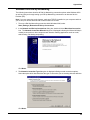
The following instructions will guide you through setting up a basic Dial-Up Networking connection to
the Internet. Many features and settings beyond those shown here are available for use when
creating a Dial-Up connection.
55