1
AFS 224
™
Applications
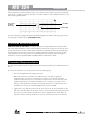
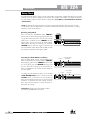
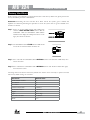
Application 1 – Mixer Channel Inserts
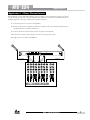
This application provides dedicated feedback suppression directly on the microphone channels of a mixing
console, thereby leaving other channels unaffected. This application provides two individual channels of
feedback suppression with up to 24 filters per microphone channel.
1. Turn off the power to the mixer and amplifiers.
2. Ensure the AFS 224 is configured for dual mono operation (this is the default configuration). See
“Linking Channels” for further information.
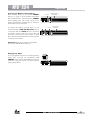
3. Connect the mixer’s channel insert sends to the input of the AFS 224.
4. Connect the outputs of the AFS 224 to the mixer’s channel insert returns.
5. Apply power to the mixer and amplifiers.
Input
Channel 1
AFS 224
Microphone In
4
6
4
2
6
4
8 2
0
0
6
0 +1
4
-3
0 +1
-2
+3 -3
-4
Pan
Pan
Mute
Mute
6
-5
+5
Pan
Mute
L/R
0 +1
+3
-3
+4
-4
+3
L/R
+4
-5
+5
+10
+10
+10
+10
+10
+10
+5
+5
+5
+5
+5
+5
+5
+5
+5
+5
0
0
0
0
0
0
0
0
0
0
-5
-5
-5
-5
-5
-5
-5
-5
-5
-5
-10
-10
-10
-10
-10
-10
-10
-10
-10
-10
-20
-20
-20
-20
-20
-20
-20
-20
-20
-20
-30
-°
-30
-°
-30
-°
-30
-°
-30
-°
-30
-°
-30
-°
-30
-°
-30
-°
-30
-°
5
6
7
8
+5
L/R
+10
4
Pan
Mute
+10
3
+2
+3 -3
Pan
+10
2
0 +1
-2
+4 -4
-5
+5
Aux 2 10
-1
+2
+10
1
6
8
0
Aux 2 10
-2
Mute
L/R
Aux 1 10
4
8 2
0
-1
+3 -3
Pan
6
8
0
6
2
0 +1
+2
4
Aux 1 10
4
Aux 2 10
-2
+4 -4
-5
+5
Mute
L/R
6
-1
+2
6
8 2
0
8
0
0 +1
+3 -3
Pan
4
2
Aux 1 10
4
Aux 2 10
-2
+4 -4
-5
+5
Mute
L/R
6
-1
+2
6
8
0
8 2
0
0 +1
+3 -3
Pan
4
Aux 1 10
4
Aux 2 10
-2
+4 -4
-5
+5
Mute
L/R
6
-1
+2
6
8 2
0
8 2
0
0 +1
+3 -3
Pan
4
Aux 1 10
4
Aux 2 10
-2
+4 -4
-5
+5
Mute
L/R
6
-1
+2
6
Microphone In
8 2
0
8 2
0
0 +1
+3 -3
Pan
4
Aux 1 10
4
Aux 2 10
-1
-2
+4 -4
-5
+5
Mute
L/R
L/R
0 +1
+2
6
8 2
0
8 2
0
Aux 2 10
-2
+4 -4
-5
+5
4
Aux 1 10
4
+3 -3
+4 -4
-5
6
-1
+2
0
8 2
0
Aux 2 10
-1
+2
6
8 2
Aux 1 10
8 2
0
Aux 2 10
-1
0
6
8 2
0
-2
4
8 2
Aux 1 10
4
2
6
8 2
Aux 1 10
4
Input
Channel 2
AFS 224
Output A Output B
INSERT ON MICROPHONE CHANNEL
AFS™ 224 User Manual
7